Open Document Format for Office Applications (OpenDocument) Version 1.2
Part 1: OpenDocument Schema
Committee Draft 05
19 June 2010
Specification URIs:
This Version:
http://docs.oasis-open.org/office/v1.2/cd05/OpenDocument-v1.2-cd05-part1.odt (Authoritative)
http://docs.oasis-open.org/office/v1.2/cd05/OpenDocument-v1.2-cd05-part1.pdf
http://docs.oasis-open.org/office/v1.2/cd05/OpenDocument-v1.2-cd05-part1.html
Previous Version:
http://docs.oasis-open.org/office/v1.1/OS/OpenDocument-v1.1.odt
http://docs.oasis-open.org/office/v1.1/OS/OpenDocument-v1.1.pdf
http://docs.oasis-open.org/office/v1.1/OS/OpenDocument-v1.1-html/OpenDocument-v1.1.html
Latest Version:
http://docs.oasis-open.org/office/v1.2/OpenDocument-v1.2-part1.odt
http://docs.oasis-open.org/office/v1.2/OpenDocument-v1.2-part1.pdf
http://docs.oasis-open.org/office/v1.2/OpenDocument-v1.2-part1.html
Technical Committee:
OASIS Open Document Format for Office Applications (OpenDocument) TC
Chairs:
Rob Weir, IBM
Michael Brauer, Oracle Corporation
Editors:
Patrick Durusau <patrick@durusau.net>
Michael Brauer, Oracle Corporation <michael.brauer@sun.com>
Related Work:
This document is part of the OASIS Open Document Format for Office Applications (OpenDocument) Version 1.2 specification.
The OpenDocument v1.2 specification has these parts:
OpenDocument v1.2 part 1 (this part); OpenDocument Schema
OpenDocument v1.2 part 2: Recalculated Formula (OpenFormula) Format
OpenDocument v1.2 part 3: Packages
OpenDocument v1.2 part 1 defines these schemas and ontologies:
OpenDocument v1.2 Relax NG Schema
OpenDocument v1.2 Metadata Manifest Ontology
Declared XML Namespaces:
urn:oasis:names:tc:opendocument:xmlns:animation:1.0
urn:oasis:names:tc:opendocument:xmlns:chart:1.0
urn:oasis:names:tc:opendocument:xmlns:config:1.0
urn:oasis:names:tc:opendocument:xmlns:database:1.0
urn:oasis:names:tc:opendocument:xmlns:dr3d:1.0
urn:oasis:names:tc:opendocument:xmlns:drawing:1.0
urn:oasis:names:tc:opendocument:xmlns:form:1.0
urn:oasis:names:tc:opendocument:xmlns:manifest:1.0
urn:oasis:names:tc:opendocument:xmlns:meta:1.0
urn:oasis:names:tc:opendocument:xmlns:data style:1.0
urn:oasis:names:tc:opendocument:xmlns:office:1.0
urn:oasis:names:tc:opendocument:xmlns:presentation:1.0
urn:oasis:names:tc:opendocument:xmlns:script:1.0
urn:oasis:names:tc:opendocument:xmlns:table:1.0
urn:oasis:names:tc:opendocument:xmlns:text:1.0
urn:oasis:names:tc:opendocument:xmlns:style:1.0
urn:oasis:names:tc:opendocument:xmlns:xsl-fo-compatible:1.0
urn:oasis:names:tc:opendocument:xmlns:svg-compatible:1.0
urn:oasis:names:tc:opendocument:xmlns:smil-compatible:1.0
http://docs.oasis-open.org/ns/office/1.2/meta/odf#
Abstract:
This document is part of the Open Document Format for Office Applications (OpenDocument) Version 1.2 specification.
It defines an XML schema for office applications and its semantics. The schema is suitable for office documents, including text documents, spreadsheets, charts and graphical documents like drawings or presentations, but is not restricted to these kinds of documents.
Status:
This document was last revised or approved by the OASIS Open Document Format for Office Applications (OpenDocument) Technical Committee on the above date. The level of approval is also listed above. Check the current location noted above for possible later revisions of this document. This document is updated periodically on no particular schedule.
Technical Committee members should send comments on this specification to the Technical Committee's email list. Others should send comments to the Technical Committee by using the "Send A Comment" button on the Technical Committee's web page at
www.oasis-open.org/committees/office.
For information on whether any patents have been disclosed that may be essential to implementing this specification, and any offers of patent licensing terms, please refer to the Intellectual Property Rights section of the Technical Committee web page
(www.oasis-open.org/committees/office/ipr.php.)
The non-normative errata page for this specification is located at www.oasis-open.org/committees/office.
Notices
Copyright © OASIS® 2002–2010. All Rights Reserved.
All capitalized terms in the following text have the meanings assigned to them in the OASIS Intellectual Property Rights Policy (the "OASIS IPR Policy"). The full Policy may be found at the OASIS website.
This document and translations of it may be copied and furnished to others, and derivative works that comment on or otherwise explain it or assist in its implementation may be prepared, copied, published, and distributed, in whole or in part, without restriction of any kind, provided that the above copyright notice and this section are included on all such copies and derivative works. However, this document itself may not be modified in any way, including by removing the copyright notice or references to OASIS, except as needed for the purpose of developing any document or deliverable produced by an OASIS Technical Committee (in which case the rules applicable to copyrights, as set forth in the OASIS IPR Policy, must be followed) or as required to translate it into languages other than English.
The limited permissions granted above are perpetual and will not be revoked by OASIS or its successors or assigns.
This document and the information contained herein is provided on an "AS IS" basis and OASIS DISCLAIMS ALL WARRANTIES, EXPRESS OR IMPLIED, INCLUDING BUT NOT LIMITED TO ANY WARRANTY THAT THE USE OF THE INFORMATION HEREIN WILL NOT INFRINGE ANY OWNERSHIP RIGHTS OR ANY IMPLIED WARRANTIES OF MERCHANTABILITY OR FITNESS FOR A PARTICULAR PURPOSE.
OASIS requests that any OASIS Party or any other party that believes it has patent claims that would necessarily be infringed by implementations of this OASIS Committee Specification or OASIS Standard, to notify OASIS TC Administrator and provide an indication of its willingness to grant patent licenses to such patent claims in a manner consistent with the IPR Mode of the OASIS Technical Committee that produced this specification.
OASIS invites any party to contact the OASIS TC Administrator if it is aware of a claim of ownership of any patent claims that would necessarily be infringed by implementations of this specification by a patent holder that is not willing to provide a license to such patent claims in a manner consistent with the IPR Mode of the OASIS Technical Committee that produced this specification. OASIS may include such claims on its website, but disclaims any obligation to do so.
OASIS takes no position regarding the validity or scope of any intellectual property or other rights that might be claimed to pertain to the implementation or use of the technology described in this document or the extent to which any license under such rights might or might not be available; neither does it represent that it has made any effort to identify any such rights. Information on OASIS' procedures with respect to rights in any document or deliverable produced by an OASIS Technical Committee can be found on the OASIS website. Copies of claims of rights made available for publication and any assurances of licenses to be made available, or the result of an attempt made to obtain a general license or permission for the use of such proprietary rights by implementers or users of this OASIS Committee Specification or OASIS Standard, can be obtained from the OASIS TC Administrator. OASIS makes no representation that any information or list of intellectual property rights will at any time be complete, or that any claims in such list are, in fact, Essential Claims.
The names "OASIS", “OpenDocument”, “Open Document Format” and “ODF” are trademarks of OASIS, the owner and developer of this specification, and should be used only to refer to the organization and its official outputs. OASIS welcomes reference to, and implementation and use of, specifications, while reserving the right to enforce its marks against misleading uses. Please see http://www.oasis-open.org/who/trademark.php for above guidance.
Table of Contents
G.1. Changes from “Open Document Format for Office Applications (OpenDocument) v1.1” |
This document is part of the Open Document Format for Office Applications (OpenDocument) Version 1.2 specification.It defines an XML schema for office documents. Office documents includes text documents, spreadsheets, charts and graphical documents like drawings or presentations, but is not restricted to these kinds of documents.
The XML schema defined herein is designed for transformations using XSLT and processing with XML-based tools.
All text is normative unless otherwise labeled.
Text with a gray background color which is contained in boxes is informative. It lists the XML element-element and element-attribute relations for cross reference purposes.
Within the normative text of this specification, the terms "shall", "shall not", "should", "should not", "may" and “need not” are to be interpreted as described in Annex H of [ISO/IEC Directives].
Within this specification, some attributes and elements are marked as deprecated. Attributes and elements marked as deprecated should not be used any longer, and may be removed from future versions of the specification.
XML Element, attribute names, attribute value types, and attribute values appear in monospace font.
This standard, for illustrative purposes, describes functionality using terminology common in desktop computing environments that contain a display terminal, keyboard and mouse, attached to a computer hosting an operating system with a graphical user interface which includes user interface controls such as input controls, command buttons, selection boxes, etc.
However, this standard is not limited to such environments. The standard also supports the use of alternative computing environments, other form factors, non-GUI consumers and producers, and the use of assistive technologies, using analogous user interface operations.
[CSS2] Bert Bos, Håkon Wium Lie, Chris Lilley, Ian Jacobs, Cascading Style Sheets, level 2, http://www.w3.org/TR/1998/REC-CSS2-19980512, W3C, 1998.
[DCMI] Dublin Core Metadata Element Set, Version 1.1: Reference Description, http://www.dublincore.org/documents/2008/01/14/dces/, Dublin Core Metadata Initiative, 2003.
[DOMEvents2] Tom Pixley, Document Object Model (DOM) Level 2 Events Specification, http://www.w3.org/TR/2000/REC-DOM-Level-2-Events-20001113, W3C, 2000.
[GRDDL] Don Conolly, Gleaning Resource Descriptions from Dialects of Languages (GRDDL), http://www.w3.org/TR/2007/REC-grddl-20070911/, W3C, 2007.
[HTML4] Dave Raggett, Arnaud Le Hors, Ian Jacobs, HTML 4.01 Specification, http://www.w3.org/TR/1999/REC-html401-19991224, W3C, 1999.
[ISO/IEC Directives] ISO/IEC Directives, Part 2 (Fifth Edition) Rules for the structure and drafting of International Standards, International Organization for Standardization and International Electrotechnical Commission, 2004.
[ISO15924] ISO 15924:2004 Information and documentation -- Codes for the representation of names of scripts, International Organization for Standardization and International Electrotechnical Commission, 2004.
[ISO3166-1] ISO 3166-1:2006/Cor 1:2007 Codes for the representation of names of countries and their subdivisions -- Part 1: Country codes, International Organization for Standardization and International Electrotechnical Commission, 2007.
[ISO3166-2] ISO 3166-2:2007 Codes for the representation of names of countries and their subdivisions -- Part 2: Country subdivision code, International Organization for Standardization and International Electrotechnical Commission, 2007.
[ISO3166-3] ISO 3166-3:1999 Codes for the representation of names of countries and their subdivisions -- Part 3: Code for formerly used names of countries, International Organization for Standardization and International Electrotechnical Commission, 1999.
[ISO639-1] ISO 639-1:2002 Codes for the representation of names of languages -- Part 1: Alpha-2 code, International Organization for Standardization and International Electrotechnical Commission, 2002.
[ISO639-2] ISO 639-2:1998 Codes for the representation of names of languages -- Part 2: Alpha-3 code, International Organization for Standardization and International Electrotechnical Commission, 1998.
[ISO639-3] ISO 639-3:2007 Codes for the representation of names of languages -- Part 3: Alpha-3 code for comprehensive coverage of languages, International Organization for Standardization and International Electrotechnical Commission, 2007.
[ISO8601] ISO 8601:2004 Data elements and interchange formats -- Information interchange -- Representation of dates and times, International Organization for Standardization and International Electrotechnical Commission, 2004.
[JIS X 0301] JIS X 0301:2002 Data elements and interchange formats -- Information interchange -- Representation of dates and times, Japanese Standards Association, 2002.
[MathML] David Carlisle, Patrick Ion, Robert Miner, Nico Poppelier, Mathematical Markup Language (MathML) Version 2.0 (Second Edition), http://www.w3.org/TR/2003/REC-MathML2-20031021/, W3C, 2003.
[OLE] Kraig Brockschmidt, Inside OLE, Microsoft Press, 1995, ISBN: 1-55615-843-2
[OWL] Deborah L. McGuinness, Frank van Harmelen, OWL Web Ontology Language Overview, http://www.w3.org/TR/2004/REC-owl-features-20040210/, W3C, 2004.
[RDF-CONCEPTS] Graham Klyne, Jeremy J. Carroll, Brian McBride, Resource Description Framework (RDF): Concepts and Abstract Syntax, http://www.w3.org/TR/2004/REC-rdf-concepts-20040210/, W3C, 2004.
[RDFa] Ben Adida, Mark Birbeck, Shane McCarron, Steven Pemberton, RDFa in XHTML: Syntax and Processing, http://www.w3.org/TR/2008/REC-rdfa-syntax-20081014, W3C, 2008.
[RFC2045] N. Freed and N. Borenstein, Multipurpose Internet Mail Extensions (MIME) Part One: Format of Internet Message Bodies, http://www.ietf.org/rfc/rfc2045.txt, IETF, 1996.
[RFC2616] R. Fielding, et al., Hypertext Transfer Protocol -- HTTP/1.1, http://www.ietf.org/rfc/rfc2616.txt, IETF, 1999.
[RFC4288] N. Freed, J. Klensin, Media Type Specifications and Registration Procedures, http://www.ietf.org/rfc/rfc4288.txt, IETF, 2005.
[RFC4514] K. Zeilenga, Lightweight Directory Access Protocol (LDAP): String Representation of Distinguished Names, http://tools.ietf.org/html/rfc4514, IETF, 2006.
[RFC5646] A. Phillips, M. Davis, Tags for Identifying Languages, http://www.ietf.org/rfc/rfc5646.txt, IETF, 2009.
[RNG] ISO/IEC 19757-2 Document Schema Definition Language (DSDL) -- Part 2: Regular-grammar-based validation -- RELAX NG, International Organization for Standardization and International Electrotechnical Commission, 2003.
[SMIL20] Jeff Ayars, etc al., Synchronized Multimedia Integration Language (SMIL 2.0) - [Second Edition], http://www.w3.org/TR/2005/REC-SMIL2-20050107/, W3C, 2001.
[SQL] ISO/IEC 9075-1:2008 Information Technology -- Database Language -- SQL -- Part 2: Foundation (SQL/Foundation), International Organization for Standardization and International Electrotechnical Commission, 2008.
[SVG] Jon Ferraiolo, 藤沢 淳 (FUJISAWA Jun), Dean Jackson, Scalable Vector Graphics (SVG) 1.1, http://www.w3.org/TR/2003/REC-SVG11-20030114/, W3C, 2003.
[UNICODE] The Unicode Consortium. The Unicode Standard, Version 5.2.0, defined by: The Unicode Standard, Version 5.2 (Boston, MA, Addison-Wesley, 2009. ISBN 978-1-936213-00-9).
[XForms] John M. Boyer, XForms 1.0 (Third Edition), http://www.w3.org/TR/2007/REC-xforms-20071029/, W3C, 2007.
[XLink] Steve DeRose, Eve Maler, David Orchard, XML Linking Language (XLink) Version 1.0, http://www.w3.org/TR/2001/REC-xlink-20010627/, W3C, 2001.
[XML-ID] Jonathan Marsh, Daniel Veillard, Norman Walsh, xml:id Version 1.0, http://www.w3.org/TR/2005/REC-xml-id-20050909/, W3C, 2005.
[xml-names] Tim Bray rt al., Namespaces in XML 1.0 (Second Edition), http://www.w3.org/TR/2006/REC-xml-names-20060816, W3C, 2006.
[XML1.0] Tim Bray, Jean Paoli, C. M. Sperberg-McQueen, Eve Maler, François Yergeau , Extensible Markup Language (XML) 1.0 (Fourth Edition), http://www.w3.org/TR/2006/REC-xml-20060816/, W3C, 2006.
[xmlenc-core] Donald Eastlake, Joseph Reagle, XML Encryption Syntax and Processing, http://www.w3.org/TR/2002/REC-xmlenc-core-20021210/, W3C, 2002.
[xmlschema-2] Paul V. Biron, Ashok Malhotra, XML Schema Part 2: Datatypes Second Edition, http://www.w3.org/TR/2004/REC-xmlschema-2-20041028/, W3C, 2004.
[XSL] Sharon Adler, et al., Extensible Stylesheet Language (XSL), http://www.w3.org/TR/2001/REC-xsl-20011015/, W3C, 2001.
[BibTeXing] BIBT E Xing, http://citeseerx.ist.psu.edu/viewdoc/summary?doi=10.1.1.49.6093, 1988 |
[CSS3Text] CSS3 Text Module, http://www.w3.org/TR/2003/CR-css3-text-20030514, W3C, 2003. |
[DAISY] ANSI/NISO Z39.86-2005 Specifications for the Digital Talking Book, http://www.niso.org/standards/resources/Z39-86-2005.html, 2005. |
[MIMETYPES] MIME Media Types, http://www.iana.org/assignments/media-types/, IANA. |
[ODF10] Open Document Format for Office Applications (OpenDocument) v1.0, May 2005, http://docs.oasis-open.org/office/v1.0/OpenDocument-v1.0-os.pdf. |
[ODF11] Open Document Format for Office Applications (OpenDocument) v1.1, February 2007, http://docs.oasis-open.org/office/v1.1/OS/OpenDocument-v1.1.pdf. |
[PNG] Portable Network Graphics (PNG) Specification (Second Edition), http://www.w3.org/TR/2003/REC-PNG-20031110, W3C, 2003. |
[RFC3066] Tags for the Identification of Languages, http://www.ietf.org/rfc/rfc3066.txt, IETF, 2001. |
[UAX9] Mark Davis, The Bidirectional Algorithm, Unicode Standard Annex #9, http://www.unicode.org/reports/tr9/tr9-15.html, 2005. |
[UTR20] Martin Dürst and Asmus Freytag, Unicode in XML and other Markup Languages, Unicode Technical Report #20, http://www.unicode.org/reports/tr20/tr20-7.html, 2003. |
[XSLT] XSL Transformations (XSLT) Version 1.0, http://www.w3.org/TR/1999/REC-xslt-19991116, W3C, 1999. |
The namespaces used or defined by OpenDocument are listed in tables 1-4.
Note: The defined XML namespaces conform to the Namespaces in XML specification [xml-names].
This specification uses the prefixes defined in tables 1 and 2 when referring to elements and attributes in this specification. However, implementors may use any prefix, provided that there is a namespace declaration that binds the prefix to the URI of the corresponding namespace.
Table 1 - XML Namespaces defined by the OpenDocument schema
|
Prefix |
Description |
Namespace |
|
anim |
Elements and attributes that describe animation content. |
urn:oasis:names:tc:opendocument:xmlns: |
|
chart |
Elements and attributes that describe chart content. |
urn:oasis:names:tc:opendocument:xmlns: |
|
config |
Elements and attributes that describe application specific settings. |
urn:oasis:names:tc:opendocument:xmlns: |
|
db |
For elements and attributes that describe database specific objects. |
urn:oasis:names:tc:opendocument:xmlns: |
|
dr3d |
Elements and attributes that describe 3D graphic content. |
urn:oasis:names:tc:opendocument:xmlns: |
|
draw |
Elements and attributes that describe graphic content. |
urn:oasis:names:tc:opendocument:xmlns: |
|
form |
Elements and attributes that describe forms and controls. |
urn:oasis:names:tc:opendocument:xmlns: |
|
manifest |
Elements and attribute contained in the package manifest. |
urn:oasis:names:tc:opendocument:xmlns: |
|
meta |
Elements and attributes that describe meta information. |
urn:oasis:names:tc:opendocument:xmlns: |
|
number |
Elements and attributes that describe data style information. |
urn:oasis:names:tc:opendocument:xmlns: |
|
office |
All common pieces of information that are not contained in another, more specific namespace. |
urn:oasis:names:tc:opendocument:xmlns: |
|
presentation |
Elements and attributes that describe presentation content. |
urn:oasis:names:tc:opendocument:xmlns: |
|
script |
Elements and attributes that represent scripts or events. |
urn:oasis:names:tc:opendocument:xmlns: |
|
table |
Elements and attributes that may occur within spreadsheets or within table definitions of a text document. |
urn:oasis:names:tc:opendocument:xmlns: |
|
text |
Elements and attributes that may occur within text documents and text parts of other document types., |
urn:oasis:names:tc:opendocument:xmlns: |
|
style |
Elements and attributes that describe the style and inheritance model used by the OpenDocument format. |
urn:oasis:names:tc:opendocument:xmlns: |
Table 2 - XML Namespaces defined by the OpenDocument metadata manifest ontology
|
Prefix |
Description |
Namespace |
|
odf |
RDF node property and node elements for OpenDocument package entities |
http://docs.oasis-open.org/ns/office/1.2/meta/odf# |
|
|
|
|
Table 3 - XML Namespaces defined by the OpenDocument schema that include elements and attributes that are compatible to elements and attributes of other standards.
|
Prefix |
Description |
Namespace |
|
fo |
Attributes that are compatible to attributes defined in [XSL]. |
urn:oasis:names:tc:opendocument:xmlns: |
|
svg |
Elements and attributes that are compatible to elements or attributes defined in [SVG]. |
urn:oasis:names:tc:opendocument:xmlns: |
|
smil |
Attributes that are compatible to attributes defined in [SMIL20]. |
urn:oasis:names:tc:opendocument:xmlns: |
Table 4 - XML Namespaces used by the OpenDocument schema
|
Prefix |
Description |
Namespace |
|
dc |
The Dublin Core Namespace (see [DCMI]). |
http://purl.org/dc/elements/1.1/ |
|
math |
MathML Namespace (see [MathML]) |
http://www.w3.org/1998/Math/MathML |
|
xforms |
The XForms namespace (see [XForms]). |
http://www.w3.org/2002/xforms |
|
xlink |
The XLink namespace (see [XLink]). |
http://www.w3.org/1999/xlink |
|
xhtml |
RDFa attributes (see [RDFa]). |
http://www.w3.org/1999/xhtml |
|
grddl |
GRDDL attributes (see [GRDDL]) |
http://www.w3.org/2003/g/data-view# |
Table 5 - Other XML Namespaces defined by this specification
|
Prefix |
Description |
Namespace |
|
of |
Namespace for formulas defined by part 2 of this specification that occur in attribute values. |
urn:oasis:names:tc:opendocument:xmlns:of:1.2 |
An OpenDocument document shall meet the following requirements:
A)If the document is an OpenDocument package, then
A.1)it shall be a conforming OpenDocument package (C19), and
A.2)the package shall contain at least one of the following files: content.xml and styles.xml. It may contain additional files, including files named settings.xml and meta.xml.
B)If the document is an OpenDocument package, then the following requirements shall be met for its contained files named content.xml, styles.xml, settings.xml and meta.xml, if present:
B.1)The files shall be well formed XML documents with respect to the XML 1.0 [XML1.0] specification.
B.2)The XML root elements of the files shall be
B.2.1)<office:document-content> or <math:math> for files named content.xml,
B.2.2)<office:document-styles> for files named styles.xml,
B.2.3)<office:document-meta> for files named meta.xml,
B.2.4)<office:document-settings> for files named settings.xml.
B.3)If the XML root element of a file is <office:document-content>, <office:document-styles>, <office:document-meta> or <office:document-settings>, then the XML file shall be valid with respect to the schema defined in appendix A.
B.4)If the XML root element of a file is <math:math>, then the XML file shall be valid with respect to the MathML 2.0 [MathML] schema.
C)If the document is a single XML file, then
C.1)the file shall be a well formed XML document with respect to the XML 1.0 [XML1.0] specification
C.2)the XML root element of the file shall be <office:document>.
C.3)the XML file shall be valid with respect to the schema defined in appendix A.
D)The files contained in a package listed in A2) or the single file listed in A3) meet the following requirements:
D.1)They shall be namespace-well-formed with regard to the XML Namespaces specification [xml-names].
D.2)They shall conform to the xml-id specification [XML-ID].
D.3)If the namespace prefix of a style:condition, table:condition, table:expression, table:formula or text:formula attribute is associated with the "urn:oasis:names:tc:opendocument:xmlns:of:1.2" namespace, or if a namespace prefix is omitted for any of these attributes, the syntax of any formula which is contained in the values of these attributes shall conform to part 2 of this specification.
E)It shall conform to one of: (C3) OpenDocument Text Document, (C4) OpenDocument Spreadsheet Document, (C5) OpenDocument Drawing Document, (C6) OpenDocument Presentation Document, (C7) OpenDocument Chart Document, (C8) OpenDocument Image Document, (C9) OpenDocument Formula Document, (C10) OpenDocument Database Front End Document.
An OpenDocument extended document shall meet all requirements of a conforming document listed in 2.1.1 except A.1), B.3), C.3) and E) and shall meet the following requirements:
A)If the document is an OpenDocument package, then it shall be a conforming ODF extended package (C20)
B)If the document is an OpenDocument package, then the following requirement shall be met for its contained files named content.xml, styles.xml, settings.xml and meta.xml, if present:
B.1)If the XML root element of a file is <office:document-content>, <office:document-styles>, <office:document-meta> or <office:document-settings>, then the XML file shall be valid with respect to the schema defined in appendix A, after the following processing of foreign elements has taken place:
B.1.1)Foreign elements and attributes, as defined in section Error: Reference source not found have been removed.
B.1.2)The content of foreign elements has been processed as defined in section Error: Reference source not found.
C)If the document is a single XML file, then the XML files shall be valid with respect to the schema defined in appendix A, after processing of foreign elements as defined in B1) has taken place.
An OpenDocument Text document shall meet all requirements of a Conforming OpenDocument Document, as well as the following additional requirements:
A)The <office:document> element shall have an office:mimetype attribute with one of these values: "application/vnd.oasis.opendocument.text", "application/vnd.oasis.opendocument.text-template" or "application/vnd.oasis.opendocument.text-master".
B)If the document is an OpenDocument package then it shall contain a file named mimetype containing one of these strings: "application/vnd.oasis.opendocument.text", "application/vnd.oasis.opendocument.text-template" or "application/vnd.oasis.opendocument.text-master".
C)The <office:body> element shall have the child element <office:text>.
An OpenDocument Spreadsheet document shall meet all requirements of a Conforming OpenDocument Document, as well as the following additional requirements:
A)The <office:document> element shall have an office:mimetype attribute with one of these values: "application/vnd.oasis.opendocument.spreadsheet" or "application/vnd.oasis.opendocument.spreadsheet-template".
B)If the document is an OpenDocument package then it shall contain a file named mimetype containing one of these strings: "application/vnd.oasis.opendocument.spreadsheet" or "application/vnd.oasis.opendocument.spreadsheet-template".
C)The <office:body> element shall have the child element <office:spreadsheet>.
D)All namespace prefixes used in the values of table:formula attributes values shall be bound to the "urn:oasis:names:tc:opendocument:xmlns:of:1.2 " namespace.
E)All table:formula attribute values shall be a conforming OpenDocument Formula expression (C15).
An OpenDocument Drawing document shall meet all requirements of a Conforming OpenDocument Document, as well as the following additional requirements:
A)The <office:document> element shall have an office:mimetype attribute with one of these values: "application.vnd.oasis.opendocument.graphics" or "application/vnd.oasis.opendocument.graphic-template".
B)If the document is an OpenDocument package then it shall contain a file named mimetype containing one of these strings: "application.vnd.oasis.opendocument.graphics" or "application/vnd.oasis.opendocument.graphic-template".
C)The <office:body> element shall have the child element <office:drawing>.
An OpenDocument Presentation document shall meet all requirements of a Conforming OpenDocument Document, as well as the following additional requirements:
A)The <office:document> element shall have an office:mimetype attribute with one of these values: "application/vnd.oasis.opendocument.presentation" or "application/vnd.oasis.opendocument.presentation-template".
B)If the document is an OpenDocument package then it shall contain a file named mimetype containing one of these strings: "application/vnd.oasis.opendocument.presentation" or "application/vnd.oasis.opendocument.presentation-template".
C)The <office:body> element shall have the child element <office:presentation>.
An OpenDocument Chart document shall meet all requirements of a Conforming OpenDocument Document, as well as the following additional requirements:
A)The <office:document> element shall have an office:mimetype attribute with one of these values: "application/vnd.oasis.opendocument.chart" or "application/vnd.oasis.opendocument.chart-template".
B)If the document is an OpenDocument package then it shall contain a file named mimetype containing one of these strings: "application/vnd.oasis.opendocument.chart" or "application/vnd.oasis.opendocument.chart-template".
C)The <office:body> element shall have the child element <office:chart>.
An OpenDocument Image document shall meet all requirements of a Conforming OpenDocument Document, as well as the following additional requirements:
A)The <office:document> element shall have an office:mimetype attribute with one of these values: "application/vnd.oasis.opendocument.image" or "application/vnd.oasis.opendocument.image-template".
B)If the document is an OpenDocument package then it shall contain a file named mimetype containing oen of these strings: "application/vnd.oasis.opendocument.image" or "application/vnd.oasis.opendocument.image-template".
C)The <office:body> element shall have the child element <office:image>.
An OpenDocument Formula document shall meet all requirements of a Conforming OpenDocument Document, as well as the following additional requirements:
A)If the document is an OpenDocument package. The OpenDocument package shall contain a file named mimetype with content being the string "application/vnd.oasis.opendocument.formula".
B)The package "content.xml" file shall have a <math:math> root element.
An OpenDocument Database Front End document shall meet all requirements of a Conforming OpenDocument Document, as well as the following additional requirements:
A)The <office:document> element shall have an office:mimetype attribute with the value "http://www.iana.org/assignments/media-types/application/application/vnd.oasis.opendocument.base".
B)If the document is an OpenDocument package then it shall contain a file named mimetype containing the string "http://www.iana.org/assignments/media-types/application/ application/vnd.oasis.opendocument.base".
C)The <office:body> element shall have the child element <office:database>.
An OpenDocument producer is a program that creates at least one conforming OpenDocument document, and that meets the following additional requirements:
A)It may produce conforming OpenDocument extended documents, but it shall have a mode of operation where all OpenDocument documents that are created are conforming OpenDocument documents.
B)It shall be accompanied by a document that defines all implementation-defined values used by the OpenDocument producer.
An OpenDocument extended producer is a program that creates at least one conforming OpenDocument extended document, and that meets the following additional requirements:
A)It shall be accompanied by a document that defines all implementation-defined values used by the OpenDocument extended producer.
B)It should be accompanied by a document that defines all foreign elements and attributes used by the OpenDocument extended producer.
An OpenDocument consumer is a program that can parse and interpret OpenDocument documents according to the semantics defined by this specification, and that meets the following additional requirements:
A)It shall be able to parse and interpret OpenDocument documents of one or more of the document types defined by this specification (see 3.3) any of which are represented in packages, but it need not interpret the semantics of all elements, attributes and attribute values.
B)It may be able to parse and interpret OpenDocument documents stored as single XML document, but it need not interpret the semantics of all elements, attributes and attribute values.
C)It shall interpret those elements and attributes it does interpret consistent with the semantics defined for the element or attribute by this specification.
D)It should be able to parse and interpret conforming OpenDocument extended documents, but it need not interpret the semantics of all elements, attributes and attribute values.
E)The XML parser used to parse the files contained in a package listed in 2.1.1, item A2) or the single document listed in 2.1.1, item 3) meets the following requirements:
E.1)It shall be a non validating XML processor with regard to the XML 1.0 specification [XML1.0].
E.2)It shall be and be a conforming processor with regard to the XML Namespaces specification [xml-names].
E.3)It shall conform to the xml-id specification [XML-ID].
This defines two methods of document representation:
●A single XML document.
●A collection of files within a package (see OpenDocument specification part 3), each of which stores a part of a complete document.
The <office:document> element is the root element of a document in OpenDocument format which is represented as a single XML document. It contains the entire document.
The <office:document> element is a root element.
The <office:document> element is usable with the following elements: <db:component> 12.25.5 and <draw:object> 10.4.6.2.
The <office:document> element has the following attributes: grddl:transformation 19.322, office:mimetype 19.377 and office:version 19.388.
The <office:document> element has the following child elements: <office:automatic-styles> 3.15.3, <office:body> 3.3, <office:font-face-decls> 3.14, <office:master-styles> 3.15.4, <office:meta> 3.2, <office:scripts> 3.12, <office:settings> 3.10 and <office:styles> 3.15.2.
When an OpenDocument document is represented as a package, there are four root elements, <office:document-content>, <office:document-styles>, <office:document-meta>, and, <office:document-settings>, each stored as a separate file.
A package may also contain image files, embedded objects and implementation specific files.
The <office:document-content> root element contains document content and automatic styles used in a document. The file within the package for the <office:document-content> element is content.xml.
The <office:document-content> element is a root element.
The <office:document-content> element has the following attributes: grddl:transformation 19.322 and office:version 19.388.
The <office:document-content> element has the following child elements: <office:automatic-styles> 3.15.3, <office:body> 3.3, <office:font-face-decls> 3.14 and <office:scripts> 3.12.
The <office:document-styles> root element contains styles used in document content and automatic styles used in styles. The file within the package for the <office:document-styles> element is styles.xml.
The <office:document-styles> element is a root element.
The <office:document-styles> element has the following attributes: grddl:transformation 19.322 and office:version 19.388.
The <office:document-styles> element has the following child elements: <office:automatic-styles> 3.15.3, <office:font-face-decls> 3.14, <office:master-styles> 3.15.4 and <office:styles> 3.15.2.
The <office:document-meta> root element contains document metadata elements. The file within the package for the <office:document-meta> element is meta.xml.
The <office:document-meta> element is a root element.
The <office:document-meta> element has the following attributes: grddl:transformation 19.322 and office:version 19.388.
The <office:document-meta> element has the following child element: <office:meta> 3.2.
The <office:document-settings> root element contains implementation-specific settings. The file within the package for the <office:document-settings> element is settings.xml.
The <office:document-settings> element is a root element.
The <office:document-settings> element has the following attributes: grddl:transformation 19.322 and office:version 19.388.
The <office:document-settings> element has the following child element: <office:settings> 3.10.
The models for representing an OpenDocument file are summarized in Table 5.
Table 6 - Root element content models
|
Root Element |
<office:meta> |
<office:settings> |
<office:scripts> |
<office:font-face-decls> |
<office:styles> |
<office:automatic-styles> |
<office:master-styles> |
<office:body> |
|
<office:document> |
X |
X |
X |
X |
X |
X |
X |
X |
|
<office:document-content> |
|
|
X |
X |
|
X |
|
X |
|
<office:document-styles> |
|
|
|
X |
X |
X |
X |
|
|
<office:document-meta> |
X |
|
|
|
|
|
|
|
|
<office:document-settings> |
|
X |
|
|
|
|
|
|
The <office:meta> element contains metadata elements for a document that are not specified by a manifest.rdf file. 4.2.2
All the child elements of an <office:meta> element contain metadata about a document as a whole.
The <office:meta> element is usable with the following elements: <office:document> 3.1.2 and <office:document-meta> 3.1.3.4.
The <office:meta> element has no attributes.
The <office:meta> element has the following child elements: <dc:creator> 4.3.2.7, <dc:date> 4.3.2.10, <dc:description> 4.3.2.3, <dc:language> 4.3.2.15, <dc:subject> 4.3.2.4, <dc:title> 4.3.2.2, <meta:auto-reload> 4.3.2.13, <meta:creation-date> 4.3.2.9, <meta:document-statistic> 4.3.2.18, <meta:editing-cycles> 4.3.2.16, <meta:editing-duration> 4.3.2.17, <meta:generator> 4.3.2.1, <meta:hyperlink-behaviour> 4.3.2.14, <meta:initial-creator> 4.3.2.6, <meta:keyword> 4.3.2.5, <meta:print-date> 4.3.2.11, <meta:printed-by> 4.3.2.8, <meta:template> 4.3.2.12 and <meta:user-defined> 4.3.3.
The <office:body> element contains the elements that represent the content of a document.
The <office:body> element is usable with the following elements: <office:document> 3.1.2 and <office:document-content> 3.1.3.2.
The <office:body> element has no attributes.
The <office:body> element has the following child elements: <office:chart> 3.8, <office:database> 12.1, <office:drawing> 3.5, <office:image> 3.9, <office:presentation> 3.6, <office:spreadsheet> 3.7 and <office:text> 3.4.
The <office:text> element represents the content of a text document.
The <office:text> element is usable with the following element: <office:body> 3.3.
The <office:text> element has the following attributes: text:global 19.808 and text:use-soft-page-breaks 19.899.
The <office:text> element has the following child elements: <dr3d:scene> 10.5.1, <draw:a> 10.4.12, <draw:caption> 10.3.11, <draw:circle> 10.3.8, <draw:connector> 10.3.10, <draw:control> 10.3.13, <draw:custom-shape> 10.6.1, <draw:ellipse> 10.3.9, <draw:frame> 10.4.2, <draw:g> 10.3.15, <draw:line> 10.3.3, <draw:measure> 10.3.12, <draw:page-thumbnail> 10.3.14, <draw:path> 10.3.7, <draw:polygon> 10.3.5, <draw:polyline> 10.3.4, <draw:rect> 10.3.2, <draw:regular-polygon> 10.3.6, <office:forms> 13.2, <table:calculation-settings> 9.4.1, <table:consolidation> 9.7, <table:content-validations> 9.4.4, <table:database-ranges> 9.4.14, <table:data-pilot-tables> 9.6.2, <table:dde-links> 9.8, <table:label-ranges> 9.4.10, <table:named-expressions> 9.4.11, <table:table> 9.1.2, <text:alphabetical-index> 8.8, <text:alphabetical-index-auto-mark-file> 8.8.3, <text:bibliography> 8.9, <text:change> 5.5.7.4, <text:change-end> 5.5.7.3, <text:change-start> 5.5.7.2, <text:dde-connection-decls> 14.6.3, <text:h> 5.1.2, <text:illustration-index> 8.4, <text:list> 5.3.1, <text:numbered-paragraph> 5.3.6, <text:object-index> 8.6, <text:p> 5.1.3, <text:page-sequence> 5.2, <text:section> 5.4, <text:sequence-decls> 7.4.11, <text:soft-page-break> 5.6, <text:table-index> 8.5, <text:table-of-content> 8.3, <text:tracked-changes> 5.5.1, <text:user-field-decls> 7.4.7, <text:user-index> 8.7 and <text:variable-decls> 7.4.2.
The <office:drawing> element represents a drawing document.
The <office:drawing> element is usable with the following element: <office:body> 3.3.
The <office:drawing> element has no attributes.
The <office:drawing> element has the following child elements: <draw:page> 10.2.4, <table:calculation-settings> 9.4.1, <table:consolidation> 9.7, <table:content-validations> 9.4.4, <table:database-ranges> 9.4.14, <table:data-pilot-tables> 9.6.2, <table:dde-links> 9.8, <table:label-ranges> 9.4.10, <table:named-expressions> 9.4.11, <text:alphabetical-index-auto-mark-file> 8.8.3, <text:dde-connection-decls> 14.6.3, <text:sequence-decls> 7.4.11, <text:user-field-decls> 7.4.7 and <text:variable-decls> 7.4.2.
The <office:presentation> element represents a presentation document.
The <office:presentation> element is usable with the following element: <office:body> 3.3.
The <office:presentation> element has no attributes.
The <office:presentation> element has the following child elements: <draw:page> 10.2.4, <presentation:date-time-decl> 10.9.3.6, <presentation:footer-decl> 10.9.3.4, <presentation:header-decl> 10.9.3.2, <presentation:settings> 10.9.3.7, <table:calculation-settings> 9.4.1, <table:consolidation> 9.7, <table:content-validations> 9.4.4, <table:database-ranges> 9.4.14, <table:data-pilot-tables> 9.6.2, <table:dde-links> 9.8, <table:label-ranges> 9.4.10, <table:named-expressions> 9.4.11, <text:alphabetical-index-auto-mark-file> 8.8.3, <text:dde-connection-decls> 14.6.3, <text:sequence-decls> 7.4.11, <text:user-field-decls> 7.4.7 and <text:variable-decls> 7.4.2.
The <office:spreadsheet> element represents a spreadsheet document.
The <office:spreadsheet> element is usable with the following element: <office:body> 3.3.
The <office:spreadsheet> element has the following attributes: table:protection-key 19.699, table:protection-key-digest-algorithm 19.700 and table:structure-protected 19.727.
The <office:spreadsheet> element has the following child elements: <table:calculation-settings> 9.4.1, <table:consolidation> 9.7, <table:content-validations> 9.4.4, <table:database-ranges> 9.4.14, <table:data-pilot-tables> 9.6.2, <table:dde-links> 9.8, <table:label-ranges> 9.4.10, <table:named-expressions> 9.4.11, <table:table> 9.1.2, <table:tracked-changes> 9.9.2, <text:alphabetical-index-auto-mark-file> 8.8.3, <text:dde-connection-decls> 14.6.3, <text:sequence-decls> 7.4.11, <text:user-field-decls> 7.4.7 and <text:variable-decls> 7.4.2.
The <office:chart> element represents a chart document.
The <office:chart> element is usable with the following element: <office:body> 3.3.
The <office:chart> element has no attributes.
The <office:chart> element has the following child elements: <chart:chart> 11.1, <table:calculation-settings> 9.4.1, <table:consolidation> 9.7, <table:content-validations> 9.4.4, <table:database-ranges> 9.4.14, <table:data-pilot-tables> 9.6.2, <table:dde-links> 9.8, <table:label-ranges> 9.4.10, <table:named-expressions> 9.4.11, <text:alphabetical-index-auto-mark-file> 8.8.3, <text:dde-connection-decls> 14.6.3, <text:sequence-decls> 7.4.11, <text:user-field-decls> 7.4.7 and <text:variable-decls> 7.4.2.
The <office:image> element represents an image document.
The <office:image> element contains a <draw:frame> element which shall contain a single <draw:image> element.
The <office:image> element is usable with the following element: <office:body> 3.3.
The <office:image> element has no attributes.
The <office:image> element has the following child element: <draw:frame> 10.4.2.
The <office:settings> element contains one or more <config:config-item-set> elements, each of which represents a set of application settings.
The <office:settings> element is usable with the following elements: <office:document> 3.1.2 and <office:document-settings> 3.1.3.5.
The <office:settings> element has no attributes.
The <office:settings> element has the following child element: <config:config-item-set> 3.10.2.
The <config:config-item-set> element is a container element for application setting elements. Setting child elements may occur in any order.
The <config:config-item-set> element is usable with the following elements: <config:config-item-map-entry> 3.10.5, <config:config-item-set> 3.10.2 and <office:settings> 3.10.
The <config:config-item-set> element has the following attribute: config:name 19.31.
The <config:config-item-set> element has the following child elements: <config:config-item> 3.10.3, <config:config-item-map-indexed> 3.10.4, <config:config-item-map-named> 3.10.6 and <config:config-item-set> 3.10.2.
The <config:config-item> element contains the value of an application setting whose name is specified by its config:name attribute.
The <config:config-item> element is usable with the following elements: <config:config-item-map-entry> 3.10.5 and <config:config-item-set> 3.10.2.
The <config:config-item> element has the following attributes: config:name 19.31 and config:type 19.32.
The <config:config-item> element has no child elements.
The <config:config-item> element has text content.
The <config:config-item-map-indexed> element is a container element for ordered sequences of application settings.
The <config:config-item-map-indexed> element is usable with the following elements: <config:config-item-map-entry> 3.10.5 and <config:config-item-set> 3.10.2.
The <config:config-item-map-indexed> element has the following attribute: config:name 19.31.
The <config:config-item-map-indexed> element has the following child element: <config:config-item-map-entry> 3.10.5.
The <config:config-item-map-entry> element represents a single setting in a sequence of settings. The setting itself is defined by the child element of <config:config-item-map-entry>, and may be a single value, a set of settings, or a sequence of settings.
The <config:config-item-map-entry> element is usable with the following elements: <config:config-item-map-indexed> 3.10.4 and <config:config-item-map-named> 3.10.6.
The <config:config-item-map-entry> element has the following attribute: config:name 19.31.
The <config:config-item-map-entry> element has the following child elements: <config:config-item> 3.10.3, <config:config-item-map-indexed> 3.10.4, <config:config-item-map-named> 3.10.6 and <config:config-item-set> 3.10.2.
The <config:config-item-map-named> element contains a sequence of application setting elements. Each sequence is identified by the value of its config:name attribute.
The <config:config-item-map-named> element is usable with the following elements: <config:config-item-map-entry> 3.10.5 and <config:config-item-set> 3.10.2.
The <config:config-item-map-named> element has the following attribute: config:name 19.31.
The <config:config-item-map-named> element has the following child element: <config:config-item-map-entry> 3.10.5.
To represent a text cursor position within a document, a processing instruction with PITarget opendocument (see §2.6 of [XML1.0]) should be used. The name of the cursor position processing instruction, cursor-position, shall follow the PITarget opendocument. The processing instruction may have arbitrary implementation specific attributes.
Note 1: A common view setting for is the position of the text cursor when saving the document. For WYSIWYG editing producers, this usually will be a position within a paragraph only. For editing producers that provide an XML based view of the document, the cursor position could also be between arbitrary elements, or even within tags.
Note 2: Where a text cursor position is not sufficient to recreate a document view, producers may use arbitrary document specific settings in addition to a cursor position processing instruction.
The <office:scripts> element contains all the <office:script> elements for a document.
Each <office:script> element contains a script. A document may contain scripts in different scripting languages.
Note: Scripts need not use XML document models.
The <office:scripts> element may also contain <office:event-listeners> elements which contain the events assigned to the document itself. 14.4.2
The <office:scripts> element is usable with the following elements: <office:document> 3.1.2 and <office:document-content> 3.1.3.2.
The <office:scripts> element has no attributes.
The <office:scripts> element has the following child elements: <office:event-listeners> 10.3.19 and <office:script> 3.13.
The <office:script> element contains a script.
The <office:script> element is usable with the following element: <office:scripts> 3.12.
The <office:script> element has the following attribute: script:language 19.432.
The <office:script> element has mixed content where arbitrary child elements are permitted.
Note: In most situations, the element contains the source code of the script, but it may also contain a compiled version of the script or a link to external script code.
The <office:font-face-decls> element contains all the font face declarations (<style:font-face> elements) for a document.
The <office:font-face-decls> element is usable with the following elements: <office:document> 3.1.2, <office:document-content> 3.1.3.2 and <office:document-styles> 3.1.3.3.
The <office:font-face-decls> element has no attributes.
The <office:font-face-decls> element has the following child element: <style:font-face> 16.21.
Styles for a document are defined in container elements according to their type, common, automatic and master.
Page layouts and styles are defined by <style:page-layout> 17.2 and <style:master-page> 16.9 elements, respectively.
The <office:styles> element contains common styles used in a document. A common style is a style chosen by a user for a document or some portion thereof.
The <office:styles> element is usable with the following elements: <office:document> 3.1.2 and <office:document-styles> 3.1.3.3.
The <office:styles> element has no attributes.
The <office:styles> element has the following child elements: <draw:fill-image> 16.40.6, <draw:gradient> 16.40.1, <draw:hatch> 16.40.5, <draw:marker> 16.40.8, <draw:opacity> 16.40.7, <draw:stroke-dash> 16.40.9, <number:boolean-style> 16.27.23, <number:currency-style> 16.27.7, <number:date-style> 16.27.10, <number:number-style> 16.27.2, <number:percentage-style> 16.27.9, <number:text-style> 16.27.25, <number:time-style> 16.27.18, <style:default-page-layout> 16.8, <style:default-style> 16.4, <style:presentation-page-layout> 16.41, <style:style> 16.2, <svg:linearGradient> 16.40.2, <svg:radialGradient> 16.40.3, <text:bibliography-configuration> 16.29.6, <text:linenumbering-configuration> 16.29.1, <text:list-style> 16.30, <text:notes-configuration> 16.29.3 and <text:outline-style> 16.34.
The <office:automatic-styles> element contains automatic styles used in a document.
An automatic style is one contains formatting properties that are considered to be properties of the object to which the style is assigned rather than dedicated style elements.
Note: Common and automatic styles behave differently in OpenDocument editingconsumers. Common styles are presented to the user as a named set of formatting properties, automatic styles are not presented to the user as such. The formatting properties of an automatic style are presented to a user as properties of the object to which the style is applied.
The <office:automatic-styles> element is usable with the following elements: <office:document> 3.1.2, <office:document-content> 3.1.3.2 and <office:document-styles> 3.1.3.3.
The <office:automatic-styles> element has no attributes.
The <office:automatic-styles> element has the following child elements: <number:boolean-style> 16.27.23, <number:currency-style> 16.27.7, <number:date-style> 16.27.10, <number:number-style> 16.27.2, <number:percentage-style> 16.27.9, <number:text-style> 16.27.25, <number:time-style> 16.27.18, <style:page-layout> 16.5, <style:style> 16.2 and <text:list-style> 16.30.
The <office:master-styles> element contains master styles that are used in a document. A master style contains formatting and other content that is displayed with document content when the style is used.
The <office:master-styles> element is usable with the following elements: <office:document> 3.1.2 and <office:document-styles> 3.1.3.3.
The <office:master-styles> element has no attributes.
The <office:master-styles> element has the following child elements: <draw:layer-set> 10.2.2, <style:handout-master> 10.2.1, <style:master-page> 16.9 and <table:table-template> 16.18.
An OpenDocument document that is stored in a package may have one or more digital signatures applied to the package. Document signatures shall contain a <ds:Reference> element for each file within the package, with the exception that a <ds:Reference> element for the file containing the signature may be omitted.
Document signatures shall be stored in a file called META-INF/documentsignatures.xml in the package as described in section 2.4 of the OpenDocument specification part 3. A document signature shall be considered to be valid only if the “XML Digital Signature” contained in documentsignatures.xml is valid and the file is valid as defined by its digital signature technique. A macro signature is a digital signature that is applied to macro code and other executable code that may be contained in a package. Macro signatures are stored in a file called META-INF/macrosignatures.xml in the package as described in section 2.4 of the OpenDocument specification part 3. Since macro code and executable code is implementation specific, this specification does not define to the files to which a macro signature applies.
A document may have document and macro signatures applied simultaneously, and may have further implementation specific signatures applied to its package.
OpenDocument extended documents may contain elements and attributes not defined by the OpenDocument schema. Such elements and attributes are called foreign elements and attributes. Foreign elements and attributes shall not be associated with a namespace that is listed in tables 1, 2 or 3 of section 1.5.
If a foreign element:
●has a <text:h> or <text:p> ancestor element, and
●is a child element of an element for which the OpenDocument schema permits the inclusion of character data, and
●if the OpenDocument schema permits the inclusion of character data for all its ancestors up to the <text:p> or <text:h> element ancestor element,
then the element's content may be interpreted by conforming OpenDocument consumers, and the document itself shall be valid against the OpenDocument schema as if the foreign element's start- and end-tags or its empty-element-tag are removed.
For a foreign element that occurs at another location, conforming consumers should not interpret the element's content, but may preserve its content.
Foreign elements may have an office:process-content attribute 19.379 attached which controls the processing of the element content.
Note: In OpenDocument 1.0 and 1.1, the content of foreign elements should be processed unless there was an office:process-content attribute with value false.
Conforming extended producers should not use foreign elements and attributes for features defined in the OpenDocument specification.
OpenDocument consumers should be able to parse and interpret documents that contain attribute values not defined by the OpenDocument schema. If an attribute which has such a non defined value has a default value, then a conforming consumer should assume that the attribute has this value. Otherwise, a conforming consumer should ignore the attribute.
OpenDocument consumers shall ignore white space characters occurring in elements with element-only content. White space and end-of-line (EOL) [UNICODE] characters are defined as:
●HORIZONTAL TABULATION (U+0009)
●LINE FEED (U+000A)
●CARRIAGE RETURN (U+000D)
●SPACE (U+0020)
For any other element, all white space characters shall be processed, unless the description of the element within this specification declares specific rules for the handling of white space characters.
Note: The <text:p> and <text:h> elements and their child elements have specific rules for the handling of white space characters. 6.1.2
Appendix C contains a list of MIME types and file name extensions to be used for office documents that conform to this specification and that are contained in a package. See 3.1.3.
Office documents that conform to this specification but are not contained in a package should use the MIME type text/xml.
Only MIME types and extensions that have been registered according to [RFC4288] should used for office documents that conform to this specification. The MIME types and extensions listed in appendix C should be used where appropriate.
Metadata is general information about a document or its content.
OpenDocument supports five types of metadata:
1)RDF metadata describing documents or the content of identifiable OpenDocument elements. 4.2.2
2)Text content being used as RDF metadata. 4.2.1
3)Pre-defined metadata (meta.xml). 4.3.2
4)User-defined metadata (using the <meta:user-defined> element). 4.3.3
5)Custom metadata (custom XML elements within meta.xml). 4.3.1
Pre-defined and user-defined metadata are both stored in the metadata <office:meta> element. The elements representing this metadata may be omitted or occur multiple times. The updating of multiple instances of the same metadata elements is implementation-specific.
Metadata in OpenDocument documents may be expressed using the model of the W3C Resource Description Framework [RDF-CONCEPTS].
In addition to the mechanism defined in Part 3 of this specification RDF metadata can be attached to elements in the "content.xml" and "styles.xml" file. Elements supporting this kind of metadata have the following attributes: xhtml:about 19.907, xhtml:property 19.910, xhtml:content 19.908, and xhtml:datatype 19.909. When metadata is added using these attributes, it is referred to as in content metatada. If "content.xml" and "styles.xml" files contain in content metadata they shall be listed in the package's "manifest.rdf" file.
Note: Content can be generated from metadata associated with a <text:meta-field> element. See 7.5.19.
The OpenDocument document contains a metadata manifest, as defined in Part 3 of this specification. The [OWL] Metadata Manifest Description ontology defined in Part 3 is extended with additional properties and classes in appendix B. The following OWL classes and properties are defined.
An instance of the odf:ContentFile class represents a content.xml file.
The odf:ContentFile class is a subclass of pkg:File.
An instance of the odf:StylesFile class represents a styles.xml file.
The odf:StylesFile class is a subclass of pkg:File
An instance of the odf:Element class represents an OpenDocument XML element in a content.xml or styles.xml file. It is a subclass of the pkg:Element class, which represents any XML element in the OpenDocument package.
Note: One or more rdf:type properties specify the metadata type of an odf:Element.
Every XML element that is defined by this specification and has an attribute of type ID may be described using an OWL class. The URI of said OWL class is the concatenation of the element's QName namespace IRI and its local name part. These classes are subclasses of odf:Element.
The following properties are defined for the subclass describing a <text:meta-field> element (urn:oasis:names:tc:opendocument:xmlns:text:1.0meta-field) : odf:prefix 4.2.2.5 and odf:suffix 4.2.2.6.
The odf:prefix property defines the prefix content of a <text:meta-field> field 7.5.19.
This property can be used with the following class: urn:oasis:names:tc:opendocument:xmlns:text:1.0meta-field 4.2.2.4.
The odf:suffix property defines the suffix content of a <text:meta-field> field 7.5.19.
This property can be used with the following class: urn:oasis:names:tc:opendocument:xmlns:text:1.0meta-field 4.2.2.4.
Non-RDF metadata in OpenDocument is composed of pre-defined metadata elements, user defined metadata elements, and custom metadata elements.
The pre-defined metadata elements have defined semantics. They should be processed by consumers and updated by producers. They can be referenced from within the document using text fields.
The pre-defined metadata elements borrow heavily upon the metadata standards developed by the Dublin Core Metadata Initiative (http://www.dublincore.org). Metadata elements drawn directly from the Dublin Core work are in the “http://purl.org/dc/elements/1.1/namespace”.
User-defined metadata is a more generic mechanism which specifies a triplet of name, type, and value. Consumers can present these values to the user.
Custom metadata elements are arbitrary elements inside an <office:meta> element. The semantics of custom metadata elements is implementation defined.
Custom metadata elements shall only occur in OpenDocument extended documents. The use of custom metadata is deprecated in favor of RDF/XML based metadata.
Note: Consumers need not process custom metadata other than to preserve it when editing a document.
The <meta:generator> element contains a string that identifies the OpenDocument producer that was used to create or last modify the document. This string should match the definition for user-agents in the HTTP protocol as specified in section 14.43 of [RFC2616]. The generator string should allow OpenDocument consumers to distinguish between all released versions of a producer..
Note: Release versions of a producer could be distinguished based on build ids or patch level information.
If an OpenDocument producer that creates a document cannot provide an identifier string, the producer shall not export this element. If a producer stores a modified document created by another producer cannot provide a unique identifier, it shall not export the original identifier belonging to the producer that created the document.
The <meta:generator> element is usable with the following element: <office:meta> 3.2.
The <meta:generator> element has no attributes.
The <meta:generator> element has no child elements.
The <meta:generator> element has content of data type string 18.2.
The <dc:title> element specifies the title of a document.
The <dc:title> element is usable with the following element: <office:meta> 3.2.
The <dc:title> element has no attributes.
The <dc:title> element has no child elements.
The <dc:title> element has content of data type string 18.2.
The <dc:description> element contains a description of a document.
The <dc:description> element is usable with the following element: <office:meta> 3.2.
The <dc:description> element has no attributes.
The <dc:description> element has no child elements.
The <dc:description> element has content of data type string 18.2.
The <dc:subject> element specifies the subject of a document.
The <dc:subject> element is usable with the following element: <office:meta> 3.2.
The <dc:subject> element has no attributes.
The <dc:subject> element has no child elements.
The <dc:subject> element has content of data type string 18.2.
The <meta:keyword> element contains a keyword pertaining to a document.
The <meta:keyword> element is usable with the following element: <office:meta> 3.2.
The <meta:keyword> element has no attributes.
The <meta:keyword> element has no child elements.
The <meta:keyword> element has content of data type string 18.2.
The <meta:initial-creator> element specifies the name of the initial creator of a document.
The <meta:initial-creator> element is usable with the following element: <office:meta> 3.2.
The <meta:initial-creator> element has no attributes.
The <meta:initial-creator> element has no child elements.
The <meta:initial-creator> element has content of data type string 18.2.
The <dc:creator> element specifies the name of the person who last modified a document (<office:meta>), who created an annotation (<office:annotation>), who authored a change (<office:change-info>).
The <dc:creator> element is usable with the following elements: <office:annotation> 14.1, <office:change-info> 5.5.6 and <office:meta> 3.2.
The <dc:creator> element has no attributes.
The <dc:creator> element has no child elements.
The <dc:creator> element has content of data type string 18.2.
The <meta:printed-by> element specifies the name of the last person who printed a document.
The <meta:printed-by> element is usable with the following element: <office:meta> 3.2.
The <meta:printed-by> element has no attributes.
The <meta:printed-by> element has no child elements.
The <meta:printed-by> element has content of data type string 18.2.
The <meta:creation-date> element specifies the date and time when a document was created.
The <meta:creation-date> element is usable with the following element: <office:meta> 3.2.
The <meta:creation-date> element has no attributes.
The <meta:creation-date> element has no child elements.
The <meta:creation-date> element has content of data type dateTime 18.2.
The <dc:date> element specifies the date and time when the document was last modified (<office:meta>), when an annotation was created (<office:annotation>), when a change was made (<office:change-info>).
The <dc:date> element is usable with the following elements: <office:annotation> 14.1, <office:change-info> 5.5.6 and <office:meta> 3.2.
The <dc:date> element has no attributes.
The <dc:date> element has no child elements.
The <dc:date> element has content of data type dateTime 18.2.
The <meta:print-date> element specifies the date and time when a document was last printed.
The <meta:print-date> element is usable with the following element: <office:meta> 3.2.
The <meta:print-date> element has no attributes.
The <meta:print-date> element has no child elements.
The <meta:print-date> element has content of data type dateTime 18.2.
The <meta:template> element specifies a URL for the document template that was used to create a document. The URL is specified as an Xlink. See [XLink].
The <meta:template> element is usable with the following element: <office:meta> 3.2.
The <meta:template> element has the following attributes: meta:date 19.325, xlink:actuate 19.911, xlink:href 19.912.24, xlink:title 19.914 and xlink:type 19.915.
The <meta:template> element has no child elements.
The <meta:auto-reload> element specifies whether a document is reloaded or replaced by another document after a certain period of time has elapsed.
The <meta:auto-reload> element is usable with the following element: <office:meta> 3.2.
The <meta:auto-reload> element has the following attributes: meta:delay 19.326, xlink:actuate 19.911, xlink:href 19.912.23, xlink:show 19.913 and xlink:type 19.915.
The <meta:auto-reload> element has no child elements.
The <meta:hyperlink-behaviour> element specifies the default behavior for hyperlinks in a document.
The <meta:hyperlink-behaviour> element is usable with the following element: <office:meta> 3.2.
The <meta:hyperlink-behaviour> element has the following attributes: office:target-frame-name 19.383 and xlink:show 19.913.
The <meta:hyperlink-behaviour> element has no child elements.
The <dc:language> element specifies the default language of a document.
The <dc:language> element is usable with the following element: <office:meta> 3.2.
The <dc:language> element has no attributes.
The <dc:language> element has no child elements.
The <dc:language> element has content of data type language 18.3.15.
The <meta:editing-cycles> element specifies the number of times a document has been edited. When a document is created, this value is set to 1. Each time a document is saved, the editing-cycles number is incremented by 1.
The <meta:editing-cycles> element is usable with the following element: <office:meta> 3.2.
The <meta:editing-cycles> element has no attributes.
The <meta:editing-cycles> element has no child elements.
The <meta:editing-cycles> element has content of data type nonNegativeInteger 18.2.
The <meta:editing-duration> element specifies the total time spent editing a document.
The <meta:editing-duration> element is usable with the following element: <office:meta> 3.2.
The <meta:editing-duration> element has no attributes.
The <meta:editing-duration> element has no child elements.
The <meta:editing-duration> element has content of data type duration 18.2.
The <meta:document-statistic> element represents statistics about a document.
The <meta:document-statistic> element is usable with the following element: <office:meta> 3.2.
The <meta:document-statistic> element has the following attributes: meta:cell-count 19.323, meta:character-count 19.324, meta:draw-count 19.327, meta:frame-count 19.328, meta:image-count 19.329, meta:non-whitespace-character-count 19.331, meta:object-count 19.332, meta:ole-object-count 19.333, meta:page-count 19.334, meta:paragraph-count 19.335, meta:row-count 19.336, meta:sentence-count 19.337, meta:syllable-count 19.338, meta:table-count 19.339 and meta:word-count 19.341.
The <meta:document-statistic> element has no child elements.
The <meta:user-defined> element specifies any additional user-defined metadata for a document.
The <meta:user-defined> element is usable with the following element: <office:meta> 3.2.
The <meta:user-defined> element has the following attributes: meta:name 19.330, meta:value-type 19.340.
The <meta:user-defined> element has no child elements.
The <meta:user-defined> element has text content, or depending on the value of the meta:value-type attribute content of type double 18.2, date 18.2, dateTime 18.2, duration 18.2, boolean 18.3.2 or string 18.2.
The <text:h> and <text:p> elements represent headings and paragraphs, respectively.
Headings and paragraphs are collectively referred to as paragraph elements.
The <text:h> element represents a heading in a document. Headings define the division structure for a document. A chapter or section begins with a heading and extends to the next heading at the same or higher level.
The <text:h> element is usable with the following elements: <draw:text-box> 10.4.3, <office:text> 3.4, <style:footer> 16.11, <style:footer-left> 16.13, <style:header> 16.10, <style:header-left> 16.12, <table:covered-table-cell> 9.1.5, <table:table-cell> 9.1.4, <text:deletion> 5.5.4, <text:index-body> 8.2.2, <text:index-title> 8.2.3, <text:list-header> 5.3.3, <text:list-item> 5.3.4, <text:note-body> 6.3.4, <text:numbered-paragraph> 5.3.6 and <text:section> 5.4.
The <text:h> element has the following attributes: text:class-names 19.772.2, text:cond-style-name 19.778, text:id 19.811.6, text:is-list-header 19.818, text:outline-level 19.846.4, text:restart-numbering 19.859, text:start-value 19.870.2, text:style-name 19.876.7, xhtml:about 19.907, xhtml:content 19.908, xhtml:datatype 19.909, xhtml:property 19.910 and xml:id 19.916.
The <text:h> element has the following child elements: <dr3d:scene> 10.5.1, <draw:a> 10.4.12, <draw:caption> 10.3.11, <draw:circle> 10.3.8, <draw:connector> 10.3.10, <draw:control> 10.3.13, <draw:custom-shape> 10.6.1, <draw:ellipse> 10.3.9, <draw:frame> 10.4.2, <draw:g> 10.3.15, <draw:line> 10.3.3, <draw:measure> 10.3.12, <draw:page-thumbnail> 10.3.14, <draw:path> 10.3.7, <draw:polygon> 10.3.5, <draw:polyline> 10.3.4, <draw:rect> 10.3.2, <draw:regular-polygon> 10.3.6, <office:annotation> 14.1, <office:annotation-end> 14.2, <presentation:date-time> 10.9.3.5, <presentation:footer> 10.9.3.3, <presentation:header> 10.9.3.1, <text:a> 6.1.8, <text:alphabetical-index-mark> 8.1.10, <text:alphabetical-index-mark-end> 8.1.9, <text:alphabetical-index-mark-start> 8.1.8, <text:author-initials> 7.3.7.2, <text:author-name> 7.3.7.1, <text:bibliography-mark> 8.1.11, <text:bookmark> 6.2.1.2, <text:bookmark-end> 6.2.1.4, <text:bookmark-ref> 7.7.6, <text:bookmark-start> 6.2.1.3, <text:change> 5.5.7.4, <text:change-end> 5.5.7.3, <text:change-start> 5.5.7.2, <text:chapter> 7.3.8, <text:character-count> 7.5.18.5, <text:conditional-text> 7.7.3, <text:creation-date> 7.5.3, <text:creation-time> 7.5.4, <text:creator> 7.5.17, <text:database-display> 7.6.3, <text:database-name> 7.6.7, <text:database-next> 7.6.4, <text:database-row-number> 7.6.6, <text:database-row-select> 7.6.5, <text:date> 7.3.2, <text:dde-connection> 7.7.12, <text:description> 7.5.5, <text:editing-cycles> 7.5.13, <text:editing-duration> 7.5.14, <text:execute-macro> 7.7.10, <text:expression> 7.4.14, <text:file-name> 7.3.9, <text:hidden-paragraph> 7.7.11, <text:hidden-text> 7.7.4, <text:image-count> 7.5.18.7, <text:initial-creator> 7.5.2, <text:keywords> 7.5.12, <text:line-break> 6.1.5, <text:measure> 7.7.13, <text:meta> 6.1.9, <text:meta-field> 7.5.19, <text:modification-date> 7.5.16, <text:modification-time> 7.5.15, <text:note> 6.3.2, <text:note-ref> 7.7.7, <text:number> 6.1.10, <text:object-count> 7.5.18.8, <text:page-continuation> 7.3.5, <text:page-count> 7.5.18.2, <text:page-number> 7.3.4, <text:page-variable-get> 7.7.1.3, <text:page-variable-set> 7.7.1.2, <text:paragraph-count> 7.5.18.3, <text:placeholder> 7.7.2, <text:print-date> 7.5.8, <text:printed-by> 7.5.9, <text:print-time> 7.5.7, <text:reference-mark> 6.2.2.2, <text:reference-mark-end> 6.2.2.4, <text:reference-mark-start> 6.2.2.3, <text:reference-ref> 7.7.5, <text:ruby> 6.4, <text:s> 6.1.3, <text:script> 7.7.9, <text:sender-city> 7.3.6.13, <text:sender-company> 7.3.6.10, <text:sender-country> 7.3.6.15, <text:sender-email> 7.3.6.7, <text:sender-fax> 7.3.6.9, <text:sender-firstname> 7.3.6.2, <text:sender-initials> 7.3.6.4, <text:sender-lastname> 7.3.6.3, <text:sender-phone-private> 7.3.6.8, <text:sender-phone-work> 7.3.6.11, <text:sender-position> 7.3.6.6, <text:sender-postal-code> 7.3.6.14, <text:sender-state-or-province> 7.3.6.16, <text:sender-street> 7.3.6.12, <text:sender-title> 7.3.6.5, <text:sequence> 7.4.13, <text:sequence-ref> 7.7.8, <text:sheet-name> 7.3.11, <text:soft-page-break> 5.6, <text:span> 6.1.7, <text:subject> 7.5.11, <text:tab> 6.1.4, <text:table-count> 7.5.18.6, <text:table-formula> 7.7.14, <text:template-name> 7.3.10, <text:text-input> 7.4.15, <text:time> 7.3.3, <text:title> 7.5.10, <text:toc-mark> 8.1.4, <text:toc-mark-end> 8.1.3, <text:toc-mark-start> 8.1.2, <text:user-defined> 7.5.6, <text:user-field-get> 7.4.9, <text:user-field-input> 7.4.10, <text:user-index-mark> 8.1.7, <text:user-index-mark-end> 8.1.6, <text:user-index-mark-start> 8.1.5, <text:variable-get> 7.4.5, <text:variable-input> 7.4.6, <text:variable-set> 7.4.4 and <text:word-count> 7.5.18.4.
The <text:h> element has mixed content.
The <text:p> element represents a paragraph, which is the basic unit of text in an OpenDocument file.
The <text:p> element is usable with the following elements: <chart:data-label> 11.14, <chart:equation> 11.18, <chart:footer> 11.2.3, <chart:label-separator> 17.24, <chart:legend> 11.3, <chart:subtitle> 11.2.2, <chart:title> 11.2.1, <draw:caption> 10.3.11, <draw:circle> 10.3.8, <draw:connector> 10.3.10, <draw:custom-shape> 10.6.1, <draw:ellipse> 10.3.9, <draw:image> 10.4.4, <draw:line> 10.3.3, <draw:measure> 10.3.12, <draw:path> 10.3.7, <draw:polygon> 10.3.5, <draw:polyline> 10.3.4, <draw:rect> 10.3.2, <draw:regular-polygon> 10.3.6, <draw:text-box> 10.4.3, <form:textarea> 13.5.3, <office:annotation> 14.1, <office:change-info> 5.5.6, <office:text> 3.4, <style:footer> 16.11, <style:footer-left> 16.13, <style:header> 16.10, <style:header-left> 16.12, <style:region-center> 16.15, <style:region-left> 16.14, <style:region-right> 16.16, <table:change-track-table-cell> 9.9.16, <table:covered-table-cell> 9.1.5, <table:error-message> 9.4.7, <table:help-message> 9.4.6, <table:table-cell> 9.1.4, <text:deletion> 5.5.4, <text:index-body> 8.2.2, <text:index-title> 8.2.3, <text:list-header> 5.3.3, <text:list-item> 5.3.4, <text:note-body> 6.3.4, <text:numbered-paragraph> 5.3.6 and <text:section> 5.4.
The <text:p> element has the following attributes: text:class-names 19.772.3, text:cond-style-name 19.778, text:id 19.811.8, text:style-name 19.876.29, xhtml:about 19.907, xhtml:content 19.908, xhtml:datatype 19.909, xhtml:property 19.910 and xml:id 19.916.
The <text:p> element has the following child elements: <dr3d:scene> 10.5.1, <draw:a> 10.4.12, <draw:caption> 10.3.11, <draw:circle> 10.3.8, <draw:connector> 10.3.10, <draw:control> 10.3.13, <draw:custom-shape> 10.6.1, <draw:ellipse> 10.3.9, <draw:frame> 10.4.2, <draw:g> 10.3.15, <draw:line> 10.3.3, <draw:measure> 10.3.12, <draw:page-thumbnail> 10.3.14, <draw:path> 10.3.7, <draw:polygon> 10.3.5, <draw:polyline> 10.3.4, <draw:rect> 10.3.2, <draw:regular-polygon> 10.3.6, <office:annotation> 14.1, <office:annotation-end> 14.2, <presentation:date-time> 10.9.3.5, <presentation:footer> 10.9.3.3, <presentation:header> 10.9.3.1, <text:a> 6.1.8, <text:alphabetical-index-mark> 8.1.10, <text:alphabetical-index-mark-end> 8.1.9, <text:alphabetical-index-mark-start> 8.1.8, <text:author-initials> 7.3.7.2, <text:author-name> 7.3.7.1, <text:bibliography-mark> 8.1.11, <text:bookmark> 6.2.1.2, <text:bookmark-end> 6.2.1.4, <text:bookmark-ref> 7.7.6, <text:bookmark-start> 6.2.1.3, <text:change> 5.5.7.4, <text:change-end> 5.5.7.3, <text:change-start> 5.5.7.2, <text:chapter> 7.3.8, <text:character-count> 7.5.18.5, <text:conditional-text> 7.7.3, <text:creation-date> 7.5.3, <text:creation-time> 7.5.4, <text:creator> 7.5.17, <text:database-display> 7.6.3, <text:database-name> 7.6.7, <text:database-next> 7.6.4, <text:database-row-number> 7.6.6, <text:database-row-select> 7.6.5, <text:date> 7.3.2, <text:dde-connection> 7.7.12, <text:description> 7.5.5, <text:editing-cycles> 7.5.13, <text:editing-duration> 7.5.14, <text:execute-macro> 7.7.10, <text:expression> 7.4.14, <text:file-name> 7.3.9, <text:hidden-paragraph> 7.7.11, <text:hidden-text> 7.7.4, <text:image-count> 7.5.18.7, <text:initial-creator> 7.5.2, <text:keywords> 7.5.12, <text:line-break> 6.1.5, <text:measure> 7.7.13, <text:meta> 6.1.9, <text:meta-field> 7.5.19, <text:modification-date> 7.5.16, <text:modification-time> 7.5.15, <text:note> 6.3.2, <text:note-ref> 7.7.7, <text:object-count> 7.5.18.8, <text:page-continuation> 7.3.5, <text:page-count> 7.5.18.2, <text:page-number> 7.3.4, <text:page-variable-get> 7.7.1.3, <text:page-variable-set> 7.7.1.2, <text:paragraph-count> 7.5.18.3, <text:placeholder> 7.7.2, <text:print-date> 7.5.8, <text:printed-by> 7.5.9, <text:print-time> 7.5.7, <text:reference-mark> 6.2.2.2, <text:reference-mark-end> 6.2.2.4, <text:reference-mark-start> 6.2.2.3, <text:reference-ref> 7.7.5, <text:ruby> 6.4, <text:s> 6.1.3, <text:script> 7.7.9, <text:sender-city> 7.3.6.13, <text:sender-company> 7.3.6.10, <text:sender-country> 7.3.6.15, <text:sender-email> 7.3.6.7, <text:sender-fax> 7.3.6.9, <text:sender-firstname> 7.3.6.2, <text:sender-initials> 7.3.6.4, <text:sender-lastname> 7.3.6.3, <text:sender-phone-private> 7.3.6.8, <text:sender-phone-work> 7.3.6.11, <text:sender-position> 7.3.6.6, <text:sender-postal-code> 7.3.6.14, <text:sender-state-or-province> 7.3.6.16, <text:sender-street> 7.3.6.12, <text:sender-title> 7.3.6.5, <text:sequence> 7.4.13, <text:sequence-ref> 7.7.8, <text:sheet-name> 7.3.11, <text:soft-page-break> 5.6, <text:span> 6.1.7, <text:subject> 7.5.11, <text:tab> 6.1.4, <text:table-count> 7.5.18.6, <text:table-formula> 7.7.14, <text:template-name> 7.3.10, <text:text-input> 7.4.15, <text:time> 7.3.3, <text:title> 7.5.10, <text:toc-mark> 8.1.4, <text:toc-mark-end> 8.1.3, <text:toc-mark-start> 8.1.2, <text:user-defined> 7.5.6, <text:user-field-get> 7.4.9, <text:user-field-input> 7.4.10, <text:user-index-mark> 8.1.7, <text:user-index-mark-end> 8.1.6, <text:user-index-mark-start> 8.1.5, <text:variable-get> 7.4.5, <text:variable-input> 7.4.6, <text:variable-set> 7.4.4 and <text:word-count> 7.5.18.4.
The <text:p> element has mixed content.
The <text:page-sequence> element contains at least one <text:page> element. If there is more than one <text:page> element, the text:master-page-name attribute of the first <text:page> element specifies the default master style for a document.
The <text:page-sequence> element is usable with the following element: <office:text> 3.4.
The <text:page-sequence> element has no attributes.
The <text:page-sequence> element has the following child element: <text:page> 5.2.2.
The <text:page> element represents a page in a <text:page-sequence> element.
The <text:page> element is usable with the following element: <text:page-sequence> 5.2.
The <text:page> element has the following attribute: text:master-page-name 19.835.
The <text:page> element has no child elements.
The <text:list> element represents a list. It may contain a <text:list-header> element, followed by any number of <text:list-item> elements.
Lists may be numbered. The numbering may be restarted with a specific numbering at each list item. Lists may also continue numbering from other lists in order to merge lists into a single, discontinuous list. Whether list numbering is displayed or not depends on the list style being used.
Every list has a list level, which is determined by the nesting of the <text:list> element that represents that list. If a list is not contained in another list, its list level is 1. If a list is contained within another list, the list level of the contained list is the list level of the list in which it is contained incremented by one. If a list is contained in a table cell or text box, its list level returns to 1, even though the table or text box may be nested in another list.
Every list with a list level of 1 defines a list and the counter domain for its list items and any sub list of that list. Each sub list starts a counter for its list items and any sub list it may contain.
Every list, including sub lists, may have a list style which is applied to its list items and sub lists. A list style specified for a sub list overrides the list style specified for the list in which the sub list is contained.
The <text:list> element is usable with the following elements: <draw:caption> 10.3.11, <draw:circle> 10.3.8, <draw:connector> 10.3.10, <draw:custom-shape> 10.6.1, <draw:ellipse> 10.3.9, <draw:image> 10.4.4, <draw:line> 10.3.3, <draw:measure> 10.3.12, <draw:path> 10.3.7, <draw:polygon> 10.3.5, <draw:polyline> 10.3.4, <draw:rect> 10.3.2, <draw:regular-polygon> 10.3.6, <draw:text-box> 10.4.3, <office:annotation> 14.1, <office:text> 3.4, <style:footer> 16.11, <style:footer-left> 16.13, <style:header> 16.10, <style:header-left> 16.12, <table:covered-table-cell> 9.1.5, <table:table-cell> 9.1.4, <text:deletion> 5.5.4, <text:index-body> 8.2.2, <text:index-title> 8.2.3, <text:list-header> 5.3.3, <text:list-item> 5.3.4, <text:note-body> 6.3.4 and <text:section> 5.4.
The <text:list> element has the following attributes: text:continue-list 19.782, text:continue-numbering 19.783, text:style-name 19.876.22 and xml:id 19.916.
The <text:list> element has the following child elements: <text:list-header> 5.3.3 and <text:list-item> 5.3.4.
If a list does not have a style:name attribute and therefore no list style is specified, one of the following actions is taken:
●If the list is contained in another list, the list style defaults to the style of the surrounding list.
●If there is no list style specified for the surrounding list, but the list contains paragraphs that have paragraph styles attached that specify a list style, that list style is used.
●An implementation specific default is applied to the list.
To determine which formatting properties are applied to a list, the list level and its style name are taken into account. 16.30.
The <text:list-header> element represents a list header and is a kind of list item. It contains one or more paragraphs that are displayed before a list. The paragraphs are formatted as list items but they do not have a preceding number or bullet.
The <text:list-header> element is usable with the following element: <text:list> 5.3.1.
The <text:list-header> element has the following attribute: xml:id 19.916.
The <text:list-header> element has the following child elements: <text:h> 5.1.2, <text:list> 5.3.1, <text:number> 6.1.10, <text:p> 5.1.3 and <text:soft-page-break> 5.6.
The <text:list-item> element represents an item in a list.
The <text:list-item> element is usable with the following element: <text:list> 5.3.1.
The <text:list-item> element has the following attributes: text:start-value 19.870.3, text:style-override 19.877 and xml:id 19.916.
The <text:list-item> element has the following child elements: <text:h> 5.1.2, <text:list> 5.3.1, <text:number> 6.1.10, <text:p> 5.1.3 and <text:soft-page-break> 5.6.
The first line in a list item is preceded by a bullet or number, depending on the list style assigned to the list. If a list item starts another list and does not contain any text, no bullet or number is displayed.
The list style which is applied to a list need not contain a list level style for the list level the list item specifies. The following rules are applied to determine the list level style in this case
●If the list is contained in another list, the list level style defined in the list style which is applied to the surrounding list for the level of the item is used.
●If the list is not contained in another list or if no list level style is not defined by any of the list styles assigned to surrounding lists, the list level style defined by the default list style is used See 5.3.2.
The <text:numbered-paragraph> element numbers an individual paragraph, as if it was part of a list at a specified level.
Note: Numbered paragraphs form an equivalent, alternative way of specifying lists. A list in <text:list> representation can be converted into a list in <text:numbered-paragraph> representation and vice versa.
A numbered paragraph can be assigned a list level. A numbered paragraph is equivalent to a list nested to the given level, containing one list item with one paragraph. If no level is given, the numbered paragraph is interpreted as being on level 1.
If a list style is not specified for a numbered paragraph, the list style of the previous numbered paragraph in the same sublist is used. If this paragraph is the first in the sublist, the list style of the previous paragraph in the higher list level is used. If there is no such style available, a default style is applied. This is the same default list style as the one mentioned in section 5.3.2.
If a list level style is missing in the applied list style of a numbered paragraph, the same rules are applied to determine this list level style as for list items.
The text of a formatted number can be included in a <text:number> element.
Note: This text can be used by consumers that do not support numbering.
The <text:numbered-paragraph> element is usable with the following elements: <draw:text-box> 10.4.3, <office:text> 3.4, <table:covered-table-cell> 9.1.5, <table:table-cell> 9.1.4, <text:deletion> 5.5.4, <text:index-body> 8.2.2, <text:index-title> 8.2.3, <text:note-body> 6.3.4 and <text:section> 5.4.
The <text:numbered-paragraph> element has the following attributes: text:continue-numbering 19.783, text:level 19.830, text:list-id 19.831, text:start-value 19.870.6, text:style-name 19.876.25 and xml:id 19.916.
The <text:numbered-paragraph> element has the following child elements: <text:h> 5.1.2, <text:number> 6.1.10 and <text:p> 5.1.3.
If a list style is not specified for a numbered paragraph, the list style of the previous numbered paragraph in the same list is used. If this paragraph is the first in the list, the list style of the previous numbered paragraph in a higher list level is used. If there is no such style available, a default style is applied. 5.3.2
If a list level style is missing in the applied list style of a numbered paragraph, the rules for styles on list items are applied. 5.3.5
The <text:section> element represents a named region of content in a document.
Sections are used to assign certain formatting properties to a region of text or to group text that is automatically acquired from an external data source.
Sections support two ways of linking to external content. If a section is linked to another document, the link can be through one of the following:
●A resource identified by an XLink, represented by a <text:section-source> element
●Dynamic Data Exchange (DDE), represented by a <office:dde-source> element
The <text:section-source> or <office:dde-source> elements occur only in the alternative and then as the first child element of a <text:section> element.
A section that links to external content contains a full representation of the data, so that consumers need to understand the linking information only if they wish to update the contents of the section.
Note: List items shall not contain sections. Lists shall only be wholly contained within section elements. If it is desired to achieve the effect of overlapping lists and sections, or of sections contained within lists, the lists shall be split into distinct lists, each of which would then be wholly contained within a section. When splitting a list, attributes for continuous numbering should be set such that display and behavior are the same as with the original list not interrupted by sections.
The <text:section> element is usable with the following elements: <draw:text-box> 10.4.3, <office:text> 3.4, <style:footer> 16.11, <style:footer-left> 16.13, <style:header> 16.10, <style:header-left> 16.12, <table:covered-table-cell> 9.1.5, <table:table-cell> 9.1.4, <text:deletion> 5.5.4, <text:index-body> 8.2.2, <text:index-title> 8.2.3, <text:note-body> 6.3.4 and <text:section> 5.4.
The <text:section> element has the following attributes: text:condition 19.779.7, text:display 19.798.6, text:name 19.837.14, text:protected 19.851, text:protection-key 19.852, text:protection-key-digest-algorithm 19.853, text:style-name 19.876.32 and xml:id 19.916.
The <text:section> element has the following child elements: <dr3d:scene> 10.5.1, <draw:a> 10.4.12, <draw:caption> 10.3.11, <draw:circle> 10.3.8, <draw:connector> 10.3.10, <draw:control> 10.3.13, <draw:custom-shape> 10.6.1, <draw:ellipse> 10.3.9, <draw:frame> 10.4.2, <draw:g> 10.3.15, <draw:line> 10.3.3, <draw:measure> 10.3.12, <draw:page-thumbnail> 10.3.14, <draw:path> 10.3.7, <draw:polygon> 10.3.5, <draw:polyline> 10.3.4, <draw:rect> 10.3.2, <draw:regular-polygon> 10.3.6, <office:dde-source> 14.6.6, <table:table> 9.1.2, <text:alphabetical-index> 8.8, <text:bibliography> 8.9, <text:change> 5.5.7.4, <text:change-end> 5.5.7.3, <text:change-start> 5.5.7.2, <text:h> 5.1.2, <text:illustration-index> 8.4, <text:list> 5.3.1, <text:numbered-paragraph> 5.3.6, <text:object-index> 8.6, <text:p> 5.1.3, <text:section> 5.4, <text:section-source> 5.4.2, <text:soft-page-break> 5.6, <text:table-index> 8.5, <text:table-of-content> 8.3 and <text:user-index> 8.7.
The <text:section-source> element indicates that an enclosed section is a linked section.
The <text:section-source> element is usable with the following element: <text:section> 5.4.
The <text:section-source> element has the following attributes: text:filter-name 19.804, text:section-name 19.863, xlink:href 19.912.37, xlink:show 19.913 and xlink:type 19.915.
The <text:section-source> element has no child elements.
The <text:tracked-changes> element acts as a container for <text:changed-region> elements that represent changes in an OpenDocument document. If the <text:tracked-changes> element is absent, change tracking is not possible.
The <text:tracked-changes> element is usable with the following elements: <office:text> 3.4, <style:footer> 16.11, <style:footer-left> 16.13, <style:header> 16.10 and <style:header-left> 16.12.
The <text:tracked-changes> element has the following attribute: text:track-changes 19.885.
The <text:tracked-changes> element has the following child element: <text:changed-region> 5.5.2.
The <text:changed-region> element contains a list of tracked changes for any changed region of a document.
The start and end points of a change region are marked by <text:change-start> and <text:change-end> elements.
The <text:changed-region> element is usable with the following element: <text:tracked-changes> 5.5.1.
The <text:changed-region> element has the following attributes: text:id 19.811.5 and xml:id 19.916.
The <text:changed-region> element has the following child elements: <text:deletion> 5.5.4, <text:format-change> 5.5.5 and <text:insertion> 5.5.3.
The <text:insertion> element contains the information that identify the person responsible for a change and the date of that change. This information may also contain one or more <text:p> elements which contains a comment on the insertion.
The <text:insertion> element's parent <text:changed-region> element has an xml:id or text:id attribute, the value of which binds that parent element to the text:change-id attribute on the <text:change-start> and <text:change-end> elements.
The <text:insertion> element is usable with the following element: <text:changed-region> 5.5.2.
The <text:insertion> element has no attributes.
The <text:insertion> element has the following child element: <office:change-info> 5.5.6.
The <text:deletion> element contains information that identifies the person responsible for a deletion and the date of that deletion. This information may also contain one or more <text:p> elements which contains a comment on the deletion. The <text:deletion> element may also contain content that was deleted while change tracking was enabled. The position where the text was deleted is marked by a <text:change> element.
Deleted text is contained in a paragraph element. To reconstruct the original text, the paragraph containing the deleted text is merged with its surrounding paragraph or heading element.
To reconstruct the text before a deletion took place:
●If the change mark is inside a paragraph, insert the text content of the <text:deletion> element as if the beginning <text:p> and final </text:p> tags were missing.
●If the change mark is inside a heading, proceed as above, except adapt the end tags to match their new counterparts.
●Otherwise, copy the text content of the <text:deletion> element in place of the change mark.
The <text:deletion> element is usable with the following element: <text:changed-region> 5.5.2.
The <text:deletion> element has no attributes.
The <text:deletion> element has the following child elements: <dr3d:scene> 10.5.1, <draw:a> 10.4.12, <draw:caption> 10.3.11, <draw:circle> 10.3.8, <draw:connector> 10.3.10, <draw:control> 10.3.13, <draw:custom-shape> 10.6.1, <draw:ellipse> 10.3.9, <draw:frame> 10.4.2, <draw:g> 10.3.15, <draw:line> 10.3.3, <draw:measure> 10.3.12, <draw:page-thumbnail> 10.3.14, <draw:path> 10.3.7, <draw:polygon> 10.3.5, <draw:polyline> 10.3.4, <draw:rect> 10.3.2, <draw:regular-polygon> 10.3.6, <office:change-info> 5.5.6, <table:table> 9.1.2, <text:alphabetical-index> 8.8, <text:bibliography> 8.9, <text:change> 5.5.7.4, <text:change-end> 5.5.7.3, <text:change-start> 5.5.7.2, <text:h> 5.1.2, <text:illustration-index> 8.4, <text:list> 5.3.1, <text:numbered-paragraph> 5.3.6, <text:object-index> 8.6, <text:p> 5.1.3, <text:section> 5.4, <text:soft-page-break> 5.6, <text:table-index> 8.5, <text:table-of-content> 8.3 and <text:user-index> 8.7.
The <text:format-change> element represents any change in formatting attributes. The region where the change took place is marked by <text:change-start>, <text:change-end> or <text:change> elements.
Note: This element does not contain formatting changes that have taken place.
The <text:format-change> element is usable with the following element: <text:changed-region> 5.5.2.
The <text:format-change> element has no attributes.
The <text:format-change> element has the following child element: <office:change-info> 5.5.6.
The <office:change-info> element represents who made a change and when. It may also contain a comment (one or more <text:p> elements) on the change.
The <office:change-info> element is usable with the following elements: <table:cell-content-change> 9.9.17, <table:deletion> 9.9.9, <table:insertion> 9.9.3, <table:movement> 9.9.13, <text:deletion> 5.5.4, <text:format-change> 5.5.5 and <text:insertion> 5.5.3.
The <office:change-info> element has no attributes.
The <office:change-info> element has the following child elements: <dc:creator> 4.3.2.7, <dc:date> 4.3.2.10 and <text:p> 5.1.3.
The change mark elements mark start, end and positions in a text where a change has occurred.
These elements use the text:change-id attribute to link to <text:changed-region> elements that contain the change information.
The <text:change-start> element marks the start of a region with content where text has been inserted or the format has been changed.
The <text:change-start> element is usable with the following elements: <draw:text-box> 10.4.3, <office:text> 3.4, <style:footer> 16.11, <style:footer-left> 16.13, <style:header> 16.10, <style:header-left> 16.12, <table:covered-table-cell> 9.1.5, <table:table-cell> 9.1.4, <text:a> 6.1.8, <text:deletion> 5.5.4, <text:h> 5.1.2, <text:index-body> 8.2.2, <text:index-title> 8.2.3, <text:meta> 6.1.9, <text:meta-field> 7.5.19, <text:note-body> 6.3.4, <text:p> 5.1.3, <text:ruby-base> 6.4.2, <text:section> 5.4 and <text:span> 6.1.7.
The <text:change-start> element has the following attribute: text:change-id 19.768.
The <text:change-start> element has no child elements.
The <text:change-end> element marks the end of a region with content where text has been inserted or the format has been changed.
The <text:change-end> element is usable with the following elements: <draw:text-box> 10.4.3, <office:text> 3.4, <style:footer> 16.11, <style:footer-left> 16.13, <style:header> 16.10, <style:header-left> 16.12, <table:covered-table-cell> 9.1.5, <table:table-cell> 9.1.4, <text:a> 6.1.8, <text:deletion> 5.5.4, <text:h> 5.1.2, <text:index-body> 8.2.2, <text:index-title> 8.2.3, <text:meta> 6.1.9, <text:meta-field> 7.5.19, <text:note-body> 6.3.4, <text:p> 5.1.3, <text:ruby-base> 6.4.2, <text:section> 5.4 and <text:span> 6.1.7.
The <text:change-end> element has the following attribute: text:change-id 19.768.
The <text:change-end> element has no child elements.
The <text:change> element marks a position in an empty region where text has been deleted.
The <text:change> element is usable with the following elements: <draw:text-box> 10.4.3, <office:text> 3.4, <style:footer> 16.11, <style:footer-left> 16.13, <style:header> 16.10, <style:header-left> 16.12, <table:covered-table-cell> 9.1.5, <table:table-cell> 9.1.4, <text:a> 6.1.8, <text:deletion> 5.5.4, <text:h> 5.1.2, <text:index-body> 8.2.2, <text:index-title> 8.2.3, <text:meta> 6.1.9, <text:meta-field> 7.5.19, <text:note-body> 6.3.4, <text:p> 5.1.3, <text:ruby-base> 6.4.2, <text:section> 5.4 and <text:span> 6.1.7.
The <text:change> element has the following attribute: text:change-id 19.768.
The <text:change> element has no child elements.
The <text:soft-page-break> element represents a soft page break within or between paragraph elements.
As a child element of a <table:table> element it represents a soft page break between two table rows. It may appear in front of a <table:table-row> element.
The <text:soft-page-break> element is usable with the following elements: <draw:text-box> 10.4.3, <office:text> 3.4, <table:covered-table-cell> 9.1.5, <table:table> 9.1.2, <table:table-cell> 9.1.4, <table:table-header-rows> 9.1.7, <table:table-row-group> 9.1.9, <table:table-rows> 9.1.8, <text:a> 6.1.8, <text:deletion> 5.5.4, <text:h> 5.1.2, <text:index-body> 8.2.2, <text:index-title> 8.2.3, <text:list-header> 5.3.3, <text:list-item> 5.3.4, <text:meta> 6.1.9, <text:meta-field> 7.5.19, <text:note-body> 6.3.4, <text:p> 5.1.3, <text:ruby-base> 6.4.2, <text:section> 5.4 and <text:span> 6.1.7.
The <text:soft-page-break> element has no attributes.
The <text:soft-page-break> element has no child elements.
The following declaration elements appear before the main content element of a document:
●<text:variable-decl> – declarations for variable fields.
●<text:user-field-decl> – declarations for user-defined fields.
●<text:sequence-decl> – declarations for sequence fields.
●<text:dde-connection> – declarations for DDE fields and DDE sections.
●<text:alphabetical-index-auto-mark-file> – declaration for generation of alphabetical indexes.
The paragraph elements <text:p> and <text:h> and their descendant elements contain the text content of any document. The character content of a paragraph consists of the character data of the paragraph element and the character data of its descendant elements concatenated in document order, with the following exceptions:
Text character data contained in the following elements or their descendant elements are not included in the character content of a paragraph:
●<text:note-body>. 6.3.4.
●<text:ruby-text>. 7.5.19
●<office:annotation>. 14.1
●Drawing shape and frame elements defined in sections 10.3, 10.4, 10.5 and 10.6.
Note: This should significantly ease transformations into other formats, since transformations need not interpret most of the descendant elements of a paragraph element to obtain the character content of a paragraph.
Consumers shall collapse white space characters that occur in
●a <text:p> or <text:h> element (so called paragraph elements), and
●in their descendant elements, if the OpenDocument schema permits the inclusion of character data for the element itself and all its ancestor elements up to the paragraph element.
Collapsing white space characters is defined by the following algorithm:
1)The following [UNICODE] characters are normalized to a SPACE character:
HORIZONTAL TABULATION (U+0009)
CARRIAGE RETURN (U+000D)
LINE FEED (U+000A)
SPACE (U+0020)
2)The character data of the paragraph element and of all descendant elements for which the OpenDocument schema permits the inclusion of character data for the element itself and all its ancestor elements up to the paragraph element, is concatenated in document order.
3)Leading SPACE characters at the start of the resulting text and trailing SPACE characters at the end of the resulting text are removed.
4)Sequences of SPACE characters are replaced by a single SPACE character.
The <text:s> element is used to represent the [UNICODE] character SPACE (U+0020).
This element shall be used to represent the second and all following SPACE characters in a sequence of SPACE characters.
Note: It is not an error if the character preceding the element is not a white space character, but it is good practice to use this element only for the second and all following SPACE characters in a sequence.
The <text:s> element is usable with the following elements: <text:a> 6.1.8, <text:h> 5.1.2, <text:meta> 6.1.9, <text:meta-field> 7.5.19, <text:p> 5.1.3, <text:ruby-base> 6.4.2 and <text:span> 6.1.7.
The <text:s> element has the following attribute: text:c 19.765.
The <text:s> element has no child elements.
The <text:tab> element represents the [UNICODE] tab character (HORIZONTAL TABULATION, U+0009). A <text:tab> element reserves space from the current position up to the next tab-stop, as defined in the paragraph's style information.
The <text:tab> element is usable with the following elements: <text:a> 6.1.8, <text:h> 5.1.2, <text:meta> 6.1.9, <text:meta-field> 7.5.19, <text:p> 5.1.3, <text:ruby-base> 6.4.2 and <text:span> 6.1.7.
The <text:tab> element has the following attribute: text:tab-ref 19.879.
The <text:tab> element has no child elements.
The <text:line-break> element represents a line break.
The <text:line-break> element is usable with the following elements: <text:a> 6.1.8, <text:h> 5.1.2, <text:meta> 6.1.9, <text:meta-field> 7.5.19, <text:p> 5.1.3, <text:ruby-base> 6.4.2 and <text:span> 6.1.7.
The <text:line-break> element has no attributes.
The <text:line-break> element has no child elements.
Soft hyphens, hyphens, and non-breaking blanks are represented by [UNICODE] characters.
|
The [UNICODE] character... |
Represents... |
|
SOFT HYPHEN (U+00AD) |
soft hyphens |
|
NON-BREAKING HYPHEN (U+2011) |
non-breaking hyphens |
|
NO-BREAK SPACE (U+00A0) |
non-breaking spaces |
The <text:span> element represents the application of a style to the character content of a portion of text. The content of this element is the text which uses that text style.
The <text:span> element can be nested.
White space characters contained in this element are collapsed.
The <text:span> element is usable with the following elements: <text:a> 6.1.8, <text:h> 5.1.2, <text:meta> 6.1.9, <text:meta-field> 7.5.19, <text:p> 5.1.3, <text:ruby-base> 6.4.2 and <text:span> 6.1.7.
The <text:span> element has the following attributes: text:class-names 19.772.4 and text:style-name 19.876.33.
The <text:span> element has the following child elements: <dr3d:scene> 10.5.1, <draw:a> 10.4.12, <draw:caption> 10.3.11, <draw:circle> 10.3.8, <draw:connector> 10.3.10, <draw:control> 10.3.13, <draw:custom-shape> 10.6.1, <draw:ellipse> 10.3.9, <draw:frame> 10.4.2, <draw:g> 10.3.15, <draw:line> 10.3.3, <draw:measure> 10.3.12, <draw:page-thumbnail> 10.3.14, <draw:path> 10.3.7, <draw:polygon> 10.3.5, <draw:polyline> 10.3.4, <draw:rect> 10.3.2, <draw:regular-polygon> 10.3.6, <office:annotation> 14.1, <office:annotation-end> 14.2, <presentation:date-time> 10.9.3.5, <presentation:footer> 10.9.3.3, <presentation:header> 10.9.3.1, <text:a> 6.1.8, <text:alphabetical-index-mark> 8.1.10, <text:alphabetical-index-mark-end> 8.1.9, <text:alphabetical-index-mark-start> 8.1.8, <text:author-initials> 7.3.7.2, <text:author-name> 7.3.7.1, <text:bibliography-mark> 8.1.11, <text:bookmark> 6.2.1.2, <text:bookmark-end> 6.2.1.4, <text:bookmark-ref> 7.7.6, <text:bookmark-start> 6.2.1.3, <text:change> 5.5.7.4, <text:change-end> 5.5.7.3, <text:change-start> 5.5.7.2, <text:chapter> 7.3.8, <text:character-count> 7.5.18.5, <text:conditional-text> 7.7.3, <text:creation-date> 7.5.3, <text:creation-time> 7.5.4, <text:creator> 7.5.17, <text:database-display> 7.6.3, <text:database-name> 7.6.7, <text:database-next> 7.6.4, <text:database-row-number> 7.6.6, <text:database-row-select> 7.6.5, <text:date> 7.3.2, <text:dde-connection> 7.7.12, <text:description> 7.5.5, <text:editing-cycles> 7.5.13, <text:editing-duration> 7.5.14, <text:execute-macro> 7.7.10, <text:expression> 7.4.14, <text:file-name> 7.3.9, <text:hidden-paragraph> 7.7.11, <text:hidden-text> 7.7.4, <text:image-count> 7.5.18.7, <text:initial-creator> 7.5.2, <text:keywords> 7.5.12, <text:line-break> 6.1.5, <text:measure> 7.7.13, <text:meta> 6.1.9, <text:meta-field> 7.5.19, <text:modification-date> 7.5.16, <text:modification-time> 7.5.15, <text:note> 6.3.2, <text:note-ref> 7.7.7, <text:object-count> 7.5.18.8, <text:page-continuation> 7.3.5, <text:page-count> 7.5.18.2, <text:page-number> 7.3.4, <text:page-variable-get> 7.7.1.3, <text:page-variable-set> 7.7.1.2, <text:paragraph-count> 7.5.18.3, <text:placeholder> 7.7.2, <text:print-date> 7.5.8, <text:printed-by> 7.5.9, <text:print-time> 7.5.7, <text:reference-mark> 6.2.2.2, <text:reference-mark-end> 6.2.2.4, <text:reference-mark-start> 6.2.2.3, <text:reference-ref> 7.7.5, <text:ruby> 6.4, <text:s> 6.1.3, <text:script> 7.7.9, <text:sender-city> 7.3.6.13, <text:sender-company> 7.3.6.10, <text:sender-country> 7.3.6.15, <text:sender-email> 7.3.6.7, <text:sender-fax> 7.3.6.9, <text:sender-firstname> 7.3.6.2, <text:sender-initials> 7.3.6.4, <text:sender-lastname> 7.3.6.3, <text:sender-phone-private> 7.3.6.8, <text:sender-phone-work> 7.3.6.11, <text:sender-position> 7.3.6.6, <text:sender-postal-code> 7.3.6.14, <text:sender-state-or-province> 7.3.6.16, <text:sender-street> 7.3.6.12, <text:sender-title> 7.3.6.5, <text:sequence> 7.4.13, <text:sequence-ref> 7.7.8, <text:sheet-name> 7.3.11, <text:soft-page-break> 5.6, <text:span> 6.1.7, <text:subject> 7.5.11, <text:tab> 6.1.4, <text:table-count> 7.5.18.6, <text:table-formula> 7.7.14, <text:template-name> 7.3.10, <text:text-input> 7.4.15, <text:time> 7.3.3, <text:title> 7.5.10, <text:toc-mark> 8.1.4, <text:toc-mark-end> 8.1.3, <text:toc-mark-start> 8.1.2, <text:user-defined> 7.5.6, <text:user-field-get> 7.4.9, <text:user-field-input> 7.4.10, <text:user-index-mark> 8.1.7, <text:user-index-mark-end> 8.1.6, <text:user-index-mark-start> 8.1.5, <text:variable-get> 7.4.5, <text:variable-input> 7.4.6, <text:variable-set> 7.4.4 and <text:word-count> 7.5.18.4.
The <text:span> element has mixed content.
The <text:a> element represents a hyperlink.
The anchor of a hyperlink is composed of the character content contained by the <text:a> element and any of its descendant elements which define character content of the surrounding paragraph elements.
The <text:a> element is usable with the following elements: <text:h> 5.1.2, <text:meta> 6.1.9, <text:meta-field> 7.5.19, <text:p> 5.1.3, <text:ruby-base> 6.4.2 and <text:span> 6.1.7.
The <text:a> element has the following attributes: office:name 19.378.9, office:target-frame-name 19.383, office:title 19.385, text:style-name 19.876.2, text:visited-style-name 19.903, xlink:actuate 19.911, xlink:href 19.912.33, xlink:show 19.913 and xlink:type 19.915.
The <text:a> element has the following child elements: <dr3d:scene> 10.5.1, <draw:a> 10.4.12, <draw:caption> 10.3.11, <draw:circle> 10.3.8, <draw:connector> 10.3.10, <draw:control> 10.3.13, <draw:custom-shape> 10.6.1, <draw:ellipse> 10.3.9, <draw:frame> 10.4.2, <draw:g> 10.3.15, <draw:line> 10.3.3, <draw:measure> 10.3.12, <draw:page-thumbnail> 10.3.14, <draw:path> 10.3.7, <draw:polygon> 10.3.5, <draw:polyline> 10.3.4, <draw:rect> 10.3.2, <draw:regular-polygon> 10.3.6, <office:annotation> 14.1, <office:annotation-end> 14.2, <office:event-listeners> 10.3.19, <presentation:date-time> 10.9.3.5, <presentation:footer> 10.9.3.3, <presentation:header> 10.9.3.1, <text:alphabetical-index-mark> 8.1.10, <text:alphabetical-index-mark-end> 8.1.9, <text:alphabetical-index-mark-start> 8.1.8, <text:author-initials> 7.3.7.2, <text:author-name> 7.3.7.1, <text:bibliography-mark> 8.1.11, <text:bookmark> 6.2.1.2, <text:bookmark-end> 6.2.1.4, <text:bookmark-ref> 7.7.6, <text:bookmark-start> 6.2.1.3, <text:change> 5.5.7.4, <text:change-end> 5.5.7.3, <text:change-start> 5.5.7.2, <text:chapter> 7.3.8, <text:character-count> 7.5.18.5, <text:conditional-text> 7.7.3, <text:creation-date> 7.5.3, <text:creation-time> 7.5.4, <text:creator> 7.5.17, <text:database-display> 7.6.3, <text:database-name> 7.6.7, <text:database-next> 7.6.4, <text:database-row-number> 7.6.6, <text:database-row-select> 7.6.5, <text:date> 7.3.2, <text:dde-connection> 7.7.12, <text:description> 7.5.5, <text:editing-cycles> 7.5.13, <text:editing-duration> 7.5.14, <text:execute-macro> 7.7.10, <text:expression> 7.4.14, <text:file-name> 7.3.9, <text:hidden-paragraph> 7.7.11, <text:hidden-text> 7.7.4, <text:image-count> 7.5.18.7, <text:initial-creator> 7.5.2, <text:keywords> 7.5.12, <text:line-break> 6.1.5, <text:measure> 7.7.13, <text:meta> 6.1.9, <text:meta-field> 7.5.19, <text:modification-date> 7.5.16, <text:modification-time> 7.5.15, <text:note> 6.3.2, <text:note-ref> 7.7.7, <text:object-count> 7.5.18.8, <text:page-continuation> 7.3.5, <text:page-count> 7.5.18.2, <text:page-number> 7.3.4, <text:page-variable-get> 7.7.1.3, <text:page-variable-set> 7.7.1.2, <text:paragraph-count> 7.5.18.3, <text:placeholder> 7.7.2, <text:print-date> 7.5.8, <text:printed-by> 7.5.9, <text:print-time> 7.5.7, <text:reference-mark> 6.2.2.2, <text:reference-mark-end> 6.2.2.4, <text:reference-mark-start> 6.2.2.3, <text:reference-ref> 7.7.5, <text:ruby> 6.4, <text:s> 6.1.3, <text:script> 7.7.9, <text:sender-city> 7.3.6.13, <text:sender-company> 7.3.6.10, <text:sender-country> 7.3.6.15, <text:sender-email> 7.3.6.7, <text:sender-fax> 7.3.6.9, <text:sender-firstname> 7.3.6.2, <text:sender-initials> 7.3.6.4, <text:sender-lastname> 7.3.6.3, <text:sender-phone-private> 7.3.6.8, <text:sender-phone-work> 7.3.6.11, <text:sender-position> 7.3.6.6, <text:sender-postal-code> 7.3.6.14, <text:sender-state-or-province> 7.3.6.16, <text:sender-street> 7.3.6.12, <text:sender-title> 7.3.6.5, <text:sequence> 7.4.13, <text:sequence-ref> 7.7.8, <text:sheet-name> 7.3.11, <text:soft-page-break> 5.6, <text:span> 6.1.7, <text:subject> 7.5.11, <text:tab> 6.1.4, <text:table-count> 7.5.18.6, <text:table-formula> 7.7.14, <text:template-name> 7.3.10, <text:text-input> 7.4.15, <text:time> 7.3.3, <text:title> 7.5.10, <text:toc-mark> 8.1.4, <text:toc-mark-end> 8.1.3, <text:toc-mark-start> 8.1.2, <text:user-defined> 7.5.6, <text:user-field-get> 7.4.9, <text:user-field-input> 7.4.10, <text:user-index-mark> 8.1.7, <text:user-index-mark-end> 8.1.6, <text:user-index-mark-start> 8.1.5, <text:variable-get> 7.4.5, <text:variable-input> 7.4.6, <text:variable-set> 7.4.4 and <text:word-count> 7.5.18.4.
The <text:a> element has mixed content.
The <text:meta> element represents portions of text that have in content metadata attached. See 19.907.
The <text:meta> element is usable with the following elements: <text:a> 6.1.8, <text:h> 5.1.2, <text:meta> 6.1.9, <text:meta-field> 7.5.19, <text:p> 5.1.3, <text:ruby-base> 6.4.2 and <text:span> 6.1.7.
The <text:meta> element has the following attributes: xhtml:about 19.907, xhtml:content 19.908, xhtml:datatype 19.909, xhtml:property 19.910 and xml:id 19.916.
The <text:meta> element has the following child elements: <dr3d:scene> 10.5.1, <draw:a> 10.4.12, <draw:caption> 10.3.11, <draw:circle> 10.3.8, <draw:connector> 10.3.10, <draw:control> 10.3.13, <draw:custom-shape> 10.6.1, <draw:ellipse> 10.3.9, <draw:frame> 10.4.2, <draw:g> 10.3.15, <draw:line> 10.3.3, <draw:measure> 10.3.12, <draw:page-thumbnail> 10.3.14, <draw:path> 10.3.7, <draw:polygon> 10.3.5, <draw:polyline> 10.3.4, <draw:rect> 10.3.2, <draw:regular-polygon> 10.3.6, <office:annotation> 14.1, <office:annotation-end> 14.2, <presentation:date-time> 10.9.3.5, <presentation:footer> 10.9.3.3, <presentation:header> 10.9.3.1, <text:a> 6.1.8, <text:alphabetical-index-mark> 8.1.10, <text:alphabetical-index-mark-end> 8.1.9, <text:alphabetical-index-mark-start> 8.1.8, <text:author-initials> 7.3.7.2, <text:author-name> 7.3.7.1, <text:bibliography-mark> 8.1.11, <text:bookmark> 6.2.1.2, <text:bookmark-end> 6.2.1.4, <text:bookmark-ref> 7.7.6, <text:bookmark-start> 6.2.1.3, <text:change> 5.5.7.4, <text:change-end> 5.5.7.3, <text:change-start> 5.5.7.2, <text:chapter> 7.3.8, <text:character-count> 7.5.18.5, <text:conditional-text> 7.7.3, <text:creation-date> 7.5.3, <text:creation-time> 7.5.4, <text:creator> 7.5.17, <text:database-display> 7.6.3, <text:database-name> 7.6.7, <text:database-next> 7.6.4, <text:database-row-number> 7.6.6, <text:database-row-select> 7.6.5, <text:date> 7.3.2, <text:dde-connection> 7.7.12, <text:description> 7.5.5, <text:editing-cycles> 7.5.13, <text:editing-duration> 7.5.14, <text:execute-macro> 7.7.10, <text:expression> 7.4.14, <text:file-name> 7.3.9, <text:hidden-paragraph> 7.7.11, <text:hidden-text> 7.7.4, <text:image-count> 7.5.18.7, <text:initial-creator> 7.5.2, <text:keywords> 7.5.12, <text:line-break> 6.1.5, <text:measure> 7.7.13, <text:meta> 6.1.9, <text:meta-field> 7.5.19, <text:modification-date> 7.5.16, <text:modification-time> 7.5.15, <text:note> 6.3.2, <text:note-ref> 7.7.7, <text:object-count> 7.5.18.8, <text:page-continuation> 7.3.5, <text:page-count> 7.5.18.2, <text:page-number> 7.3.4, <text:page-variable-get> 7.7.1.3, <text:page-variable-set> 7.7.1.2, <text:paragraph-count> 7.5.18.3, <text:placeholder> 7.7.2, <text:print-date> 7.5.8, <text:printed-by> 7.5.9, <text:print-time> 7.5.7, <text:reference-mark> 6.2.2.2, <text:reference-mark-end> 6.2.2.4, <text:reference-mark-start> 6.2.2.3, <text:reference-ref> 7.7.5, <text:ruby> 6.4, <text:s> 6.1.3, <text:script> 7.7.9, <text:sender-city> 7.3.6.13, <text:sender-company> 7.3.6.10, <text:sender-country> 7.3.6.15, <text:sender-email> 7.3.6.7, <text:sender-fax> 7.3.6.9, <text:sender-firstname> 7.3.6.2, <text:sender-initials> 7.3.6.4, <text:sender-lastname> 7.3.6.3, <text:sender-phone-private> 7.3.6.8, <text:sender-phone-work> 7.3.6.11, <text:sender-position> 7.3.6.6, <text:sender-postal-code> 7.3.6.14, <text:sender-state-or-province> 7.3.6.16, <text:sender-street> 7.3.6.12, <text:sender-title> 7.3.6.5, <text:sequence> 7.4.13, <text:sequence-ref> 7.7.8, <text:sheet-name> 7.3.11, <text:soft-page-break> 5.6, <text:span> 6.1.7, <text:subject> 7.5.11, <text:tab> 6.1.4, <text:table-count> 7.5.18.6, <text:table-formula> 7.7.14, <text:template-name> 7.3.10, <text:text-input> 7.4.15, <text:time> 7.3.3, <text:title> 7.5.10, <text:toc-mark> 8.1.4, <text:toc-mark-end> 8.1.3, <text:toc-mark-start> 8.1.2, <text:user-defined> 7.5.6, <text:user-field-get> 7.4.9, <text:user-field-input> 7.4.10, <text:user-index-mark> 8.1.7, <text:user-index-mark-end> 8.1.6, <text:user-index-mark-start> 8.1.5, <text:variable-get> 7.4.5, <text:variable-input> 7.4.6, <text:variable-set> 7.4.4 and <text:word-count> 7.5.18.4.
The <text:meta> element has mixed content.
The <text:number> element contains the text of a formatted number which is present when a list style is applied to an element whose corresponding list level style specifies that the list label is a number. This text may be used by consumers that do not support the automatic generation of numbering but should be ignored by consumers that do support it.
This element has no attributes.
The <text:number> element is usable with the following elements: <text:h> 5.1.2, <text:list-header> 5.3.3, <text:list-item> 5.3.4 and <text:numbered-paragraph> 5.3.6.
The <text:number> element has no attributes.
The <text:number> element has no child elements.
The <text:number> element has content of data type string 18.2.
Bookmarks can either mark a text position or a text range. A text position is a position inside the text content of a document. A text range starts at any text position and ends at another text position.
Bookmarks which mark a text range support overlapping references.
The <text:bookmark> element marks a text position.
The <text:bookmark> element is usable with the following elements: <text:a> 6.1.8, <text:h> 5.1.2, <text:meta> 6.1.9, <text:meta-field> 7.5.19, <text:p> 5.1.3, <text:ruby-base> 6.4.2 and <text:span> 6.1.7.
The <text:bookmark> element has the following attributes: text:name 19.837.4 and xml:id 19.916.
The <text:bookmark> element has no child elements.
The <text:bookmark-start> element marks the start position of a bookmark in a text range.
For every <text:bookmark-start> element, there shall be a <text:bookmark-end> element in the same document using the same value for the text:name attribute, and vice versa. The <text:bookmark-start> element shall precede the <text:bookmark-end> element.
The <text:bookmark-start> element is usable with the following elements: <text:a> 6.1.8, <text:h> 5.1.2, <text:meta> 6.1.9, <text:meta-field> 7.5.19, <text:p> 5.1.3, <text:ruby-base> 6.4.2 and <text:span> 6.1.7.
The <text:bookmark-start> element has the following attributes: text:name 19.837.6, xhtml:about 19.907, xhtml:content 19.908, xhtml:datatype 19.909, xhtml:property 19.910 and xml:id 19.916.
The <text:bookmark-start> element has no child elements.
The <text:bookmark-end> element marks the end position of a bookmark in a text range.
For every <text:bookmark-end> element, there shall be a preceding <text:bookmark-start> element in the same document using the same value for the text:name attribute.
The <text:bookmark-end> element is usable with the following elements: <text:a> 6.1.8, <text:h> 5.1.2, <text:meta> 6.1.9, <text:meta-field> 7.5.19, <text:p> 5.1.3, <text:ruby-base> 6.4.2 and <text:span> 6.1.7.
The <text:bookmark-end> element has the following attribute: text:name 19.837.5.
The <text:bookmark-end> element has no child elements.
There are two types of reference marks:
●A point reference
A point reference marks a position in text and is represented by a single <text:reference-mark> element.
●A range reference
A range reference marks a range of characters in text and is represented by two elements; a <text:reference-mark-start> element to mark the start of the range and a following <text:reference-mark-end> element to mark the end of the range.
Every reference is identified by the value of its text:name attribute, which shall be unique. In a range reference, the start and end elements shall use the same attribute value.
Range references support overlapping references.
The <text:reference-mark> element represents a point reference.
The <text:reference-mark> element is usable with the following elements: <text:a> 6.1.8, <text:h> 5.1.2, <text:meta> 6.1.9, <text:meta-field> 7.5.19, <text:p> 5.1.3, <text:ruby-base> 6.4.2 and <text:span> 6.1.7.
The <text:reference-mark> element has the following attribute: text:name 19.837.11.
The <text:reference-mark> element has no child elements.
The <text:reference-mark-start> element represent the start of a range reference.
The <text:reference-mark-start> element is usable with the following elements: <text:a> 6.1.8, <text:h> 5.1.2, <text:meta> 6.1.9, <text:meta-field> 7.5.19, <text:p> 5.1.3, <text:ruby-base> 6.4.2 and <text:span> 6.1.7.
The <text:reference-mark-start> element has the following attribute: text:name 19.837.13.
The <text:reference-mark-start> element has no child elements.
The <text:reference-mark-end> element represent the end of a range reference.
The <text:reference-mark-end> element is usable with the following elements: <text:a> 6.1.8, <text:h> 5.1.2, <text:meta> 6.1.9, <text:meta-field> 7.5.19, <text:p> 5.1.3, <text:ruby-base> 6.4.2 and <text:span> 6.1.7.
The <text:reference-mark-end> element has the following attribute: text:name 19.837.12.
The <text:reference-mark-end> element has no child elements.
Notes consist of a <text:note> element which occurs in the text stream at the position to which the note is anchored. The numbering and rendering of notes is specified by a <text:notes-configuration> element, which occurs inside an <office:styles> element.
The <text:note> element represents text notes which are attached to a text position.
The <text:note> element is usable with the following elements: <text:a> 6.1.8, <text:h> 5.1.2, <text:meta> 6.1.9, <text:meta-field> 7.5.19, <text:p> 5.1.3, <text:ruby-base> 6.4.2 and <text:span> 6.1.7.
The <text:note> element has the following attributes: text:id 19.811.7 and text:note-class 19.839.
The <text:note> element has the following child elements: <text:note-body> 6.3.4 and <text:note-citation> 6.3.3.
The <text:note-citation> element contains a citation, either as a formatted number or a string.
The <text:note-citation> element is usable with the following element: <text:note> 6.3.2.
The <text:note-citation> element has the following attribute: text:label 19.828.
The <text:note-citation> element has no child elements.
The <text:note-citation> element has text content.
The <text:note-body> element contains the actual content of a note. It does not have any attributes.
Note: The schema allows for the inclusion of notes into the note body. While this may be reasonable for some note types, it is not reasonable for footnotes and endnotes. Conforming consumers need not support such nested notes.
The <text:note-body> element is usable with the following element: <text:note> 6.3.2.
The <text:note-body> element has no attributes.
The <text:note-body> element has the following child elements: <dr3d:scene> 10.5.1, <draw:a> 10.4.12, <draw:caption> 10.3.11, <draw:circle> 10.3.8, <draw:connector> 10.3.10, <draw:control> 10.3.13, <draw:custom-shape> 10.6.1, <draw:ellipse> 10.3.9, <draw:frame> 10.4.2, <draw:g> 10.3.15, <draw:line> 10.3.3, <draw:measure> 10.3.12, <draw:page-thumbnail> 10.3.14, <draw:path> 10.3.7, <draw:polygon> 10.3.5, <draw:polyline> 10.3.4, <draw:rect> 10.3.2, <draw:regular-polygon> 10.3.6, <table:table> 9.1.2, <text:alphabetical-index> 8.8, <text:bibliography> 8.9, <text:change> 5.5.7.4, <text:change-end> 5.5.7.3, <text:change-start> 5.5.7.2, <text:h> 5.1.2, <text:illustration-index> 8.4, <text:list> 5.3.1, <text:numbered-paragraph> 5.3.6, <text:object-index> 8.6, <text:p> 5.1.3, <text:section> 5.4, <text:soft-page-break> 5.6, <text:table-index> 8.5, <text:table-of-content> 8.3 and <text:user-index> 8.7.
A ruby is additional text that is displayed above or below a base text. The purpose of a ruby is to annotate a base text or provide information about its pronunciation.
The <text:ruby> element is usable with the following elements: <text:a> 6.1.8, <text:h> 5.1.2, <text:meta> 6.1.9, <text:meta-field> 7.5.19, <text:p> 5.1.3, <text:ruby-base> 6.4.2 and <text:span> 6.1.7.
The <text:ruby> element has the following attribute: text:style-name 19.876.30.
The <text:ruby> element has the following child elements: <text:ruby-base> 6.4.2 and <text:ruby-text> 6.4.3.
The <text:ruby-base> element contains the text that is to be annotated. It contains any paragraph element content, like text spans. The element's text:style-name attribute references a ruby style that specifies formatting attributes of the ruby.
The <text:ruby-base> element is usable with the following element: <text:ruby> 6.4.
The <text:ruby-base> element has no attributes.
The <text:ruby-base> element has the following child elements: <dr3d:scene> 10.5.1, <draw:a> 10.4.12, <draw:caption> 10.3.11, <draw:circle> 10.3.8, <draw:connector> 10.3.10, <draw:control> 10.3.13, <draw:custom-shape> 10.6.1, <draw:ellipse> 10.3.9, <draw:frame> 10.4.2, <draw:g> 10.3.15, <draw:line> 10.3.3, <draw:measure> 10.3.12, <draw:page-thumbnail> 10.3.14, <draw:path> 10.3.7, <draw:polygon> 10.3.5, <draw:polyline> 10.3.4, <draw:rect> 10.3.2, <draw:regular-polygon> 10.3.6, <office:annotation> 14.1, <office:annotation-end> 14.2, <presentation:date-time> 10.9.3.5, <presentation:footer> 10.9.3.3, <presentation:header> 10.9.3.1, <text:a> 6.1.8, <text:alphabetical-index-mark> 8.1.10, <text:alphabetical-index-mark-end> 8.1.9, <text:alphabetical-index-mark-start> 8.1.8, <text:author-initials> 7.3.7.2, <text:author-name> 7.3.7.1, <text:bibliography-mark> 8.1.11, <text:bookmark> 6.2.1.2, <text:bookmark-end> 6.2.1.4, <text:bookmark-ref> 7.7.6, <text:bookmark-start> 6.2.1.3, <text:change> 5.5.7.4, <text:change-end> 5.5.7.3, <text:change-start> 5.5.7.2, <text:chapter> 7.3.8, <text:character-count> 7.5.18.5, <text:conditional-text> 7.7.3, <text:creation-date> 7.5.3, <text:creation-time> 7.5.4, <text:creator> 7.5.17, <text:database-display> 7.6.3, <text:database-name> 7.6.7, <text:database-next> 7.6.4, <text:database-row-number> 7.6.6, <text:database-row-select> 7.6.5, <text:date> 7.3.2, <text:dde-connection> 7.7.12, <text:description> 7.5.5, <text:editing-cycles> 7.5.13, <text:editing-duration> 7.5.14, <text:execute-macro> 7.7.10, <text:expression> 7.4.14, <text:file-name> 7.3.9, <text:hidden-paragraph> 7.7.11, <text:hidden-text> 7.7.4, <text:image-count> 7.5.18.7, <text:initial-creator> 7.5.2, <text:keywords> 7.5.12, <text:line-break> 6.1.5, <text:measure> 7.7.13, <text:meta> 6.1.9, <text:meta-field> 7.5.19, <text:modification-date> 7.5.16, <text:modification-time> 7.5.15, <text:note> 6.3.2, <text:note-ref> 7.7.7, <text:object-count> 7.5.18.8, <text:page-continuation> 7.3.5, <text:page-count> 7.5.18.2, <text:page-number> 7.3.4, <text:page-variable-get> 7.7.1.3, <text:page-variable-set> 7.7.1.2, <text:paragraph-count> 7.5.18.3, <text:placeholder> 7.7.2, <text:print-date> 7.5.8, <text:printed-by> 7.5.9, <text:print-time> 7.5.7, <text:reference-mark> 6.2.2.2, <text:reference-mark-end> 6.2.2.4, <text:reference-mark-start> 6.2.2.3, <text:reference-ref> 7.7.5, <text:ruby> 6.4, <text:s> 6.1.3, <text:script> 7.7.9, <text:sender-city> 7.3.6.13, <text:sender-company> 7.3.6.10, <text:sender-country> 7.3.6.15, <text:sender-email> 7.3.6.7, <text:sender-fax> 7.3.6.9, <text:sender-firstname> 7.3.6.2, <text:sender-initials> 7.3.6.4, <text:sender-lastname> 7.3.6.3, <text:sender-phone-private> 7.3.6.8, <text:sender-phone-work> 7.3.6.11, <text:sender-position> 7.3.6.6, <text:sender-postal-code> 7.3.6.14, <text:sender-state-or-province> 7.3.6.16, <text:sender-street> 7.3.6.12, <text:sender-title> 7.3.6.5, <text:sequence> 7.4.13, <text:sequence-ref> 7.7.8, <text:sheet-name> 7.3.11, <text:soft-page-break> 5.6, <text:span> 6.1.7, <text:subject> 7.5.11, <text:tab> 6.1.4, <text:table-count> 7.5.18.6, <text:table-formula> 7.7.14, <text:template-name> 7.3.10, <text:text-input> 7.4.15, <text:time> 7.3.3, <text:title> 7.5.10, <text:toc-mark> 8.1.4, <text:toc-mark-end> 8.1.3, <text:toc-mark-start> 8.1.2, <text:user-defined> 7.5.6, <text:user-field-get> 7.4.9, <text:user-field-input> 7.4.10, <text:user-index-mark> 8.1.7, <text:user-index-mark-end> 8.1.6, <text:user-index-mark-start> 8.1.5, <text:variable-get> 7.4.5, <text:variable-input> 7.4.6, <text:variable-set> 7.4.4 and <text:word-count> 7.5.18.4.
The <text:ruby-base> element has mixed content.
The <text:ruby-text> element contains an annotation text. It may contain only plain text. The element's text:style-name attribute references a text style that specifies further formatting attributes used for the annotation text.
The <text:ruby-text> element is usable with the following element: <text:ruby> 6.4.
The <text:ruby-text> element has the following attribute: text:style-name 19.876.31.
The <text:ruby-text> element has no child elements.
The <text:ruby-text> element has text content.
OpenDocument text documents or OpenDocument text content embedded in other types of documents may contain variable text elements called fields. Fields are commonly used for:
●Page numbers
A page number field displays the number of the page on which it appears.
●Creation dates
A creation date field displays the date on which a document was created.
Each field type is represented by a corresponding element type. The content of an element is a textual representation of the current field value as it would be displayed or printed.
The value of a field is stored in an attribute. Storage of the value enables recalculation of the presentation of a field. For string values, if a value is identical to a presentation, the value attribute is omitted to avoid duplicate storage of information.
The presentation of information in a field is determined by the style applied to the field.
OpenDocument fields display information about the current document or about a specific part of the current document.,
The <text:date> element displays a date, by default this is the current date. The date can be adjusted to display a date other than the current date.
The <text:date> element is usable with the following elements: <text:a> 6.1.8, <text:h> 5.1.2, <text:meta> 6.1.9, <text:meta-field> 7.5.19, <text:p> 5.1.3, <text:ruby-base> 6.4.2 and <text:span> 6.1.7.
The <text:date> element has the following attributes: style:data-style-name 19.471.7, text:date-adjust 19.794, text:date-value 19.795 and text:fixed 19.805.
The <text:date> element has no child elements.
The <text:date> element has text content.
The <text:time> element displays a time, by default this is the current time.
The <text:time> element is usable with the following elements: <text:a> 6.1.8, <text:h> 5.1.2, <text:meta> 6.1.9, <text:meta-field> 7.5.19, <text:p> 5.1.3, <text:ruby-base> 6.4.2 and <text:span> 6.1.7.
The <text:time> element has the following attributes: style:data-style-name 19.471.16, text:fixed 19.805, text:time-adjust 19.882 and text:time-value 19.883.
The <text:time> element has no child elements.
The <text:time> element has text content.
The <text:page-number> element displays the current page number.
If a number style is not specified for page numbers, the default is the number style of the current page style.
Note: The <text:page-count> element displays the total number of pages in a document. 7.5.18.2
The <text:page-number> element is usable with the following elements: <text:a> 6.1.8, <text:h> 5.1.2, <text:meta> 6.1.9, <text:meta-field> 7.5.19, <text:p> 5.1.3, <text:ruby-base> 6.4.2 and <text:span> 6.1.7.
The <text:page-number> element has the following attributes: style:num-format 19.502, style:num-letter-sync 19.503, text:fixed 19.805, text:page-adjust 19.847.2 and text:select-page 19.865.3.
The <text:page-number> element has no child elements.
The <text:page-number> element has text content.
The <text:page-continuation> element displays a continuation reminder printed at the bottom of the page in addition to the page number.
The <text:page-continuation> element is usable with the following elements: <text:a> 6.1.8, <text:h> 5.1.2, <text:meta> 6.1.9, <text:meta-field> 7.5.19, <text:p> 5.1.3, <text:ruby-base> 6.4.2 and <text:span> 6.1.7.
The <text:page-continuation> element has the following attributes: text:select-page 19.865.2 and text:string-value 19.873.4.
The <text:page-continuation> element has no child elements.
The <text:page-continuation> element has text content.
There subsequent author fields capture information about second and following authors for a document. In OpenDocument 1.0/1.1, these fields were referenced as “sender” fields and that terminology still appears in the names of these elements.
If a subsequent author field is marked fixed using the text:fixed attribute, the original information in that field is preserved. 19.805 Otherwise, the information is updated each time the file is edited, causing the fields to change value when the document is edited by a different author.
The <text:sender-firstname> element represents the first name of a subsequent author.
The <text:sender-firstname> element is usable with the following elements: <text:a> 6.1.8, <text:h> 5.1.2, <text:meta> 6.1.9, <text:meta-field> 7.5.19, <text:p> 5.1.3, <text:ruby-base> 6.4.2 and <text:span> 6.1.7.
The <text:sender-firstname> element has the following attribute: text:fixed 19.805.
The <text:sender-firstname> element has no child elements.
The <text:sender-firstname> element has text content.
The <text:sender-lastname> element represents the last name of a subsequent author.
The <text:sender-lastname> element is usable with the following elements: <text:a> 6.1.8, <text:h> 5.1.2, <text:meta> 6.1.9, <text:meta-field> 7.5.19, <text:p> 5.1.3, <text:ruby-base> 6.4.2 and <text:span> 6.1.7.
The <text:sender-lastname> element has the following attribute: text:fixed 19.805.
The <text:sender-lastname> element has no child elements.
The <text:sender-lastname> element has text content.
The <text:sender-initials> element represents the initials of a subsequent author.
The <text:sender-initials> element is usable with the following elements: <text:a> 6.1.8, <text:h> 5.1.2, <text:meta> 6.1.9, <text:meta-field> 7.5.19, <text:p> 5.1.3, <text:ruby-base> 6.4.2 and <text:span> 6.1.7.
The <text:sender-initials> element has the following attribute: text:fixed 19.805.
The <text:sender-initials> element has no child elements.
The <text:sender-initials> element has text content.
The <text:sender-title> element represents the title of a subsequent author.
The <text:sender-title> element is usable with the following elements: <text:a> 6.1.8, <text:h> 5.1.2, <text:meta> 6.1.9, <text:meta-field> 7.5.19, <text:p> 5.1.3, <text:ruby-base> 6.4.2 and <text:span> 6.1.7.
The <text:sender-title> element has the following attribute: text:fixed 19.805.
The <text:sender-title> element has no child elements.
The <text:sender-title> element has text content.
The <text:sender-position> element represents the position of a subsequent author.
The <text:sender-position> element is usable with the following elements: <text:a> 6.1.8, <text:h> 5.1.2, <text:meta> 6.1.9, <text:meta-field> 7.5.19, <text:p> 5.1.3, <text:ruby-base> 6.4.2 and <text:span> 6.1.7.
The <text:sender-position> element has the following attribute: text:fixed 19.805.
The <text:sender-position> element has no child elements.
The <text:sender-position> element has text content.
The <text:sender-email> element represents the email address of a subsequent author.
The <text:sender-email> element is usable with the following elements: <text:a> 6.1.8, <text:h> 5.1.2, <text:meta> 6.1.9, <text:meta-field> 7.5.19, <text:p> 5.1.3, <text:ruby-base> 6.4.2 and <text:span> 6.1.7.
The <text:sender-email> element has the following attribute: text:fixed 19.805.
The <text:sender-email> element has no child elements.
The <text:sender-email> element has text content.
The <text:sender-phone-private> element represents the private telephone number of a subsequent author.
The <text:sender-phone-private> element is usable with the following elements: <text:a> 6.1.8, <text:h> 5.1.2, <text:meta> 6.1.9, <text:meta-field> 7.5.19, <text:p> 5.1.3, <text:ruby-base> 6.4.2 and <text:span> 6.1.7.
The <text:sender-phone-private> element has the following attribute: text:fixed 19.805.
The <text:sender-phone-private> element has no child elements.
The <text:sender-phone-private> element has text content.
The <text:sender-fax> element represents the facsimile number of a subsequent author.
The <text:sender-fax> element is usable with the following elements: <text:a> 6.1.8, <text:h> 5.1.2, <text:meta> 6.1.9, <text:meta-field> 7.5.19, <text:p> 5.1.3, <text:ruby-base> 6.4.2 and <text:span> 6.1.7.
The <text:sender-fax> element has the following attribute: text:fixed 19.805.
The <text:sender-fax> element has no child elements.
The <text:sender-fax> element has text content.
The <text:sender-company> element represents the name of the company that employs a subsequent author.
The <text:sender-company> element is usable with the following elements: <text:a> 6.1.8, <text:h> 5.1.2, <text:meta> 6.1.9, <text:meta-field> 7.5.19, <text:p> 5.1.3, <text:ruby-base> 6.4.2 and <text:span> 6.1.7.
The <text:sender-company> element has the following attribute: text:fixed 19.805.
The <text:sender-company> element has no child elements.
The <text:sender-company> element has text content.
The <text:sender-phone-work> element represents the office telephone number of a subsequent author.
The <text:sender-phone-work> element is usable with the following elements: <text:a> 6.1.8, <text:h> 5.1.2, <text:meta> 6.1.9, <text:meta-field> 7.5.19, <text:p> 5.1.3, <text:ruby-base> 6.4.2 and <text:span> 6.1.7.
The <text:sender-phone-work> element has the following attribute: text:fixed 19.805.
The <text:sender-phone-work> element has no child elements.
The <text:sender-phone-work> element has text content.
The <text:sender-street> element represents the street address of a subsequent author.
The <text:sender-street> element is usable with the following elements: <text:a> 6.1.8, <text:h> 5.1.2, <text:meta> 6.1.9, <text:meta-field> 7.5.19, <text:p> 5.1.3, <text:ruby-base> 6.4.2 and <text:span> 6.1.7.
The <text:sender-street> element has the following attribute: text:fixed 19.805.
The <text:sender-street> element has no child elements.
The <text:sender-street> element has text content.
The <text:sender-city> element represents the city name of the address of a subsequent author.
The <text:sender-city> element is usable with the following elements: <text:a> 6.1.8, <text:h> 5.1.2, <text:meta> 6.1.9, <text:meta-field> 7.5.19, <text:p> 5.1.3, <text:ruby-base> 6.4.2 and <text:span> 6.1.7.
The <text:sender-city> element has the following attribute: text:fixed 19.805.
The <text:sender-city> element has no child elements.
The <text:sender-city> element has text content.
The <text:sender-postal-code> element represents the postal code of the address of a subsequent author.
The <text:sender-postal-code> element is usable with the following elements: <text:a> 6.1.8, <text:h> 5.1.2, <text:meta> 6.1.9, <text:meta-field> 7.5.19, <text:p> 5.1.3, <text:ruby-base> 6.4.2 and <text:span> 6.1.7.
The <text:sender-postal-code> element has the following attribute: text:fixed 19.805.
The <text:sender-postal-code> element has no child elements.
The <text:sender-postal-code> element has text content.
The <text:sender-country> element represents the country name of the address of a subsequent author.
The <text:sender-country> element is usable with the following elements: <text:a> 6.1.8, <text:h> 5.1.2, <text:meta> 6.1.9, <text:meta-field> 7.5.19, <text:p> 5.1.3, <text:ruby-base> 6.4.2 and <text:span> 6.1.7.
The <text:sender-country> element has the following attribute: text:fixed 19.805.
The <text:sender-country> element has no child elements.
The <text:sender-country> element has text content.
The <text:sender-state-or-province> element represents the state or province name of the address of a subsequent author, if applicable.
The <text:sender-state-or-province> element is usable with the following elements: <text:a> 6.1.8, <text:h> 5.1.2, <text:meta> 6.1.9, <text:meta-field> 7.5.19, <text:p> 5.1.3, <text:ruby-base> 6.4.2 and <text:span> 6.1.7.
The <text:sender-state-or-province> element has the following attribute: text:fixed 19.805.
The <text:sender-state-or-province> element has no child elements.
The <text:sender-state-or-province> element has text content.
The <text:author-name> element represents the full name of the author of a document.
The <text:author-name> element is usable with the following elements: <text:a> 6.1.8, <text:h> 5.1.2, <text:meta> 6.1.9, <text:meta-field> 7.5.19, <text:p> 5.1.3, <text:ruby-base> 6.4.2 and <text:span> 6.1.7.
The <text:author-name> element has the following attribute: text:fixed 19.805.
The <text:author-name> element has no child elements.
The <text:author-name> element has text content.
The <text:author-initials> element represents the initials of the author of a document.
The <text:author-initials> element is usable with the following elements: <text:a> 6.1.8, <text:h> 5.1.2, <text:meta> 6.1.9, <text:meta-field> 7.5.19, <text:p> 5.1.3, <text:ruby-base> 6.4.2 and <text:span> 6.1.7.
The <text:author-initials> element has the following attribute: text:fixed 19.805.
The <text:author-initials> element has no child elements.
The <text:author-initials> element has text content.
The <text:chapter> element represents a field that displays one of the following:
●The name of the current chapter
●The number of the current chapter
●Both the name and number of the current chapter
If this element is placed inside a header or footer, it displays the current chapter name or number on every page.
The <text:chapter> element is usable with the following elements: <text:a> 6.1.8, <text:h> 5.1.2, <text:meta> 6.1.9, <text:meta-field> 7.5.19, <text:p> 5.1.3, <text:ruby-base> 6.4.2 and <text:span> 6.1.7.
The <text:chapter> element has the following attributes: text:display 19.798.2 and text:outline-level 19.846.3.
The <text:chapter> element has no child elements.
The <text:chapter> element has text content.
The <text:file-name> element represents a field that displays the name of a file that is being edited.
The <text:file-name> element is usable with the following elements: <text:a> 6.1.8, <text:h> 5.1.2, <text:meta> 6.1.9, <text:meta-field> 7.5.19, <text:p> 5.1.3, <text:ruby-base> 6.4.2 and <text:span> 6.1.7.
The <text:file-name> element has the following attributes: text:display 19.798.4 and text:fixed 19.805.
The <text:file-name> element has no child elements.
The <text:file-name> element has text content.
The <text:template-name> element represents a field that displays information about the document template in use.
The <text:template-name> element is usable with the following elements: <text:a> 6.1.8, <text:h> 5.1.2, <text:meta> 6.1.9, <text:meta-field> 7.5.19, <text:p> 5.1.3, <text:ruby-base> 6.4.2 and <text:span> 6.1.7.
The <text:template-name> element has the following attribute: text:display 19.798.8.
The <text:template-name> element has no child elements.
The <text:template-name> element has text content.
The <text:sheet-name> element displays represents the name of a sheet that is currently being edited in a Spreadsheet document.
The <text:sheet-name> element is usable with the following elements: <text:a> 6.1.8, <text:h> 5.1.2, <text:meta> 6.1.9, <text:meta-field> 7.5.19, <text:p> 5.1.3, <text:ruby-base> 6.4.2 and <text:span> 6.1.7.
The <text:sheet-name> element has no attributes.
The <text:sheet-name> element has no child elements.
The <text:sheet-name> element has text content.
OpenDocument documents can contain variables, which are processed or displayed using variable fields. In an OpenDocument file, variable declarations shall precede in document order any use of those variable declarations.
There are three types of variables:
●Simple variables
Simple variables, or variables, can take different values at different positions throughout a document. Simple variables can be set using either setter or input fields. Setter fields contain an expression, which is used to compute the new value of the variable. Input fields prompt the user for the new value.
Note: Simple variables can be used to display different text in recurring elements, such as headers or footers.
●User variables
User variables have the same value throughout a document. If a user variable is set anywhere within the document, all fields in the document that display the user variable have the same value. In a consumer's user interface, a user variable can be set at any occurrence of a user field, or by using user variable input fields. In the OpenDocument file format, the value of the user variable can only be set after the variable is declared.
●Sequence variables
Sequence variables are used to number items in an OpenDocument text document
Note: Sequence variables can be used to number images or tables in a text.
The value of a sequence variable is initialized to 0 (zero) by its declaration.
Expression and text input fields are also variable fields, but they are not associated with any defined variables. Since their functionality is closely related to that of the variable fields, they are also described in this section.
Variables shall be declared before they can be used. The variable declarations are collected in container elements for each variable type. The OpenDocument elements for declaring variables are described in sections 7.4.3, 7.4.8 and 7.4.12.
The display of variables is determined by styles which are specified by the element that defines the variable.
The <text:variable-decls> element is a container for <text:variable-decl> elements.
The <text:variable-decls> element is usable with the following elements: <office:chart> 3.8, <office:drawing> 3.5, <office:presentation> 3.6, <office:spreadsheet> 3.7, <office:text> 3.4, <style:footer> 16.11, <style:footer-left> 16.13, <style:header> 16.10 and <style:header-left> 16.12.
The <text:variable-decls> element has no attributes.
The <text:variable-decls> element has the following child element: <text:variable-decl> 7.4.3.
The <text:variable-decl> element is used to declare simple variables. This element specifies the name and the value type of a variable.
The <text:variable-decl> element is usable with the following element: <text:variable-decls> 7.4.2.
The <text:variable-decl> element has the following attributes: office:value-type 19.387 and text:name 19.837.25.
The <text:variable-decl> element has no child elements.
The <text:variable-set> element represents a simple variable.
The <text:variable-set> element is usable with the following elements: <text:a> 6.1.8, <text:h> 5.1.2, <text:meta> 6.1.9, <text:meta-field> 7.5.19, <text:p> 5.1.3, <text:ruby-base> 6.4.2 and <text:span> 6.1.7.
The <text:variable-set> element has the following attributes: office:boolean-value 19.369, office:currency 19.371, office:date-value 19.372, office:string-value 19.381, office:time-value 19.384, office:value 19.386, office:value-type 19.387, style:data-style-name 19.471.22, text:display 19.798.12, text:formula 19.807 and text:name 19.837.24.
The <text:variable-set> element has no child elements.
The <text:variable-set> element has text content.
The <text:variable-get> element sets the display of the value of a simple variable. The value of this element is the value of the last preceding <text:variable-set> element with an identical value for its text:name attribute.
If there is no preceding <text:variable-set> element with an identical value for its text:name attribute the value of a <text:variable-get> field is undefined.
The <text:variable-get> element is usable with the following elements: <text:a> 6.1.8, <text:h> 5.1.2, <text:meta> 6.1.9, <text:meta-field> 7.5.19, <text:p> 5.1.3, <text:ruby-base> 6.4.2 and <text:span> 6.1.7.
The <text:variable-get> element has the following attributes: style:data-style-name 19.471.20, text:display 19.798.10 and text:name 19.837.26.
The <text:variable-get> element has no child elements.
The <text:variable-get> element has text content.
The <text:variable-input> element represents user supplied variable values. This element can be empty if its text:display attribute is set to none.
The <text:variable-input> element is usable with the following elements: <text:a> 6.1.8, <text:h> 5.1.2, <text:meta> 6.1.9, <text:meta-field> 7.5.19, <text:p> 5.1.3, <text:ruby-base> 6.4.2 and <text:span> 6.1.7.
The <text:variable-input> element has the following attributes: office:value-type 19.387, style:data-style-name 19.471.21, text:description 19.797, text:display 19.798.11 and text:name 19.837.27.
The <text:variable-input> element has no child elements.
The <text:variable-input> element has text content.
The <text:user-field-decls> element is a container for <text:user-field-decl> elements.
The <text:user-field-decls> element is usable with the following elements: <office:chart> 3.8, <office:drawing> 3.5, <office:presentation> 3.6, <office:spreadsheet> 3.7, <office:text> 3.4, <style:footer> 16.11, <style:footer-left> 16.13, <style:header> 16.10 and <style:header-left> 16.12.
The <text:user-field-decls> element has no attributes.
The <text:user-field-decls> element has the following child element: <text:user-field-decl> 7.4.8.
The <text:user-field-decl> element is used to specify user variable values that are displayed using the <text:user-field-get> element. User variables have the same value throughout a document.
The <text:user-field-decl> element is usable with the following element: <text:user-field-decls> 7.4.7.
The <text:user-field-decl> element has the following attributes: office:boolean-value 19.369, office:currency 19.371, office:date-value 19.372, office:string-value 19.381, office:time-value 19.384, office:value 19.386, office:value-type 19.387, text:formula 19.807 and text:name 19.837.20.
The <text:user-field-decl> element has no child elements.
The <text:user-field-get> element displays the content of a user variable. The value of this element is the value of a <text:user-field-decl> element with a text:name attribute value that matches the text:name attribute of this element.
The <text:user-field-get> element is usable with the following elements: <text:a> 6.1.8, <text:h> 5.1.2, <text:meta> 6.1.9, <text:meta-field> 7.5.19, <text:p> 5.1.3, <text:ruby-base> 6.4.2 and <text:span> 6.1.7.
The <text:user-field-get> element has the following attributes: style:data-style-name 19.471.18, text:display 19.798.9 and text:name 19.837.21.
The <text:user-field-get> element has no child elements.
The <text:user-field-get> element has text content.
The <text:user-field-input> element is an alternative method of displaying user variables. The value of this element is the value of a <text:user-field-decl> element with a text:name attribute value that matches the text:name attribute of this element.
This element can be empty if the text:display attribute is set to none.
The <text:user-field-input> element is usable with the following elements: <text:a> 6.1.8, <text:h> 5.1.2, <text:meta> 6.1.9, <text:meta-field> 7.5.19, <text:p> 5.1.3, <text:ruby-base> 6.4.2 and <text:span> 6.1.7.
The <text:user-field-input> element has the following attributes: style:data-style-name 19.471.19, text:description 19.797 and text:name 19.837.22.
The <text:user-field-input> element has no child elements.
The <text:user-field-input> element has text content.
The <text:sequence-decls> element is a container for <text:sequence-decl> elements.
The <text:sequence-decls> element is usable with the following elements: <office:chart> 3.8, <office:drawing> 3.5, <office:presentation> 3.6, <office:spreadsheet> 3.7, <office:text> 3.4, <style:footer> 16.11, <style:footer-left> 16.13, <style:header> 16.10 and <style:header-left> 16.12.
The <text:sequence-decls> element has no attributes.
The <text:sequence-decls> element has the following child element: <text:sequence-decl> 7.4.12.
The <text:sequence-decl> element is used to declare sequence variables used to number items within an OpenDocument text document.
Note: Sequence variables are commonly used for sequential numbering. However, expression formulas can be included in sequence fields to support more advanced sequences.
The <text:sequence-decl> element is usable with the following element: <text:sequence-decls> 7.4.11.
The <text:sequence-decl> element has the following attributes: text:display-outline-level 19.800, text:name 19.837.16 and text:separation-character 19.866.
The <text:sequence-decl> element has no child elements.
A <text:sequence> element specifies a sequence field.
A sequence field changes the value of a sequence variable by a specified formula and displays the changed value of the sequence variable in a specified format.
Note: Sequence variables and fields are used to number repeating document elements such as pages, tables or images. In such cases, the formula could be: "sequenceVariableName + 1." A sequence variable can be set to a certain value or not changed at all.
The <text:sequence> element is usable with the following elements: <text:a> 6.1.8, <text:h> 5.1.2, <text:meta> 6.1.9, <text:meta-field> 7.5.19, <text:p> 5.1.3, <text:ruby-base> 6.4.2 and <text:span> 6.1.7.
The <text:sequence> element has the following attributes: style:num-format 19.502, style:num-letter-sync 19.503, text:formula 19.807, text:name 19.837.15 and text:ref-name 19.855.5.
The <text:sequence> element has no child elements.
The <text:sequence> element has text content.
The <text:expression> element represents expressions that are evaluated and the resulting value displayed.
The <text:expression> element is usable with the following elements: <text:a> 6.1.8, <text:h> 5.1.2, <text:meta> 6.1.9, <text:meta-field> 7.5.19, <text:p> 5.1.3, <text:ruby-base> 6.4.2 and <text:span> 6.1.7.
The <text:expression> element has the following attributes: office:boolean-value 19.369, office:currency 19.371, office:date-value 19.372, office:string-value 19.381, office:time-value 19.384, office:value 19.386, office:value-type 19.387, style:data-style-name 19.471.9, text:display 19.798.3 and text:formula 19.807.
The <text:expression> element has no child elements.
The <text:expression> element has text content.
The <text:text-input> element is a text input field. A text input field is used in a user interface to prompt a user to input text. This text is stored and displayed as the content of this element until it is replaced by a user.
The <text:text-input> element is usable with the following elements: <text:a> 6.1.8, <text:h> 5.1.2, <text:meta> 6.1.9, <text:meta-field> 7.5.19, <text:p> 5.1.3, <text:ruby-base> 6.4.2 and <text:span> 6.1.7.
The <text:text-input> element has the following attribute: text:description 19.797.
The <text:text-input> element has no child elements.
The <text:text-input> element has text content.
Metadata field elements display meta information about a document.
All metadata field elements can be marked as fixed using the text:fixed attribute. 19.805
The <text:initial-creator> element displays the value contained by the <meta:initial-creator> element of a document. 4.3.2.6
The <text:initial-creator> element is usable with the following elements: <text:a> 6.1.8, <text:h> 5.1.2, <text:meta> 6.1.9, <text:meta-field> 7.5.19, <text:p> 5.1.3, <text:ruby-base> 6.4.2 and <text:span> 6.1.7.
The <text:initial-creator> element has the following attribute: text:fixed 19.805.
The <text:initial-creator> element has no child elements.
The <text:initial-creator> element has text content.
The <text:creation-date> element displays the value contained by the <meta:creation-date> element of a document. 4.3.2.9
The <text:creation-date> element is usable with the following elements: <text:a> 6.1.8, <text:h> 5.1.2, <text:meta> 6.1.9, <text:meta-field> 7.5.19, <text:p> 5.1.3, <text:ruby-base> 6.4.2 and <text:span> 6.1.7.
The <text:creation-date> element has the following attributes: style:data-style-name 19.471.4, text:date-value 19.795 and text:fixed 19.805.
The <text:creation-date> element has no child elements.
The <text:creation-date> element has text content.
The <text:creation-time> element represents the time at which a document was created.
The <text:creation-time> element is usable with the following elements: <text:a> 6.1.8, <text:h> 5.1.2, <text:meta> 6.1.9, <text:meta-field> 7.5.19, <text:p> 5.1.3, <text:ruby-base> 6.4.2 and <text:span> 6.1.7.
The <text:creation-time> element has the following attributes: style:data-style-name 19.471.5, text:fixed 19.805 and text:time-value 19.883.
The <text:creation-time> element has no child elements.
The <text:creation-time> element has text content.
The <text:description> element displays the content contained by the <dc:description> element of a document. 4.3.2.3
The <text:description> element is usable with the following elements: <text:a> 6.1.8, <text:h> 5.1.2, <text:meta> 6.1.9, <text:meta-field> 7.5.19, <text:p> 5.1.3, <text:ruby-base> 6.4.2 and <text:span> 6.1.7.
The <text:description> element has the following attribute: text:fixed 19.805.
The <text:description> element has no child elements.
The <text:description> element has text content.
The <text:user-defined> element displays the value contained by a <meta:user-defined> element of a document. 4.3.3
Note: The correspondence between a <text:user-defined> element and a <meta:user-defined> element is established by the text:name and meta:name attributes, respectively, containing the same value.
The <text:user-defined> element is usable with the following elements: <text:a> 6.1.8, <text:h> 5.1.2, <text:meta> 6.1.9, <text:meta-field> 7.5.19, <text:p> 5.1.3, <text:ruby-base> 6.4.2 and <text:span> 6.1.7.
The <text:user-defined> element has the following attributes: office:boolean-value 19.369, office:date-value 19.372, office:string-value 19.381, office:time-value 19.384, office:value 19.386, style:data-style-name 19.471.17, text:fixed 19.805 and text:name 19.837.19.
The <text:user-defined> element has no child elements.
The <text:user-defined> element has text content.
The <text:print-time> element represents the time at which a document was last printed.
The <text:print-time> element is usable with the following elements: <text:a> 6.1.8, <text:h> 5.1.2, <text:meta> 6.1.9, <text:meta-field> 7.5.19, <text:p> 5.1.3, <text:ruby-base> 6.4.2 and <text:span> 6.1.7.
The <text:print-time> element has the following attributes: style:data-style-name 19.471.14, text:fixed 19.805 and text:time-value 19.883.
The <text:print-time> element has no child elements.
The <text:print-time> element has text content.
The <text:print-date> element displays the value contained by the <meta:print-date> element of a document. 4.3.2.11
The <text:print-date> element is usable with the following elements: <text:a> 6.1.8, <text:h> 5.1.2, <text:meta> 6.1.9, <text:meta-field> 7.5.19, <text:p> 5.1.3, <text:ruby-base> 6.4.2 and <text:span> 6.1.7.
The <text:print-date> element has the following attributes: style:data-style-name 19.471.13, text:date-value 19.795 and text:fixed 19.805.
The <text:print-date> element has no child elements.
The <text:print-date> element has text content.
The <text:printed-by> element displays the value contained by the <meta:printed-by> element of a document. 4.3.2.8
The <text:printed-by> element is usable with the following elements: <text:a> 6.1.8, <text:h> 5.1.2, <text:meta> 6.1.9, <text:meta-field> 7.5.19, <text:p> 5.1.3, <text:ruby-base> 6.4.2 and <text:span> 6.1.7.
The <text:printed-by> element has the following attribute: text:fixed 19.805.
The <text:printed-by> element has no child elements.
The <text:printed-by> element has text content.
The <text:title> element displays the value contained by the <dc:title> element of a document. 4.3.2.2
The <text:title> element is usable with the following elements: <text:a> 6.1.8, <text:h> 5.1.2, <text:meta> 6.1.9, <text:meta-field> 7.5.19, <text:p> 5.1.3, <text:ruby-base> 6.4.2 and <text:span> 6.1.7.
The <text:title> element has the following attribute: text:fixed 19.805.
The <text:title> element has no child elements.
The <text:title> element has text content.
The <text:subject> element displays the values contained by the <dc:subject> element of a document. 4.3.2.4
The <text:subject> element is usable with the following elements: <text:a> 6.1.8, <text:h> 5.1.2, <text:meta> 6.1.9, <text:meta-field> 7.5.19, <text:p> 5.1.3, <text:ruby-base> 6.4.2 and <text:span> 6.1.7.
The <text:subject> element has the following attribute: text:fixed 19.805.
The <text:subject> element has no child elements.
The <text:subject> element has text content.
The <text:keywords> element displays a list of keywords contained in the <meta:keyword> elements of a document.
The format of a list of keywords is implementation dependent.
The <text:keywords> element is usable with the following elements: <text:a> 6.1.8, <text:h> 5.1.2, <text:meta> 6.1.9, <text:meta-field> 7.5.19, <text:p> 5.1.3, <text:ruby-base> 6.4.2 and <text:span> 6.1.7.
The <text:keywords> element has the following attribute: text:fixed 19.805.
The <text:keywords> element has no child elements.
The <text:keywords> element has text content.
The <text:editing-cycles> element displays the value contained by the <meta:editing-cycles> element of a document. 4.3.2.16
The <text:editing-cycles> element is usable with the following elements: <text:a> 6.1.8, <text:h> 5.1.2, <text:meta> 6.1.9, <text:meta-field> 7.5.19, <text:p> 5.1.3, <text:ruby-base> 6.4.2 and <text:span> 6.1.7.
The <text:editing-cycles> element has the following attribute: text:fixed 19.805.
The <text:editing-cycles> element has no child elements.
The <text:editing-cycles> element has text content.
The <text:editing-duration> element displays the value contained by the <meta:editing-duration> element of a document.
The <text:editing-duration> element is usable with the following elements: <text:a> 6.1.8, <text:h> 5.1.2, <text:meta> 6.1.9, <text:meta-field> 7.5.19, <text:p> 5.1.3, <text:ruby-base> 6.4.2 and <text:span> 6.1.7.
The <text:editing-duration> element has the following attributes: style:data-style-name 19.471.8, text:duration 19.801 and text:fixed 19.805.
The <text:editing-duration> element has no child elements.
The <text:editing-duration> element has text content.
The <text:modification-time> element represents the time at which a document was last modified.
This element displays the time information portion of the value of the <dc:date> element.
The <text:modification-time> element is usable with the following elements: <text:a> 6.1.8, <text:h> 5.1.2, <text:meta> 6.1.9, <text:meta-field> 7.5.19, <text:p> 5.1.3, <text:ruby-base> 6.4.2 and <text:span> 6.1.7.
The <text:modification-time> element has the following attributes: style:data-style-name 19.471.12, text:fixed 19.805 and text:time-value 19.883.
The <text:modification-time> element has no child elements.
The <text:modification-time> element has text content.
The <text:modification-date> element displays the value contained by the <dc:date> element of a document. 4.3.2.10
The <text:modification-date> element is usable with the following elements: <text:a> 6.1.8, <text:h> 5.1.2, <text:meta> 6.1.9, <text:meta-field> 7.5.19, <text:p> 5.1.3, <text:ruby-base> 6.4.2 and <text:span> 6.1.7.
The <text:modification-date> element has the following attributes: style:data-style-name 19.471.11, text:date-value 19.795 and text:fixed 19.805.
The <text:modification-date> element has no child elements.
The <text:modification-date> element has text content.
The <text:creator> element displays the value contained by the <dc:creator> element of a document. 4.3.2.7
The <text:creator> element is usable with the following elements: <text:a> 6.1.8, <text:h> 5.1.2, <text:meta> 6.1.9, <text:meta-field> 7.5.19, <text:p> 5.1.3, <text:ruby-base> 6.4.2 and <text:span> 6.1.7.
The <text:creator> element has the following attribute: text:fixed 19.805.
The <text:creator> element has no child elements.
The <text:creator> element has text content.
The contents of <text:word-count> and <text:character-count> elements are locale specific and are not defined by OpenDocument.
The <text:page-count> element displays the value of the meta:page-count attribute of the <meta:document-statistic> element of a document. 19.334
The <text:page-count> element is usable with the following elements: <text:a> 6.1.8, <text:h> 5.1.2, <text:meta> 6.1.9, <text:meta-field> 7.5.19, <text:p> 5.1.3, <text:ruby-base> 6.4.2 and <text:span> 6.1.7.
The <text:page-count> element has the following attributes: style:num-format 19.502 and style:num-letter-sync 19.503.
The <text:page-count> element has no child elements.
The <text:page-count> element has text content.
The <text:paragraph-count> element displays the value of the meta:paragraph-count attribute of the <meta:document-statistic> element of a document. 19.335
The <text:paragraph-count> element is usable with the following elements: <text:a> 6.1.8, <text:h> 5.1.2, <text:meta> 6.1.9, <text:meta-field> 7.5.19, <text:p> 5.1.3, <text:ruby-base> 6.4.2 and <text:span> 6.1.7.
The <text:paragraph-count> element has the following attributes: style:num-format 19.502 and style:num-letter-sync 19.503.
The <text:paragraph-count> element has no child elements.
The <text:paragraph-count> element has text content.
The <text:word-count> element displays the value of the meta:word-count attribute of the <meta:document-statistic> element of a document. 19.341
The <text:word-count> element is usable with the following elements: <text:a> 6.1.8, <text:h> 5.1.2, <text:meta> 6.1.9, <text:meta-field> 7.5.19, <text:p> 5.1.3, <text:ruby-base> 6.4.2 and <text:span> 6.1.7.
The <text:word-count> element has the following attributes: style:num-format 19.502 and style:num-letter-sync 19.503.
The <text:word-count> element has no child elements.
The <text:word-count> element has text content.
The <text:character-count> element displays the value of the meta:character-count attribute of the <meta:document-statistic> element of a document. 19.324
The <text:character-count> element is usable with the following elements: <text:a> 6.1.8, <text:h> 5.1.2, <text:meta> 6.1.9, <text:meta-field> 7.5.19, <text:p> 5.1.3, <text:ruby-base> 6.4.2 and <text:span> 6.1.7.
The <text:character-count> element has the following attributes: style:num-format 19.502 and style:num-letter-sync 19.503.
The <text:character-count> element has no child elements.
The <text:character-count> element has text content.
The <text:table-count> element displays the value of the meta:table-count attribute of the <meta:document-statistic> element of a document. 19.339
The <text:table-count> element is usable with the following elements: <text:a> 6.1.8, <text:h> 5.1.2, <text:meta> 6.1.9, <text:meta-field> 7.5.19, <text:p> 5.1.3, <text:ruby-base> 6.4.2 and <text:span> 6.1.7.
The <text:table-count> element has the following attributes: style:num-format 19.502 and style:num-letter-sync 19.503.
The <text:table-count> element has no child elements.
The <text:table-count> element has text content.
The <text:image-count> element displays the value of the meta:image-count attribute of the <meta:document-statistic> element of a document. 19.329
The <text:image-count> element is usable with the following elements: <text:a> 6.1.8, <text:h> 5.1.2, <text:meta> 6.1.9, <text:meta-field> 7.5.19, <text:p> 5.1.3, <text:ruby-base> 6.4.2 and <text:span> 6.1.7.
The <text:image-count> element has the following attributes: style:num-format 19.502 and style:num-letter-sync 19.503.
The <text:image-count> element has no child elements.
The <text:image-count> element has text content.
The <text:object-count> element displays the value of the meta:object-count attribute of the <meta:document-statistic> element of a document. 19.332
The <text:object-count> element is usable with the following elements: <text:a> 6.1.8, <text:h> 5.1.2, <text:meta> 6.1.9, <text:meta-field> 7.5.19, <text:p> 5.1.3, <text:ruby-base> 6.4.2 and <text:span> 6.1.7.
The <text:object-count> element has the following attributes: style:num-format 19.502 and style:num-letter-sync 19.503.
The <text:object-count> element has no child elements.
The <text:object-count> element has text content.
The <text:meta-field> element acts as a wrapper for content generated upon existing metadata. This metadata may be stored in a separate RDF/XML metadata file. 4.2
The <text:meta-field> element shall have an xml:id attribute, that shall be used to attach (link) the metadata used to generate the content of a <text:meta-field> element
The <text:meta-field> element may contain any paragraph content, including another <text:meta-field> element.
The <text:meta-field> element is usable with the following elements: <text:a> 6.1.8, <text:h> 5.1.2, <text:meta> 6.1.9, <text:meta-field> 7.5.19, <text:p> 5.1.3, <text:ruby-base> 6.4.2 and <text:span> 6.1.7.
The <text:meta-field> element has the following attributes: style:data-style-name 19.471.10 and xml:id 19.916.
The <text:meta-field> element has the following child elements: <dr3d:scene> 10.5.1, <draw:a> 10.4.12, <draw:caption> 10.3.11, <draw:circle> 10.3.8, <draw:connector> 10.3.10, <draw:control> 10.3.13, <draw:custom-shape> 10.6.1, <draw:ellipse> 10.3.9, <draw:frame> 10.4.2, <draw:g> 10.3.15, <draw:line> 10.3.3, <draw:measure> 10.3.12, <draw:page-thumbnail> 10.3.14, <draw:path> 10.3.7, <draw:polygon> 10.3.5, <draw:polyline> 10.3.4, <draw:rect> 10.3.2, <draw:regular-polygon> 10.3.6, <office:annotation> 14.1, <office:annotation-end> 14.2, <presentation:date-time> 10.9.3.5, <presentation:footer> 10.9.3.3, <presentation:header> 10.9.3.1, <text:a> 6.1.8, <text:alphabetical-index-mark> 8.1.10, <text:alphabetical-index-mark-end> 8.1.9, <text:alphabetical-index-mark-start> 8.1.8, <text:author-initials> 7.3.7.2, <text:author-name> 7.3.7.1, <text:bibliography-mark> 8.1.11, <text:bookmark> 6.2.1.2, <text:bookmark-end> 6.2.1.4, <text:bookmark-ref> 7.7.6, <text:bookmark-start> 6.2.1.3, <text:change> 5.5.7.4, <text:change-end> 5.5.7.3, <text:change-start> 5.5.7.2, <text:chapter> 7.3.8, <text:character-count> 7.5.18.5, <text:conditional-text> 7.7.3, <text:creation-date> 7.5.3, <text:creation-time> 7.5.4, <text:creator> 7.5.17, <text:database-display> 7.6.3, <text:database-name> 7.6.7, <text:database-next> 7.6.4, <text:database-row-number> 7.6.6, <text:database-row-select> 7.6.5, <text:date> 7.3.2, <text:dde-connection> 7.7.12, <text:description> 7.5.5, <text:editing-cycles> 7.5.13, <text:editing-duration> 7.5.14, <text:execute-macro> 7.7.10, <text:expression> 7.4.14, <text:file-name> 7.3.9, <text:hidden-paragraph> 7.7.11, <text:hidden-text> 7.7.4, <text:image-count> 7.5.18.7, <text:initial-creator> 7.5.2, <text:keywords> 7.5.12, <text:line-break> 6.1.5, <text:measure> 7.7.13, <text:meta> 6.1.9, <text:meta-field> 7.5.19, <text:modification-date> 7.5.16, <text:modification-time> 7.5.15, <text:note> 6.3.2, <text:note-ref> 7.7.7, <text:object-count> 7.5.18.8, <text:page-continuation> 7.3.5, <text:page-count> 7.5.18.2, <text:page-number> 7.3.4, <text:page-variable-get> 7.7.1.3, <text:page-variable-set> 7.7.1.2, <text:paragraph-count> 7.5.18.3, <text:placeholder> 7.7.2, <text:print-date> 7.5.8, <text:printed-by> 7.5.9, <text:print-time> 7.5.7, <text:reference-mark> 6.2.2.2, <text:reference-mark-end> 6.2.2.4, <text:reference-mark-start> 6.2.2.3, <text:reference-ref> 7.7.5, <text:ruby> 6.4, <text:s> 6.1.3, <text:script> 7.7.9, <text:sender-city> 7.3.6.13, <text:sender-company> 7.3.6.10, <text:sender-country> 7.3.6.15, <text:sender-email> 7.3.6.7, <text:sender-fax> 7.3.6.9, <text:sender-firstname> 7.3.6.2, <text:sender-initials> 7.3.6.4, <text:sender-lastname> 7.3.6.3, <text:sender-phone-private> 7.3.6.8, <text:sender-phone-work> 7.3.6.11, <text:sender-position> 7.3.6.6, <text:sender-postal-code> 7.3.6.14, <text:sender-state-or-province> 7.3.6.16, <text:sender-street> 7.3.6.12, <text:sender-title> 7.3.6.5, <text:sequence> 7.4.13, <text:sequence-ref> 7.7.8, <text:sheet-name> 7.3.11, <text:soft-page-break> 5.6, <text:span> 6.1.7, <text:subject> 7.5.11, <text:tab> 6.1.4, <text:table-count> 7.5.18.6, <text:table-formula> 7.7.14, <text:template-name> 7.3.10, <text:text-input> 7.4.15, <text:time> 7.3.3, <text:title> 7.5.10, <text:toc-mark> 8.1.4, <text:toc-mark-end> 8.1.3, <text:toc-mark-start> 8.1.2, <text:user-defined> 7.5.6, <text:user-field-get> 7.4.9, <text:user-field-input> 7.4.10, <text:user-index-mark> 8.1.7, <text:user-index-mark-end> 8.1.6, <text:user-index-mark-start> 8.1.5, <text:variable-get> 7.4.5, <text:variable-input> 7.4.6, <text:variable-set> 7.4.4 and <text:word-count> 7.5.18.4.
The <text:meta-field> element has mixed content.
Documents can reference databases and display database information as text content. To display database information, the OpenDocument schema uses a group of text fields, collectively called database fields. Consumers may use database tables from SQL servers, therefore database fields can be used to access any SQL database, provided that the appropriate drivers are available.
A database may contain the following components:
●Tables, which store data.
●Queries, which extract a subset of data from one or more tables.
●Forms, which present data. 12.25.2
●Reports, which summarize database content. 12.25.3
From the point of view of embedding database information in OpenDocument text documents, queries and tables are considered the same. Therefore for the remainder of this section, the phrase database table refers to both database tables and database queries.
Database fields operate on a set of database rows, the so called current selection, which is either a database table, or the result of a database query. The current selection is determined by the data source information that is contained in database fields. The current selection is retrieved once per document and data source, regardless of the number of database fields that are associated with a particular data source.
Database fields display data contained in a particular database row within the current selection, the so called current row. Which row within the current selection is the current row is controlled by database fields, too.
The <form:connection-resource> element specifies a source database.
The <form:connection-resource> element is usable with the following elements: <form:form> 13.3, <text:database-display> 7.6.3, <text:database-name> 7.6.7, <text:database-next> 7.6.4, <text:database-row-number> 7.6.6 and <text:database-row-select> 7.6.5.
The <form:connection-resource> element has the following attribute: xlink:href 19.912.20.
The <form:connection-resource> element has no child elements.
The <text:database-display> element represents data from the current database row.
The <text:database-display> element is usable with the following elements: <text:a> 6.1.8, <text:h> 5.1.2, <text:meta> 6.1.9, <text:meta-field> 7.5.19, <text:p> 5.1.3, <text:ruby-base> 6.4.2 and <text:span> 6.1.7.
The <text:database-display> element has the following attributes: style:data-style-name 19.471.6, text:column-name 19.773, text:database-name 19.793, text:table-name 19.880 and text:table-type 19.881.
The <text:database-display> element has the following child element: <form:connection-resource> 7.6.2.
The <text:database-display> element has text content.
The <text:database-next> element selects the database row following the one currently displayed in a <text:database-display> field.
The <text:database-next> element is usable with the following elements: <text:a> 6.1.8, <text:h> 5.1.2, <text:meta> 6.1.9, <text:meta-field> 7.5.19, <text:p> 5.1.3, <text:ruby-base> 6.4.2 and <text:span> 6.1.7.
The <text:database-next> element has the following attributes: text:condition 19.779.3, text:database-name 19.793, text:table-name 19.880 and text:table-type 19.881.
The <text:database-next> element has the following child element: <form:connection-resource> 7.6.2.
The <text:database-row-select> element selects a specific row from a current selection.
The <text:database-row-select> element is usable with the following elements: <text:a> 6.1.8, <text:h> 5.1.2, <text:meta> 6.1.9, <text:meta-field> 7.5.19, <text:p> 5.1.3, <text:ruby-base> 6.4.2 and <text:span> 6.1.7.
The <text:database-row-select> element has the following attributes: text:condition 19.779.4, text:database-name 19.793, text:row-number 19.861, text:table-name 19.880 and text:table-type 19.881.
The <text:database-row-select> element has the following child element: <form:connection-resource> 7.6.2.
The <text:database-row-number> element displays the current row number for a given table. The element displays the actual row number from ac database and not the row number of a current selection that is used as an attribute value in the <text:database-row-select> element.
The <text:database-row-number> element is usable with the following elements: <text:a> 6.1.8, <text:h> 5.1.2, <text:meta> 6.1.9, <text:meta-field> 7.5.19, <text:p> 5.1.3, <text:ruby-base> 6.4.2 and <text:span> 6.1.7.
The <text:database-row-number> element has the following attributes: style:num-format 19.502, style:num-letter-sync 19.503, text:database-name 19.793, text:table-name 19.880, text:table-type 19.881 and text:value 19.902.
The <text:database-row-number> element has the following child element: <form:connection-resource> 7.6.2.
The <text:database-row-number> element has text content.
The <text:database-name> element displays the database and table name of the last used table.
The <text:database-name> element is usable with the following elements: <text:a> 6.1.8, <text:h> 5.1.2, <text:meta> 6.1.9, <text:meta-field> 7.5.19, <text:p> 5.1.3, <text:ruby-base> 6.4.2 and <text:span> 6.1.7.
The <text:database-name> element has the following attributes: text:database-name 19.793, text:table-name 19.880 and text:table-type 19.881.
The <text:database-name> element has the following child element: <form:connection-resource> 7.6.2.
The <text:database-name> element has text content.
Page variables enable an alternative page numbering to be defined for documents. There is only one page variable, and it is set by any set page variable field in the document. The value of the page variable is increased on each page.
The <text:page-variable-set> element is used to set a page variable.
The <text:page-variable-set> element is usable with the following elements: <text:a> 6.1.8, <text:h> 5.1.2, <text:meta> 6.1.9, <text:meta-field> 7.5.19, <text:p> 5.1.3, <text:ruby-base> 6.4.2 and <text:span> 6.1.7.
The <text:page-variable-set> element has the following attributes: text:active 19.752 and text:page-adjust 19.847.3.
The <text:page-variable-set> element has no child elements.
The <text:page-variable-set> element has text content.
The <text:page-variable-get> element displays the value of a page variable.
If the text:active attribute 19.752, has the value of false, the <text:page-variable-get> element will have no display for that page.
The <text:page-variable-get> element is usable with the following elements: <text:a> 6.1.8, <text:h> 5.1.2, <text:meta> 6.1.9, <text:meta-field> 7.5.19, <text:p> 5.1.3, <text:ruby-base> 6.4.2 and <text:span> 6.1.7.
The <text:page-variable-get> element has the following attributes: style:num-format 19.502 and style:num-letter-sync 19.503.
The <text:page-variable-get> element has no child elements.
The <text:page-variable-get> element has text content.
The <text:placeholder> element is a placeholder field to indicate locations in a document where the user may insert content of a certain type. Defined content types are text, table, text box, image or object and are specified in the mandatory attribute text:placeholder-type. The placeholder field's content is displayed in the document for the purpose of presenting further information about the placeholder field's intention. When the content of the specified type is inserted the placeholder field is removed from the document.
The <text:placeholder> element is usable with the following elements: <text:a> 6.1.8, <text:h> 5.1.2, <text:meta> 6.1.9, <text:meta-field> 7.5.19, <text:p> 5.1.3, <text:ruby-base> 6.4.2 and <text:span> 6.1.7.
The <text:placeholder> element has the following attributes: text:description 19.797 and text:placeholder-type 19.849.
The <text:placeholder> element has no child elements.
The <text:placeholder> element has text content.
The <text:conditional-text> element specifies a condition for display of one text string or another. If the condition is true, one of the text strings is displayed. If the condition is false, the other text string is displayed.
The <text:conditional-text> element is usable with the following elements: <text:a> 6.1.8, <text:h> 5.1.2, <text:meta> 6.1.9, <text:meta-field> 7.5.19, <text:p> 5.1.3, <text:ruby-base> 6.4.2 and <text:span> 6.1.7.
The <text:conditional-text> element has the following attributes: text:condition 19.779.2, text:current-value 19.787, text:string-value-if-false 19.874 and text:string-value-if-true 19.875.
The <text:conditional-text> element has no child elements.
The <text:conditional-text> element has text content.
The <text:hidden-text> element hides the text it contains when a specified condition is true. If its text:condition attribute is missing or evaluates to false, the text content is displayed.
The <text:hidden-text> element is usable with the following elements: <text:a> 6.1.8, <text:h> 5.1.2, <text:meta> 6.1.9, <text:meta-field> 7.5.19, <text:p> 5.1.3, <text:ruby-base> 6.4.2 and <text:span> 6.1.7.
The <text:hidden-text> element has the following attributes: text:condition 19.779.6, text:is-hidden 19.817 and text:string-value 19.873.3.
The <text:hidden-text> element has no child elements.
The <text:hidden-text> element has text content.
The <text:reference-ref> element represents a field that represents a reference to a <text:reference-mark-start> or <text:reference-mark> element in a text.
The <text:reference-ref> element is usable with the following elements: <text:a> 6.1.8, <text:h> 5.1.2, <text:meta> 6.1.9, <text:meta-field> 7.5.19, <text:p> 5.1.3, <text:ruby-base> 6.4.2 and <text:span> 6.1.7.
The <text:reference-ref> element has the following attributes: text:reference-format 19.856 and text:ref-name 19.855.4.
The <text:reference-ref> element has no child elements.
The <text:reference-ref> element has text content.
The <text:bookmark-ref> element represents a field that represents a reference to a <text:bookmark-start> or <text:bookmark> element in a text.
The <text:bookmark-ref> element is usable with the following elements: <text:a> 6.1.8, <text:h> 5.1.2, <text:meta> 6.1.9, <text:meta-field> 7.5.19, <text:p> 5.1.3, <text:ruby-base> 6.4.2 and <text:span> 6.1.7.
The <text:bookmark-ref> element has the following attributes: text:reference-format 19.856 and text:ref-name 19.855.2.
The <text:bookmark-ref> element has no child elements.
The <text:bookmark-ref> element has text content.
The <text:note-ref> element represents a field that represents a reference to a <text:note> element in a text.
The <text:note-ref> element is usable with the following elements: <text:a> 6.1.8, <text:h> 5.1.2, <text:meta> 6.1.9, <text:meta-field> 7.5.19, <text:p> 5.1.3, <text:ruby-base> 6.4.2 and <text:span> 6.1.7.
The <text:note-ref> element has the following attributes: text:note-class 19.839, text:reference-format 19.856 and text:ref-name 19.855.3.
The <text:note-ref> element has no child elements.
The <text:note-ref> element has text content.
The <text:sequence-ref> element represents a field that represents a reference to a <text:sequence> element in a text.
The <text:sequence-ref> element is usable with the following elements: <text:a> 6.1.8, <text:h> 5.1.2, <text:meta> 6.1.9, <text:meta-field> 7.5.19, <text:p> 5.1.3, <text:ruby-base> 6.4.2 and <text:span> 6.1.7.
The <text:sequence-ref> element has the following attributes: text:reference-format 19.856 and text:ref-name 19.855.6.
The <text:sequence-ref> element has no child elements.
The <text:sequence-ref> element has text content.
The <text:script> element represents a field that stores scripts or sections of scripts. The field can be used to store and edit scripts that are attached to the document.
Note: The primary purpose of this field is to provide an equivalent to the <script> element in [HTML4], so that the content of a <script> element in HTML can be imported, edited, and exported using office application software.
The source code for the script can be stored in one of the following ways:
●The <text:script> element contains the source code.
●The source code is stored in an external file. The xlink:href attribute specifies the location of the source file.
The element should have either an xlink:href attribute or content, but not both.
The <text:script> element is usable with the following elements: <text:a> 6.1.8, <text:h> 5.1.2, <text:meta> 6.1.9, <text:meta-field> 7.5.19, <text:p> 5.1.3, <text:ruby-base> 6.4.2 and <text:span> 6.1.7.
The <text:script> element has the following attributes: script:language 19.432, xlink:href 19.912.36 and xlink:type 19.915.
The <text:script> element has no child elements.
The <text:script> element has text content. Text content is only permitted if a xlink:href attribute is not present.
The <text:execute-macro> element represents a field that contains the name of a macro that is executed when the field is activated. The element may contain a text description of the macro. The name of the macro to be executed is specified by the text:name attribute.
The <text:execute-macro> element is usable with the following elements: <text:a> 6.1.8, <text:h> 5.1.2, <text:meta> 6.1.9, <text:meta-field> 7.5.19, <text:p> 5.1.3, <text:ruby-base> 6.4.2 and <text:span> 6.1.7.
The <text:execute-macro> element has the following attribute: text:name 19.837.7.
The <text:execute-macro> element has the following child element: <office:event-listeners> 10.3.19.
The <text:execute-macro> element has text content.
The <text:hidden-paragraph> element is a field that represents a condition. If the condition evaluates to false, the paragraph where this element appears is displayed unless the paragraph is enclosed in any other hiding element. If the condition evaluates to true, the paragraph is hidden unless the paragraph contains another <text:hidden-paragraph> element whose condition evaluates to false.
The <text:hidden-paragraph> element is usable with the following elements: <text:a> 6.1.8, <text:h> 5.1.2, <text:meta> 6.1.9, <text:meta-field> 7.5.19, <text:p> 5.1.3, <text:ruby-base> 6.4.2 and <text:span> 6.1.7.
The <text:hidden-paragraph> element has the following attributes: text:condition 19.779.5 and text:is-hidden 19.817.
The <text:hidden-paragraph> element has no child elements.
The <text:hidden-paragraph> element has text content.
The <text:dde-connection> element represents a field that is information from a DDE connection. The content of this field is the last data that was received from a DDE connection. This is used as the content of this field if the DDE connection cannot be accessed.
See 14.6 for the use of DDE connections.
The <text:dde-connection> element is usable with the following elements: <text:a> 6.1.8, <text:h> 5.1.2, <text:meta> 6.1.9, <text:meta-field> 7.5.19, <text:p> 5.1.3, <text:ruby-base> 6.4.2 and <text:span> 6.1.7.
The <text:dde-connection> element has the following attribute: text:connection-name 19.780.
The <text:dde-connection> element has no child elements.
The <text:dde-connection> element has text content.
The <text:measure> element represents a field that displays measure text. It can only be used within text that is contained in measure drawing objects.
The <text:measure> element is usable with the following elements: <text:a> 6.1.8, <text:h> 5.1.2, <text:meta> 6.1.9, <text:meta-field> 7.5.19, <text:p> 5.1.3, <text:ruby-base> 6.4.2 and <text:span> 6.1.7.
The <text:measure> element has the following attribute: text:kind 19.827.
The <text:measure> element has no child elements.
The <text:measure> element has text content.
The <text:table-formula> element field is deprecated. It stores a formula to be used in tables, a function that is better performed by the table:formula attribute of the table cell.
The <text:table-formula> element is usable with the following elements: <text:a> 6.1.8, <text:h> 5.1.2, <text:meta> 6.1.9, <text:meta-field> 7.5.19, <text:p> 5.1.3, <text:ruby-base> 6.4.2 and <text:span> 6.1.7.
The <text:table-formula> element has the following attributes: style:data-style-name 19.471.15, text:display 19.798.7 and text:formula 19.807.
The <text:table-formula> element has no child elements.
The <text:table-formula> element has text content.
OpenDocument text documents may contain automatically generated indexes. An index contains a sorted list of all items of certain types, where the sorting and the type of items are determined by the specific type of index.
There are three types of index marks that correspond to the three types of index that make use of index marks. The three types of index marks are:
●Table of contents index marks
●User-defined index marks
●Alphabetical index marks
The rules for index marks are:
●Index marks are represented by start and end elements or by non-enclosing index point elements.
●Start and end index elements use the text:id attribute to match start and end elements for a particular index mark.
●Start and end index elements shall be contained in the same paragraph, with the start element occurring first in document order.
●The attributes associated with an index mark are attached to the start element.
●The text between the start and end index elements is the text of the index entry.
●Index marks can overlap.
The <text:toc-mark-start> element marks the start of a table of contents index entry.
The <text:toc-mark-start> element is usable with the following elements: <text:a> 6.1.8, <text:h> 5.1.2, <text:meta> 6.1.9, <text:meta-field> 7.5.19, <text:p> 5.1.3, <text:ruby-base> 6.4.2 and <text:span> 6.1.7.
The <text:toc-mark-start> element has the following attributes: text:id 19.811.10 and text:outline-level 19.846.11.
The <text:toc-mark-start> element has no child elements.
The <text:toc-mark-end> element marks the end of a table of contents index entry.
The <text:toc-mark-end> element is usable with the following elements: <text:a> 6.1.8, <text:h> 5.1.2, <text:meta> 6.1.9, <text:meta-field> 7.5.19, <text:p> 5.1.3, <text:ruby-base> 6.4.2 and <text:span> 6.1.7.
The <text:toc-mark-end> element has the following attribute: text:id 19.811.9.
The <text:toc-mark-end> element has no child elements.
The <text:toc-mark> element marks a non-enclosed location that will appear in the table of contents.
The <text:toc-mark> element is usable with the following elements: <text:a> 6.1.8, <text:h> 5.1.2, <text:meta> 6.1.9, <text:meta-field> 7.5.19, <text:p> 5.1.3, <text:ruby-base> 6.4.2 and <text:span> 6.1.7.
The <text:toc-mark> element has the following attributes: text:outline-level 19.846.10 and text:string-value 19.873.5.
The <text:toc-mark> element has no child elements.
The <text:user-index-mark-start> element marks the start of a user-defined index entry.
The <text:user-index-mark-start> element is usable with the following elements: <text:a> 6.1.8, <text:h> 5.1.2, <text:meta> 6.1.9, <text:meta-field> 7.5.19, <text:p> 5.1.3, <text:ruby-base> 6.4.2 and <text:span> 6.1.7.
The <text:user-index-mark-start> element has the following attributes: text:id 19.811.12, text:index-name 19.813 and text:outline-level 19.846.13.
The <text:user-index-mark-start> element has no child elements.
The <text:user-index-mark-end> element marks the end of the user-defined index entry.
The <text:user-index-mark-end> element is usable with the following elements: <text:a> 6.1.8, <text:h> 5.1.2, <text:meta> 6.1.9, <text:meta-field> 7.5.19, <text:p> 5.1.3, <text:ruby-base> 6.4.2 and <text:span> 6.1.7.
The <text:user-index-mark-end> element has the following attribute: text:id 19.811.11.
The <text:user-index-mark-end> element has no child elements.
The <text:user-index-mark> element represents a user defined index mark that does not enclose content.
The <text:user-index-mark> element is usable with the following elements: <text:a> 6.1.8, <text:h> 5.1.2, <text:meta> 6.1.9, <text:meta-field> 7.5.19, <text:p> 5.1.3, <text:ruby-base> 6.4.2 and <text:span> 6.1.7.
The <text:user-index-mark> element has the following attributes: text:index-name 19.813, text:outline-level 19.846.7 and text:string-value 19.873.6.
The <text:user-index-mark> element has no child elements.
The <text:alphabetical-index-mark-start> element marks the start of an alphabetical index entry.
The <text:alphabetical-index-mark-start> element is usable with the following elements: <text:a> 6.1.8, <text:h> 5.1.2, <text:meta> 6.1.9, <text:meta-field> 7.5.19, <text:p> 5.1.3, <text:ruby-base> 6.4.2 and <text:span> 6.1.7.
The <text:alphabetical-index-mark-start> element has the following attributes: text:id 19.811.4, text:key1 19.823, text:key1-phonetic 19.825, text:key2 19.824, text:key2-phonetic 19.826, text:main-entry 19.833 and text:string-value-phonetic 19.872.
The <text:alphabetical-index-mark-start> element has no child elements.
The <text:alphabetical-index-mark-end> element marks the end of an alphabetical index entry.
The <text:alphabetical-index-mark-end> element is usable with the following elements: <text:a> 6.1.8, <text:h> 5.1.2, <text:meta> 6.1.9, <text:meta-field> 7.5.19, <text:p> 5.1.3, <text:ruby-base> 6.4.2 and <text:span> 6.1.7.
The <text:alphabetical-index-mark-end> element has the following attribute: text:id 19.811.3.
The <text:alphabetical-index-mark-end> element has no child elements.
The <text:user-index-mark> element represents a user defined index mark that does not enclose content.
The <text:alphabetical-index-mark> element is usable with the following elements: <text:a> 6.1.8, <text:h> 5.1.2, <text:meta> 6.1.9, <text:meta-field> 7.5.19, <text:p> 5.1.3, <text:ruby-base> 6.4.2 and <text:span> 6.1.7.
The <text:alphabetical-index-mark> element has the following attributes: text:key1 19.823, text:key1-phonetic 19.825, text:key2 19.824, text:key2-phonetic 19.826, text:main-entry 19.833, text:string-value 19.873.2 and text:string-value-phonetic 19.872.
The <text:alphabetical-index-mark> element has no child elements.
The <text:bibliography-mark> element contains the text and information for a bibliography index entry.
The <text:bibliography-mark> element is usable with the following elements: <text:a> 6.1.8, <text:h> 5.1.2, <text:meta> 6.1.9, <text:meta-field> 7.5.19, <text:p> 5.1.3, <text:ruby-base> 6.4.2 and <text:span> 6.1.7.
The <text:bibliography-mark> element has the following attributes: text:address 19.753, text:annote 19.757, text:author 19.758, text:bibliography-type 19.760, text:booktitle 19.761, text:chapter 19.769, text:custom1 19.788, text:custom2 19.789, text:custom3 19.790, text:custom4 19.791, text:custom5 19.792, text:edition 19.802, text:editor 19.803, text:howpublished 19.809, text:identifier 19.812, text:institution 19.816, text:isbn 19.819, text:issn 19.820, text:journal 19.821, text:month 19.836, text:note 19.838, text:number 19.840, text:organizations 19.845, text:pages 19.848, text:publisher 19.854, text:report-type 19.858, text:school 19.862, text:series 19.864, text:title 19.884, text:url 19.886, text:volume 19.904 and text:year 19.905.
The <text:bibliography-mark> element has no child elements.
The <text:bibliography-mark> element has text content.
An index consists of two parts: the index source, and the index body.
The index source is specific to the type of index it is being used for. It contains the information necessary to generate the index content. An index source has no graphical rendition.
The <text:index-body> element contains an index.
The <text:index-body> element is used for all types of indexes. It contains the index content generated to form the index.
The <text:index-body> element is usable with the following elements: <text:alphabetical-index> 8.8, <text:bibliography> 8.9, <text:illustration-index> 8.4, <text:object-index> 8.6, <text:table-index> 8.5, <text:table-of-content> 8.3 and <text:user-index> 8.7.
The <text:index-body> element has no attributes.
The <text:index-body> element has the following child elements: <dr3d:scene> 10.5.1, <draw:a> 10.4.12, <draw:caption> 10.3.11, <draw:circle> 10.3.8, <draw:connector> 10.3.10, <draw:control> 10.3.13, <draw:custom-shape> 10.6.1, <draw:ellipse> 10.3.9, <draw:frame> 10.4.2, <draw:g> 10.3.15, <draw:line> 10.3.3, <draw:measure> 10.3.12, <draw:page-thumbnail> 10.3.14, <draw:path> 10.3.7, <draw:polygon> 10.3.5, <draw:polyline> 10.3.4, <draw:rect> 10.3.2, <draw:regular-polygon> 10.3.6, <table:table> 9.1.2, <text:alphabetical-index> 8.8, <text:bibliography> 8.9, <text:change> 5.5.7.4, <text:change-end> 5.5.7.3, <text:change-start> 5.5.7.2, <text:h> 5.1.2, <text:illustration-index> 8.4, <text:index-title> 8.2.3, <text:list> 5.3.1, <text:numbered-paragraph> 5.3.6, <text:object-index> 8.6, <text:p> 5.1.3, <text:section> 5.4, <text:soft-page-break> 5.6, <text:table-index> 8.5, <text:table-of-content> 8.3 and <text:user-index> 8.7.
The <text:index-title> element contains the title of an index.
The <text:index-title> element is usable with the following elements: <style:footer> 16.11, <style:footer-left> 16.13, <style:header> 16.10, <style:header-left> 16.12, <text:index-body> 8.2.2 and <text:index-title> 8.2.3.
The <text:index-title> element has the following attributes: text:name 19.837.9, text:protected 19.851, text:protection-key 19.852, text:protection-key-digest-algorithm 19.853, text:style-name 19.876.19 and xml:id 19.916.
The <text:index-title> element has the following child elements: <dr3d:scene> 10.5.1, <draw:a> 10.4.12, <draw:caption> 10.3.11, <draw:circle> 10.3.8, <draw:connector> 10.3.10, <draw:control> 10.3.13, <draw:custom-shape> 10.6.1, <draw:ellipse> 10.3.9, <draw:frame> 10.4.2, <draw:g> 10.3.15, <draw:line> 10.3.3, <draw:measure> 10.3.12, <draw:page-thumbnail> 10.3.14, <draw:path> 10.3.7, <draw:polygon> 10.3.5, <draw:polyline> 10.3.4, <draw:rect> 10.3.2, <draw:regular-polygon> 10.3.6, <table:table> 9.1.2, <text:alphabetical-index> 8.8, <text:bibliography> 8.9, <text:change> 5.5.7.4, <text:change-end> 5.5.7.3, <text:change-start> 5.5.7.2, <text:h> 5.1.2, <text:illustration-index> 8.4, <text:index-title> 8.2.3, <text:list> 5.3.1, <text:numbered-paragraph> 5.3.6, <text:object-index> 8.6, <text:p> 5.1.3, <text:section> 5.4, <text:soft-page-break> 5.6, <text:table-index> 8.5, <text:table-of-content> 8.3 and <text:user-index> 8.7.
The <text:table-of-content> element represents a table of contents for a document.
The items that can be listed in a table of contents are:
●Headings (as defined by the outline structure of the document), up to a selected level.
●Table of contents index marks.
●Paragraphs formatted with a set of selectable paragraph styles.
The <text:table-of-content> element is usable with the following elements: <draw:text-box> 10.4.3, <office:text> 3.4, <style:footer> 16.11, <style:footer-left> 16.13, <style:header> 16.10, <style:header-left> 16.12, <table:covered-table-cell> 9.1.5, <table:table-cell> 9.1.4, <text:deletion> 5.5.4, <text:index-body> 8.2.2, <text:index-title> 8.2.3, <text:note-body> 6.3.4 and <text:section> 5.4.
The <text:table-of-content> element has the following attributes: text:name 19.837.17, text:protected 19.851, text:protection-key 19.852, text:protection-key-digest-algorithm 19.853, text:style-name 19.876.35 and xml:id 19.916.
The <text:table-of-content> element has the following child elements: <text:index-body> 8.2.2 and <text:table-of-content-source> 8.3.2.
The <text:table-of-content-source> element specifies how a table of contents is generated. It also specifies the styles to be applied to index entries.
The <text:table-of-content-source> element is usable with the following element: <text:table-of-content> 8.3.
The <text:table-of-content-source> element has the following attributes: text:index-scope 19.814, text:outline-level 19.846.9, text:relative-tab-stop-position 19.857, text:use-index-marks 19.892, text:use-index-source-styles 19.893 and text:use-outline-level 19.898.
The <text:table-of-content-source> element has the following child elements: <text:index-source-styles> 8.10, <text:index-title-template> 8.12 and <text:table-of-content-entry-template> 8.3.3.
The <text:table-of-content-entry-template> element specifies the format of an index entry for a particular outline level.
The <text:table-of-content-entry-template> element is usable with the following element: <text:table-of-content-source> 8.3.2.
The <text:table-of-content-entry-template> element has the following attributes: text:outline-level 19.846.8 and text:style-name 19.876.36.
The <text:table-of-content-entry-template> element has the following child elements: <text:index-entry-chapter> 8.13.1, <text:index-entry-link-end> 8.13.8, <text:index-entry-link-start> 8.13.7, <text:index-entry-page-number> 8.13.3, <text:index-entry-span> 8.13.4, <text:index-entry-tab-stop> 8.13.6 and <text:index-entry-text> 8.13.2.
The <text:illustration-index> element represents an index of the images and graphics in a current document or chapter.
The <text:illustration-index> element is usable with the following elements: <draw:text-box> 10.4.3, <office:text> 3.4, <style:footer> 16.11, <style:footer-left> 16.13, <style:header> 16.10, <style:header-left> 16.12, <table:covered-table-cell> 9.1.5, <table:table-cell> 9.1.4, <text:deletion> 5.5.4, <text:index-body> 8.2.2, <text:index-title> 8.2.3, <text:note-body> 6.3.4 and <text:section> 5.4.
The <text:illustration-index> element has the following attributes: text:name 19.837.8, text:protected 19.851, text:protection-key 19.852, text:protection-key-digest-algorithm 19.853, text:style-name 19.876.8 and xml:id 19.916.
The <text:illustration-index> element has the following child elements: <text:illustration-index-source> 8.4.2 and <text:index-body> 8.2.2.
The <text:illustration-index-source> element specifies how an index of illustrations is generated.
The <text:illustration-index-source> element is usable with the following element: <text:illustration-index> 8.4.
The <text:illustration-index-source> element has the following attributes: text:caption-sequence-format 19.766, text:caption-sequence-name 19.767, text:index-scope 19.814, text:relative-tab-stop-position 19.857 and text:use-caption 19.887.
The <text:illustration-index-source> element has the following child elements: <text:illustration-index-entry-template> 8.4.3 and <text:index-title-template> 8.12.
The <text:illustration-index-entry-template> element specifies the format of an index entry.
The <text:illustration-index-entry-template> element is usable with the following element: <text:illustration-index-source> 8.4.2.
The <text:illustration-index-entry-template> element has the following attribute: text:style-name 19.876.9.
The <text:illustration-index-entry-template> element has the following child elements: <text:index-entry-chapter> 8.13.1, <text:index-entry-page-number> 8.13.3, <text:index-entry-span> 8.13.4, <text:index-entry-tab-stop> 8.13.6 and <text:index-entry-text> 8.13.2.
The <text:table-index> element represents an index of the tables in a document or chapter.
The <text:table-index> element is usable with the following elements: <draw:text-box> 10.4.3, <office:text> 3.4, <style:footer> 16.11, <style:footer-left> 16.13, <style:header> 16.10, <style:header-left> 16.12, <table:covered-table-cell> 9.1.5, <table:table-cell> 9.1.4, <text:deletion> 5.5.4, <text:index-body> 8.2.2, <text:index-title> 8.2.3, <text:note-body> 6.3.4 and <text:section> 5.4.
The <text:table-index> element has the following attributes: text:name 19.837.18, text:protected 19.851, text:protection-key 19.852, text:protection-key-digest-algorithm 19.853, text:style-name 19.876.37 and xml:id 19.916.
The <text:table-index> element has the following child elements: <text:index-body> 8.2.2 and <text:table-index-source> 8.5.2.
The <text:table-index-source> element specifies how an index of tables is generated.
The <text:table-index-source> element is usable with the following element: <text:table-index> 8.5.
The <text:table-index-source> element has the following attributes: text:caption-sequence-format 19.766, text:caption-sequence-name 19.767, text:index-scope 19.814, text:relative-tab-stop-position 19.857 and text:use-caption 19.887.
The <text:table-index-source> element has the following child elements: <text:index-title-template> 8.12 and <text:table-index-entry-template> 8.5.3.
The <text:table-index-entry-template> element specifies the format of an index entry.
The <text:table-index-entry-template> element is usable with the following element: <text:table-index-source> 8.5.2.
The <text:table-index-entry-template> element has the following attribute: text:style-name 19.876.34.
The <text:table-index-entry-template> element has the following child elements: <text:index-entry-chapter> 8.13.1, <text:index-entry-page-number> 8.13.3, <text:index-entry-span> 8.13.4, <text:index-entry-tab-stop> 8.13.6 and <text:index-entry-text> 8.13.2.
The <text:object-index> element represents an index of the objects in a document or chapter. The types of objects that should be included in the index are defined by the <text:object-index-source> element. 8.6.2
The <text:object-index> element is usable with the following elements: <draw:text-box> 10.4.3, <office:text> 3.4, <style:footer> 16.11, <style:footer-left> 16.13, <style:header> 16.10, <style:header-left> 16.12, <table:covered-table-cell> 9.1.5, <table:table-cell> 9.1.4, <text:deletion> 5.5.4, <text:index-body> 8.2.2, <text:index-title> 8.2.3, <text:note-body> 6.3.4 and <text:section> 5.4.
The <text:object-index> element has the following attributes: text:name 19.837.10, text:protected 19.851, text:protection-key 19.852, text:protection-key-digest-algorithm 19.853, text:style-name 19.876.26 and xml:id 19.916.
The <text:object-index> element has the following child elements: <text:index-body> 8.2.2 and <text:object-index-source> 8.6.2.
The <text:object-index-source> element specifies which object types to include in the index of objects.
The <text:object-index-source> element is usable with the following element: <text:object-index> 8.6.
The <text:object-index-source> element has the following attributes: text:index-scope 19.814, text:relative-tab-stop-position 19.857, text:use-chart-objects 19.888, text:use-draw-objects 19.889, text:use-math-objects 19.895, text:use-other-objects 19.897 and text:use-spreadsheet-objects 19.900.
The <text:object-index-source> element has the following child elements: <text:index-title-template> 8.12 and <text:object-index-entry-template> 8.6.3.
The <text:object-index-entry-template> element specifies the format of an index entry.
The <text:object-index-entry-template> element is usable with the following element: <text:object-index-source> 8.6.2.
The <text:object-index-entry-template> element has the following attribute: text:style-name 19.876.27.
The <text:object-index-entry-template> element has the following child elements: <text:index-entry-chapter> 8.13.1, <text:index-entry-page-number> 8.13.3, <text:index-entry-span> 8.13.4, <text:index-entry-tab-stop> 8.13.6 and <text:index-entry-text> 8.13.2.
The <text:user-index> element represents a user-defined index. A user-defined index may include entries from the following sources:
●Index marks
●Paragraphs formatted using particular paragraph styles
●Tables, images, or objects
●Text frames
The <text:user-index> element is usable with the following elements: <draw:text-box> 10.4.3, <office:text> 3.4, <style:footer> 16.11, <style:footer-left> 16.13, <style:header> 16.10, <style:header-left> 16.12, <table:covered-table-cell> 9.1.5, <table:table-cell> 9.1.4, <text:deletion> 5.5.4, <text:index-body> 8.2.2, <text:index-title> 8.2.3, <text:note-body> 6.3.4 and <text:section> 5.4.
The <text:user-index> element has the following attributes: text:name 19.837.23, text:protected 19.851, text:protection-key 19.852, text:protection-key-digest-algorithm 19.853, text:style-name 19.876.38 and xml:id 19.916.
The <text:user-index> element has the following child elements: <text:index-body> 8.2.2 and <text:user-index-source> 8.7.2.
The <text:user-index-source> element defines the generation of user defined indexes.
The <text:user-index-source> element is usable with the following element: <text:user-index> 8.7.
The <text:user-index-source> element has the following attributes: text:copy-outline-levels 19.784, text:index-name 19.813, text:index-scope 19.814, text:relative-tab-stop-position 19.857, text:use-floating-frames 19.890, text:use-graphics 19.891, text:use-index-marks 19.892, text:use-index-source-styles 19.893, text:use-objects 19.896 and text:use-tables 19.901.
The <text:user-index-source> element has the following child elements: <text:index-source-styles> 8.10, <text:index-title-template> 8.12 and <text:user-index-entry-template> 8.7.3.
The <text:user-index-entry-template> element contains entry elements for chapter number, page number, entry text, text spans, and tab stops.
The <text:user-index-entry-template> element is usable with the following element: <text:user-index-source> 8.7.2.
The <text:user-index-entry-template> element has the following attributes: text:outline-level 19.846.12 and text:style-name 19.876.39.
The <text:user-index-entry-template> element has the following child elements: <text:index-entry-chapter> 8.13.1, <text:index-entry-page-number> 8.13.3, <text:index-entry-span> 8.13.4, <text:index-entry-tab-stop> 8.13.6 and <text:index-entry-text> 8.13.2.
The <text:alphabetical-index> element represents an index which is solely based on alphabetical index marks. The entries in an alphabetical index are sorted.
Note: Sort orders are locale specific.
The <text:alphabetical-index> element is usable with the following elements: <draw:text-box> 10.4.3, <office:text> 3.4, <style:footer> 16.11, <style:footer-left> 16.13, <style:header> 16.10, <style:header-left> 16.12, <table:covered-table-cell> 9.1.5, <table:table-cell> 9.1.4, <text:deletion> 5.5.4, <text:index-body> 8.2.2, <text:index-title> 8.2.3, <text:note-body> 6.3.4 and <text:section> 5.4.
The <text:alphabetical-index> element has the following attributes: text:name 19.837.2, text:protected 19.851, text:protection-key 19.852, text:protection-key-digest-algorithm 19.853, text:style-name 19.876.3 and xml:id 19.916.
The <text:alphabetical-index> element has the following child elements: <text:alphabetical-index-source> 8.8.2 and <text:index-body> 8.2.2.
The <text:alphabetical-index-source> element specifies how an alphabetical index is generated.
The <text:alphabetical-index-source> element is usable with the following element: <text:alphabetical-index> 8.8.
The <text:alphabetical-index-source> element has the following attributes: fo:country 19.236.1, fo:language 19.238.2, fo:script 19.244.2, style:rfc-language-tag 19.514, text:alphabetical-separators 19.754, text:capitalize-entries 19.764, text:combine-entries 19.774, text:combine-entries-with-dash 19.775, text:combine-entries-with-pp 19.776, text:comma-separated 19.777, text:ignore-case 19.815, text:index-scope 19.814, text:main-entry-style-name 19.834, text:relative-tab-stop-position 19.857, text:sort-algorithm 19.867 and text:use-keys-as-entries 19.894.
The <text:alphabetical-index-source> element has the following child elements: <text:alphabetical-index-entry-template> 8.8.4 and <text:index-title-template> 8.12.
The <text:alphabetical-index-auto-mark-file> element specifies an auto mark file. An auto mark file is a file that defines a list of terms that may be used by consumers to automatically insert alphabetical index marks (see 8.1.8, 8.1.10).
The format of an index mark file is implementation defined.
The <text:alphabetical-index-auto-mark-file> element is usable with the following elements: <office:chart> 3.8, <office:drawing> 3.5, <office:presentation> 3.6, <office:spreadsheet> 3.7, <office:text> 3.4, <style:footer> 16.11, <style:footer-left> 16.13, <style:header> 16.10 and <style:header-left> 16.12.
The <text:alphabetical-index-auto-mark-file> element has the following attributes: xlink:href 19.912.34 and xlink:type 19.915.
The <text:alphabetical-index-auto-mark-file> element has no child elements.
The <text:alphabetical-index-entry-template> element specifies the format of an alphabetical index entry.
The <text:alphabetical-index-entry-template> element is usable with the following element: <text:alphabetical-index-source> 8.8.2.
The <text:alphabetical-index-entry-template> element has the following attributes: text:outline-level 19.846.2 and text:style-name 19.876.4.
The <text:alphabetical-index-entry-template> element has the following child elements: <text:index-entry-chapter> 8.13.1, <text:index-entry-page-number> 8.13.3, <text:index-entry-span> 8.13.4, <text:index-entry-tab-stop> 8.13.6 and <text:index-entry-text> 8.13.2.
The <text:bibliography> element represents a bibliography constructed from bibliography index marks.
The <text:bibliography> element is usable with the following elements: <draw:text-box> 10.4.3, <office:text> 3.4, <style:footer> 16.11, <style:footer-left> 16.13, <style:header> 16.10, <style:header-left> 16.12, <table:covered-table-cell> 9.1.5, <table:table-cell> 9.1.4, <text:deletion> 5.5.4, <text:index-body> 8.2.2, <text:index-title> 8.2.3, <text:note-body> 6.3.4 and <text:section> 5.4.
The <text:bibliography> element has the following attributes: text:name 19.837.3, text:protected 19.851, text:protection-key 19.852, text:protection-key-digest-algorithm 19.853, text:style-name 19.876.5 and xml:id 19.916.
The <text:bibliography> element has the following child elements: <text:bibliography-source> 8.9.2 and <text:index-body> 8.2.2.
The <text:bibliography-source> element specifies how a bibliography is generated.
The <text:bibliography-source> element is usable with the following element: <text:bibliography> 8.9.
The <text:bibliography-source> element has no attributes.
The <text:bibliography-source> element has the following child elements: <text:bibliography-entry-template> 8.9.3 and <text:index-title-template> 8.12.
The <text:bibliography-entry-template> element specifies the formatting for a bibliographic entry. There is one entry template element for each type of entry.
The <text:bibliography-entry-template> element is usable with the following element: <text:bibliography-source> 8.9.2.
The <text:bibliography-entry-template> element has the following attributes: text:bibliography-type 19.760 and text:style-name 19.876.6.
The <text:bibliography-entry-template> element has the following child elements: <text:index-entry-bibliography> 8.13.5, <text:index-entry-span> 8.13.4 and <text:index-entry-tab-stop> 8.13.6.
The <text:index-source-styles> element contains all of the <text:index-source-style> elements for a particular outline level. The text:outline-level attribute specifies at which outline level to list the index entries gathered from the respective paragraph styles. There can only be one <text:index-source-styles> element for each outline level.
The <text:index-source-styles> element is usable with the following elements: <text:table-of-content-source> 8.3.2 and <text:user-index-source> 8.7.2.
The <text:index-source-styles> element has the following attribute: text:outline-level 19.846.6.
The <text:index-source-styles> element has the following child element: <text:index-source-style> 8.11.
The <text:index-source-style> element specifies the name of a style or a class. Paragraphs formatted using that style or class are included in the index.
The <text:index-source-style> element is usable with the following element: <text:index-source-styles> 8.10.
The <text:index-source-style> element has the following attribute: text:style-name 19.876.18.
The <text:index-source-style> element has no child elements.
The <text:index-title-template> element specifies the style and content of the index title. There can only be one <text:index-title-template> element contained in a <text:table-of-content-source> element.
The <text:index-title-template> element is usable with the following elements: <text:alphabetical-index-source> 8.8.2, <text:bibliography-source> 8.9.2, <text:illustration-index-source> 8.4.2, <text:object-index-source> 8.6.2, <text:table-index-source> 8.5.2, <text:table-of-content-source> 8.3.2 and <text:user-index-source> 8.7.2.
The <text:index-title-template> element has the following attribute: text:style-name 19.876.20.
The <text:index-title-template> element has no child elements.
The <text:index-title-template> element has text content.
The <text:index-entry-chapter> element represents the chapter number where an index entry is located.
The <text:index-entry-chapter> element is usable with the following elements: <text:alphabetical-index-entry-template> 8.8.4, <text:illustration-index-entry-template> 8.4.3, <text:object-index-entry-template> 8.6.3, <text:table-index-entry-template> 8.5.3, <text:table-of-content-entry-template> 8.3.3 and <text:user-index-entry-template> 8.7.3.
The <text:index-entry-chapter> element has the following attributes: text:display 19.798.5, text:outline-level 19.846.5 and text:style-name 19.876.11.
The <text:index-entry-chapter> element has no child elements.
The <text:index-entry-text> element contains the text of an index entry.
The <text:index-entry-text> element is usable with the following elements: <text:alphabetical-index-entry-template> 8.8.4, <text:illustration-index-entry-template> 8.4.3, <text:object-index-entry-template> 8.6.3, <text:table-index-entry-template> 8.5.3, <text:table-of-content-entry-template> 8.3.3 and <text:user-index-entry-template> 8.7.3.
The <text:index-entry-text> element has the following attribute: text:style-name 19.876.17.
The <text:index-entry-text> element has no child elements.
The <text:index-entry-page-number> element represents the number of the chapter where an index entry is located.
The <text:index-entry-page-number> element is usable with the following elements: <text:alphabetical-index-entry-template> 8.8.4, <text:illustration-index-entry-template> 8.4.3, <text:object-index-entry-template> 8.6.3, <text:table-index-entry-template> 8.5.3, <text:table-of-content-entry-template> 8.3.3 and <text:user-index-entry-template> 8.7.3.
The <text:index-entry-page-number> element has the following attribute: text:style-name 19.876.14.
The <text:index-entry-page-number> element has no child elements.
The <text:index-entry-span> element represents a fixed string within an index entry.
The <text:index-entry-span> element is usable with the following elements: <text:alphabetical-index-entry-template> 8.8.4, <text:bibliography-entry-template> 8.9.3, <text:illustration-index-entry-template> 8.4.3, <text:object-index-entry-template> 8.6.3, <text:table-index-entry-template> 8.5.3, <text:table-of-content-entry-template> 8.3.3 and <text:user-index-entry-template> 8.7.3.
The <text:index-entry-span> element has the following attribute: text:style-name 19.876.15.
The <text:index-entry-span> element has no child elements.
The <text:index-entry-span> element has text content.
The <text:index-entry-bibliography> element specifies the field of a bibliographic entry that will be displayed in an index.
The <text:index-entry-bibliography> element is usable with the following element: <text:bibliography-entry-template> 8.9.3.
The <text:index-entry-bibliography> element has the following attributes: text:bibliography-data-field 19.759 and text:style-name 19.876.10.
The <text:index-entry-bibliography> element has no child elements.
The <text:index-entry-tab-stop> element represents a tab stop within an index entry.
The <text:index-entry-tab-stop> element is usable with the following elements: <text:alphabetical-index-entry-template> 8.8.4, <text:bibliography-entry-template> 8.9.3, <text:illustration-index-entry-template> 8.4.3, <text:object-index-entry-template> 8.6.3, <text:table-index-entry-template> 8.5.3, <text:table-of-content-entry-template> 8.3.3 and <text:user-index-entry-template> 8.7.3.
The <text:index-entry-tab-stop> element has the following attributes: style:leader-char 19.485, style:position 19.510.4, style:type 19.517.2 and text:style-name 19.876.16.
The <text:index-entry-tab-stop> element has no child elements.
The <text:index-entry-link-start> element represents the start of a hyperlink index entry.
The <text:index-entry-link-start> element is usable with the following element: <text:table-of-content-entry-template> 8.3.3.
The <text:index-entry-link-start> element has the following attribute: text:style-name 19.876.13.
The <text:index-entry-link-start> element has no child elements.
The <text:index-entry-link-end> element represents the end of a hyperlink index entry.
The <text:index-entry-link-end> element is usable with the following element: <text:table-of-content-entry-template> 8.3.3.
The <text:index-entry-link-end> element has the following attribute: text:style-name 19.876.12.
The <text:index-entry-link-end> element has no child elements.
The representation of tables is based on the concept of grids of rows and columns. In markup, rows are partitioned into table cells. Columns are implied by taking together all cells with the same position within the rows.
Column properties are defined by column descriptions.
Rows and columns appear in row groups and column groups. These groups specify whether to repeat a row or column on the next page.
Note: There is only one model for tables, although some tables, such as for spreadsheets, may have additional capabilities when compared to tables in text documents.
Tables may be nested, that is, tables may occur within tables.
The <table:table> element is the root element for a table.
The <table:table> element is usable with the following elements: <chart:chart> 11.1, <draw:frame> 10.4.2, <draw:text-box> 10.4.3, <office:spreadsheet> 3.7, <office:text> 3.4, <style:footer> 16.11, <style:footer-left> 16.13, <style:header> 16.10, <style:header-left> 16.12, <table:covered-table-cell> 9.1.5, <table:dde-link> 14.6.5, <table:table-cell> 9.1.4, <text:deletion> 5.5.4, <text:index-body> 8.2.2, <text:index-title> 8.2.3, <text:note-body> 6.3.4 and <text:section> 5.4.
The <table:table> element has the following attributes: table:is-sub-table 19.657, table:name 19.675.13, table:print 19.695, table:print-ranges 19.696, table:protected 19.698.4, table:protection-key 19.699, table:protection-key-digest-algorithm 19.700, table:style-name 19.728.16, table:template-name 19.734, table:use-banding-columns-styles 19.738, table:use-banding-rows-styles 19.739, table:use-first-column-styles 19.740, table:use-first-row-styles 19.741, table:use-last-column-styles 19.742, table:use-last-row-styles 19.743 and xml:id 19.916.
The <table:table> element has the following child elements: <office:dde-source> 14.6.6, <office:forms> 13.2, <table:desc> 9.1.14, <table:named-expressions> 9.4.11, <table:scenario> 9.2.7, <table:shapes> 9.2.8, <table:table-column> 9.1.6, <table:table-column-group> 9.1.10, <table:table-columns> 9.1.12, <table:table-header-columns> 9.1.11, <table:table-header-rows> 9.1.7, <table:table-row> 9.1.3, <table:table-row-group> 9.1.9, <table:table-rows> 9.1.8, <table:table-source> 9.2.6, <table:title> 9.1.13, <text:soft-page-break> 5.6.
The <table:table-row> element represents a row in a table. It contains elements that specify the cells of the table row.
The <table:table-row> element is usable with the following elements: <table:table> 9.1.2, <table:table-header-rows> 9.1.7, <table:table-row-group> 9.1.9 and <table:table-rows> 9.1.8.
The <table:table-row> element has the following attributes: table:default-cell-style-name 19.617, table:number-rows-repeated 19.679, table:style-name 19.728.15, table:visibility 19.751 and xml:id 19.916.
The <table:table-row> element has the following child elements: <table:covered-table-cell> 9.1.5 and <table:table-cell> 9.1.4.
The <table:table-cell> element represents a table cell. It is contained in a table row element. A table cell can contain paragraphs and other text content as well as sub tables. Table cells may span multiple columns and rows. Table cells may be empty.
The <table:table-cell> element is usable with the following element: <table:table-row> 9.1.3.
The <table:table-cell> element has the following attributes: office:boolean-value 19.369, office:currency 19.371, office:date-value 19.372, office:string-value 19.381, office:time-value 19.384, office:value 19.386, office:value-type 19.387, table:content-validation-name 19.603, table:formula 19.644, table:number-columns-repeated 19.677.3, table:number-columns-spanned 19.678, table:number-matrix-columns-spanned 19.681, table:number-matrix-rows-spanned 19.682, table:number-rows-spanned 19.680, table:protect 19.697, table:protected 19.698.5, table:style-name 19.728.13, xhtml:about 19.907, xhtml:content 19.908, xhtml:datatype 19.909, xhtml:property 19.910 and xml:id 19.916.
The <table:table-cell> element has the following child elements: <dr3d:scene> 10.5.1, <draw:a> 10.4.12, <draw:caption> 10.3.11, <draw:circle> 10.3.8, <draw:connector> 10.3.10, <draw:control> 10.3.13, <draw:custom-shape> 10.6.1, <draw:ellipse> 10.3.9, <draw:frame> 10.4.2, <draw:g> 10.3.15, <draw:line> 10.3.3, <draw:measure> 10.3.12, <draw:page-thumbnail> 10.3.14, <draw:path> 10.3.7, <draw:polygon> 10.3.5, <draw:polyline> 10.3.4, <draw:rect> 10.3.2, <draw:regular-polygon> 10.3.6, <office:annotation> 14.1, <table:cell-range-source> 9.3.1, <table:detective> 9.3.2, <table:table> 9.1.2, <text:alphabetical-index> 8.8, <text:bibliography> 8.9, <text:change> 5.5.7.4, <text:change-end> 5.5.7.3, <text:change-start> 5.5.7.2, <text:h> 5.1.2, <text:illustration-index> 8.4, <text:list> 5.3.1, <text:numbered-paragraph> 5.3.6, <text:object-index> 8.6, <text:p> 5.1.3, <text:section> 5.4, <text:soft-page-break> 5.6, <text:table-index> 8.5, <text:table-of-content> 8.3 and <text:user-index> 8.7.
The <table:covered-table-cell> element specifies cells that are covered by a <table:table-cell> 9.1.4 element that spans multiple columns or rows. The <table:covered-table-cell> elements shall be located in document order following a <table:table-cell> element that spans multiple columns or rows. They shall be located at those positions in the document where <table:cell> elements would have to be located if the initial <table:cell> element would span only one column and row.
The <table:covered-table-cell> element is usable with the following element: <table:table-row> 9.1.3.
The <table:covered-table-cell> element has the following attributes: office:boolean-value 19.369, office:currency 19.371, office:date-value 19.372, office:string-value 19.381, office:time-value 19.384, office:value 19.386, office:value-type 19.387, table:content-validation-name 19.603, table:formula 19.644, table:number-columns-repeated 19.677.2, table:protect 19.697, table:protected 19.698.2, table:style-name 19.728.4, xhtml:about 19.907, xhtml:content 19.908, xhtml:datatype 19.909, xhtml:property 19.910 and xml:id 19.916.
The <table:covered-table-cell> element has the following child elements: <dr3d:scene> 10.5.1, <draw:a> 10.4.12, <draw:caption> 10.3.11, <draw:circle> 10.3.8, <draw:connector> 10.3.10, <draw:control> 10.3.13, <draw:custom-shape> 10.6.1, <draw:ellipse> 10.3.9, <draw:frame> 10.4.2, <draw:g> 10.3.15, <draw:line> 10.3.3, <draw:measure> 10.3.12, <draw:page-thumbnail> 10.3.14, <draw:path> 10.3.7, <draw:polygon> 10.3.5, <draw:polyline> 10.3.4, <draw:rect> 10.3.2, <draw:regular-polygon> 10.3.6, <office:annotation> 14.1, <table:cell-range-source> 9.3.1, <table:detective> 9.3.2, <table:table> 9.1.2, <text:alphabetical-index> 8.8, <text:bibliography> 8.9, <text:change> 5.5.7.4, <text:change-end> 5.5.7.3, <text:change-start> 5.5.7.2, <text:h> 5.1.2, <text:illustration-index> 8.4, <text:list> 5.3.1, <text:numbered-paragraph> 5.3.6, <text:object-index> 8.6, <text:p> 5.1.3, <text:section> 5.4, <text:soft-page-break> 5.6, <text:table-index> 8.5, <text:table-of-content> 8.3 and <text:user-index> 8.7.
The <table:table-column> element specifies attributes for every column in a table.
The <table:table-column> element is usable with the following elements: <table:table> 9.1.2, <table:table-column-group> 9.1.10, <table:table-columns> 9.1.12 and <table:table-header-columns> 9.1.11.
The <table:table-column> element has the following attributes: table:default-cell-style-name 19.617, table:number-columns-repeated 19.677.4, table:style-name 19.728.14, table:visibility 19.751 and xml:id 19.916.
The <table:table-column> element has no child elements.
The <table:table-header-rows> element represents row headers in a table. It is composed of adjacent <table:table-row> 9.1.3 elements.
Note: Accessibility is facilitated by the use of this element to designate row headers. The use of styles to designate row headers diminishes accessibility.
If a table does not fit on a single page, table rows that are included in a <table:table-header-rows> element are automatically repeated on every page.
A table shall not contain more than one <table:table-header-rows> element, except that the table contains grouped rows defined by one or more <table:table-row-group> 9.1.9 elements. In this case, the table and each distinct group may contain one <table:table-header-rows> element, if and only if the table rows contained in the <table:table-header-rows> elements are adjacent.
Consumers that do not support header rows shall process header rows as non-header rows.
The <table:table-header-rows> element is usable with the following elements: <table:table> 9.1.2 and <table:table-row-group> 9.1.9.
The <table:table-header-rows> element has no attributes.
The <table:table-header-rows> element has the following child elements: <table:table-row> 9.1.3 and <text:soft-page-break> 5.6.
The <table:table-rows> element contains groups of <table:table-row> 9.1.3 elements that do not repeat when a table spans more than one page.
The <table:table-rows> element is usable with the following elements: <table:table> 9.1.2 and <table:table-row-group> 9.1.9.
The <table:table-rows> element has no attributes.
The <table:table-rows> element has the following child elements: <table:table-row> 9.1.3 and <text:soft-page-break> 5.6.
The <table:table-row-group> element groups adjacent table rows that do not appear as table headers. Every group can contain a new group, rows, and row headers. A row group can be visible or hidden.
If a set of header rows and a row group overlap, the header row group breaks the row header set. That is, the <table:table-row-group> may contain <table:table-header-rows> elements, but not vice versa.
The <table:table-row-group> element is usable with the following elements: <table:table> 9.1.2 and <table:table-row-group> 9.1.9.
The <table:table-row-group> element has the following attribute: table:display 19.619.
The <table:table-row-group> element has the following child elements: <table:table-header-rows> 9.1.7, <table:table-row> 9.1.3, <table:table-row-group> 9.1.9, <table:table-rows> 9.1.8, <text:soft-page-break> 5.6.
The <table:table-column-group> element groups adjacent table columns. Every group can contain a new group, columns, and column headers. A column group can be visible or hidden.
If a set of header columns and a column group overlap, the header column group breaks the column header set. That is, the <table:table-column-group> may contain <table:table-header-columns> elements, but not vice versa.
The <table:table-column-group> element is usable with the following elements: <table:table> 9.1.2 and <table:table-column-group> 9.1.10.
The <table:table-column-group> element has the following attribute: table:display 19.619.
The <table:table-column-group> element has the following child elements: <table:table-column> 9.1.6, <table:table-column-group> 9.1.10, <table:table-columns> 9.1.12, <table:table-header-columns> 9.1.11.
The <table:table-header-columns> element represents column headers in a table. It is composed of adjacent <table:table-column> 9.1.6 elements.
Note: Accessibility is facilitated by the use of this element to designate column headers. The use of styles to designate column headers diminishes accessibility.
If a table does not fit on a single page, table columns that are included in a <table:table-header-columns> element are automatically repeated on every page.
A table shall not contain more than one <table:table-header-columns> element, except that the table contains grouped rows defined by one or more <table:table-column-group> 9.1.10 elements. In this case, the table and each distinct group may contain one <table:table-header-columns> element, if and only if the table columns contained in the <table:table-header-columns> elements are adjacent.
Consumers that do not support header columns shall process header column as non header columns .
The <table:table-header-columns> element is usable with the following elements: <table:table> 9.1.2 and <table:table-column-group> 9.1.10.
The <table:table-header-columns> element has no attributes.
The <table:table-header-columns> element has the following child element: <table:table-column> 9.1.6.
The <table:table-columns> element contains groups of <table:table-column> 9.1.6 elements that do not repeat when a table spans more than one page.
These elements shall not follow each other unless they appear in separate grouped columns.
The <table:table-columns> element is usable with the following elements: <table:table> 9.1.2 and <table:table-column-group> 9.1.10.
The <table:table-columns> element has no attributes.
The <table:table-columns> element has the following child element: <table:table-column> 9.1.6.
The <table:title> element specifies a title for a table. The element shall not be used if the parent <table:table> element is contained within a <draw:frame> element.
The <table:title> element is usable with the following element: <table:table> 9.1.2.
The <table:title> element has no attributes.
The <table:title> element has no child elements.
The <table:title> element has text content.
The <table:desc> element specifies a prose description of a table that may be used to support accessibility. The element shall not be used if the parent <table:table> element is contained within a <draw:frame> element.
The <table:desc> element is usable with the following element: <table:table> 9.1.2.
The <table:desc> element has no attributes.
The <table:desc> element has no child elements.
The <table:desc> element has text content.
To reference cells in a table, cell addresses are used. Cell addresses are constructed as follows:
1)The name of the table.
2)A dot “.” (FULL STOP, U+002E).
3)An alphabetic value representing the column. The letter A represents column 1, B represents column 2, and so on. AA represents column 27, AB represents column 28, and so on.
4)A numeric value representing the row. The number 1 represents the first row, the number 2 represents the second row, and so on.
This means that A1 represents the cell in column 1 and row 1. B1 represents the cell in column 2 and row 1. A2 represents the cell in column 1 and row 2.
The structure of the address of a cell in a subtable is as follows:
1)The address of the cell that contains the subtable.
2)A dot “.” (FULL STOP, U+002E).
3)The address of the cell in the subtable.
If the name of the table contains blanks, dots “.” (FULL STOP, U+002E) or apostrophes “'” (APOSTROPHE, U+0027), the name shall be quoted with apostrophes “'” (APOSTROPHE, U+0027). Any apostrophes in the name shall be escaped by doubling the APOSTROPHE character.
The behavior of a consumer when a cell is referenced but not declared is implementation-dependent
Cells can be referenced by using either absolute addresses or relative addresses. When an operation is performed on a table cell absolute cell references do not change. Relative cell references are adapted to the address of the target cell of a copy operation.
To create an absolute address, a dollar sign “$” (DOLLAR SIGN, U+0024) shall be placed before each table name, column reference, and row reference. Absolute and relative references may be mixed within a single cell address. Absolute addresses shall contain a table name.
When differentiation between absolute and relative addresses is not necessary, the dollar signs in absolute addresses may be omitted.
A cell range is a number of adjacent cells forming a rectangular shape. The rectangle stretches from the cell on the logical top left to the cell on the logical bottom right.
A cell range address references a cell range. It is constructed as follow:
1)The address of the cell at the top left of the range.
2)A colon “:” (COLON, U+003A).
3)The address of the cell at the bottom right of the range.
The smallest range is a single cell. The range address of a single cell is the same as the cell address.
Column and row addresses are cell range addresses that reference a entire rows or columns.
The syntax of a row address is the same as a cell address, except the alphabetic values that indicate the column are omitted.
The syntax of a column address is the same as a cell address, except the numeric values that indicate the row are omitted.
A cell range address list is a list of cell range addresses and cell addresses. Each item in the list is separated by white space. If any table name used in the list contains a SPACE (U+0020) character, the table name is quoted within apostrophes “'” (APOSTROPHE, U+0027).
The <table:table-source> element represents a link to a table that provides a source for a table.
The <table:table-source> element is usable with the following element: <table:table> 9.1.2.
The <table:table-source> element has the following attributes: table:filter-name 19.640, table:filter-options 19.641, table:mode 19.673, table:refresh-delay 19.703, table:table-name 19.731, xlink:actuate 19.911, xlink:href 19.912.32 and xlink:type 19.915.
The <table:table-source> element has no child elements.
The <table:scenario> element defines a scenario for display on a table. A table represented by a <table:table> element which contains a <table:scenario> child element is called a scenario table.
A scenario is one or more cell ranges of a table whose contents temporarily replaces the contents of the cell ranges in the nearest non-scenario table preceding the scenario table in document order. If multiple scenarios are defined for a cell range, an user may choose between the scenarios. The names of the scenarios are the same as the names of tables which contain the <table:scenario> elements.
The visibility of a scenario table is controlled by its style. Only one scenario table can be applied to a table at one time.
The <table:scenario> element is usable with the following element: <table:table> 9.1.2.
The <table:scenario> element has the following attributes: table:border-color 19.590, table:comment 19.597, table:copy-back 19.604, table:copy-formulas 19.605, table:copy-styles 19.606, table:display-border 19.620, table:is-active 19.654, table:protected 19.698.3 and table:scenario-ranges 19.707.
The <table:scenario> element has no child elements.
The <table:shapes> element contains all the elements that represent graphic shapes that are anchored on a table where this element occurs.
The <table:shapes> element is usable with the following element: <table:table> 9.1.2.
The <table:shapes> element has no attributes.
The <table:shapes> element has the following child elements: <dr3d:scene> 10.5.1, <draw:a> 10.4.12, <draw:caption> 10.3.11, <draw:circle> 10.3.8, <draw:connector> 10.3.10, <draw:control> 10.3.13, <draw:custom-shape> 10.6.1, <draw:ellipse> 10.3.9, <draw:frame> 10.4.2, <draw:g> 10.3.15, <draw:line> 10.3.3, <draw:measure> 10.3.12, <draw:page-thumbnail> 10.3.14, <draw:path> 10.3.7, <draw:polygon> 10.3.5, <draw:polyline> 10.3.4, <draw:rect> 10.3.2 and <draw:regular-polygon> 10.3.6.
The <table:cell-range-source> element represents a database range or named range of another file in a cell range. The first cell in the cell range contains this element. A cell range can be linked to a database range or named range of another file.
The <table:cell-range-source> element is usable with the following elements: <table:covered-table-cell> 9.1.5 and <table:table-cell> 9.1.4.
The <table:cell-range-source> element has the following attributes: table:filter-name 19.640, table:filter-options 19.641, table:last-column-spanned 19.660, table:last-row-spanned 19.662, table:name 19.675.2, table:refresh-delay 19.703, xlink:actuate 19.911, xlink:href 19.912.31 and xlink:type 19.915.
The <table:cell-range-source> element has no child elements.
The <table:detective> element is a container for <table:operation> 9.3.3 and <table:highlighted-range> 9.3.4 elements, both of which specify the highlighting of ranges of table cells in a UI.
The <table:detective> element is usable with the following elements: <table:covered-table-cell> 9.1.5 and <table:table-cell> 9.1.4.
The <table:detective> element has no attributes.
The <table:detective> element has the following child elements: <table:highlighted-range> 9.3.4 and <table:operation> 9.3.3.
The <table:operation> element specifies the name of a detective operation (table:name, 19.675) and the order in which it is to be performed (table:index, 19.653).
Note: A single cell may be the subject of one or more detective operations.
The <table:operation> element is usable with the following element: <table:detective> 9.3.2.
The <table:operation> element has the following attributes: table:index 19.653 and table:name 19.675.11.
The <table:operation> element has no child elements.
The <table:highlighted-range> element specifies a cell range that is highlighted in the UI either because of detective operations defined by a <table:operation> element or because it contains an error or invalid data.
The information contained in this element reflects the state of the document at the time the detective operations or error conditions were calculated. That information need not reflect the current state of the document.
The <table:highlighted-range> element is usable with the following element: <table:detective> 9.3.2.
The <table:highlighted-range> element has the following attributes: table:cell-range-address 19.595.6, table:contains-error 19.601, table:direction 19.618 and table:marked-invalid 19.666.
The <table:highlighted-range> element has no child elements.
The <table:calculation-settings> element is a container for settings that affect the calculation of formula.
The <table:calculation-settings> element is usable with the following elements: <office:chart> 3.8, <office:drawing> 3.5, <office:presentation> 3.6, <office:spreadsheet> 3.7 and <office:text> 3.4.
The <table:calculation-settings> element has the following attributes: table:automatic-find-labels 19.587, table:case-sensitive 19.592, table:null-year 19.676, table:precision-as-shown 19.694, table:search-criteria-must-apply-to-whole-cell 19.709, table:use-regular-expressions 19.745 and table:use-wildcards 19.746.
The <table:calculation-settings> element has the following child elements: <table:iteration> 9.4.3 and <table:null-date> 9.4.2.
The <table:null-date> element specifies the null date for a spreadsheet document. The null date is the date that results in the value “0” if a date value is converted into a numeric value. The null date is specified in the element's table:date-value attribute.
Note: Commonly used values are 12/30/1899, 01/01/1900, and 01/01/1904.
The <table:null-date> element is usable with the following element: <table:calculation-settings> 9.4.1.
The <table:null-date> element has the following attributes: table:date-value 19.616 and table:value-type 19.750.
The <table:null-date> element has no child elements.
The <table:iteration> element enables formulas with iterative (or cyclic) references to be calculated after a specific number of iterations. If this iterative calculations are not enabled, a formula with an iterative reference in a table causes an error message.
The <table:iteration> element is usable with the following element: <table:calculation-settings> 9.4.1.
The <table:iteration> element has the following attributes: table:maximum-difference 19.668, table:status 19.724 and table:steps 19.726.
The <table:iteration> element has no child elements.
The <table:content-validations> element contains all the validation rules for the content of table cells.
The <table:content-validations> element is usable with the following elements: <office:chart> 3.8, <office:drawing> 3.5, <office:presentation> 3.6, <office:spreadsheet> 3.7 and <office:text> 3.4.
The <table:content-validations> element has no attributes.
The <table:content-validations> element has the following child element: <table:content-validation> 9.4.5.
The <table:content-validation> element specifies a validation rule for table cell content.
The names of validation rules are stored in the table:name attribute of a <table:content-validation> element.
The <table:content-validation> element is usable with the following element: <table:content-validations> 9.4.4.
The <table:content-validation> element has the following attributes: table:allow-empty-cell 19.585, table:base-cell-address 19.588, table:condition 19.598, table:display-list 19.623 and table:name 19.675.3.
The <table:content-validation> element has the following child elements: <office:event-listeners> 10.3.19, <table:error-macro> 9.4.8, <table:error-message> 9.4.7 and <table:help-message> 9.4.6.
The <table:help-message> element specifies a message to display if a user selects a cell.
The <table:help-message> element is usable with the following element: <table:content-validation> 9.4.5.
The <table:help-message> element has the following attributes: table:display 19.619 and table:title 19.735.
The <table:help-message> element has the following child element: <text:p> 5.1.3.
The <table:error-message> element specifies a message to display if a user tries to enter invalid content into a cell. That is when a validation rule's condition evaluates to “false” on the content the user attempts to enter.
The <table:error-message> element is usable with the following element: <table:content-validation> 9.4.5.
The <table:error-message> element has the following attributes: table:display 19.619, table:message-type 19.672 and table:title 19.735.
The <table:error-message> element has the following child element: <text:p> 5.1.3.
The <table:error-macro> element specifies if a macro should be executed upon an attempt to enter invalid content.
Such a macro is specified by an <office:event-listeners> element. 14.4 The event name shall be one that specifies an event that is called on invalid user input.
The <table:error-macro> element is usable with the following element: <table:content-validation> 9.4.5.
The <table:error-macro> element has the following attribute: table:execute 19.636.
The <table:error-macro> element has no child elements.
The <table:label-range> element specifies a label cell range which contain labels, and a data cell range which specifies the rows or columns whose content is referenced by the labels.
There are two types of label ranges:
●Label ranges for columns.
●Label ranges for rows.
Data and label ranges should match in both height and vertical position for row orientation, or in both width and horizontal position for column orientation. For information on defining a cell range, see 9.2.2.
The <table:label-range> element is usable with the following element: <table:label-ranges> 9.4.10.
The <table:label-range> element has the following attributes: table:data-cell-range-address 19.610, table:label-cell-range-address 19.658 and table:orientation 19.688.4.
The <table:label-range> element has no child elements.
The <table:label-ranges> element contains all the <table:label-range> elements in a document.
The <table:label-ranges> element is usable with the following elements: <office:chart> 3.8, <office:drawing> 3.5, <office:presentation> 3.6, <office:spreadsheet> 3.7 and <office:text> 3.4.
The <table:label-ranges> element has no attributes.
The <table:label-ranges> element has the following child element: <table:label-range> 9.4.9.
The <table:named-expressions> element contains a collection of assignments of names to expressions, so that the names can be used to refer to the expression.
The following expressions may have names:
●cell ranges.
●Other expressions.
If the <table:named-expressions> element is used with a <table:table> element, the scope of the named expressions are local to the table it is contained in.
The <table:named-expressions> element is usable with the following elements: <office:chart> 3.8, <office:drawing> 3.5, <office:presentation> 3.6, <office:spreadsheet> 3.7, <office:text> 3.4 and <table:table> 9.1.2.
The <table:named-expressions> element has no attributes.
The <table:named-expressions> element has the following child elements: <table:named-expression> 9.4.13 and <table:named-range> 9.4.12.
The <table:named-range> element specifies a cell range that has a name assigned.
The <table:named-range> element is usable with the following element: <table:named-expressions> 9.4.11.
The <table:named-range> element has the following attributes: table:base-cell-address 19.588, table:cell-range-address 19.595.7, table:name 19.675.10 and table:range-usable-as 19.702.
The <table:named-range> element has no child elements.
The <table:named-expression> element represents an expression with a name.
The <table:named-expression> element is usable with the following element: <table:named-expressions> 9.4.11.
The <table:named-expression> element has the following attributes: table:base-cell-address 19.588, table:expression 19.637 and table:name 19.675.9.
The <table:named-expression> element has no child elements.
The <table:database-ranges> element contains all the <table:database-range> elements in a document.
The <table:database-ranges> element is usable with the following elements: <office:chart> 3.8, <office:drawing> 3.5, <office:presentation> 3.6, <office:spreadsheet> 3.7 and <office:text> 3.4.
The <table:database-ranges> element has no attributes.
The <table:database-ranges> element has the following child element: <table:database-range> 9.4.15.
The <table:database-range> element defines a single database range. A database range is a named area in a table upon which database operations are performed.
The <table:database-range> element is usable with the following element: <table:database-ranges> 9.4.14.
The <table:database-range> element has the following attributes: table:contains-header 19.602, table:display-filter-buttons 19.622, table:has-persistent-data 19.649, table:is-selection 19.656, table:name 19.675.8, table:on-update-keep-size 19.684, table:on-update-keep-styles 19.685, table:orientation 19.688.3, table:refresh-delay 19.703 and table:target-range-address 19.733.3.
The <table:database-range> element has the following child elements: <table:database-source-query> 9.4.18, <table:database-source-sql> 9.4.16, <table:database-source-table> 9.4.17, <table:filter> 9.5.2, <table:sort> 9.4.19 and <table:subtotal-rules> 9.4.21.
The <table:database-source-sql> element specifies an [SQL] database that contains the source data of a database range.
The <table:database-source-sql> element is usable with the following elements: <table:database-range> 9.4.15 and <table:data-pilot-table> 9.6.3.
The <table:database-source-sql> element has the following attributes: table:database-name 19.611, table:parse-sql-statement 19.691 and table:sql-statement 19.718.
The <table:database-source-sql> element has no child elements.
The <table:database-source-table> element specifies the database and table that acts as the source data for a database range.
The <table:database-source-table> element is usable with the following elements: <table:database-range> 9.4.15 and <table:data-pilot-table> 9.6.3.
The <table:database-source-table> element has the following attributes: table:database-name 19.611 and table:database-table-name 19.612.
The <table:database-source-table> element has no child elements.
The <table:database-source-query> element specifies the query that produces the source data for a database range.
The <table:database-source-query> element is usable with the following elements: <table:database-range> 9.4.15 and <table:data-pilot-table> 9.6.3.
The <table:database-source-query> element has the following attributes: table:database-name 19.611 and table:query-name 19.701.
The <table:database-source-query> element has no child elements.
The <table:sort> element <table:sort> specifies the sort keys to be applied to a database range.
The <table:sort> element is usable with the following element: <table:database-range> 9.4.15.
The <table:sort> element has the following attributes: table:algorithm 19.583, table:bind-styles-to-content 19.589, table:case-sensitive 19.592, table:country 19.608, table:embedded-number-behavior 19.626, table:language 19.659, table:rfc-language-tag 19.705, table:script 19.708 and table:target-range-address 19.733.5.
The <table:sort> element has the following child element: <table:sort-by> 9.4.20.
The <table:sort-by> element specifies a key or field to sort, the data type of this field, and how to sort it for a database range.
The <table:sort-by> element is usable with the following element: <table:sort> 9.4.19.
The <table:sort-by> element has the following attributes: table:data-type 19.613.3, table:field-number 19.639 and table:order 19.687.
The <table:sort-by> element has no child elements.
The <table:subtotal-rules> element is a container for <table:subtotal-rule> elements which specify the calculation of provisional results (called subtotals) for a database range. Cells of the same field form a group. A provisional result is calculated and display at the end of each group.
The <table:subtotal-rules> element is usable with the following element: <table:database-range> 9.4.15.
The <table:subtotal-rules> element has the following attributes: table:bind-styles-to-content 19.589, table:case-sensitive 19.592 and table:page-breaks-on-group-change 19.689.
The <table:subtotal-rules> element has the following child elements: <table:sort-groups> 9.4.22 and <table:subtotal-rule> 9.4.23.
The <table:sort-groups> element specifies a sort order for columns or rows of a table.
The <table:sort-groups> element is usable with the following element: <table:subtotal-rules> 9.4.21.
The <table:sort-groups> element has the following attributes: table:data-type 19.613.4 and table:order 19.687.
The <table:sort-groups> element has no child elements.
The <table:subtotal-rule> element specifies the calculation of subtotals for a row or column. As the container element for <table:subtotal-field>, the calculation specified by this element may use provisional results in its calculation.
The <table:subtotal-rule> element is usable with the following element: <table:subtotal-rules> 9.4.21.
The <table:subtotal-rule> element has the following attribute: table:group-by-field-number 19.647.
The <table:subtotal-rule> element has the following child element: <table:subtotal-field> 9.4.24.
The <table:subtotal-field> element specifies the field number and the function that is applied to the content of that field to calculate a provisional result.
The <table:subtotal-field> element is usable with the following element: <table:subtotal-rule> 9.4.23.
The <table:subtotal-field> element has the following attributes: table:field-number 19.639 and table:function 19.645.5.
The <table:subtotal-field> element has no child elements.
Filter element specify conditions that if not met, render portions of a table invisible.
The <table:filter> element is a container for elements that specify filters for data contained in database ranges or data pilot tables. The filters are applied to all rows in the database range or the data pilot table. Rows where the condition does not evaluate to true are made invisible.
The <table:filter> element is usable with the following elements: <table:database-range> 9.4.15 and <table:source-cell-range> 9.6.5.
The <table:filter> element has the following attributes: table:condition-source 19.599, table:condition-source-range-address 19.600, table:display-duplicates 19.621 and table:target-range-address 19.733.4.
The <table:filter> element has the following child elements: <table:filter-and> 9.5.3, <table:filter-condition> 9.5.5 and <table:filter-or> 9.5.4.
The <table:filter-and> element specifies that the logical operator AND is applied to conditions specified by the child elements of this element.
The <table:filter-and> element is usable with the following elements: <table:filter> 9.5.2 and <table:filter-or> 9.5.4.
The <table:filter-and> element has no attributes.
The <table:filter-and> element has the following child elements: <table:filter-condition> 9.5.5 and <table:filter-or> 9.5.4.
The <table:filter-or> element specifies that the logical operator OR is applied to conditions specified by the child elements of this element.
The <table:filter-or> element is usable with the following elements: <table:filter> 9.5.2 and <table:filter-and> 9.5.3.
The <table:filter-or> element has no attributes.
The <table:filter-or> element has the following child elements: <table:filter-and> 9.5.3 and <table:filter-condition> 9.5.5.
The <table:filter-condition> element specifies a single condition to apply in a filter operation.
The filter condition is either specified
●by the table:operator 19.686, table:value 19.749 and table:data-type 19.613 attributes or
●a set of <table:filter-set-item> 9.5.6 child elements as a set of values.
If one or more of <table:filter-set-item> elements are present as children of the <table:filter-condition> element, the table:operator, table:value and table:data-type attributes are ignored.
Note: To improve backward compatibility with OpenDocument 1.1 documents, the following attributes should have these values if <table:filter-set-item> elements are included: table:operator: "=", table:value: value of the first <table:filter-set-item> child element, table:data-type: "text".
The <table:filter-condition> element is usable with the following elements: <table:filter> 9.5.2, <table:filter-and> 9.5.3 and <table:filter-or> 9.5.4.
The <table:filter-condition> element has the following attributes: table:case-sensitive 19.592, table:data-type 19.613.2, table:field-number 19.639, table:operator 19.686 and table:value 19.749.1.
The <table:filter-condition> element has the following child element: <table:filter-set-item> 9.5.6.
The <table:filter-set-item> element specifies a single value used in a filter condition where the table:operator attribute is set to "=", and the table:data-type attribute to text. The filter sub condition in which the element is included evaluates to true for a particular cell, if, and only if, the value of the cell is textually equal to one of the values in the set specified by be <table:filter> element.
The <table:filter-set-item> element is usable with the following element: <table:filter-condition> 9.5.5.
The <table:filter-set-item> element has the following attribute: table:value 19.749.2.
The <table:filter-set-item> element has no child elements.
Data pilot tables enable users to rearrange data from data sources so as to create new relationships between data elements or to view data from a variety of perspectives. This is in contrast to scenario tables 9.2.7, where the data elements remain fixed but the values and operations on them are varied to illustrate different outcomes.
The behavior of a data pilot table is specified by fields, where each field has a name and an orientation. The category columns are specified by fields with the orientation “row” or “column” and data columns are specified by fields that have the orientation “data”.
A third kind of fields are data layout fields. Data layout fields are not connected to a column in the source table, but are used to change the layout of the data pilot table.
The order in which fields are specified determines the order in which the data of category columns are grouped and results are displayed.
The <table:data-pilot-tables> element contains all the data pilot tables within a document.
The <table:data-pilot-tables> element is usable with the following elements: <office:chart> 3.8, <office:drawing> 3.5, <office:presentation> 3.6, <office:spreadsheet> 3.7 and <office:text> 3.4.
The <table:data-pilot-tables> element has no attributes.
The <table:data-pilot-tables> element has the following child element: <table:data-pilot-table> 9.6.3.
The <table:data-pilot-table> element contains the elements that define the sources of a data pilot table.
The <table:data-pilot-table> element is usable with the following element: <table:data-pilot-tables> 9.6.2.
The <table:data-pilot-table> element has the following attributes: table:application-data 19.586, table:buttons 19.591, table:drill-down-on-double-click 19.625, table:grand-total 19.646, table:identify-categories 19.651, table:ignore-empty-rows 19.652, table:name 19.675.7, table:show-filter-button 19.713 and table:target-range-address 19.733.2.
The <table:data-pilot-table> element has the following child elements: <table:database-source-query> 9.4.18, <table:database-source-sql> 9.4.16, <table:database-source-table> 9.4.17, <table:data-pilot-field> 9.6.7, <table:source-cell-range> 9.6.5 and <table:source-service> 9.6.6.
The source of a data pilot table is specified by one of the following elements:
●<table:database-source-query> 9.4.18
●<table:database-source-sql> 9.4.16
●<table:database-source-table> 9.4.17
●<table:source-cell-range> 9.6.5
●<table:source-service> 9.6.6
The <table:source-cell-range> element specifies a cell range as a source of data for a data pilot table. A filter may be specified by a <table:filter> child element that is applied prior to return of data to a data pilot table.
The <table:source-cell-range> element is usable with the following element: <table:data-pilot-table> 9.6.3.
The <table:source-cell-range> element has the following attribute: table:cell-range-address 19.595.8.
The <table:source-cell-range> element has the following child element: <table:filter> 9.5.2.
The <table:source-service> element specifies a service that returns data to a data pilot table.
The <table:source-service> element is usable with the following element: <table:data-pilot-table> 9.6.3.
The <table:source-service> element has the following attributes: table:name 19.675.12, table:object-name 19.683, table:password 19.692, table:source-name 19.717 and table:user-name 19.748.
The <table:source-service> element has no child elements.
The <table:data-pilot-field> element specifies a field for a data pilot table.
The <table:data-pilot-field> element is usable with the following element: <table:data-pilot-table> 9.6.3.
The <table:data-pilot-field> element has the following attributes: table:function 19.645.3, table:is-data-layout-field 19.655, table:orientation 19.688.2, table:selected-page 19.710, table:source-field-name 19.716 and table:used-hierarchy 19.747.
The <table:data-pilot-field> element has the following child elements: <table:data-pilot-field-reference> 9.6.16, <table:data-pilot-groups> 9.6.17 and <table:data-pilot-level> 9.6.8.
The <table:data-pilot-level> element acts as a container for elements that specify addition information about a data pilot field.
The <table:data-pilot-level> element is usable with the following element: <table:data-pilot-field> 9.6.7.
The <table:data-pilot-level> element has the following attribute: table:show-empty 19.712.
The <table:data-pilot-level> element has the following child elements: <table:data-pilot-display-info> 9.6.13, <table:data-pilot-layout-info> 9.6.15, <table:data-pilot-members> 9.6.11, <table:data-pilot-sort-info> 9.6.14 and <table:data-pilot-subtotals> 9.6.9.
The <table:data-pilot-subtotals> element contains the <table:data-pilot-subtotal> elements for a data pilot table.
The <table:data-pilot-subtotals> element is usable with the following element: <table:data-pilot-level> 9.6.8.
The <table:data-pilot-subtotals> element has no attributes.
The <table:data-pilot-subtotals> element has the following child element: <table:data-pilot-subtotal> 9.6.10.
The <table:data-pilot-subtotal> element contains the results of a single subtotal calculation.
The <table:data-pilot-subtotal> element is usable with the following element: <table:data-pilot-subtotals> 9.6.9.
The <table:data-pilot-subtotal> element has the following attribute: table:function 19.645.4.
The <table:data-pilot-subtotal> element has no child elements.
The <table:data-pilot-members> element specifies whether category columns in data pilot tables or information for such category columns is displayed or not.
The <table:data-pilot-members> element is usable with the following element: <table:data-pilot-level> 9.6.8.
The <table:data-pilot-members> element has no attributes.
The <table:data-pilot-members> element has the following child element: <table:data-pilot-member> 9.6.12.
The <table:data-pilot-member> element specifies what information is displayed for a member.
The <table:data-pilot-member> element is usable with the following element: <table:data-pilot-members> 9.6.11.
The <table:data-pilot-member> element has the following attributes: table:display 19.619, table:name 19.675.6 and table:show-details 19.711.
The <table:data-pilot-member> element has no child elements.
The <table:data-pilot-display-info> element restricts the number rows that are displayed for a category column to a specific number of values of a data field.
The <table:data-pilot-display-info> element is usable with the following element: <table:data-pilot-level> 9.6.8.
The <table:data-pilot-display-info> element has the following attributes: table:data-field 19.609, table:display-member-mode 19.624, table:enabled 19.627 and table:member-count 19.669.
The <table:data-pilot-display-info> element has no child elements.
The <table:data-pilot-sort-info> element specifies how the members of a category column are sorted.
The <table:data-pilot-sort-info> element is usable with the following element: <table:data-pilot-level> 9.6.8.
The <table:data-pilot-sort-info> element has the following attributes: table:data-field 19.609, table:order 19.687, table:sort-mode 19.714.
The <table:data-pilot-sort-info> element has no child elements.
The <table:data-pilot-layout-info> element specifies how to layout a field.
The <table:data-pilot-layout-info> element is usable with the following element: <table:data-pilot-level> 9.6.8.
The <table:data-pilot-layout-info> element has the following attributes: table:add-empty-lines 19.584 and table:layout-mode 19.664.
The <table:data-pilot-layout-info> element has no child elements.
The <table:data-pilot-field-reference> element specifies data which can be used to modify the displayed values of data fields.
The <table:data-pilot-field-reference> element is usable with the following element: <table:data-pilot-field> 9.6.7.
The <table:data-pilot-field-reference> element has the following attributes: table:field-name 19.638, table:member-name 19.670, table:member-type 19.671 and table:type 19.737.2.
The <table:data-pilot-field-reference> element has no child elements.
The <table:data-pilot-groups> element specifies that a data pilot field is a group field. A group field allows grouping of other fields.
Grouping may also take place for numeric or date values.
The <table:data-pilot-groups> element is usable with the following element: <table:data-pilot-field> 9.6.7.
The <table:data-pilot-groups> element has the following attributes: table:date-end 19.614, table:date-start 19.615, table:end 19.628, table:grouped-by 19.648, table:source-field-name 19.716, table:start 19.719 and table:step 19.725.
The <table:data-pilot-groups> element has the following child element: <table:data-pilot-group> 9.6.18.
The <table:data-pilot-group> element specifies names of groups if grouping takes place by specifying the member names.
The <table:data-pilot-group> element is usable with the following element: <table:data-pilot-groups> 9.6.17.
The <table:data-pilot-group> element has the following attribute: table:name 19.675.4.
The <table:data-pilot-group> element has the following child element: <table:data-pilot-group-member> 9.6.19.
The <table:data-pilot-group-member> element specifies the name of a single group member.
The <table:data-pilot-group-member> element is usable with the following element: <table:data-pilot-group> 9.6.18.
The <table:data-pilot-group-member> element has the following attribute: table:name 19.675.5.
The <table:data-pilot-group-member> element has no child elements.
The <table:consolidation> element defines the consolidation of data from multiple table ranges. Consolidation means that a new table range is filled with values calculated by applying a mathematical function to all cells in the source table ranges that have the same relative address within these ranges.
The <table:consolidation> element is usable with the following elements: <office:chart> 3.8, <office:drawing> 3.5, <office:presentation> 3.6, <office:spreadsheet> 3.7 and <office:text> 3.4.
The <table:consolidation> element has the following attributes: table:function 19.645.2, table:link-to-source-data 19.665, table:source-cell-range-addresses 19.715, table:target-cell-address 19.732 and table:use-labels 19.744.
The <table:consolidation> element has no child elements.
The <table:dde-links> container element stores all DDE links within a spreadsheet document. Every link contains the DDE Source and the data of the last connection.
See 14.6 for the use of DDE connections.
The <table:dde-links> element is usable with the following elements: <office:chart> 3.8, <office:drawing> 3.5, <office:presentation> 3.6, <office:spreadsheet> 3.7 and <office:text> 3.4.
The <table:dde-links> element has no attributes.
The <table:dde-links> element has the following child element: <table:dde-link> 14.6.5.
All changes that have been applied to a spreadsheet document are stored in a list. The list contains an element for each change made to the table.
Note: Change tracking of tables is not supported for text documents.
The <table:tracked-changes> element is a container for tracked changes of a spreadsheet. Its presence further enables change tracking for a spreadsheet.
The <table:tracked-changes> element is usable with the following element: <office:spreadsheet> 3.7.
The <table:tracked-changes> element has the following attribute: table:track-changes 19.736.
The <table:tracked-changes> element has the following child elements: <table:cell-content-change> 9.9.17, <table:deletion> 9.9.9, <table:insertion> 9.9.3 and <table:movement> 9.9.13.
The <table:insertion> element contains the information that identifies any insertion of content. This content can be one or more rows, one or more columns, or a table.
The <table:insertion> element is usable with the following element: <table:tracked-changes> 9.9.2.
The <table:insertion> element has the following attributes: table:acceptance-state 19.582, table:count 19.607, table:id 19.650, table:position 19.693, table:rejecting-change-id 19.704, table:table 19.729 and table:type 19.737.4.
The <table:insertion> element has the following child elements: <office:change-info> 5.5.6, <table:deletions> 9.9.6 and <table:dependencies> 9.9.4.
The <table:dependencies> element contains the information on which other tracked changes a tracked change depends.
The <table:dependencies> element is usable with the following elements: <table:cell-content-change> 9.9.17, <table:deletion> 9.9.9, <table:insertion> 9.9.3 and <table:movement> 9.9.13.
The <table:dependencies> element has no attributes.
The <table:dependencies> element has the following child element: <table:dependency> 9.9.5.
The <table:dependency> element contains the information about one change action on which its parent element depends. The change action on which the current change depends is referenced by its table:id attribute
The <table:dependency> element is usable with the following element: <table:dependencies> 9.9.4.
The <table:dependency> element has the following attribute: table:id 19.650.
The <table:dependency> element has no child elements.
The <table:deletions> element contains all deletions which are performed while tracking a single change to a table.
The <table:deletions> element is usable with the following elements: <table:cell-content-change> 9.9.17, <table:deletion> 9.9.9, <table:insertion> 9.9.3 and <table:movement> 9.9.13.
The <table:deletions> element has no attributes.
The <table:deletions> element has the following child elements: <table:cell-content-deletion> 9.9.7 and <table:change-deletion> 9.9.8.
The <table:cell-content-deletion> element specifies that a cell content has been deleted. It contains the address of the effected cell and its former content. If a table:id attribute is present, it specifies the id of a previously tracked change for the cell that gets deleted by the current change.
The <table:cell-content-deletion> element is usable with the following element: <table:deletions> 9.9.6.
The <table:cell-content-deletion> element has the following attribute: table:id 19.650.
The <table:cell-content-deletion> element has the following child elements: <table:cell-address> 9.9.18 and <table:change-track-table-cell> 9.9.16.
The <table:change-deletion> element specifies the value of the table:id of a previously tracked change that is deleted by the current change.
The <table:change-deletion> element is usable with the following element: <table:deletions> 9.9.6.
The <table:change-deletion> element has the following attribute: table:id 19.650.
The <table:change-deletion> element has no child elements.
A <table:deletion> element contains content that was deleted while change tracking was enabled. The content of a cell that was deleted is contained in either a <table:dependencies>, or a <table:deletions> element.
The <table:deletion> element is usable with the following element: <table:tracked-changes> 9.9.2.
The <table:deletion> element has the following attributes: table:acceptance-state 19.582, table:id 19.650, table:multi-deletion-spanned 19.674, table:position 19.693, table:rejecting-change-id 19.704, table:table 19.729 and table:type 19.737.3.
The <table:deletion> element has the following child elements: <office:change-info> 5.5.6, <table:cut-offs> 9.9.10, <table:deletions> 9.9.6 and <table:dependencies> 9.9.4.
A <table:cut-offs> element contains elements that specify the location of tracked but now deleted insertions or movements.
The <table:cut-offs> element is usable with the following element: <table:deletion> 9.9.9.
The <table:cut-offs> element has no attributes.
The <table:cut-offs> element has the following child elements: <table:insertion-cut-off> 9.9.11, <table:movement-cut-off> 9.9.12.
The <table:insertion-cut-off> element specifies where an insertion was deleted.
The <table:insertion-cut-off> element is usable with the following element: <table:cut-offs> 9.9.10.
The <table:insertion-cut-off> element has the following attributes: table:id 19.650 and table:position 19.693.
The <table:insertion-cut-off> element has no child elements.
The <table:movement-cut-off> element specifies the deletion of a movement.
The <table:movement-cut-off> element is usable with the following element: <table:cut-offs> 9.9.10.
The <table:movement-cut-off> element has the following attributes: table:end-position 19.631, table:position 19.693 and table:start-position 19.721.
The <table:movement-cut-off> element has no child elements.
A <table:movement> element specifies the information that identifies movement of content. This content can be a cell content or a cell range content.
The <table:movement> element is usable with the following element: <table:tracked-changes> 9.9.2.
The <table:movement> element has the following attributes: table:acceptance-state 19.582, table:id 19.650 and table:rejecting-change-id 19.704.
The <table:movement> element has the following child elements: <office:change-info> 5.5.6, <table:deletions> 9.9.6, <table:dependencies> 9.9.4, <table:source-range-address> 9.9.14 and <table:target-range-address> 9.9.15.
The <table:source-range-address> element specifies the source or cell range address of a movement.
The <table:source-range-address> element is usable with the following element: <table:movement> 9.9.13.
The <table:source-range-address> element has the following attributes: table:column 19.596, table:end-column 19.630, table:end-row 19.632, table:end-table 19.633, table:row 19.706, table:start-column 19.720, table:start-row 19.722, table:start-table 19.723 and table:table 19.729.
The <table:source-range-address> element has no child elements.
The <table:target-range-address> element specifies the target cell address or cell range address of a movement.
The <table:target-range-address> element is usable with the following element: <table:movement> 9.9.13.
The <table:target-range-address> element has the following attributes: table:column 19.596, table:end-column 19.630, table:end-row 19.632, table:end-table 19.633, table:row 19.706, table:start-column 19.720, table:start-row 19.722, table:start-table 19.723 and table:table 19.729.
The <table:target-range-address> element has no child elements.
The <table:change-track-table-cell> element specifies the information that tracks changes to a table cell.
The <table:change-track-table-cell> element is usable with the following elements: <table:cell-content-deletion> 9.9.7 and <table:previous> 9.9.19.
The <table:change-track-table-cell> element has the following attributes: office:boolean-value 19.369, office:currency 19.371, office:date-value 19.372, office:string-value 19.381, office:time-value 19.384, office:value 19.386, office:value-type 19.387, table:cell-address 19.593, table:formula 19.644, table:matrix-covered 19.667, table:number-matrix-columns-spanned 19.681 and table:number-matrix-rows-spanned 19.682.
The <table:change-track-table-cell> element has the following child element: <text:p> 5.1.3.
A <table:cell-content-change> element specifies the information that identifies changes of the cell content.
The <table:cell-content-change> element is usable with the following element: <table:tracked-changes> 9.9.2.
The <table:cell-content-change> element has the following attributes: table:acceptance-state 19.582, table:id 19.650 and table:rejecting-change-id 19.704.
The <table:cell-content-change> element has the following child elements: <office:change-info> 5.5.6, <table:cell-address> 9.9.18, <table:deletions> 9.9.6, <table:dependencies> 9.9.4 and <table:previous> 9.9.19.
The <table:cell-address> element contains the address of a cell that has changed. Unlike other cell addresses, the cell address consists of the row, column and table number of the cell. This allows specifying addresses that are outside a valid cell address range.,
The <table:cell-address> element is usable with the following elements: <table:cell-content-change> 9.9.17 and <table:cell-content-deletion> 9.9.7.
The <table:cell-address> element has the following attributes: table:column 19.596, table:row 19.706 and table:table 19.729.
The <table:cell-address> element has no child elements.
The <table:previous> element contains the previous cell content which is overwritten by the current change. If a table:id attribute is present, it specifies the id of a previously tracked change for the cell that is changed again by the current change.
The <table:previous> element is usable with the following element: <table:cell-content-change> 9.9.17.
The <table:previous> element has the following attribute: table:id 19.650.
The <table:previous> element has the following child element: <table:change-track-table-cell> 9.9.16.
This chapter specifies the elements that represent graphic objects and elements used in the representation of graphical objects.
The <style:handout-master> element represents a template for the generation of handout pages.
The <style:handout-master> element is usable with the following element: <office:master-styles> 3.15.4.
The <style:handout-master> element has the following attributes: draw:style-name 19.221.26, presentation:presentation-page-layout-name 19.411, presentation:use-date-time-name 19.426, presentation:use-footer-name 19.427, presentation:use-header-name 19.428 and style:page-layout-name 19.506.
The <style:handout-master> element has the following child elements: <dr3d:scene> 10.5.1, <draw:a> 10.4.12, <draw:caption> 10.3.11, <draw:circle> 10.3.8, <draw:connector> 10.3.10, <draw:control> 10.3.13, <draw:custom-shape> 10.6.1, <draw:ellipse> 10.3.9, <draw:frame> 10.4.2, <draw:g> 10.3.15, <draw:line> 10.3.3, <draw:measure> 10.3.12, <draw:page-thumbnail> 10.3.14, <draw:path> 10.3.7, <draw:polygon> 10.3.5, <draw:polyline> 10.3.4, <draw:rect> 10.3.2 and <draw:regular-polygon> 10.3.6.
The <draw:layer-set> element defines a set of layers. If placed inside a <style:master-page> or <draw:page> element it defines a set of layers for that page. If placed inside the <office:master-styles> element it defines a set of layers for all pages that do not have their own set of layers.
Layers group drawing objects. Drawing objects may be assigned to these layers with the help of their draw:layer attribute. Assigning a shape to a layer does not change the paint order for the shapes.
The <draw:layer-set> schema element contains a set of <draw:layer> elements.
The <draw:layer-set> element is usable with the following elements: <draw:page> 10.2.4, <office:master-styles> 3.15.4 and <style:master-page> 16.9.
The <draw:layer-set> element has no attributes.
The <draw:layer-set> element has the following child element: <draw:layer> 10.2.3.
The <draw:layer> element defines a single layer. Layers group drawing objects.
Each drawing object inside a drawing or presentation document can be assigned to a layer. Each object that is assigned to a layer inherits the settings of the layer. Drawing objects may be assigned to these layers by the value of their draw:layer attribute.
The <draw:layer> element is usable with the following element: <draw:layer-set> 10.2.2.
The <draw:layer> element has the following attributes: draw:display 19.134, draw:name 19.199.14 and draw:protected 19.209.
The <draw:layer> element has the following child elements: <svg:desc> 10.3.18 and <svg:title> 10.3.17.
The <draw:page> element is a container for content in a drawing or presentation document. This element is used for the following:
●Layers 10.2.2
●Forms 13.2
●Drawing Objects 10.3
●Frames 10.4
●Presentation Animations 10.9
●Presentation Notes 16.17
The <draw:page> element is usable with the following elements: <office:drawing> 3.5 and <office:presentation> 3.6.
The <draw:page> element has the following attributes: draw:id 19.189.3, draw:master-page-name 19.196, draw:name 19.199.19, draw:nav-order 19.200, draw:style-name 19.221.17, presentation:presentation-page-layout-name 19.411, presentation:use-date-time-name 19.426, presentation:use-footer-name 19.427, presentation:use-header-name 19.428 and xml:id 19.916.
The <draw:page> element has the following child elements: <anim:animate> 15.2.2, <anim:animateColor> 15.2.6, <anim:animateMotion> 15.2.5, <anim:animateTransform> 15.2.3, <anim:audio> 15.5, <anim:command> 15.6.1, <anim:iterate> 15.4.4, <anim:par> 15.4.2, <anim:seq> 15.4.3, <anim:set> 15.2.4, <anim:transitionFilter> 15.2.7, <dr3d:scene> 10.5.1, <draw:a> 10.4.12, <draw:caption> 10.3.11, <draw:circle> 10.3.8, <draw:connector> 10.3.10, <draw:control> 10.3.13, <draw:custom-shape> 10.6.1, <draw:ellipse> 10.3.9, <draw:frame> 10.4.2, <draw:g> 10.3.15, <draw:layer-set> 10.2.2, <draw:line> 10.3.3, <draw:measure> 10.3.12, <draw:page-thumbnail> 10.3.14, <draw:path> 10.3.7, <draw:polygon> 10.3.5, <draw:polyline> 10.3.4, <draw:rect> 10.3.2, <draw:regular-polygon> 10.3.6, <office:forms> 13.2, <presentation:animations> 10.8.1, <presentation:notes> 16.17, <svg:desc> 10.3.18 and <svg:title> 10.3.17.
The <draw:equation> element specifies a formula for the calculation of a value and the name by which that formula can be referenced.
The <draw:equation> element is usable with the following element: <draw:enhanced-geometry> 10.6.2.
The <draw:equation> element has the following attributes: draw:formula 19.173 and draw:name 19.199.8.
The <draw:equation> element has no child elements.
This section defines graphical objects that may occur within all kinds of documents.
The <draw:rect> element represents a rectangular drawing shape.
The <draw:rect> element is usable with the following elements: <draw:a> 10.4.12, <draw:g> 10.3.15, <draw:page> 10.2.4, <draw:text-box> 10.4.3, <office:text> 3.4, <presentation:notes> 16.17, <style:handout-master> 10.2.1, <style:master-page> 16.9, <table:covered-table-cell> 9.1.5, <table:shapes> 9.2.8, <table:table-cell> 9.1.4, <text:a> 6.1.8, <text:deletion> 5.5.4, <text:h> 5.1.2, <text:index-body> 8.2.2, <text:index-title> 8.2.3, <text:meta> 6.1.9, <text:meta-field> 7.5.19, <text:note-body> 6.3.4, <text:p> 5.1.3, <text:ruby-base> 6.4.2, <text:section> 5.4 and <text:span> 6.1.7.
The <draw:rect> element has the following attributes: draw:caption-id 19.117, draw:class-names 19.122, draw:corner-radius 19.129, draw:id 19.189.3, draw:layer 19.191, draw:name 19.199.25, draw:style-name 19.221.22, draw:text-style-name 19.229, draw:transform 19.230, draw:z-index 19.233, presentation:class-names 19.392, presentation:style-name 19.424, svg:height 19.541.8, svg:rx 19.552, svg:ry 19.553, svg:width 19.573.10, svg:x 19.575.5, svg:y 19.579.5, table:end-cell-address 19.629, table:end-x 19.634, table:end-y 19.635, table:table-background 19.730, text:anchor-page-number 19.755, text:anchor-type 19.756 and xml:id 19.916.
The <draw:rect> element has the following child elements: <draw:glue-point> 10.3.16, <office:event-listeners> 10.3.19, <svg:desc> 10.3.18, <svg:title> 10.3.17, <text:list> 5.3.1 and <text:p> 5.1.3.
The <draw:line> element represents a line.
The <draw:line> element is usable with the following elements: <draw:a> 10.4.12, <draw:g> 10.3.15, <draw:page> 10.2.4, <draw:text-box> 10.4.3, <office:text> 3.4, <presentation:notes> 16.17, <style:handout-master> 10.2.1, <style:master-page> 16.9, <table:covered-table-cell> 9.1.5, <table:shapes> 9.2.8, <table:table-cell> 9.1.4, <text:a> 6.1.8, <text:deletion> 5.5.4, <text:h> 5.1.2, <text:index-body> 8.2.2, <text:index-title> 8.2.3, <text:meta> 6.1.9, <text:meta-field> 7.5.19, <text:note-body> 6.3.4, <text:p> 5.1.3, <text:ruby-base> 6.4.2, <text:section> 5.4 and <text:span> 6.1.7.
The <draw:line> element has the following attributes: draw:caption-id 19.117, draw:class-names 19.122, draw:id 19.189.3, draw:layer 19.191, draw:name 19.199.15, draw:style-name 19.221.15, draw:text-style-name 19.229, draw:transform 19.230, draw:z-index 19.233, presentation:class-names 19.392, presentation:style-name 19.424, svg:x1 19.576.1, svg:x2 19.577.1, svg:y1 19.580.1, svg:y2 19.581.1, table:end-cell-address 19.629, table:end-x 19.634, table:end-y 19.635, table:table-background 19.730, text:anchor-page-number 19.755, text:anchor-type 19.756 and xml:id 19.916.
The <draw:line> element has the following child elements: <draw:glue-point> 10.3.16, <office:event-listeners> 10.3.19, <svg:desc> 10.3.18, <svg:title> 10.3.17, <text:list> 5.3.1 and <text:p> 5.1.3.
The <draw:polyline> element represents a polyline drawing shape.
Consumers may ignore svg:height and svg:width attributes, and instead determine the size of a shape exclusively from the polygon vertices.
The <draw:polyline> element is usable with the following elements: <draw:a> 10.4.12, <draw:g> 10.3.15, <draw:page> 10.2.4, <draw:text-box> 10.4.3, <office:text> 3.4, <presentation:notes> 16.17, <style:handout-master> 10.2.1, <style:master-page> 16.9, <table:covered-table-cell> 9.1.5, <table:shapes> 9.2.8, <table:table-cell> 9.1.4, <text:a> 6.1.8, <text:deletion> 5.5.4, <text:h> 5.1.2, <text:index-body> 8.2.2, <text:index-title> 8.2.3, <text:meta> 6.1.9, <text:meta-field> 7.5.19, <text:note-body> 6.3.4, <text:p> 5.1.3, <text:ruby-base> 6.4.2, <text:section> 5.4 and <text:span> 6.1.7.
The <draw:polyline> element has the following attributes: draw:caption-id 19.117, draw:class-names 19.122, draw:id 19.189.3, draw:layer 19.191, draw:name 19.199.24, draw:points 19.208, draw:style-name 19.221.21, draw:text-style-name 19.229, draw:transform 19.230, draw:z-index 19.233, presentation:class-names 19.392, presentation:style-name 19.424, svg:height 19.541.8, svg:viewBox 19.572, svg:width 19.573.10, svg:x 19.575.5, svg:y 19.579.5, table:end-cell-address 19.629, table:end-x 19.634, table:end-y 19.635, table:table-background 19.730, text:anchor-page-number 19.755, text:anchor-type 19.756 and xml:id 19.916.
The <draw:polyline> element has the following child elements: <draw:glue-point> 10.3.16, <office:event-listeners> 10.3.19, <svg:desc> 10.3.18, <svg:title> 10.3.17, <text:list> 5.3.1 and <text:p> 5.1.3.
The <draw:polygon> element represents a polygon. A polygon is a closed set of straight lines.
Consumers may ignore svg:height and svg:width attributes, and instead determine the size of a shape exclusively from the polygon vertices.
The <draw:polygon> element is usable with the following elements: <draw:a> 10.4.12, <draw:g> 10.3.15, <draw:page> 10.2.4, <draw:text-box> 10.4.3, <office:text> 3.4, <presentation:notes> 16.17, <style:handout-master> 10.2.1, <style:master-page> 16.9, <table:covered-table-cell> 9.1.5, <table:shapes> 9.2.8, <table:table-cell> 9.1.4, <text:a> 6.1.8, <text:deletion> 5.5.4, <text:h> 5.1.2, <text:index-body> 8.2.2, <text:index-title> 8.2.3, <text:meta> 6.1.9, <text:meta-field> 7.5.19, <text:note-body> 6.3.4, <text:p> 5.1.3, <text:ruby-base> 6.4.2, <text:section> 5.4 and <text:span> 6.1.7.
The <draw:polygon> element has the following attributes: draw:caption-id 19.117, draw:class-names 19.122, draw:id 19.189.3, draw:layer 19.191, draw:name 19.199.23, draw:points 19.208, draw:style-name 19.221.20, draw:text-style-name 19.229, draw:transform 19.230, draw:z-index 19.233, presentation:class-names 19.392, presentation:style-name 19.424, svg:height 19.541.8, svg:viewBox 19.572, svg:width 19.573.10, svg:x 19.575.5, svg:y 19.579.5, table:end-cell-address 19.629, table:end-x 19.634, table:end-y 19.635, table:table-background 19.730, text:anchor-page-number 19.755, text:anchor-type 19.756 and xml:id 19.916.
The <draw:polygon> element has the following child elements: <draw:glue-point> 10.3.16, <office:event-listeners> 10.3.19, <svg:desc> 10.3.18, <svg:title> 10.3.17, <text:list> 5.3.1 and <text:p> 5.1.3.
The <draw:regular-polygon> element represents a regular polygon. A regular polygon is a polygon that is specified by its number of edges (that is equal to the number of its corners), rather than by arbitrary points.
The <draw:regular-polygon> element is usable with the following elements: <draw:a> 10.4.12, <draw:g> 10.3.15, <draw:page> 10.2.4, <draw:text-box> 10.4.3, <office:text> 3.4, <presentation:notes> 16.17, <style:handout-master> 10.2.1, <style:master-page> 16.9, <table:covered-table-cell> 9.1.5, <table:shapes> 9.2.8, <table:table-cell> 9.1.4, <text:a> 6.1.8, <text:deletion> 5.5.4, <text:h> 5.1.2, <text:index-body> 8.2.2, <text:index-title> 8.2.3, <text:meta> 6.1.9, <text:meta-field> 7.5.19, <text:note-body> 6.3.4, <text:p> 5.1.3, <text:ruby-base> 6.4.2, <text:section> 5.4 and <text:span> 6.1.7.
The <draw:regular-polygon> element has the following attributes: draw:caption-id 19.117, draw:class-names 19.122, draw:concave 19.125, draw:corners 19.130, draw:id 19.189.3, draw:layer 19.191, draw:name 19.199.26, draw:sharpness 19.213, draw:style-name 19.221.23, draw:text-style-name 19.229, draw:transform 19.230, draw:z-index 19.233, presentation:class-names 19.392, presentation:style-name 19.424, svg:height 19.541.8, svg:width 19.573.10, svg:x 19.575.5, svg:y 19.579.5, table:end-cell-address 19.629, table:end-x 19.634, table:end-y 19.635, table:table-background 19.730, text:anchor-page-number 19.755, text:anchor-type 19.756 and xml:id 19.916.
The <draw:regular-polygon> element has the following child elements: <draw:glue-point> 10.3.16, <office:event-listeners> 10.3.19, <svg:desc> 10.3.18, <svg:title> 10.3.17, <text:list> 5.3.1 and <text:p> 5.1.3.
The <draw:path> element represents a path. A path is a shape with a user-defined outline. The shape is built with the following drawing actions:
●moveto – set a new current point
●lineto – draw a straight line
●curveto – draw a curve using a cubic Bézier
●arc – draw an elliptical or circular arc
●closepath – close the current shape by drawing a line to the last moveto
Compound paths are paths with subpaths, each subpath consisting of a single moveto followed by one or more line or curve operations.
Note: Compound paths can be used for effects such as holes in objects.
The <draw:path> element is usable with the following elements: <draw:a> 10.4.12, <draw:g> 10.3.15, <draw:page> 10.2.4, <draw:text-box> 10.4.3, <office:text> 3.4, <presentation:notes> 16.17, <style:handout-master> 10.2.1, <style:master-page> 16.9, <table:covered-table-cell> 9.1.5, <table:shapes> 9.2.8, <table:table-cell> 9.1.4, <text:a> 6.1.8, <text:deletion> 5.5.4, <text:h> 5.1.2, <text:index-body> 8.2.2, <text:index-title> 8.2.3, <text:meta> 6.1.9, <text:meta-field> 7.5.19, <text:note-body> 6.3.4, <text:p> 5.1.3, <text:ruby-base> 6.4.2, <text:section> 5.4 and <text:span> 6.1.7.
The <draw:path> element has the following attributes: draw:caption-id 19.117, draw:class-names 19.122, draw:id 19.189.3, draw:layer 19.191, draw:name 19.199.22, draw:style-name 19.221.19, draw:text-style-name 19.229, draw:transform 19.230, draw:z-index 19.233, presentation:class-names 19.392, presentation:style-name 19.424, svg:d 19.528, svg:height 19.541.8, svg:viewBox 19.572, svg:width 19.573.10, svg:x 19.575.5, svg:y 19.579.5, table:end-cell-address 19.629, table:end-x 19.634, table:end-y 19.635, table:table-background 19.730, text:anchor-page-number 19.755, text:anchor-type 19.756 and xml:id 19.916.
The <draw:path> element has the following child elements: <draw:glue-point> 10.3.16, <office:event-listeners> 10.3.19, <svg:desc> 10.3.18, <svg:title> 10.3.17, <text:list> 5.3.1 and <text:p> 5.1.3.
The <draw:circle> element represents a circular drawing shape.
The <draw:circle> element is usable with the following elements: <draw:a> 10.4.12, <draw:g> 10.3.15, <draw:page> 10.2.4, <draw:text-box> 10.4.3, <office:text> 3.4, <presentation:notes> 16.17, <style:handout-master> 10.2.1, <style:master-page> 16.9, <table:covered-table-cell> 9.1.5, <table:shapes> 9.2.8, <table:table-cell> 9.1.4, <text:a> 6.1.8, <text:deletion> 5.5.4, <text:h> 5.1.2, <text:index-body> 8.2.2, <text:index-title> 8.2.3, <text:meta> 6.1.9, <text:meta-field> 7.5.19, <text:note-body> 6.3.4, <text:p> 5.1.3, <text:ruby-base> 6.4.2, <text:section> 5.4 and <text:span> 6.1.7.
The <draw:circle> element has the following attributes: draw:caption-id 19.117, draw:class-names 19.122, draw:end-angle 19.142, draw:id 19.189.3, draw:kind 19.190, draw:layer 19.191, draw:name 19.199.3, draw:start-angle 19.215, draw:style-name 19.221.8, draw:text-style-name 19.229, draw:transform 19.230, draw:z-index 19.233, presentation:class-names 19.392, presentation:style-name 19.424, svg:cx 19.526.2, svg:cy 19.527.2, svg:height 19.541.8, svg:r 19.551.2, svg:width 19.573.10, svg:x 19.575.5, svg:y 19.579.5, table:end-cell-address 19.629, table:end-x 19.634, table:end-y 19.635, table:table-background 19.730, text:anchor-page-number 19.755, text:anchor-type 19.756 and xml:id 19.916.
The <draw:circle> element has the following child elements: <draw:glue-point> 10.3.16, <office:event-listeners> 10.3.19, <svg:desc> 10.3.18, <svg:title> 10.3.17, <text:list> 5.3.1 and <text:p> 5.1.3.
The <draw:ellipse> element represents an ellipse.
The <draw:ellipse> element is usable with the following elements: <draw:a> 10.4.12, <draw:g> 10.3.15, <draw:page> 10.2.4, <draw:text-box> 10.4.3, <office:text> 3.4, <presentation:notes> 16.17, <style:handout-master> 10.2.1, <style:master-page> 16.9, <table:covered-table-cell> 9.1.5, <table:shapes> 9.2.8, <table:table-cell> 9.1.4, <text:a> 6.1.8, <text:deletion> 5.5.4, <text:h> 5.1.2, <text:index-body> 8.2.2, <text:index-title> 8.2.3, <text:meta> 6.1.9, <text:meta-field> 7.5.19, <text:note-body> 6.3.4, <text:p> 5.1.3, <text:ruby-base> 6.4.2, <text:section> 5.4 and <text:span> 6.1.7.
The <draw:ellipse> element has the following attributes: draw:caption-id 19.117, draw:class-names 19.122, draw:end-angle 19.142, draw:id 19.189.3, draw:kind 19.190, draw:layer 19.191, draw:name 19.199.7, draw:start-angle 19.215, draw:style-name 19.221.12, draw:text-style-name 19.229, draw:transform 19.230, draw:z-index 19.233, presentation:class-names 19.392, presentation:style-name 19.424, svg:cx 19.526.3, svg:cy 19.527.3, svg:height 19.541.8, svg:rx 19.552, svg:ry 19.553, svg:width 19.573.10, svg:x 19.575.5, svg:y 19.579.5, table:end-cell-address 19.629, table:end-x 19.634, table:end-y 19.635, table:table-background 19.730, text:anchor-page-number 19.755, text:anchor-type 19.756 and xml:id 19.916.
The <draw:ellipse> element has the following child elements: <draw:glue-point> 10.3.16, <office:event-listeners> 10.3.19, <svg:desc> 10.3.18, <svg:title> 10.3.17, <text:list> 5.3.1 and <text:p> 5.1.3.
The <draw:connector> element represents a series of lines that are connected to the glue points of two other shapes.
The <draw:connector> element is usable with the following elements: <draw:a> 10.4.12, <draw:g> 10.3.15, <draw:page> 10.2.4, <draw:text-box> 10.4.3, <office:text> 3.4, <presentation:notes> 16.17, <style:handout-master> 10.2.1, <style:master-page> 16.9, <table:covered-table-cell> 9.1.5, <table:shapes> 9.2.8, <table:table-cell> 9.1.4, <text:a> 6.1.8, <text:deletion> 5.5.4, <text:h> 5.1.2, <text:index-body> 8.2.2, <text:index-title> 8.2.3, <text:meta> 6.1.9, <text:meta-field> 7.5.19, <text:note-body> 6.3.4, <text:p> 5.1.3, <text:ruby-base> 6.4.2, <text:section> 5.4 and <text:span> 6.1.7.
The <draw:connector> element has the following attributes: draw:caption-id 19.117, draw:class-names 19.122, draw:end-glue-point 19.144, draw:end-shape 19.146, draw:id 19.189.3, draw:layer 19.191, draw:line-skew 19.192, draw:name 19.199.4, draw:start-glue-point 19.217, draw:start-shape 19.219, draw:style-name 19.221.9, draw:text-style-name 19.229, draw:transform 19.230, draw:type 19.231.2, draw:z-index 19.233, presentation:class-names 19.392, presentation:style-name 19.424, svg:d 19.528, svg:viewBox 19.572, svg:x1 19.576.1, svg:x2 19.577.1, svg:y1 19.580.1, svg:y2 19.581.1, table:end-cell-address 19.629, table:end-x 19.634, table:end-y 19.635, table:table-background 19.730, text:anchor-page-number 19.755, text:anchor-type 19.756 and xml:id 19.916.
The <draw:connector> element has the following child elements: <draw:glue-point> 10.3.16, <office:event-listeners> 10.3.19, <svg:desc> 10.3.18, <svg:title> 10.3.17, <text:list> 5.3.1 and <text:p> 5.1.3.
The <draw:caption> element represents a description attached to a fixed point. It consists of rectangular drawing shape with an additional set of connected lines that connect the rectangle with the fixed point.
The <draw:caption> element is usable with the following elements: <draw:a> 10.4.12, <draw:g> 10.3.15, <draw:page> 10.2.4, <draw:text-box> 10.4.3, <office:text> 3.4, <presentation:notes> 16.17, <style:handout-master> 10.2.1, <style:master-page> 16.9, <table:covered-table-cell> 9.1.5, <table:shapes> 9.2.8, <table:table-cell> 9.1.4, <text:a> 6.1.8, <text:deletion> 5.5.4, <text:h> 5.1.2, <text:index-body> 8.2.2, <text:index-title> 8.2.3, <text:meta> 6.1.9, <text:meta-field> 7.5.19, <text:note-body> 6.3.4, <text:p> 5.1.3, <text:ruby-base> 6.4.2, <text:section> 5.4 and <text:span> 6.1.7.
The <draw:caption> element has the following attributes: draw:caption-id 19.117, draw:caption-point-x 19.118, draw:caption-point-y 19.119, draw:class-names 19.122, draw:corner-radius 19.129, draw:id 19.189.3, draw:layer 19.191, draw:name 19.199.2, draw:style-name 19.221.7, draw:text-style-name 19.229, draw:transform 19.230, draw:z-index 19.233, presentation:class-names 19.392, presentation:style-name 19.424, svg:height 19.541.8, svg:width 19.573.10, svg:x 19.575.5, svg:y 19.579.5, table:end-cell-address 19.629, table:end-x 19.634, table:end-y 19.635, table:table-background 19.730, text:anchor-page-number 19.755, text:anchor-type 19.756 and xml:id 19.916.
The <draw:caption> element has the following child elements: <draw:glue-point> 10.3.16, <office:event-listeners> 10.3.19, <svg:desc> 10.3.18, <svg:title> 10.3.17, <text:list> 5.3.1 and <text:p> 5.1.3.
The <draw:measure> element represents a shape that is used to measure distances in drawings.
A measure shape consists of two parallel lines, called extension lines, and a line perpendicular to the extension lines, called a dimension line. The dimension line has arrows at its endpoints. It is displayed between the extension lines and terminated by them.
The positions of extension lines and the dimension line are determined by two reference points, called start and end reference points.
The draw:line-distance style attribute defines the distance between the (virtual) line between the reference points, called reference line, and the dimension line. The draw:placing style attributes defines if the measure shape is placed above or below the reference line.
The start reference point is defined by the attributes svg:x1 and svg:y1
The first extension line is drawn on a line as defined by the vector from the start reference point to the start point of the dimension line. The extension line will start along this vector at a distance from the start reference point that is defined by the draw:guide-distance style attribute minus the value of draw:start-guide style attribute.
The end reference point is defined by the attributes svg:x2, and svg:y2.
The second extension line is drawn on a line as defined by the vector from the end reference point to the end point of the dimension line. The extension line will start along this vector at the distance from the end reference point that is defined by the draw:guide-distance style attribute minus the value of draw:end-guide style attribute.
The end points of the extension lines are at the distance defined by the draw:guide-overhang style attribute after the intersection with the dimension line.
The <draw:measure> element is usable with the following elements: <draw:a> 10.4.12, <draw:g> 10.3.15, <draw:page> 10.2.4, <draw:text-box> 10.4.3, <office:text> 3.4, <presentation:notes> 16.17, <style:handout-master> 10.2.1, <style:master-page> 16.9, <table:covered-table-cell> 9.1.5, <table:shapes> 9.2.8, <table:table-cell> 9.1.4, <text:a> 6.1.8, <text:deletion> 5.5.4, <text:h> 5.1.2, <text:index-body> 8.2.2, <text:index-title> 8.2.3, <text:meta> 6.1.9, <text:meta-field> 7.5.19, <text:note-body> 6.3.4, <text:p> 5.1.3, <text:ruby-base> 6.4.2, <text:section> 5.4 and <text:span> 6.1.7.
The <draw:measure> element has the following attributes: draw:caption-id 19.117, draw:class-names 19.122, draw:id 19.189.3, draw:layer 19.191, draw:name 19.199.17, draw:style-name 19.221.16, draw:text-style-name 19.229, draw:transform 19.230, draw:z-index 19.233, presentation:class-names 19.392, presentation:style-name 19.424, svg:x1 19.576.1, svg:x2 19.577.1, svg:y1 19.580.1, svg:y2 19.581.1, table:end-cell-address 19.629, table:end-x 19.634, table:end-y 19.635, table:table-background 19.730, text:anchor-page-number 19.755, text:anchor-type 19.756 and xml:id 19.916.
The <draw:measure> element has the following child elements: <draw:glue-point> 10.3.16, <office:event-listeners> 10.3.19, <svg:desc> 10.3.18, <svg:title> 10.3.17, <text:list> 5.3.1 and <text:p> 5.1.3.
The <draw:control> element represents a shape that is linked to a control inside an <office:forms> element.
The <draw:control> element is usable with the following elements: <draw:a> 10.4.12, <draw:g> 10.3.15, <draw:page> 10.2.4, <draw:text-box> 10.4.3, <office:text> 3.4, <presentation:notes> 16.17, <style:handout-master> 10.2.1, <style:master-page> 16.9, <table:covered-table-cell> 9.1.5, <table:shapes> 9.2.8, <table:table-cell> 9.1.4, <text:a> 6.1.8, <text:deletion> 5.5.4, <text:h> 5.1.2, <text:index-body> 8.2.2, <text:index-title> 8.2.3, <text:meta> 6.1.9, <text:meta-field> 7.5.19, <text:note-body> 6.3.4, <text:p> 5.1.3, <text:ruby-base> 6.4.2, <text:section> 5.4 and <text:span> 6.1.7.
The <draw:control> element has the following attributes: draw:caption-id 19.117, draw:class-names 19.122, draw:control 19.127, draw:id 19.189.3, draw:layer 19.191, draw:name 19.199.5, draw:style-name 19.221.10, draw:text-style-name 19.229, draw:transform 19.230, draw:z-index 19.233, presentation:class-names 19.392, presentation:style-name 19.424, svg:height 19.541.8, svg:width 19.573.10, svg:x 19.575.5, svg:y 19.579.5, table:end-cell-address 19.629, table:end-x 19.634, table:end-y 19.635, table:table-background 19.730, text:anchor-page-number 19.755, text:anchor-type 19.756 and xml:id 19.916.
The <draw:control> element has the following child elements: <draw:glue-point> 10.3.16, <svg:desc> 10.3.18 and <svg:title> 10.3.17.
The <draw:page-thumbnail> element represents a rectangular area that displays the thumbnail of a drawing page.
The <draw:page-thumbnail> element is usable with the following elements: <draw:a> 10.4.12, <draw:g> 10.3.15, <draw:page> 10.2.4, <draw:text-box> 10.4.3, <office:text> 3.4, <presentation:notes> 16.17, <style:handout-master> 10.2.1, <style:master-page> 16.9, <table:covered-table-cell> 9.1.5, <table:shapes> 9.2.8, <table:table-cell> 9.1.4, <text:a> 6.1.8, <text:deletion> 5.5.4, <text:h> 5.1.2, <text:index-body> 8.2.2, <text:index-title> 8.2.3, <text:meta> 6.1.9, <text:meta-field> 7.5.19, <text:note-body> 6.3.4, <text:p> 5.1.3, <text:ruby-base> 6.4.2, <text:section> 5.4 and <text:span> 6.1.7.
The <draw:page-thumbnail> element has the following attributes: draw:caption-id 19.117, draw:class-names 19.122, draw:id 19.189.3, draw:layer 19.191, draw:name 19.199.20, draw:page-number 19.205, draw:style-name 19.221.18, draw:transform 19.230, draw:z-index 19.233, presentation:class 19.391, presentation:class-names 19.392, presentation:placeholder 19.409, presentation:style-name 19.424, presentation:user-transformed 19.429, svg:height 19.541.8, svg:width 19.573.10, svg:x 19.575.5, svg:y 19.579.5, table:end-cell-address 19.629, table:end-x 19.634, table:end-y 19.635, table:table-background 19.730, text:anchor-page-number 19.755, text:anchor-type 19.756 and xml:id 19.916.
The <draw:page-thumbnail> element has the following child elements: <svg:desc> 10.3.18 and <svg:title> 10.3.17.
The <draw:g> element represents a group of drawing shapes.
Drawing shapes contained by a <draw:g> element that is itself contained by a <draw:a> element, act as hyperlinks using the xlink:href attribute of the containing <draw:a> element. If the included drawing shapes are themselves contained within <draw:a> elements, then the xlink:href attributes of those <draw:a> elements act as the hyperlink information for the shapes they contain.
The <draw:g> element is usable with the following elements: <draw:a> 10.4.12, <draw:g> 10.3.15, <draw:page> 10.2.4, <draw:text-box> 10.4.3, <office:text> 3.4, <presentation:notes> 16.17, <style:handout-master> 10.2.1, <style:master-page> 16.9, <table:covered-table-cell> 9.1.5, <table:shapes> 9.2.8, <table:table-cell> 9.1.4, <text:a> 6.1.8, <text:deletion> 5.5.4, <text:h> 5.1.2, <text:index-body> 8.2.2, <text:index-title> 8.2.3, <text:meta> 6.1.9, <text:meta-field> 7.5.19, <text:note-body> 6.3.4, <text:p> 5.1.3, <text:ruby-base> 6.4.2, <text:section> 5.4 and <text:span> 6.1.7.
The <draw:g> element has the following attributes: draw:caption-id 19.117, draw:class-names 19.122, draw:id 19.189.3, draw:name 19.199.11, draw:style-name 19.221.14, draw:z-index 19.233, presentation:class-names 19.392, presentation:style-name 19.424, svg:y 19.579, table:end-cell-address 19.629, table:end-x 19.634, table:end-y 19.635, table:table-background 19.730, text:anchor-page-number 19.755, text:anchor-type 19.756 and xml:id 19.916.
The <draw:g> element has the following child elements: <dr3d:scene> 10.5.1, <draw:a> 10.4.12, <draw:caption> 10.3.11, <draw:circle> 10.3.8, <draw:connector> 10.3.10, <draw:control> 10.3.13, <draw:custom-shape> 10.6.1, <draw:ellipse> 10.3.9, <draw:frame> 10.4.2, <draw:g> 10.3.15, <draw:glue-point> 10.3.16, <draw:line> 10.3.3, <draw:measure> 10.3.12, <draw:page-thumbnail> 10.3.14, <draw:path> 10.3.7, <draw:polygon> 10.3.5, <draw:polyline> 10.3.4, <draw:rect> 10.3.2, <draw:regular-polygon> 10.3.6, <office:event-listeners> 10.3.19, <svg:desc> 10.3.18 and <svg:title> 10.3.17.
The <draw:glue-point> element specifies a designated point in the area of a drawing object to which a connector shape can connect. All drawing objects have four standard glue points located at the center of the four edges of the object's bounding box. Additional glue points may be added to a drawing object by inserting one or more <draw:glue-point> elements into a drawing object element.
The <draw:glue-point> element is usable with the following elements: <dr3d:scene> 10.5.1, <draw:caption> 10.3.11, <draw:circle> 10.3.8, <draw:connector> 10.3.10, <draw:control> 10.3.13, <draw:custom-shape> 10.6.1, <draw:ellipse> 10.3.9, <draw:frame> 10.4.2, <draw:g> 10.3.15, <draw:line> 10.3.3, <draw:measure> 10.3.12, <draw:path> 10.3.7, <draw:polygon> 10.3.5, <draw:polyline> 10.3.4, <draw:rect> 10.3.2 and <draw:regular-polygon> 10.3.6.
The <draw:glue-point> element has the following attributes: draw:align 19.113, draw:escape-direction 19.149, draw:id 19.189.2, svg:x 19.575.6 and svg:y 19.579.6.
The <draw:glue-point> element has no child elements.
The <svg:title> element specifies a name for a graphic object.
The <svg:title> element is usable with the following elements: <dr3d:scene> 10.5.1, <draw:area-circle> 10.4.13.4, <draw:area-polygon> 10.4.13.5, <draw:area-rectangle> 10.4.13.3, <draw:caption> 10.3.11, <draw:circle> 10.3.8, <draw:connector> 10.3.10, <draw:control> 10.3.13, <draw:custom-shape> 10.6.1, <draw:ellipse> 10.3.9, <draw:frame> 10.4.2, <draw:g> 10.3.15, <draw:layer> 10.2.3, <draw:line> 10.3.3, <draw:measure> 10.3.12, <draw:page> 10.2.4, <draw:page-thumbnail> 10.3.14, <draw:path> 10.3.7, <draw:polygon> 10.3.5, <draw:polyline> 10.3.4, <draw:rect> 10.3.2 and <draw:regular-polygon> 10.3.6.
The <svg:title> element has no attributes.
The <svg:title> element has no child elements.
The <svg:title> element has text content.
The <svg:desc> element specifies a prose description of a graphic object that may be used to support accessibility. See appendix E.
The <svg:desc> element is usable with the following elements: <dr3d:scene> 10.5.1, <draw:area-circle> 10.4.13.4, <draw:area-polygon> 10.4.13.5, <draw:area-rectangle> 10.4.13.3, <draw:caption> 10.3.11, <draw:circle> 10.3.8, <draw:connector> 10.3.10, <draw:control> 10.3.13, <draw:custom-shape> 10.6.1, <draw:ellipse> 10.3.9, <draw:frame> 10.4.2, <draw:g> 10.3.15, <draw:layer> 10.2.3, <draw:line> 10.3.3, <draw:measure> 10.3.12, <draw:page> 10.2.4, <draw:page-thumbnail> 10.3.14, <draw:path> 10.3.7, <draw:polygon> 10.3.5, <draw:polyline> 10.3.4, <draw:rect> 10.3.2 and <draw:regular-polygon> 10.3.6.
The <svg:desc> element has no attributes.
The <svg:desc> element has no child elements.
The <svg:desc> element has text content.
The <office:event-listeners> element represents the attachment of an event listener to a drawing shape. See 14.4.
The <office:event-listeners> element is usable with the following elements: <draw:area-circle> 10.4.13.4, <draw:area-polygon> 10.4.13.5, <draw:area-rectangle> 10.4.13.3, <draw:caption> 10.3.11, <draw:circle> 10.3.8, <draw:connector> 10.3.10, <draw:custom-shape> 10.6.1, <draw:ellipse> 10.3.9, <draw:frame> 10.4.2, <draw:g> 10.3.15, <draw:line> 10.3.3, <draw:measure> 10.3.12, <draw:path> 10.3.7, <draw:polygon> 10.3.5, <draw:polyline> 10.3.4, <draw:rect> 10.3.2, <draw:regular-polygon> 10.3.6, <form:button> 13.5.15, <form:checkbox> 13.5.17, <form:combobox> 13.5.11, <form:date> 13.5.8, <form:file> 13.5.5, <form:fixed-text> 13.5.10, <form:form> 13.3, <form:formatted-text> 13.5.6, <form:frame> 13.5.19, <form:generic-control> 13.5.25, <form:grid> 13.5.22, <form:hidden> 13.5.21, <form:image> 13.5.16, <form:image-frame> 13.5.20, <form:listbox> 13.5.13, <form:number> 13.5.7, <form:password> 13.5.4, <form:radio> 13.5.18, <form:text> 13.5.2, <form:textarea> 13.5.3, <form:time> 13.5.9, <form:value-range> 13.5.24, <office:scripts> 3.12, <table:content-validation> 9.4.5, <text:a> 6.1.8 and <text:execute-macro> 7.7.10.
The <office:event-listeners> element has no attributes.
The <office:event-listeners> element has the following child elements: <presentation:event-listener> 10.9.2 and <script:event-listener> 14.4.2.
A frame is a container for enhanced content like text boxes, images or objects. A frame may contain multiple renditions of content. A consumer may choose the representation that it supports best.
Multiple representations may share <svg:desc> and <svg:title> elements.
Each child element of a frame is a different representation of the same content. The order of content elements dictates the document author's preference for rendering, with the first child element being preferred. That means that consumers should render the first child element that they support. A frame may contain multiple content elements, but shall contain at least one content element.
Within text documents, frames are also used to position content outside the default text flow of a document.
The <draw:frame> element represents a frame and serves as the container for elements that may occur in a frame.
Frame formatting properties are stored in styles belonging to the graphic family.
The <draw:frame> element is usable with the following elements: <draw:a> 10.4.12, <draw:g> 10.3.15, <draw:page> 10.2.4, <draw:text-box> 10.4.3, <office:image> 3.9, <office:text> 3.4, <presentation:notes> 16.17, <style:handout-master> 10.2.1, <style:master-page> 16.9, <table:covered-table-cell> 9.1.5, <table:shapes> 9.2.8, <table:table-cell> 9.1.4, <text:a> 6.1.8, <text:deletion> 5.5.4, <text:h> 5.1.2, <text:index-body> 8.2.2, <text:index-title> 8.2.3, <text:meta> 6.1.9, <text:meta-field> 7.5.19, <text:note-body> 6.3.4, <text:p> 5.1.3, <text:ruby-base> 6.4.2, <text:section> 5.4 and <text:span> 6.1.7.
The <draw:frame> element has the following attributes: draw:caption-id 19.117, draw:class-names 19.122, draw:copy-of 19.128, draw:id 19.189.3, draw:layer 19.191, draw:name 19.199.10, draw:style-name 19.221.13, draw:text-style-name 19.229, draw:transform 19.230, draw:z-index 19.233, presentation:class 19.391, presentation:class-names 19.392, presentation:placeholder 19.409, presentation:style-name 19.424, presentation:user-transformed 19.429, style:rel-height 19.511, style:rel-width 19.512.2, svg:height 19.541.8, svg:width 19.573.10, svg:x 19.575.5, svg:y 19.579.5, table:end-cell-address 19.629, table:end-x 19.634, table:end-y 19.635, table:table-background 19.730, text:anchor-page-number 19.755, text:anchor-type 19.756 and xml:id 19.916.
The <draw:frame> element has the following child elements: <draw:applet> 10.4.7, <draw:contour-path> 10.4.11.3, <draw:contour-polygon> 10.4.11.2, <draw:floating-frame> 10.4.10, <draw:glue-point> 10.3.16, <draw:image> 10.4.4, <draw:image-map> 10.4.13.2, <draw:object> 10.4.6.2, <draw:object-ole> 10.4.6.3, <draw:plugin> 10.4.8, <draw:text-box> 10.4.3, <office:event-listeners> 10.3.19, <svg:desc> 10.3.18, <svg:title> 10.3.17 and <table:table> 9.1.2.
The <draw:text-box> element represents a text box. This element may be used to place text in a container that is outside of the flow of the document.
The <draw:text-box> element is usable with the following element: <draw:frame> 10.4.2.
The <draw:text-box> element has the following attributes: draw:chain-next-name 19.120, draw:corner-radius 19.129, fo:max-height 19.240, fo:max-width 19.241, fo:min-height 19.242, fo:min-width 19.243, text:id 19.811.2 and xml:id 19.916.
The <draw:text-box> element has the following child elements: <dr3d:scene> 10.5.1, <draw:a> 10.4.12, <draw:caption> 10.3.11, <draw:circle> 10.3.8, <draw:connector> 10.3.10, <draw:control> 10.3.13, <draw:custom-shape> 10.6.1, <draw:ellipse> 10.3.9, <draw:frame> 10.4.2, <draw:g> 10.3.15, <draw:line> 10.3.3, <draw:measure> 10.3.12, <draw:page-thumbnail> 10.3.14, <draw:path> 10.3.7, <draw:polygon> 10.3.5, <draw:polyline> 10.3.4, <draw:rect> 10.3.2, <draw:regular-polygon> 10.3.6, <table:table> 9.1.2, <text:alphabetical-index> 8.8, <text:bibliography> 8.9, <text:change> 5.5.7.4, <text:change-end> 5.5.7.3, <text:change-start> 5.5.7.2, <text:h> 5.1.2, <text:illustration-index> 8.4, <text:list> 5.3.1, <text:numbered-paragraph> 5.3.6, <text:object-index> 8.6, <text:p> 5.1.3, <text:section> 5.4, <text:soft-page-break> 5.6, <text:table-index> 8.5, <text:table-of-content> 8.3 and <text:user-index> 8.7.
The <draw:image> element represents an image. An image can be either:
●A link to an external resource
or
●Embedded in the document
Note: While the image data may have an arbitrary format, it vector graphics should be stored in the [SVG] format and bitmap graphics in the [PNG] format.
If a user chooses to embed the image in the document with the <office:binary-data> element, the only attribute available is: draw:filter-name.
Note: Note that the choice of the method to represent the image changes the attributes available for this element.
The <draw:image> element is usable with the following element: <draw:frame> 10.4.2.
The <draw:image> element has the following attributes: draw:filter-name 19.172, xlink:actuate 19.911, xlink:href 19.912.15, xlink:show 19.913, xlink:type 19.915 and xml:id 19.916.
The <draw:image> element has the following child elements: <office:binary-data> 10.4.5, <text:list> 5.3.1 and <text:p> 5.1.3.
The <office:binary-data> element contains image data in BASE64 encoding (as defined in [RFC2045]). If this element is present, an existing xlink:href attribute in its parent element shall be ignored.
The <office:binary-data> element is usable with the following elements: <draw:image> 10.4.4, <draw:object-ole> 10.4.6.3, <style:background-image> 17.3 and <text:list-level-style-image> 16.33.
The <office:binary-data> element has no attributes.
The <office:binary-data> element has no child elements.
The <office:binary-data> element has content of data type base64Binary 18.2.
A document in OpenDocument format can contain two types of embedded objects, as follows:
●Objects that have an OpenDocument representation.
●Objects that do not have an OpenDocument representation.
Note: OLE objects are an example of objects without an OpenDocument representation. See [OLE].
The <draw:object> element declares objects that have a OpenDocument representation.
Objects with an OpenDocument representation can be:
●Contained in the same package as a document, in which case the Object is a subdocument within the package. The xlink:href attribute of this element references that folder.
●Contained in a separate OpenDocument document instance. The xlink:href attribute of this element references that document's package.
●Contained in a child <office:document> element of this element.
●Contained in a child <math:math> element of this element.
A <draw:object> shall use only one method of containment for any instance of that element.
Note: An image representation of an object should be included in a frame in addition to the object itself.
The <draw:object> element is usable with the following element: <draw:frame> 10.4.2.
The <draw:object> element has the following attributes: draw:notify-on-update-of-ranges 19.202, xlink:actuate 19.911, xlink:href 19.912.16, xlink:show 19.913, xlink:type 19.915 and xml:id 19.916.
The <draw:object> element has the following child elements: <math:math> 14.5 and <office:document> 3.1.2.
The <draw:object-ole> element represents objects that do not have an OpenDocument representation.
Objects without an OpenDocument representation can be:
●Contained in the same package as a document, in which case it is contained in a file within the package. The xlink:href attribute of this element references that file.
●Contained in a separate file. The xlink:href attribute of this element references that file.
●Contained in a child <office:binary-data> element of this element.
A <draw:object-ole> shall use only one method of containment for any instance of that element.
The <draw:object-ole> element is usable with the following element: <draw:frame> 10.4.2.
The <draw:object-ole> element has the following attributes: draw:class-id 19.121, xlink:actuate 19.911, xlink:href 19.912.17, xlink:show 19.913, xlink:type 19.915 and xml:id 19.916.
The <draw:object-ole> element has the following child element: <office:binary-data> 10.4.5.
The <draw:applet> element represents an applet that is embedded in a document. Its semantics are the same as the <applet> element in HTML. §13.4 of [HTML4]. This element shall have either a draw:code or draw:object attribute.
The <draw:applet> element is usable with the following element: <draw:frame> 10.4.2.
The <draw:applet> element has the following attributes: draw:archive 19.115, draw:code 19.123, draw:may-script 19.197, draw:object 19.203, xlink:actuate 19.911, xlink:href 19.912.9, xlink:show 19.913, xlink:type 19.915 and xml:id 19.916.
The <draw:applet> element has the following child element: <draw:param> 10.4.9.
The <draw:plugin> element represents an external application that processes data with a specified media-type.
How OpenDocument consumers interact with external applications is not defined by this specification.
Note: Consumers are responsible for any and all security issues that may arise from interaction with an external application referenced by a <draw:plugin> element.
The <draw:plugin> element is usable with the following element: <draw:frame> 10.4.2.
The <draw:plugin> element has the following attributes: draw:mime-type 19.193, xlink:actuate 19.911, xlink:href 19.912.18, xlink:show 19.913, xlink:type 19.915 and xml:id 19.916.
The <draw:plugin> element has the following child element: <draw:param> 10.4.9.
The <draw:param> element contains parameters that are passed to an applet or plugin when they are initialized.
The <draw:param> element is usable with the following elements: <draw:applet> 10.4.7 and <draw:plugin> 10.4.8.
The <draw:param> element has the following attributes: draw:name 19.199.21 and draw:value 19.232.
The <draw:param> element has no child elements.
The <draw:floating-frame> element represents a frame that is embedded in a document.
Floating frames cannot be transformed as described in section 19.230.
The <draw:floating-frame> element is usable with the following element: <draw:frame> 10.4.2.
The <draw:floating-frame> element has the following attributes: draw:frame-name 19.174, xlink:actuate 19.911, xlink:href 19.912.14, xlink:show 19.913, xlink:type 19.915 and xml:id 19.916.
The <draw:floating-frame> element has no child elements.
The <draw:contour-polygon> and <draw:contour-path> elements are used to specify contours to be applied to object or images.
Consumers should support pixel lengths for the svg:width and svg:height attributes of the <draw:contour-polygon> and <draw:contour-path> elements.
Note: A contour of an object or image establishes an outer boundary around an object or image. One use would be the wrapping of text around a contour specified for an image, if style:wrap-contour=”true” and a contour is specified.
The <draw:contour-polygon> element specifies a contour using a polygon.
The <draw:contour-polygon> element is usable with the following element: <draw:frame> 10.4.2.
The <draw:contour-polygon> element has the following attributes: draw:points 19.208, draw:recreate-on-edit 19.210, svg:height 19.541.6, svg:viewBox 19.572 and svg:width 19.573.8.
The <draw:contour-polygon> element has no child elements.
The <draw:contour-path> element specifies a contour using a path.
The <draw:contour-path> element is usable with the following element: <draw:frame> 10.4.2.
The <draw:contour-path> element has the following attributes: draw:recreate-on-edit 19.210, svg:d 19.528, svg:height 19.541.6, svg:viewBox 19.572 and svg:width 19.573.8.
The <draw:contour-path> element has no child elements.
The <draw:a> element enables both frames and drawing shapes to act as hyperlinks.
The <draw:a> element contains a drawing shape that should behave as a hyperlink.
The <draw:a> element is usable with the following elements: <draw:g> 10.3.15, <draw:page> 10.2.4, <draw:text-box> 10.4.3, <office:text> 3.4, <presentation:notes> 16.17, <style:handout-master> 10.2.1, <style:master-page> 16.9, <table:covered-table-cell> 9.1.5, <table:shapes> 9.2.8, <table:table-cell> 9.1.4, <text:a> 6.1.8, <text:deletion> 5.5.4, <text:h> 5.1.2, <text:index-body> 8.2.2, <text:index-title> 8.2.3, <text:meta> 6.1.9, <text:meta-field> 7.5.19, <text:note-body> 6.3.4, <text:p> 5.1.3, <text:ruby-base> 6.4.2, <text:section> 5.4 and <text:span> 6.1.7.
The <draw:a> element has the following attributes: office:name 19.378.2, office:server-map 19.380, office:target-frame-name 19.383, office:title 19.385, xlink:actuate 19.911, xlink:href 19.912.8, xlink:show 19.913, xlink:type 19.915 and xml:id 19.916.
The <draw:a> element has the following child elements: <dr3d:scene> 10.5.1, <draw:caption> 10.3.11, <draw:circle> 10.3.8, <draw:connector> 10.3.10, <draw:control> 10.3.13, <draw:custom-shape> 10.6.1, <draw:ellipse> 10.3.9, <draw:frame> 10.4.2, <draw:g> 10.3.15, <draw:line> 10.3.3, <draw:measure> 10.3.12, <draw:page-thumbnail> 10.3.14, <draw:path> 10.3.7, <draw:polygon> 10.3.5, <draw:polyline> 10.3.4, <draw:rect> 10.3.2 and <draw:regular-polygon> 10.3.6.
An client side image map is a collection of hyperlinks that are associated with graphic elements. The image map is a sequence of image map elements. Each image map element associates a hyperlink with an area. The area can be a rectangle, circle or polygon.
The <draw:image-map> element represents an image map.
Image map elements are specified as absolute positions which relate to the original size of its associated graphical element. OpenDocument consumer shall scale the image map to match the current size of the image.
The <draw:image-map> element is usable with the following element: <draw:frame> 10.4.2.
The <draw:image-map> element has no attributes.
The <draw:image-map> element has the following child elements: <draw:area-circle> 10.4.13.4, <draw:area-polygon> 10.4.13.5 and <draw:area-rectangle> 10.4.13.3.
The <draw:area-rectangle> element specifies a rectangular image map area.
The <draw:area-rectangle> element is usable with the following element: <draw:image-map> 10.4.13.2.
The <draw:area-rectangle> element has the following attributes: draw:nohref 19.201, office:name 19.378.4, office:target-frame-name 19.383, svg:height 19.541.5, svg:width 19.573.7, svg:x 19.575.3, svg:y 19.579.3, xlink:href 19.912.12, xlink:show 19.913 and xlink:type 19.915.
The <draw:area-rectangle> element has the following child elements: <office:event-listeners> 10.3.19, <svg:desc> 10.3.18 and <svg:title> 10.3.17.
The <draw:area-circle> element represents a circular image map area.
The <draw:area-circle> element is usable with the following element: <draw:image-map> 10.4.13.2.
The <draw:area-circle> element has the following attributes: draw:nohref 19.201, office:name 19.378.3, office:target-frame-name 19.383, svg:cx 19.526.1, svg:cy 19.527.1, svg:r 19.551.1, xlink:href 19.912.10, xlink:show 19.913 and xlink:type 19.915.
The <draw:area-circle> element has the following child elements: <office:event-listeners> 10.3.19, <svg:desc> 10.3.18 and <svg:title> 10.3.17.
The <draw:area-polygon> element specifies a polygonal image map area. A polygonal image map area is comprised of the following components:
●A bounding box.
The bounding box establishes the reference frame for the view box and the polygon point sequence. The reference frame enables the coordinates to be translated into absolute coordinates.
●A view box.
The view box attribute establishes a coordinate system for the point sequence. The view box avoids the need to record every point of the point sequence as absolute coordinates with length and unit of measurement.
●A sequence of points in view box-coordinates in the draw:points attribute.
Note: For more information about how to represent polygons, see <draw:polygon> 10.3.5.
The <draw:area-polygon> element is usable with the following element: <draw:image-map> 10.4.13.2.
The <draw:area-polygon> element has the following attributes: draw:nohref 19.201, draw:points 19.208, office:name 19.378.5, office:target-frame-name 19.383, svg:height 19.541, svg:viewBox 19.572, svg:width 19.573, svg:x 19.575, svg:y 19.579, xlink:href 19.912.11, xlink:show 19.913 and xlink:type 19.915.
The <draw:area-polygon> element has the following child elements: <office:event-listeners> 10.3.19, <svg:desc> 10.3.18 and <svg:title> 10.3.17.
The <dr3d:scene> element is the only element that can contain three-dimensional shapes. Like the <draw:g> element it groups shapes, but it also defines the projection, lighting, and other rendering details for the shapes inside the scene.
The <dr3d:scene> element is usable with the following elements: <dr3d:scene> 10.5.1, <draw:a> 10.4.12, <draw:g> 10.3.15, <draw:page> 10.2.4, <draw:text-box> 10.4.3, <office:text> 3.4, <presentation:notes> 16.17, <style:handout-master> 10.2.1, <style:master-page> 16.9, <table:covered-table-cell> 9.1.5, <table:shapes> 9.2.8, <table:table-cell> 9.1.4, <text:a> 6.1.8, <text:deletion> 5.5.4, <text:h> 5.1.2, <text:index-body> 8.2.2, <text:index-title> 8.2.3, <text:meta> 6.1.9, <text:meta-field> 7.5.19, <text:note-body> 6.3.4, <text:p> 5.1.3, <text:ruby-base> 6.4.2, <text:section> 5.4 and <text:span> 6.1.7.
The <dr3d:scene> element has the following attributes: dr3d:ambient-color 19.94, dr3d:distance 19.98, dr3d:focal-length 19.100, dr3d:lighting-mode 19.101.3, dr3d:projection 19.104, dr3d:shade-mode 19.105, dr3d:shadow-slant 19.106, dr3d:transform 19.109, dr3d:vpn 19.110, dr3d:vrp 19.111, dr3d:vup 19.112, draw:caption-id 19.117, draw:class-names 19.122, draw:id 19.189.3, draw:layer 19.191, draw:style-name 19.221.5, draw:z-index 19.233, presentation:class-names 19.392, presentation:style-name 19.424, svg:height 19.541.3, svg:width 19.573.5, svg:x 19.575.4, svg:y 19.579.4, table:end-cell-address 19.629, table:end-x 19.634, table:end-y 19.635, table:table-background 19.730, text:anchor-page-number 19.755, text:anchor-type 19.756 and xml:id 19.916.
The <dr3d:scene> element has the following child elements: <dr3d:cube> 10.5.3, <dr3d:extrude> 10.5.5, <dr3d:light> 10.5.2, <dr3d:rotate> 10.5.6, <dr3d:scene> 10.5.1, <dr3d:sphere> 10.5.4, <draw:glue-point> 10.3.16, <svg:desc> 10.3.18 and <svg:title> 10.3.17.
The <dr3d:light> element represents a light inside a scene.
Note: There may be several lights, but consumers may limit the number of lights per scene to 8.
The <dr3d:light> element is usable with the following elements: <chart:plot-area> 11.4 and <dr3d:scene> 10.5.1.
The <dr3d:light> element has the following attributes: dr3d:diffuse-color 19.96, dr3d:direction 19.97, dr3d:enabled 19.99 and dr3d:specular 19.108.
The <dr3d:light> element has no child elements.
The <dr3d:cube> element represents a three-dimensional cube shape.
The <dr3d:cube> element is usable with the following element: <dr3d:scene> 10.5.1.
The <dr3d:cube> element has the following attributes: dr3d:max-edge 19.102, dr3d:min-edge 19.103, dr3d:transform 19.109, draw:class-names 19.122, draw:id 19.189.3, draw:layer 19.191, draw:style-name 19.221.2, draw:z-index 19.233, presentation:class-names 19.392, presentation:style-name 19.424 and xml:id 19.916.
The <dr3d:cube> element has no child elements.
The <dr3d:sphere> element represents a three-dimensional sphere shape.
The <dr3d:sphere> element is usable with the following element: <dr3d:scene> 10.5.1.
The <dr3d:sphere> element has the following attributes: dr3d:center 19.95, dr3d:size 19.107, dr3d:transform 19.109, draw:class-names 19.122, draw:id 19.189.3, draw:layer 19.191, draw:style-name 19.221.6, draw:z-index 19.233, presentation:class-names 19.392, presentation:style-name 19.424 and xml:id 19.916.
The <dr3d:sphere> element has no child elements.
The <dr3d:extrude> element represents a three-dimensional extrude object based on the given polygon. The 3D geometry is formed by extruding a polygon perpendicular to the polygon by a depth (see dr3d:depth, 20.70), thus creating a front plane, a back plane and side planes. The side planes are formed by connecting all corresponding single edges of the front and back plane. When no depth is given, the polygon forms a plane without depth. The existence of a front plane depends on dr3d:close-front attribute 20.69. The existence of a back plane depends on dr3d:close-back attribute 20.68. The size of the back plane can be relative to the size of the front plane when the dr3d:back-scale atttribute is used.
The <dr3d:extrude> element is usable with the following element: <dr3d:scene> 10.5.1.
The <dr3d:extrude> element has the following attributes: dr3d:transform 19.109, draw:class-names 19.122, draw:id 19.189.3, draw:layer 19.191, draw:style-name 19.221.3, draw:z-index 19.233, presentation:class-names 19.392, presentation:style-name 19.424, svg:d 19.528, svg:viewBox 19.572 and xml:id 19.916.
The <dr3d:extrude> element has no child elements.
The <dr3d:rotate> element represents a three-dimensional rotation shape based on the given polygon. The 3D geometry is formed by rotating the polygon around it's y-axis by a number of steps (dr3d:horizontal-segments 20.76). The side planes are formed by connecting all corresponding single edges of a neighbored pair of rotated polygons. By default, the rotation uses a full rotation (360 degrees, dr3d:end-angle attribute 20.75). In that case the 3D geometry is implicitly closed and no front plane or back plane is created. If the rotation is different, a front plane is created using the first, unrotated polygon and a back plane is created using the last rotated polygon. The existence of a front plane also depends on dr3d:close-front attribute 20.69 and back plane on dr3d:close-back 20.68 attribute. The size of the back plane can be relative to the size of the front plane when dr3d:back-scale attribute 20.66 is used.
The <dr3d:rotate> element is usable with the following element: <dr3d:scene> 10.5.1.
The <dr3d:rotate> element has the following attributes: dr3d:transform 19.109, draw:class-names 19.122, draw:id 19.189.3, draw:layer 19.191, draw:style-name 19.221.4, draw:z-index 19.233, presentation:class-names 19.392, presentation:style-name 19.424, svg:d 19.528, svg:viewBox 19.572 and xml:id 19.916.
The <dr3d:rotate> element has no child elements.
The <draw:custom-shape> element represents a complex figure. It supports font geometry effects and extrusion functionality. A custom shape may have a geometry that influences its shape.
The <draw:custom-shape> element is usable with the following elements: <draw:a> 10.4.12, <draw:g> 10.3.15, <draw:page> 10.2.4, <draw:text-box> 10.4.3, <office:text> 3.4, <presentation:notes> 16.17, <style:handout-master> 10.2.1, <style:master-page> 16.9, <table:covered-table-cell> 9.1.5, <table:shapes> 9.2.8, <table:table-cell> 9.1.4, <text:a> 6.1.8, <text:deletion> 5.5.4, <text:h> 5.1.2, <text:index-body> 8.2.2, <text:index-title> 8.2.3, <text:meta> 6.1.9, <text:meta-field> 7.5.19, <text:note-body> 6.3.4, <text:p> 5.1.3, <text:ruby-base> 6.4.2, <text:section> 5.4 and <text:span> 6.1.7.
The <draw:custom-shape> element has the following attributes: draw:caption-id 19.117, draw:class-names 19.122, draw:data 19.133, draw:engine 19.148, draw:id 19.189.3, draw:layer 19.191, draw:name 19.199.6, draw:style-name 19.221.11, draw:text-style-name 19.229, draw:transform 19.230, draw:z-index 19.233, presentation:class-names 19.392, presentation:style-name 19.424, svg:height 19.541.8, svg:width 19.573.10, svg:x 19.575.5, svg:y 19.579.5, table:end-cell-address 19.629, table:end-x 19.634, table:end-y 19.635, table:table-background 19.730, text:anchor-page-number 19.755, text:anchor-type 19.756 and xml:id 19.916.
The <draw:custom-shape> element has the following child elements: <draw:enhanced-geometry> 10.6.2, <draw:glue-point> 10.3.16, <office:event-listeners> 10.3.19, <svg:desc> 10.3.18, <svg:title> 10.3.17, <text:list> 5.3.1 and <text:p> 5.1.3.
The <draw:enhanced-geometry> element contains the geometry for a <draw:custom-shape> element if its draw:engine attribute has been omitted.
The <draw:enhanced-geometry> element is usable with the following element: <draw:custom-shape> 10.6.1.
The <draw:enhanced-geometry> element has the following attributes: dr3d:projection 19.104, dr3d:shade-mode 19.105, draw:concentric-gradient-fill-allowed 19.126, draw:enhanced-path 19.147, draw:extrusion 19.150, draw:extrusion-allowed 19.151, draw:extrusion-brightness 19.152, draw:extrusion-color 19.153, draw:extrusion-depth 19.154, draw:extrusion-diffusion 19.155, draw:extrusion-first-light-direction 19.156, draw:extrusion-first-light-harsh 19.157, draw:extrusion-first-light-level 19.158, draw:extrusion-light-face 19.159, draw:extrusion-metal 19.160, draw:extrusion-number-of-line-segments 19.161, draw:extrusion-origin 19.162, draw:extrusion-rotation-angle 19.163, draw:extrusion-rotation-center 19.164, draw:extrusion-second-light-direction 19.165, draw:extrusion-second-light-harsh 19.166, draw:extrusion-second-light-level 19.167, draw:extrusion-shininess 19.168, draw:extrusion-skew 19.169, draw:extrusion-specularity 19.170, draw:extrusion-viewpoint 19.171, draw:glue-point-leaving-directions 19.175, draw:glue-points 19.177, draw:glue-point-type 19.176, draw:mirror-horizontal 19.194, draw:mirror-vertical 19.195, draw:modifiers 19.198, draw:path-stretchpoint-x 19.206, draw:path-stretchpoint-y 19.207, draw:text-areas 19.222, draw:text-path 19.223, draw:text-path-allowed 19.224, draw:text-path-mode 19.225, draw:text-path-same-letter-heights 19.226, draw:text-path-scale 19.227, draw:text-rotate-angle 19.228, draw:type 19.231.3 and svg:viewBox 19.572.
The <draw:enhanced-geometry> element has the following child elements: <draw:equation> 10.2.5 and <draw:handle> 10.6.3.
The <draw:handle> element represents a single interaction handle for a drawing shape.
The <draw:handle> element is usable with the following element: <draw:enhanced-geometry> 10.6.2.
The <draw:handle> element has the following attributes: draw:handle-mirror-horizontal 19.178, draw:handle-mirror-vertical 19.179, draw:handle-polar 19.180, draw:handle-position 19.181, draw:handle-radius-range-maximum 19.182, draw:handle-radius-range-minimum 19.183, draw:handle-range-x-maximum 19.184, draw:handle-range-x-minimum 19.185, draw:handle-range-y-maximum 19.186, draw:handle-range-y-minimum 19.187 and draw:handle-switched 19.188.
The <draw:handle> element has no child elements.
Presentation shapes are shapes on a draw page that are part of a presentation page layout.16.41 They use styles with a style family value of presentation, unlike drawing shapes which use styles with a style family value of graphic. Presentation shapes can be empty, acting only as placeholders. If a draw page's presentation layout is changed, all presentation shapes contained in that draw page are adapted automatically.
Standard drawing shapes can also be used in presentations. The presentation:class attribute distinguishes presentation shapes from drawing shapes. Unlike presentation shapes, standard drawing shapes are not adapted if the presentation page layout is changed.
The <presentation:animations> element is a container for animation effects. Animation effects are executed when a page represented by a <draw:page> 10.2.4 element containing this element is displayed.
A single shape may be the subject of multiple effects.
The <presentation:animations> element is usable with the following element: <draw:page> 10.2.4.
The <presentation:animations> element has no attributes.
The <presentation:animations> element has the following child elements: <presentation:animation-group> 10.8.9, <presentation:dim> 10.8.7, <presentation:hide-shape> 10.8.5, <presentation:hide-text> 10.8.6, <presentation:play> 10.8.8, <presentation:show-shape> 10.8.3 and <presentation:show-text> 10.8.4.
The <presentation:sound> element represents a sound.
The <presentation:sound> element is usable with the following elements: <presentation:dim> 10.8.7, <presentation:event-listener> 10.9.2, <presentation:hide-shape> 10.8.5, <presentation:hide-text> 10.8.6, <presentation:show-shape> 10.8.3, <presentation:show-text> 10.8.4 and <style:drawing-page-properties> 17.25.
The <presentation:sound> element has the following attributes: presentation:play-full 19.410, xlink:actuate 19.911, xlink:href 19.912.26, xlink:show 19.913, xlink:type 19.915 and xml:id 19.916.
The <presentation:sound> element has no child elements.
The <presentation:show-shape> element specifies when and how a shape becomes visible. Prior to execution of the effect defined by this element the shape containing it is invisible.
The <presentation:show-shape> element is usable with the following elements: <presentation:animation-group> 10.8.9 and <presentation:animations> 10.8.1.
The <presentation:show-shape> element has the following attributes: draw:shape-id 19.212, presentation:delay 19.393, presentation:direction 19.394, presentation:effect 19.396, presentation:path-id 19.407, presentation:speed 19.419 and presentation:start-scale 19.420.
The <presentation:show-shape> element has the following child element: <presentation:sound> 10.8.2.
The <presentation:show-text> element defines an effect that makes text within a shape visible. Prior to execution of the effect defined by this element the shape and the text it contains are invisible.
The <presentation:show-text> element is usable with the following elements: <presentation:animation-group> 10.8.9 and <presentation:animations> 10.8.1.
The <presentation:show-text> element has the following attributes: draw:shape-id 19.212, presentation:delay 19.393, presentation:direction 19.394, presentation:effect 19.396, presentation:path-id 19.407, presentation:speed 19.419 and presentation:start-scale 19.420.
The <presentation:show-text> element has the following child element: <presentation:sound> 10.8.2.
The <presentation:hide-shape> element specifies that a shape is invisible.
The <presentation:hide-shape> element is usable with the following elements: <presentation:animation-group> 10.8.9 and <presentation:animations> 10.8.1.
The <presentation:hide-shape> element has the following attributes: draw:shape-id 19.212, presentation:delay 19.393, presentation:direction 19.394, presentation:effect 19.396, presentation:path-id 19.407, presentation:speed 19.419 and presentation:start-scale 19.420.
The <presentation:hide-shape> element has the following child element: <presentation:sound> 10.8.2.
The <presentation:hide-text> element specifies an effect that makes text within a shape visible. Prior to execution of the effect specified by this element, the text contained inside a shape is invisible.
The <presentation:hide-text> element is usable with the following elements: <presentation:animation-group> 10.8.9 and <presentation:animations> 10.8.1.
The <presentation:hide-text> element has the following attributes: draw:shape-id 19.212, presentation:delay 19.393, presentation:direction 19.394, presentation:effect 19.396, presentation:path-id 19.407, presentation:speed 19.419 and presentation:start-scale 19.420.
The <presentation:hide-text> element has the following child element: <presentation:sound> 10.8.2.
The <presentation:dim> element specifies a fill color for a shape.
The <presentation:dim> element is usable with the following elements: <presentation:animation-group> 10.8.9 and <presentation:animations> 10.8.1.
The <presentation:dim> element has the following attributes: draw:color 19.124.3 and draw:shape-id 19.212.
The <presentation:dim> element has the following child element: <presentation:sound> 10.8.2.
The <presentation:play> element specifies the presentation speed of animation of a shape.
The <presentation:play> element is usable with the following elements: <presentation:animation-group> 10.8.9 and <presentation:animations> 10.8.1.
The <presentation:play> element has the following attributes: draw:shape-id 19.212 and presentation:speed 19.419.
The <presentation:play> element has no child elements.
The <presentation:animation-group> element contains elements that specify multiple animation effects. Containment results in all effects occurring at the same time.
The <presentation:animation-group> element is usable with the following element: <presentation:animations> 10.8.1.
The <presentation:animation-group> element has no attributes.
The <presentation:animation-group> element has the following child elements: <presentation:dim> 10.8.7, <presentation:hide-shape> 10.8.5, <presentation:hide-text> 10.8.6, <presentation:play> 10.8.8, <presentation:show-shape> 10.8.3 and <presentation:show-text> 10.8.4.
SMIL based shape animations are specified for presentation documents. This kind of animation can be used instead of that specified by <presentation:animations> elements if one of the following items is required:
●Multiple animations per shape.
●A mixture of animations starting on user interaction and starting automatically per page.
●Multiple animations running at the same time.
●Additional effects ”programmed” in XML by combining animation elements.
●Document transformations to SVG.
An effect is a combination of one or more animation elements that animate a single shape and or a shape's paragraphs.
The <presentation:event-listener> element defines the trigger for a presentation event.
The <presentation:event-listener> element is usable with the following element: <office:event-listeners> 10.3.19.
The <presentation:event-listener> element has the following attributes: presentation:action 19.389, presentation:direction 19.394, presentation:effect 19.396, presentation:speed 19.419, presentation:start-scale 19.420, presentation:verb 19.430, script:event-name 19.431, xlink:actuate 19.911, xlink:href 19.912.25, xlink:show 19.913 and xlink:type 19.915.
The <presentation:event-listener> element has the following child element: <presentation:sound> 10.8.2.
The <presentation:header> element defines a field that contains a header for a presentation. Which header field declaration is used is specified by the presentation:use-header-name attribute of the draw page where the field occurs. In a presentation shape inside a master page 19.391, the presentation:use-header-name attribute of the <draw:page> element for which the drawing shape is displayed is used.
Note: This field is mainly used inside master pages. Since its value may differ for the individual drawing pages that make use of a master page, the current field value is not available.
The <presentation:header> element is usable with the following elements: <text:a> 6.1.8, <text:h> 5.1.2, <text:meta> 6.1.9, <text:meta-field> 7.5.19, <text:p> 5.1.3, <text:ruby-base> 6.4.2 and <text:span> 6.1.7.
The <presentation:header> element has no attributes.
The <presentation:header> element has no child elements.
The <presentation:header-decl> element specifies the text of a header field.
The <presentation:header-decl> element is usable with the following element: <office:presentation> 3.6.
The <presentation:header-decl> element has the following attribute: presentation:name 19.403.
The <presentation:header-decl> element has no child elements.
The <presentation:header-decl> element has text content.
The <presentation:footer> element defines a field that contains a footer for a presentation. Footer fields display a footer text specified in a footer field declaration. See 10.9.3.4. Which footer field declaration is used is specified by the presentation:use-footer-name attribute of the draw page where the field occurs. In a presentation drawing shape inside a master page 19.391, the presentation:use-footer-name attribute of the <draw:page> for which the drawing shape is displayed is used.
This field is mainly used inside master pages. Since its value may differ for the individual drawing pages that make use of a master page, the current field value is not available.
The <presentation:footer> element is usable with the following elements: <text:a> 6.1.8, <text:h> 5.1.2, <text:meta> 6.1.9, <text:meta-field> 7.5.19, <text:p> 5.1.3, <text:ruby-base> 6.4.2 and <text:span> 6.1.7.
The <presentation:footer> element has no attributes.
The <presentation:footer> element has no child elements.
The <presentation:footer-decl> element specifies the text of a footer field.
The <presentation:footer-decl> element is usable with the following element: <office:presentation> 3.6.
The <presentation:footer-decl> element has the following attribute: presentation:name 19.403.
The <presentation:footer-decl> element has no child elements.
The <presentation:footer-decl> element has text content.
The <presentation:date-time> element defines a field that contains the date/time text for a presentation. Date and time fields display a date/time text as specified in the date/time field declaration. See 10.9.3.6. Which date-time field declaration is used is specified by the presentation:use-date-time-name attribute of the draw page where the field occurs. In a presentation drawing shape inside a master page 19.391, the presentation:use-date-time-name attribute of the drawing page for which the drawing shape is displayed is used.
This field is mainly used inside master pages. Since its value may differ for the individual drawing pages that make use of a master page, the current field value is not available.
The <presentation:date-time> element is usable with the following elements: <text:a> 6.1.8, <text:h> 5.1.2, <text:meta> 6.1.9, <text:meta-field> 7.5.19, <text:p> 5.1.3, <text:ruby-base> 6.4.2 and <text:span> 6.1.7.
The <presentation:date-time> element has no attributes.
The <presentation:date-time> element has no child elements.
The <presentation:date-time-decl> element specifies the text of a date-time field.
The <presentation:date-time-decl> element is usable with the following element: <office:presentation> 3.6.
The <presentation:date-time-decl> element has the following attributes: presentation:name 19.403, presentation:source 19.418 and style:data-style-name 19.471.2.
The <presentation:date-time-decl> element has no child elements.
The <presentation:date-time-decl> element has text content.
The <presentation:settings> element is a container for the settings for a presentation in a document.
The <presentation:settings> element is usable with the following element: <office:presentation> 3.6.
The <presentation:settings> element has the following attributes: presentation:animations 19.390, presentation:endless 19.395, presentation:force-manual 19.397, presentation:full-screen 19.398, presentation:mouse-as-pen 19.401, presentation:mouse-visible 19.402, presentation:pause 19.408, presentation:show 19.415, presentation:show-end-of-presentation-slide 19.416, presentation:show-logo 19.417, presentation:start-page 19.421, presentation:start-with-navigator 19.422, presentation:stay-on-top 19.423 and presentation:transition-on-click 19.425.
The <presentation:settings> element has the following child element: <presentation:show> 10.9.3.8.
The <presentation:show> element specifies the order in which the pages are displayed during a presentation. It can be also used to omit pages from the presentation or to repeat pages during the presentation.
The <presentation:show> element is usable with the following element: <presentation:settings> 10.9.3.7.
The <presentation:show> element has the following attributes: presentation:name 19.403 and presentation:pages 19.406.
The <presentation:show> element has no child elements.
The <chart:chart> element represents a chart.
The <chart:chart> element is usable with the following element: <office:chart> 3.8.
The <chart:chart> element has the following attributes: chart:class 19.15.1, chart:column-mapping 19.16, chart:row-mapping 19.28, chart:style-name 19.29, svg:height 19.541.1, svg:width 19.573.1, xlink:href 19.912.3, xlink:type 19.915 and xml:id 19.916.
The <chart:chart> element has the following child elements: <chart:footer> 11.2.3, <chart:legend> 11.3, <chart:plot-area> 11.4, <chart:subtitle> 11.2.2, <chart:title> 11.2.1 and <table:table> 9.1.2.
The <chart:title> element represents a title in a chart document.
The text of a title is specified by a child <text:p> element or a table:cell-range attribute. If a child <text:p> element and a table:cell-range attribute are both present, the text specified by the table:cell-range attribute is used as the title. By default, the content of a child <text:p> element is displayed as the title.
This element can also be a sub-element of <chart:axis>. 11.8 In that case the title is displayed beside the axis specified by the <chart:axis> element.
The <chart:title> element is usable with the following elements: <chart:axis> 11.8 and <chart:chart> 11.1.
The <chart:title> element has the following attributes: chart:style-name 19.29, svg:x 19.575.1, svg:y 19.579.1 and table:cell-range 19.594.
The <chart:title> element has the following child element: <text:p> 5.1.3.
The <chart:subtitle> element represents a subtitle for a chart.
The text of a subtitle is specified by a child <text:p> element or a table:cell-range attribute. If a child <text:p> element and a table:cell-range attribute are both present, the text specified by the table:cell-range attribute is used as the subtitle. By default, the content of a child <text:p> element is displayed as the title.
The <chart:subtitle> element is usable with the following element: <chart:chart> 11.1.
The <chart:subtitle> element has the following attributes: chart:style-name 19.29, svg:x 19.575.1, svg:y 19.579.1 and table:cell-range 19.594.
The <chart:subtitle> element has the following child element: <text:p> 5.1.3.
The <chart:footer> element represents a footer below a chart's plot area.
The text of a footer is specified by a child <text:p> element or a table:cell-range attribute. If a child <text:p> element and a table:cell-range attribute are both present, the text specified by the table:cell-range attribute is used as the footer. By default, the content of a child <text:p> element is displayed as the footer.
The <chart:footer> element is usable with the following element: <chart:chart> 11.1.
The <chart:footer> element has the following attributes: chart:style-name 19.29, svg:x 19.575.1, svg:y 19.579.1 and table:cell-range 19.594.
The <chart:footer> element has the following child element: <text:p> 5.1.3.
The <chart:legend> element represents a legend for a chart. If there is no <chart:legend> element for a chart, no legend is displayed.
A legend contains a list of legend entries. Each entry consists of a graphical entry key and an entry text.
For circle and ring charts each legend entry represents an individual data point of the first series. The graphical entry key reflects the visual appearance of the point while the entry text is the category of the point. The categories to use are given as a list of labels defined by the <chart:categories> element at the x-axis. They are paired with matching data points in the order in which they appear.
For surface charts each graphic entry key represents the graphical appearance of the surface within a major interval of the altitude axis and the entry text represents the value range of that interval.
For all other chart types the legend entries represent the series of the chart. The graphical entry keys represent the visual appearance of each series while the entry texts contain the names of the series.
The legend may include additional entries for regression-curves and mean-value lines.
The <chart:legend> element may contain a <text:p> element. If present, it defines a title for the legend.
The <chart:legend> element is usable with the following element: <chart:chart> 11.1.
The <chart:legend> element has the following attributes: chart:legend-align 19.24, chart:legend-position 19.25, chart:style-name 19.29, style:legend-expansion 19.492, style:legend-expansion-aspect-ratio 19.493, svg:x 19.575.1 and svg:y 19.579.1.
The <chart:legend> element has the following child element: <text:p> 5.1.3.
The <chart:plot-area> element represents a coordinate system in which data is plotted including defined axes.
If data for a chart is provided by a document other than the chart document itself, the table:cell-range-address attribute defines the ranges in that providing document that contain the data. This data is interpreted by the chart as consecutive series. Addressing of documents is described in 19.912.
If the chart data is to be taken from the table element contained in the <chart:chart> element itself, the table:cell-range-address attribute shall be omitted.
The <chart:plot-area> element is usable with the following element: <chart:chart> 11.1.
The <chart:plot-area> element has the following attributes: chart:data-source-has-labels 19.17, chart:style-name 19.29, dr3d:ambient-color 19.94, dr3d:distance 19.98, dr3d:focal-length 19.100, dr3d:lighting-mode 19.101.2, dr3d:projection 19.104, dr3d:shade-mode 19.105, dr3d:shadow-slant 19.106, dr3d:transform 19.109, dr3d:vpn 19.110, dr3d:vrp 19.111, dr3d:vup 19.112, svg:height 19.541.2, svg:width 19.573.3, svg:x 19.575.1, svg:y 19.579.1, table:cell-range-address 19.595.5 and xml:id 19.916.
The <chart:plot-area> element has the following child elements: <chart:axis> 11.8, <chart:floor> 11.7, <chart:series> 11.11, <chart:stock-gain-marker> 11.19, <chart:stock-loss-marker> 11.20, <chart:stock-range-line> 11.21, <chart:wall> 11.6 and <dr3d:light> 10.5.2.
The plot area may be displayed as an 3D scene as specified in section 10.5.1. All 3D attributes that can be applied to the <dr3d:scene> element can be applied to the <chart:plot-area> element. This includes the dr3d:transform attribute that specifies the rotation of the three-dimensional plot area. 10.5.1 The <chart:plot-area> element may contain a <dr3d:light> element as specified in section 10.5.2.
The <chart:wall> element specifies the wall of a chart. For two-dimensional charts, the wall spans the entire plot area. For three-dimensional charts, the wall consists of two perpendicular rectangles.
The svg:width attribute specifies the thickness of a wall for three-dimensional charts.
The <chart:wall> element is usable with the following element: <chart:plot-area> 11.4.
The <chart:wall> element has the following attributes: chart:style-name 19.29 and svg:width 19.573.4.
The <chart:wall> element has no child elements.
The <chart:floor> element specifies the floor of a chart. For three-dimensional charts, the <chart:floor> element shall be present in addition to the <chart:wall> element.
The svg:width attribute specifies the thickness of the floor.
The <chart:floor> element is usable with the following element: <chart:plot-area> 11.4.
The <chart:floor> element has the following attributes: chart:style-name 19.29 and svg:width 19.573.2.
The <chart:floor> element has no child elements.
The <chart:axis> element specifies an axis for a chart.
The <chart:axis> element is usable with the following element: <chart:plot-area> 11.4.
The <chart:axis> element has the following attributes: chart:dimension 19.18, chart:name 19.26 and chart:style-name 19.29.
The <chart:axis> element has the following child elements: <chart:categories> 11.9, <chart:grid> 11.10 and <chart:title> 11.2.1.
The <chart:categories> element represents labels that are displayed on a category-axis.
This element may have a table:cell-range-address attribute that denotes a range from which category labels are taken. If this attribute or the <chart:categories> element itself is omitted, the chart:data-source-has-labels attribute of the <chart:plot-area> element should be evaluated for labels to display on a category-axis.
The <chart:categories> element is usable with the following element: <chart:axis> 11.8.
The <chart:categories> element has the following attribute: table:cell-range-address 19.595.2.
The <chart:categories> element has no child elements.
The <chart:grid> element specifies a grid for an axis.
The <chart:grid> element is usable with the following element: <chart:axis> 11.8.
The <chart:grid> element has the following attributes: chart:class 19.15.2 and chart:style-name 19.29.
The <chart:grid> element has no child elements.
The <chart:series> element represents a data series in a chart. If the chart requires more input data, like it is the case for scatter and bubble charts, <chart:domain> sub-elements shall be defined that contain the cell range addresses of the corresponding data.
The <chart:series> element is usable with the following element: <chart:plot-area> 11.4.
The <chart:series> element has the following attributes: chart:attached-axis 19.13, chart:class 19.15.1, chart:label-cell-address 19.23, chart:style-name 19.29, chart:values-cell-range-address 19.30 and xml:id 19.916.
The <chart:series> element has the following child elements: <chart:data-label> 11.14, <chart:data-point> 11.13, <chart:domain> 11.12, <chart:error-indicator> 11.16, <chart:mean-value> 11.15 and <chart:regression-curve> 11.17.
The <chart:domain> element specifies coordinate values required by particular chart types.
For scatter charts, one <chart:domain> element shall exist. Its table:cell-range-address attribute references the x-coordinate values for the scatter chart.
For bubble charts, two <chart:domain> elements shall exist. The values for the y-coordinates are given by the first <chart:domain> element. The values for the x-coordinates are given by the second <chart:domain> element.
At least one <chart:series> element of a given chart:class shall have the necessary number of <chart:domain> sub-elements. All other <chart:series> elements with the same chart:class may omit the <chart:domain> sub-elements and use the previously defined values for that type of chart.
The <chart:domain> element is usable with the following element: <chart:series> 11.11.
The <chart:domain> element has the following attribute: table:cell-range-address 19.595.3.
The <chart:domain> element has no child elements.
The <chart:data-point> element specifies a style for a single data point in a data series.
Note: This element can be used if a single data point has a special or distinct appearance.
The <chart:data-point> element is usable with the following element: <chart:series> 11.11.
The <chart:data-point> element has the following attributes: chart:repeated 19.27, chart:style-name 19.29 and xml:id 19.916.
The <chart:data-point> element has the following child element: <chart:data-label> 11.14.
The <chart:data-label> element represents the data label of a data point.
The <chart:data-label> element can also be a sub-element of a data series. In that case, the data label serves as default for all the data points of this series.
The <chart:data-label> element is usable with the following elements: <chart:data-point> 11.13 and <chart:series> 11.11.
The <chart:data-label> element has the following attributes: chart:style-name 19.29, svg:x 19.575.1 and svg:y 19.579.1.
The <chart:data-label> element has the following child element: <text:p> 5.1.3.
The <chart:mean-value> element specifies a style for a mean-value line.
The <chart:mean-value> element is usable with the following element: <chart:series> 11.11.
The <chart:mean-value> element has the following attribute: chart:style-name 19.29.
The <chart:mean-value> element has no child elements.
The <chart:error-indicator> element specifies a style for error-indicators.
The <chart:error-indicator> element is usable with the following element: <chart:series> 11.11.
The <chart:error-indicator> element has the following attributes: chart:dimension 19.18, chart:error-lower-range 19.21, chart:error-upper-range 19.22 and chart:style-name 19.29.
The <chart:error-indicator> element has no child elements.
The <chart:regression-curve> element specifies the properties of regression-lines.
The <chart:regression-curve> element is usable with the following element: <chart:series> 11.11.
The <chart:regression-curve> element has the following attribute: chart:style-name 19.29.
The <chart:regression-curve> element has the following child element: <chart:equation> 11.18.
The <chart:equation> element represents the equation for a containing regression curve.
The <chart:equation> element is usable with the following element: <chart:regression-curve> 11.17.
The <chart:equation> element has the following attributes: chart:automatic-content 19.14, chart:display-equation 19.19, chart:display-r-square 19.20, chart:style-name 19.29, svg:x 19.575.1 and svg:y 19.579.1.
The <chart:equation> element has the following child element: <text:p> 5.1.3.
The <chart:stock-gain-marker> element specifies a style for candlestick-bars in a stock chart that have a higher closing value than opening value.
The <chart:stock-gain-marker> element is usable with the following element: <chart:plot-area> 11.4.
The <chart:stock-gain-marker> element has the following attribute: chart:style-name 19.29.
The <chart:stock-gain-marker> element has no child elements.
The <chart:stock-loss-marker> element specifies the style for candlestick-bars in a stock chart that have a lower closing value than opening value.
The <chart:stock-loss-marker> element is usable with the following element: <chart:plot-area> 11.4.
The <chart:stock-loss-marker> element has the following attribute: chart:style-name 19.29.
The <chart:stock-loss-marker> element has no child elements.
The <chart:stock-range-line> element specifies a style for the range-lines in a stock chart. A range-line is a line connecting the minimum value with the maximum value.
The <chart:stock-range-line> element is usable with the following element: <chart:plot-area> 11.4.
The <chart:stock-range-line> element has the following attribute: chart:style-name 19.29.
The <chart:stock-range-line> element has no child elements.
A <office:database> element is a container of database elements.
The <office:database> element is usable with the following element: <office:body> 3.3.
The <office:database> element has no attributes.
The <office:database> element has the following child elements: <db:data-source> 12.2, <db:forms> 12.25.2, <db:queries> 12.26, <db:reports> 12.25.3, <db:schema-definition> 12.36 and <db:table-representations> 12.32.
A <db:data-source> element is a container for data source specific elements that are needed to create a connection to a database.
The <db:data-source> element is usable with the following element: <office:database> 12.1.
The <db:data-source> element has no attributes.
The <db:data-source> element has the following child elements: <db:application-connection-settings> 12.15, <db:connection-data> 12.3 and <db:driver-settings> 12.9.
The <db:connection-data> element specifies the information necessary to connect to a database.
The <db:connection-data> element is usable with the following element: <db:data-source> 12.2.
The <db:connection-data> element has no attributes.
The <db:connection-data> element has the following child elements: <db:connection-resource> 12.7, <db:database-description> 12.4 and <db:login> 12.8.
The <db:database-description> element specifies a database resource by its type and access parameters.
The <db:database-description> element is usable with the following element: <db:connection-data> 12.3.
The <db:database-description> element has no attributes.
The <db:database-description> element has the following child elements: <db:file-based-database> 12.5 and <db:server-database> 12.6.
The <db:file-based-database> element specifies a database which is composed of one or more files in an arbitrary file system.
The <db:file-based-database> element is usable with the following element: <db:database-description> 12.4.
The <db:file-based-database> element has the following attributes: db:extension 19.54, db:media-type 19.71, xlink:href 19.912.7 and xlink:type 19.915.
The <db:file-based-database> element has no child elements.
The <db:server-database> element specifies connection information for a server-based database.
The <db:server-database> element is usable with the following element: <db:database-description> 12.4.
The <db:server-database> element has the following attributes: db:database-name 19.45, db:hostname 19.56, db:local-socket 19.69, db:port 19.74 and db:type 19.87.3.
The <db:server-database> element has no child elements.
The <db:connection-resource> element specifies a database connection by IRI.
The <db:connection-resource> element is usable with the following element: <db:connection-data> 12.3.
The <db:connection-resource> element has the following attributes: xlink:actuate 19.911, xlink:href 19.912.6, xlink:show 19.913 and xlink:type 19.915.
The <db:connection-resource> element has no child elements.
The <db:login> element specifies the information needed to establish a connection to a database.
Note: For security reasons, the <db:login> element does not have an attribute to store a password that may be required to establish a connection.
The <db:login> element is usable with the following element: <db:connection-data> 12.3.
The <db:login> element has the following attributes: db:is-password-required 19.65, db:login-timeout 19.63, db:user-name 19.92 and db:use-system-user 19.91.
The <db:login> element has no child elements.
The <db:driver-settings> element specifies settings for a driver establishing the database connection.
The <db:driver-settings> element is usable with the following element: <db:data-source> 12.2.
The <db:driver-settings> element has the following attributes: db:base-dn 19.37, db:is-first-row-header-line 19.62, db:parameter-name-substitution 19.73, db:show-deleted 19.80 and db:system-driver-settings 19.84.
The <db:driver-settings> element has the following child elements: <db:auto-increment> 12.10, <db:character-set> 12.12, <db:delimiter> 12.11 and <db:table-settings> 12.13.
The <db:auto-increment> element is a container for information related to dealing with auto-increment values and table columns.
The <db:auto-increment> element is usable with the following element: <db:driver-settings> 12.9.
The <db:auto-increment> element has the following attributes: db:additional-column-statement 19.33 and db:row-retrieving-statement 19.77.
The <db:auto-increment> element has no child elements.
The <db:delimiter> element defines a delimiter for parsing data.
The <db:delimiter> element is usable with the following elements: <db:driver-settings> 12.9 and <db:table-setting> 12.14.
The <db:delimiter> element has the following attributes: db:decimal 19.46, db:field 19.55, db:string 19.81 and db:thousand 19.85.
The <db:delimiter> element has no child elements.
The <db:character-set> element defines the text encoding that is used to transform string data obtained from the database.
The <db:character-set> element is usable with the following elements: <db:driver-settings> 12.9 and <db:table-setting> 12.14.
The <db:character-set> element has the following attribute: db:encoding 19.52.
The <db:character-set> element has no child elements.
The <db:table-settings> element is a container for <db:table-setting> elements.
The <db:table-settings> element is usable with the following element: <db:driver-settings> 12.9.
The <db:table-settings> element has no attributes.
The <db:table-settings> element has the following child element: <db:table-setting> 12.14.
The <db:table-setting> element specifies driver-level settings which are used by a database driver for defining a single database table.
The <db:table-setting> element is usable with the following element: <db:table-settings> 12.13.
The <db:table-setting> element has the following attributes: db:is-first-row-header-line 19.62 and db:show-deleted 19.80.
The <db:table-setting> element has the following child elements: <db:character-set> 12.12 and <db:delimiter> 12.11.
The <db:application-connection-settings> element specifies settings which define how a consumer uses a database connection.
The <db:application-connection-settings> element is usable with the following element: <db:data-source> 12.2.
The <db:application-connection-settings> element has the following attributes: db:append-table-alias-name 19.34, db:boolean-comparison-mode 19.38, db:enable-sql92-check 19.51, db:ignore-driver-privileges 19.57, db:is-table-name-length-limited 19.68, db:max-row-count 19.70, db:suppress-version-columns 19.83 and db:use-catalog 19.90.
The <db:application-connection-settings> element has the following child elements: <db:data-source-settings> 12.22, <db:table-filter> 12.16 and <db:table-type-filter> 12.20.
A <db:table-filter> element defines a list of filter patterns which are applied on the table names returned by a database. Whether a consumer should display a given table to a user depends on which patterns are matched. Only tables which match at least one include filter, and do not match any exclude filter, will be displayed.
The <db:table-filter> element is usable with the following element: <db:application-connection-settings> 12.15.
The <db:table-filter> element has no attributes.
The <db:table-filter> element has the following child elements: <db:table-exclude-filter> 12.18 and <db:table-include-filter> 12.17.
The <db:table-include-filter> element specifies a list of filter patterns which determine inclusion of tables in a consumer's table display.
The <db:table-include-filter> element is usable with the following element: <db:table-filter> 12.16.
The <db:table-include-filter> element has no attributes.
The <db:table-include-filter> element has the following child element: <db:table-filter-pattern> 12.19.
The <db:table-exclude-filter> element specifies a list of filter patterns which determine exclusion of tables in an consumer's table display.
The <db:table-exclude-filter> element is usable with the following element: <db:table-filter> 12.16.
The <db:table-exclude-filter> element has no attributes.
The <db:table-exclude-filter> element has the following child element: <db:table-filter-pattern> 12.19.
The <db:table-filter-pattern> element specifies a filter pattern.
The “%” (PERCENT SIGN, U+0025) character is used as wildcard.
The <db:table-filter-pattern> element is usable with the following elements: <db:table-exclude-filter> 12.18 and <db:table-include-filter> 12.17.
The <db:table-filter-pattern> element has no attributes.
The <db:table-filter-pattern> element has no child elements.
The <db:table-filter-pattern> element has content of data type string 18.2.
A <db:table-type-filter> element defines a list of table types which a database uses to filter tables.
The <db:table-type-filter> element is usable with the following element: <db:application-connection-settings> 12.15.
The <db:table-type-filter> element has no attributes.
The <db:table-type-filter> element has the following child element: <db:table-type> 12.21.
The <db:table-type> element specifies a table type.
Note: Table types are database specific.
The <db:table-type> element is usable with the following element: <db:table-type-filter> 12.20.
The <db:table-type> element has no attributes.
The <db:table-type> element has no child elements.
The <db:table-type> element has content of data type string 18.2.
The <db:data-source-settings> element is a container element for <db:data-source-setting> elements.
The <db:data-source-settings> element is usable with the following element: <db:application-connection-settings> 12.15.
The <db:data-source-settings> element has no attributes.
The <db:data-source-settings> element has the following child element: <db:data-source-setting> 12.23.
The <db:data-source-setting> element specifies the name of a data-source-setting, a data-source-setting type, and whether a data-source-setting contains a list of data or single data.
The <db:data-source-setting> element is usable with the following element: <db:data-source-settings> 12.22.
The <db:data-source-setting> element has the following attributes: db:data-source-setting-is-list 19.41, db:data-source-setting-name 19.42 and db:data-source-setting-type 19.43.
The <db:data-source-setting> element has the following child element: <db:data-source-setting-value> 12.24.
The <db:data-source-setting-value> element specifies the content of a data-source-setting.
The <db:data-source-setting-value> element is usable with the following element: <db:data-source-setting> 12.23.
The <db:data-source-setting-value> element has no attributes.
The <db:data-source-setting-value> element has no child elements.
The <db:data-source-setting-value> element has content of data type string 18.2.
Database documents can contain forms and reports as sub documents.
The <db:forms> element may contain <db:component> or <db:component-collection> elements or both.
The <db:forms> element is usable with the following element: <office:database> 12.1.
The <db:forms> element has no attributes.
The <db:forms> element has the following child elements: <db:component> 12.25.5 and <db:component-collection> 12.25.4.
The <db:reports> element may contain <db:component> or <db:component-collection> elements or both.
The <db:reports> element is usable with the following element: <office:database> 12.1.
The <db:reports> element has no attributes.
The <db:reports> element has the following child elements: <db:component> 12.25.5 and <db:component-collection> 12.25.4.
The <db:component-collection> element specifies a collection of <db:component> elements and <db:component-collection> elements.
The <db:component-collection> element is usable with the following elements: <db:component-collection> 12.25.4, <db:forms> 12.25.2 and <db:reports> 12.25.3.
The <db:component-collection> element has the following attributes: db:description 19.50, db:name 19.72.5 and db:title 19.86.
The <db:component-collection> element has the following child elements: <db:component> 12.25.5 and <db:component-collection> 12.25.4.
The <db:component> element specifies a database component which can be either a form or a report.
A database component is either referenced using the xlink:href attribute or it is contained in a child <office:document> or <math:math> element. If the component is contained in a element, the xlink:href attribute needs not exist.
The <db:component> element is usable with the following elements: <db:component-collection> 12.25.4, <db:forms> 12.25.2 and <db:reports> 12.25.3.
The <db:component> element has the following attributes: db:as-template 19.36, db:description 19.50, db:name 19.72.4, db:title 19.86, xlink:actuate 19.911, xlink:href 19.912.5, xlink:show 19.913 and xlink:type 19.915.
The <db:component> element has the following child elements: <math:math> 14.5 and <office:document> 3.1.2.
The <db:queries> element may contain <db:query> or <db:query-collection> elements or both.
The <db:queries> element is usable with the following element: <office:database> 12.1.
The <db:queries> element has no attributes.
The <db:queries> element has the following child elements: <db:query> 12.28 and <db:query-collection> 12.27.
The <db:query-collection> element may contain <db:query> or <db:query-collection> elements or both.
The <db:query-collection> element is usable with the following elements: <db:queries> 12.26 and <db:query-collection> 12.27.
The <db:query-collection> element has the following attributes: db:description 19.50, db:name 19.72.11 and db:title 19.86.
The <db:query-collection> element has the following child elements: <db:query> 12.28 and <db:query-collection> 12.27.
The <db:query> element specifies a database query.
The <db:query> element is usable with the following elements: <db:queries> 12.26 and <db:query-collection> 12.27.
The <db:query> element has the following attributes: db:command 19.40, db:default-row-style-name 19.48, db:description 19.50, db:escape-processing 19.53, db:name 19.72.10, db:style-name 19.82.3 and db:title 19.86.
The <db:query> element has the following child elements: <db:columns> 12.34, <db:filter-statement> 12.30, <db:order-statement> 12.29 and <db:update-table> 12.31.
The <db:order-statement> element specifies a sort ("ORDER BY") SQL clause which is to be applied on top of another SQL statement producing a result set.
The <db:order-statement> element is usable with the following elements: <db:query> 12.28 and <db:table-representation> 12.33.
The <db:order-statement> element has the following attributes: db:apply-command 19.35 and db:command 19.40.
The <db:order-statement> element has no child elements.
The <db:filter-statement> element specifies a filter ("WHERE") SQL clause which is to be applied on top of another SQL-statement producing a result set.
The <db:filter-statement> element is usable with the following elements: <db:query> 12.28 and <db:table-representation> 12.33.
The <db:filter-statement> element has the following attributes: db:apply-command 19.35 and db:command 19.40.
The <db:filter-statement> element has no child elements.
The <db:update-table> element specifies the name of the table which will be updated when an UPDATE, INSERT or DELETE SQL statement is executed. It defines the table which should be updated when the select statement contains more than one table.
The <db:update-table> element is usable with the following element: <db:query> 12.28.
The <db:update-table> element has the following attributes: db:catalog-name 19.39, db:name 19.72.14 and db:schema-name 19.79.
The <db:update-table> element has no child elements.
The <db:table-representations> element specifies a collection of tables.
The <db:table-representations> element is usable with the following element: <office:database> 12.1.
The <db:table-representations> element has no attributes.
The <db:table-representations> element has the following child element: <db:table-representation> 12.33.
A <db:table-representation> element specifies how an consumer presents a table to the user.
The <db:table-representation> element is usable with the following element: <db:table-representations> 12.32.
The <db:table-representation> element has the following attributes: db:catalog-name 19.39, db:default-row-style-name 19.48, db:description 19.50, db:name 19.72.13, db:schema-name 19.79, db:style-name 19.82.4 and db:title 19.86.
The <db:table-representation> element has the following child elements: <db:columns> 12.34, <db:filter-statement> 12.30 and <db:order-statement> 12.29.
The <db:columns> element is a collection of <db:column> elements.
The <db:columns> element is usable with the following elements: <db:query> 12.28 and <db:table-representation> 12.33.
The <db:columns> element has no attributes.
The <db:columns> element has the following child element: <db:column> 12.35.
The <db:column> element specifies settings for a column.
The <db:column> element is usable with the following element: <db:columns> 12.34.
The <db:column> element has the following attributes: db:default-cell-style-name 19.47, db:description 19.50, db:name 19.72.2, db:style-name 19.82.2, db:title 19.86, db:visible 19.93, office:boolean-value 19.369, office:currency 19.371, office:date-value 19.372, office:string-value 19.381, office:time-value 19.384, office:value 19.386, office:value-type 19.387.
The <db:column> element has no child elements.
The <db:schema-definition> element specifies a database schema.
The <db:schema-definition> element is usable with the following element: <office:database> 12.1.
The <db:schema-definition> element has no attributes.
The <db:schema-definition> element has the following child element: <db:table-definitions> 12.37.
The <db:table-definitions> element is a container for multiple <db:table-definition> elements.
The <db:table-definitions> element is usable with the following element: <db:schema-definition> 12.36.
The <db:table-definitions> element has no attributes.
The <db:table-definitions> element has the following child element: <db:table-definition> 12.38.
The <db:table-definition> element specifies the schema of a single table.
The <db:table-definition> element is usable with the following element: <db:table-definitions> 12.37.
The <db:table-definition> element has the following attributes: db:catalog-name 19.39, db:name 19.72.12, db:schema-name 19.79 and db:type 19.87.4.
The <db:table-definition> element has the following child elements: <db:column-definitions> 12.39, <db:indices> 12.45 and <db:keys> 12.41.
The <db:column-definitions> element is a container for <db:column-definition> elements.
The <db:column-definitions> element is usable with the following element: <db:table-definition> 12.38.
The <db:column-definitions> element has no attributes.
The <db:column-definitions> element has the following child element: <db:column-definition> 12.40.
The <db:column-definition> element defines a table column. The column attributes that a column is associated with depend on the type of the column and the type of the database.
The <db:column-definition> element is usable with the following element: <db:column-definitions> 12.39.
The <db:column-definition> element has the following attributes: db:data-type 19.44, db:is-autoincrement 19.59, db:is-empty-allowed 19.61, db:is-nullable 19.64, db:name 19.72.3, db:precision 19.67, db:scale 19.78, db:type-name 19.88, office:boolean-value 19.369, office:currency 19.371, office:date-value 19.372, office:string-value 19.381, office:time-value 19.384, office:value 19.386, office:value-type 19.387.
The <db:column-definition> element has no child elements.
The <db:keys> element is a container for one or more <db:key> elements.
The <db:keys> element is usable with the following element: <db:table-definition> 12.38.
The <db:keys> element has no attributes.
The <db:keys> element has the following child element: <db:key> 12.42.
The <db:key> element specifies a key for a table.
The <db:key> element is usable with the following element: <db:keys> 12.41.
The <db:key> element has the following attributes: db:delete-rule 19.49, db:name 19.72.8, db:referenced-table-name 19.75, db:type 19.87.2 and db:update-rule 19.89.
The <db:key> element has the following child element: <db:key-columns> 12.43.
The <db:key-columns> element specifies the columns of a key.
The <db:key-columns> element is usable with the following element: <db:key> 12.42.
The <db:key-columns> element has no attributes.
The <db:key-columns> element has the following child element: <db:key-column> 12.44.
The <db:key-column> element specifies a description of a column of a table key
The <db:key-column> element is usable with the following element: <db:key-columns> 12.43.
The <db:key-column> element has the following attributes: db:name 19.72.9 and db:related-column-name 19.76.
The <db:key-column> element has no child elements.
The <db:indices> element defines the indexes of a table.
The <db:indices> element is usable with the following element: <db:table-definition> 12.38.
The <db:indices> element has no attributes.
The <db:indices> element has the following child element: <db:index> 12.46.
The <db:index> element defines the types of indexes of a table.
The <db:index> element is usable with the following element: <db:indices> 12.45.
The <db:index> element has the following attributes: db:catalog-name 19.39, db:is-clustered 19.60, db:is-unique 19.66 and db:name 19.72.6.
The <db:index> element has the following child element: <db:index-columns> 12.47.
The <db:index-columns> element specifies the columns of an index.
The <db:index-columns> element is usable with the following element: <db:index> 12.46.
The <db:index-columns> element has no attributes.
The <db:index-columns> element has the following child element: <db:index-column> 12.48.
The <db:index-column> element specifies the description of a column of a table index.
The <db:index-column> element is usable with the following element: <db:index-columns> 12.47.
The <db:index-column> element has the following attributes: db:is-ascending 19.58 and db:name 19.72.7.
The <db:index-column> element has no child elements.
A form is a container for user interface controls.
Note: Buttons, text boxes, check boxes, and drop-down lists are user interface controls that can be contained in a form.
In the OpenDocument format, the following rules apply to user interface controls and forms:
●All controls shall be located in a form.
●All controls that are not hidden are assigned an absolute or relative position. These visual aspects of a control are represented by drawing shapes that contain a reference to the control.
●Forms may be nested. The containing form provides a context for the contained form.
●Forms are not connected with the text flow and layout of a document. This does not apply to controls.
●Forms can be data-aware. A form is data-aware if the values subject to its controls are populated from and updated to a database.
Form behavior is defined for submission and connection to a data source only for forms defined by a <form:form> element.
The result set of values subject to the controls of the form is defined by the form:datasource, form:command, and form:command-type attributes. At any point in time, only one row of the result set is subject to the forms controls.
Form behavior is not defined for forms defined by a <xforms:model> element.
The <office:forms> element is a container for <form:form> or <xforms:model> elements.
The <office:forms> element is usable with the following elements: <draw:page> 10.2.4, <office:text> 3.4, <presentation:notes> 16.17, <style:master-page> 16.9 and <table:table> 9.1.2.
The <office:forms> element has the following attributes: form:apply-design-mode 19.252 and form:automatic-focus 19.255.
The <office:forms> element has the following child elements: <form:form> 13.3 and <xforms:model> 13.4.
The <form:form> element specifies a user interface form and defines the contents and properties of the form.
The <form:form> element is usable with the following elements: <form:form> 13.3 and <office:forms> 13.2.
The <form:form> element has the following attributes: form:allow-deletes 19.249, form:allow-inserts 19.250, form:allow-updates 19.251, form:apply-filter 19.253, form:command 19.258, form:command-type 19.259, form:control-implementation 19.260, form:datasource 19.266, form:detail-fields 19.269, form:enctype 19.273, form:escape-processing 19.274, form:filter 19.275, form:ignore-result 19.279, form:master-fields 19.289, form:method 19.293, form:name 19.296, form:navigation-mode 19.297, form:order 19.298, form:tab-cycle 19.311, office:target-frame 19.382, xlink:actuate 19.911, xlink:href 19.912.22 and xlink:type 19.915.
The <form:form> element has the following child elements: <form:button> 13.5.15, <form:checkbox> 13.5.17, <form:combobox> 13.5.11, <form:connection-resource> 7.6.2, <form:date> 13.5.8, <form:file> 13.5.5, <form:fixed-text> 13.5.10, <form:form> 13.3, <form:formatted-text> 13.5.6, <form:frame> 13.5.19, <form:generic-control> 13.5.25, <form:grid> 13.5.22, <form:hidden> 13.5.21, <form:image> 13.5.16, <form:image-frame> 13.5.20, <form:listbox> 13.5.13, <form:number> 13.5.7, <form:password> 13.5.4, <form:properties> 13.7, <form:radio> 13.5.18, <form:text> 13.5.2, <form:textarea> 13.5.3, <form:time> 13.5.9, <form:value-range> 13.5.24 and <office:event-listeners> 10.3.19.
The <xforms:model> element is imported from [XForms] and is embedded in the <office:forms> element. XForms consists of two major parts, the XForms model which contains the form logic plus form data, and XForms controls, which can be bound to a data model.
Controls defined by OpenDocument (see 13.5) may be bound to an XForms model by an xforms:bind attribute.
The <xforms:model> element has the attributes and content defined in §3.3.1 of [XForms].
The <xforms:model> element is usable with the following element: <office:forms> 13.2.
Controls are used to interact with forms. Each control in a form is identified by a name, though the names need not be unique.
Controls are connected to the surrounding document (and its text flow, if applicable) by binding them to a shape that acts as a placeholder for the control. 10.3.13
In addition to the attributes defined in this standard, controls may have implementation-specific attributes. Those attributes are stored in a <form:properties> element in each control. Control events are specified in a <office:event-listeners> element.
The <form:text> element defines a control for displaying and inputting text on a single line.
The <form:text> element is usable with the following elements: <form:column> 13.5.23 and <form:form> 13.3.
The <form:text> element has the following attributes: form:control-implementation 19.260, form:convert-empty-to-null 19.261, form:current-value 19.264, form:data-field 19.265, form:disabled 19.270, form:id 19.278, form:linked-cell 19.285, form:max-length 19.290, form:name 19.296, form:printable 19.301, form:readonly 19.303, form:tab-index 19.312, form:tab-stop 19.313, form:title 19.315, form:value 19.318, xforms:bind 19.906 and xml:id 19.916.
The <form:text> element has the following child elements: <form:properties> 13.7 and <office:event-listeners> 10.3.19.
The <form:textarea> element defines a control for displaying and inputting text on multiple lines.
The <form:textarea> element may be used with plain text values (specified by the form:current-value attribute) as well as with formatted text (specified as paragraph content). If both the form:current-value and one or more <text:p> elements are present, is undefined which information is used.
The <form:textarea> element is usable with the following elements: <form:column> 13.5.23 and <form:form> 13.3.
The <form:textarea> element has the following attributes: form:control-implementation 19.260, form:convert-empty-to-null 19.261, form:current-value 19.264, form:data-field 19.265, form:disabled 19.270, form:id 19.278, form:linked-cell 19.285, form:max-length 19.290, form:name 19.296, form:printable 19.301, form:readonly 19.303, form:tab-index 19.312, form:tab-stop 19.313, form:title 19.315, form:value 19.318, xforms:bind 19.906 and xml:id 19.916.
The <form:textarea> element has the following child elements: <form:properties> 13.7, <office:event-listeners> 10.3.19 and <text:p> 5.1.3.
The <form:password> element defines a control that hides text a user inputs using an echo character.
The <form:password> element is usable with the following element: <form:form> 13.3.
The <form:password> element has the following attributes: form:control-implementation 19.260, form:convert-empty-to-null 19.261, form:disabled 19.270, form:echo-char 19.272, form:id 19.278, form:linked-cell 19.285, form:max-length 19.290, form:name 19.296, form:printable 19.301, form:tab-index 19.312, form:tab-stop 19.313, form:title 19.315, form:value 19.318, xforms:bind 19.906 and xml:id 19.916.
The <form:password> element has the following child elements: <form:properties> 13.7 and <office:event-listeners> 10.3.19.
The <form:file> element defines a control for selecting a file.
The <form:file> element is usable with the following element: <form:form> 13.3.
The <form:file> element has the following attributes: form:control-implementation 19.260, form:current-value 19.264, form:disabled 19.270, form:id 19.278, form:linked-cell 19.285, form:max-length 19.290, form:name 19.296, form:printable 19.301, form:readonly 19.303, form:tab-index 19.312, form:tab-stop 19.313, form:title 19.315, form:value 19.318, xforms:bind 19.906 and xml:id 19.916.
The <form:file> element has the following child elements: <form:properties> 13.7 and <office:event-listeners> 10.3.19.
The <form:formatted-text> element defines a control for inputting text, which follows the format defined by a data style that is assigned to the control's graphical shape.
The <form:formatted-text> element is usable with the following elements: <form:column> 13.5.23 and <form:form> 13.3.
The <form:formatted-text> element has the following attributes: form:control-implementation 19.260, form:convert-empty-to-null 19.261, form:current-value 19.264, form:data-field 19.265, form:delay-for-repeat 19.268, form:disabled 19.270, form:id 19.278, form:linked-cell 19.285, form:max-length 19.290, form:max-value 19.291, form:min-value 19.292, form:name 19.296, form:printable 19.301, form:readonly 19.303, form:repeat 19.304, form:spin-button 19.308, form:tab-index 19.312, form:tab-stop 19.313, form:title 19.315, form:validation 19.317, form:value 19.318, xforms:bind 19.906 and xml:id 19.916.
The <form:formatted-text> element has the following child elements: <form:properties> 13.7 and <office:event-listeners> 10.3.19.
The <form:number> element defines a control which allows the user to enter a floating point number. The data type of this element is restricted to numeric data.
The <form:number> element is usable with the following elements: <form:column> 13.5.23 and <form:form> 13.3.
The <form:number> element has the following attributes: form:control-implementation 19.260, form:convert-empty-to-null 19.261, form:current-value 19.264, form:data-field 19.265, form:delay-for-repeat 19.268, form:disabled 19.270, form:id 19.278, form:linked-cell 19.285, form:max-length 19.290, form:max-value 19.291, form:min-value 19.292, form:name 19.296, form:printable 19.301, form:readonly 19.303, form:repeat 19.304, form:spin-button 19.308, form:tab-index 19.312, form:tab-stop 19.313, form:title 19.315, form:value 19.318, xforms:bind 19.906 and xml:id 19.916.
The <form:number> element has the following child elements: <form:properties> 13.7 and <office:event-listeners> 10.3.19.
The <form:date> element defines a control for inputting date data.
The <form:date> element is usable with the following elements: <form:column> 13.5.23 and <form:form> 13.3.
The <form:date> element has the following attributes: form:control-implementation 19.260, form:convert-empty-to-null 19.261, form:current-value 19.264, form:data-field 19.265, form:delay-for-repeat 19.268, form:disabled 19.270, form:id 19.278, form:linked-cell 19.285, form:max-length 19.290, form:max-value 19.291, form:min-value 19.292, form:name 19.296, form:printable 19.301, form:readonly 19.303, form:repeat 19.304, form:spin-button 19.308, form:tab-index 19.312, form:tab-stop 19.313, form:title 19.315, form:value 19.318, xforms:bind 19.906 and xml:id 19.916.
The <form:date> element has the following child elements: <form:properties> 13.7 and <office:event-listeners> 10.3.19.
The <form:time> element defines a control for inputting time data.
The <form:time> element is usable with the following elements: <form:column> 13.5.23 and <form:form> 13.3.
The <form:time> element has the following attributes: form:control-implementation 19.260, form:convert-empty-to-null 19.261, form:current-value 19.264, form:data-field 19.265, form:delay-for-repeat 19.268, form:disabled 19.270, form:id 19.278, form:linked-cell 19.285, form:max-length 19.290, form:max-value 19.291, form:min-value 19.292, form:name 19.296, form:printable 19.301, form:readonly 19.303, form:repeat 19.304, form:spin-button 19.308, form:tab-index 19.312, form:tab-stop 19.313, form:title 19.315, form:value 19.318, xforms:bind 19.906 and xml:id 19.916.
The <form:time> element has the following child elements: <form:properties> 13.7 and <office:event-listeners> 10.3.19.
The <form:fixed-text> element defines a control which attaches additional information to controls, or displays information. Only one label may be associated with a control.
The <form:fixed-text> element is usable with the following element: <form:form> 13.3.
The <form:fixed-text> element has the following attributes: form:control-implementation 19.260, form:disabled 19.270, form:for 19.277, form:id 19.278, form:label 19.284, form:multi-line 19.294, form:name 19.296, form:printable 19.301, form:title 19.315, xforms:bind 19.906 and xml:id 19.916.
The <form:fixed-text> element has the following child elements: <form:properties> 13.7 and <office:event-listeners> 10.3.19.
The <form:combobox> element defines a control which allows displaying and editing of text, and contains a list of possible values for that text.
The <form:combobox> element is usable with the following elements: <form:column> 13.5.23 and <form:form> 13.3.
The <form:combobox> element has the following attributes: form:auto-complete 19.254, form:control-implementation 19.260, form:convert-empty-to-null 19.261, form:current-value 19.264, form:data-field 19.265, form:disabled 19.270, form:dropdown 19.271, form:id 19.278, form:linked-cell 19.285, form:list-source 19.287, form:list-source-type 19.288, form:max-length 19.290, form:name 19.296, form:printable 19.301, form:readonly 19.303, form:size 19.306, form:source-cell-range 19.307, form:tab-index 19.312, form:tab-stop 19.313, form:title 19.315, form:value 19.318, xforms:bind 19.906 and xml:id 19.916.
The <form:combobox> element has the following child elements: <form:item> 13.5.12, <form:properties> 13.7 and <office:event-listeners> 10.3.19.
The <form:item> element defines a list item for a <form:combobox> control.
The <form:item> element is usable with the following element: <form:combobox> 13.5.11.
The <form:item> element has the following attribute: form:label 19.284.
The <form:item> element has no child elements.
The <form:item> element has text content.
The <form:listbox> element defines an input control that allows a user to select one or more items from a list. It is an alternative representation for a group of radio buttons.
The <form:listbox> element is usable with the following elements: <form:column> 13.5.23 and <form:form> 13.3.
The <form:listbox> element has the following attributes: form:bound-column 19.256, form:control-implementation 19.260, form:data-field 19.265, form:disabled 19.270, form:dropdown 19.271, form:id 19.278, form:linked-cell 19.285, form:list-linkage-type 19.286, form:list-source 19.287, form:list-source-type 19.288, form:multiple 19.295, form:name 19.296, form:printable 19.301, form:size 19.306, form:source-cell-range 19.307, form:tab-index 19.312, form:tab-stop 19.313, form:title 19.315, form:xforms-list-source 19.320, xforms:bind 19.906 and xml:id 19.916.
The <form:listbox> element has the following child elements: <form:option> 13.5.14, <form:properties> 13.7 and <office:event-listeners> 10.3.19.
The <form:option> element defines a list item for a <form:listbox> control.
The <form:option> element is usable with the following element: <form:listbox> 13.5.13.
The <form:option> element has the following attributes: form:current-selected 19.262, form:label 19.284, form:selected 19.305 and form:value 19.318.
The <form:option> element has no child elements.
The <form:option> element has text content.
The <form:button> element defines a button.
The <form:button> element is usable with the following element: <form:form> 13.3.
The <form:button> element has the following attributes: form:button-type 19.257, form:control-implementation 19.260, form:default-button 19.267, form:delay-for-repeat 19.268, form:disabled 19.270, form:focus-on-click 19.276, form:id 19.278, form:image-align 19.280, form:image-data 19.281, form:image-position 19.282, form:label 19.284, form:name 19.296, form:printable 19.301, form:repeat 19.304, form:tab-index 19.312, form:tab-stop 19.313, form:title 19.315, form:toggle 19.316, form:value 19.318, form:xforms-submission 19.321, office:target-frame 19.382, xforms:bind 19.906, xlink:href 19.912.19 and xml:id 19.916.
The <form:button> element has the following child elements: <form:properties> 13.7 and <office:event-listeners> 10.3.19.
The <form:image> element defines a graphical button control.
Note: HTML 4.01 only allows the button type to be “submit” for an image button. In OpenDocument, an image button can be of any type.
The <form:image> element is usable with the following element: <form:form> 13.3.
The <form:image> element has the following attributes: form:button-type 19.257, form:control-implementation 19.260, form:disabled 19.270, form:id 19.278, form:image-data 19.281, form:name 19.296, form:printable 19.301, form:tab-index 19.312, form:tab-stop 19.313, form:title 19.315, form:value 19.318, office:target-frame 19.382, xforms:bind 19.906, xlink:href 19.912.21 and xml:id 19.916.
The <form:image> element has the following child elements: <form:properties> 13.7 and <office:event-listeners> 10.3.19.
The <form:checkbox> element defines an on/off control. The control is on when the value of the form:current-state attribute associated with the control element is checked.
The <form:checkbox> element is usable with the following elements: <form:column> 13.5.23 and <form:form> 13.3.
The <form:checkbox> element has the following attributes: form:control-implementation 19.260, form:current-state 19.263, form:data-field 19.265, form:disabled 19.270, form:id 19.278, form:image-align 19.280, form:image-position 19.282, form:is-tristate 19.283, form:label 19.284, form:linked-cell 19.285, form:name 19.296, form:printable 19.301, form:state 19.309, form:tab-index 19.312, form:tab-stop 19.313, form:title 19.315, form:value 19.318, form:visual-effect 19.319, xforms:bind 19.906 and xml:id 19.916.
The <form:checkbox> element has the following child elements: <form:properties> 13.7 and <office:event-listeners> 10.3.19.
The <form:radio> element defines a control which acts like a check box except that when multiple radio buttons belong to the same group they are mutually exclusive. When one button is on, all of the other buttons with the same name are off. If no radio button is defined to be initially on, it is undefined which radio button is initially on.
Radio buttons are defined to belong to the same group if they have the same control name, as specified by their form:name attribute.
If a group of radio buttons is bound to one database field, and a user selects any given button, the reference value of the selected radio button is written into its database field.
The <form:radio> element is usable with the following element: <form:form> 13.3.
The <form:radio> element has the following attributes: form:control-implementation 19.260, form:current-selected 19.262, form:data-field 19.265, form:disabled 19.270, form:id 19.278, form:image-align 19.280, form:image-position 19.282, form:label 19.284, form:linked-cell 19.285, form:name 19.296, form:printable 19.301, form:selected 19.305, form:tab-index 19.312, form:tab-stop 19.313, form:title 19.315, form:value 19.318, form:visual-effect 19.319, xforms:bind 19.906 and xml:id 19.916.
The <form:radio> element has the following child elements: <form:properties> 13.7 and <office:event-listeners> 10.3.19.
The <form:frame> element defines a frame in which controls may be visually arranged.
The <form:frame> element is usable with the following element: <form:form> 13.3.
The <form:frame> element has the following attributes: form:control-implementation 19.260, form:disabled 19.270, form:for 19.277, form:id 19.278, form:label 19.284, form:name 19.296, form:printable 19.301, form:title 19.315, xforms:bind 19.906 and xml:id 19.916.
The <form:frame> element has the following child elements: <form:properties> 13.7 and <office:event-listeners> 10.3.19.
The <form:image-frame> element defines a graphical control. The control displays an image, whose location is described in the control.
The <form:image-frame> element is usable with the following element: <form:form> 13.3.
The <form:image-frame> element has the following attributes: form:control-implementation 19.260, form:data-field 19.265, form:disabled 19.270, form:id 19.278, form:image-data 19.281, form:name 19.296, form:printable 19.301, form:readonly 19.303, form:title 19.315, xforms:bind 19.906 and xml:id 19.916.
The <form:image-frame> element has the following child elements: <form:properties> 13.7 and <office:event-listeners> 10.3.19.
The <form:hidden> element defines a control that does not have a visual representation.
Note: A control without visual representation can be used for information not displayed to the user but nevertheless is submitted as part of a form.
The <form:hidden> element is usable with the following element: <form:form> 13.3.
The <form:hidden> element has the following attributes: form:control-implementation 19.260, form:id 19.278, form:name 19.296, form:value 19.318, xforms:bind 19.906 and xml:id 19.916.
The <form:hidden> element has the following child elements: <form:properties> 13.7 and <office:event-listeners> 10.3.19.
The <form:grid> element defines a control that displays table data.
Each column in the grid is specified by a <form:column> element.
The <form:grid> element is usable with the following element: <form:form> 13.3.
The <form:grid> element has the following attributes: form:control-implementation 19.260, form:disabled 19.270, form:id 19.278, form:name 19.296, form:printable 19.301, form:tab-index 19.312, form:tab-stop 19.313, form:title 19.315, xforms:bind 19.906 and xml:id 19.916.
The <form:grid> element has the following child elements: <form:column> 13.5.23, <form:properties> 13.7 and <office:event-listeners> 10.3.19.
The <form:column> element defines a column in a grid control.
The <form:column> element is usable with the following element: <form:grid> 13.5.22.
The <form:column> element has the following attributes: form:control-implementation 19.260, form:label 19.284, form:name 19.296 and form:text-style-name 19.314.
The <form:column> element has the following child elements: <form:checkbox> 13.5.17, <form:combobox> 13.5.11, <form:date> 13.5.8, <form:formatted-text> 13.5.6, <form:listbox> 13.5.13, <form:number> 13.5.7, <form:text> 13.5.2, <form:textarea> 13.5.3 and <form:time> 13.5.9.
The <form:value-range> element defines a control which allows the user to select a value from a continuous number range.
The <form:value-range> element is usable with the following element: <form:form> 13.3.
The <form:value-range> element has the following attributes: form:control-implementation 19.260, form:delay-for-repeat 19.268, form:disabled 19.270, form:id 19.278, form:linked-cell 19.285, form:max-value 19.291, form:min-value 19.292, form:name 19.296, form:orientation 19.299, form:page-step-size 19.300, form:printable 19.301, form:repeat 19.304, form:step-size 19.310, form:tab-index 19.312, form:tab-stop 19.313, form:title 19.315, form:value 19.318, xforms:bind 19.906 and xml:id 19.916.
The <form:value-range> element has the following child elements: <form:properties> 13.7 and <office:event-listeners> 10.3.19.
The <form:generic-control> element defines an implementation defined placeholder for a generic control. The generic control can contain any properties and any events.
The <form:generic-control> element is usable with the following element: <form:form> 13.3.
The <form:generic-control> element has the following attributes: form:control-implementation 19.260, form:id 19.278, form:name 19.296, xforms:bind 19.906 and xml:id 19.916.
The <form:generic-control> element has the following child elements: <form:properties> 13.7 and <office:event-listeners> 10.3.19.
Forms and form controls may have event listeners attached. The event listeners that are attached to a control are represented by an event listener element as described in section 14.4. This element is contained within form or form control elements.,
Section 19.431 contains guidelines for event names that may be used within forms and form controls. In addition to those, the events listed in Table 8 may be used in forms and form controls.
Table 8 - Form control event names
|
Value of script:event-name Attribute |
Applies To |
Description of Event |
|
form:approveaction |
Button or image. |
Occurs before an “on perform action” event takes place. Allows a user to veto an action. |
|
form:performaction |
Button or image. |
Occurs when the control action is to be performed. The common interpretation of this event is “pressing the button”. |
|
form:textchange |
All controls that allow text input. |
Occurs when a user changes the text in a control. |
|
form:itemstatechange |
Check box or radio button. |
Occurs when the state of a check box or radio button changes. |
|
form:mousedrag |
All controls. |
Occurs when a user presses and holds one of the mouse buttons and moves the mouse pointer onto a control. |
|
form:approvereset |
same objects as for form:on-reset |
Occurs before an “on-reset” event takes place. Allows a user to veto a reset event. |
|
form:approveupdate |
All controls that can be bound to a database field, that is controls that contain the data-field attribute. |
Occurs before an “on update” event takes place. Allows a user to veto an update. |
|
form:update |
All controls that can be bound to a database field, that is controls that contain the data-field attribute. |
Occurs when the content of a control that is bound to a database field is committed. |
|
form:load |
Forms. |
Occurs when a form establishes a connection to the data source. |
|
form:startreload |
Forms. |
Occurs when a form is about to refresh a data source connection. |
|
form:reload |
Forms. |
Occurs when a form has refreshed a data source connection. |
|
form:startunload |
Forms. |
Occurs when a form is about to drop a data source connection. |
|
form:unload |
Forms. |
Occurs when a form has dropped a data source connection. |
|
form:confirmdelete |
Forms. |
Occurs when a user is about to delete a record. |
|
form:approverowchange |
Forms. |
Occurs before an “on row change” event takes place. Allows a user to veto a change. |
|
form:rowchange |
Forms. |
Occurs after changes to a row are complete. |
|
form:approvecursormove |
Forms. |
Occurs before a form is moved to another row. Allows a user to veto a move. |
|
form:cursormove |
Forms. |
Occurs after a form is moved to another row. |
|
form:supplyparameter |
Forms. |
Occurs when a form asks for parameters to connect to a data source. |
|
form:error |
Forms, combo boxes and list boxes. |
Occurs when a database-related error occurs. |
|
form:adjust |
Value Range |
Occurs when the value of a Value Range element has been adjusted. |
The <form:properties> element is a container for <form:property> and <form:list-property> elements.
The <form:properties> element is usable with the following elements: <form:button> 13.5.15, <form:checkbox> 13.5.17, <form:combobox> 13.5.11, <form:date> 13.5.8, <form:file> 13.5.5, <form:fixed-text> 13.5.10, <form:form> 13.3, <form:formatted-text> 13.5.6, <form:frame> 13.5.19, <form:generic-control> 13.5.25, <form:grid> 13.5.22, <form:hidden> 13.5.21, <form:image> 13.5.16, <form:image-frame> 13.5.20, <form:listbox> 13.5.13, <form:number> 13.5.7, <form:password> 13.5.4, <form:radio> 13.5.18, <form:text> 13.5.2, <form:textarea> 13.5.3, <form:time> 13.5.9 and <form:value-range> 13.5.24.
The <form:properties> element has no attributes.
The <form:properties> element has the following child elements: <form:list-property> 13.9 and <form:property> 13.8.
The <form:property> element defines a property that is not defined by this Standard. Each such element represents a single property, and contains its name, type and value.
The <form:property> element is usable with the following element: <form:properties> 13.7.
The <form:property> element has the following attributes: form:property-name 19.302, office:boolean-value 19.369, office:currency 19.371, office:date-value 19.372, office:string-value 19.381, office:time-value 19.384, office:value 19.386, office:value-type 19.387.
The <form:property> element has no child elements.
The <form:list-property> element container for <form:list-value> elements.
The <form:list-property> element has an office:value-type attribute (19.387) that acts as a constraint on the attributes that may appear on its child <form:list-value> element.
The <form:list-property> element is usable with the following element: <form:properties> 13.7.
The <form:list-property> element has the following attributes: form:property-name 19.302, office:value-type 19.387.
The <form:list-property> element has the following child elements: <form:list-value> 13.10.
The list value element contains value attributes for the value type given in the containing <form:list-property> element.
The <form:list-value> element is usable with the following element: <form:list-property> 13.9.
The <form:list-value> element has the following attributes: office:boolean-value 19.369, office:currency 19.371, office:date-value 19.372, office:string-value 19.381, office:time-value 19.384, office:value 19.386.
The <form:list-value> element has no child elements.
The <office:annotation> element specifies an OpenDocument annotation. The annotation's text is contained in <text:p> and <text:list> elements.
The <office:annotation> element is usable with the following elements: <table:covered-table-cell> 9.1.5, <table:table-cell> 9.1.4, <text:a> 6.1.8, <text:h> 5.1.2, <text:meta> 6.1.9, <text:meta-field> 7.5.19, <text:p> 5.1.3, <text:ruby-base> 6.4.2 and <text:span> 6.1.7.
The <office:annotation> element has the following attributes: draw:caption-point-x 19.118, draw:caption-point-y 19.119, draw:class-names 19.122, draw:corner-radius 19.129, draw:id 19.189.3, draw:layer 19.191, draw:name 19.199.28, draw:style-name 19.221.24, draw:text-style-name 19.229, draw:transform 19.230, draw:z-index 19.233, office:display 19.376, office:name 19.378.6, presentation:class-names 19.392, presentation:style-name 19.424, svg:height 19.541.9, svg:width 19.573.11, svg:x 19.575.7, svg:y 19.579.7, table:end-cell-address 19.629, table:end-x 19.634, table:end-y 19.635, table:table-background 19.730, text:anchor-page-number 19.755, text:anchor-type 19.756 and xml:id 19.916.
The <office:annotation> element has the following child elements: <dc:creator> 4.3.2.7, <dc:date> 4.3.2.10, <meta:date-string> 14.3, <text:list> 5.3.1 and <text:p> 5.1.3.
The <office:annotation-end> element may be used to define the end of a text range of document content that spans element boundaries. In that case, an <office:annotation> element shall precede the <office:annotation-end> element. Both elements shall have the same value for their office:name attribute.
An <office:annotation-end> element without a preceding <office:annotation> element that has the same name assigned is ignored.
The <office:annotation-end> element is usable with the following elements: <text:a> 6.1.8, <text:h> 5.1.2, <text:meta> 6.1.9, <text:meta-field> 7.5.19, <text:p> 5.1.3, <text:ruby-base> 6.4.2 and <text:span> 6.1.7.
The <office:annotation-end> element has the following attribute: office:name 19.378.7.
The <office:annotation-end> element has no child elements.
The <meta:date-string> element contains a date entered by a user that is of type string and not a date type. This value is used only for display as entered.
The <meta:date-string> element is usable with the following element: <office:annotation> 14.1.
The <meta:date-string> element has no attributes.
The <meta:date-string> element has no child elements.
The <meta:date-string> element has content of data type string 18.2.
Objects such as controls, images, text boxes, or an entire document can support events. An event binds the occurrence of a condition to an action that is executed if the condition arises.
The representation of events and event tables is structured as follows:
●All of the event elements that are associated with an object are located in an <office:event-listeners> element.
●Each event-to-action association is recorded in one child element.
●Depending on the type of action that the event triggers, the following child elements are used:
The <script:event-listener> element binds an event to a macro.
The <script:event-listener> element is usable with the following element: <office:event-listeners> 10.3.19.
The <script:event-listener> element has the following attributes: script:event-name 19.431, script:language 19.432, script:macro-name 19.433, xlink:actuate 19.911, xlink:href 19.912.27 and xlink:type 19.915.
The <script:event-listener> element has no child elements.
Event types are implementation defined. See 19.431.
Macro code for an event may be specified by either an xlink:href attribute as an IRI, or a script:macro-name attribute by name. Macro names and applicable IRI schemes are script language dependent.
The <math:math> element serves as a container for arbitrary content defined by the MathML 2.0 standard. See [MathML].
The <math:math> element is usable with the following elements: <db:component> 12.25.5 and <draw:object> 10.4.6.2.
A Dynamic Data Exchange (DDE) connection consists of parameters for a DDE target application, a file name, and a command string. A DDE connection also takes a parameter that specifies whether it will be updated automatically or only on the user's request. Every DDE connection shall be named.
All elements making use of DDE connections shall contain their content (or its presentation), so that documents using DDE can still be properly displayed on machines which do not support the DDE mechanism, or where the DDE target is not available. Consumers should preserve the DDE connection information even if they cannot make use of it.
Note: DDE only is available on some operating systems. In order to create portable documents, authors are advised to use this feature in their documents with great care.
Within text and spreadsheet documents, DDE connection declarations are contained in one declaration element. For text documents, the element is <text:dde-connection-decls> as described in section 14.6.3. For spreadsheet documents, it is <table:dde-links> as described in section 9.8.
The <text:dde-connection-decls> element is a container element for <text:dde-connection-decl> elements in text documents.
The <text:dde-connection-decls> element is usable with the following elements: <office:chart> 3.8, <office:drawing> 3.5, <office:presentation> 3.6, <office:spreadsheet> 3.7, <office:text> 3.4, <style:footer> 16.11, <style:footer-left> 16.13, <style:header> 16.10 and <style:header-left> 16.12.
The <text:dde-connection-decls> element has no attributes.
The <text:dde-connection-decls> element has the following child element: <text:dde-connection-decl> 14.6.4.
The <text:dde-connection-decl> element defines a DDE connection. Multiple DDE fields can refer to one DDE connection by using the same name.
The <text:dde-connection-decl> element is usable with the following element: <text:dde-connection-decls> 14.6.3.
The <text:dde-connection-decl> element has the following attributes: office:automatic-update 19.368, office:dde-application 19.373, office:dde-item 19.374, office:dde-topic 19.375 and office:name 19.378.10.
The <text:dde-connection-decl> element has no child elements.
The <table:dde-link> element contains DDE source data in a <office:dde-source> element and a simple table element that may be used to cache the data of a DDE source. The table does not need a name and does not contain style information. Only the data contained in the cell attributes is used. The cells themselves remain empty.
The <table:dde-link> element is usable with the following element: <table:dde-links> 9.8.
The <table:dde-link> element has no attributes.
The <table:dde-link> element has the following child elements: <office:dde-source> 14.6.6 and <table:table> 9.1.2.
The <office:dde-source> element is a container for DDE connection data of tables. The usage of this element differs between spreadsheet and text document tables. For text document tables, the element is contained within the table's <table:table> element directly. For spreadsheet documents, it is contained in a <table:dde-link> element, that specifies a single DDE connection.
The <office:dde-source> element is usable with the following elements: <table:dde-link> 14.6.5, <table:table> 9.1.2 and <text:section> 5.4.
The <office:dde-source> element has the following attributes: office:automatic-update 19.368, office:conversion-mode 19.370, office:dde-application 19.373, office:dde-item 19.374, office:dde-topic 19.375 and office:name 19.378.8.
The <office:dde-source> element has no child elements.
This section specifies [SMIL20] based elements and attributes that can be used within the OpenDocument format for animation effects.
The animation elements are derived from animation elements specified §3.5 and §12.5 of [SMIL20], and section §19.2 of [SVG].
The <anim:animate> element behaves the same as the [SMIL20] <smil:animate> element. See §3.5.1 of [SMIL20].
The <anim:animate> element is usable with the following elements: <anim:iterate> 15.4.4, <anim:par> 15.4.2, <anim:seq> 15.4.3, <draw:page> 10.2.4 and <style:master-page> 16.9.
The <anim:animate> element has the following attributes: anim:formula 19.6, anim:sub-item 19.11, smil:accelerate 19.434, smil:accumulate 19.435, smil:additive 19.436, smil:attributeName 19.437, smil:autoReverse 19.438, smil:begin 19.439, smil:by 19.440, smil:calcMode 19.441, smil:decelerate 19.442, smil:dur 19.444, smil:end 19.445, smil:fill 19.448, smil:fillDefault 19.449, smil:from 19.450, smil:keySplines 19.451, smil:keyTimes 19.452, smil:repeatCount 19.454, smil:repeatDur 19.455, smil:restart 19.456, smil:restartDefault 19.457, smil:targetElement 19.459, smil:to 19.460 and smil:values 19.462.
The <anim:animate> element has no child elements.
The <anim:animateTransform> element defines the transformation of an animation. It is based on the [SVG] <svg:animateTransform> element. See §19.2.14 of [SVG].
The <anim:animateTransform> element is usable with the following elements: <anim:iterate> 15.4.4, <anim:par> 15.4.2, <anim:seq> 15.4.3, <draw:page> 10.2.4 and <style:master-page> 16.9.
The <anim:animateTransform> element has the following attributes: anim:formula 19.6, anim:sub-item 19.11, smil:accelerate 19.434, smil:accumulate 19.435, smil:additive 19.436, smil:attributeName 19.437, smil:autoReverse 19.438, smil:begin 19.439, smil:by 19.440, smil:decelerate 19.442, smil:dur 19.444, smil:end 19.445, smil:fill 19.448, smil:fillDefault 19.449, smil:from 19.450, smil:repeatCount 19.454, smil:repeatDur 19.455, smil:restart 19.456, smil:restartDefault 19.457, smil:targetElement 19.459, smil:to 19.460, smil:values 19.462 and svg:type 19.563.
The <anim:animateTransform> element has no child elements.
The <anim:set> element behaves the same as the [SMIL20] <smil:set> element. See §3.5.2 of [SMIL20].
The <anim:set> element is usable with the following elements: <anim:iterate> 15.4.4, <anim:par> 15.4.2, <anim:seq> 15.4.3, <draw:page> 10.2.4 and <style:master-page> 16.9.
The <anim:set> element has the following attributes: anim:sub-item 19.11, smil:accelerate 19.434, smil:accumulate 19.435, smil:additive 19.436, smil:attributeName 19.437, smil:autoReverse 19.438, smil:begin 19.439, smil:decelerate 19.442, smil:dur 19.444, smil:end 19.445, smil:fill 19.448, smil:fillDefault 19.449, smil:repeatCount 19.454, smil:repeatDur 19.455, smil:restart 19.456, smil:restartDefault 19.457, smil:targetElement 19.459 and smil:to 19.460.
The <anim:set> element has no child elements.
The <anim:animateMotion> element behaves the same as the [SVG] <svg:animateMotion> element. See §19.2.12 of [SVG] and §3.5.3 of [SMIL20].
The <anim:animateMotion> element is usable with the following elements: <anim:iterate> 15.4.4, <anim:par> 15.4.2, <anim:seq> 15.4.3, <draw:page> 10.2.4 and <style:master-page> 16.9.
The <anim:animateMotion> element has the following attributes: anim:formula 19.6, anim:sub-item 19.11, smil:accelerate 19.434, smil:accumulate 19.435, smil:additive 19.436, smil:attributeName 19.437, smil:autoReverse 19.438, smil:begin 19.439, smil:by 19.440, smil:calcMode 19.441, smil:decelerate 19.442, smil:dur 19.444, smil:end 19.445, smil:fill 19.448, smil:fillDefault 19.449, smil:from 19.450, smil:keySplines 19.451, smil:keyTimes 19.452, smil:repeatCount 19.454, smil:repeatDur 19.455, smil:restart 19.456, smil:restartDefault 19.457, smil:targetElement 19.459, smil:to 19.460, smil:values 19.462, svg:origin 19.546 and svg:path 19.550.
The <anim:animateMotion> element has no child elements.
The <anim:animateColor> element behaves the same as the [SMIL20] <smil:animateColor> element. See §3.5.4 of [SMIL20].
The <anim:animateColor> element is usable with the following elements: <anim:iterate> 15.4.4, <anim:par> 15.4.2, <anim:seq> 15.4.3, <draw:page> 10.2.4 and <style:master-page> 16.9.
The <anim:animateColor> element has the following attributes: anim:color-interpolation 19.2, anim:color-interpolation-direction 19.3, anim:formula 19.6, anim:sub-item 19.11, smil:accelerate 19.434, smil:accumulate 19.435, smil:additive 19.436, smil:attributeName 19.437, smil:autoReverse 19.438, smil:begin 19.439, smil:by 19.440, smil:calcMode 19.441, smil:decelerate 19.442, smil:dur 19.444, smil:end 19.445, smil:fill 19.448, smil:fillDefault 19.449, smil:from 19.450, smil:keySplines 19.451, smil:keyTimes 19.452, smil:repeatCount 19.454, smil:repeatDur 19.455, smil:restart 19.456, smil:restartDefault 19.457, smil:targetElement 19.459, smil:to 19.460 and smil:values 19.462.
The <anim:animateColor> element has no child elements.
The <anim:transitionFilter> element is based on the [SMIL20] <smil:transitionFilter> element. See §12.5.1 of [SMIL20].
The <anim:transitionFilter> element is usable with the following elements: <anim:iterate> 15.4.4, <anim:par> 15.4.2, <anim:seq> 15.4.3, <draw:page> 10.2.4 and <style:master-page> 16.9.
The <anim:transitionFilter> element has the following attributes: anim:formula 19.6, anim:sub-item 19.11, smil:accelerate 19.434, smil:accumulate 19.435, smil:additive 19.436, smil:autoReverse 19.438, smil:begin 19.439, smil:by 19.440, smil:calcMode 19.441, smil:decelerate 19.442, smil:direction 19.443, smil:dur 19.444, smil:end 19.445, smil:fadeColor 19.447, smil:fill 19.448, smil:fillDefault 19.449, smil:from 19.450, smil:mode 19.453, smil:repeatCount 19.454, smil:repeatDur 19.455, smil:restart 19.456, smil:restartDefault 19.457, smil:subtype 19.458, smil:targetElement 19.459, smil:to 19.460, smil:type 19.461 and smil:values 19.462.
The <anim:transitionFilter> element has no child elements.
The animation model uses the same concepts and syntax as specified in §3 of [SMIL20].
In addition to describing an animation with a list of values, a simplified version using the [SMIL20] smil:from, smil:to and smil:by attributes can be used. See §3.4.4 of [SMIL20].
Animation timing uses the same concepts and syntax as specified in §10 and §11 of [SMIL20].
The <anim:par> element is a container of child animation nodes that have a common starting point.
The <anim:par> element is usable with the following elements: <anim:iterate> 15.4.4, <anim:par> 15.4.2, <anim:seq> 15.4.3, <draw:page> 10.2.4 and <style:master-page> 16.9.
The <anim:par> element has the following attributes: anim:id 19.7, presentation:group-id 19.399, presentation:master-element 19.400, presentation:node-type 19.404, presentation:preset-class 19.412, presentation:preset-id 19.413, presentation:preset-sub-type 19.414, smil:accelerate 19.434, smil:autoReverse 19.438, smil:begin 19.439, smil:decelerate 19.442, smil:dur 19.444, smil:end 19.445, smil:endsync 19.446, smil:fill 19.448, smil:fillDefault 19.449, smil:repeatCount 19.454, smil:repeatDur 19.455, smil:restart 19.456, smil:restartDefault 19.457 and xml:id 19.916.
The <anim:par> element has the following child elements: <anim:animate> 15.2.2, <anim:animateColor> 15.2.6, <anim:animateMotion> 15.2.5, <anim:animateTransform> 15.2.3, <anim:audio> 15.5, <anim:command> 15.6.1, <anim:iterate> 15.4.4, <anim:par> 15.4.2, <anim:seq> 15.4.3, <anim:set> 15.2.4 and <anim:transitionFilter> 15.2.7.
The <anim:seq> element is a container for child animation nodes that start in a sequential fashion.
The <anim:seq> element is usable with the following elements: <anim:iterate> 15.4.4, <anim:par> 15.4.2, <anim:seq> 15.4.3, <draw:page> 10.2.4 and <style:master-page> 16.9.
The <anim:seq> element has the following attributes: anim:id 19.7, presentation:group-id 19.399, presentation:master-element 19.400, presentation:node-type 19.404, presentation:preset-class 19.412, presentation:preset-id 19.413, presentation:preset-sub-type 19.414, smil:accelerate 19.434, smil:autoReverse 19.438, smil:begin 19.439, smil:decelerate 19.442, smil:dur 19.444, smil:end 19.445, smil:endsync 19.446, smil:fill 19.448, smil:fillDefault 19.449, smil:repeatCount 19.454, smil:repeatDur 19.455, smil:restart 19.456, smil:restartDefault 19.457 and xml:id 19.916.
The <anim:seq> element has the following child elements: <anim:animate> 15.2.2, <anim:animateColor> 15.2.6, <anim:animateMotion> 15.2.5, <anim:animateTransform> 15.2.3, <anim:audio> 15.5, <anim:command> 15.6.1, <anim:iterate> 15.4.4, <anim:par> 15.4.2, <anim:seq> 15.4.3, <anim:set> 15.2.4 and <anim:transitionFilter> 15.2.7.
The <anim:iterate> element defines a parallel time container. The difference to a <anim:par> element is that the <anim:iterate> element does not specify effects for its target element itself. It iterates over child elements of the target element and executes all its child effects with the children of the target element as target.
The <anim:iterate> element is usable with the following elements: <anim:iterate> 15.4.4, <anim:par> 15.4.2, <anim:seq> 15.4.3, <draw:page> 10.2.4 and <style:master-page> 16.9.
The <anim:iterate> element has the following attributes: anim:id 19.7, anim:iterate-interval 19.8, anim:iterate-type 19.9, anim:sub-item 19.11, presentation:group-id 19.399, presentation:master-element 19.400, presentation:node-type 19.404, presentation:preset-class 19.412, presentation:preset-id 19.413, presentation:preset-sub-type 19.414, smil:accelerate 19.434, smil:autoReverse 19.438, smil:begin 19.439, smil:decelerate 19.442, smil:dur 19.444, smil:end 19.445, smil:endsync 19.446, smil:fill 19.448, smil:fillDefault 19.449, smil:repeatCount 19.454, smil:repeatDur 19.455, smil:restart 19.456, smil:restartDefault 19.457, smil:targetElement 19.459 and xml:id 19.916.
The <anim:iterate> element has the following child elements: <anim:animate> 15.2.2, <anim:animateColor> 15.2.6, <anim:animateMotion> 15.2.5, <anim:animateTransform> 15.2.3, <anim:audio> 15.5, <anim:command> 15.6.1, <anim:iterate> 15.4.4, <anim:par> 15.4.2, <anim:seq> 15.4.3, <anim:set> 15.2.4 and <anim:transitionFilter> 15.2.7.
The <anim:audio> element is based on the [SMIL20] <smil:audio> element. It specifies the playback of audio streams during an animation. See §7.3.1 of [SMIL20].
The <anim:audio> element is usable with the following elements: <anim:iterate> 15.4.4, <anim:par> 15.4.2, <anim:seq> 15.4.3, <draw:page> 10.2.4 and <style:master-page> 16.9.
The <anim:audio> element has the following attributes: anim:audio-level 19.4, anim:id 19.7, presentation:group-id 19.399, presentation:master-element 19.400, presentation:node-type 19.404, presentation:preset-class 19.412, presentation:preset-id 19.413, presentation:preset-sub-type 19.414, smil:begin 19.439, smil:dur 19.444, smil:end 19.445, smil:fill 19.448, smil:fillDefault 19.449, smil:repeatCount 19.454, smil:repeatDur 19.455, smil:restart 19.456, smil:restartDefault 19.457, xlink:href 19.912.2 and xml:id 19.916.
The <anim:audio> element has no child elements.
The <anim:command> element specifies an animation command.
Note: See 19.5 for details about the element's usage in presentation documents.
The <anim:command> element is usable with the following elements: <anim:iterate> 15.4.4, <anim:par> 15.4.2, <anim:seq> 15.4.3, <draw:page> 10.2.4 and <style:master-page> 16.9.
The <anim:command> element has the following attributes: anim:command 19.5, anim:id 19.7, anim:sub-item 19.11, presentation:group-id 19.399, presentation:master-element 19.400, presentation:node-type 19.404, presentation:preset-class 19.412, presentation:preset-id 19.413, presentation:preset-sub-type 19.414, smil:begin 19.439, smil:end 19.445, smil:targetElement 19.459 and xml:id 19.916.
The <anim:command> element has the following child element: <anim:param> 15.6.2.
The <anim:param> element specifies a parameter for an <anim:command> element.
The <anim:param> element is usable with the following element: <anim:command> 15.6.1.
The <anim:param> element has the following attributes: anim:name 19.10 and anim:value 19.12.
The <anim:param> element has no child elements.
Objects in an office document may have formatting properties. A formatting property influences the visual representation of an object but it does not contribute to the content or structure of the document.
In the OpenDocument format, formatting properties are stored in styles.
There are two main reasons for using styles to store formatting properties:
1)The format and layout of the document is separated from the document content.
2)If two or more objects have the same formatting properties and styles assigned, the formatting properties that are assigned to the objects directly can be represented by a single automatic style for all objects. This saves disk space and allows styles to integrate seamlessly into the overall document style.
Styles and font face declarations are referenced by their style:name attribute. A referenced style or font face declaration should be defined in the same file as the reference, or in styles.xml.
The <style:style> element represents styles.
Styles defined by the <style:style> element may create a hierarchical style model. The <style:style> element supports inheritance of formatting properties by a style from its parent style. A parent style is specified by the style:parent-style-name attribute on a <style:style> element.
The determination of the value of a formatting property begins with any style that is specified by an element. If the formatting property is present in that style, its value is used.
If that style does not specify a value for that formatting property and it has a parent style, the value of the formatting element is taken from the parent style, if present.
If the parent style does not have a value for the formatting property, the search for the formatting property value continues up parent styles until either the formatting property has been found or a style is found with no parent style.
If a search of the parent styles of a style does not produce a value for a formatting property, the determination of its value depends on the style family and the element to which a style is applied.
For styles where the style:family attribute 19.478 has the value text, applied to an descendant elements of a paragraph which defines character content 6.1.1, the paragraph style applied to the paragraph containing those elements is searched for the formatting property. If the formatting property is not found, the parent styles, if any, of the style applied to the containing paragraph are searched until the formatting property is found or a style is found with no parent style.
For styles with family paragraph which are applied to paragraph elements which are contained in a drawing shape or a chart element, the search continues within the graphic, presentation or chart style that is applied to the drawing object or chart element, and continues in its parent styles.
For styles with family paragraph which are applied to paragraph elements which are contained in a table cell, the search continues within the table-cell style that is applied to the table-cell, and continues in its parent parent styles. If a value for the formatting property has not been found, the search continues as defined for styles with family table-cell.
For styles with family table-cell which are applied to a table cell, the search continues with the style specified by the table:default-cell-style-name attribute 19.617 of the table cell's <table:table-row> parent element, if present, and then with the style specified by the table:default-cell-style-name attribute of the <table:table-column> element associated with the table cell.
In all other cases, or if a value for the formatting property has not been found by any of the family specific rules, a default style 16.4 that has the same family as the style initially declared sets the value. If there is no value specified in that default style, an implementation specific value is used.
The <style:style> element is usable with the following elements: <office:automatic-styles> 3.15.3 and <office:styles> 3.15.2.
The <style:style> element has the following attributes: style:auto-update 19.465, style:class 19.468, style:data-style-name 19.471.3, style:default-outline-level 19.472, style:display-name 19.474, style:family 19.478, style:list-level 19.497, style:list-style-name 19.498, style:master-page-name 19.499, style:name 19.500.2, style:next-style-name 19.501.3, style:parent-style-name 19.508 and style:percentage-data-style-name 19.509.
The <style:style> element has the following child elements: <style:chart-properties> 17.22, <style:drawing-page-properties> 17.25, <style:graphic-properties> 17.21, <style:map> 16.3, <style:paragraph-properties> 17.6, <style:ruby-properties> 17.10, <style:section-properties> 17.11, <style:table-cell-properties> 17.18, <style:table-column-properties> 17.16, <style:table-properties> 17.15, <style:table-row-properties> 17.17, <style:text-properties> 16.27.28.
The <style:map> element represents a condition, which if met, results in the mapping of a style. A style that contains one or more such mappings is called an conditional style. Each condition is represented by a unique <style:map> element.
Conditional styles are supported by:
●paragraph styles contained in text documents
●table cell styles contained in spreadsheets
●data styles
The <style:map> element is usable with the following elements: <number:boolean-style> 16.27.23, <number:currency-style> 16.27.7, <number:date-style> 16.27.10, <number:number-style> 16.27.2, <number:percentage-style> 16.27.9, <number:text-style> 16.27.25, <number:time-style> 16.27.18 and <style:style> 16.2.
The <style:map> element has the following attributes: style:apply-style-name 19.464, style:base-cell-address 19.466 and style:condition 19.470.
The <style:map> element has no child elements.
The <style:default-style> element represents default styles. A default style specifies default formatting properties for a style family. These defaults are used if a formatting property is neither specified by an automatic nor a common style. Default styles exist for all style families that are represented by the <style:style> element specified by the style:family attribute 19.478.
An OpenDocument document should contain the default styles of the style families for which are used in common or automatic styles in the document.
The <style:default-style> element is usable with the following element: <office:styles> 3.15.2.
The <style:default-style> element has the following attributes: style:family 19.478.
The <style:default-style> element has the following child elements: <style:chart-properties> 17.22, <style:drawing-page-properties> 17.25, <style:graphic-properties> 17.21, <style:paragraph-properties> 17.6, <style:ruby-properties> 17.10, <style:section-properties> 17.11, <style:table-cell-properties> 17.18, <style:table-column-properties> 17.16, <style:table-properties> 17.15, <style:table-row-properties> 17.17, <style:text-properties> 16.27.28.
The <style:page-layout> element specifies the styles that establish the formatting properties of a page.
The <style:page-layout> element is usable with the following element: <office:automatic-styles> 3.15.3.
The <style:page-layout> element has the following attributes: style:name 19.500.2 and style:page-usage 19.507.
The <style:page-layout> element has the following child elements: <style:footer-style> 16.7, <style:header-style> 16.6 and <style:page-layout-properties> 17.2.
The <style:header-style> element specifies the formatting properties for a header element.
The <style:header-style> element is usable with the following elements: <style:default-page-layout> 16.8 and <style:page-layout> 16.5.
The <style:header-style> element has no attributes.
The <style:header-style> element has the following child element: <style:header-footer-properties> 17.5.
The <style:footer-style> element specifies the formatting properties for a footer element.
The <style:footer-style> element is usable with the following elements: <style:default-page-layout> 16.8 and <style:page-layout> 16.5.
The <style:footer-style> element has no attributes.
The <style:footer-style> element has the following child element: <style:header-footer-properties> 17.5.
The <style:default-page-layout> element specifies default formatting properties for page layouts. These defaults are used if a formatting property is not specified in a page layout.
The <style:default-page-layout> element is usable with the following element: <office:styles> 3.15.2.
The <style:default-page-layout> element has no attributes.
The <style:default-page-layout> element has the following child elements: <style:footer-style> 16.7, <style:header-style> 16.6 and <style:page-layout-properties> 17.2.
In text and spreadsheet documents, the <style:master-page> element contains the content of headers and footers. For these types of documents, consumers may generate a sequence of pages by making use of a single master page or a set of master pages.
In drawing and presentation documents, the <style:master-page> element is used to define master pages as common backgrounds for drawing pages. Each drawing page here is directly linked to one master page, which is specified by the draw:master-page-name attribute of the drawing pages style.
Master pages are contained in the <office:master-styles> element.
All documents shall contain at least one master page element.
If a text or spreadsheet document is displayed in a paged layout, the master pages are instantiated to generate a sequence of pages containing the document content. When a master page is instantiated, an empty page is generated with the properties of the page master and the static content of the master page. The body of the page is then filled with content. If multiple pages in a document use the same master page, the master page can be instantiated multiple times within the document.
In text and spreadsheet documents, a master page can be assigned to paragraph and table styles using a style:master-page-name attribute. Each time the paragraph or table style is applied to text, a page break is inserted before the paragraph or table. A page that starts at the page break position uses the specified master page.
In drawings and presentations, master pages can be assigned to drawing pages using a style:parent-style-name attribute.
Note: The OpenDocument paging methodology differs significantly from the methodology used in [XSL]. In XSL, headers and footers are contained within page sequences that also contain the document content. In the OpenDocument format, headers and footers are contained in page styles. With either approach, the content of headers and footers can be changed or omitted without affecting the document content.
The <style:master-page> element is usable with the following element: <office:master-styles> 3.15.4.
The <style:master-page> element has the following attributes: draw:style-name 19.221.27, style:display-name 19.474, style:name 19.500.2, style:next-style-name 19.501.2 and style:page-layout-name 19.506.
The <style:master-page> element has the following child elements: <anim:animate> 15.2.2, <anim:animateColor> 15.2.6, <anim:animateMotion> 15.2.5, <anim:animateTransform> 15.2.3, <anim:audio> 15.5, <anim:command> 15.6.1, <anim:iterate> 15.4.4, <anim:par> 15.4.2, <anim:seq> 15.4.3, <anim:set> 15.2.4, <anim:transitionFilter> 15.2.7, <dr3d:scene> 10.5.1, <draw:a> 10.4.12, <draw:caption> 10.3.11, <draw:circle> 10.3.8, <draw:connector> 10.3.10, <draw:control> 10.3.13, <draw:custom-shape> 10.6.1, <draw:ellipse> 10.3.9, <draw:frame> 10.4.2, <draw:g> 10.3.15, <draw:layer-set> 10.2.2, <draw:line> 10.3.3, <draw:measure> 10.3.12, <draw:page-thumbnail> 10.3.14, <draw:path> 10.3.7, <draw:polygon> 10.3.5, <draw:polyline> 10.3.4, <draw:rect> 10.3.2, <draw:regular-polygon> 10.3.6, <office:forms> 13.2, <presentation:notes> 16.17, <style:footer> 16.11, <style:footer-left> 16.13, <style:header> 16.10 and <style:header-left> 16.12.
The <style:header> element represents the content of a header in a <style:master-page> element.
The <style:header> element is usable with the following element: <style:master-page> 16.9.
The <style:header> element has the following attribute: style:display 19.473.
The <style:header> element has the following child elements: <style:region-center> 16.15, <style:region-left> 16.14, <style:region-right> 16.16, <table:table> 9.1.2, <text:alphabetical-index> 8.8, <text:alphabetical-index-auto-mark-file> 8.8.3, <text:bibliography> 8.9, <text:change> 5.5.7.4, <text:change-end> 5.5.7.3, <text:change-start> 5.5.7.2, <text:dde-connection-decls> 14.6.3, <text:h> 5.1.2, <text:illustration-index> 8.4, <text:index-title> 8.2.3, <text:list> 5.3.1, <text:object-index> 8.6, <text:p> 5.1.3, <text:section> 5.4, <text:sequence-decls> 7.4.11, <text:table-index> 8.5, <text:table-of-content> 8.3, <text:tracked-changes> 5.5.1, <text:user-field-decls> 7.4.7, <text:user-index> 8.7 and <text:variable-decls> 7.4.2.
The <style:footer> element represents the content of a footer in a <style:master-page> element.
The <style:footer> element is usable with the following element: <style:master-page> 16.9.
The <style:footer> element has the following attribute: style:display 19.473.
The <style:footer> element has the following child elements: <style:region-center> 16.15, <style:region-left> 16.14, <style:region-right> 16.16, <table:table> 9.1.2, <text:alphabetical-index> 8.8, <text:alphabetical-index-auto-mark-file> 8.8.3, <text:bibliography> 8.9, <text:change> 5.5.7.4, <text:change-end> 5.5.7.3, <text:change-start> 5.5.7.2, <text:dde-connection-decls> 14.6.3, <text:h> 5.1.2, <text:illustration-index> 8.4, <text:index-title> 8.2.3, <text:list> 5.3.1, <text:object-index> 8.6, <text:p> 5.1.3, <text:section> 5.4, <text:sequence-decls> 7.4.11, <text:table-index> 8.5, <text:table-of-content> 8.3, <text:tracked-changes> 5.5.1, <text:user-field-decls> 7.4.7, <text:user-index> 8.7 and <text:variable-decls> 7.4.2.
The <style:header-left> element represents the content for a header for a left page, if different from the right page in a <style:master-page> element.
The <style:header-left> element is usable with the following element: <style:master-page> 16.9.
The <style:header-left> element has the following attribute: style:display 19.473.
The <style:header-left> element has the following child elements: <style:region-center> 16.15, <style:region-left> 16.14, <style:region-right> 16.16, <table:table> 9.1.2, <text:alphabetical-index> 8.8, <text:alphabetical-index-auto-mark-file> 8.8.3, <text:bibliography> 8.9, <text:change> 5.5.7.4, <text:change-end> 5.5.7.3, <text:change-start> 5.5.7.2, <text:dde-connection-decls> 14.6.3, <text:h> 5.1.2, <text:illustration-index> 8.4, <text:index-title> 8.2.3, <text:list> 5.3.1, <text:object-index> 8.6, <text:p> 5.1.3, <text:section> 5.4, <text:sequence-decls> 7.4.11, <text:table-index> 8.5, <text:table-of-content> 8.3, <text:tracked-changes> 5.5.1, <text:user-field-decls> 7.4.7, <text:user-index> 8.7 and <text:variable-decls> 7.4.2.
The <style:footer-left> element represents the content for a footer for a left page, if different from the right page for a <style:master-page> element.
The <style:footer-left> element is usable with the following element: <style:master-page> 16.9.
The <style:footer-left> element has the following attribute: style:display 19.473.
The <style:footer-left> element has the following child elements: <style:region-center> 16.15, <style:region-left> 16.14, <style:region-right> 16.16, <table:table> 9.1.2, <text:alphabetical-index> 8.8, <text:alphabetical-index-auto-mark-file> 8.8.3, <text:bibliography> 8.9, <text:change> 5.5.7.4, <text:change-end> 5.5.7.3, <text:change-start> 5.5.7.2, <text:dde-connection-decls> 14.6.3, <text:h> 5.1.2, <text:illustration-index> 8.4, <text:index-title> 8.2.3, <text:list> 5.3.1, <text:object-index> 8.6, <text:p> 5.1.3, <text:section> 5.4, <text:sequence-decls> 7.4.11, <text:table-index> 8.5, <text:table-of-content> 8.3, <text:tracked-changes> 5.5.1, <text:user-field-decls> 7.4.7, <text:user-index> 8.7 and <text:variable-decls> 7.4.2.
The <style:region-left> element specifies a left-aligned portion of a header or footer. That region may contain a sequence of <text:p> elements.
The <style:region-left> element is usable with the following elements: <style:footer> 16.11, <style:footer-left> 16.13, <style:header> 16.10 and <style:header-left> 16.12.
The <style:region-left> element has no attributes.
The <style:region-left> element has the following child element: <text:p> 5.1.3.
The <style:region-center> element specifies a center-aligned portion of a header or footer. That region may contain a sequence of <text:p> elements.
The <style:region-center> element is usable with the following elements: <style:footer> 16.11, <style:footer-left> 16.13, <style:header> 16.10 and <style:header-left> 16.12.
The <style:region-center> element has no attributes.
The <style:region-center> element has the following child element: <text:p> 5.1.3.
The <style:region-right> element specifies a right-aligned portion of a header or footer. That region may contain a sequence of <text:p> elements.
The <style:region-right> element is usable with the following elements: <style:footer> 16.11, <style:footer-left> 16.13, <style:header> 16.10 and <style:header-left> 16.12.
The <style:region-right> element has no attributes.
The <style:region-right> element has the following child element: <text:p> 5.1.3.
The <presentation:notes> element defines a notes page. A notes page contains a preview of a drawing page and additional graphic shapes.
The <presentation:notes> element is usable with the following elements: <draw:page> 10.2.4 and <style:master-page> 16.9.
The <presentation:notes> element has the following attributes: draw:style-name 19.221.25, presentation:use-date-time-name 19.426, presentation:use-footer-name 19.427, presentation:use-header-name 19.428 and style:page-layout-name 19.506.
The <presentation:notes> element has the following child elements: <dr3d:scene> 10.5.1, <draw:a> 10.4.12, <draw:caption> 10.3.11, <draw:circle> 10.3.8, <draw:connector> 10.3.10, <draw:control> 10.3.13, <draw:custom-shape> 10.6.1, <draw:ellipse> 10.3.9, <draw:frame> 10.4.2, <draw:g> 10.3.15, <draw:line> 10.3.3, <draw:measure> 10.3.12, <draw:page-thumbnail> 10.3.14, <draw:path> 10.3.7, <draw:polygon> 10.3.5, <draw:polyline> 10.3.4, <draw:rect> 10.3.2, <draw:regular-polygon> 10.3.6 and <office:forms> 13.2.
A <table:table-template> element represents a set of references to table cell styles that specify the formatting to be used when creating a table.
If more than one table cell style reference is applicable to a cell, the first style that is applicable is chosen in the following order:
●First Column
●Last Column
●First Row
●Last Row
●Banded Rows (Even rows, odd rows )
●Banded Columns (Even columns, odd columns)
●Body
Table templates are contained in a <office:master-styles> element.
The <table:table-template> element is usable with the following element: <office:master-styles> 3.15.4.
The <table:table-template> element has the following attributes: table:first-row-end-column 19.642, table:first-row-start-column 19.643, table:last-row-end-column 19.661, table:last-row-start-column 19.663 and table:name 19.675.14.
The <table:table-template> element has the following child elements: <table:background> 16.20, <table:body> 16.19.6, <table:even-columns> 16.19.9, <table:even-rows> 16.19.7, <table:first-column> 16.19.4, <table:first-row> 16.19.2, <table:last-column> 16.19.5, <table:last-row> 16.19.3, <table:odd-columns> 16.19.10 and <table:odd-rows> 16.19.8.
The cell styles applied in a table are based on the position of cells in a table.
The <table:first-row> element specifies a cell style that shall be applied to the first row of a table.
The <table:first-row> element is usable with the following element: <table:table-template> 16.18.
The <table:first-row> element has the following attributes: table:paragraph-style-name 19.690 and table:style-name 19.728.8.
The <table:first-row> element has no child elements.
The <table:last-row> element specifies a cell style that shall be applied to the last row of a table.
The <table:last-row> element is usable with the following element: <table:table-template> 16.18.
The <table:last-row> element has the following attributes: table:paragraph-style-name 19.690 and table:style-name 19.728.10.
The <table:last-row> element has no child elements.
The <table:first-column> element specifies a cell style that shall be applied to the first table column in a table.
The <table:first-column> element is usable with the following element: <table:table-template> 16.18.
The <table:first-column> element has the following attributes: table:paragraph-style-name 19.690 and table:style-name 19.728.7.
The <table:first-column> element has no child elements.
The <table:last-column> element specifies a cell style that shall be applied to the last table column in a table.
The <table:last-column> element is usable with the following element: <table:table-template> 16.18.
The <table:last-column> element has the following attributes: table:paragraph-style-name 19.690 and table:style-name 19.728.9.
The <table:last-column> element has no child elements.
The <table:body> element specifies styles for cells that are not governed by other specified styles.
The <table:body> element is usable with the following element: <table:table-template> 16.18.
The <table:body> element has the following attributes: table:paragraph-style-name 19.690 and table:style-name 19.728.3.
The <table:body> element has no child elements.
The <table:even-rows> element specifies styles to be applied to even rows in a table.
The <table:even-rows> element is usable with the following element: <table:table-template> 16.18.
The <table:even-rows> element has the following attributes: table:paragraph-style-name 19.690 and table:style-name 19.728.6.
The <table:even-rows> element has no child elements.
The <table:odd-rows> element specifies styles to be applied to odd rows in a table.
The <table:odd-rows> element is usable with the following element: <table:table-template> 16.18.
The <table:odd-rows> element has the following attributes: table:paragraph-style-name 19.690 and table:style-name 19.728.12.
The <table:odd-rows> element has no child elements.
The <table:even-columns> element specifies styles to be applied to even columns in a table.
The <table:even-columns> element is usable with the following element: <table:table-template> 16.18.
The <table:even-columns> element has the following attributes: table:paragraph-style-name 19.690 and table:style-name 19.728.5.
The <table:even-columns> element has no child elements.
The <table:odd-columns> element specifies styles to be applied to odd columns in a table.
The <table:odd-columns> element is usable with the following element: <table:table-template> 16.18.
The <table:odd-columns> element has the following attributes: table:paragraph-style-name 19.690 and table:style-name 19.728.11.
The <table:odd-columns> element has no child elements.
The <table:background> element specifies a table style that provides a background to a table that is visible if all or part of the table is transparent.
The <table:background> element is usable with the following element: <table:table-template> 16.18.
The <table:background> element has the following attribute: table:style-name 19.728.2.
The <table:background> element has no child elements.
The <style:font-face> element represents a font face declaration which documents the properties of a font used by the author of a document.
OpenDocument font face declarations directly correspond to the @font-face font description of [CSS2] (see §15.3.1) and the <font-face> element of [SVG] (see §20.8.3), but have the following two extensions:
●OpenDocument font face declarations may have an unique name. This name can be used inside styles (as an attribute of <style:text-properties> element) as value of the style:font-name attribute to select a font face declaration. If a font face declaration is referenced this way, the font matching algorithms for selecting a font declaration based on the font-family, font-style, font-variant, font-weight and font-size descriptors are not used but the referenced font face declaration is used directly. (See §15.5 [CSS2])
●Additional font descriptor attributes.
With the exception mentioned above, consumers should implement the CSS2 font matching algorithm, but they may also implement variants of it. They may implement a font matching based only on the font face declarations, that is, a font matching that is not applied to every character independently but only once for each font face declaration. (See §15.5 [CSS2])
Font face declarations support the font descriptor attributes and elements described in §20.8.3 of [SVG].
The <style:font-face> element is usable with the following element: <office:font-face-decls> 3.14.
The <style:font-face> element has the following attributes: style:font-adornments 19.480, style:font-charset 19.481, style:font-family-generic 19.482, style:font-pitch 19.483, style:name 19.500.3, svg:accent-height 19.521, svg:alphabetic 19.522, svg:ascent 19.523, svg:bbox 19.524, svg:cap-height 19.525, svg:descent 19.529, svg:font-family 19.530, svg:font-size 19.531, svg:font-stretch 19.532, svg:font-style 19.533, svg:font-variant 19.534, svg:font-weight 19.535, svg:hanging 19.540, svg:ideographic 19.542, svg:mathematical 19.543, svg:overline-position 19.547, svg:overline-thickness 19.548, svg:panose-1 19.549, svg:slope 19.554, svg:stemh 19.556, svg:stemv 19.557, svg:strikethrough-position 19.560, svg:strikethrough-thickness 19.561, svg:underline-position 19.564, svg:underline-thickness 19.565, svg:unicode-range 19.566, svg:units-per-em 19.567, svg:v-alphabetic 19.568, svg:v-hanging 19.569, svg:v-ideographic 19.570, svg:v-mathematical 19.571, svg:widths 19.574 and svg:x-height 19.578.
The <style:font-face> element has the following child elements: <svg:definition-src> 16.25 and <svg:font-face-src> 16.22.
See §20.8.3 of [SVG].
The <svg:font-face-src> element is usable with the following element: <style:font-face> 16.21.
The <svg:font-face-src> element has no attributes.
The <svg:font-face-src> element has the following child elements: <svg:font-face-name> 16.23 and <svg:font-face-uri> 16.24.
See §20.8.3 of [SVG].
The <svg:font-face-name> element is usable with the following element: <svg:font-face-src> 16.22.
The <svg:font-face-name> element has the following attribute: svg:name 19.544.
The <svg:font-face-name> element has no child elements.
See § 20.8.3 of [SVG].
The <svg:font-face-uri> element is usable with the following element: <svg:font-face-src> 16.22.
The <svg:font-face-uri> element has the following attributes: xlink:actuate 19.911, xlink:href 19.912.30 and xlink:type 19.915.
The <svg:font-face-uri> element has the following child element: <svg:font-face-format> 16.26.
See § 20.8.3 of [SVG].
The <svg:definition-src> element is usable with the following element: <style:font-face> 16.21.
The <svg:definition-src> element has the following attributes: xlink:actuate 19.911, xlink:href 19.912.29 and xlink:type 19.915.
The <svg:definition-src> element has no child elements.
See §20.8.3 of [SVG].
The <svg:font-face-format> element is usable with the following element: <svg:font-face-uri> 16.24.
The <svg:font-face-format> element has the following attribute: svg:string 19.562.
The <svg:font-face-format> element has no child elements.
Data styles specify the styles to be applied to defined data types for display.
Data styles shall not specify two <number:text> elements in sequence as part of a data style.
The <number:number-style> element is a container for elements that define a style for decimal numbers.
The <number:number-style> element is usable with the following elements: <office:automatic-styles> 3.15.3 and <office:styles> 3.15.2.
The <number:number-style> element has the following attributes: number:country 19.344, number:language 19.351, number:rfc-language-tag 19.358, number:script 19.359, number:title 19.362, number:transliteration-country 19.363, number:transliteration-format 19.364, number:transliteration-language 19.365, number:transliteration-style 19.366, style:display-name 19.474, style:name 19.500.2 and style:volatile 19.519.
The <number:number-style> element has the following child elements: <number:fraction> 16.27.6, <number:number> 16.27.3, <number:scientific-number> 16.27.5, <number:text> 16.27.26, <style:map> 16.3 and <style:text-properties> 16.27.28.
The <number:number> element specifies the display formatting properties for a decimal number.
The <number:number> element is usable with the following elements: <number:currency-style> 16.27.7, <number:number-style> 16.27.2 and <number:percentage-style> 16.27.9.
The <number:number> element has the following attributes: number:decimal-places 19.345.2, number:decimal-replacement 19.346, number:display-factor 19.348, number:grouping 19.350 and number:min-integer-digits 19.354.
The <number:number> element has the following child element: <number:embedded-text> 16.27.4.
The <number:embedded-text> element specifies text that is displayed at one specific position within a number.
The <number:embedded-text> element is usable with the following element: <number:number> 16.27.3.
The <number:embedded-text> element has the following attribute: number:position 19.356.
The <number:embedded-text> element has no child elements.
The <number:embedded-text> element has text content.
The <number:scientific-number> element specifies the display formatting properties for a number style that should be displayed in scientific format.
The <number:scientific-number> element is usable with the following element: <number:number-style> 16.27.2.
The <number:scientific-number> element has the following attributes: number:decimal-places 19.345.4, number:grouping 19.350, number:min-exponent-digits 19.353 and number:min-integer-digits 19.354.
The <number:scientific-number> element has no child elements.
The <number:fraction> element specifies the display formatting properties for a number style that should be displayed as a fraction.
The <number:fraction> element is usable with the following element: <number:number-style> 16.27.2.
The <number:fraction> element has the following attributes: number:denominator-value 19.347, number:grouping 19.350, number:min-denominator-digits 19.352, number:min-integer-digits 19.354 and number:min-numerator-digits 19.355.
The <number:fraction> element has no child elements.
The <number:currency-style> element specifies the style for currency values.
The <number:currency-style> element is usable with the following elements: <office:automatic-styles> 3.15.3 and <office:styles> 3.15.2.
The <number:currency-style> element has the following attributes: number:automatic-order 19.342, number:country 19.344, number:language 19.351, number:rfc-language-tag 19.358, number:script 19.359, number:title 19.362, number:transliteration-country 19.363, number:transliteration-format 19.364, number:transliteration-language 19.365, number:transliteration-style 19.366, style:display-name 19.474, style:name 19.500.2 and style:volatile 19.519.
The <number:currency-style> element has the following child elements: <number:currency-symbol> 16.27.8, <number:number> 16.27.3, <number:text> 16.27.26, <style:map> 16.3 and <style:text-properties> 16.27.28.
The <number:currency-symbol> element specifies whether a currency symbol is displayed in a currency style.
The content of this element is the text that is displayed as the currency symbol. If the element is empty or contains white space characters only, the default currency symbol for the currency style or the language and country of the currency style is displayed.
The <number:currency-symbol> element is usable with the following element: <number:currency-style> 16.27.7.
The <number:currency-symbol> element has the following attributes: number:country 19.344, number:language 19.351, number:rfc-language-tag 19.358 and number:script 19.359.
The <number:currency-symbol> element has no child elements.
The <number:currency-symbol> element has text content.
The <number:percentage-style> element specifies the style for percentage values.
A <number:percentage-style> element should have <number:text> child element whose text content contains a “%” (PERCENT SIGN, U+0025) character.
The <number:percentage-style> element is usable with the following elements: <office:automatic-styles> 3.15.3 and <office:styles> 3.15.2.
The <number:percentage-style> element has the following attributes: number:country 19.344, number:language 19.351, number:rfc-language-tag 19.358, number:script 19.359, number:title 19.362, number:transliteration-country 19.363, number:transliteration-format 19.364, number:transliteration-language 19.365, number:transliteration-style 19.366, style:display-name 19.474, style:name 19.500.2 and style:volatile 19.519.
The <number:percentage-style> element has the following child elements: <number:number> 16.27.3, <number:text> 16.27.26, <style:map> 16.3 and <style:text-properties> 16.27.28.
The <number:date-style> element specifies a style for date values.
This element can contain one instance of each of the following elements: <number:day>, <number:month>, <number:year>, <number:era>, <number:day-of-week>, <number:week-of-year>, <number:quarter>, <number:hours>, <number:minutes>, <number:seconds>, and <number:am-pm>.
The <number:date-style> element is usable with the following elements: <office:automatic-styles> 3.15.3 and <office:styles> 3.15.2.
The <number:date-style> element has the following attributes: number:automatic-order 19.342, number:country 19.344, number:format-source 19.349, number:language 19.351, number:rfc-language-tag 19.358, number:script 19.359, number:title 19.362, number:transliteration-country 19.363, number:transliteration-format 19.364, number:transliteration-language 19.365, number:transliteration-style 19.366, style:display-name 19.474, style:name 19.500.2 and style:volatile 19.519.
The <number:date-style> element has the following child elements: <number:am-pm> 16.27.22, <number:day> 16.27.11, <number:day-of-week> 16.27.15, <number:era> 16.27.14, <number:hours> 16.27.19, <number:minutes> 16.27.20, <number:month> 16.27.12, <number:quarter> 16.27.17, <number:seconds> 16.27.21, <number:text> 16.27.26, <number:week-of-year> 16.27.16, <number:year> 16.27.13, <style:map> 16.3 and <style:text-properties> 16.27.28.
The <number:day> element specifies a day of a month in a date.
The <number:day> element is usable with the following element: <number:date-style> 16.27.10.
The <number:day> element has the following attributes: number:calendar 19.343 and number:style 19.360.2.
The <number:day> element has no child elements.
The <number:month> element specifies a month in a date.
The <number:month> element is usable with the following element: <number:date-style> 16.27.10.
The <number:month> element has the following attributes: number:calendar 19.343, number:possessive-form 19.357, number:style 19.360.7 and number:textual 19.361.
The <number:month> element has no child elements.
The <number:year> element specifies a year in a date.
The <number:year> element is usable with the following element: <number:date-style> 16.27.10.
The <number:year> element has the following attributes: number:calendar 19.343 and number:style 19.360.10.
The <number:year> element has no child elements.
The <number:era> element specifies an era in which a year is counted.
The <number:era> element is usable with the following element: <number:date-style> 16.27.10.
The <number:era> element has the following attributes: number:calendar 19.343 and number:style 19.360.4.
The <number:era> element has no child elements.
The <number:day-of-week> element specifies a day of a week in a date.
The <number:day-of-week> element is usable with the following element: <number:date-style> 16.27.10.
The <number:day-of-week> element has the following attributes: number:calendar 19.343 and number:style 19.360.3.
The <number:day-of-week> element has no child elements.
The <number:week-of-year> element specifies a week of a year in a date.
The <number:week-of-year> element is usable with the following element: <number:date-style> 16.27.10.
The <number:week-of-year> element has the following attribute: number:calendar 19.343.
The <number:week-of-year> element has no child elements.
The <number:quarter> element specifies a quarter of the year in a date.
The <number:quarter> element is usable with the following element: <number:date-style> 16.27.10.
The <number:quarter> element has the following attributes: number:calendar 19.343 and number:style 19.360.8.
The <number:quarter> element has no child elements.
The <number:time-style> element specifies a style for time values.
This element can contain one instance of any of the following elements: <number:hours>, <number:minutes>, <number:seconds> and <number:am-pm>.
The <number:time-style> element can also contain <number:text> elements, which display additional text.
The <number:time-style> element is usable with the following elements: <office:automatic-styles> 3.15.3 and <office:styles> 3.15.2.
The <number:time-style> element has the following attributes: number:country 19.344, number:format-source 19.349, number:language 19.351, number:rfc-language-tag 19.358, number:script 19.359, number:title 19.362, number:transliteration-country 19.363, number:transliteration-format 19.364, number:transliteration-language 19.365, number:transliteration-style 19.366, number:truncate-on-overflow 19.367, style:display-name 19.474, style:name 19.500.2 and style:volatile 19.519.
The <number:time-style> element has the following child elements: <number:am-pm> 16.27.22, <number:hours> 16.27.19, <number:minutes> 16.27.20, <number:seconds> 16.27.21, <number:text> 16.27.26, <style:map> 16.3 and <style:text-properties> 16.27.28.
The <number:hours> element specifies whether hours are displayed as part of a date or time.
The <number:hours> element is usable with the following elements: <number:date-style> 16.27.10 and <number:time-style> 16.27.18.
The <number:hours> element has the following attribute: number:style 19.360.5.
The <number:hours> element has no child elements.
The <number:minutes> element specifies whether minutes are displayed as part of a date or time.
The <number:minutes> element is usable with the following elements: <number:date-style> 16.27.10 and <number:time-style> 16.27.18.
The <number:minutes> element has the following attribute: number:style 19.360.6.
The <number:minutes> element has no child elements.
The <number:seconds> element specifies whether seconds are displayed as part of a date or time.
The <number:seconds> element is usable with the following elements: <number:date-style> 16.27.10 and <number:time-style> 16.27.18.
The <number:seconds> element has the following attributes: number:decimal-places 19.345.3 and number:style 19.360.9.
The <number:seconds> element has no child elements.
The <number:am-pm> element specifies whether AM/PM is included as part of a date or time.
If a <number:am-pm> element is contained in a date or time style, hours are displayed using values from 1 to 12 only.
The <number:am-pm> element is usable with the following elements: <number:date-style> 16.27.10 and <number:time-style> 16.27.18.
The <number:am-pm> element has no attributes.
The <number:am-pm> element has no child elements.
The <number:boolean-style> element defines a style for Boolean values.
The <number:boolean-style> element is usable with the following elements: <office:automatic-styles> 3.15.3 and <office:styles> 3.15.2.
The <number:boolean-style> element has the following attributes: number:country 19.344, number:language 19.351, number:rfc-language-tag 19.358, number:script 19.359, number:title 19.362, number:transliteration-country 19.363, number:transliteration-format 19.364, number:transliteration-language 19.365, number:transliteration-style 19.366, style:display-name 19.474, style:name 19.500.2 and style:volatile 19.519.
The <number:boolean-style> element has the following child elements: <number:boolean> 16.27.24, <number:text> 16.27.26, <style:map> 16.3 and <style:text-properties> 16.27.28.
The <number:boolean> element contains the Boolean value of a Boolean style.
The <number:boolean> element is usable with the following element: <number:boolean-style> 16.27.23.
The <number:boolean> element has no attributes.
The <number:boolean> element has no child elements.
The <number:text-style> element defines a style for displaying text.
It can also contain <number:text> elements, which display additional text.
The <number:text-style> element is usable with the following elements: <office:automatic-styles> 3.15.3 and <office:styles> 3.15.2.
The <number:text-style> element has the following attributes: number:country 19.344, number:language 19.351, number:rfc-language-tag 19.358, number:script 19.359, number:title 19.362, number:transliteration-country 19.363, number:transliteration-format 19.364, number:transliteration-language 19.365, number:transliteration-style 19.366, style:display-name 19.474, style:name 19.500.2 and style:volatile 19.519.
The <number:text-style> element has the following child elements: <number:text> 16.27.26, <number:text-content> 16.27.27, <style:map> 16.3 and <style:text-properties> 16.27.28.
The <number:text> element contains any fixed text for a data style.
The <number:text> element is usable with the following elements: <number:boolean-style> 16.27.23, <number:currency-style> 16.27.7, <number:date-style> 16.27.10, <number:number-style> 16.27.2, <number:percentage-style> 16.27.9, <number:text-style> 16.27.25 and <number:time-style> 16.27.18.
The <number:text> element has no attributes.
The <number:text> element has no child elements.
The <number:text> element has text content.
The <number:text-content> element contains any variable text content of a text style.
The <number:text-content> element is usable with the following element: <number:text-style> 16.27.25.
The <number:text-content> element has no attributes.
The <number:text-content> element has no child elements.
The <style:text-properties> element specifies formatting properties for text.
It also specifies the formatting properties for a section.
The <style:text-properties> element is usable with the following elements: <number:boolean-style> 16.27.23, <number:currency-style> 16.27.7, <number:date-style> 16.27.10, <number:number-style> 16.27.2, <number:percentage-style> 16.27.9, <number:text-style> 16.27.25, <number:time-style> 16.27.18, <style:default-style> 16.4, <style:style> 16.2, <text:list-level-style-bullet> 16.31, <text:list-level-style-number> 16.32 and <text:outline-level-style> 16.35.
The <style:text-properties> element has the following attributes: fo:background-color 20.173, fo:color 20.178, fo:country 20.179, fo:font-family 20.180, fo:font-size 20.181, fo:font-style 20.182, fo:font-variant 20.183, fo:font-weight 20.184, fo:hyphenate 20.186, fo:hyphenation-push-char-count 20.189, fo:hyphenation-remain-char-count 20.190, fo:language 20.193, fo:letter-spacing 20.194, fo:script 20.213, fo:text-shadow 20.217, fo:text-transform 20.218, style:country-asian 20.246, style:country-complex 20.247, style:font-charset 20.258, style:font-charset-asian 20.259, style:font-charset-complex 20.260, style:font-family-asian 20.261, style:font-family-complex 20.262, style:font-family-generic 20.263, style:font-family-generic-asian 20.264, style:font-family-generic-complex 20.265, style:font-name 20.267, style:font-name-asian 20.268, style:font-name-complex 20.269, style:font-pitch 20.270, style:font-pitch-asian 20.271, style:font-pitch-complex 20.272, style:font-relief 20.273, style:font-size-asian 20.274, style:font-size-complex 20.275, style:font-size-rel 20.276, style:font-size-rel-asian 20.277, style:font-size-rel-complex 20.278, style:font-style-asian 20.279, style:font-style-complex 20.280, style:font-style-name 20.281, style:font-style-name-asian 20.282, style:font-style-name-complex 20.283, style:font-weight-asian 20.284, style:font-weight-complex 20.285, style:language-asian 20.292, style:language-complex 20.293, style:letter-kerning 20.306, style:rfc-language-tag 20.333, style:rfc-language-tag-asian 20.334, style:rfc-language-tag-complex 20.335, style:script-asian 20.344, style:script-complex 20.345, style:script-type 20.346, style:text-blinking 20.354, style:text-combine 20.355, style:text-combine-end-char 20.357, style:text-combine-start-char 20.356, style:text-emphasize 20.358, style:text-line-through-color 20.359, style:text-line-through-mode 20.360, style:text-line-through-style 20.361, style:text-line-through-text 20.362, style:text-line-through-text-style 20.363, style:text-line-through-type 20.364, style:text-line-through-width 20.365, style:text-outline 20.366, style:text-overline-color 20.367, style:text-overline-mode 20.368, style:text-overline-style 20.369, style:text-overline-type 20.370, style:text-overline-width 20.371, style:text-position 20.372, style:text-rotation-angle 20.373, style:text-rotation-scale 20.374, style:text-scale 20.375, style:text-underline-color 20.376, style:text-underline-mode 20.377, style:text-underline-style 20.378, style:text-underline-type 20.379, style:text-underline-width 20.380, style:use-window-font-color 20.383, text:condition 20.414, text:display 20.415.
The <style:text-properties> element has no child elements.
Text styles are represented by <style:style> elements whose style:family attribute has the value text.
Paragraph styles are represented by <style:style> elements whose style:family attribute has the value paragraph.
In addition to paragraph properties, paragraph styles may define text properties. These are applied to the character content of the paragraph unless they are overwritten by a text style that is specified by any of the descendant elements of the paragraph element.
Section styles are represented by <style:style> elements whose style:family attribute has the value section.
Ruby styles are represented by <style:style> elements whose style:family attribute has the value ruby.
The <text:linenumbering-configuration> element specifies line numbering within the <office:styles> element.
The <text:linenumbering-configuration> element is usable with the following element: <office:styles> 3.15.2.
The <text:linenumbering-configuration> element has the following attributes: style:num-format 19.502, style:num-letter-sync 19.503, text:count-empty-lines 19.785, text:count-in-text-boxes 19.786, text:increment 19.810, text:number-lines 19.841, text:number-position 19.842, text:offset 19.844, text:restart-on-page 19.860 and text:style-name 19.876.21.
The <text:linenumbering-configuration> element has the following child element: <text:linenumbering-separator> 16.29.2.
The <text:linenumbering-separator> element contains the text that is displayed as a separator. A separator is text that is displayed instead of a line number for lines where no number is displayed.
The <text:linenumbering-separator> element is usable with the following element: <text:linenumbering-configuration> 16.29.1.
The <text:linenumbering-separator> element has the following attribute: text:increment 19.810.
The <text:linenumbering-separator> element has no child elements.
The <text:linenumbering-separator> element has text content.
A <text:notes-configuration> element specifies values for each note class used in a document. If there is no note configuration element, an implementation defined default note configuration is used.
The <text:notes-configuration> element is usable with the following elements: <office:styles> 3.15.2 and <style:section-properties> 17.11.
The <text:notes-configuration> element has the following attributes: style:num-format 19.502, style:num-letter-sync 19.503, style:num-prefix 19.504, style:num-suffix 19.505, text:citation-body-style-name 19.770, text:citation-style-name 19.771, text:default-style-name 19.796, text:footnotes-position 19.806, text:master-page-name 19.835, text:note-class 19.839, text:start-numbering-at 19.871 and text:start-value 19.870.5.
The <text:notes-configuration> element has the following child elements: <text:note-continuation-notice-backward> 16.29.5 and <text:note-continuation-notice-forward> 16.29.4.
The <text:note-continuation-notice-forward> elements specifies the text that is displayed at the end of a footnote that is continued on the next page
The <text:note-continuation-notice-forward> element is usable with the following element: <text:notes-configuration> 16.29.3.
The <text:note-continuation-notice-forward> element has no attributes.
The <text:note-continuation-notice-forward> element has no child elements.
The <text:note-continuation-notice-forward> element has text content.
The <text:note-continuation-notice-backward> elements specifies the text that is displayed before continued text.
The <text:note-continuation-notice-backward> element is usable with the following element: <text:notes-configuration> 16.29.3.
The <text:note-continuation-notice-backward> element has no attributes.
The <text:note-continuation-notice-backward> element has no child elements.
The <text:note-continuation-notice-backward> element has text content.
The <text:bibliography-configuration> element specifies how bibliography entries are displayed in-line, and how they are displayed in a bibliography index.
The <text:bibliography-configuration> element is usable with the following element: <office:styles> 3.15.2.
The <text:bibliography-configuration> element has the following attributes: fo:country 19.236.2, fo:language 19.238.3, fo:script 19.244.3, style:rfc-language-tag 19.514, text:numbered-entries 19.843, text:prefix 19.850, text:sort-algorithm 19.867, text:sort-by-position 19.869 and text:suffix 19.878.
The <text:bibliography-configuration> element has the following child element: <text:sort-key> 16.29.7.
The <text:sort-key> element specifies a single sort key if bibliography entries are not displayed in document order.
The <text:sort-key> element is usable with the following element: <text:bibliography-configuration> 16.29.6.
The <text:sort-key> element has the following attributes: text:key 19.822 and text:sort-ascending 19.868.
The <text:sort-key> element has no child elements.
The <text:list-style> element contains a set of style elements for each list level, which are called list level styles. There are three different list level style elements, depending on whether this particular list level is to have a list label containing the list numbering, a bullet, or an image.
If a list style is applied to a list but does not contain a list level specification for a specific level, the list level style of the next lower level is used. If no specific list level style has been defined, an implementation specific default style is used.
<text:list-style> elements may occur in the <office:automatic-styles> 3.15.3 and <office:styles> 3.15.2 elements, but they may also occur within the <style:graphic-properties> 17.21.elements of graphic styles.
Including a list style element into a graphic style has the same semantics as adding a style:list-style-name attribute ( 19.498) to the style that references a list style that is declared outside a graphic style.
Note: The inclusion of a list style element is needed in cases where a common graphic style should be associated with an automatic list style.
List styles contained in a graphic style can be referenced by other graphic styles using the style:list-style-name attribute. Their names are not displayed in the user interface, even if the graphic style that contains it is a common style.
The <text:list-style> element is usable with the following elements: <office:automatic-styles> 3.15.3, <office:styles> 3.15.2 and <style:graphic-properties> 17.21.
The <text:list-style> element has the following attributes: style:display-name 19.474, style:name 19.500.2 and text:consecutive-numbering 19.781.
The <text:list-style> element has the following child elements: <text:list-level-style-bullet> 16.31, <text:list-level-style-image> 16.33 and <text:list-level-style-number> 16.32.
A <text:list-level-style-bullet> element specifies a list style where list items are preceded by bullets.
The <text:list-level-style-bullet> element is usable with the following element: <text:list-style> 16.30.
The <text:list-level-style-bullet> element has the following attributes: style:num-prefix 19.504, style:num-suffix 19.505, text:bullet-char 19.762, text:bullet-relative-size 19.763, text:level 19.830 and text:style-name 19.876.24.
The <text:list-level-style-bullet> element has the following child elements: <style:list-level-properties> 17.19 and <style:text-properties> 16.27.28.
A <text:list-level-style-number> specifies a list style where list items are preceded by numbers.
The <text:list-level-style-number> element is usable with the following element: <text:list-style> 16.30.
The <text:list-level-style-number> element has the following attributes: style:num-format 19.502, style:num-letter-sync 19.503, style:num-prefix 19.504, style:num-suffix 19.505, text:display-levels 19.799, text:level 19.830, text:start-value 19.870.4 and text:style-name 19.876.23.
The <text:list-level-style-number> element has the following child elements: <style:list-level-properties> 17.19 and <style:text-properties> 16.27.28.
A <text:list-level-style-image> specifies a list style where list items are preceded by images. This element can be an [XLink] and can only be contained in list style elements.
The <text:list-level-style-image> element is usable with the following element: <text:list-style> 16.30.
The <text:list-level-style-image> element has the following attributes: text:level 19.830, xlink:actuate 19.911, xlink:href 19.912.35, xlink:show 19.913 and xlink:type 19.915.
The <text:list-level-style-image> element has the following child elements: <office:binary-data> 10.4.5 and <style:list-level-properties> 17.19.
The <text:outline-style> element contains the elements that specify a style for each outline level.
An outline style is a list style that is applied to all headings within a text document where the heading's paragraph style does not define a list style to use itself.
The <text:outline-style> element is usable with the following element: <office:styles> 3.15.2.
The <text:outline-style> element has the following attribute: style:name 19.500.2.
The <text:outline-style> element has the following child element: <text:outline-level-style> 16.35.
The <text:outline-level-style> element specifies a style for each outline level.
The <text:outline-level-style> element is usable with the following element: <text:outline-style> 16.34.
The <text:outline-level-style> element has the following attributes: style:num-format 19.502, style:num-letter-sync 19.503, style:num-prefix 19.504, style:num-suffix 19.505, text:display-levels 19.799, text:level 19.830, text:start-value 19.870.7 and text:style-name 19.876.28.
The <text:outline-level-style> element has the following child elements: <style:list-level-properties> 17.19 and <style:text-properties> 16.27.28.
Table styles are <style:style> elements that have the family table.
Table column styles are <style:style> elements that have the family table-column.
Table row styles are <style:style> elements that have the family table-row.
Table cell styles are <style:style> elements that have the family table-cell.
In addition to table cell properties, table cell styles may define paragraph and text properties. These are applied to paragraphs contained in a table cell unless they are overwritten by paragraph styles that are specified by the paragraph elements themselves.
Graphic styles are <style:style> elements that have the family graphic.
In addition to graphic properties, graphic styles may define paragraph and text properties. These are applied to paragraphs contained in drawing objects unless they are overwritten by paragraph styles that are specified by the paragraph elements themselves.
Presentation styles are <style:style> elements that have the family presentation.
In addition to graphic properties, presentation styles may define paragraph and text properties. These are applied to paragraphs contained in drawing objects unless they are overwritten by paragraph styles that are specified by the paragraph elements themselves.
A drawing page style is a <style:style> element with family drawing-page.
Within drawing and presentation documents, drawing page styles can be used to change the background of a draw page. If a background is set with the help of a drawing page style, it overrides the background of the master page that is assigned to the draw page, but not the shapes that are on the master page.
Within presentation documents, the draw page style additionally may contain presentation formatting properties.
The <draw:gradient> element defines a gradient for filling a drawing object.
The <draw:gradient> element is usable with the following element: <office:styles> 3.15.2.
The <draw:gradient> element has the following attributes: draw:angle 19.114, draw:border 19.116, draw:cx 19.131, draw:cy 19.132, draw:display-name 19.135.3, draw:end-color 19.143, draw:end-intensity 19.145, draw:name 19.199.12, draw:start-color 19.216, draw:start-intensity 19.218 and draw:style 19.220.2.
The <draw:gradient> element has no child elements.
The <svg:linearGradient> element as specified in §13.2 of [SVG] can used in documents in OpenDocument format subject to the following rules:
●The gradient shall have a name. It is specified by the draw:name attribute.
●Only the svg:gradientTransform, svg:x1, svg:y1, svg:x2, svg:y2 and svg:spreadMethod attributes are evaluated.
●The gradient will be calculated as having a svg:gradientUnits attribute of objectBoundingBox. Any other value will be disregarded.
●The only child element that is evaluated is <svg:stop>.
●For <svg:stop>, only the svg:offset, svg:stop-color and svg:stop-opacity attributes are evaluated.
The <svg:linearGradient> element is usable with the following element: <office:styles> 3.15.2.
The <svg:linearGradient> element has the following attributes: draw:display-name 19.135.8, draw:name 19.199.29, svg:gradientTransform 19.538, svg:gradientUnits 19.539, svg:spreadMethod 19.555, svg:x1 19.576.2, svg:x2 19.577.2, svg:y1 19.580.2 and svg:y2 19.581.2.
The <svg:linearGradient> element has the following child element: <svg:stop> 16.40.4.
The <svg:radialGradient> element as specified in §13.2 of [SVG] can used in documents in OpenDocument format subject to the following rules:
●The gradient shall have a name. It is specified by the draw:name attribute.
●For <svg:radialGradient>, only the svg:gradientTransform, svg:cx, svg:cy, svg:r, svg:fx, svg:fy and svg:spreadMethod attributes are evaluated.
●The gradient will be calculated as having a svg:gradientUnits attribute of objectBoundingBox. Any other value will be disregarded.
●The only child element that is evaluated is <svg:stop>.
●For <svg:stop>, only the svg:offset, svg:stop-color and svg:stop-opacity attributes are evaluated.
The <svg:radialGradient> element is usable with the following element: <office:styles> 3.15.2.
The <svg:radialGradient> element has the following attributes: draw:display-name 19.135.9, draw:name 19.199.30, svg:cx 19.526.4, svg:cy 19.527.4, svg:fx 19.536, svg:fy 19.537, svg:gradientTransform 19.538, svg:gradientUnits 19.539, svg:r 19.551.3 and svg:spreadMethod 19.555.
The <svg:radialGradient> element has the following child element: <svg:stop> 16.40.4.
See §13.2.4 of [SVG].
The <svg:stop> element is usable with the following elements: <svg:linearGradient> 16.40.2 and <svg:radialGradient> 16.40.3.
The <svg:stop> element has the following attributes: svg:offset 19.545, svg:stop-color 19.558 and svg:stop-opacity 19.559.
The <svg:stop> element has no child elements.
The <draw:hatch> element defines a hatch for filling graphic objects. A hatch is a simple pattern of straight lines that is repeated in the fill area.
The <draw:hatch> element is usable with the following element: <office:styles> 3.15.2.
The <draw:hatch> element has the following attributes: draw:color 19.124.2, draw:display-name 19.135.4, draw:distance 19.136.2, draw:name 19.199.13, draw:rotation 19.211 and draw:style 19.220.3.
The <draw:hatch> element has no child elements.
The <draw:fill-image> element specifies a link to a bitmap resource. Fill image are not available as automatic styles.
The <draw:fill-image> element is usable with the following element: <office:styles> 3.15.2.
The <draw:fill-image> element has the following attributes: draw:display-name 19.135.2, draw:name 19.199.9, svg:height 19.541.7, svg:width 19.573.9, xlink:actuate 19.911, xlink:href 19.912.13, xlink:show 19.913 and xlink:type 19.915.
The <draw:fill-image> element has no child elements.
The <draw:opacity> element specifies an opacity gradient for a graphic object. An opacity gradient works like a gradient, except that the opacity is interpolated instead of the color. Opacity gradients are not available as automatic styles.
The <draw:opacity> element is usable with the following element: <office:styles> 3.15.2.
The <draw:opacity> element has the following attributes: draw:angle 19.114, draw:border 19.116, draw:cx 19.131, draw:cy 19.132, draw:display-name 19.135.6, draw:end 19.141, draw:name 19.199.18, draw:start 19.214 and draw:style 19.220.4.
The <draw:opacity> element has no child elements.
The <draw:marker> element represents a marker, which is used to draw polygons at the start and end points of strokes. Markers are not available as automatic styles.
The <draw:marker> element is usable with the following element: <office:styles> 3.15.2.
The <draw:marker> element has the following attributes: draw:display-name 19.135.5, draw:name 19.199.16, svg:d 19.528 and svg:viewBox 19.572.
The <draw:marker> element has no child elements.
The <draw:stroke-dash> element represents a dash style that can be used to render strokes of shapes. Dash styles are not available as automatic styles.
The <draw:stroke-dash> element is usable with the following element: <office:styles> 3.15.2.
The <draw:stroke-dash> element has the following attributes: draw:display-name 19.135.7, draw:distance 19.136.3, draw:dots1 19.137, draw:dots1-length 19.138, draw:dots2 19.139, draw:dots2-length 19.140, draw:name 19.199.27 and draw:style 19.220.5.
The <draw:stroke-dash> element has no child elements.
The <style:presentation-page-layout> element is a container <presentation:placeholder> elements. These placeholders are used as templates for creating new presentation objects and to mark the size and position of an object if the presentation page layout of a drawing page is changed.
The <style:presentation-page-layout> element is usable with the following element: <office:styles> 3.15.2.
The <style:presentation-page-layout> element has the following attributes: style:display-name 19.474 and style:name 19.500.2.
The <style:presentation-page-layout> element has the following child element: <presentation:placeholder> 16.42.
The <presentation:placeholder> element specifies a placeholder for presentation objects.
The <presentation:placeholder> element is usable with the following element: <style:presentation-page-layout> 16.41.
The <presentation:placeholder> element has the following attributes: presentation:object 19.405, svg:height 19.541.10, svg:width 19.573.12, svg:x 19.575.8 and svg:y 19.579.8.
The <presentation:placeholder> element has no child elements.
Chart styles are <style:style> elements that have the family chart.
Attributes used with chart styles applied to <chart:plot-area>, <chart:series> and <chart:data-point> elements are applied in a hierarchical manner. If an attribute is not specified with a chart style applied to a <chart:data-point> element, the attribute specified with a chart style applied to the parent <chart:series> element is used instead. Further if an attribute is not specified with a chart styles applied to a <chart:series> element, the attribute specified with a chart styles applied to the parent <chart:plot-area> element is used instead.
In addition to chart and graphic properties, chart styles may define paragraph and text properties. These are applied to paragraphs contained in chart elements unless they are overwritten by paragraph styles that are specified by the paragraph elements themselves.
A document can contain multiple style elements. Formatting properties are attributes and child elements of formatting properties elements, which are described in this chapter, and which are child elements of style elements. This container relationship means:
●Formatting properties can be addressed by [CSS2] or [XSLT] stylesheets regardless of the style type.
●Styles may contain additional information that is not defined by formatting properties.
The <style:page-layout-properties> element acts as a container for attributes and elements that define a page layout.
The <style:page-layout-properties> element is usable with the following elements: <style:default-page-layout> 16.8 and <style:page-layout> 16.5.
The <style:page-layout-properties> element has the following attributes: fo:background-color 20.173, fo:border 20.174.2, fo:border-bottom 20.174.3, fo:border-left 20.174.4, fo:border-right 20.174.5, fo:border-top 20.174.6, fo:margin 20.196, fo:margin-bottom 20.197, fo:margin-left 20.198, fo:margin-right 20.199, fo:margin-top 20.200, fo:padding 20.208, fo:padding-bottom 20.209, fo:padding-left 20.210, fo:padding-right 20.211, fo:padding-top 20.212, fo:page-height 20.206, fo:page-width 20.207, style:border-line-width 20.239, style:border-line-width-bottom 20.240, style:border-line-width-left 20.241, style:border-line-width-right 20.242, style:border-line-width-top 20.243, style:first-page-number 20.256, style:footnote-max-height 20.286, style:layout-grid-base-height 20.294, style:layout-grid-base-width 20.295, style:layout-grid-color 20.296, style:layout-grid-display 20.297, style:layout-grid-lines 20.298, style:layout-grid-mode 20.299, style:layout-grid-print 20.300, style:layout-grid-ruby-below 20.301, style:layout-grid-ruby-height 20.302, style:layout-grid-snap-to 20.303, style:layout-grid-standard-mode 20.304, style:num-format 20.312, style:num-letter-sync 20.313, style:num-prefix 20.314, style:num-suffix 20.315, style:paper-tray-name 20.319, style:print 20.320, style:print-orientation 20.323, style:print-page-order 20.322, style:register-truth-ref-style-name 20.327, style:scale-to 20.342, style:scale-to-pages 20.343, style:shadow 20.347, style:table-centering 20.351 and style:writing-mode 20.392.3.
The <style:page-layout-properties> element has the following child elements: <style:background-image> 17.3, <style:columns> 17.12 and <style:footnote-sep> 17.4.
The <style:background-image> element specifies an image as a background.
If the <style:background-image> element is empty and if there is no color specified by an fo:background-color element in the same formatting properties element, the background color is set to transparent.
Note: The fo:background-color property also sets a background attribute.
The <style:background-image> element is usable with the following elements: <style:graphic-properties> 17.21, <style:header-footer-properties> 17.5, <style:page-layout-properties> 17.2, <style:paragraph-properties> 17.6, <style:section-properties> 17.11, <style:table-cell-properties> 17.18, <style:table-properties> 17.15 and <style:table-row-properties> 17.17.
The <style:background-image> element has the following attributes: draw:opacity 19.204, style:filter-name 19.479, style:position 19.510.2, style:repeat 19.513, xlink:actuate 19.911, xlink:href 19.912.28, xlink:show 19.913 and xlink:type 19.915.
The <style:background-image> element has the following child element: <office:binary-data> 10.4.5.
The <style:footnote-sep> element specifies the line that separates a footnote area from a body text area on a page.
The <style:footnote-sep> element is usable with the following element: <style:page-layout-properties> 17.2.
The <style:footnote-sep> element has the following attributes: style:adjustment 19.463, style:color 19.469, style:distance-after-sep 19.477, style:distance-before-sep 19.476, style:line-style 19.495, style:rel-width 19.512.4 and style:width 19.520.3.
The <style:footnote-sep> element has no child elements.
The <style:header-footer-properties> element specifies formatting properties for both headers and footers.
The <style:header-footer-properties> element is usable with the following elements: <style:footer-style> 16.7 and <style:header-style> 16.6.
The <style:header-footer-properties> element has the following attributes: fo:background-color 20.173, fo:border 20.174.2, fo:border-bottom 20.174.3, fo:border-left 20.174.4, fo:border-right 20.174.5, fo:border-top 20.174.6, fo:margin 20.196, fo:margin-bottom 20.197, fo:margin-left 20.198, fo:margin-right 20.199, fo:margin-top 20.200, fo:min-height 20.203.2, fo:padding 20.208, fo:padding-bottom 20.209, fo:padding-left 20.210, fo:padding-right 20.211, fo:padding-top 20.212, style:border-line-width 20.239, style:border-line-width-bottom 20.240, style:border-line-width-left 20.241, style:border-line-width-right 20.242, style:border-line-width-top 20.243, style:dynamic-spacing 20.254, style:shadow 20.347 and svg:height 20.395.2.
The <style:header-footer-properties> element has the following child element: <style:background-image> 17.3.
The <style:paragraph-properties> element specifies formatting properties for paragraphs.
The <style:paragraph-properties> element is usable with the following elements: <style:default-style> 16.4 and <style:style> 16.2.
The <style:paragraph-properties> element has the following attributes: fo:background-color 20.173, fo:border 20.174.2, fo:border-bottom 20.174.3, fo:border-left 20.174.4, fo:border-right 20.174.5, fo:border-top 20.174.6, fo:break-after 20.175, fo:break-before 20.176, fo:hyphenation-keep 20.187, fo:hyphenation-ladder-count 20.188, fo:keep-together 20.191, fo:keep-with-next 20.192, fo:line-height 20.195, fo:margin 20.196, fo:margin-bottom 20.197, fo:margin-left 20.198, fo:margin-right 20.199, fo:margin-top 20.200, fo:orphans 20.205, fo:padding 20.208, fo:padding-bottom 20.209, fo:padding-left 20.210, fo:padding-right 20.211, fo:padding-top 20.212, fo:text-align 20.214.1, fo:text-align-last 20.215, fo:text-indent 20.216, fo:widows 20.219, style:auto-text-indent 20.237, style:background-transparency 20.238, style:border-line-width 20.239, style:border-line-width-bottom 20.240, style:border-line-width-left 20.241, style:border-line-width-right 20.242, style:border-line-width-top 20.243, style:font-independent-line-spacing 20.266, style:join-border 20.290, style:justify-single-word 20.291, style:line-break 20.305, style:line-height-at-least 20.307, style:line-spacing 20.308, style:page-number 20.318, style:punctuation-wrap 20.325, style:register-true 20.326, style:shadow 20.347, style:snap-to-layout-grid 20.349, style:tab-stop-distance 20.350, style:text-autospace 20.353, style:vertical-align 20.384.1, style:writing-mode 20.392.4, style:writing-mode-automatic 20.393, text:line-number 20.418 and text:number-lines 20.422.
The <style:paragraph-properties> element has the following child elements: <style:background-image> 17.3, <style:drop-cap> 17.9 and <style:tab-stops> 17.7.
The <style:tab-stops> element is a container for <style:tab-stop> elements.
The <style:tab-stops> element is usable with the following element: <style:paragraph-properties> 17.6.
The <style:tab-stops> element has no attributes.
The <style:tab-stops> element has the following child element: <style:tab-stop> 17.8.
The <style:tab-stop> element defines a tab stop.
The <style:tab-stop> element is usable with the following element: <style:tab-stops> 17.7.
The <style:tab-stop> element has the following attributes: style:char 19.467, style:leader-color 19.486, style:leader-style 19.487, style:leader-text 19.488, style:leader-text-style 19.489, style:leader-type 19.490, style:leader-width 19.491, style:position 19.510.3, style:type 19.517.3.
The <style:tab-stop> element has no child elements.
The <style:drop-cap> element specifies if the first character or more of a paragraph is displayed in a larger font, that spans multiple lines.
The <style:drop-cap> element is usable with the following element: <style:paragraph-properties> 17.6.
The <style:drop-cap> element has the following attributes: style:distance 19.475, style:length 19.494, style:lines 19.496 and style:style-name 19.516.
The <style:drop-cap> element has no child elements.
The <style:ruby-properties> element specifies formatting properties for ruby elements.
The <style:ruby-properties> element is usable with the following elements: <style:default-style> 16.4 and <style:style> 16.2.
The <style:ruby-properties> element has the following attributes: style:ruby-align 20.339 and style:ruby-position 20.340.
The <style:ruby-properties> element has no child elements.
The <style:section-properties> element defined the formatting properties used by section styles.
The <style:section-properties> element is usable with the following elements: <style:default-style> 16.4 and <style:style> 16.2.
The <style:section-properties> element has the following attributes: fo:background-color 20.173, fo:margin-left 20.198, fo:margin-right 20.199, style:editable 20.255, style:protect 20.324.3, style:writing-mode 20.392.5 and text:dont-balance-text-columns 20.416.
The <style:section-properties> element has the following child elements: <style:background-image> 17.3, <style:columns> 17.12 and <text:notes-configuration> 16.29.3.
The <style:columns> element specifies the formatting properties of columns by its attributes and its child elements. It specifies the count of columns and can contain a respective number of child elements for each column's formatting properties. If it does not contain any column formatting properties all columns are assigned the same width.
The <style:columns> element is usable with the following elements: <style:graphic-properties> 17.21, <style:page-layout-properties> 17.2 and <style:section-properties> 17.11.
The <style:columns> element has the following attributes: fo:column-count 19.234 and fo:column-gap 19.235.
The <style:columns> element has the following child elements: <style:column> 17.13 and <style:column-sep> 17.14.
The <style:column> element specifies formatting properties for a column.
The <style:column> element is usable with the following element: <style:columns> 17.12.
The <style:column> element has the following attributes: fo:end-indent 19.237, fo:space-after 19.245, fo:space-before 19.246, fo:start-indent 19.247 and style:rel-width 19.512.3.
The <style:column> element has no child elements.
The <style:column-sep> element specifies a separator line between columns.
The <style:column-sep> element is usable with the following element: <style:columns> 17.12.
The <style:column-sep> element has the following attributes: style:color 19.469, style:height 19.484, style:style 19.515, style:vertical-align 19.518 and style:width 19.520.2.
The <style:column-sep> element has no child elements.
The <style:table-properties> element specifies formatting properties for tables.
The <style:table-properties> element is usable with the following elements: <style:default-style> 16.4 and <style:style> 16.2.
The <style:table-properties> element has the following attributes: fo:background-color 20.173, fo:break-after 20.175, fo:break-before 20.176, fo:keep-with-next 20.192, fo:margin 20.196, fo:margin-bottom 20.197, fo:margin-left 20.198, fo:margin-right 20.199, fo:margin-top 20.200, style:may-break-between-rows 20.309, style:page-number 20.318, style:rel-width 20.330.2, style:shadow 20.347, style:width 20.387, style:writing-mode 20.392.7, table:align 20.402, table:border-model 20.403 and table:display 20.404.
The <style:table-properties> element has the following child element: <style:background-image> 17.3.
The <style:table-column-properties> element specifies formatting properties for table columns.
The <style:table-column-properties> element is usable with the following elements: <style:default-style> 16.4 and <style:style> 16.2.
The <style:table-column-properties> element has the following attributes: fo:break-after 20.175, fo:break-before 20.176, style:column-width 20.245, style:rel-column-width 20.328 and style:use-optimal-column-width 20.381.
The <style:table-column-properties> element has no child elements.
The <style:table-row-properties> element specifies formatting properties for table rows.
The <style:table-row-properties> element is usable with the following elements: <style:default-style> 16.4 and <style:style> 16.2.
The <style:table-row-properties> element has the following attributes: fo:background-color 20.173, fo:break-after 20.175, fo:break-before 20.176, fo:keep-together 20.191, style:min-row-height 20.310, style:row-height 20.338 and style:use-optimal-row-height 20.382.
The <style:table-row-properties> element has the following child element: <style:background-image> 17.3.
The <style:table-cell-properties> element specifies formatting properties for cells.
The <style:table-cell-properties> element is usable with the following elements: <style:default-style> 16.4 and <style:style> 16.2.
The <style:table-cell-properties> element has the following attributes: fo:background-color 20.173, fo:border 20.174.2, fo:border-bottom 20.174.3, fo:border-left 20.174.4, fo:border-right 20.174.5, fo:border-top 20.174.6, fo:padding 20.208, fo:padding-bottom 20.209, fo:padding-left 20.210, fo:padding-right 20.211, fo:padding-top 20.212, fo:wrap-option 20.221, style:border-line-width 20.239, style:border-line-width-bottom 20.240, style:border-line-width-left 20.241, style:border-line-width-right 20.242, style:border-line-width-top 20.243, style:cell-protect 20.244, style:decimal-places 20.248, style:diagonal-bl-tr 20.249, style:diagonal-bl-tr-widths 20.250, style:diagonal-tl-br 20.251, style:diagonal-tl-br-widths 20.252, style:direction 20.253, style:glyph-orientation-vertical 20.287, style:print-content 20.321.3, style:repeat-content 20.332, style:rotation-align 20.336, style:rotation-angle 20.337, style:shadow 20.347, style:shrink-to-fit 20.348, style:text-align-source 20.352, style:vertical-align 20.384.2 and style:writing-mode 20.392.6.
The <style:table-cell-properties> element has the following child element: <style:background-image> 17.3.
The <style:list-level-properties> element specifies formatting properties for a list level.
The <style:list-level-properties> element is usable with the following elements: <text:list-level-style-bullet> 16.31, <text:list-level-style-image> 16.33, <text:list-level-style-number> 16.32 and <text:outline-level-style> 16.35.
The <style:list-level-properties> element has the following attributes: fo:height 20.185, fo:text-align 20.214.2, fo:width 20.220, style:font-name 20.267, style:vertical-pos 20.385, style:vertical-rel 20.386, svg:y 20.400.2, text:list-level-position-and-space-mode 20.419, text:min-label-distance 20.420, text:min-label-width 20.421 and text:space-before 20.423.
The <style:list-level-properties> element has the following child element: <style:list-level-label-alignment> 17.20.
The <style:list-level-label-alignment> element specifies the position and spacing of a list label and its list item.
The element will be evaluated only if the text:list-level-position-and-space-mode attribute has the value label-alignment.
The fo:text-indent and fo:margin-left attributes specify the indent and margin for the text lines of the paragraph inside a list item. The value fo:margin-left and fo:text-indent together specify the indent of the first text line of the list item. The value of the text:min-label-width attribute is the alignment position for the list label.
The fo:text-indent and fo:margin-left attributes are evaluated only for paragraphs inside list items whose paragraph styles do not specify them list levels. If one of the two properties, or both, are specified by the paragraph style, the text indent and/or left margin is taken from the paragraph style. In that case the paragraph style's properties are used to determine the indent and margin for the text lines and the alignment position.
The <style:list-level-label-alignment> element is usable with the following element: <style:list-level-properties> 17.19.
The <style:list-level-label-alignment> element has the following attributes: fo:margin-left 19.239, fo:text-indent 19.248, text:label-followed-by 19.829 and text:list-tab-stop-position 19.832.
The <style:list-level-label-alignment> element has no child elements.
The <style:graphic-properties> element specifies formatting properties for draw, graphic, and frame elements.
The <style:graphic-properties> element is usable with the following elements: <style:default-style> 16.4 and <style:style> 16.2.
The <style:graphic-properties> element has the following attributes: dr3d:ambient-color 20.65, dr3d:backface-culling 20.67, dr3d:back-scale 20.66, dr3d:close-back 20.68, dr3d:close-front 20.69, dr3d:depth 20.70, dr3d:diffuse-color 20.71, dr3d:edge-rounding 20.72, dr3d:edge-rounding-mode 20.73, dr3d:emissive-color 20.74, dr3d:end-angle 20.75, dr3d:horizontal-segments 20.76, dr3d:lighting-mode 20.77, dr3d:normals-direction 20.78, dr3d:normals-kind 20.79, dr3d:shadow 20.80, dr3d:shininess 20.81, dr3d:specular-color 20.82, dr3d:texture-filter 20.83, dr3d:texture-generation-mode-x 20.86, dr3d:texture-generation-mode-y 20.87, dr3d:texture-kind 20.84, dr3d:texture-mode 20.85, dr3d:vertical-segments 20.88, draw:auto-grow-height 20.89, draw:auto-grow-width 20.90, draw:blue 20.92, draw:caption-angle 20.93, draw:caption-angle-type 20.94, draw:caption-escape 20.95, draw:caption-escape-direction 20.96, draw:caption-fit-line-length 20.97, draw:caption-gap 20.98, draw:caption-line-length 20.99, draw:caption-type 20.100, draw:color-inversion 20.101, draw:color-mode 20.102, draw:contrast 20.103, draw:decimal-places 20.104, draw:draw-aspect 20.105, draw:end-guide 20.106, draw:end-line-spacing-horizontal 20.107, draw:end-line-spacing-vertical 20.108, draw:fill 20.109, draw:fill-color 20.110, draw:fill-gradient-name 20.111, draw:fill-hatch-name 20.112, draw:fill-hatch-solid 20.113, draw:fill-image-height 20.114, draw:fill-image-name 20.115, draw:fill-image-ref-point 20.116, draw:fill-image-ref-point-x 20.117, draw:fill-image-ref-point-y 20.118, draw:fill-image-width 20.119, draw:fit-to-contour 20.120, draw:fit-to-size 20.121, draw:frame-display-border 20.122, draw:frame-display-scrollbar 20.124, draw:frame-margin-horizontal 20.123, draw:frame-margin-vertical 20.125, draw:gamma 20.126, draw:gradient-step-count 20.128, draw:green 20.127, draw:guide-distance 20.129, draw:guide-overhang 20.130, draw:image-opacity 20.131, draw:line-distance 20.132, draw:luminance 20.133, draw:marker-end 20.134, draw:marker-end-center 20.135, draw:marker-end-width 20.136, draw:marker-start 20.137, draw:marker-start-center 20.138, draw:marker-start-width 20.139, draw:measure-align 20.140, draw:measure-vertical-align 20.141, draw:ole-draw-aspect 20.142, draw:opacity 20.143, draw:opacity-name 20.144, draw:parallel 20.145, draw:placing 20.146, draw:red 20.147, draw:secondary-fill-color 20.148, draw:shadow 20.149, draw:shadow-color 20.150, draw:shadow-offset-x 20.151, draw:shadow-offset-y 20.152, draw:shadow-opacity 20.153, draw:show-unit 20.154, draw:start-guide 20.155, draw:start-line-spacing-horizontal 20.156, draw:start-line-spacing-vertical 20.157, draw:stroke 20.158, draw:stroke-dash 20.159, draw:stroke-dash-names 20.160, draw:stroke-linejoin 20.161, draw:symbol-color 20.163, draw:textarea-horizontal-align 20.164, draw:textarea-vertical-align 20.165, draw:tile-repeat-offset 20.166, draw:unit 20.171, draw:visible-area-height 20.167, draw:visible-area-left 20.168, draw:visible-area-top 20.169, draw:visible-area-width 20.170, draw:wrap-influence-on-position 20.172, fo:background-color 20.173, fo:border 20.174.2, fo:border-bottom 20.174.3, fo:border-left 20.174.4, fo:border-right 20.174.5, fo:border-top 20.174.6, fo:clip 20.177, fo:margin 20.196, fo:margin-bottom 20.197, fo:margin-left 20.198, fo:margin-right 20.199, fo:margin-top 20.200, fo:max-height 20.201, fo:max-width 20.202, fo:min-height 20.203, fo:min-width 20.204, fo:padding 20.208, fo:padding-bottom 20.209, fo:padding-left 20.210, fo:padding-right 20.211, fo:padding-top 20.212, fo:wrap-option 20.221, style:background-transparency 20.238, style:border-line-width 20.239, style:border-line-width-bottom 20.240, style:border-line-width-left 20.241, style:border-line-width-right 20.242, style:border-line-width-top 20.243, style:editable 20.255, style:flow-with-text 20.257, style:horizontal-pos 20.288, style:horizontal-rel 20.289, style:mirror 20.311, style:number-wrapped-paragraphs 20.316, style:overflow-behavior 20.317, style:print-content 20.321.2, style:protect 20.324.2, style:rel-height 20.329, style:rel-width 20.330.1, style:repeat 20.331, style:run-through 20.341, style:shadow 20.347, style:shrink-to-fit 20.348, style:vertical-pos 20.385, style:vertical-rel 20.386, style:wrap 20.388, style:wrap-contour 20.389, style:wrap-contour-mode 20.390, style:wrap-dynamic-threshold 20.391, style:writing-mode 20.392.2, svg:fill-rule 20.394, svg:height 20.395.1, svg:stroke-color 20.396, svg:stroke-linecap 20.162, svg:stroke-opacity 20.397, svg:stroke-width 20.398, svg:width 20.401, svg:x 20.399, svg:y 20.400.1, text:anchor-page-number 20.405, text:anchor-type 20.406, text:animation 20.407, text:animation-delay 20.408, text:animation-direction 20.409, text:animation-repeat 20.410, text:animation-start-inside 20.411, text:animation-steps 20.412 and text:animation-stop-inside 20.413.
The <style:graphic-properties> element has the following child elements: <style:background-image> 17.3, <style:columns> 17.12 and <text:list-style> 16.30.
The <style:chart-properties> element specifies formatting properties for charts.
The <style:chart-properties> element is usable with the following elements: <style:default-style> 16.4 and <style:style> 16.2.
The <style:chart-properties> element has the following attributes: chart:angle-offset 20.2, chart:auto-position 20.3, chart:auto-size 20.4, chart:axis-label-position 20.5, chart:axis-position 20.6, chart:connect-bars 20.7, chart:data-label-number 20.8, chart:data-label-symbol 20.9, chart:data-label-text 20.10, chart:deep 20.11, chart:display-label 20.12, chart:error-category 20.13, chart:error-lower-indicator 20.14, chart:error-lower-limit 20.15, chart:error-margin 20.16, chart:error-percentage 20.17, chart:error-upper-indicator 20.18, chart:error-upper-limit 20.19, chart:gap-width 20.20, chart:group-bars-per-axis 20.21, chart:hole-size 20.22, chart:include-hidden-cells 20.23, chart:interpolation 20.24, chart:interval-major 20.25, chart:interval-minor-divisor 20.26, chart:japanese-candle-stick 20.27, chart:label-arrangement 20.28, chart:label-position 20.29, chart:label-position-negative 20.30, chart:lines 20.31, chart:link-data-style-to-source 20.32, chart:logarithmic 20.33, chart:maximum 20.34, chart:mean-value 20.35, chart:minimum 20.36, chart:origin 20.37, chart:overlap 20.38, chart:percentage 20.40, chart:pie-offset 20.39, chart:regression-type 20.41, chart:reverse-direction 20.42, chart:right-angled-axes 20.43, chart:scale-text 20.44, chart:series-source 20.45, chart:solid-type 20.47, chart:sort-by-x-values 20.46, chart:spline-order 20.48, chart:spline-resolution 20.49, chart:stacked 20.50, chart:symbol-height 20.51, chart:symbol-name 20.52, chart:symbol-type 20.53, chart:symbol-width 20.54, chart:text-overlap 20.55, chart:three-dimensional 20.56, chart:tick-mark-position 20.61, chart:tick-marks-major-inner 20.57, chart:tick-marks-major-outer 20.58, chart:tick-marks-minor-inner 20.59, chart:tick-marks-minor-outer 20.60, chart:treat-empty-cells 20.62, chart:vertical 20.63, chart:visible 20.64, style:direction 20.253, style:rotation-angle 20.337 and text:line-break 20.417.
The <style:chart-properties> element has the following child elements: <chart:label-separator> 17.24 and <chart:symbol-image> 17.23.
The <chart:symbol-image> element specifies an image to be used for a data point in a chart.
This element should be used only together with a chart:symbol-type attribute and only when that attribute has the value image.
The <chart:symbol-image> element is usable with the following element: <style:chart-properties> 17.22.
The <chart:symbol-image> element has the following attribute: xlink:href 19.912.4.
The <chart:symbol-image> element has no child elements.
The <chart:label-separator> element specifies text that is used for separating different parts of a textual data label. These parts can be the value as number, the value as a percentage (20.8), and the label text (20.10).
If the <chart:label-separator> element is omitted, the default value is a space character (SPACE, U+0020).
This element should be used within chart styles that are applied to <chart:data-label>, <chart:data-point>, <chart:series> or <chart:plot-area> elements.
If a separator is not specified by this element in a chart style applied to a <chart:data-label> element, the separator specified with a chart style applied to a parent element is used.
The <chart:label-separator> element is usable with the following element: <style:chart-properties> 17.22.
The <chart:label-separator> element has no attributes.
The <chart:label-separator> element has the following child element: <text:p> 5.1.3.
The <style:drawing-page-properties> element specifies formatting that can be applied to a <draw:page> element.
The <style:drawing-page-properties> element is usable with the following elements: <style:default-style> 16.4 and <style:style> 16.2.
The <style:drawing-page-properties> element has the following attributes: draw:background-size 20.91, draw:fill 20.109, draw:fill-color 20.110, draw:fill-gradient-name 20.111, draw:fill-hatch-name 20.112, draw:fill-hatch-solid 20.113, draw:fill-image-height 20.114, draw:fill-image-name 20.115, draw:fill-image-ref-point 20.116, draw:fill-image-ref-point-x 20.117, draw:fill-image-ref-point-y 20.118, draw:fill-image-width 20.119, draw:gradient-step-count 20.128, draw:opacity 20.143, draw:opacity-name 20.144, draw:secondary-fill-color 20.148, draw:tile-repeat-offset 20.166, presentation:background-objects-visible 20.222, presentation:background-visible 20.223, presentation:display-date-time 20.224, presentation:display-footer 20.225, presentation:display-header 20.226, presentation:display-page-number 20.227, presentation:duration 20.228, presentation:transition-speed 20.229, presentation:transition-style 20.230, presentation:transition-type 20.231, presentation:visibility 20.232, smil:direction 20.233, smil:fadeColor 20.234, smil:subtype 20.235, smil:type 20.236, style:repeat 20.331 and svg:fill-rule 20.394.
The <style:drawing-page-properties> element has the following child element: <presentation:sound> 10.8.2.
The values of attributes and elements are often described as having datatypes. These datatypes either are datatypes defined within [xmlschema-2], or are defined by this specification. Dataypes for which no [xmlschema-2] datatype exists are expressed in the schema by [xmlschema-2] datatypes with additional constraints. These constraints are either specified in the schema, or in this specification.
The following [xmlschema-2] datatypes are used in this specification:
An angle, as defined in §4.1 of [SVG]. An angle is a double value that may be followed immediately by one of the following angle unit identifiers: deg (degrees), grad (grads) or rad (radians). If no unit identifier is specified, the value is assumed to be in degrees.
Note: OpenDocument v1.1 did not support angle specifications that contain an angle unit identifier. Therefore, angle unit identifiers should be omitted if compatibility with OpenDocument v1.1 is of interest.
A Boolean value may have either of the values true or false.
A cell address as specified in 9.2.1.
A cell range address as specified in 9.2.3.
A cell range address list as specified in 9.2.5.
A character value is a string with only one character.
A clip shape as defined in §7.20.1 of [XSL]. Offsets shall not be specified using the units em and px.
A RGB color in conformance with §5.9.11 of [XSL], that is a RGB color in notation “#rrggbb”, where rr, gg and bb are 8-bit hexadecimal digits.
Like a length, except that the physical length denotes a certain point.
A country code is a value that conforms to ISO 3166 ([ISO3166-1], [ISO3166-2], [ISO3166-3], or their successors, and further parts). For rules regarding the use of these country codes see also §2.2.4 Region Subtag of [RFC5646], or its successors.
A CURIE, as described in §7 of [RDFa].
A list of CURIEs, as described in §7 of [RDFa], separated by whitespaces.
A dateOrDateTime value is either an [xmlschema-2] date value or an [xmlschema-2] dateTime value.
Distance is similar to length, except that the physical length measures the distance between two points.
A language is a natural language identifier as defined by [RFC5646], or its successor. The lexical space is the same as the [xmlschema-2] language data type.
Note 1: The language datatype is the same as the [xmlschema-2] language datatype, except that its value range is not restricted to values of [RFC3066], but follows the conventions of the xml:lang attribute. See §2.12 of [XML1.0].
A language code is a value that conforms to ISO 639 ([ISO639-1], [ISO639-2], [ISO639-3] or their successors, and further parts). Fur rules regarding the use of these language codes see also §2.2.1 Primary Language Subtag of [RFC5646], or its successors.
A (positive or negative) physical length, consisting of magnitude and unit, in conformance with the Units of Measure defined in §5.9.13 of [XSL].
A namespaced token is an [xmlschema-2] QName that matches the definition of PrefixedName in §4 of [xml-names].
A measurement with a value that shall be zero or positive.
A non-negative measurement that shall have the unit px (pixels).
Path data as described in §8.3 of [SVG]. Attribute values of this data type shall match the BNF grammar for SVG path data in §8.3.9 of [SVG].
(Positive or negative) percentage values in conformance with §5.9.11 of [XSL].
A 3D point. The syntax of a 3D point is the same as that of a vector3D, except that each coordinate is shall be followed by a unit.
A sequence of points. Each point consists of two integer coordinates separated by a comma (COMMA, U+002C). The points are separated by white space.
A measurement with a value that shall be positive.
A relative length is a positive integer, followed by a ”*” (ASTERISK, U+002A) character.
A safe CURIE, as described in §7 of [RDFa].
A script code conforming to [ISO15924], or its successors. Fur rules regarding the use of these script codes see also §2.2.3 Script Subtag of [RFC5646], or its successors.
Percentage values in the range [-100%,100%] in conformance with §5.9.11 of [XSL].
A NCName as specified in [xmlschema-2] that is the name of a style.
A NCName as specified in [xmlschema-2] that is the name of a referenced style, or an empty value.
A white space separated list of NCNames as specified in [xmlschema-2] that are the names of a styles.
The name of a target frame in conformance with §6.16 of [HTML4].
A character encoding in the notation described in the §4.3.3 of [XML1.0], or the value x-symbol. The value is x-symbol means that the code points do not denote glyphs according to the semantics of [UNICODE] or another text encoding.
A timeOrDateTime value is either an [xmlschema-2] time or an [xmlschema-2] dateTime value.
An IRI or a safe CURIE, as described in §7 of [RDFa].
A list of value types.,
A string specifying the name of a variable
A 3-element vector that is represented by floating point x, y, z coordinates. The coordinates are encapsulated between parentheses and the coordinates are noted in the order x, y and z, separated by whitespaces. If this value represents a normal, then it should be normalized.
Percentage values in the range [0%,100%] in conformance with §5.9.11 of [XSL].
Attributes for elements defined by this Standard are divided between those used by structural elements (19) versus those used by <style:*-properties> elements (20).
Some attributes have default values defined by this standard. When any element appears in a document instance without such an attribute, consumers should behave as though the attribute is present with the defined default value.
Attribute values are specified for all attributes. Where those values are defined by other standards those standards are cited and only deviations from those standards are defined herein.
The anim:color-interpolation attribute specifies the color space that is used for color interpolation.
The defined values for the anim:color-interpolation attribute are:
●hsl: HSL (hue, saturation, lightness) color model.
●rgb: RGB (red, green, blue) color model.
The default value for this attribute is rgb.
The anim:color-interpolation attribute is usable with the following element: <anim:animateColor> 15.2.6.
The values of the anim:color-interpolation attribute are rgb or hsl.
The anim:color-interpolation-direction attribute specifies the direction that is used for color interpolation. This is only valid for the HSL color space.
The defined values for the anim:color-interpolation-direction attribute are:
●clockwise: color interpolation proceeds in a clockwise direction.
●counterclockwise: color interpolation proceeds in a counterclockwise direction.
The default value for this attribute is clockwise.
The anim:color-interpolation-direction attribute is usable with the following element: <anim:animateColor> 15.2.6.
The values of the anim:color-interpolation-direction attribute are clockwise or counter-clockwise.
The anim:audio-level attribute specifies the audio volume during a playback.
The defined value range for the anim:audio-level attribute is a rational number between 0 (inaudible) and 1 (system volume), inclusive.
The anim:audio-level attribute is usable with the following element: <anim:audio> 15.5.
The anim:audio-level attribute has the data type double 18.2.
The anim:command attribute specifies an animation command.
The defined values for the anim:command attribute are:
●custom: the command is user defined.
●verb: the command targets an OLE2 shape. The parameter verb is the verb number executed at the OLE2 shape.
●play: the command targets a media shape and starts its playback. The parameter media-time defines the playback start time in seconds. If this parameter is not set, playback starts at the last position.
●toggle-pause: the command targets a media shape and toggles its playback state from play to paused or from paused to play.
●stop: the command targets a media shape and stops its playback.
●stop-audio: the command has no target and stops all running audio playback.
If the value of the anim:command attribute is custom, then there shall be a <anim:param> child element whose anim:name attribute and anim:value attribute values are user defined.
If the value of the anim:command attribute is verb, then there shall be a <anim:param> child element whose anim:name attribute value is verb and whose anim:value attribute value contains the verb number.
If the value of the anim:command attribute is play, then there shall be a <anim:param> child element whose anim:name attribute value is play and whose anim:value attribute value contains a value expressed in seconds.
The anim:command attribute is usable with the following element: <anim:command> 15.6.1.
The anim:command attribute has the data type string 18.2.
The anim:formula attribute specifies a formula used in an animation function.
The following is the minimum supported grammar:
formula::= additive_expression
identifier::= '$' | 'pi' | 'e' | 'x' | 'y' | 'width' | 'height'
function::= 'abs'|'sqrt'|'sin'|'cos'|'tan'|'atan'|'acos'|'asin'|'exp'|'log'
binary_function::= 'min'|'max'
basic_expression::= number
| identifier
| unary_function S* '(' S* additive_expression S* ')'
| binary_function S* '(' S* additive_expression S* ',' S*additive_expression S* ')'
| '(' S* additive_expression S* ')'
unary_expression::= '-' S* basic_expression | basic_expression
multiplicative_expression::= unary_expression ( ( S* '*' S* unary_expression )
| ( S* '/' S* unary_expression ) )*
additive_expression::= multiplicative_expression ( ( S* '+' S* multiplicative_expression )
| ( S* '-' S* multiplicative_expression ) )*
number::= sign? integer | sign? Floating-point-constant
floating-point-constant::= fractional-constant exponent? | integer exponent
fractional-constant::= integer? '.' integer | integer '.'
exponent::= ( 'e' | 'E' ) sign? Integer
sign::= '+' | '-'
integer::= [0-9]+
S::= (#x20 | #x9)
The defined identifiers for the anim:formula attribute are:
●$ (DOLLAR SIGN, U+0024): The identifier ”$” is replaced by a value between 0 and 1 (inclusive) that represents a proportional offset into an animation element's duration.
●pi: The Pi constant.
When the anim:formula attribute appears on a descendant element of <office:presentation>, it may use the following additional identifiers:
●e: the Euler constant.
●x: the animated elements left edge in screen space where 0 is the left edge of the screen and 1 is the right edge.
●y: the animated elements top edge in screen space, where 0 is the top edge of the screen and 1 is the bottom edge.
●width: the animated elements width in screen space, where 0 is no width and 1 is the screens width.
●height: the animated elements height in screen space, where 0 is no height and 1 is the screens height.
If an anim:formula attribute is given, it overrides the smil:values, smil:to, smil:from and smil:by attributes as specified in 15.3.2.
The anim:formula attribute is usable with the following elements: <anim:animate> 15.2.2, <anim:animateColor> 15.2.6, <anim:animateMotion> 15.2.5, <anim:animateTransform> 15.2.3 and <anim:transitionFilter> 15.2.7.
The anim:formula attribute has the data type string 18.2.
The anim:formula attribute is usable with the following elements: <anim:animate> 15.2.2, <anim:animateColor> 15.2.6, <anim:animateMotion> 15.2.5, <anim:animateTransform> 15.2.3 and <anim:transitionFilter> 15.2.7.
The anim:formula attribute has the data type string 18.2.
The anim:id attribute assigns an identifier to an animation element.
OpenDocument consumers shall ignore an anim:id attribute if it occurs on an element with an xml:id attribute value. An anim:id attribute should be processed as an xml:id if there is no xml:id attribute value.
OpenDocument producers may write anim:id attributes for elements in addition to an xml:id attribute.
An element shall not have an anim:id attribute if it has no xml:id attribute value. The value of an anim:id attribute shall equal the value of an xml:id attribute on the same element.
The anim:id attribute is deprecated in favor of xml:id. 19.916
The anim:id attribute is usable with the following elements: <anim:audio> 15.5, <anim:command> 15.6.1, <anim:iterate> 15.4.4, <anim:par> 15.4.2 and <anim:seq> 15.4.3.
The anim:id attribute has the data type NCName 18.2.
The anim:iterate-interval attribute specifies the time interval between effects that are children of <anim:iterate> elements.
The anim:iterate-interval attribute is usable with the following element: <anim:iterate> 15.4.4.
The anim:iterate-interval attribute has the data type duration 18.2.
The anim:iterate-type attribute of a <anim:iterate> element specifies the iteration of child elements.
The defined values for the anim:iterate-type attribute are:
●by-letter: the target shape or paragraph is iterated by letters.
●by-paragraph: the target shape is iterated by paragraphs.
●by-word: the target shape or paragraph is iterated by words.
The anim:iterate-type attribute is usable with the following element: <anim:iterate> 15.4.4.
The anim:iterate-type attribute has the data type string 18.2.
The anim:name attribute specifies the name of a parameter for an <anim:command> element.
The anim:name attribute is usable with the following element: <anim:param> 15.6.2.
The anim:name attribute has the data type string 18.2.
The anim:sub-item attribute specifies components of a target element for application of animation effects.
The defined values for the anim:sub-item attribute are:
●background: animates only a shape's background and not its text.
●text: animates only the text of a shape.
●whole: animates both a shape and its text.
The anim:sub-item attribute is usable with the following elements: <anim:animate> 15.2.2, <anim:animateColor> 15.2.6, <anim:animateMotion> 15.2.5, <anim:animateTransform> 15.2.3, <anim:command> 15.6.1, <anim:iterate> 15.4.4, <anim:set> 15.2.4 and <anim:transitionFilter> 15.2.7.
The anim:sub-item attribute has the data type string 18.2.
The anim:value attribute specifies the value of a parameter for an <anim:command> element.
The anim:value attribute is usable with the following element: <anim:param> 15.6.2.
The anim:value attribute has the data type string 18.2.
The chart:attached-axis attribute assigns a data series, defined by a <chart:series> element, to an axis by specifying the name of the axis as defined by its chart:name attribute.
The chart:attached-axis attribute is usable with the following element: <chart:series> 11.11.
The chart:attached-axis attribute has the data type string 18.2.
The chart:automatic-content attribute specifies if an equation to be displayed should be calculated automatically or if text given within a <text:p> element should be used instead.
If no <text:p> element is provided, the chart:automatic-content attribute is assumed to be true.
The defined values for the chart:automatic-content attribute are:
●false: the text within a <text:p> element is displayed.
●true: an equation is calculated and displayed automatically.
The default value for this attribute is true.
The chart:automatic-content attribute is usable with the following element: <chart:equation> 11.18.
The chart:automatic-content attribute has the data type boolean 18.3.2.
The chart:class attribute specifies a chart type. The value is a namespaced token. The values for the predefined chart types are defined within the chart namespace (URN: urn:oasis:names:tc:opendocument:xmlns:chart:1.0).
The term line attributes is used in defining chart:class values to refer to the attributes of the <style:graphic-properties> element within a chart style: draw:stroke, svg:stroke-color, svg:stroke-width, svg:stroke-opacity, draw:stroke-dash and draw:stroke-linejoin.
The term fill attributes is used in defining chart:class values to refer to the attributes of the <style:graphic-properties> element within a chart style: draw:fill, draw:fill-color, draw:fill-gradient-name, draw:gradient-step-count, draw:fill-hatch-name, draw:fill-hatch-solid, draw:fill-image-name, style:repeat, draw:fill-image-height, draw:fill-image-width, draw:fill-image-ref-point, draw:fill-image-ref-point-x, draw:fill-image-ref-point-y, draw:tile-repeat-offset, draw:opacity and draw:opacity-name.
The defined values for the chart:class attribute are:
●chart:area –The values given by a chart:values-cell-range-address attribute on a <chart:series> element are interpreted as y-coordinates within a Cartesian coordinate system with horizontal x-axis and vertical y-axis. The accessory x-coordinates are generated from the positions in the y-value sequence starting with 1.0. The first y value gets an x value 1.0. The second y value is associated with an x value of 2.0 and so forth. The <chart:categories> element can be used to define labels for the x-axis.
Where chart:three-dimensional="true" a left handed three-dimensional Cartesian coordinate system is used with horizontal x-axis and vertical y-axis (prior to any 3D scene transformations).
Where chart:deep="true" the z-coordinates are generated from the order of the series elements starting with 1.0. The first series has an associated z-coordinate of 1.0. The second series has a z-coordinate 2.0 and so forth. The series names are used as labels at the z-axis.
The area in the xy-pane between the data points and the x-axis is filled (chart:origin 20.37).
Where chart:stacked="true" the area between a series and the previous series is filled. The filling is done as indicated by the fill attributes of the series. A border is drawn as specified by the line attributes of the series.
●chart:bar – The values given by a chart:values-cell-range-address attribute on a <chart:series> element are interpreted as y-coordinates within a Cartesian coordinate system with horizontal x-axis and vertical y-axis. The accessory x-coordinates are generated from the positions in the y-value sequence starting with 1.0. The first y value gets an x value 1.0. The second y value is associated with an x value of 2.0 and so forth. The <chart:categories> element> can be used to define labels for the x-axis. Where chart:three-dimensional="true" a left handed three-dimensional Cartesian coordinate system is used with horizontal x-axis and vertical y-axis (prior to any 3D scene transformations).
Where chart:deep="true" the z-coordinates are generated from the order of the series elements starting with 1.0. The first series has an associated z-coordinate of 1.0. The second series has a z-coordinate 2.0 and so forth. The series names are used as labels at the z-axis.
Bars are displayed for each data point starting at the x-axis and ending at the indicated y-coordinate (see chart:origin for more details). In case of chart:stacked="true" the bar starts at the previous series instead of the x-axis. The width and exact position of the bars along the x-axis is influenced by the attributes chart:gap-width, chart:overlap, chart:group-bars-per-axis, chart:stacked and chart:percentage. In case of chart:three-dimensional="false" the bars are simple rectangles.
Where chart:three-dimensional="true" the shape of the bars are defined by a chart:solid-type attribute. A chart:vertical attribute indicates whether the positions of x- and y-axis should be swapped, resulting in a horizontal y-axis and vertical x-axis. The bars are filled as indicated by the fill attributes of the series and points. A border is drawn as specified by the line attributes.
●chart:bubble – Circles(bubbles) with different sizes are displayed in a Cartesian coordinate system with horizontal x-axis and vertical y-axis. The values given by a chart:values-cell-range-address attribute on a <chart:series> element are interpreted as relative bubble area. The values for the y-coordinates are given by the first <chart:domain> element. The values for the x-coordinates are given by the second <chart:domain> element. The bubbles are filled as indicated by the fill attributes of the series and points. A border is drawn as specified by the line attributes.
●chart:circle – The values given by a chart:values-cell-range-address attribute on a <chart:series> element are displayed as pie chart. For a value sequence a circle is divided into sectors, thus the angle of a sector represents the relative weight of a value. Only one series can be displayed with this chart type. By default, the segments are arranged counter clockwise starting at 12 o'clock. To arrange the segments in clockwise order the attribute chart:reverse-direction at the y-axis is set to true. The chart:angle-offset attribute is used to rotate the pie. The <chart:categories> element at the x-axis can be used to define categories for the data points. The segments are filled as indicated by the fill attributes of the series and points. A border is drawn as specified by the line attributes.
●chart:filled-radar – The values given by a chart:values-cell-range-address attribute on a <chart:series> element are interpreted as radius-coordinates within a counter clockwise polar coordinate system. The angle axis starts at 12 o'clock. The axis element with chart:dimension="y" is interpreted as radius axis. The axis element with chart:dimension="x" is interpreted as angle axis. The <chart:categories> element can be used to define labels for the x-axis. The x-coordinates are generated from the positions in the value sequence starting with 1.0. First value gets an x value 1.0. The second value is associated with an x value of 2.0 and so forth.
The area surrounded by the data points is filled as indicated by the fill attributes of the series. In case of chart:stacked="true" the area between a series and the previous series is filled instead. A border is drawn as specified by the line attributes.
●chart:gantt – The values given by a chart:values-cell-range-address attribute of two <chart:series> (marked as being of type chart:gantt) are interpreted
together to form the start and end values (in this order) in a gantt chart. Start and end values are displayed at the y-axis in a Cartesian coordinate system with horizontal x-axis and vertical y-axis. The accessory x-coordinates are generated from the positions in the y-value sequence starting with 1.0. The first y value gets an x value 1.0. The second y value is associated with an x value of 2.0 and so forth. The <chart:categories> element can be used to define labels for the x-axis.
For each x-coordinate, a bar is displayed, starting at the start value and ending at the end value. The fill and line attributes of the series and points specify how the bars are to be displayed. If the end value is greater than or equal to the start value the style of the first series, shall be used. If the end value is smaller than the start value, the styles of the second series shall be used.
●chart:line – The values given by a chart:values-cell-range-address attribute on a <chart:series> element are interpreted as y-coordinates within a Cartesian coordinate system with horizontal x-axis and vertical y-axis.
The accessory x-coordinates are generated from the positions in the y-value sequence starting with 1.0. The first y value gets an x value 1.0. The second y value is associated with an x value of 2.0 and so forth. The <chart:categories> element can be used to define labels for the x-axis.
Where chart:three-dimensional="true" a left handed three-dimensional Cartesian coordinate system is used with horizontal x-axis and vertical y-axis (prior to any 3D scene transformations).
Where chart:deep="true" the z-coordinates are generated from the order of the series elements starting with 1.0. The first series has an associated z-coordinate of 1.0. The second series has a z-coordinate 2.0 and so forth. The series names are used as labels at the z-axis.
Where chart:three-dimensional="false" the data points are connected with a line as specified by the line attributes of the series. By default a solid line is drawn. If symbols should be used for the data points this shall be specified with the chart:symbol-type attribute. The fill attributes of the series and data points specify how the symbols are filled. By default. the symbols are filled solid with the same color as the connecting line. In case no line color is given but a fill color, the line uses the fill color.
Where chart:three-dimensional="true" no symbols are shown. The data points are connected with a line that is extruded in z direction. The extruded line is filled as specified by the fill attributes of the series. A border is drawn as specified by the line attributes.
The attribute chart:interpolation within the chart style at the plot-area specifies which kind of interpolation is used while connecting the points with lines.
●chart:radar – The values given by a chart:values-cell-range-address attribute on a <chart:series> element are interpreted as radius-coordinates within a counter clockwise polar coordinate system. The angle axis starts at 12 o'clock. The axis element with chart:dimension="y" is interpreted as radius axis. The axis element with chart:dimension="x" is interpreted as angle axis. The <chart:categories> element can be used to define labels for the x-axis. The x-coordinates are generated from the positions in the value sequence starting with 1.0. First value gets an x value 1.0. The second value is associated with an x value of 2.0 and so forth.
The data points are connected with a line as specified by the line attributes of the series. By default a solid line is drawn. If symbols should be used for the data points this shall be specified with the chart:symbol-type attribute. The fill attributes of the series and data points specify how the symbols are filled. By default, the symbols are filled solid with the same color as the connecting line. In case no line color is given but a fill color, the line uses the fill color.
●chart:ring – The values given by a chart:values-cell-range-address attribute on
a <chart:series> element are displayed as one ring in a donut chart. For a given value sequence, the ring is divided into sectors, thus the angle of a sector represents the relative weight of a value.
By default, segments are arranged counter clockwise starting at 12 o'clock. To arrange the segments in clockwise order the attribute chart:reverse-direction at the y-axis is set to "true". The chart:angle-offset attribute is used to rotate the donut.
By default, the first series of class ring forms the inner ring and the last series forms the outermost ring. To arrange the the rings in opposite order the attribute chart:reverse-direction is set to "true" at the x-axis. The attribute chart:hole-size is used to influence the inner hole size.
The <chart:categories> element at the x-axis can be used to define categories for the data points. The segments are filled as specified by the fill attributes of the series and points. A border is drawn around a segment as specified by the line attributes.
●chart:scatter – The values given by a chart:values-cell-range-address attribute on a <chart:series> element are interpreted as y-coordinates within a Cartesian coordinate system with horizontal x-axis and vertical y-axis. The values for the x-coordinates are given by the first <chart:domain> element.
Where chart:three-dimensional="true" a left handed three-dimensional Cartesian coordinate system is used with horizontal x-axis and vertical y-axis (prior to any 3D scene transformations).
Where chart:deep="true" the z-coordinates are generated from the order of the series elements starting with 1.0. The first series has an associated z-coordinate of 1.0. The second series has a z-coordinate 2.0 and so forth. The series names are used as labels at the z-axis.
Where chart:three-dimensional="false" the data points are connected with a line as specified by the line attributes of the series. By default a solid line is drawn. If symbols should be used for the data points this shall be specified with the chart:symbol-type attribute.
The fill attributes of the series and data points specify how the symbols are filled. By default the symbols are filled solid with the same color as the connecting line. In case no line color is given but a fill color, the line uses the fill color.
Where chart:three-dimensional="true" no symbols are shown. The data points are connected with a line that is extruded in z direction. The extruded line is filled as specified by the fill attributes of the series. A border is drawn as specified by the line attributes.
The attribute chart:interpolation within the chart style at the plot-area specifies which kind of interpolation is used while connecting the points with lines.
●chart:stock – The values given by a chart:values-cell-range-address attribute on up to four <chart:series> (marked as being of type chart:stock) are interpreted together to form the opening, minimum, maximum and closing (in this order) values of a stock symbol displayed at the y scale in a Cartesian coordinate system with horizontal x-axis and vertical y-axis. If only three series are given, the values are interpreted as minimum, maximum and closing values (in this order). The accessory x-coordinates are generated from the positions in the y-value sequence starting with 1.0. The first y value gets an x value 1.0. The second y value is associated with an x value of 2.0 and so forth. The <chart:categories> element can be used to define labels for the x-axis.
For each x-coordinate, the minimum and maximum y-values are connected with a line. The line style is specified with element <chart:stock-range-line>. The chart:japanese-candle-stick attribute specifies the display of opening and closing values in a stock chart. In case of chart:japanese-candle-stick="false" opening and closing values are displayed as left and right tick-lines in the same style as the line connecting minimum and maximum value. This is the default. Only in case of chart:japanese-candle-stick="true" a bar is drawn from opening to closing value. The styles to use for those bars are defined with elements <chart:stock-gain-marker> and <chart:stock-loss-marker>.
●chart:surface – The values given by a chart:values-cell-range-address attribute on multiple <chart:series> elements (marked as being of type chart:surface) are interpreted as altitudes at specific grid locations.
Where chart:three-dimensional="true" a surface chart is displayed in a left handed three-dimensional Cartesian coordinate system with horizontal x-axis and vertical y-axis (prior to any 3D scene transformation). The altitude values are displayed on the y-axis in this case. The attribute chart:deep shall be true. The accessory x-coordinates are generated from the positions in the altitude-value sequence starting with 1.0. The first altitude value in each series gets an x value 1.0. The second altitude value is associated with an x value of 2.0 and so forth. The <chart:categories> element can be used to define labels for the x-axis. The z-coordinates are generated from the order of the series elements starting with 1.0. The first series marked as being of type surface gets an associated z-coordinate of 1.0. The second series marked as being of type surface gets a z-coordinate 2.0 and so forth. The series names are used as labels at the z-axis. The surface is displayed as specified by the line and fill attributes of the first series. Furthermore the <chart:data-point> elements of the first series can be used to specify differing fill and line styles for the different altitude intervals. The surface within the first major interval (starting at lower values) is displayed with the line and fill attributes of the first data-point, within the second major interval the surface is displayed with the line and fill attributes of the second data-point and so on.
Where chart:three-dimensional="false" a contour plot is displayed in a 2 dimensional Cartesian coordinate system with horizontal x-axis and vertical y-axis. The x-coordinates are generated from the positions in the altitude-value sequence starting with 1.0. The <chart:categories> element can be used to define labels for the x-axis. The y-coordinates are generated from the order of the series elements starting with 1.0. The series names are used as labels at the y-axis. A third axis element with chart:dimension="z" is used to define the range and segmentation of the displayed altitude values. Contour lines are drawn along lines of equal altitude specified by the major interval of the z-axis. The area between the contour lines can be filled. The line and fill style is specified by the line and fill attributes of the first series. Furthermore the <chart:data-point> elements of the first series can be used to specify differing line and fill attributes for the different altitude intervals. The contour line and area belonging to the first major interval is displayed with the line and fill attributes of the first data-point, the contour line and area belonging to the second interval is displayed as specified by the line and fill attributes of the second data-point and so on.
Additional chart types may be supported by using a different namespace.
A chart:class attribute for a <chart:series> element overrides the chart:class attribute for the entire chart.
Note: The following table shows examples for the pre-defined chart types. Those charts that use one or two data series use two data series with the values 1;2;3;4 and 1;4;9;16 and the labels a;b;c;d. Those chart types that use more than two data series (stock and bubble) use the data series 1;2;3;4 and multiples thereof. The radar chart uses two data series with five data points.
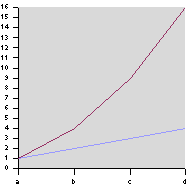
chart:line |
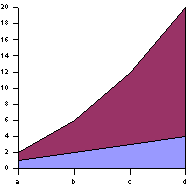
chart:area |
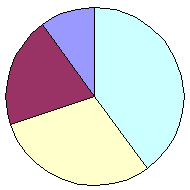
chart:circle |
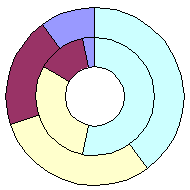
chart:ring |
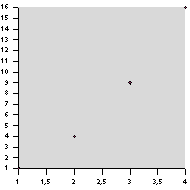
chart:scatter |
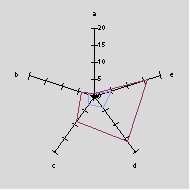
chart:radar |

chart:bar |

chart:stock |
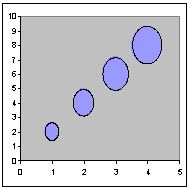
chart:bubble |

chart:surface |
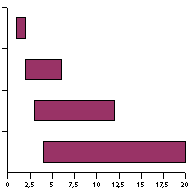
chart:gantt |
|
The chart:class attribute is usable with the following elements: <chart:chart> 11.1 and <chart:series> 11.11.
The chart:class attribute has the data type namespacedToken 18.3.18.
The chart:class attribute of a <chart:grid> element specifies whether major or minor tick marks are used on a grid.
The defined values for the chart:class attribute are:
●major: major tick marks are extended to grid lines.
●minor: minor tick marks are extended to grid lines.
For a <chart:grid> 11.10 element the default value for this attribute is major.
The chart:class attribute is usable with the following element: <chart:grid> 11.10.
The values of the chart:class attribute are major or minor.
The chart:column-mapping attribute is deprecated. It specifies a list of indexes of series. The numbers define a reordering of data that comes from a container document that provides the data for the chart. The numbering begins with 1. A list of ascending numbers beginning with 1 has no effect. To exchange two series, their numbers shall be exchanged in the list.
The chart:column-mapping and chart:row-mapping 19.28 attributes shall not be used simultaneously.
Instead of using the deprecated chart:column-mapping attribute, <chart:series> elements may be reordered and and specific cell ranges may be assigned to them using the chart:values-cell-range-address attribute.
The chart:column-mapping attribute is usable with the following element: <chart:chart> 11.1.
The chart:column-mapping attribute has the data type string 18.2.
The chart:data-source-has-labels attribute specifies whether a chart's source range (as given within table:cell-range-address attribute on a <chart:plot-area> element) contain labels.
The defined values for the chart:data-source-has-labels attribute are:
●both: first row and column of a chart's source range both contain labels.
●column: first column of a chart's source range contains labels.
●none: neither the first row nor the first column of a chart's source range contains labels.
●row: first row of a chart's source range contains labels.
The default value for this attribute is none.
The chart:data-source-has-labels attribute is usable with the following element: <chart:plot-area> 11.4.
The values of the chart:data-source-has-labels attribute are none, row, column or both.
The chart:dimension attribute specifies a dimension in a coordinate system.
For charts with less than three axes the chart:dimension attribute may appear with values for the x-axis and y-axis only.
The defined values for the chart:dimension attribute are:
●x: dimension represented by the x-axis of a chart.
●y: dimension represented by the y-axis of a chart.
●z: dimension represented by the z-axis of a chart.
The chart:dimension attribute is usable with the following elements: <chart:axis> 11.8 and <chart:error-indicator> 11.16.
The values of the chart:dimension attribute are x, y or z.
The chart:display-equation attribute specifies whether the equation itself should be displayed or not. It is only evaluated if the value of the chart:automatic-content attribute is true.
The defined values for the chart:display-equation attribute are:
●false: the equation is not displayed.
●true: the equation is displayed.
The default value for this attribute is true.
The chart:display-equation attribute is usable with the following element: <chart:equation> 11.18.
The chart:display-equation attribute has the data type boolean 18.3.2.
The chart:display-r-square attribute specifies whether an R-square value should be displayed or not. It is only evaluated if the value of the chart:automatic-content attribute is true.
The defined values for the chart:display-r-square attribute are:
●false: R-square value is not displayed.
●true: R-square value is displayed.
The default value for this attribute is false.
The chart:display-r-square attribute is usable with the following element: <chart:equation> 11.18.
The chart:display-r-square attribute has the data type boolean 18.3.2.
The chart:error-lower-range attribute specifies the cell range used for negative error indicators when a chart:error-category attribute has a value of cell-range. 20.13
The chart:error-lower-range attribute is usable with the following element: <chart:error-indicator> 11.16.
The chart:error-lower-range attribute has the data type cellRangeAddressList 18.3.5.
The chart:error-upper-range attribute specifies the cell range used for positive error indicators when the chart:error-category attribute has the value cell-range 20.13.
The chart:error-upper-range attribute is usable with the following element: <chart:error-indicator> 11.16.
The chart:error-upper-range attribute has the data type cellRangeAddressList 18.3.5.
The chart:label-cell-address attribute specifies a cell range list that contains the name for a series.
The chart:label-cell-address attribute is usable with the following element: <chart:series> 11.11.
The chart:label-cell-address attribute has the data type cellRangeAddressList 18.3.5.
The chart:legend-align attribute specifies the alignment of a legend with the plot area.
The defined values for the chart:legend-align attribute are:
●center: legend is aligned at the center of the plot-area.
●end: legend is aligned at the end of the plot-area (which is right or bottom).
●start: legend is aligned at the beginning of the plot-area (which is left or top).
Note: This attribute can be used when the chart:legend-position attribute has one of the following values: start, end, top, bottom.
The chart:legend-align attribute is usable with the following element: <chart:legend> 11.3.
The values of the chart:legend-align attribute are start, center or end.
The chart:legend-position attribute specifies the placement of a legend.
The defined values for the chart:legend-position attribute to specify the location of a legend in one of the corners of a chart outside the plot area are:
●bottom-end: place legend in the bottom right corner.
●bottom-start: place the legend in the bottom left corner.
●top-end: place legend in the top right corner.
●top-start: place legend in the top left corner.
The defined values for the chart:legend-position attribute to specify the location of a legend next to the plot area are:
●bottom: place legend below the plot area.
●end: place legend on the right side of the plot area.
●start: place legend on the left side of the plot area.
●top: place legend above the plot area.
The legend position can also be given in absolute coordinates with svg:x and svg:y attributes, as with any drawing object. If both absolute coordinates and the legend-position attribute are given, the legend-position attribute takes precedence and the position should reflect the automatic placement.
The chart:legend-position attribute is usable with the following element: <chart:legend> 11.3.
The values of the chart:legend-position attribute are start, end, top, bottom, top-start, bottom-start, top-end or bottom-end.
The chart:name attribute assigns a name to an axis.,
Note: The value of a chart:name attribute can be used to reference an axis.
The chart:name attribute is usable with the following element: <chart:axis> 11.8.
The chart:name attribute has the data type string 18.2.
The chart:repeated attribute specifies that more than one consecutive data-point has the same style.
The chart:repeated attribute is usable with the following element: <chart:data-point> 11.13.
The chart:repeated attribute has the data type nonNegativeInteger 18.2.
The chart:row-mapping attribute specifies a list of indexes of series. The numbers define a reordering of data that comes from a container document that provides the data for the chart. The numbering begins with 1. A list of ascending numbers beginning with 1 has no effect. To exchange two series, their numbers shall be exchanged in the list.
The chart:row-mapping and chart:column-mapping 19.16 attributes shall not be used simultaneously.
Instead of using the deprecated chart:row-mapping attribute, <chart:series> elements may be reordered and and specific cell ranges may be assigned to them using the chart:values-cell-range-address attribute.
The chart:row-mapping attribute is usable with the following element: <chart:chart> 11.1.
The chart:row-mapping attribute has the data type string 18.2.
The chart:style-name attribute references a chart style by its name.19.500
The chart:style-name attribute is usable with the following elements: <chart:axis> 11.8, <chart:chart> 11.1, <chart:data-label> 11.14, <chart:data-point> 11.13, <chart:equation> 11.18, <chart:error-indicator> 11.16, <chart:floor> 11.7, <chart:footer> 11.2.3, <chart:grid> 11.10, <chart:legend> 11.3, <chart:mean-value> 11.15, <chart:plot-area> 11.4, <chart:regression-curve> 11.17, <chart:series> 11.11, <chart:stock-gain-marker> 11.19, <chart:stock-loss-marker> 11.20, <chart:stock-range-line> 11.21, <chart:subtitle> 11.2.2, <chart:title> 11.2.1 and <chart:wall> 11.6.
The chart:style-name attribute has the data type styleNameRef 18.3.31.
The chart:values-cell-range-address attribute specifies a cell range that contains the values that should be visualized by that data series.
The chart:values-cell-range-address attribute is usable with the following element: <chart:series> 11.11.
The chart:values-cell-range-address attribute has the data type cellRangeAddressList 18.3.5.
The config:name attribute specifies a name of an application setting, an application setting sequence, or an iapplication setting container.
For <config:config-item-set> elements that are children of <office:settings> elements, the name should begin with a namespace prefix followed by a “:” (COLON, U+003A). The XML namespace bound to the prefix identifies the implementation that defines the name of a setting.
The config:name attribute is usable with the following elements: <config:config-item> 3.10.3, <config:config-item-map-entry> 3.10.5, <config:config-item-map-indexed> 3.10.4, <config:config-item-map-named> 3.10.6 and <config:config-item-set> 3.10.2.
The config:name attribute has the data type string 18.2.
The config:type attribute specifies a data type for a setting.
The defined values for the config:type attribute are:
●base64Binary: 18.2
●boolean: 18.3.2
●datetime: 18.2
●double: 18.2
●int: 18.2
●long: defined by [SQL].
●short: defined by [SQL].
●string: 18.2
The config:type attribute is usable with the following element: <config:config-item> 3.10.3.
The values of the config:type attribute are boolean, short, int, long, double, string, datetime or base64Binary.
The db:additional-column-statement attribute specifies a statement, which is placed after the column part of a “CREATE TABLE” SQL-statement, for a column whose value should be automatically incremented by the database engine upon data insertion.
The db:additional-column-statement attribute is usable with the following element: <db:auto-increment> 12.10.
The db:additional-column-statement attribute has the data type string 18.2.
The db:append-table-alias-name attribute specifies that a table alias name should be appended when creating a SQL query.
The defined values for the db:append-table-alias-name attribute are:
●false: table alias name is not appended to a query when creating an SQL query.
●true: table alias name is appended to a query when creating an SQL query.
The default value for this attribute is true.
The db:append-table-alias-name attribute is usable with the following element: <db:application-connection-settings> 12.15.
The db:append-table-alias-name attribute has the data type boolean 18.3.2.
The db:apply-command attribute specifies whether an SQL clause specified by a db:command attribute should be appended to an underlying statement.
The defined values for the db:apply-command attribute are:
●false: an SQL clause specified by a db:command will not be appended to an underlying statement.
●true: an SQL clause specified by a db:command attribute will be appended to an underlying statement.
The default value for this attribute is false.
The db:apply-command attribute is usable with the following elements: <db:filter-statement> 12.30 and <db:order-statement> 12.29.
The db:apply-command attribute has the data type boolean 18.3.2.
The db:as-template attribute specifies that a document is used as a template for a table structure to be created inside a database.
The defined values for the db:as-template attribute are:
●false: document is not used as a template.
●true: document is used as a template.
The db:as-template attribute is usable with the following element: <db:component> 12.25.5.
The db:as-template attribute has the data type boolean 18.3.2.
The db:base-dn attribute specifies a base DN for data that is retrieved using LDAP. [RFC4514]
The db:base-dn attribute is usable with the following element: <db:driver-settings> 12.9.
The db:base-dn attribute has the data type string 18.2.
The db:boolean-comparison-mode attribute specifies a comparison mode used for Boolean values in SQL SELECT statements.
The defined values for the db:boolean-comparison-mode attribute are:
●equal-boolean: “= TRUE" will be used for true and “= FALSE" for false.
●equal-integer: “= 1" will be used for true and “= 0" for false.
●equal-use-only-zero: “NOT ($value = 0 or $value IS NULL)" will be used for true and “= 0" for false.
●is-boolean: “IS TRUE" will be used for true and “IS FALSE" for false.
The default value for this attribute is equal-integer.
The db:boolean-comparison-mode attribute is usable with the following element: <db:application-connection-settings> 12.15.
The values of the db:boolean-comparison-mode attribute are equal-integer, is-boolean, equal-boolean or equal-use-only-zero.
The db:catalog-name attribute specifies the name of a catalog. This can be a part of a full qualified table name or a part of a full qualified index name.
The db:catalog-name attribute is usable with the following elements: <db:index> 12.46, <db:table-definition> 12.38, <db:table-representation> 12.33 and <db:update-table> 12.31.
The db:catalog-name attribute has the data type string 18.2.
The db:command attribute specifies an SQL select, order or filter clause that is used as part of a SELECT statement.
The db:command attribute is usable with the following elements: <db:filter-statement> 12.30, <db:order-statement> 12.29 and <db:query> 12.28.
The db:command attribute has the data type string 18.2.
The db:data-source-setting-is-list attribute specifies whether a <db:data-source-setting> element contains a list of <db:data-source-setting-value> elements.
The defined values for the db:data-source-setting-is-list attribute are:
●false: <db:data-source-settings> element should not contain a list of <db:data-source-setting-value> elements.
●true: <db:data-source-settings> element should contain a list of <db:data-source-setting-value> elements.
The db:data-source-setting-is-list attribute is usable with the following element: <db:data-source-setting> 12.23.
The db:data-source-setting-is-list attribute has the data type boolean 18.3.2.
The db:data-source-setting-name attribute specifies a name for a <db:data-source-setting> element.
The db:data-source-setting-name attribute is usable with the following element: <db:data-source-setting> 12.23.
The db:data-source-setting-name attribute has the data type string 18.2.
The db:data-source-setting-type attribute specifies a data type for a data-source-setting value.
The defined values for the db:data-source-setting-type attribute are:
The db:data-source-setting-type attribute is usable with the following element: <db:data-source-setting> 12.23.
The values of the db:data-source-setting-type attribute are boolean, short, int, long, double or string.
The db:data-type attribute specifies an SQL data type for a column.
The values accepted by db:data-type are defined by [SQL].
The db:data-type attribute is usable with the following element: <db:column-definition> 12.40.
The values of the db:data-type attribute are bit, boolean, tinyint, smallint, integer, bigint, float, real, double, numeric, decimal, char, varchar, longvarchar, date, time, timestmp, binary, varbinary, longvarbinary, sqlnull, other, object, distinct, struct, array, blob, clob or ref.
The db:database-name attribute specifies the database for a connection if the database type supports multiple logical databases per server.
The db:database-name attribute is usable with the following element: <db:server-database> 12.6.
The db:database-name attribute has the data type string 18.2.
The db:decimal attribute specifies a decimal separator for numeric fields.
The default value for this attribute is “.” (U+002E, FULL STOP)..
The db:decimal attribute is usable with the following element: <db:delimiter> 12.11.
The db:decimal attribute has the data type string 18.2.
The db:default-cell-style-name attribute specifies a default cell style. This style is applied to all cells in a column.
The db:default-cell-style-name attribute is usable with the following element: <db:column> 12.35.
The db:default-cell-style-name attribute has the data type styleNameRef 18.3.31.
The db:default-row-style-name attribute specifies a default row style. This style is applied to all rows in a table.
The db:default-row-style-name attribute is usable with the following elements: <db:query> 12.28 and <db:table-representation> 12.33.
The db:default-row-style-name attribute has the data type styleNameRef 18.3.31.
The db:delete-rule attribute specifies a rule that is applied for deleting records from a table. It is used only with foreign keys.
The defined values for the db:delete-rule attribute are:
●cascade: when the primary key is deleted, rows that imported that key are deleted.
●no-action: indicates that if the primary key has been imported, it cannot be deleted.
●restrict: a primary key shall not be deleted if it has been imported by another table as a foreign key.
●set-default: when the primary key is deleted, the foreign key (imported key) is set to the default value.
●set-null: when the primary key is deleted, the foreign key (imported key) is changed to NULL.
The default value for this attribute is no-action.
The db:delete-rule attribute is usable with the following element: <db:key> 12.42.
The values of the db:delete-rule attribute are cascade, restrict, set-null, no-action or set-default.
The db:description attribute specifies a description of a database object.
The db:description attribute is usable with the following elements: <db:column> 12.35, <db:component> 12.25.5, <db:component-collection> 12.25.4, <db:query> 12.28, <db:query-collection> 12.27 and <db:table-representation> 12.33.
The db:description attribute has the data type string 18.2.
The db:enable-sql92-check attribute specifies whether the names of tables, views, columns, and queries may contain characters defined by the [SQL] feature F392.
The defined values for the db:enable-sql92-check attribute are:
●false: consumers should permit characters defined by the [SQL] feature F392 for new or changed names of tables, views, columns, and queries.
●true: consumers should not permit characters defined by the [SQL] feature F392 for new or changed names of tables, views, columns, and queries.
The default value for this attribute is false.
The db:enable-sql92-check attribute is usable with the following element: <db:application-connection-settings> 12.15.
The db:enable-sql92-check attribute has the data type boolean 18.3.2.
The db:encoding attribute specifies a text encoding for string data.
The default value for this attribute is utf-8.
The db:encoding attribute is usable with the following element: <db:character-set> 12.12.
The db:encoding attribute has the data type textEncoding 18.3.34.
The db:escape-processing attribute specifies whether escape processing for a query is used or not.
The defined values for the db:escape-processing attribute are:
●false: consumer should pass a query statement to the database driver without interpreting it itself.
●true: consumer may pass a query statement to a database driver after interpreting it itself.
The default value for this attribute is true.
The db:escape-processing attribute is usable with the following element: <db:query> 12.28.
The db:escape-processing attribute has the data type boolean 18.3.2.
The db:extension attribute of a <db:file-based-database> element specifies a file name extension for files which are used as tables.
The db:extension attribute is usable with the following element: <db:file-based-database> 12.5.
The db:extension attribute has the data type string 18.2.
The db:field attribute specifies a separator for database fields.
The default value for this attribute is “;” (U+003B, SEMICOLON).
The db:field attribute is usable with the following element: <db:delimiter> 12.11.
The db:field attribute has the data type string 18.2.
The db:hostname attribute specifies the name of a server for a server-based database.
The db:hostname attribute is usable with the following element: <db:server-database> 12.6.
The db:hostname attribute has the data type string 18.2.
The db:ignore-driver-privileges attribute specifies whether privileges returned by a database driver should be ignored.
The defined values for the db:ignore-driver-privileges attribute are:
●false: privileges returned by a database driver should not be ignored.
●true: privileges returned by a database driver should be ignored.
The default value for this attribute is true.
The db:ignore-driver-privileges attribute is usable with the following element: <db:application-connection-settings> 12.15.
The db:ignore-driver-privileges attribute has the data type boolean 18.3.2.
The db:is-ascending attribute specifies that a column is to be sorted in ascending order. This attribute is mandatory.
The defined values for the db:is-ascending attribute are:
●false: column is not sorted in ascending order.
●true: column is sorted in ascending order.
The db:is-ascending attribute is usable with the following element: <db:index-column> 12.48.
The db:is-ascending attribute has the data type boolean 18.3.2.
The db:is-autoincrement attribute specifies whether a column is automatically numbered.
The defined values for the db:is-autoincrement attribute are:
●false: column is not automatically numbered.
●true: column is automatically numbered.
The db:is-autoincrement attribute is usable with the following element: <db:column-definition> 12.40.
The db:is-autoincrement attribute has the data type boolean 18.3.2.
The db:is-clustered attribute specifies that an index is clustered.
The defined values for the db:is-clustered attribute are:
●false: index is not clustered.
●true: index is clustered.
The db:is-clustered attribute is usable with the following element: <db:index> 12.46.
The db:is-clustered attribute has the data type boolean 18.3.2.
The db:is-empty-allowed attribute specifies whether a column may contain empty values.
The defined values for the db:is-empty-allowed attribute are:
●false: column may not contain empty values.
●true: column may contain empty values.
The db:is-empty-allowed attribute is usable with the following element: <db:column-definition> 12.40.
The db:is-empty-allowed attribute has the data type boolean 18.3.2.
The db:is-first-row-header-line attribute specifies whether the first row in a text file, which is interpreted as table of a file-based database, is used to define the columns of a table.
The defined values for the db:is-first-row-header-line attribute are:
●false: first row of text file does not define columns of a table.
●true: first row of text file does define columns of a table.
The default value for this attribute is true.
The db:is-first-row-header-line attribute is usable with the following elements: <db:driver-settings> 12.9 and <db:table-setting> 12.14.
The db:is-first-row-header-line attribute has the data type boolean 18.3.2.
The db:login-timeout attribute indicates a default time-out to be used when establishing a connection for this data source. If the attribute is not present, then default time-out is specified by the database server.
The db:login-timeout attribute is usable with the following element: <db:login> 12.8.
The db:login-timeout attribute has the data type positiveInteger 18.2.
The db:is-nullable attribute specifies the nullability of values in a designated column.
The defined values for the db:is-nullable attribute are:
●no-nulls: null values should not appear in a column.
●nullable: null values may appear in a column.
The db:is-nullable attribute is usable with the following element: <db:column-definition> 12.40.
The values of the db:is-nullable attribute are no-nulls or nullable.
The db:is-password-required attribute specifies if a password is always necessary when establishing a connection for a data source.
The defined values for the db:is-password-required attribute are:
●false: password should not be required for a connection to data source.
●true: password should be required for a connection to data source.
The default value for this attribute is false.
The db:is-password-required attribute is usable with the following element: <db:login> 12.8.
The db:is-password-required attribute has the data type boolean 18.3.2.
The db:is-unique attribute specifies an index shall have unique values.
The defined values for the db:is-unique attribute are:
●false: index should not require unique values.
●true: index shall have unique values.
The db:is-unique attribute is usable with the following element: <db:index> 12.46.
The db:is-unique attribute has the data type boolean 18.3.2.
The db:precision attribute specifies a column's number of decimal digits.
The db:precision attribute is usable with the following element: <db:column-definition> 12.40.
The db:precision attribute has the data type positiveInteger 18.2.
The db:is-table-name-length-limited attribute specifies whether table names are limited to eight characters or fewer characters.
The defined values for the db:is-table-name-length-limited attribute are:
●false: tables names may exceed eight characters in length.
●true: table names shall not be greater than eight characters in length.
The default value for this attribute is true.
The db:is-table-name-length-limited attribute is usable with the following element: <db:application-connection-settings> 12.15.
The db:is-table-name-length-limited attribute has the data type boolean 18.3.2.
The db:local-socket attribute specifies local socket on which a server database is running and accepting connections. The server's local socket filename is used for connecting to a server database when it is running locally.
If db:local-socket is present but empty, consumers should use the default local socket for the database type in question.
The db:local-socket attribute is usable with the following element: <db:server-database> 12.6.
The db:local-socket attribute has the data type string 18.2.
The db:max-row-count attribute specifies the maximum number of rows that should be returned in a result set.
The db:max-row-count attribute is usable with the following element: <db:application-connection-settings> 12.15.
The db:max-row-count attribute has the data type integer 18.2.
The db:media-type attribute of a <db:file-based-database> element specifies the type of the file(s) that comprise a database. If the database consists of multiple files of different types which all are required for it to be operational, this attribute specifies the type of the file pointed to by the xlink:href attribute on the <db:file-based-database> element.
The db:media-type attribute is usable with the following element: <db:file-based-database> 12.5.
The db:media-type attribute has the data type string 18.2.
The db:name attribute specifies a name for the element upon which it appears. What is being named depends upon the element where the attribute appears.
The db:name attribute value specifies the name of a column.
The db:name attribute is usable with the following element: <db:column> 12.35.
The db:name attribute has the data type string 18.2.
The db:name attribute specifies the name of a column.
The db:name attribute is usable with the following element: <db:column-definition> 12.40.
The db:name attribute has the data type string 18.2.
The db:name attribute specifies the name of a database component.
The db:name attribute is usable with the following element: <db:component> 12.25.5.
The db:name attribute has the data type string 18.2.
The db:name attribute specifies the name of a collection of <db:component> and <db:component-collection> elements.
The db:name attribute is usable with the following element: <db:component-collection> 12.25.4.
The db:name attribute has the data type string 18.2.
The db:name attribute value specifies the name of an index.
The db:name attribute is usable with the following element: <db:index> 12.46.
The db:name attribute has the data type string 18.2.
The db:name attribute value specifies the name of an index column.
The db:name attribute is usable with the following element: <db:index-column> 12.48.
The db:name attribute has the data type string 18.2.
The db:name attribute value specifies the name of a key. This attribute is mandatory if the key is not the primary key.
The db:name attribute is usable with the following element: <db:key> 12.42.
The db:name attribute has the data type string 18.2.
The db:name attribute specifies the name of a <db:key-column> element.
The db:name attribute is usable with the following element: <db:key-column> 12.44.
The db:name attribute has the data type string 18.2.
The db:name attribute specifies the name of a <db:query> element.
The db:name attribute is usable with the following element: <db:query> 12.28.
The db:name attribute has the data type string 18.2.
The db:name attribute specifies the name of a collection of <db:query> and <db:query-collection> elements.
The db:name attribute is usable with the following element: <db:query-collection> 12.27.
The db:name attribute has the data type string 18.2.
The db:name attribute specifies the name of a schema for a table.
The db:name attribute is usable with the following element: <db:table-definition> 12.38.
The db:name attribute has the data type string 18.2.
The db:name attribute value specifies the name of a table. Fully identifying a table in a database may require values from the db:catalog-name and db:schema-name attributes.
The db:name attribute is usable with the following element: <db:table-representation> 12.33.
The db:name attribute has the data type string 18.2.
The db:name attribute specifies the name of a <db:update-table> element.
The db:name attribute is usable with the following element: <db:update-table> 12.31.
The db:name attribute has the data type string 18.2.
The db:parameter-name-substitution attribute specifies that parameter names shall be replaced with a ”?” (QUESTION MARK, U+003F).
The defined values for the db:parameter-name-substitution attribute are:
●false: parameters names may be replaced by a ”?”.
●true: parameters names shall be replaced by a “?”.
The default value for this attribute is true.
The db:parameter-name-substitution attribute is usable with the following element: <db:driver-settings> 12.9.
The db:parameter-name-substitution attribute has the data type boolean 18.3.2.
The db:port attribute specifies the port on which a server database is accepting connections. If no port is present, consumers should use the default port for the database type in question.
The db:port attribute is usable with the following element: <db:server-database> 12.6.
The db:port attribute has the data type positiveInteger 18.2.
The db:referenced-table-name attribute specifies the name of a referenced table. It is only used with foreign keys.
The db:referenced-table-name attribute is usable with the following element: <db:key> 12.42.
The db:referenced-table-name attribute has the data type string 18.2.
The db:related-column-name attribute specifies the name of a reference column out of the referenced table. It is used only with foreign keys.
The db:related-column-name attribute is usable with the following element: <db:key-column> 12.44.
The db:related-column-name attribute has the data type string 18.2.
The db:row-retrieving-statement attribute specifies an SQL statement, which is executed to retrieve auto generated values after inserting a new row.
The db:row-retrieving-statement attribute is usable with the following element: <db:auto-increment> 12.10.
The db:row-retrieving-statement attribute has the data type string 18.2.
The db:scale attribute specifies a column's number of digits to the right of the decimal point.
The db:scale attribute is usable with the following element: <db:column-definition> 12.40.
The db:scale attribute has the data type positiveInteger 18.2.
The db:schema-name attribute specifies the name of a schema.
The db:schema-name attribute is usable with the following elements: <db:table-definition> 12.38, <db:table-representation> 12.33 and <db:update-table> 12.31.
The db:schema-name attribute has the data type string 18.2.
The db:show-deleted attribute specifies that deleted records should be included in result sets.
The defined values for the db:show-deleted attribute are:
●false: deleted records not included in result sets.
●true: deleted records included in result sets.
The default value for this attribute is false.
The db:show-deleted attribute is usable with the following elements: <db:driver-settings> 12.9 and <db:table-setting> 12.14.
The db:show-deleted attribute has the data type boolean 18.3.2.
The db:string attribute specifies a separator for strings.
The default value for this attribute is "." (U+002E, FULL STOP).
The db:string attribute is usable with the following element: <db:delimiter> 12.11.
The db:string attribute has the data type string 18.2.
The db:style-name attribute specifies a style name of a style family for the element upon which it appears.
The db:style-name attribute value specifies the name of a style of the family table-column.
The db:style-name attribute is usable with the following element: <db:column> 12.35.
The db:style-name attribute has the data type styleNameRef 18.3.31.
The db:style-name attribute value specifies the name of a style of the family table.
The db:style-name attribute is usable with the following element: <db:query> 12.28.
The db:style-name attribute has the data type styleNameRef 18.3.31.
The db:style-name attribute value specifies the name of a style of the family table.
The db:style-name attribute is usable with the following element: <db:table-representation> 12.33.
The db:style-name attribute has the data type styleNameRef 18.3.31.
The db:suppress-version-columns attribute specifies that version columns, columns that are used for versioning row content, in components that display data obtained from a database, should be suppressed.
The defined values for the db:suppress-version-columns attribute are:
●false: version columns are not suppressed.
●true: version columns should be suppressed.
The default value for this attribute is true.
The db:suppress-version-columns attribute is usable with the following element: <db:application-connection-settings> 12.15.
The db:suppress-version-columns attribute has the data type boolean 18.3.2.
The db:system-driver-settings attribute specifies system specific options for a connection.
The db:system-driver-settings attribute is usable with the following element: <db:driver-settings> 12.9.
The db:system-driver-settings attribute has the data type string 18.2.
The db:thousand attribute specifies a thousand separator of numeric fields.
The default value for this attribute is “,” (COMMA, U+002C).
The db:thousand attribute is usable with the following element: <db:delimiter> 12.11.
The db:thousand attribute has the data type string 18.2.
The db:title attribute specifies a human-readable title of an object.
The db:title attribute is usable with the following elements: <db:column> 12.35, <db:component> 12.25.5, <db:component-collection> 12.25.4, <db:query> 12.28, <db:query-collection> 12.27 and <db:table-representation> 12.33.
The db:title attribute has the data type string 18.2.
The db:type attribute specifies a type for keys, server-databases, or tables, depending upon the element where it occurs.
The db:type attribute specifies the type of a key.
The defined values for the db:type attribute are:
●foreign: a foreign key is a tuple of values in a database record that points to a key of a record in another table.
●primary: a primary key is a tuple of values that can be used to identify a row in a table.
●unique: a unique key specifies that the value of the key is unique but may be the NULL value.
The db:type attribute is usable with the following element: <db:key> 12.42.
The values of the db:type attribute are primary, unique or foreign.
The db:type attribute specifies the type of a server-database.
The db:type attribute is usable with the following element: <db:server-database> 12.6.
The db:type attribute has the data type namespacedToken 18.3.18.
The db:type attribute specifies the type of a table.
The defined values for the db:type attribute are:
●system table: a table used by a database for administration.
●table: a table.
●view: a table that is a view of another table.
●Implementation defined values
The db:type attribute is usable with the following element: <db:table-definition> 12.38.
The db:type attribute has the data type string 18.2.
The db:type-name attribute specifies a database dependent type name of a database column.
The db:type-name attribute is usable with the following element: <db:column-definition> 12.40.
The db:type-name attribute has the data type string 18.2.
The db:update-rule attribute specifies a rule that is applied for updating records in a table. It is only used for foreign keys.
The defined values for the db:update-rule attribute are:
●cascade: when the primary key is updated, the foreign key (imported key) is changed to the same value.
●restrict: a primary key shall not be updated if it has been imported by another table as a foreign key.
●no-action: if the primary key has been imported, it cannot be updated.
●set-default: when the primary key is updated, the foreign key (imported key) is set to the default value.
●set-null: when the primary key is updated, the foreign key (imported key) is changed to NULL.
The default value for this attribute is no-action.
The db:update-rule attribute is usable with the following element: <db:key> 12.42.
The values of the db:update-rule attribute are cascade, restrict, set-null, no-action or set-default.
The db:use-catalog attribute specifies that a catalog name should be used to reference a table in SQL statements.
The defined values for the db:use-catalog attribute are:
●false: catalog name is not use to reference a table in SQL statements.
●true: catalog name should be used to reference a table in SQL statements.
The default value for this attribute is false.
The db:use-catalog attribute is usable with the following element: <db:application-connection-settings> 12.15.
The db:use-catalog attribute has the data type boolean 18.3.2.
The db:use-system-user attribute specifies that the name of a user as logged in to the client operating system is used.
If db:use-system-user and db:user-name attributes are omitted and the server requires a user name, the user is prompted to enter a name.
The defined values for the db:use-system-user attribute are:
●false: name of user logged into client operating system is not used for login.
●true: name of user logged into client operating system is used for login.
The db:use-system-user attribute is usable with the following element: <db:login> 12.8.
The db:use-system-user attribute has the data type boolean 18.3.2.
The db:user-name attribute specifies a user name for authentication upon creating a connection to a database.
If db:user-name and db:use-system-user attributes are omitted and the server requires a user name, the user is prompted to enter a name.
The db:user-name attribute is usable with the following element: <db:login> 12.8.
The db:user-name attribute has the data type string 18.2.
The db:visible attribute specifies whether a column appears in a table grid view.
The defined values for the db:visible attribute are:
●false: column does not appear in a table grid view.
●true: column appears in a table grid view.
The default value for this attribute is true.
The db:visible attribute is usable with the following element: <db:column> 12.35.
The db:visible attribute has the data type boolean 18.3.2.
The dr3d:ambient-color attribute specifies a color for ambient light.
Note: Ambient light is light that seems to come from all directions.
The dr3d:ambient-color attribute, along with dr3d:diffuse-color, dr3d:emissive-color, and dr3d:specular-color specifies the four colors that define the color of a material.
The dr3d:ambient-color attribute is usable with the following elements: <chart:plot-area> 11.4 and <dr3d:scene> 10.5.1.
The dr3d:ambient-color attribute has the data type color 18.3.8.
The dr3d:center attribute specifies the center of a sphere in a three-dimensional space.
The dr3d:center attribute is usable with the following element: <dr3d:sphere> 10.5.4.
The dr3d:center attribute has the data type vector3D 18.3.39.
The dr3d:diffuse-color attribute specifies the base color that a light is emitting.
The dr3d:diffuse-color attribute is usable with the following element: <dr3d:light> 10.5.2.
The dr3d:diffuse-color attribute has the data type color 18.3.8.
The dr3d:direction attribute specifies the direction in which light is emitted.
The dr3d:direction attribute is usable with the following element: <dr3d:light> 10.5.2.
The dr3d:direction attribute has the data type vector3D 18.3.39.
The dr3d:distance attribute specifies the distance between a camera and an object.
The dr3d:distance attribute is usable with the following elements: <chart:plot-area> 11.4 and <dr3d:scene> 10.5.1.
The dr3d:distance attribute has the data type length 18.3.17.
The dr3d:enabled attribute specifies if a light is enabled. If a light is not enabled, it does not emit any light.
The defined values for the dr3d:enabled attribute are:
●false: light is not enabled.
●true: light is enabled.
The dr3d:enabled attribute is usable with the following element: <dr3d:light> 10.5.2.
The dr3d:enabled attribute has the data type boolean 18.3.2.
The dr3d:focal-length attribute specifies the focal length of a virtual camera in a scene.
The dr3d:focal-length attribute is usable with the following elements: <chart:plot-area> 11.4 and <dr3d:scene> 10.5.1.
The dr3d:focal-length attribute has the data type length 18.3.17.
The use of this attribute varies depending upon its context.
Note: The dr3d:lighting-mode attribute is also defined for 3D objects. 20.77
The dr3d:lighting-mode attribute specifies whether lighting is used in a three-dimensional chart.
The defined values for the dr3d:lighting-mode attribute are:
●false: lighting is not used.
●true: lighting is used.
The dr3d:lighting-mode attribute is usable with the following element: <chart:plot-area> 11.4.
The dr3d:lighting-mode attribute has the data type boolean 18.3.2.
The dr3d:lighting-mode attribute specifies whether lighting is used in a three-dimensional scene.
The defined values for the dr3d:lighting-mode attribute are:
●false: lighting is not used.
●true: lighting is used.
The dr3d:lighting-mode attribute is usable with the following element: <dr3d:scene> 10.5.1.
The dr3d:lighting-mode attribute has the data type boolean 18.3.2.
The dr3d:max-edge attribute specifies the maximum x, y and z coordinate values for a cube.
The dr3d:max-edge attribute is usable with the following element: <dr3d:cube> 10.5.3.
The dr3d:max-edge attribute has the data type vector3D 18.3.39.
The dr3d:min-edge attribute specifies the minimum x, y and z coordinate values for a cube.
The dr3d:min-edge attribute is usable with the following element: <dr3d:cube> 10.5.3.
The dr3d:min-edge attribute has the data type vector3D 18.3.39.
The dr3d:projection attribute specifies a projection mode.
The defined values for the dr3d:projection attribute are:
●parallel: distance from the center of projection to the projection plane is infinite.
●perspective: distance from the center of projection to the projection plane is finite.
For a <draw:enhanced-geometry> 10.6.2 element the default value for this attribute is parallel.
The dr3d:projection attribute is usable with the following elements: <chart:plot-area> 11.4, <dr3d:scene> 10.5.1 and <draw:enhanced-geometry> 10.6.2.
The values of the dr3d:projection attribute are parallel or perspective.
The dr3d:shade-mode attribute specifies how lighting is calculated for rendered surfaces.
The defined values for the dr3d:shade-mode attribute are:
●draft: surfaces are not lit and drawn as wireframe only.
●flat: lighting is calculated by one surface normal.
●gouraud: lighting is calculated by interpolating the color calculated with the surface normals at each edge.
●phong: lighting is calculated by interpolating the surface normals over the surface.
For a <draw:enhanced-geometry> 10.6.2 element the default value for this attribute is flat.
The dr3d:shade-mode attribute is usable with the following elements: <chart:plot-area> 11.4, <dr3d:scene> 10.5.1 and <draw:enhanced-geometry> 10.6.2.
The values of the dr3d:shade-mode attribute are flat, phong, gouraud or draft.
The dr3d:shadow-slant attribute specifies an angle from a three-dimensional scene to a virtual paper on which a shadow is cast.
The dr3d:shadow-slant attribute is usable with the following elements: <chart:plot-area> 11.4 and <dr3d:scene> 10.5.1.
The dr3d:shadow-slant attribute has the data type angle 18.3.1.
The dr3d:size attribute specifies the size of a sphere in a three-dimensional space.
The dr3d:size attribute is usable with the following element: <dr3d:sphere> 10.5.4.
The dr3d:size attribute has the data type vector3D 18.3.39.
The dr3d:specular attribute specifies whether a light causes a specular reflection on objects. consumers may evaluate this attribute only for the first light in a scene.
The defined values for the dr3d:specular attribute are:
●false: light does not cause specular reflection.
●true: light does cause specular reflection.
The dr3d:specular attribute is usable with the following element: <dr3d:light> 10.5.2.
The dr3d:specular attribute has the data type boolean 18.3.2.
The dr3d:transform attribute specifies a list of transform definitions, which are applied in the order provided. The individual transform definitions are separated by white space.
The defined transforms are:
●matrix(<a> <b> <c> <d> <e> <f> <g> <h> <i> <j> <k> <l>): specifies a transformation in the form of a transformation matrix of twelve values. The values describe a standard 4x3 homogeneous transformation matrix in column-major order, where the right column (<j>, <k>, <l>) describes the translation.
●rotatex(<rotate-angle>): specifies a rotation by <rotate-angle> degrees along the x-axis.
●rotatey(<rotate-angle>): specifies a rotation by <rotate-angle> degrees along the y-axis.
●rotatez(<rotate-angle>): specifies a rotation by <rotate-angle> degrees along the z-axis.
●scale(<sx> <sy> <sz>): specifies a scale operation by sx, sy and sz.
●translate(<tx> <ty> <tz>): specifies a translation by tx, ty and tz.
The dr3d:transform attribute is usable with the following elements: <chart:plot-area> 11.4, <dr3d:cube> 10.5.3, <dr3d:extrude> 10.5.5, <dr3d:rotate> 10.5.6, <dr3d:scene> 10.5.1 and <dr3d:sphere> 10.5.4.
The dr3d:transform attribute has the data type string 18.2.
The dr3d:vpn attribute specifies a pointer towards projected objects.
With the dr3d:vrp and dr3d:vup attributes, the dr3d:vpn attribute specifies a viewing volume.
The dr3d:vpn attribute is usable with the following elements: <chart:plot-area> 11.4 and <dr3d:scene> 10.5.1.
The dr3d:vpn attribute has the data type vector3D 18.3.39.
The dr3d:vrp attribute specifies an origin.
With the dr3d:vpn and dr3d:vup attributes, the dr3d:vrp attribute specifies a viewing volume.
The dr3d:vrp attribute is usable with the following elements: <chart:plot-area> 11.4 and <dr3d:scene> 10.5.1.
The dr3d:vrp attribute has the data type vector3D 18.3.39.
The dr3d:vup attribute specifies an up vector.
With the dr3d:vpn and dr3d:vrp attributes, the dr3d:vup attribute specifies a viewing volume.
The dr3d:vup attribute is usable with the following elements: <chart:plot-area> 11.4 and <dr3d:scene> 10.5.1.
The dr3d:vup attribute has the data type vector3D 18.3.39.
The draw:align attribute specifies the shape edge where a glue point is positioned.
The defined values for the draw:align attribute are:
●bottom-left: The position of the glue point is specified relative to the bottom-left corner of the shape's bounding box.
●bottom-right: The position of the glue point is specified relative to the bottom-right corner of the shape's bounding box.
●center: The position of the glue point is specified relative to the center of the shape's bounding box.
●right: The position of the glue point is specified relative to the right of the shape's bounding box.
●top: The position of the glue point is specified relative to the top of the shape's bounding box.
●top-right: The position of the glue point is specified relative to the top-rght corner of the shape's bounding box.
●top-left: The position of the glue point is specified relative to the top-left corner of the shape's bounding box.
The draw:align attribute is usable with the following element: <draw:glue-point> 10.3.16.
The values of the draw:align attribute are top-left, top, top-right, left, center, right, bottom-left or bottom-right.
The draw:angle attribute specifies an angle that rotates the axis at which the gradient values are interpolated. This attribute is ignored for radial style gradients.
The draw:angle attribute is usable with the following elements: <draw:gradient> 16.40.1 and <draw:opacity> 16.40.7.
The draw:angle attribute has the data type angle 18.3.1.
The draw:archive attribute is equivalent to the archive attribute of an <applet> element in HTML. See. §13.4 of [HTML4].
The draw:archive attribute is usable with the following element: <draw:applet> 10.4.7.
The draw:archive attribute has the data type string 18.2.
The draw:border attribute specifies a percentage value that is used to scale a border area which is filled by a solid color.
For linear, square, rectangle, radial and elliptical gradients the start color is used. For axial gradients, the end color is used.
The draw:border attribute is usable with the following elements: <draw:gradient> 16.40.1 and <draw:opacity> 16.40.7.
The draw:border attribute has the data type percent 18.3.22.
The draw:caption-id attribute establishes a relationship between a drawing shape and its caption. It takes a value of type IDREF. The value for the draw:caption-id attribute is the target ID assigned to the <draw:text-box> element (see 10.4.3) that contains the caption.
Note 1: When a caption is assigned to a drawing shape, an id shall be assigned to the element containing the text used to caption a drawing shape. Removing the caption should result in removing the draw:caption-id attribute of the drawing shape that was being captioned.
Note 2: If an consumer provides a draw:caption-id relationship in its accessibility API, this relationship for captions should be used to fulfill the relationship. See appendix E.
The draw:caption-id attribute is usable with the following elements: <dr3d:scene> 10.5.1, <draw:caption> 10.3.11, <draw:circle> 10.3.8, <draw:connector> 10.3.10, <draw:control> 10.3.13, <draw:custom-shape> 10.6.1, <draw:ellipse> 10.3.9, <draw:frame> 10.4.2, <draw:g> 10.3.15, <draw:line> 10.3.3, <draw:measure> 10.3.12, <draw:page-thumbnail> 10.3.14, <draw:path> 10.3.7, <draw:polygon> 10.3.5, <draw:polyline> 10.3.4, <draw:rect> 10.3.2 and <draw:regular-polygon> 10.3.6.
The draw:caption-id attribute has the data type IDREF 18.2.
The draw:caption-point-x attribute, along with the draw:caption-point-y specifies the position of a point that is captioned. A set of lines are rendered to that point from the caption area.
The draw:caption-point-x attribute is usable with the following elements: <draw:caption> 10.3.11 and <office:annotation> 14.1.
The draw:caption-point-x attribute has the data type coordinate 18.3.9.
The draw:caption-point-y attribute, along with the draw:caption-point-x specifies the position of a point that is captioned. A set of lines are rendered to that point from the caption area.
The draw:caption-point-y attribute is usable with the following elements: <draw:caption> 10.3.11 and <office:annotation> 14.1.
The draw:caption-point-y attribute has the data type coordinate 18.3.9.
The draw:chain-next-name attribute specifies a name that is used to chain text boxes together for cases where the content of a text box exceeds its capacity. The content flows into the next text box in the chain. The value of this attribute is the name of the next text box in the chain.
The draw:chain-next-name attribute is usable with the following element: <draw:text-box> 10.4.3.
The draw:chain-next-name attribute has the data type string 18.2.
The draw:class-id attribute specifies the OLE class id of an object.
The draw:class-id attribute is usable with the following element: <draw:object-ole> 10.4.6.3.
The draw:class-id attribute has the data type string 18.2.
The draw:class-names attribute specifies a white space separated list of styles with the family value of graphic. The referenced styles are applied in the order they are contained in the list.
If both draw:style-name and draw:class-names are present, the style referenced by the draw:style-name attribute is applied before the styles referenced by the draw:class-names attribute.
The draw:class-names attribute is usable with the following elements: <dr3d:cube> 10.5.3, <dr3d:extrude> 10.5.5, <dr3d:rotate> 10.5.6, <dr3d:scene> 10.5.1, <dr3d:sphere> 10.5.4, <draw:caption> 10.3.11, <draw:circle> 10.3.8, <draw:connector> 10.3.10, <draw:control> 10.3.13, <draw:custom-shape> 10.6.1, <draw:ellipse> 10.3.9, <draw:frame> 10.4.2, <draw:g> 10.3.15, <draw:line> 10.3.3, <draw:measure> 10.3.12, <draw:page-thumbnail> 10.3.14, <draw:path> 10.3.7, <draw:polygon> 10.3.5, <draw:polyline> 10.3.4, <draw:rect> 10.3.2, <draw:regular-polygon> 10.3.6 and <office:annotation> 14.1.
The draw:class-names attribute has the data type styleNameRefs 18.3.32.
The draw:code attribute is equivalent to the code attribute of an <applet> element in HTML. See. §13.4 of [HTML4].
The draw:code attribute is usable with the following element: <draw:applet> 10.4.7.
The draw:code attribute has the data type string 18.2.
The draw:color attribute specifies different colors depending upon the element where it appears.
The draw:color attribute specifies the color of hatch lines.
The draw:color attribute is usable with the following element: <draw:hatch> 16.40.5.
The draw:color attribute has the data type color 18.3.8.
The draw:color attribute specifies the color of that is used to fill a shape when the shape is dimmed.
The draw:color attribute is usable with the following element: <presentation:dim> 10.8.7.
The draw:color attribute has the data type color 18.3.8.
The draw:concave attribute specifies whether a regular polygon is convex or concave. For a concave regular polygon the draw:sharpness attribute shall be specified in addition to the draw:concave attribute.
The defined values for the draw:concave attribute are:
●false: polygon is convex.
●true: polygon is concave.
The draw:concave attribute is usable with the following element: <draw:regular-polygon> 10.3.6.
The values of the draw:concave attribute are false or true.
The draw:concentric-gradient-fill-allowed attribute specifies the rendering of a shape with a concentric gradient that uses a custom shape path.
The defined values for the draw:concentric-gradient-fill-allowed attribute are:
●false: the rendering of a shape with a concentric gradient that does not use a custom shape path.
●true: the rendering of a shape with a concentric gradient that does use a custom shape path.
The default value for this attribute is false.
The draw:concentric-gradient-fill-allowed attribute is usable with the following element: <draw:enhanced-geometry> 10.6.2.
The draw:concentric-gradient-fill-allowed attribute has the data type boolean 18.3.2.
The draw:control attribute specifies a control within a form that is linked to the control shape by its ID.
The draw:control attribute is usable with the following element: <draw:control> 10.3.13.
The draw:control attribute has the data type IDREF 18.2.
The draw:copy-of attribute specifies that a frame displays the contents of another frame. This does not effect style and position information. The style and position information of the frame with the draw:copy-of attribute is used to render the copied contents.
Note: Multiple frames can be set to display the exact same underlying data: for instance for a company logo, that shall appear somewhere on every page, without being part of a header or footer.
The draw:copy-of attribute is usable with the following element: <draw:frame> 10.4.2.
The draw:copy-of attribute has the data type string 18.2.
The draw:corner-radius attribute specifies the radius of the circle used to round off the corners of a caption <draw:caption>, rectangle <draw:rect>, or a text-box <draw:text-box>.
The svg:rx and svg:ry attributes can also be used to round off the corners of a rectangle <draw:rect>.
If svg:rx and/or svg:ry and draw:corner-radius attributes are present on an element, the svg:rx and svg:ry attributes control the rounding applied to the shape defined by the element. If one or both of svg:rx and svg:ry attributes are present, any draw:corner-radius attribute is ignored.
The draw:corner-radius attribute is usable with the following elements: <draw:caption> 10.3.11, <draw:rect> 10.3.2, <draw:text-box> 10.4.3 and <office:annotation> 14.1.
The draw:corner-radius attribute has the data type nonNegativeLength 18.3.19.
The draw:corners attribute specifies the number of polygon corners on a polygon shape.
The draw:corners attribute is usable with the following element: <draw:regular-polygon> 10.3.6.
The draw:corners attribute has the data type positiveInteger 18.2.
The draw:cx attribute, along with the draw:cy attribute, specifies the center of the geometry that is used for a gradient, if the gradient style is ellipsoid, radial, rectangular, or square.
The draw:cx attribute is usable with the following elements: <draw:gradient> 16.40.1 and <draw:opacity> 16.40.7.
The draw:cx attribute has the data type percent 18.3.22.
The draw:cy attribute, along with the draw:cx attribute, specifies the center of the geometry that is used for a gradient, if the gradient style is ellipsoid, radial, rectangular, or square.
The draw:cy attribute is usable with the following elements: <draw:gradient> 16.40.1 and <draw:opacity> 16.40.7.
The draw:cy attribute has the data type percent 18.3.22.
The draw:data attribute specifies rendering engine specific data for a custom shape. This attribute is only evaluated if a rendering engine is specified by the draw:engine attribute.
The draw:data attribute is usable with the following element: <draw:custom-shape> 10.6.1.
The draw:data attribute has the data type string 18.2.
The draw:display attribute specifies the visibility of drawing objects contained in a layer for display or printing.
The defined values for the draw:display attribute are:
●always: drawing objects are visible on screen and in printed output.
●none: drawing objects are not visible on screen or in printed output.
●printer: drawing objects are visible in printed output but not on screen.
●screen: drawing objects are visible on screen but not in printed output.
The default value for this attribute is always.
The draw:display attribute is usable with the following element: <draw:layer> 10.2.3.
The values of the draw:display attribute are always, screen, printer or none.
The draw:display-name attribute specifies a name as it should appear in the user interface. In contrast to the internal name itself, this name may contain arbitrary characters. If this attribute is not present, the display name is the same as the internal name.
The draw:display-name attribute specifies the name of a fill image.
The draw:display-name attribute is usable with the following element: <draw:fill-image> 16.40.6.
The draw:display-name attribute has the data type string 18.2.
The draw:display-name attribute specifies the name of a gradient.
The draw:display-name attribute is usable with the following element: <draw:gradient> 16.40.1.
The draw:display-name attribute has the data type string 18.2.
The draw:display-name attribute specifies the name of a hatch style.
The draw:display-name attribute is usable with the following element: <draw:hatch> 16.40.5.
The draw:display-name attribute has the data type string 18.2.
The draw:display-name attribute specifies the name of a marker.
The draw:display-name attribute is usable with the following element: <draw:marker> 16.40.8.
The draw:display-name attribute has the data type string 18.2.
The draw:display-name attribute specifies the name of an opacity gradient.
The draw:display-name attribute is usable with the following element: <draw:opacity> 16.40.7.
The draw:display-name attribute has the data type string 18.2.
The draw:display-name attribute specifies the name of a dash style.
The draw:display-name attribute is usable with the following element: <draw:stroke-dash> 16.40.9.
The draw:display-name attribute has the data type string 18.2.
The draw:display-name attribute specifies the name of a gradient.
The draw:display-name attribute is usable with the following element: <svg:linearGradient> 16.40.2.
The draw:display-name attribute has the data type string 18.2.
The draw:display-name attribute specifies the name of a gradient.
The draw:display-name attribute is usable with the following element: <svg:radialGradient> 16.40.3.
The draw:display-name attribute has the data type string 18.2.
The draw:distance attribute specifies distances.
The draw:distance attribute specifies the distance between two hatch lines.
The draw:distance attribute is usable with the following element: <draw:hatch> 16.40.5.
The draw:distance attribute has the data type length 18.3.17.
The draw:distance attribute specifies the distance between the dashes of a stroke.
The value of the attribute may be an absolute length or a percentage value. Percentage values are relative to the width of the stroke as defined by the svg:stroke-width attribute. 20.398
The draw:distance attribute is usable with the following element: <draw:stroke-dash> 16.40.9.
The values of the draw:distance attribute are a value of type length 18.3.17 or a value of type percent 18.3.22.
The draw:dots1 attribute specifies the number of dashes for the first sequence in an alternating sequence of dots.
The draw:dots1 attribute is usable with the following element: <draw:stroke-dash> 16.40.9.
The draw:dots1 attribute has the data type integer 18.2.
The draw:dots1-length attributes specifies the length of the dashes in the sequence specified by draw:dots1.
The value of the attribute may be an absolute length or a percentage value. Percentage values are relative to the width of the stroke as defined by the svg:stroke-width attribute. 20.398
The draw:dots1-length attribute is usable with the following element: <draw:stroke-dash> 16.40.9.
The values of the draw:dots1-length attribute are a value of type length 18.3.17 or a value of type percent 18.3.22.
The draw:dots2 attribute specifies the number of dashes for the second sequence in an alternating sequence of dots.
The draw:dots2 attribute is usable with the following element: <draw:stroke-dash> 16.40.9.
The draw:dots2 attribute has the data type integer 18.2.
The draw:dots2-length attributes specifies the length of the dashes in the sequence specified by draw:dots2.
The value of the attribute may be an absolute length or a percentage value. Percentage values relative to the width of the stroke as defined by the svg:stroke-width attribute. 20.398
The draw:dots2-length attribute is usable with the following element: <draw:stroke-dash> 16.40.9.
The values of the draw:dots2-length attribute are a value of type length 18.3.17 or a value of type percent 18.3.22.
The draw:end attributes specifies the end value for the <draw:opacity> element, which interpolates between the value of this attribute and draw:start. The defined value range for the draw:end attribute is 0% to 100%, where 0% is transparent and 100% is opaque.
The draw:end attribute is usable with the following element: <draw:opacity> 16.40.7.
The draw:end attribute has the data type zeroToHundredPercent 18.3.40.
The draw:end-angle attribute specifies the end angle of a arc, cut, or section for circles where the draw:kind attribute value is arc, cut, or section.
The draw:end-angle attribute is usable with the following elements: <draw:circle> 10.3.8 and <draw:ellipse> 10.3.9.
The draw:end-angle attribute has the data type angle 18.3.1.
The draw:end-color attribute specifies the end value for the <draw:gradient> element, which interpolates between the value of this attribute and draw:start-color.
The draw:end-color attribute is usable with the following element: <draw:gradient> 16.40.1.
The draw:end-color attribute has the data type color 18.3.8.
The draw:end-glue-point attribute identifies the glue point in a shape where a connector ends by its number. See 10.3.16. Glue point numbers are defined by the draw:id attributes of the glue point elements <draw:glue-point>. See 19.189.
If the connector is not connected to a shape, this attribute is ignored.
The draw:end-glue-point attribute is usable with the following element: <draw:connector> 10.3.10.
The draw:end-glue-point attribute has the data type nonNegativeInteger 18.2.
The draw:end-intensity attribute specifies the intensity of the gradient's end color as a percentage value. If it is not specified, the color is used at 100% intensity. The defined value range for the draw:end-intensity attribute is 0% to 100%,
The draw:end-intensity attribute is usable with the following element: <draw:gradient> 16.40.1.
The draw:end-intensity attribute has the data type zeroToHundredPercent 18.3.40.
The draw:end-shape attribute specifies a drawing shape to which the end of a connector is connected by its ID.
The draw:end-shape attribute is usable with the following element: <draw:connector> 10.3.10.
The draw:end-shape attribute has the data type IDREF 18.2.
The draw:enhanced-path attribute specifies a path that is the outline of a shape.
The syntax of a value for a draw:enhanced-path attribute is defined as:
●Commands are expressed as one character.
●Commands are followed by parameters.
●Commands and parameters are delimited by white space characters. Parameters may also be delimited by comma (COMMA, U+002C) characters.
●White space and commas may be eliminated if they are not necessary to identify individual commands or parameters.
●If a command is repeated multiple times, all repeated command characters except the first one may be omitted.
●The decimal delimiter is the ”.” (FULL STOP, U+002E) character.
A parameter in the value of a draw:enhanced-path attribute may be:
●An integer value.
●An integer value preceded by a “$” (DOLLAR SIGN, U+0024) character. Such a value is an index to a draw:modifiers attribute on the element where the draw:enhanced-path attribute appears. The corresponding modifier value is used as the parameter value.
●A floating point value.
●A formula name, preceded by a “?” (QUESTION MARK, U+003F) character. The result of the value of the draw:formula attribute of the <draw:equation> child element of the <draw:enhanced-geometry> element on which the draw:enhanced-path attribute appears is used as the parameter value.
The syntax for describing parameters in Table 9 is defined as:
●(): grouping of parameters.
●+: 1 or more of the given parameter(s) shall be present.
The following commands are defined:
Table 9 - Enhanced path commands
|
Command |
Name |
Parameters |
Description |
|
A |
arcto |
(x1 y1 x2 y2 x3 y3 x y) + |
(x1, y1) and (x2, y2) is defining the bounding box of a ellipse. A line is then drawn from the current point to the start angle of the arc that is specified by the radial vector of point (x3, y3) and then counter clockwise to the end-angle that is specified by point (x4, y4). |
|
B |
arc |
(x1 y1 x2 y2 x3 y3 x y) + |
The same as the “A” command, except that a implied moveto to the starting point is done. |
|
C |
curveto |
(x1 y1 x2 y2 x y) + |
Draws a cubic Bézier curve from the current point to (x,y) using (x1,y1) as the control point at the beginning of the curve and (x2,y2) as the control point at the end of the curve. |
|
F |
nofill |
(none) |
Specifies that the current set of sub-paths will not be filled. |
|
L |
lineto |
(x y) + |
Draws a line from the current point to (x, y). If followed by multiple coordinate pairs, they are all interpreted as lineto. |
|
M |
moveto |
(x y) + |
Start a new sub-path at the given (x,y) coordinate. If a moveto is followed by multiple pairs of coordinates, they are treated as lineto. |
|
N |
endpath |
(none) |
Ends the current set of sub-paths. The sub-paths will be filled by using the “even-odd” filling rule. Other following subpaths will be filled independently. |
|
Q |
quadraticcurveto |
(x1 y1 x y)+ |
Draws a quadratic Bézier curve from the current point to (x, y) using (x1, y1) as the control point. (x, y) becomes the new current point at the end of the command. |
|
S |
nostroke |
(none) |
Specifies that the current set of sub-paths will not be stroked. |
|
T |
angleellipseto |
(x y w h t0 t1) + |
Draws a segment of an ellipse. The ellipse is specified by the center(x, y), the size(w, h) and the start-angle t0 in degrees and end-angle t1 in degrees. |
|
U |
angleellipse |
(x y w h t0 t1) + |
The same as the “T” command, except that a implied moveto to the starting point is done. |
|
V |
clockwisearc |
(x1 y1 x2 y2 x3 y3 x y)+ |
The same as the “A” command, except that a implied moveto to the starting point is done and the arc is drawn clockwise. |
|
W |
clockwisearcto |
(x1 y1 x2 y2 x3 y3 x y) + |
The same as the “A” command except, that the arc is drawn clockwise. |
|
X |
ellipticalquatrantx |
(x y) + |
Draws a quarter ellipse, whose initial segment is tangential to the |
|
Y |
ellipticalquadranty |
(x y) + |
Draws a quarter ellipse, whose initial segment is tangential to the |
|
Z |
closepath |
(none) |
Close the current sub-path by drawing a straight line from the current point to current sub-path's initial point. |
Note: The value of the draw:enhanced-path attribute is based upon [SVG] §8.3.
The draw:enhanced-path attribute is usable with the following element: <draw:enhanced-geometry> 10.6.2.
The draw:enhanced-path attribute has the data type string 18.2.
The draw:engine attribute specifies the name of a specific rendering engine that can be used to render a custom shape.
The value of the draw:engine attribute shall not influence the geometry of a shape.
The draw:engine attribute is usable with the following element: <draw:custom-shape> 10.6.1.
The draw:engine attribute has the data type namespacedToken 18.3.18.
The draw:escape-direction attribute specifies the direction in which a connection line escapes from a drawing object if a connector connects to a glue point.
The defined values for the draw:escape-direction attribute are:
●auto: the connection line may escape in all four directions from a drawing object.
●down: the connection line escapes down from a drawing object.
●horizontal: the connection line may escape to the left or to the right of a drawing object.
●left: the connection line escapes to the left of a drawing object.
●right: the connection line escapes to the right of a drawing object.
●up: the connection line escapes up from a drawing object.
●vertical: the connection line may escape up or down from a drawing object.
The draw:escape-direction attribute is usable with the following element: <draw:glue-point> 10.3.16.
The values of the draw:escape-direction attribute are auto, left, right, up, down, horizontal or vertical.
The draw:extrusion attribute specifies if an extrusion is displayed.
The defined values for the draw:extrusion attribute are:
●false: extrusion is not displayed.
●true: extrusion is displayed.
The default value for this attribute is false.
The draw:extrusion attribute is usable with the following element: <draw:enhanced-geometry> 10.6.2.
The draw:extrusion attribute has the data type boolean 18.3.2.
The draw:extrusion-allowed attribute specifies whether a shape is capable to be rendered as extrusion object.
The defined values for the draw:extrusion-allowed attribute are:
●false: shape is cannot be rendered as an extrusion object.
●true: shape can be rendered as an extrusion object.
The default value for this attribute is false.
The draw:extrusion-allowed attribute is usable with the following element: <draw:enhanced-geometry> 10.6.2.
The draw:extrusion-allowed attribute has the data type boolean 18.3.2.
The draw:extrusion-brightness attribute specifies the brightness of a scene.
The default value for this attribute is 33%.
The draw:extrusion-brightness attribute is usable with the following element: <draw:enhanced-geometry> 10.6.2.
The draw:extrusion-brightness attribute has the data type zeroToHundredPercent 18.3.40.
The draw:extrusion-color attribute specifies if an extrusion color is used. The extrusion color is defined by the draw:secondary-fill-color attribute specified in a custom shape's graphic style.
The defined values for the draw:extrusion-color attribute are:
●false: extrusion color is not used.
●true: extrusion color is used.
The default value for this attribute is false.
The draw:extrusion-color attribute is usable with the following element: <draw:enhanced-geometry> 10.6.2.
The draw:extrusion-color attribute has the data type boolean 18.3.2.
The draw:extrusion-depth attribute specifies the depth of an extrusion. It takes two white space separated values. The first value specifies the depth of the extrusion in units, the second value specifies the fraction of the extrusion that lies before a shape. The second value shall be in the range [0,1]. A value of 0 is the default.
The default value for this attribute is 36pt 0.
The draw:extrusion-depth attribute is usable with the following element: <draw:enhanced-geometry> 10.6.2.
The draw:extrusion-depth attribute has two white space separated values. The first value is of type length 18.3.17. The second value is of type double 18.2.
The draw:extrusion-diffusion attribute specifies the amount of diffusion reflected by a shape.
The default value for this attribute is 0%.
The draw:extrusion-diffusion attribute is usable with the following element: <draw:enhanced-geometry> 10.6.2.
The draw:extrusion-diffusion attribute has the data type percent 18.3.22.
The draw:extrusion-first-light-direction attribute specifies the direction of the first light.
The default value for this attribute is (5 0 1).
The draw:extrusion-first-light-direction attribute is usable with the following element: <draw:enhanced-geometry> 10.6.2.
The draw:extrusion-first-light-direction attribute has the data type vector3D 18.3.39.
The draw:extrusion-first-light-harsh attribute specifies if the first light is harsh.
The defined values for the draw:extrusion-first-light-harsh attribute are:
●false: the light is not harsh. The means by which the light is softened is implementation-defined.
●true: the light is harsh. The light is an undiffused point source.
The default value for this attribute is true.
The draw:extrusion-first-light-harsh attribute is usable with the following element: <draw:enhanced-geometry> 10.6.2.
The draw:extrusion-first-light-harsh attribute has the data type boolean 18.3.2.
The draw:extrusion-first-light-level attribute specifies the intensity of the first light.
The default value for this attribute is 66%.
The draw:extrusion-first-light-level attribute is usable with the following element: <draw:enhanced-geometry> 10.6.2.
The draw:extrusion-first-light-level attribute has the data type zeroToHundredPercent 18.3.40.
The draw:extrusion-light-face attribute specifies if the front face of an extrusion responds to lighting changes.
The defined values for the draw:extrusion-light-face attribute are:
●false: front face of extrusion does not respond to lighting changes.
●true: front face of extrusion responds to lighting changes.
The default value for this attribute is true.
The draw:extrusion-light-face attribute is usable with the following element: <draw:enhanced-geometry> 10.6.2.
The draw:extrusion-light-face attribute has the data type boolean 18.3.2.
The draw:extrusion-metal attribute specifies the shading of an extruded shape.
The defined values for the draw:extrusion-metal attribute are:
●false: the specular color for the shading of an extruded shape is white.
●true: the specular color for the shading of an extruded shape is gray (red green and blue value of 200) instead of white and 15% is added to the specularity.
The default value for this attribute is false.
The draw:extrusion-metal attribute is usable with the following element: <draw:enhanced-geometry> 10.6.2.
The draw:extrusion-metal attribute has the data type boolean 18.3.2.
The draw:extrusion-number-of-line-segments attribute specifies the number of line segments that should be used to display curved surfaces.
The default value for this attribute is 30.
The draw:extrusion-number-of-line-segments attribute is usable with the following element: <draw:enhanced-geometry> 10.6.2.
The draw:extrusion-number-of-line-segments attribute has the data type integer 18.2.
The draw:extrusion-origin attribute specifies the point of origin of a shape within its bounding box in shape size fractions. The value of the draw:extrusion-origin attribute consists of two parameters separated by white space.
The first parameter represents the horizontal origin of a shape.
The defined values for the first parameter of the draw:extrusion-origin attribute are:
●-0.5: represents the left side of the shape.
●0: represents the center of the shape.
●0.5: represents the right side of the shape.
The second parameter represents the vertical origin of a shape.
The defined values for the second parameter of the draw:extrusion-origin attribute are:
●-0.5: represents the top side of the shape.
●0: represents the center of the shape.
●0.5: represents the bottom side of the shape.
The default value for this attribute is 0.5 -0.5.
The draw:extrusion-origin attribute is usable with the following element: <draw:enhanced-geometry> 10.6.2.
The draw:extrusion-origin attribute has two white space separated values. The first value is a value of type double 18.2 in the range [-0.5,0.5]. The second value is a value of type double 18.2 in the range [-0.5,0.5].
The draw:extrusion-rotation-angle attribute specifies rotation about an x-axis and y-axis. The values are separated by a white space. The first angle specifies rotation on the x-axis and the second angle specifies rotation on the y-axis. z-axis is specified by the draw:transform attribute on the <draw:custom-shape> element.
The order of the rotation is: z-axis, y-axis and then x-axis.
The default value for this attribute is 0 0.
The draw:extrusion-rotation-angle attribute is usable with the following element: <draw:enhanced-geometry> 10.6.2.
The draw:extrusion-rotation-angle attribute has two white space separated values. The first value is of type angle 18.3.1. The second value is of type angle 18.3.1.
The draw:extrusion-rotation-center attribute specifies the position of a rotation center in terms of shape size fractions. If the draw:extrusion-rotation-center attribute is omitted, the geometric center of the shape is used as the rotation center.
The draw:extrusion-rotation-center attribute is usable with the following element: <draw:enhanced-geometry> 10.6.2.
The draw:extrusion-rotation-center attribute has the data type vector3D 18.3.39.
The draw:extrusion-second-light-direction attribute specifies the direction of a second light.
The default value for this attribute is (-5 0 1).
The draw:extrusion-second-light-direction attribute is usable with the following element: <draw:enhanced-geometry> 10.6.2.
The draw:extrusion-second-light-direction attribute has the data type vector3D 18.3.39.
The draw:extrusion-second-light-harsh attribute specifies if a second light is harsh.
The defined values for the draw:extrusion-second-light-harsh attribute are:
●false: the light is not harsh. The means by which the light is softened is implementation-defined.
●true: the light is harsh. The light is an undiffused point source.
The default value for this attribute is true.
The draw:extrusion-second-light-harsh attribute is usable with the following element: <draw:enhanced-geometry> 10.6.2.
The draw:extrusion-second-light-harsh attribute has the data type boolean 18.3.2.
The draw:extrusion-second-light-level attribute specifies the intensity of a second light.
The default value for this attribute is 66%.
The draw:extrusion-second-light-level attribute is usable with the following element: <draw:enhanced-geometry> 10.6.2.
The draw:extrusion-second-light-level attribute has the data type zeroToHundredPercent 18.3.40.
The draw:extrusion-shininess attribute specifies the reflectivity of a mirror.
The default value for this attribute is 50%.
The draw:extrusion-shininess attribute is usable with the following element: <draw:enhanced-geometry> 10.6.2.
The draw:extrusion-shininess attribute has the data type zeroToHundredPercent 18.3.40.
The draw:extrusion-skew attribute specifies the skew amount and skew angle of an extrusion. Skew settings are only applied if the dr3d:projection attribute on the same element has the value parallel.
The attribute value is a white space separated number and angle. The first value defines the skew amount in percent, the second value defines the skew angle.
The default value for this attribute is 50 45.
The draw:extrusion-skew attribute is usable with the following element: <draw:enhanced-geometry> 10.6.2.
The draw:extrusion-skew attribute has two white space separated values. The first value is of type double 18.2. The second value is of type angle 18.3.1.
The draw:extrusion-specularity attribute specifies the specularity of an extrusion object.
The default value for this attribute is 0%.
The draw:extrusion-specularity attribute is usable with the following element: <draw:enhanced-geometry> 10.6.2.
The draw:extrusion-specularity attribute has the data type zeroToHundredPercent 18.3.40.
The draw:extrusion-viewpoint attribute specifies the viewpoint of an observer as an 3D point.
The default value for this attribute is 3.5cm -3.5cm 25cm.
The draw:extrusion-viewpoint attribute is usable with the following element: <draw:enhanced-geometry> 10.6.2.
The draw:extrusion-viewpoint attribute has the data type point3D 18.3.23.
The draw:filter-name attribute represents the filter name for an image. This attribute contains the internal filter name that an consumer has used to load the graphic.
The draw:filter-name attribute is usable with the following element: <draw:image> 10.4.4.
The draw:filter-name attribute has the data type string 18.2.
The draw:formula attribute specifies an equation that should be used to evaluate a value. A formula can make use of other formulas or modifier values by function and or modifier reference.
The value of a draw:formula attribute can have one of the following parameters:
●A "?" (QUESTION MARK, U+003F) is used to mark the beginning of a formula name. The result of the <draw:equation> element's draw:formula attribute whose draw:name attribute is the formula name used as the value.
●If ”$” (DOLLAR SIGN, U+0024) precedes a integer value, the value is an index to a draw:modifiers attribute. The corresponding modifier value is used as value.
formula::=additive_expression
identifier::= 'pi' | 'left' | 'top' | 'right' | 'bottom' | 'xstretch'
| 'ystretch' | 'hasstroke' | 'hasfill' | 'width' | 'height' | 'logwidth'
| 'logheight'
unary_function::= 'abs' | 'sqrt' | 'sin' | 'cos' | 'tan' | 'atan'
binary_function::= 'min' | 'max' | 'atan2'
ternary_function::= 'if'
basic_expression::= number
| identifier
| function_reference
| modifier_reference
| unary_function S* '(' S* additive_expression S* ')'
| binary_function S* '(' S* additive_expression S* ',' S*
additive_expression S* ')'
| ternary_function S* '(' S* additive_expression S* ',' S*
additive_expression S* ',' S* additive_expression S* ')'
| '(' S* additive_expression S* ')'
unary_expression::= '-' S* basic_expression | basic_expression
multiplicative_expression::= unary_expression ( ( S* '*' S* unary_expression )
| ( S* '/' S* unary_expression ) )*
additive_expression::= multiplicative_expression
( ( S* '+' S* multiplicative_expression )
| ( S* '-' S* multiplicative_expression ) )*
number::= sign? Integer | sign? Floating-point-constant
function_reference::= "?" name
modifier_reference::= "$" integer
floating-point-constant::= fractional-constant exponent? | integer exponent
fractional-constant::= integer? '.' integer | integer '.'
exponent::= ( 'e' | 'E' ) sign? Integer
sign::= '+' | '-'
name::= [^#x20#x9]+
integer::= [0-9]+
S::= (#x20 | #x9)
Table 10 - Enhanced geometry equation identifiers
|
Identifier |
Description |
|
bottom |
The bottom position the svg:viewBox attribute is used. |
|
hasfill |
If the shape has a fill style, a value of 1 is used.If the shape has a fill style, a value of 1 is used. If the shape has no fill style, a value of 0 is used. |
|
hasstroke |
If the shape has a line style, a value of 1 is used.If the shape has a line style, a value of 1 is used. If the shape has no line style, a value of 0 is used. |
|
height |
The height of the svg:viewBox attribute is used. |
|
left |
The left position of the svg:viewBox attribute is used. |
|
logheight |
The height of the svg:viewBox attribute in 1/100th mm is used. |
|
logwidth |
The width of the svg:viewBox attribute in 1/100th mm is used. |
|
right |
The right position the svg:viewBox attribute is used. |
|
top |
The top position the svg:viewBox attribute is used. |
|
width |
The width of the svg:viewBox attribute is used. |
|
xstretch |
The value of the draw:path-stretchpoint-x attribute is used. |
|
ystretch |
The value of the draw:path-stretchpoint-y attribute is used. |
Table 11 - Functions Used in draw:formula
|
Function |
Description |
|
abs(n) |
returns the absolute value of n |
|
sqrt(n) |
returns the positive square root of n |
|
sin(n) |
returns the trigonometric sine of n, where n is an angle specified in degrees |
|
cos(n) |
returns the trigonometric cosine of n, where n is an angle specified in degrees |
|
tan(n) |
returns the trigonometric tangent of n, where n is an angle specified in degrees |
|
atan(n) |
returns the arc tangent of n in degrees |
|
min(x,y) |
returns the smaller of two values |
|
max(x,y) |
returns the greater of two values |
|
atan2(x,y) |
returns the angle in degrees of the vector (x,y) with the x-axis |
|
if(c,x,y) |
conditional testing: if c is greater than zero then the result of evaluating x is returned, otherwise the result of evaluating y is returned. |
The draw:formula attribute is usable with the following element: <draw:equation> 10.2.5.
The draw:formula attribute has the data type string 18.2.
The draw:frame-name attribute specifies the name of a frame. The name of a frame can be used as a target by hyperlinks.
The draw:frame-name attribute is usable with the following element: <draw:floating-frame> 10.4.10.
The draw:frame-name attribute has the data type string 18.2.
The draw:glue-point-leaving-directions attribute specifies a comma (COMMA, U+002C) separated list of angles. The angles are listed in the same order as the glue-points specified in the draw:glue-points attribute. 19.177
The draw:glue-point-leaving-directions attribute is usable with the following element: <draw:enhanced-geometry> 10.6.2.
The draw:glue-point-leaving-directions attribute has the data type string 18.2.
The draw:glue-point-type attribute specifies a glue-point type. If the draw:glue-points attribute has a value, this attribute is ignored.
The defined values for the draw:glue-point-type attribute are:
●none: there are no glue points, including default glue points.
●rectangle: the middle of each side of the shape bound rectangle specifies a object specific glue point
●segments: a connector will connect with each point of the draw:enhanced-path attribute.
The default value for this attribute is none.
The draw:glue-point-type attribute is usable with the following element: <draw:enhanced-geometry> 10.6.2.
The values of the draw:glue-point-type attribute are none, segments or rectangle.
The draw:glue-points attribute specifies a list of object defined glue points. Unlike the user defined glue points which are defined by the <draw:glue-point> sub-element, the object defined glue point can make use of equations and modifiers.
The first parameter specifies the horizontal position of the glue point.
The second parameter specifies the vertical position of the glue point.
Each parameter can be a float, or it can also have one of the following enhancements:
●A “?” (QUESTION MARK, U+003F) is used to mark the beginning of a formula name. The result of the <draw:equation> element's draw:formula attribute whose draw:name attribute is the formula name that is used as the value.
●If “$” (DOLLAR SIGN, U+0024) precedes a integer value, the value is an index to a draw:modifiers attribute. The corresponding modifier value is used as parameter value.
The value of a draw:glue-points attribute is formally defined as:
gluepoints::= gluepointsequence?
gluepointsequence::= gluepoint ( ' '+ gluepointsequence )*
glue-point::= position ' '+ position
position::= formula | modifier | number
formula::= '?' name
modifier::= '$' integer
number::= sign? float | sign? integer
float::= fractional exponent? | integer exponent
fractional::= integer? '.' integer | integer '.'
exponent::= ( 'e' | 'E' ) sign? integer
sign::= '+'| '-'
integer::= [0-9]+
name ::= [^ ]+
The draw:glue-points attribute is usable with the following element: <draw:enhanced-geometry> 10.6.2.
The draw:glue-points attribute has the data type string 18.2.
The draw:handle-mirror-horizontal attribute specifies if the y position of a handle is mirrored.
The defined values for the draw:handle-mirror-horizontal attribute are:
●false: the y position of a handle is not mirrored.
●true: the y position of a handle is mirrored.
The default value for this attribute is false.
The draw:handle-mirror-horizontal attribute is usable with the following element: <draw:handle> 10.6.3.
The draw:handle-mirror-horizontal attribute has the data type boolean 18.3.2.
The draw:handle-mirror-vertical attribute specifies if the x position of a handle is mirrored.
The defined values for the draw:handle-mirror-vertical attribute are:
●false: the x position of a handle is not mirrored.
●true: the x position of a handle is mirrored.
The default value for this attribute is false.
The draw:handle-mirror-vertical attribute is usable with the following element: <draw:handle> 10.6.3.
The draw:handle-mirror-vertical attribute has the data type boolean 18.3.2.
The draw:handle-polar attribute specifies that a handle is a polar handle. The syntax for this attribute is the same as for the draw:handle-position attribute. The first parameter specifies the horizontal center position, the vertical center position is specified by the second parameter. If this attribute is set, the draw:handle-range-x-minimum, draw:handle-range-x-maximum, draw:handle-range-y-minimum and draw:handle-range-y-maximum attributes are ignored, and the draw:handle-radius-range-minimum and draw:handle-radius-range-maximum attributes are used.
The draw:handle-polar attribute is usable with the following element: <draw:handle> 10.6.3.
The draw:handle-polar attribute has the data type string 18.2.
The draw:handle-position attribute specifies the position of a handle and consists of two values.
Each value can be a float or it can have one of the following enhancements:
●A “?” (QUESTION MARK, U+003F) is used to mark the beginning of a formula name. The result of the <draw:equation> element's draw:formula attribute whose draw:name attribute is the formula name that is used as the value.
●If “$” (DOLLAR SIGN, U+0024) precedes a integer value, the value is an index to a draw:modifiers attribute. The corresponding modifier value is used as parameter value.
●Instead of a number a value can also be one of the following constants:
Table 12 - Handle position constants
|
Constant |
Description |
|
bottom |
The bottom coordinate of the view box as specified by the svg:viewBox attribute is used. |
|
hasfill |
If the shape has a fill style, a value of 1 is used. |
|
hasstroke |
If the shape has a line style, a value of 1 is used. |
|
height |
The view box height as specified by the svg:viewBox attribute is used. |
|
logheight |
The view box height in 1/100th mm as specified by the svg:viewBox attribute is used. |
|
logwidth |
The view box width in 1/100th mm as specified by the svg:viewBox attribute is used. |
|
left |
The left coordinate of the view box as specified by the svg:viewBox attribute is used. |
|
right |
The right coordinate of the view box as specified by the svg:viewBox attribute is used. |
|
top |
The top coordinate of the view box as specified by the svg:viewBox attribute is used. |
|
width |
The view box width as specified by the svg:viewBox attribute is used. |
|
xstretch |
The value of the draw:path-stretchpoint-x attribute is used. |
|
ystretch |
The value of the draw:path-stretchpoint-y attribute is used. |
If the draw:handle-polar attribute is not set, the first parameter of the draw:handle-position attribute specifies the horizontal handle position, the vertical handle position is described by the second parameter. If the draw:handle-polar attribute is set, then a handle is a polar handle and the first parameter of the draw:handle-position attribute specifies the angle (as defined in 18.3.1), the handle radius is specified by the second parameter.
The value of a draw:handle-position attribute is formally defined as:
handleposition ::= position ' '+ position
position::= formula | modifier | constant | number
formula::= '?' name
modifier::= '$' integer
constant::= 'left' | 'top' | 'right' | 'bottom' |
'xstretch' | 'ystretch' | 'hasstroke' | 'hasfill ' |
'width' | 'height' | 'logwidth' | 'logheight'
number::=sign? float | sign? integer
float::= fractional exponent? | integer exponent
fractional::= integer? '.' integer | integer '.'
exponent::= ( 'e' | 'E' ) sign? integer
sign::= '+'| '-'
integer::= [0-9]+
name ::= [^ ]+
The draw:handle-position attribute is usable with the following element: <draw:handle> 10.6.3.
The draw:handle-position attribute has the data type string 18.2.
The draw:handle-radius-range-maximum attribute specifies the maximum radius range for a polar handle. The syntax for the value of the draw:handle-radius-range-maximum attribute is the same as the draw:handle-position attribute, except that only the first parameter is used. 19.181
The draw:handle-radius-range-maximum attribute is usable with the following element: <draw:handle> 10.6.3.
The draw:handle-radius-range-maximum attribute has the data type string 18.2.
The draw:handle-radius-range-minimum attribute specifies the minimum radius range for a polar handle. The syntax for the value of the draw:handle-radius-range-minimum attribute is the same as the draw:handle-position attribute, except that only the first parameter is used. 19.181
The draw:handle-radius-range-minimum attribute is usable with the following element: <draw:handle> 10.6.3.
The draw:handle-radius-range-minimum attribute has the data type string 18.2.
The draw:handle-range-x-maximum attribute specifies the horizontal maximum value of the range for movement of a handle. The syntax for the value of the draw:handle-range-x-maximum attribute is the same as the draw:handle-position attribute, except that only the first parameter is used. 19.181
The draw:handle-range-x-maximum attribute is usable with the following element: <draw:handle> 10.6.3.
The draw:handle-range-x-maximum attribute has the data type string 18.2.
The draw:handle-range-x-minimum attribute specifies the horizontal minimum value of the range of movement of a handle. The syntax for the value of the draw:handle-range-x-minimum attribute is the same as the draw:handle-position attribute, except that only the first parameter is used. 19.181
The draw:handle-range-x-minimum attribute is usable with the following element: <draw:handle> 10.6.3.
The draw:handle-range-x-minimum attribute has the data type string 18.2.
The draw:handle-range-y-maximum attribute specifies the vertical maximum value of the range for movement of a handle. The syntax for the value of the draw:handle-range-y-maximum attribute is the same as the draw:handle-position attribute, except that only the first parameter is used. 19.181
The draw:handle-range-y-maximum attribute is usable with the following element: <draw:handle> 10.6.3.
The draw:handle-range-y-maximum attribute has the data type string 18.2.
The draw:handle-range-y-minimum attribute specifies the vertical minimum value of the range of movement of a handle. The syntax for the value of the draw:handle-range-y-minimum attribute is the same as the draw:handle-position attribute, except that only the first parameter is used. 19.181
The draw:handle-range-y-minimum attribute is usable with the following element: <draw:handle> 10.6.3.
The draw:handle-range-y-minimum attribute has the data type string 18.2.
The draw:handle-switched attribute specifies if handle directions are swapped if shape height exceeds shape width.
The defined values for the draw:handle-switched attribute are:
●false: handle directions are not switched if a shape's height exceeds its width.
●true: handle directions are switched if a shape's height exceeds it width.
The default value for this attribute is false.
The draw:handle-switched attribute is usable with the following element: <draw:handle> 10.6.3.
The draw:handle-switched attribute has the data type boolean 18.3.2.
The draw:id attribute assigns an identifier to an element.
The draw:id attribute assigns an identifier to a glue point. See 10.3.16. The ids 0 to 3 are reserved for the 4 standard glue points of drawing objects. The glue points are numbered clockwise, starting at the top left corner edge of the shape.
The draw:id attribute is usable with the following element: <draw:glue-point> 10.3.16.
The draw:id attribute has the data type nonNegativeInteger 18.2.
The draw:id attribute assigns unrestricted identifiers to draw elements other that <draw:glue-point>.
OpenDocument consumers shall ignore a draw:id attribute if it occurs on a draw element with an xml:id attribute value. If there is no xml:id attribute value, then a draw:id attribute should be processed as it were an xml:id attribute.
OpenDocument producers may write draw:id attributes for any draw element in addition to an xml:id attribute.
An element shall not have a draw:id attribute if it has no xml:id attribute value. The value of a draw:id attribute shall equal the value of an xml:id attribute on the same element.
The draw:id attribute is deprecated in favor of xml:id. 19.916
The draw:id attribute is usable with the following elements: <dr3d:cube> 10.5.3, <dr3d:extrude> 10.5.5, <dr3d:rotate> 10.5.6, <dr3d:scene> 10.5.1, <dr3d:sphere> 10.5.4, <draw:caption> 10.3.11, <draw:circle> 10.3.8, <draw:connector> 10.3.10, <draw:control> 10.3.13, <draw:custom-shape> 10.6.1, <draw:ellipse> 10.3.9, <draw:frame> 10.4.2, <draw:g> 10.3.15, <draw:line> 10.3.3, <draw:measure> 10.3.12, <draw:page> 10.2.4, <draw:page-thumbnail> 10.3.14, <draw:path> 10.3.7, <draw:polygon> 10.3.5, <draw:polyline> 10.3.4, <draw:rect> 10.3.2, <draw:regular-polygon> 10.3.6 and <office:annotation> 14.1.
The draw:id attribute has the data type NCName 18.2.
The draw:kind attribute specifies the appearance of a circle.
The defined values for the draw:kind attribute are:
.
.
.
.
The default value for this attribute is full.
The draw:kind attribute is usable with the following elements: <draw:circle> 10.3.8 and <draw:ellipse> 10.3.9.
The values of the draw:kind attribute are full, section, cut or arc.
The draw:layer attribute assigns a shape to a layer. The value of this attribute shall be the name of a layer in the layer-set of a document.
The draw:layer attribute is usable with the following elements: <dr3d:cube> 10.5.3, <dr3d:extrude> 10.5.5, <dr3d:rotate> 10.5.6, <dr3d:scene> 10.5.1, <dr3d:sphere> 10.5.4, <draw:caption> 10.3.11, <draw:circle> 10.3.8, <draw:connector> 10.3.10, <draw:control> 10.3.13, <draw:custom-shape> 10.6.1, <draw:ellipse> 10.3.9, <draw:frame> 10.4.2, <draw:line> 10.3.3, <draw:measure> 10.3.12, <draw:page-thumbnail> 10.3.14, <draw:path> 10.3.7, <draw:polygon> 10.3.5, <draw:polyline> 10.3.4, <draw:rect> 10.3.2, <draw:regular-polygon> 10.3.6 and <office:annotation> 14.1.
The draw:layer attribute has the data type string 18.2.
The draw:line-skew attribute specifies the generation of the lines that connect the start and end points. Depending on the type of connector, this can vary from one to three distances that move the connector lines relative to their position.
The draw:line-skew attribute is usable with the following element: <draw:connector> 10.3.10.
The values of the draw:line-skew attribute are one, two or three white space separated values of type length 18.3.17.
The draw:mime-type attribute specifies the MIME type of the media-type which a plugin processes. Valid values for this attribute are those defined in accordance with §3.7 of [RFC2616], or registered in accordance with [RFC4288].
Note: Additional information on MIME media types can be found at [MIMETYPES].
The draw:mime-type attribute is usable with the following element: <draw:plugin> 10.4.8.
The draw:mime-type attribute has the data type string 18.2.
The draw:mirror-horizontal attribute specifies if the horizontal geometry of a shape is to be mirrored.
The defined values for the draw:mirror-horizontal attribute are:
●false: horizontal geometry of a shape is not mirrored.
●true: horizontal geometry of a shape is mirrored.
The default value for this attribute is false.
The draw:mirror-horizontal attribute is usable with the following element: <draw:enhanced-geometry> 10.6.2.
The draw:mirror-horizontal attribute has the data type boolean 18.3.2.
The draw:mirror-vertical attribute specifies if the vertical geometry of a shape is to be mirrored.
The defined values for the draw:mirror-vertical attribute are:
●false: vertical geometry of a shape is not mirrored.
●true: vertical geometry of a shape is mirrored.
The default value for this attribute is false.
The draw:mirror-vertical attribute is usable with the following element: <draw:enhanced-geometry> 10.6.2.
The draw:mirror-vertical attribute has the data type boolean 18.3.2.
The draw:master-page-name attribute specifies the name of a master page assigned to a drawing page.
The draw:master-page-name attribute is usable with the following element: <draw:page> 10.2.4.
The draw:master-page-name attribute has the data type styleNameRef 18.3.31.
The draw:may-script attribute specifies whether an applet can be modified by scripts.
The defined values for the draw:may-script attribute are:
●false: applet cannot be modified by scripts.
●true: applet can be modified by scripts.
The default value for this attribute is false.
The draw:may-script attribute is usable with the following element: <draw:applet> 10.4.7.
The draw:may-script attribute has the data type boolean 18.3.2.
The draw:modifiers attribute contains list of modifier values.
The value of a draw:modifiers attribute is formally defined as:
modifiers::= numbersequence?
numbersequence::= number ( ' '+ numbersequence )*
number::= sign? float | sign? integer
float::= fractional exponent? | integer exponent
fractional::= integer? '.' integer | integer '.'
exponent::= ( 'e' | 'E' ) sign? integer
sign::= '+'| '-'
integer::= [0-9]+
The draw:modifiers attribute is usable with the following element: <draw:enhanced-geometry> 10.6.2.
The draw:modifiers attribute has the data type string 18.2.
The draw:name attribute specifies names that are used for referencing graphical elements.
The draw:name attribute specifies a name by which a <draw:caption> element can be referenced.
The draw:name attribute is usable with the following element: <draw:caption> 10.3.11.
The draw:name attribute has the data type string 18.2.
The draw:name attribute specifies a name by which a <draw:circle> element can be referenced.
The draw:name attribute is usable with the following element: <draw:circle> 10.3.8.
The draw:name attribute has the data type string 18.2.
The draw:name attribute specifies a name by which a <draw:connector> element can be referenced.
The draw:name attribute is usable with the following element: <draw:connector> 10.3.10.
The draw:name attribute has the data type string 18.2.
The draw:name attribute specifies a name by which a <draw:control> element can be referenced.
The draw:name attribute is usable with the following element: <draw:control> 10.3.13.
The draw:name attribute has the data type string 18.2.
The draw:name attribute specifies a name by which a <draw:custom-shape> element can be referenced.
The draw:name attribute is usable with the following element: <draw:custom-shape> 10.6.1.
The draw:name attribute has the data type string 18.2.
The draw:name attribute specifies a name by which a <draw:ellipse> element can be referenced.
The draw:name attribute is usable with the following element: <draw:ellipse> 10.3.9.
The draw:name attribute has the data type string 18.2.
The draw:name attribute specifies a name by which a <draw:equation> element can be referenced.
The draw:name attribute is usable with the following element: <draw:equation> 10.2.5.
The draw:name attribute has the data type string 18.2.
The draw:name attribute specifies a name by which a <draw:fill-image> element can be referenced.
The draw:name attribute is usable with the following element: <draw:fill-image> 16.40.6.
The draw:name attribute has the data type styleName 18.3.30.
The draw:name attribute specifies a name by which a <draw:frame> element can be referenced.
The draw:name attribute is usable with the following element: <draw:frame> 10.4.2.
The draw:name attribute has the data type string 18.2.
The draw:name attribute specifies a name by which a <draw:g> element can be referenced.
The draw:name attribute is usable with the following element: <draw:g> 10.3.15.
The draw:name attribute has the data type string 18.2.
The draw:name attribute specifies a name by which a <draw:gradient> element can be referenced.
The draw:name attribute is usable with the following element: <draw:gradient> 16.40.1.
The draw:name attribute has the data type styleName 18.3.30.
The draw:name attribute specifies a name by which a <draw:hatch> element can be referenced.
The draw:name attribute is usable with the following element: <draw:hatch> 16.40.5.
The draw:name attribute has the data type styleName 18.3.30.
The draw:name attribute specifies a name by which a <draw:layer> element can be referenced.
The draw:name attribute is usable with the following element: <draw:layer> 10.2.3.
The draw:name attribute has the data type string 18.2.
The draw:name attribute specifies a name by which a <draw:line> element can be referenced.
The draw:name attribute is usable with the following element: <draw:line> 10.3.3.
The draw:name attribute has the data type string 18.2.
The draw:name attribute specifies a name by which a <draw:marker> element can be referenced.
The draw:name attribute is usable with the following element: <draw:marker> 16.40.8.
The draw:name attribute has the data type styleName 18.3.30.
The draw:name attribute specifies a name by which a <draw:measure> element can be referenced.
The draw:name attribute is usable with the following element: <draw:measure> 10.3.12.
The draw:name attribute has the data type string 18.2.
The draw:name attribute specifies a name by which a <draw:opacity> element can be referenced.
The draw:name attribute is usable with the following element: <draw:opacity> 16.40.7.
The draw:name attribute has the data type styleName 18.3.30.
The draw:name attribute specifies a name by which a <draw:page> element can be referenced. The name shall be unique within the document instance. If the attribute is not present, a consumer may generate a unique name.
The draw:name attribute is usable with the following element: <draw:page> 10.2.4.
The draw:name attribute has the data type string 18.2.
The draw:name attribute specifies a name by which a <draw:page-thumbnail> element can be referenced.
The draw:name attribute is usable with the following element: <draw:page-thumbnail> 10.3.14.
The draw:name attribute has the data type string 18.2.
The draw:name attribute specifies the name of a runtime parameter.
The draw:name attribute is usable with the following element: <draw:param> 10.4.9.
The draw:name attribute has the data type string 18.2.
The draw:name attribute specifies a name by which a <draw:path> element can be referenced.
The draw:name attribute is usable with the following element: <draw:path> 10.3.7.
The draw:name attribute has the data type string 18.2.
The draw:name attribute specifies a name by which a <draw:polygon> element can be referenced.
The draw:name attribute is usable with the following element: <draw:polygon> 10.3.5.
The draw:name attribute has the data type string 18.2.
The draw:name attribute specifies a name by which a <draw:polyline> element can be referenced.
The draw:name attribute is usable with the following element: <draw:polyline> 10.3.4.
The draw:name attribute has the data type string 18.2.
The draw:name attribute specifies a name by which a <draw:rect> element can be referenced.
The draw:name attribute is usable with the following element: <draw:rect> 10.3.2.
The draw:name attribute has the data type string 18.2.
The draw:name attribute specifies a name by which a <draw:regular-polygon> element can be referenced.
The draw:name attribute is usable with the following element: <draw:regular-polygon> 10.3.6.
The draw:name attribute has the data type string 18.2.
The draw:name attribute specifies a name by which a <draw:stroke-dash> element can be referenced.
The draw:name attribute is usable with the following element: <draw:stroke-dash> 16.40.9.
The draw:name attribute has the data type styleName 18.3.30.
The draw:name attribute assigns a name to an <office:annotation> element.
The draw:name attribute has been deprecated in favor of the office:name attribute.
The draw:name attribute is usable with the following element: <office:annotation> 14.1.
The draw:name attribute has the data type string 18.2.
The draw:name attribute specifies a name by which a <svg:linearGradient> element can be referenced.
SVG gradients are referenced by the name assigned to them by use of the draw:fill-gradient-name attribute within a graphic style. SVG gradients cannot be referenced by a draw:opacity-name attribute. The result of referencing a SVG gradient with a draw:fill-gradient-name attribute and an opacity gradient with a draw:opacity-name attribute at the same time is unspecified.
The draw:name attribute is usable with the following element: <svg:linearGradient> 16.40.2.
The draw:name attribute has the data type styleName 18.3.30.
The draw:name attribute specifies a name by which a <svg:radialGradient> element can be referenced.
SVG gradients are referenced by the name assigned to them by use of the draw:fill-gradient-name attribute within a graphic style. SVG gradients cannot be referenced by a draw:opacity-name attribute. The result of referencing a SVG gradient with a draw:fill-gradient-name attribute and an opacity gradient with a draw:opacity-name attribute at the same time is unspecified.
The draw:name attribute is usable with the following element: <svg:radialGradient> 16.40.3.
The draw:name attribute has the data type styleName 18.3.30.
The draw:nav-order attribute defines a navigation sequence for the graphical elements included in a <draw:page> element. Its value is a sequence of IDREFs. It shall include all graphic elements in the page that are not contained within a <draw:g> element. Any <draw:g> elements are included in that list as a graphical elements.
The value of this attribute reflects the intentional ordering of graphics as set by the document author.
Note: The ordering within any <draw:g> element is set by the value of its draw:z-index attribute.
The draw:nav-order attribute is usable with the following element: <draw:page> 10.2.4.
The draw:nav-order attribute has the data type IDREFS 18.2.
The draw:nohref attribute specifies that an image map element and its associated area are inactive.
The draw:nohref attribute is usable with the following elements: <draw:area-circle> 10.4.13.4, <draw:area-polygon> 10.4.13.5 and <draw:area-rectangle> 10.4.13.3.
The only value of the draw:nohref attribute is nohref.
The draw:notify-on-update-of-ranges attribute specifies that a <draw:object> will be notified if content within a given ranges changes.
The defined values for the draw:escape-direction attribute are:
●a list of cell ranges.
●a table name.
If a table name is specified, the <draw:object> element is notified if any of the table's cells change.
The draw:notify-on-update-of-ranges attribute is usable with the following element: <draw:object> 10.4.6.2.
The values of the draw:notify-on-update-of-ranges attribute are a value of type cellRangeAddressList 18.3.5 or a value of type string 18.2.
The draw:object attribute is equivalent to the archive attribute of an <applet> element in HTML. See. §13.4 of [HTML4].
The draw:object attribute is usable with the following element: <draw:applet> 10.4.7.
The draw:object attribute has the data type string 18.2.
The draw:opacity attribute specifies the opacity for an image or graphic object. The defined value range for the draw:opacity attribute is 0% to 100%, where 0% is fully transparent and 100% is fully opaque.
Use of the draw:opacity attribute disables any transparency effect and set the opacity for the fill area of a graphic object.
The draw:opacity attribute is usable with the following element: <style:background-image> 17.3.
The draw:opacity attribute has the data type zeroToHundredPercent 18.3.40.
The draw:page-number attribute specifies the number of a page that is displayed as a thumbnail. For thumbnails on notes pages, the value of this attribute is fixed to the drawing page of a notes page. For thumbnails on handout master pages, the value of this attribute is the order in which the pages are previewed on the handout.
The draw:page-number attribute is usable with the following element: <draw:page-thumbnail> 10.3.14.
The draw:page-number attribute has the data type positiveInteger 18.2.
The draw:path-stretchpoint-x attribute specifies that a drawing shape is stretched horizontally.
If specified, and if the x/y aspect ratio of the svg:viewBox is lower than the x/y aspect ratio of the shape size then the whole path is stretched horizontally at draw:path-stretchpoint-x.
Stretching is done by:
1)intersecting the path vertically at draw:path-stretchpoint-x
2)moving the right path fragments to the right border of the drawing shape, using its original aspect ratio.
The left path fragment remains unmodified at the left border of drawing the shape
The draw:path-stretchpoint-x attribute is usable with the following element: <draw:enhanced-geometry> 10.6.2.
The draw:path-stretchpoint-x attribute has the data type double 18.2.
The draw:path-stretchpoint-y attribute specifies that a drawing shape is stretched vertically.If the x/y aspect ratio of the svg:viewBox is greater than the x/y aspect ratio of the shape size then the whole path is stretched vertically at draw:path-stretchpoint-y.
Stretching is done by
1)intersecting the path horizontally at draw:path-stretchpoint-y
2)moving the bottom path fragments to the bottom border of the drawing shape, using its original aspect ratio.
The top path fragment remains unmodified at the top border of drawing the shape
The draw:path-stretchpoint-y attribute is usable with the following element: <draw:enhanced-geometry> 10.6.2.
The draw:path-stretchpoint-y attribute has the data type double 18.2.
The draw:points attribute stores a sequence of points, which are connected by straight lines. Each point consists of two coordinates. The coordinates are separated by a comma (COMMA, U+002C) and the points are separated by white spaces.
The draw:points attribute is usable with the following elements: <draw:area-polygon> 10.4.13.5, <draw:contour-polygon> 10.4.11.2, <draw:polygon> 10.3.5 and <draw:polyline> 10.3.4.
The draw:points attribute has the data type points 18.3.24.
The draw:protected attribute specifies if drawing objects in a layer are protected from modification.
The defined values for the draw:protected attribute are:
●false: objects in a layer are not protected from modification.
●true: objects in a layer are protected from modification.
The default value for this attribute is false.
The draw:protected attribute is usable with the following element: <draw:layer> 10.2.3.
The draw:protected attribute has the data type boolean 18.3.2.
The draw:recreate-on-edit attribute specifies if the contour of an image or object should be recreated automatically if the image or object is edited.
The defined values for the draw:recreate-on-edit attribute are:
●false: the contour of an image or object is not recreated automatically if the image or object is edited.
●true: the contour of an image or object is recreated automatically if the image or object is edited.
The draw:recreate-on-edit attribute is usable with the following elements: <draw:contour-path> 10.4.11.3 and <draw:contour-polygon> 10.4.11.2.
The draw:recreate-on-edit attribute has the data type boolean 18.3.2.
The draw:rotation attribute specifies the rotation angle of hatch lines.
The draw:rotation attribute is usable with the following element: <draw:hatch> 16.40.5.
The draw:rotation attribute has the data type angle 18.3.1.
The draw:shape-id attribute identifies the shape to which an effect defined by a presentation shape effect element is applied.
The draw:shape-id attribute is usable with the following elements: <presentation:dim> 10.8.7, <presentation:hide-shape> 10.8.5, <presentation:hide-text> 10.8.6, <presentation:play> 10.8.8, <presentation:show-shape> 10.8.3 and <presentation:show-text> 10.8.4.
The draw:shape-id attribute has the data type IDREF 18.2.
The draw:sharpness attribute specifies the radius of the ellipse on which inner polygon corners are located. The value is a percentage, where 0% means that all corners are located on a single ellipse, while 100% means that the inner corners are located at the center point of the polygon. If r is the radius of the polygon, and s is the sharpness, the inner corners a located on a ellipse that's radius is r(100-s)/100.
Note: This attribute is only meaningful only with a draw:concave attribute with the value true.
The draw:sharpness attribute is usable with the following element: <draw:regular-polygon> 10.3.6.
The draw:sharpness attribute has the data type percent 18.3.22.
The draw:start attribute specifies the start value for the <draw:opacity> element, which interpolates between the value of this attribute and draw:end. The defined value range for the draw:start attribute is 0% to 100%, where 0% is transparent and 100% is opaque.
The draw:start attribute is usable with the following element: <draw:opacity> 16.40.7.
The draw:start attribute has the data type zeroToHundredPercent 18.3.40.
The draw:start-angle attribute specifies the start angle of a section, cut, or arc for circles where the draw:kind attribute value is section, cut or arc.
The draw:start-angle attribute is usable with the following elements: <draw:circle> 10.3.8 and <draw:ellipse> 10.3.9.
The draw:start-angle attribute has the data type angle 18.3.1.
The draw:start-color attributes specifies the start value for the <draw:gradient> element, which interpolates between the value of this attribute and draw:end-color.
The draw:start-color attribute is usable with the following element: <draw:gradient> 16.40.1.
The draw:start-color attribute has the data type color 18.3.8.
The draw:start-glue-point attribute identifies the glue point in a shape where a connector starts by its number. See 10.3.16. Glue point numbers are defined by the draw:id attributes of the glue point elements <draw:glue-point>. See 19.189.
If the connector is not connected to a shape, this attribute is ignored.
The draw:start-glue-point attribute is usable with the following element: <draw:connector> 10.3.10.
The draw:start-glue-point attribute has the data type nonNegativeInteger 18.2.
The draw:start-intensity attribute specifies the intensity of the gradient's start color as a percentage value. If it is not specified, the color is used at 100% intensity. The defined value range for the draw:start-intensity attribute is 0% to 100%.
The draw:start-intensity attribute is usable with the following element: <draw:gradient> 16.40.1.
The draw:start-intensity attribute has the data type zeroToHundredPercent 18.3.40.
The draw:start-shape attribute specifies a drawing shape to which the start of a connector is connected by its ID.
The draw:start-shape attribute is usable with the following element: <draw:connector> 10.3.10.
The draw:start-shape attribute has the data type IDREF 18.2.
The draw:style attribute specifies the rendering of graphic objects.
The draw:style attribute specifies a rendering for a gradient.
The defined values for the draw:style attribute are:
●axial, defines a bi-linear gradient that is also known as reflected gradient or mirrored linear gradient. It is created as a linear gradient that is mirrored (or reflected) along its axis.
●ellipsoid, defines a gradient where the colors are blend along the radius from the center of an ellipsoid as defined with the draw:cx and draw:cy attributes. The length of the semi major axis is the width of the filled area and the length of the semi minor axis is the height of the filled area. The area outside the ellipse is filled with the end color.
●linear, defines a gradient where the colors blend along a linear vector perpendicular to the axis of the gradient.
●radial, defines a gradient where the colors are blend along the radius from the center of a circle as defined with the draw:cx and draw:cy attributes. The outside of the circle is filled with the end color.
●rectangle, defines a gradient that produces a rectangular blend from the center of the rectangle to the shortest of the 4 borders. The center of the rectangle is defined with the attributes draw:cx and draw:cy. The width of the rectangle is the width of the filled area, the height of the rectangle is the height of the filled area. The outside of the square is filled with the end color.
●square, defines a gradient that produces a square blend, imitating the visual perspective in a corridor or the aerial view of a pyramid. Also known as "box gradient" and "pyramidal gradient". The center of the square is defined with the draw:cx and draw:cy attributes. The width and height of the square is the minimum value of either the width or the height of the filled area. The outside of the square is filled with the end color.
The draw:style attribute is usable with the following element: <draw:gradient> 16.40.1.
The values of the draw:style attribute are linear, axial, radial, ellipsoid, square or rectangular.
The draw:style attribute specifies a rendering for a hatch.
The defined values for the draw:style attribute are:
●double, defines a hatch that is made of a set of parallel lines along the axis of the hatch and a set of parallel lines perpendicular to the axis of the hatch.
●single, defines a hatch that is made of parallel lines along the axis of the hatch.
●triple, defines a hatch that is made of a set of parallel lines along the axis of the hatch, a set of parallel lines perpendicular to the axis of the hatch and a set of lines along 45 degree clockwise to the axis of the hatch.
The draw:style attribute is usable with the following element: <draw:hatch> 16.40.5.
The values of the draw:style attribute are single, double or triple.
The draw:style attribute specifies the transparency of a graphic object.
The defined values for the draw:style attribute are:
The transparency of an object is blended in contrast to the blending of colors described for draw:style on <draw:gradient>.
The draw:style attribute is usable with the following element: <draw:opacity> 16.40.7.
The values of the draw:style attribute are linear, axial, radial, ellipsoid, square or rectangular.
The draw:style attribute specifies a rendering for a stroke-dash.
The defined values for the draw:style attribute are:
●rect: dash has a rectangular shape.
●round: dash has a round shape.
The draw:style attribute is usable with the following element: <draw:stroke-dash> 16.40.9.
The values of the draw:style attribute are rect or round.
The draw:style-name attribute specifies the name of a <style:style> element whose family varies depending upon the element where it appears.
The draw:style-name attribute specifies the name of a <style:style> element that defines a style with the family value of graphic.
The draw:style-name attribute is usable with the following element: <dr3d:cube> 10.5.3.
The draw:style-name attribute has the data type styleNameRef 18.3.31.
The draw:style-name attribute specifies the name of a <style:style> element that defines a style with the family value of graphic.
The draw:style-name attribute is usable with the following element: <dr3d:extrude> 10.5.5.
The draw:style-name attribute has the data type styleNameRef 18.3.31.
The draw:style-name attribute specifies the name of a <style:style> element that defines a style with the family value of graphic.
The draw:style-name attribute is usable with the following element: <dr3d:rotate> 10.5.6.
The draw:style-name attribute has the data type styleNameRef 18.3.31.
The draw:style-name attribute specifies the name of a <style:style> element that defines a style with the family value of graphic.
The draw:style-name attribute is usable with the following element: <dr3d:scene> 10.5.1.
The draw:style-name attribute has the data type styleNameRef 18.3.31.
The draw:style-name attribute specifies the name of a <style:style> element that defines a style with the family value of graphic.
The draw:style-name attribute is usable with the following element: <dr3d:sphere> 10.5.4.
The draw:style-name attribute has the data type styleNameRef 18.3.31.
The draw:style-name attribute specifies the name of a <style:style> element that defines a style with the family value of graphic.
The draw:style-name attribute is usable with the following element: <draw:caption> 10.3.11.
The draw:style-name attribute has the data type styleNameRef 18.3.31.
The draw:style-name attribute specifies the name of a <style:style> element that defines a style with the family value of graphic.
The draw:style-name attribute is usable with the following element: <draw:circle> 10.3.8.
The draw:style-name attribute has the data type styleNameRef 18.3.31.
The draw:style-name attribute specifies the name of a <style:style> element that defines a style with the family value of graphic.
The draw:style-name attribute is usable with the following element: <draw:connector> 10.3.10.
The draw:style-name attribute has the data type styleNameRef 18.3.31.
The draw:style-name attribute specifies the name of a <style:style> element that defines a style with the family value of graphic.
The draw:style-name attribute is usable with the following element: <draw:control> 10.3.13.
The draw:style-name attribute has the data type styleNameRef 18.3.31.
The draw:style-name attribute specifies the name of a <style:style> element that defines a style with the family value of graphic.
The draw:style-name attribute is usable with the following element: <draw:custom-shape> 10.6.1.
The draw:style-name attribute has the data type styleNameRef 18.3.31.
The draw:style-name attribute specifies the name of a <style:style> element that defines a style with the family value of graphic.
The draw:style-name attribute is usable with the following element: <draw:ellipse> 10.3.9.
The draw:style-name attribute has the data type styleNameRef 18.3.31.
The draw:style-name attribute specifies the name of a <style:style> element that defines a style with the family value of graphic.
The draw:style-name attribute is usable with the following element: <draw:frame> 10.4.2.
The draw:style-name attribute has the data type styleNameRef 18.3.31.
The draw:style-name attribute specifies the name of a <style:style> element that defines a style with the family value of graphic.
The draw:style-name attribute is usable with the following element: <draw:g> 10.3.15.
The draw:style-name attribute has the data type styleNameRef 18.3.31.
The draw:style-name attribute specifies the name of a <style:style> element that defines a style with the family value of graphic.
The draw:style-name attribute is usable with the following element: <draw:line> 10.3.3.
The draw:style-name attribute has the data type styleNameRef 18.3.31.
The draw:style-name attribute specifies the name of a <style:style> element that defines a style with the family value of graphic.
The draw:style-name attribute is usable with the following element: <draw:measure> 10.3.12.
The draw:style-name attribute has the data type styleNameRef 18.3.31.
The draw:style-name attribute specifies the name of a <style:style> element that defines a style with the family value of drawing-page.
The draw:style-name attribute is usable with the following element: <draw:page> 10.2.4.
The draw:style-name attribute has the data type styleNameRef 18.3.31.
The draw:style-name attribute specifies the name of a <style:style> element that defines a style with the family value of graphic.
The draw:style-name attribute is usable with the following element: <draw:page-thumbnail> 10.3.14.
The draw:style-name attribute has the data type styleNameRef 18.3.31.
The draw:style-name attribute specifies the name of a <style:style> element that defines a style with the family value of graphic.
The draw:style-name attribute is usable with the following element: <draw:path> 10.3.7.
The draw:style-name attribute has the data type styleNameRef 18.3.31.
The draw:style-name attribute specifies the name of a <style:style> element that defines a style with the family value of graphic.
The draw:style-name attribute is usable with the following element: <draw:polygon> 10.3.5.
The draw:style-name attribute has the data type styleNameRef 18.3.31.
The draw:style-name attribute specifies the name of a <style:style> element that defines a style with the family value of graphic.
The draw:style-name attribute is usable with the following element: <draw:polyline> 10.3.4.
The draw:style-name attribute has the data type styleNameRef 18.3.31.
The draw:style-name attribute specifies the name of a <style:style> element that defines a style with the family value of graphic.
The draw:style-name attribute is usable with the following element: <draw:rect> 10.3.2.
The draw:style-name attribute has the data type styleNameRef 18.3.31.
The draw:style-name attribute specifies the name of a <style:style> element that defines a style with the family value of graphic.
The draw:style-name attribute is usable with the following element: <draw:regular-polygon> 10.3.6.
The draw:style-name attribute has the data type styleNameRef 18.3.31.
The draw:style-name attribute specifies the name of a <style:style> element that defines a style with the family value of graphic.
The draw:style-name attribute is usable with the following element: <office:annotation> 14.1.
The draw:style-name attribute has the data type styleNameRef 18.3.31.
The draw:style-name attribute specifies the name of a <style:style> element that defines a style with the family value of drawing-page.
The draw:style-name attribute is usable with the following element: <presentation:notes> 16.17.
The draw:style-name attribute has the data type styleNameRef 18.3.31.
The draw:style-name attribute specifies the name of a <style:style> element that defines a style with the family value of drawing-page.
The draw:style-name attribute is usable with the following element: <style:handout-master> 10.2.1.
The draw:style-name attribute has the data type styleNameRef 18.3.31.
The draw:style-name attribute specifies the name of a <style:style> element that defines a style with the family value of drawing-page.
In drawing and presentation documents, additional drawing page attributes may be assigned to a drawing page using the draw:style-name attribute.
The draw:style-name attribute is usable with the following element: <style:master-page> 16.9.
The draw:style-name attribute has the data type styleNameRef 18.3.31.
The draw:text-areas attribute specifies up to two text areas. If the attribute specifies one text area, this text area is used to position and align the text. If the attribute specifies two text areas, the second text area is used if a style that is assigned to the text has a style:writing-mode attribute with value tb-rl or tb. Otherwise, the first text area is used. If the draw:text-areas attribute is omitted, the entire area of the shape is used to position and align the text.
An area consists of four parameters:
The first parameter specifies the left side of a text area.
The second parameter specifies the top side of a text area.
The third parameter specifies the right side of a text area.
The fourth parameter specifies the bottom side of a text area.
A parameter can also have one of the following enhancements:
●A “?” (QUESTION MARK, U+003F) is used to mark the beginning of a formula name. The result of the <draw:equation> element's draw:formula attribute whose draw:name attribute is the formula name that is used as the value.
●If “$” (DOLLAR SIGN, U+0024) precedes a integer value, the value is an index to a draw:modifiers attribute. The corresponding modifier value is used as parameter value.
The value of a draw:text-areas attribute is formally defined as:
textareas::= textareasequence
textareasequence ::= textarea ( ' '+ textarea )?
textarea::= position ' '+ position ' '+ position ' '+ position
position::= formula | modifier | number
formula::= '?' name
modifier::= '$' integer
number::= sign? float | sign? integer
float::= fractional exponent? | integer exponent
fractional::= integer? '.' integer | integer '.'
exponent::= ( 'e' | 'E' ) sign? integer
sign::= '+'| '-'
integer::= [0-9]+
name ::= [^ ]+
The draw:text-areas attribute is usable with the following element: <draw:enhanced-geometry> 10.6.2.
The draw:text-areas attribute has the data type string 18.2.
The draw:text-path attribute specifies if text is displayed on a text path.
The defined values for the draw:text-path attribute are:
●false: text is not displayed on a text path.
●true: text is displayed on a text path.
The default value for this attribute is false.
The draw:text-path attribute is usable with the following element: <draw:enhanced-geometry> 10.6.2.
The draw:text-path attribute has the data type boolean 18.3.2.
The draw:text-path-allowed attribute specifies whether the user interface of a consumer that supports the draw:text-path attribute should allow modification of the value of the draw:text-path attribute.
The defined values for the draw:text-path-allowed attribute are:
●false: the value of the draw:text-path attribute should not be modifiable by the user interface.
●true: the value of the draw:text-path attribute should be modifiable by the user interface.
The default value for this attribute is false.
The draw:text-path-allowed attribute is usable with the following element: <draw:enhanced-geometry> 10.6.2.
The draw:text-path-allowed attribute has the data type boolean 18.3.2.
The draw:text-path-mode attribute specifies how text is drawn on a path.
The defined values for the draw:text-path-mode attribute are:
●normal: text is drawn along the path without scaling;
●path: text is fitted to the path;
●shape: text is fitted to the bounding box of the shape.
The default value for this attribute is normal.
The draw:text-path-mode attribute is usable with the following element: <draw:enhanced-geometry> 10.6.2.
The values of the draw:text-path-mode attribute are normal, path or shape.
The draw:text-path-same-letter-heights attribute specifies if all letters in a custom shape have the same height.
The defined values for the draw:text-path-same-letter-heights attribute are:
●false: letters in a custom shape may not have the same height.
●true: letters in a custom shape have the same height.
The default value for this attribute is false.
The draw:text-path-same-letter-heights attribute is usable with the following element: <draw:enhanced-geometry> 10.6.2.
The draw:text-path-same-letter-heights attribute has the data type boolean 18.3.2.
The draw:text-path-scale attribute specifies the scaling of a text path.
The defined values for the draw:text-path-scale attribute are:
●path: text scaling is determined by the length of the path from the draw:enhanced-path attribute.
●shape: text scaling is determined by the width of a shape.
The default value for this attribute is path.
The draw:text-path-scale attribute is usable with the following element: <draw:enhanced-geometry> 10.6.2.
The values of the draw:text-path-scale attribute are path or shape.
The draw:text-rotate-angle attribute specifies the angle by which text within a custom shape is rotated in addition to the rotation included in the shape's draw:transform attribute.
The default value for this attribute is 0.
The draw:text-rotate-angle attribute is usable with the following element: <draw:enhanced-geometry> 10.6.2.
The draw:text-rotate-angle attribute has the data type angle 18.3.1.
The draw:text-style-name attribute specifies a style for formatting of text in a shape.
The value of this attribute is the name of a <style:style> element with a family value of paragraph.
The draw:text-style-name attribute is usable with the following elements: <draw:caption> 10.3.11, <draw:circle> 10.3.8, <draw:connector> 10.3.10, <draw:control> 10.3.13, <draw:custom-shape> 10.6.1, <draw:ellipse> 10.3.9, <draw:frame> 10.4.2, <draw:line> 10.3.3, <draw:measure> 10.3.12, <draw:path> 10.3.7, <draw:polygon> 10.3.5, <draw:polyline> 10.3.4, <draw:rect> 10.3.2, <draw:regular-polygon> 10.3.6 and <office:annotation> 14.1.
The draw:text-style-name attribute has the data type styleNameRef 18.3.31.
The draw:transform attribute specifies a list of transformations that can be applied to a drawing shape.
The value of this attribute is a list of transform definitions, which are applied to the drawing shape in the order in which they are listed. The transform definitions in the list shall be separated by a white space and/or a comma (COMMA, U+002C). Unless otherwise stated, the parameters of the transform definitions are double values (18.2)
The defined transforms are:
●matrix(<a> <b> <c> <d> <e> <f>), specifies a transformation in the form of a transformation matrix of six values. "The values describe a standard 3x2 homogeneous transformation matrix in column-major order, where the right column (<e>, <f>) describes the translation.
●rotate(<rotate-angle>), specifies a rotation by <rotate-angle> degrees about the origin of the shapes coordinate system.
●scale(<sx> [<sy>]), specifies a scale operation by sx and sy. If <sy> is not provided, it is assumed to be equal to <sx>.
●skewX(<skew-angle>), specifies a skew transformation by <rotate-angle> degrees along the x-axis.
●skewY(<skew-angle>), specifies a skew transformation by <rotate-angle> degrees along the y-axis.
●translate(<tx> [<ty>]), specifies a translation by tx and ty, where tx and ty are lengths (18.3.17). If ty is not provided, it is assumed to be zero.
The draw:transform attribute is usable with the following elements: <draw:caption> 10.3.11, <draw:circle> 10.3.8, <draw:connector> 10.3.10, <draw:control> 10.3.13, <draw:custom-shape> 10.6.1, <draw:ellipse> 10.3.9, <draw:frame> 10.4.2, <draw:line> 10.3.3, <draw:measure> 10.3.12, <draw:page-thumbnail> 10.3.14, <draw:path> 10.3.7, <draw:polygon> 10.3.5, <draw:polyline> 10.3.4, <draw:rect> 10.3.2, <draw:regular-polygon> 10.3.6 and <office:annotation> 14.1.
The draw:transform attribute has the data type string 18.2.
The draw:type attribute specifies a drawing type.
The draw:type attribute specifies a connecting line between two escape points.
The defined values for the draw:type attribute are:
●curve: a curve connector draws a single curved line between the two escape points of connected objects
●line: a line connector draws one straight line between the two escape points of connected objects
●lines: a lines connector escapes two connecting objects with straight lines and connects them with a straight (not necessarily perpendicular) line
●standard: a standard connector escapes two connecting objects with straight lines and connects them with a straight perpendicular line
For a <draw:connector> 10.3.10 element the default value for this attribute is standard.
The draw:type attribute is usable with the following element: <draw:connector> 10.3.10.
The values of the draw:type attribute are standard, lines, line or curve.
The draw:type attribute specifies the name of a shape type that is rendering engine dependent.
The defined values for the draw:type attribute are:
●non-primitive: no shape type is available.
●a value of type string: a rendering engine specific name of a shape.
The value of this attribute shall not influence the geometry of the shape.
Note: The shape type can be used to offer specialized user interfaces for classes of shapes, like for arrows, smileys, etc.
For a <draw:enhanced-geometry> 10.6.2 element the default value for this attribute is non-primitive.
The draw:type attribute is usable with the following element: <draw:enhanced-geometry> 10.6.2.
The values of the draw:type attribute are non-primitive or a value of type string 18.2.
The draw:value attribute specifies the value of a runtime parameter specified by a draw:name attribute.
The draw:value attribute is usable with the following element: <draw:param> 10.4.9.
The draw:value attribute has the data type string 18.2.
The draw:z-index attribute defines a rendering order for shapes in a document instance. Shapes are rendered in the order in which they appear in the document in the absence of this attribute.
The draw:z-index attribute is usable with the following elements: <dr3d:cube> 10.5.3, <dr3d:extrude> 10.5.5, <dr3d:rotate> 10.5.6, <dr3d:scene> 10.5.1, <dr3d:sphere> 10.5.4, <draw:caption> 10.3.11, <draw:circle> 10.3.8, <draw:connector> 10.3.10, <draw:control> 10.3.13, <draw:custom-shape> 10.6.1, <draw:ellipse> 10.3.9, <draw:frame> 10.4.2, <draw:g> 10.3.15, <draw:line> 10.3.3, <draw:measure> 10.3.12, <draw:page-thumbnail> 10.3.14, <draw:path> 10.3.7, <draw:polygon> 10.3.5, <draw:polyline> 10.3.4, <draw:rect> 10.3.2, <draw:regular-polygon> 10.3.6 and <office:annotation> 14.1.
The draw:z-index attribute has the data type nonNegativeInteger 18.2.
The fo:column-count attribute specifies the number of columns in a section.
The fo:column-count attribute is usable with the following element: <style:columns> 17.12.
The fo:column-count attribute has the data type positiveInteger 18.2.
The fo:column-gap attribute specifies the gap between columns for <style:columns> elements that do not contain individual <style:column> elements.
Note: This attribute has the same name as an [XSL] property but it is attached to a different element.
In the OpenDocument XSL compatible namespace, the fo:column-gap attribute does not support inherit and percentage values.
The fo:column-gap attribute is usable with the following element: <style:columns> 17.12.
The fo:column-gap attribute has the data type length 18.3.17.
The fo:country attribute specifies the country code used for sorting an alphabetical index.
The fo:country attribute is usable with the following element: <text:alphabetical-index-source> 8.8.2.
The fo:country attribute has the data type countryCode 18.3.10.
The fo:country attribute specifies the country code used for sorting a bibliographic index.
The fo:country attribute is usable with the following element: <text:bibliography-configuration> 16.29.6.
The fo:country attribute has the data type countryCode 18.3.10.
The fo:end-indent attribute specifies the right space of a column. Together with the fo:start-indent attribute of an immediately adjacent and following column, it establishes the gap between the columns. 19.247
See §7.10.8 of [XSL].
In the OpenDocument XSL compatible namespace, the fo:end-indent attribute does not support inherit and percentage values.
The default value for this attribute is 0cm.
The fo:end-indent attribute is usable with the following element: <style:column> 17.13.
The fo:end-indent attribute has the data type length 18.3.17.
See §7.9.2 of [XSL]. Compared to the XSL language attribute, the value range of this attribute is extended to additional parts of ISO 639.
This attribute is evaluated for any [UNICODE] character that is not a CJK or complex text layout (CTL) character.
This attribute may be ignored if it is not specified together with a fo:country attribute.
In the OpenDocument XSL compatible namespace, the fo:language attribute does not support inherit and none values.
The fo:language attribute specifies the language code used for sorting an alphabetical index.
The fo:language attribute is usable with the following element: <text:alphabetical-index-source> 8.8.2.
The fo:language attribute has the data type languageCode 18.3.16.
The fo:language attribute specifies the language code used for sorting a bibliographic index.
The fo:language attribute is usable with the following element: <text:bibliography-configuration> 16.29.6.
The fo:language attribute has the data type languageCode 18.3.16.
See §7.10.3 of [XSL].
The fo:margin-left attribute specifies the left margins for the text lines of a list item. The attribute has the same meaning as the formatting property attribute fo:margin-left. 20.198 Its value is only considered for paragraphs inside a list item those paragraph styles do not specify a fo:text-indent attribute or a fo:margin-left attribute.
The fo:margin-left attribute is usable with the following element: <style:list-level-label-alignment> 17.20.
The fo:margin-left attribute has the data type length 18.3.17.
See §7.14.6 of [XSL].
The fo:max-height attribute specifies the maximum height of a text box when the minimum height has been set using the fo:min-height attribute. When this maximum value is reached, the text box stops increasing in height. The units of measure for this attribute shall match those used for the corresponding fo:min-height attribute.
If the anchor for the text box is in a table cell, a percentage value is relative to the size of the surrounding table cell. If the anchor for the text box is in a text box, a percentage value is relative to the size of the surrounding text box. In other cases, percentage values are relative to the width or height of the page or window.
In the OpenDocument XSL compatible namespace, the fo:max-height attribute does not support the none value.
The fo:max-height attribute is usable with the following element: <draw:text-box> 10.4.3.
The values of the fo:max-height attribute are a value of type length 18.3.17 or a value of type percent 18.3.22.
See §7.14.7 of [XSL].
The fo:max-width attribute specifies the maximum width of a text box when the minimum width have been set using the fo:min-width attribute. When this maximum value is reached, the text box stops increasing in width. The units of measure for this attribute shall match those used for the corresponding fo:min-width attribute.
If the anchor for the text box is in a table cell, a percentage value is relative to the size of the surrounding table cell. If the anchor for the text box is in a text box, a percentage value is relative to the size of the surrounding text box. In other cases, percentage values are relative to the width or height of the page or window.
The fo:max-width attribute is usable with the following element: <draw:text-box> 10.4.3.
The values of the fo:max-width attribute are a value of type length 18.3.17 or a value of type percent 18.3.22.
See §7.14.8 of [XSL].
If set, it overrides the height or width of a text box specified by the svg:height attribute of the surrounding <draw:frame> element.
If the anchor for a text box is in a table cell, a percentage value is relative to the surrounding table box. If the anchor for the text box is in a text box, a percentage value is relative to the surrounding text box. In other cases, percentage values are relative to the height of the page or window.
The fo:min-height attribute is usable with the following element: <draw:text-box> 10.4.3.
The values of the fo:min-height attribute are a value of type length 18.3.17 or a value of type percent 18.3.22.
See §7.14.9 of [XSL].
If set, it overrides the width of a text box specified by the svg:width attribute of the surrounding <draw:frame> element.
If the anchor for a text box is in a table cell, a percentage value is relative to the surrounding table box. If the anchor for a text box is in a text box, a percentage value is relative to the surrounding text box. In other cases, percentage values are relative to the height of the page or window.
The fo:min-width attribute is usable with the following element: <draw:text-box> 10.4.3.
The values of the fo:min-width attribute are a value of type length 18.3.17 or a value of type percent 18.3.22.
See §7.9.3 of [XSL]. The attribute should be used only if necessary according to the rules of §2.2.3 of [RFC5646], or its successors.
The attribute is evaluated for any [UNICODE] characters that are not CJK or complex text layout (CTL) characters.
It may be ignored if it is not specified together with a fo:language attribute.
In the OpenDocument XSL compatible namespace, the fo:script attribute does not support inherit and none values.
The fo:script attribute specifies the script code used for sorting an alphabetical index. The attribute should be used only if necessary according to the rules of §2.2.3 of [RFC5646], or its successors.
The fo:script attribute is usable with the following element: <text:alphabetical-index-source> 8.8.2.
The fo:script attribute has the data type scriptCode 18.3.28.
The fo:script attribute specifies the script code used for sorting a bibliographic index. The attribute should be used only if necessary according to the rules of §2.2.3 of [RFC5646], or its successors.
The fo:script attribute is usable with the following element: <text:bibliography-configuration> 16.29.6.
The fo:script attribute has the data type scriptCode 18.3.28.
See §7.10.6 of [XSL].
The default value for this attribute is 0cm.
The fo:space-after attribute is usable with the following element: <style:column> 17.13.
The fo:space-after attribute has the data type length 18.3.17.
See §7.10.5 of [XSL].
The default value for this attribute is 0cm.
The fo:space-before attribute is usable with the following element: <style:column> 17.13.
The fo:space-before attribute has the data type length 18.3.17.
See §7.10.7 of [XSL].
The default value for this attribute is 0cm.
The fo:start-indent attribute is usable with the following element: <style:column> 17.13.
The fo:start-indent attribute has the data type length 18.3.17.
The fo:text-indent attribute specifies the indent for the text lines of a list item. The attribute has the same meaning as the formatting property attribute fo:text-indent. See 20.216 It is used for paragraphs inside list items whose paragraph styles do not specify an fo:text-indent or fo:margin-left attribute.
The value fo:text-indent + fo:margin-left specifies the indent of the first text line of the list item. This position is also the alignment position for the list label, because the value of text:min-label-width is treated as 0.
The fo:text-indent attribute is usable with the following element: <style:list-level-label-alignment> 17.20.
The fo:text-indent attribute has the data type length 18.3.17.
The form:allow-deletes attribute specifies whether data records can be deleted by a form. It applies only if a form is data-aware.
The defined values for the form:allow-deletes attribute are:
●false: records cannot be deleted by a form.
●true: records can be deleted by a form.
The default value for this attribute is true.
The form:allow-deletes attribute is usable with the following element: <form:form> 13.3.
The form:allow-deletes attribute has the data type boolean 18.3.2.
The form:allow-inserts attribute specifies whether new data records can be inserted by a form. It applies only if the form is data-aware.
The defined values for the form:allow-inserts attribute are:
●false: records cannot be inserted by a form.
●true: records can be inserted by a form.
The default value for this attribute is true.
The form:allow-inserts attribute is usable with the following element: <form:form> 13.3.
The form:allow-inserts attribute has the data type boolean 18.3.2.
The form:allow-updates attribute specifies whether data records in the form can be updated. It applies only if the form is data-aware.
The defined values for the form:allow-updates attribute are:
●false: records cannot be updated by a form.
●true: records can be updated by a form.
The default value for this attribute is true.
The form:allow-updates attribute is usable with the following element: <form:form> 13.3.
The form:allow-updates attribute has the data type boolean 18.3.2.
In consumers that support both creation and usage (filling out) of forms, the form:apply-design-mode flag specifies whether the consumer is supposed to present the forms in this document in editable or fill-out state.
The default value for this attribute is true.
The form:apply-design-mode attribute is usable with the following element: <office:forms> 13.2.
The form:apply-design-mode attribute has the data type boolean 18.3.2.
The form:apply-filter attribute specifies whether the filter clause specified by the form:filter attribute is applied to the SQL command constituting the form's result set. 19.275
The defined values for the form:apply-filter attribute are:
●false: the filter clause specified by the form:filter attribute is not applied to the SQL command constituting the form's result set.
●true: the filter clause specified by the form:filter attribute is applied to the SQL command constituting the form's result set.
The default value for this attribute is false.
The form:apply-filter attribute is usable with the following element: <form:form> 13.3.
The form:apply-filter attribute has the data type boolean 18.3.2.
The form:auto-complete attribute specifies whether, when the user enters text in the combobox that is the prefix of one of the list items in the combobox, the consumer automatically completes the text to the one of the first such item.
The defined values for the form:auto-complete attribute are:
●false: automatic completion of text is not enabled.
●true: automatic completion of text is enabled.
The form:auto-complete attribute is usable with the following element: <form:combobox> 13.5.11.
The form:auto-complete attribute has the data type boolean 18.3.2.
The form:automatic-focus attribute specifies whether the consumer loading the document should set the focus to a form control.
The defined values for the form:automatic-focus attribute are:
●false: the consumer does not set the focus to a form control, but to the document view. In this case, the user can start editing the immediate document content.
●true: the consumer sets the focus to a form control after loading the document. In this case, the user can immediately start editing the form control content.
Note: Which form control is chosen to be focused is not defined. It may be the first control in the logical order defined by the <office:forms> elements and its sub elements, it may be the top-most form control of the document view, or any other control.
The default value for this attribute is false.
The form:automatic-focus attribute is usable with the following element: <office:forms> 13.2.
The form:automatic-focus attribute has the data type boolean 18.3.2.
The form:bound-column attribute specifies the column values of the list source result set that are used to fill the data field values.
The form:list-source and form:list-source-type attributes together define, directly or indirectly, an SQL command to execute against the database to which the control's form is bound. The result set of the execution of this SQL command is the list source result set.
The form:bound-column attribute is usable with the following element: <form:listbox> 13.5.13.
The form:bound-column attribute has the data type string 18.2.
The form:button-type attribute specifies the type of a button.
The defined values for the form:button-type attribute are:
●push: pressing the button does not perform any action by default. A user can add scripts to a button and the script will run when the button is pressed.
●reset: pressing the button resets every control in the form to its default value.
●submit: pressing the button submits the form.
●url: pressing the button loads the URL that is specified in the xlink:href attribute.
The default value for this attribute is push.
The form:button-type attribute is usable with the following elements: <form:button> 13.5.15 and <form:image> 13.5.16.
The values of the form:button-type attribute are submit, reset, push or url.
The form:command attribute specifies a command to execute on a data source.
The value is interpreted differently, depending to the value of the form:command-type attribute of the form.
The form:command attribute is usable with the following element: <form:form> 13.3.
The form:command attribute has the data type string 18.2.
The form:command-type attribute specifies the type of command to execute on a data source.
The defined values of the form:command-type attribute are:
●command: the command contains an SQL statement. The form executes the SQL statement.
●query: the command contains the name of query. The form retrieves and executes the query.
●table: the command contains a table name. The form retrieves all of the data in the table.
Note: The value of a form:datasource attribute of “A URL specifying a database connection.” does not specify a database connection and therefore the value of query for this attribute is not meaningful in that case.
The default value for this attribute is command.
The form:command-type attribute is usable with the following element: <form:form> 13.3.
The values of the form:command-type attribute are table, query or command.
The form:control-implementation attribute specifies a specific concrete rendition or implementation of a control that should be instantiated.
The form:control-implementation attribute is usable with the following elements: <form:button> 13.5.15, <form:checkbox> 13.5.17, <form:column> 13.5.23, <form:combobox> 13.5.11, <form:date> 13.5.8, <form:file> 13.5.5, <form:fixed-text> 13.5.10, <form:form> 13.3, <form:formatted-text> 13.5.6, <form:frame> 13.5.19, <form:generic-control> 13.5.25, <form:grid> 13.5.22, <form:hidden> 13.5.21, <form:image> 13.5.16, <form:image-frame> 13.5.20, <form:listbox> 13.5.13, <form:number> 13.5.7, <form:password> 13.5.4, <form:radio> 13.5.18, <form:text> 13.5.2, <form:textarea> 13.5.3, <form:time> 13.5.9 and <form:value-range> 13.5.24.
The form:control-implementation attribute has the data type namespacedToken 18.3.18.
The form:convert-empty-to-null attribute specifies whether empty current values are regarded as NULL.
The defined values for the form:convert-empty-to-null attribute are:
●false: an empty string in the control is treated as an empty string.
●true: an empty string in the control is treated as a NULL value.
The default value for this attribute is false.
The form:convert-empty-to-null attribute is usable with the following elements: <form:combobox> 13.5.11, <form:date> 13.5.8, <form:formatted-text> 13.5.6, <form:number> 13.5.7, <form:password> 13.5.4, <form:text> 13.5.2, <form:textarea> 13.5.3 and <form:time> 13.5.9.
The form:convert-empty-to-null attribute has the data type boolean 18.3.2.
The form:current-selected attribute specifies the state of a radio button or option element.
The defined values for the form:current-selected attribute are:
●false: radio button or option element is not selected.
●true: radio button or option element is selected.
The default value for this attribute is false.
The form:current-selected attribute is usable with the following elements: <form:option> 13.5.14 and <form:radio> 13.5.18.
The form:current-selected attribute has the data type boolean 18.3.2.
The form:current-state attribute specifies the state of a check box control.
The defined values for the form:current-state attribute are:
●checked: The check box is checked. The value of the control is submitted with the form.
●unchecked: The check box is not checked.
●unknown: This value is available only if the form:is-tristate attribute for a <form:checkbox> element is true. It indicates that a check box control is neither checked nor unchecked.
The form:current-state attribute is usable with the following element: <form:checkbox> 13.5.17.
The values of the form:current-state attribute are unchecked, checked or unknown.
The form:current-value attribute specifies the current status of an input control. It overrides the value of a form:value attribute, if one is present.
The defined value types for form:current-value attribute values are:
●<form:combobox> 13.5.11: string.
●<form:date> 13.5.8: date.
●<form:file> 13.5.5: string.
●<form:formatted-text> 13.5.6: string.
●<form:number> 13.5.7: double.
●<form:text> 13.5.2: string.
●<form:textarea> 13.5.3: string.
●<form:time> 13.5.9: time.
The form:current-value attribute is usable with the following elements: <form:combobox> 13.5.11, <form:date> 13.5.8, <form:file> 13.5.5, <form:formatted-text> 13.5.6, <form:number> 13.5.7, <form:text> 13.5.2, <form:textarea> 13.5.3 and <form:time> 13.5.9.
The form:current-value attribute has the data type string 18.2.
The form:data-field attribute specifies the name of a column in the result set defined by a (data-aware) form. A control interchanges content with its column when:
●the current row of a form changes, the control is initialized with the value from its column.
●the user changes the content of a control, this changed value is written back to its column.
Note: consumers may delay this write-back, for instance until the control loses the focus, instead of updating the column value with every change in the control.
The form:data-field attribute is usable with the following elements: <form:checkbox> 13.5.17, <form:combobox> 13.5.11, <form:date> 13.5.8, <form:formatted-text> 13.5.6, <form:image-frame> 13.5.20, <form:listbox> 13.5.13, <form:number> 13.5.7, <form:radio> 13.5.18, <form:text> 13.5.2, <form:textarea> 13.5.3 and <form:time> 13.5.9.
The form:data-field attribute has the data type string 18.2.
The form:datasource attribute specifies the name of a data source to use for a form.
The defined values for the form:datasource attribute are:
●A IRI specifying a database connection.
●A data source name that an consumer can use to establish database connections.
●The URL of an OpenDocument database front-end document.
Note: The data source name is a programmatic name for a database front end document which allows it to reference data sources regardless of their real location. The mapping from data source names to specific instances of database front end documents is implementation defined.
The form:datasource attribute is usable with the following element: <form:form> 13.3.
The values of the form:datasource attribute are a value of type anyURI 18.2 or a value of type string 18.2.
The form:default-button attribute specifies whether a button is the default button on a form. If a user clicks the default button or presses Return while an input control is focused, the consumer takes the same action.
If multiple buttons with form:default-button attributes with values of true are present in a form, it is implementation defined which button is the default for the form.
The defined values for the form:default-button attribute are:
●false: button is not the default button for a form.
●true: button is the default button for a form.
The default value for this attribute is false.
The form:default-button attribute is usable with the following element: <form:button> 13.5.15.
The form:default-button attribute has the data type boolean 18.3.2.
The form:delay-for-repeat attribute specifies a time-out to be used before a pressed mouse button results in repeating an action. Th form:delay-for-repeat attribute is ignored unless a form:repeat attribute is present, and evaluates to true.
The default value for this attribute is PT0.050S.
The form:delay-for-repeat attribute is usable with the following elements: <form:button> 13.5.15, <form:date> 13.5.8, <form:formatted-text> 13.5.6, <form:number> 13.5.7, <form:time> 13.5.9 and <form:value-range> 13.5.24.
The form:delay-for-repeat attribute has the data type duration 18.2.
The form:detail-fields attribute specifies the names of the columns in contained forms that are related to columns in the containing form. The columns are used as parameters in the command for the contained form to retrieve the details from its containing form.
This attribute contains a comma (COMMA, U+002C) separated list of field names.
The form:detail-fields attribute is usable with the following element: <form:form> 13.3.
The form:detail-fields attribute has the data type string 18.2.
The form:disabled attribute specifies whether a control can accept user input.
Controls that are disabled are not included in the tabbing navigation sequence and cannot be focused.
The defined values for the form:disabled attribute are:
●false: a control cannot accept user input.
●true: a control can accept user input.
The default value for this attribute is false.
The form:disabled attribute is usable with the following elements: <form:button> 13.5.15, <form:checkbox> 13.5.17, <form:combobox> 13.5.11, <form:date> 13.5.8, <form:file> 13.5.5, <form:fixed-text> 13.5.10, <form:formatted-text> 13.5.6, <form:frame> 13.5.19, <form:grid> 13.5.22, <form:image> 13.5.16, <form:image-frame> 13.5.20, <form:listbox> 13.5.13, <form:number> 13.5.7, <form:password> 13.5.4, <form:radio> 13.5.18, <form:text> 13.5.2, <form:textarea> 13.5.3, <form:time> 13.5.9 and <form:value-range> 13.5.24.
The form:disabled attribute has the data type boolean 18.3.2.
The form:dropdown attribute specifies whether a list in a <form:combobox> or <form:listbox> element is always visible or is only visible when the user clicks the drop-down button.
The defined values for the form:dropdown attribute are:
●false: list is visible only when a user selects a drop-down button.
●true: list is always visible.
The default value for this attribute is false.
The form:dropdown attribute is usable with the following elements: <form:combobox> 13.5.11 and <form:listbox> 13.5.13.
The form:dropdown attribute has the data type boolean 18.3.2.
The form:echo-char attribute specifies the character that a form uses to mask text that a user inputs in a password control.
The default value for this attribute is "*" (ASTERISK, U+002A).
The form:echo-char attribute is usable with the following element: <form:password> 13.5.4.
The form:echo-char attribute has the data type character 18.3.6.
The form:enctype attribute, when the value of the form:method attribute is post, specifies the content type used to submit the form to the server. The default value of this attribute is application/x-www-form-urlencoded. Other MIME types are also acceptable. See §17.3.4 of [HTML4].
The default value for this attribute is application/x-www-form-urlencoded.
The form:enctype attribute is usable with the following element: <form:form> 13.3.
The form:enctype attribute has the data type string 18.2.
The form:escape-processing attribute, when the value of the form:command-type attribute is command, specifies whether the consumer processes the command before passing it to a database driver.
The defined values for the form:escape-processing attribute are:
●false: consumer does not process commands before passing them to a database driver.
●true: consumer does process commands before passing them to a database driver.
The default value for this attribute is true.
The form:escape-processing attribute is usable with the following element: <form:form> 13.3.
The form:escape-processing attribute has the data type boolean 18.3.2.
The form:filter attribute specifies a filter. The filter is conjunctively added to any existing filter. The resulting filter forms a SQL “WHERE” clause, without the “WHERE” keyword.
The filter is only applied if the form:apply-filter attribute has the value true. 19.253.
Note: This allows OpenDocument consumers to toggle a filter on and off without loosing the content of the form:filter attribute.
The form:filter attribute is usable with the following element: <form:form> 13.3.
The form:filter attribute has the data type string 18.2.
The form:focus-on-click attribute specifies if a <form:button> element is given the focus in a form when the form button control for that element is clicked with a mouse.
The defined values for the form:focus-on-click attribute are:
●false: element not given focus.
●true: element given focus.
The form:focus-on-click attribute is usable with the following element: <form:button> 13.5.15.
The form:focus-on-click attribute has the data type boolean 18.3.2.
The form:for attribute specifies a comma (COMMA, U+002C) separated list of xml:ids of control elements that are the targets of the elements where this attribute appears.
The form:for attribute is usable with the following elements: <form:fixed-text> 13.5.10 and <form:frame> 13.5.19.
The form:for attribute has the data type string 18.2.
The form:id attribute specifies an identifier for a control element.
OpenDocument consumers shall ignore a form:id attribute if it occurs on an element with an xml:id attribute value. If there is no xml:id attribute value, then a form:id attribute should be processed as it were an xml:id attribute.
OpenDocument producers may write form:id attributes for elements in addition to an xml:id attribute.
An element shall not have an form:id attribute if it has no xml:id attribute value. The value of a form:id attribute shall equal the value of an xml:id attribute on the same element.
The form:id attribute is deprecated in favor of xml:id. 19.916
The form:id attribute is usable with the following elements: <form:button> 13.5.15, <form:checkbox> 13.5.17, <form:combobox> 13.5.11, <form:date> 13.5.8, <form:file> 13.5.5, <form:fixed-text> 13.5.10, <form:formatted-text> 13.5.6, <form:frame> 13.5.19, <form:generic-control> 13.5.25, <form:grid> 13.5.22, <form:hidden> 13.5.21, <form:image> 13.5.16, <form:image-frame> 13.5.20, <form:listbox> 13.5.13, <form:number> 13.5.7, <form:password> 13.5.4, <form:radio> 13.5.18, <form:text> 13.5.2, <form:textarea> 13.5.3, <form:time> 13.5.9 and <form:value-range> 13.5.24.
The form:id attribute has the data type NCName 18.2.
The form:ignore-result attribute specifies whether to discard all results that are retrieved from an underlying data source.
The defined values for the form:ignore-result attribute are:
●false: data from query of data source not discarded.
●true: data from query of data source is discarded. Only new data can be inserted into a data source.
The default value for this attribute is false.
The form:ignore-result attribute is usable with the following element: <form:form> 13.3.
The form:ignore-result attribute has the data type boolean 18.3.2.
The form:image-align attribute specifies which border (start, end) or axis (center) of an image and a text are to be aligned.
The defined values for the form:image-align attribute are:
●center: image and text are centered.
●end: image and text are aligned on the end of the image.
●start: image and text are aligned on the start of the image.
If a form:image-align attribute is not present, it is assumed to be center.
The default value for this attribute is center.
The form:image-align attribute is usable with the following elements: <form:button> 13.5.15, <form:checkbox> 13.5.17 and <form:radio> 13.5.18.
The values of the form:image-align attribute are start, center or end.
The form:image-data attribute specifies the location of a file containing image data.
The form:image-data attribute is usable with the following elements: <form:button> 13.5.15, <form:image> 13.5.16 and <form:image-frame> 13.5.20.
The form:image-data attribute has the data type anyURI 18.2.
If the form:image-position attribute specifies the location of an image relative to the text of a control.
The defined values for the form:image-position attribute are:
●bottom: image is placed below the text.
●center: image centered relative to the text.
●end: image is placed after the text.
●start: image is placed before the text.
●top: image is placed above the text.
The default value for this attribute is center.
The form:image-position attribute is usable with the following elements: <form:button> 13.5.15, <form:checkbox> 13.5.17 and <form:radio> 13.5.18.
The values of the form:image-position attribute are center, start, end, top or bottom.
The form:is-tristate attribute specifies a check box can have the values of checked, unchecked and unknown.
The defined values for the form:is-tristate attribute are:
●false: a check box can only have the values of checked and unchecked.
●true: a check box can have the values of checked, unchecked and unknown.
The default value for this attribute is false.
The form:is-tristate attribute is usable with the following element: <form:checkbox> 13.5.17.
The form:is-tristate attribute has the data type boolean 18.3.2.
The form:label attribute specifies the text for a control.
The form:label attribute is usable with the following elements: <form:button> 13.5.15, <form:checkbox> 13.5.17, <form:column> 13.5.23, <form:fixed-text> 13.5.10, <form:frame> 13.5.19, <form:item> 13.5.12, <form:option> 13.5.14 and <form:radio> 13.5.18.
The form:label attribute has the data type string 18.2.
The form:linked-cell attribute specifies a table cell to which the form control content should be linked. Linking means that the cell value and control content are equal at all times.
The table cell to link the control to can be specified as a cellAddress, or as a plain string denoting a named cell range. In the latter case, if the named range contains more than one cell, the cell in the first row and first column of the range is linked to the form control.
The form:linked-cell attribute is usable with the following elements: <form:checkbox> 13.5.17, <form:combobox> 13.5.11, <form:date> 13.5.8, <form:file> 13.5.5, <form:formatted-text> 13.5.6, <form:listbox> 13.5.13, <form:number> 13.5.7, <form:password> 13.5.4, <form:radio> 13.5.18, <form:text> 13.5.2, <form:textarea> 13.5.3, <form:time> 13.5.9 and <form:value-range> 13.5.24.
The values of the form:linked-cell attribute are a value of type cellAddress 18.3.3 or a value of type string 18.2.
The form:list-linkage-type attribute specifies how list boxes exchange their current value with a linked table cell.
The defined values for the form:list-linkage-type attribute are:
●selection: The list box should exchange the text of the selected item with its linked cell. If an item in the list box is selected, the text of this item is propagated to its linked cell. If text is entered into a linked cell, the list box should select the item whose text is the same as the cell text, or deselect all items if no such item exists.
●selection-indexes: The list box should exchange the 1-based index of the selected item with the linked cell. If an item in the list box is selected, the index of this item within the list is propagated to its linked cell. If the value in the linked cell changes, the list box should select the item with the index described by the cell value, or deselect all items if the cell value cannot be interpreted as integer value, or does not specify a valid list index.
The form:list-linkage-type attribute is usable with the following element: <form:listbox> 13.5.13.
The values of the form:list-linkage-type attribute are selection or selection-indexes.
The form:list-source attribute specifies a source for the list entries in a list or combo box.
Obtaining those list entries is may be a multi-step process. The process depends upon the value of the form:list-source-type attribute on the same element.
If the form:list-source-type attribute has the value value-list, the content of the form:list-source attribute is ignored.
In all other cases, the content of the form:list-source attribute is resolved relative to a database connection or database front-end document. The <form:form> element containing the control defines this database connection or document by its form:datasource attribute.
For retrieving the list entries depending on the form:list-source-type attribute, the following algorithms are to be used:
If the form:list-source-type attribute has the value table-fields, the form:list-source attribute specifies the name of a database table. The names of the columns of this table, in the order as returned by the database driver, are used as list entries.
For all other values of form:list-source-type, the value of the form:list-source attribute is used to create a result set. For this, the first step is to transform the value of the form:list-source attribute into an SQL command as follows:
●sql, sql-pass-through: The SQL command is the content of the form:list-source attribute.
●query: The form:list-source attribute specifies the name of a query object in the database, whose underlying SQL command is to be used.
●table: The form:list-source attribute specifies the name of a database table, and the SQL command is the default SQL command to select all data from that table. This is "SELECT * FROM <table_name>", but consumers may find it necessary to add quoting characters to the table name, if advised by the database driver.
In a next step, the obtained SQL command is executed against the database. If the form:list-source-type attribute has the value sql-pass-through or query, and if the db:escape-processing attribute of the referred query has the value false, then the SQL command shall be passed directly to the database driver, without being interpreted and possibly modified or normalized by the consumer.
This execution produces a two-dimensional homogeneous result set, whose first-column-values form the entry list to be used.
The form:list-source attribute is usable with the following elements: <form:combobox> 13.5.11 and <form:listbox> 13.5.13.
The form:list-source attribute has the data type string 18.2.
The form:list-source-type attribute specifies how to populate the entry list in a combo box or list box control.
The defined values for the form:list-source-type attribute are:
●query: evaluated against the database front-end document or database connection defined by the <form:form> element which the control belongs to. The form:list-source attribute defines that evaluation. 19.287
●sql: evaluated against the database front-end document or database connection defined by the <form:form> element which the control belongs to. The form:list-source attribute defines that evaluation. 19.287
●sql-pass-through: evaluated against the database front-end document or database connection defined by the <form:form> element which the control belongs to. The form:list-source attribute defines that evaluation. 19.287
●table: evaluated against the database front-end document or database connection defined by the <form:form> element which the control belongs to. The form:list-source attribute defines that evaluation. 19.287
●table-fields: evaluated against the database front-end document or database connection defined by the <form:form> element which the control belongs to. The form:list-source attribute defines that evaluation. 19.287
●value-list: entry list populated by values specified by the form:value attributes of <form:option> child elements. This value is applicable to list boxes only.
The form:list-source-type attribute is usable with the following elements: <form:combobox> 13.5.11 and <form:listbox> 13.5.13.
The values of the form:list-source-type attribute are table, query, sql, sql-pass-through, value-list or table-fields.
The form:master-fields attribute specifies the names of the columns in the result set represented by a parent form. The values of the columns are used to parameterize the data for the nested form. Each time the parent form changes the current row, the nested form queries the database again based on the values of the master fields.
The attribute contains a comma (COMMA, U+002C) separated list of field names.
The form:master-fields attribute is usable with the following element: <form:form> 13.3.
The form:master-fields attribute has the data type string 18.2.
The form:max-length attribute specifies the maximum number of characters that a user can enter in an input control.
The form:max-length attribute is usable with the following elements: <form:combobox> 13.5.11, <form:date> 13.5.8, <form:file> 13.5.5, <form:formatted-text> 13.5.6, <form:number> 13.5.7, <form:password> 13.5.4, <form:text> 13.5.2, <form:textarea> 13.5.3 and <form:time> 13.5.9.
The form:max-length attribute has the data type nonNegativeInteger 18.2.
The form:max-value attribute specifies the maximum value that a user can enter.
The defined value types for form:max-value attribute values are:
●<form:date> 13.5.8: date .
●<form:formatted-text> 13.5.6: string.
●<form:number> 13.5.7: double.
●<form:time> 13.5.9: time.
●<form:value-range> 13.5.24: double.
The form:max-value attribute is usable with the following elements: <form:date> 13.5.8, <form:formatted-text> 13.5.6, <form:number> 13.5.7, <form:time> 13.5.9 and <form:value-range> 13.5.24.
The form:max-value attribute has the data type string 18.2.
The form:min-value attribute specifies the minimum value that a user can enter.
The defined value types for form:min-value attribute values are:
●<form:date> 13.5.8: date .
●<form:formatted-text> 13.5.6: string.
●<form:number> 13.5.7: double.
●<form:time> 13.5.9: time.
●<form:value-range> 13.5.24: double.
The form:min-value attribute is usable with the following elements: <form:date> 13.5.8, <form:formatted-text> 13.5.6, <form:number> 13.5.7, <form:time> 13.5.9 and <form:value-range> 13.5.24.
The form:min-value attribute has the data type string 18.2.
The form:method attribute specifies the HTTP method used to submit data in a form to a server.
The defined values for the form:list-source-type attribute are:
●get: HTTP get method.
●post: HTTP post method.
●a value of type string
These values are not case sensitive.
The default value for this attribute is get.
The form:method attribute is usable with the following element: <form:form> 13.3.
The values of the form:method attribute are get, post or a value of type string 18.2.
The form:multi-line attribute specifies whether a label is displayed on multiple lines.
The defined values for the form:multi-line attribute are:
●false: label is not displayed over multiple lines.
●true: label is displayed over multiple lines.
The default value for this attribute is false.
The form:multi-line attribute is usable with the following element: <form:fixed-text> 13.5.10.
The form:multi-line attribute has the data type boolean 18.3.2.
The form:multiple attribute specifies whether a user can select multiple items from a list box.
The defined values for the form:multiple attribute are:
●false: multiple items cannot be selected from a list box.
●true: multiple items can be selected from a list box.
The default value for this attribute is false.
The form:multiple attribute is usable with the following element: <form:listbox> 13.5.13.
The form:multiple attribute has the data type boolean 18.3.2.
The form:name attribute specifies the name of a form or control element.
Note: This may be used to give a form or control element an identity, which is can be used for scripting and for submitting the content of controls.
The form:name attribute is usable with the following elements: <form:button> 13.5.15, <form:checkbox> 13.5.17, <form:column> 13.5.23, <form:combobox> 13.5.11, <form:date> 13.5.8, <form:file> 13.5.5, <form:fixed-text> 13.5.10, <form:form> 13.3, <form:formatted-text> 13.5.6, <form:frame> 13.5.19, <form:generic-control> 13.5.25, <form:grid> 13.5.22, <form:hidden> 13.5.21, <form:image> 13.5.16, <form:image-frame> 13.5.20, <form:listbox> 13.5.13, <form:number> 13.5.7, <form:password> 13.5.4, <form:radio> 13.5.18, <form:text> 13.5.2, <form:textarea> 13.5.3, <form:time> 13.5.9 and <form:value-range> 13.5.24.
The form:name attribute has the data type string 18.2.
The form:navigation-mode attribute specifies methods for navigation of a database aware form.
The defined values of the form:navigation-mode attribute are:
●current: An user interface is provided and the navigation is performed on the current form.
●none: a dedicated user interface is not provided, but the form may be navigated using the TAB and SHIFT/TAB keys on the keyboard.
●parent: a user interface is provided and the navigation is performed on the parent form of the current form.
The form:navigation-mode attribute is usable with the following element: <form:form> 13.3.
The values of the form:navigation-mode attribute are none, current or parent.
The form:order attribute specifies a sort criteria for a command.
The form:order attribute is usable with the following element: <form:form> 13.3.
The form:order attribute has the data type string 18.2.
The form:orientation attribute specifies the orientation of a control,
The defined values for the form:orientation attribute are:
●horizontal: control is oriented horizontally.
●vertical: control is oriented vertically.
The form:orientation attribute is usable with the following element: <form:value-range> 13.5.24.
The values of the form:orientation attribute are horizontal or vertical.
The form:page-step-size attribute specifies a second-level increment used for a control representing a value.
The form:page-step-size attribute is usable with the following element: <form:value-range> 13.5.24.
The form:page-step-size attribute has the data type positiveInteger 18.2.
The form:printable attribute specifies whether a control is printed when a user prints a document in which the control is contained.
The defined values for the form:printable attribute are:
●false: control not printed when a document containing the control is printed.
●true: control printed when a document containing the control is printed.
The default value for this attribute is true.
The form:printable attribute is usable with the following elements: <form:button> 13.5.15, <form:checkbox> 13.5.17, <form:combobox> 13.5.11, <form:date> 13.5.8, <form:file> 13.5.5, <form:fixed-text> 13.5.10, <form:formatted-text> 13.5.6, <form:frame> 13.5.19, <form:grid> 13.5.22, <form:image> 13.5.16, <form:image-frame> 13.5.20, <form:listbox> 13.5.13, <form:number> 13.5.7, <form:password> 13.5.4, <form:radio> 13.5.18, <form:text> 13.5.2, <form:textarea> 13.5.3, <form:time> 13.5.9 and <form:value-range> 13.5.24.
The form:printable attribute has the data type boolean 18.3.2.
The form:property-name attribute specifies the name of a property element. The name is unique within all <form:property> and <form:list-property> child elements of a <form:properties> element.
The form:property-name attribute is usable with the following elements: <form:list-property> 13.9 and <form:property> 13.8.
The form:property-name attribute has the data type string 18.2.
The form:readonly attribute specifies whether a user can modify the value of a control.
Read-only controls are included in a tabbing navigation sequence.
The defined values for the form:readonly attribute are:
●false: a user cannot modify the value of a control.
●true: a user can modify the value of a control.
The default value for this attribute is false.
The form:readonly attribute is usable with the following elements: <form:combobox> 13.5.11, <form:date> 13.5.8, <form:file> 13.5.5, <form:formatted-text> 13.5.6, <form:image-frame> 13.5.20, <form:number> 13.5.7, <form:text> 13.5.2, <form:textarea> 13.5.3 and <form:time> 13.5.9.
The form:readonly attribute has the data type boolean 18.3.2.
The form:repeat attribute specifies whether a form control, or a part of a form control repeats a defined action in response a continuous action by a user.
Note: An example of continuous actions by a user includes pressing and holding a key. Discontinuous action includes repeated pressing of the same key.
The defined values for the form:repeat attribute are:
●false: continuous action results in one defined action.
●true: continuous action results in repeating the defined action.
Note: Pressing and holding any key is an example of continuing a single act.
The form:repeat attribute is usable with the following elements: <form:button> 13.5.15, <form:date> 13.5.8, <form:formatted-text> 13.5.6, <form:number> 13.5.7, <form:time> 13.5.9 and <form:value-range> 13.5.24.
The form:repeat attribute has the data type boolean 18.3.2.
The form:selected attribute specifies the default state of a radio button or option. A control initializes to the default state specified by this attribute.
In a group of radio buttons that share the same name, only one radio button can have this attribute set to true.
The defined values for the form:selected attribute are:
●false: not the default state of a radio button or option.
●true: default state of a radio button or option.
The default value for this attribute is false.
The form:selected attribute is usable with the following elements: <form:option> 13.5.14 and <form:radio> 13.5.18.
The form:selected attribute has the data type boolean 18.3.2.
The form:size attribute specifies the number of rows that are visible at a time in a combo box list or a list box list.
The form:size attribute is usable with the following elements: <form:combobox> 13.5.11 and <form:listbox> 13.5.13.
The form:size attribute has the data type nonNegativeInteger 18.2.
The form:source-cell-range attribute specifies a rectangular cell range, whose content should be synchronized with a form controls item list. The form control reacts to changes in the cell range, that is, it should actively adjust its item list if the cell range's content changes.
Specify a cell range using cellRangeAddress or as a name of a named cell range. Display the left most columns of a range if the range constains more columns than a form control can display.
The form:source-cell-range attribute is usable with the following elements: <form:combobox> 13.5.11 and <form:listbox> 13.5.13.
The values of the form:source-cell-range attribute are a value of type cellRangeAddress 18.3.4 or a value of type string 18.2.
The form:spin-button attribute specifies whether a form control for input has spin buttons. Spin buttons are used to increment or decrement all or part of an input value.
The defined values for the form:spin-button attribute are:
●false: form control does not have spin buttons.
●true: form control has spin buttons.
The default value for this attribute is false.
The form:spin-button attribute is usable with the following elements: <form:date> 13.5.8, <form:formatted-text> 13.5.6, <form:number> 13.5.7 and <form:time> 13.5.9.
The form:spin-button attribute has the data type boolean 18.3.2.
The form:state attribute specifies the default state of a check box control. A check box control initializes to the default state specified by this attribute.
The defined values for the form:state attribute are:
●checked: default state of a check box control.
●unchecked: check box control has no default state.
●unknown: state of check box control is not known.
The default value for this attribute is unchecked.
The form:state attribute is usable with the following element: <form:checkbox> 13.5.17.
The values of the form:state attribute are unchecked, checked or unknown.
The form:step-size attribute specifies the increment used for a control representing a value.
The default value for this attribute is 1.
The form:step-size attribute is usable with the following element: <form:value-range> 13.5.24.
The form:step-size attribute has the data type positiveInteger 18.2.
The form:tab-cycle attribute specifies how the consumer responds when the user presses the TAB key in the controls in a form. The behavior of the consumer depends on whether the form is bound to a data source.
The defined values for the form:tab-cycle attribute are:
●current: If a user presses the TAB key in the last control of the form, the focus moves to the first control specified in the tab order of the same form. If the form is data aware (13.1), then the current row of
the result set subject to the form is not changed.
●page: If a user presses the TAB key in the last control of a form, the focus moves to the first control specified in the tab order for the next form.
●records: If a user presses the TAB key in the last control of the form, the focus moves to the first control specified in the tab order of the same form. If the form is data aware (13.1), then the current row of
the result set subject to the form moves to the next row.
The form:tab-cycle attribute is usable with the following element: <form:form> 13.3.
The values of the form:tab-cycle attribute are records, current or page.
The form:tab-index attribute specifies the tabbing navigation order of controls within a form. Tabbing order is the order of focus on controls when a user navigates the form using the TAB key on the keyboard. Elements within other elements can be included in a tabbing order.
The rules governing tab navigation are:
1)The controls that have a positive value for the form:tab-index attribute are navigated first.
2)The navigation starts at the control with lowest form:tab-index value and ends at the control with the highest value. Values do not have to be sequential and they do not have to begin with a particular value.
3)Controls that have the same values for the form:tab-index attribute are navigated according their position in the form.
4)Controls that do not contain the form:tab-index attribute or contain the attribute with a value of 0 are navigated next. These controls are navigated according to their position in the form.
5)Controls that have the form:disabled attribute set to true are not included in the navigation, independent on their form:tab-index value.
The default value for this attribute is 0.
The form:tab-index attribute is usable with the following elements: <form:button> 13.5.15, <form:checkbox> 13.5.17, <form:combobox> 13.5.11, <form:date> 13.5.8, <form:file> 13.5.5, <form:formatted-text> 13.5.6, <form:grid> 13.5.22, <form:image> 13.5.16, <form:listbox> 13.5.13, <form:number> 13.5.7, <form:password> 13.5.4, <form:radio> 13.5.18, <form:text> 13.5.2, <form:textarea> 13.5.3, <form:time> 13.5.9 and <form:value-range> 13.5.24.
The form:tab-index attribute has the data type nonNegativeInteger 18.2.
The form:tab-stop attribute specifies whether a control is included in the tabbing navigation order.
The defined values for the form:tab-stop attribute are:
●false: control is not included in tabbing navigation order.
●true: control is included in tabbing navigation order.
The default value for this attribute is true.
The form:tab-stop attribute is usable with the following elements: <form:button> 13.5.15, <form:checkbox> 13.5.17, <form:combobox> 13.5.11, <form:date> 13.5.8, <form:file> 13.5.5, <form:formatted-text> 13.5.6, <form:grid> 13.5.22, <form:image> 13.5.16, <form:listbox> 13.5.13, <form:number> 13.5.7, <form:password> 13.5.4, <form:radio> 13.5.18, <form:text> 13.5.2, <form:textarea> 13.5.3, <form:time> 13.5.9 and <form:value-range> 13.5.24.
The form:tab-stop attribute has the data type boolean 18.3.2.
The form:text-style-name attribute specifies paragraph style that is applied to all controls for a column. Unlike other paragraph styles, this style may reference a data style.
The form:text-style-name attribute is usable with the following element: <form:column> 13.5.23.
The form:text-style-name attribute has the data type styleNameRef 18.3.31.
The form:title attribute contains additional information about a control. The value of the attribute can be used as a tool tip.
The form:title attribute is usable with the following elements: <form:button> 13.5.15, <form:checkbox> 13.5.17, <form:combobox> 13.5.11, <form:date> 13.5.8, <form:file> 13.5.5, <form:fixed-text> 13.5.10, <form:formatted-text> 13.5.6, <form:frame> 13.5.19, <form:grid> 13.5.22, <form:image> 13.5.16, <form:image-frame> 13.5.20, <form:listbox> 13.5.13, <form:number> 13.5.7, <form:password> 13.5.4, <form:radio> 13.5.18, <form:text> 13.5.2, <form:textarea> 13.5.3, <form:time> 13.5.9 and <form:value-range> 13.5.24.
The form:title attribute has the data type string 18.2.
The form:toggle attribute specifies whether a form button control acts as push button or as toggle button.
Note: A toggle button is similar to a check box (in fact, it could be considered a different visual representation of a check box), in that operating it once, by either mouse or keyboard, toggles its state between "pressed" and "not pressed".
A push button triggers an action, which happens every time the user operates the button.
The defined values for the form:toggle attribute are:
●false: form button control acts as push button.
●true: form button control acts as a toggle button.
The default value for this attribute is false.
The form:toggle attribute is usable with the following element: <form:button> 13.5.15.
The form:toggle attribute has the data type boolean 18.3.2.
The form:validation attribute specifies whether the text that the user enters is validated during input against the input format associated with the control.
The defined values for the form:validation attribute are:
●true: invalid content is detected during input.
●false: invalid content is not detected during input.
The default value for this attribute is false.
The form:validation attribute is usable with the following element: <form:formatted-text> 13.5.6.
The form:validation attribute has the data type boolean 18.3.2.
The form:value attribute specifies the default value of an input control.
The defined value types for form:value attribute values are:
●<form:button> 13.5.15: boolean.
●<form:checkbox> 13.5.17: boolean.
●<form:combobox> 13.5.11: string.
●<form:date> 13.5.8: date.
●<form:file> 13.5.5: string.
●<form:formatted-text> 13.5.6: string.
●<form:hidden> 13.5.21: string.
●<form:image> 13.5.16: string.
●<form:number> 13.5.7: double.
●<form:option> 13.5.14: string.
●<form:password> 13.5.4: string.
●<form:radio> 13.5.18: boolean.
●<form:text> 13.5.2: string.
●<form:textarea> 13.5.3: string.
●<form:time> 13.5.9: time.
●<form:value-range> 13.5.24: double.
The form:value attribute is usable with the following elements: <form:button> 13.5.15, <form:checkbox> 13.5.17, <form:combobox> 13.5.11, <form:date> 13.5.8, <form:file> 13.5.5, <form:formatted-text> 13.5.6, <form:hidden> 13.5.21, <form:image> 13.5.16, <form:number> 13.5.7, <form:option> 13.5.14, <form:password> 13.5.4, <form:radio> 13.5.18, <form:text> 13.5.2, <form:textarea> 13.5.3, <form:time> 13.5.9 and <form:value-range> 13.5.24.
The form:value attribute has the data type string 18.2.
The form:visual-effect attributes specifies a visual affect to apply to a control.
The defined values for the form:visual-effect attribute are:
●3d: 3D visual effect.
●flat: flat visual effect.
The form:visual-effect attribute is usable with the following elements: <form:checkbox> 13.5.17 and <form:radio> 13.5.18.
The values of the form:visual-effect attribute are flat or 3d.
The form:xforms-list-source attribute specifies a reference to an <xforms:bind> element, and creates a list entry for each node in the node-set defined by that attribute.
The form:xforms-list-source attribute is usable with the following element: <form:listbox> 13.5.13.
The form:xforms-list-source attribute has the data type string 18.2.
The form:xforms-submission attribute specifies the name of an <xforms:submission> element for a <form:button> control.
The form:xforms-submission attribute is usable with the following element: <form:button> 13.5.15.
The form:xforms-submission attribute has the data type string 18.2.
The grddl:transformation attributes declares that a file includes data compatible with RDF and links to algorithms for extracting this RDF data from the document. See [GRDDL].
These algorithms are intended to be interpreted by consumers that do not support OpenDocument. OpenDocument consumers may interpret these algorithms.
The referenced algorithms should map OpenDocument elements that are children of the <office:meta> element to RDF. The referenced algorithms should also extract the RDF triples stored as RDFa attributes in the document content and styles.
Note: Please check the OASIS Open Document Format for Office Applications (OpenDocument) TC's web site for GRDDL transformations provided by the OASIS Open Document Format for Office Applications (OpenDocument) TC.
The grddl:transformation attribute is usable with the following elements: <office:document> 3.1.2, <office:document-content> 3.1.3.2, <office:document-meta> 3.1.3.4, <office:document-settings> 3.1.3.5 and <office:document-styles> 3.1.3.3.
The values of the grddl:transformation attribute are white space separated possibly empty lists of values of type anyURI 18.2.
The meta:cell-count attribute specifies the number of table cells that an OpenDocument producer has counted for a document.
The meta:cell-count attribute is usable with the following element: <meta:document-statistic> 4.3.2.18.
The meta:cell-count attribute has the data type nonNegativeInteger 18.2.
The meta:character-count attribute specifies the number of characters that an OpenDocument producer has counted for a document.
The value of the meta:character-count attribute is implementation dependent.
The meta:character-count attribute is usable with the following element: <meta:document-statistic> 4.3.2.18.
The meta:character-count attribute has the data type nonNegativeInteger 18.2.
The meta:date attribute specifies the date and time when a template was last modified, prior to being used to create the current document.
The meta:date attribute is usable with the following element: <meta:template> 4.3.2.12.
The meta:date attribute has the data type dateTime 18.2.
The meta:delay attribute specifies a reload delay.
The meta:delay attribute is usable with the following element: <meta:auto-reload> 4.3.2.13.
The meta:delay attribute has the data type duration 18.2.
The meta:draw-count attribute specifies the number of drawing-shapes that an OpenDocument producer has counted for a document.
The meta:draw-count attribute is usable with the following element: <meta:document-statistic> 4.3.2.18.
The meta:draw-count attribute has the data type nonNegativeInteger 18.2.
The meta:frame-count attribute specifies the number of text-boxes that an OpenDocument producer has counted for a document.
The meta:frame-count attribute is usable with the following element: <meta:document-statistic> 4.3.2.18.
The meta:frame-count attribute has the data type nonNegativeInteger 18.2.
The meta:image-count attribute specifies the number of images that an OpenDocument producer has counted for a document.
The meta:image-count attribute is usable with the following element: <meta:document-statistic> 4.3.2.18.
The meta:image-count attribute has the data type nonNegativeInteger 18.2.
The meta:name attribute specifies the name of a metadata element. The name shall be unique within the domain of <meta:user-defined> elements.
The meta:name attribute is usable with the following element: <meta:user-defined> 4.3.3.
The meta:name attribute has the data type string 18.2.
The meta:non-whitespace-character-count attribute specifies the number of non-white space characters that an OpenDocument producer has counted for a document.
The value of the meta:non-whitespace-character-count attribute is implementation dependent.
The meta:non-whitespace-character-count attribute is usable with the following element: <meta:document-statistic> 4.3.2.18.
The meta:non-whitespace-character-count attribute has the data type nonNegativeInteger 18.2.
The meta:object-count attribute specifies the number of embedded objects stored in OpenDocument format that the OpenDocument producer has counted for the document.
The meta:object-count attribute is usable with the following element: <meta:document-statistic> 4.3.2.18.
The meta:object-count attribute has the data type nonNegativeInteger 18.2.
The meta:ole-object-count attribute specifies the number of embedded objects stored in a different format than OpenDocument that the OpenDocument producer has counted for the document.
The meta:ole-object-count attribute is usable with the following element: <meta:document-statistic> 4.3.2.18.
The meta:ole-object-count attribute has the data type nonNegativeInteger 18.2.
The meta:page-count attribute specifies the number of pages that an OpenDocument producer has calculated for a document.
The value of the meta:page-count attribute is implementation dependent.
The meta:page-count attribute is usable with the following element: <meta:document-statistic> 4.3.2.18.
The meta:page-count attribute has the data type nonNegativeInteger 18.2.
The meta:paragraph-count attribute specifies the number of paragraphs that an OpenDocument producer has counted for a document.
The meta:paragraph-count attribute is usable with the following element: <meta:document-statistic> 4.3.2.18.
The meta:paragraph-count attribute has the data type nonNegativeInteger 18.2.
The meta:row-count attribute specifies the number of lines contained in a document instance.
The value of the meta:row-count attribute is implementation dependent.
The meta:row-count attribute is usable with the following element: <meta:document-statistic> 4.3.2.18.
The meta:row-count attribute has the data type nonNegativeInteger 18.2.
The meta:sentence-count attribute specifies the number of sentences that an OpenDocument producer has counted for a document.
The value of the meta:sentence-count attribute is implementation dependent.
The meta:sentence-count attribute is usable with the following element: <meta:document-statistic> 4.3.2.18.
The meta:sentence-count attribute has the data type nonNegativeInteger 18.2.
The meta:syllable-count attribute specifies the number of syllables that an OpenDocument producer has counted for a document.
The value of the meta:syllable-count attribute is implementation dependent.
The meta:syllable-count attribute is usable with the following element: <meta:document-statistic> 4.3.2.18.
The meta:syllable-count attribute has the data type nonNegativeInteger 18.2.
The meta:table-count attribute specifies the number of <table:table> elements contained in a document instance.
The meta:table-count attribute is usable with the following element: <meta:document-statistic> 4.3.2.18.
The meta:table-count attribute has the data type nonNegativeInteger 18.2.
The meta:value-type attribute specifies the type of a metadata element.
The defined values for the meta:value-type attribute are:
The default type for meta-data elements is string.
The meta:value-type attribute is usable with the following element: <meta:user-defined> 4.3.3.
The values of the meta:value-type attribute are float, date, time, boolean or string.
The meta:word-count attribute specifies the number of words that an OpenDocument producer has counted for a document.
The value of the meta:word-count attribute is implementation dependent.
The meta:word-count attribute is usable with the following element: <meta:document-statistic> 4.3.2.18.
The meta:word-count attribute has the data type nonNegativeInteger 18.2.
The number:automatic-order attribute specifies whether data is ordered to match the default order for the language and country of a data style.
The defined values for the number:automatic-order attribute are:
●false: data is not ordered to match the default order for the language and country of a data style.
●true: data is ordered to match the default order for the language and country of a data style.
The default value for this attribute is false.
The number:automatic-order attribute is usable with the following elements: <number:currency-style> 16.27.7 and <number:date-style> 16.27.10.
The number:automatic-order attribute has the data type boolean 18.3.2.
The number:calendar attribute specifies the calendar system used to extract parts of a date.
The defined values for the number:calendar attribute are:
●buddhist: Buddhist calendar, identical to Gregorian calendar but offset by -543 years.
●gengou: Japanese Gengou calendar, Emperor eras. Identical to Gregorian calendar but with different eras for each emperor. Consumers may implement only the modern eras starting 1868, Meiji, Taisho, Showa and Heisei. Earlier dates are then displayed using the Gregorian calendar [JIS X 0301].
●gregorian: Gregorian calendar with cut-off date 1582-10-04, 1582-10-15 following. Dates before cut-off date are calculated in Julian proleptic calendar [ISO8601]., Section 2.4.1.
●hanja: Additional Gregorian calendar in Korean locales, uses differently localized day and month names.
●hanja_yoil: Legacy alias for hanja
●hijri: Islamic Hijri lunar calendar (religious, non-civil).
●jewish: Jewish lunisolar calendar.
●ROC: Taiwanese Minguo calendar, identical to Gregorian calendar offset by -1911 years.
The attribute value may also be an arbitrary string value. If this attribute is not specified, the default calendar system for the locale of the data style is used.
The number:calendar attribute is usable with the following elements: <number:day> 16.27.11, <number:day-of-week> 16.27.15, <number:era> 16.27.14, <number:month> 16.27.12, <number:quarter> 16.27.17, <number:week-of-year> 16.27.16 and <number:year> 16.27.13.
The values of the number:calendar attribute are gregorian, gengou, ROC, hanja_yoil, hanja, hijri, jewish, buddhist or a value of type string 18.2.
The number:country attribute specifies a country code for a data style. The country code is used for formatting properties whose evaluation is locale dependent.
If a country is not specified, either the system settings or the setting for the system's country are used, depending on the property whose value should be evaluated.
The number:country attribute on a <number:currency-symbol> element, specifies the country of a currency symbol.
The number:country attribute is usable with the following elements: <number:boolean-style> 16.27.23, <number:currency-style> 16.27.7, <number:currency-symbol> 16.27.8, <number:date-style> 16.27.10, <number:number-style> 16.27.2, <number:percentage-style> 16.27.9, <number:text-style> 16.27.25 and <number:time-style> 16.27.18.
The number:country attribute has the data type countryCode 18.3.10.
The number:decimal-places attribute specifies the number of decimal places to display.
If this attribute is not specified, the number of decimal places specified by the default table cell style is used.
The number:decimal-places attribute is usable with the following element: <number:number> 16.27.3.
The number:decimal-places attribute has the data type integer 18.2.
If this attribute is not specified or if the value of the attribute is 0, fractions are not displayed.
For a <number:seconds> 16.27.21 element the default value for this attribute is 0.
The number:decimal-places attribute is usable with the following element: <number:seconds> 16.27.21.
The number:decimal-places attribute has the data type integer 18.2.
If this attribute is not specified, the number of decimal places specified by the default table cell style is used.
The number:decimal-places attribute specifies the number of decimal places to display.
The number:decimal-places attribute is usable with the following element: <number:scientific-number> 16.27.5.
The number:decimal-places attribute has the data type integer 18.2.
The number:decimal-replacement attribute specifies a replacement text for decimal places if a number style specifies that decimal places are used but the number displayed is an integer.
Note: What replacement text is supported is implementation specific.
The number:decimal-replacement attribute is usable with the following element: <number:number> 16.27.3.
The number:decimal-replacement attribute has the data type string 18.2.
The number:denominator-value attribute specifies an integer value that is used as denominator of a fraction. If this attribute is not present, a denominator that is appropriate for displaying the number is used.
Note: The number:denominator-value attribute is used with number:grouping 19.350, number:min-denominator-digits 19.352, number:min-integer-digits 19.354 and number:min-numerator-digits 19.355.in defining the display a floating point number as a fraction.
The number:denominator-value attribute is usable with the following element: <number:fraction> 16.27.6.
The number:denominator-value attribute has the data type integer 18.2.
The number:display-factor attribute specifies a factor by which each number is scaled (divided) before displaying.
The default value for this attribute is 1.
The number:display-factor attribute is usable with the following element: <number:number> 16.27.3.
The number:display-factor attribute has the data type double 18.2.
The number:format-source attribute specifies the source of definitions of the short and long display formats.
The defined values for the number:format-source attribute are:
●fixed: the values short and long of the number:style attribute are defined by this standard.
●language: the meaning of the values long and short of the number:style attribute depend upon the number:language and number:country attributes of the date style. If neither of those attributes are specified, consumers should use their default locale for short and long date and time formats.
The default value for this attribute is fixed.
The number:format-source attribute is usable with the following elements: <number:date-style> 16.27.10 and <number:time-style> 16.27.18.
The values of the number:format-source attribute are fixed or language.
The number:grouping attribute specifies whether the integer digits of a number should be grouped using a separator character.
The grouping character that is used and the number of digits that are grouped together depends on the language and country of the style.
The defined values for the number:grouping attribute are:
●false: integer digits of a number are note grouped using a separator character.
●true: integer digits of a number should be grouped by a separator character.
The default value for this attribute is false.
The number:grouping attribute is usable with the following elements: <number:fraction> 16.27.6, <number:number> 16.27.3 and <number:scientific-number> 16.27.5.
The number:grouping attribute has the data type boolean 18.3.2.
The number:language attribute specifies a language code. The country code is used for formatting properties whose evaluation is locale dependent.
If a language code is not specified, either the system settings or the setting for the system's language are used, depending on the property whose value should be evaluated.
The number:language attribute is usable with the following elements: <number:boolean-style> 16.27.23, <number:currency-style> 16.27.7, <number:currency-symbol> 16.27.8, <number:date-style> 16.27.10, <number:number-style> 16.27.2, <number:percentage-style> 16.27.9, <number:text-style> 16.27.25 and <number:time-style> 16.27.18.
The number:language attribute has the data type languageCode 18.3.16.
The number:min-denominator-digits attribute specifies the minimum number of digits to use to display the denominator of a fraction.
The number:min-denominator-digits attribute is usable with the following element: <number:fraction> 16.27.6.
The number:min-denominator-digits attribute has the data type integer 18.2.
The number:min-exponent-digits attribute specifies the minimum number of digits to use to display an exponent.
The number:min-exponent-digits attribute is usable with the following element: <number:scientific-number> 16.27.5.
The number:min-exponent-digits attribute has the data type integer 18.2.
The number:min-integer-digits attribute specifies the minimum number of integer digits to display in a number, a scientific number, or a fraction.
For a <number:fraction> element, if the number:min-integer-digits attribute is not present, no integer portion is displayed.
The number:min-integer-digits attribute is usable with the following elements: <number:fraction> 16.27.6, <number:number> 16.27.3 and <number:scientific-number> 16.27.5.
The number:min-integer-digits attribute has the data type integer 18.2.
The number:min-numerator-digits attribute specifies the minimum number of digits to use to display the numerator in a fraction.
The number:min-numerator-digits attribute is usable with the following element: <number:fraction> 16.27.6.
The number:min-numerator-digits attribute has the data type integer 18.2.
The number:position attribute specifies the position where text appears.
The index of a position starts with 1 and is counted by digits from right to left in the integer part of a number, starting left from a decimal separator if one exists, or else from the last digit of the number. Text is inserted before the digit at the specified position. If the value of number:position attribute is greater than the value of number:min-integer-digits and greater than the number of integer digits in the number, text is prepended to the number.
The number:position attribute is usable with the following element: <number:embedded-text> 16.27.4.
The number:position attribute has the data type integer 18.2.
The number:possessive-form attribute specifies whether the month is displayed as a noun or using the possessive form.
The number:possessive-form attribute is only applied when a number:textual attribute on the same <number:month> element has the value of true.
The defined values for the number:possessive-form attribute are:
●false: the name of the month is displayed in nominative form.
●true: the name of the month is displayed in possessive form.
The number:possessive-form attribute is usable with the following element: <number:month> 16.27.12.
The number:possessive-form attribute has the data type boolean 18.3.2.
The number:rfc-language-tag attribute augments the number:language, number:script and number:country attributes. It shall only be used if its value could not be expressed as a valid combination of those. The value shall be a language identifier according to the rules of [RFC5646], or its successors. If a fall-back is provided for consumers that do not support the number:rfc-language-tag attribute, producers should add number:language, number:script and number:country attributes whose values are as close as possible to the actual value of the number:rfc-language-tag attribute. The values of these attributes shall not contradict to the value of the number:rfc-language-tag attribute.
The number:rfc-language-tag attribute is usable with the following elements: <number:boolean-style> 16.27.23, <number:currency-style> 16.27.7, <number:currency-symbol> 16.27.8, <number:date-style> 16.27.10, <number:number-style> 16.27.2, <number:percentage-style> 16.27.9, <number:text-style> 16.27.25 and <number:time-style> 16.27.18.
The number:rfc-language-tag attribute has the data type language 18.3.15.
The number:script attribute specifies a script code. The script code is used for formatting properties whose evaluation is locale dependent. The attribute should be used only if necessary according to the rules of §2.2.3 of [RFC5646], or its successors.
The number:script attribute is usable with the following elements: <number:boolean-style> 16.27.23, <number:currency-style> 16.27.7, <number:currency-symbol> 16.27.8, <number:date-style> 16.27.10, <number:number-style> 16.27.2, <number:percentage-style> 16.27.9, <number:text-style> 16.27.25 and <number:time-style> 16.27.18.
The number:script attribute has the data type scriptCode 18.3.28.
The number:style attribute specifies whether the content of a time element is displayed in short or long format. The value of this attribute can be short or long. The meaning of these values depends on the value of the number:format-source attribute that is attached to a date or time style.
If the value of the number:format-source attribute is fixed the number:style attribute on the same element has the defined values:
●short: the day of month is displayed using one or two digits.
●long: the day of month is displayed using two digits.
The number:style attribute is usable with the following element: <number:day> 16.27.11.
The values of the number:style attribute are short or long.
If the value of the number:format-source attribute is fixed the number:style attribute on the same element has the defined values:
●short: abbreviated name of the day is displayed.
●long: full name of the day is displayed.
The number:style attribute is usable with the following element: <number:day-of-week> 16.27.15.
The values of the number:style attribute are short or long.
If the value of the number:format-source attribute is fixed the number:style attribute on the same element has the defined values:
●short: abbreviated era name is used.
●long: full era name is used.
The number:style attribute is usable with the following element: <number:era> 16.27.14.
The values of the number:style attribute are short or long.
If the value of the number:format-source attribute is fixed the number:style attribute on the same element has the defined values:
●short: hours are displayed using at least one digit.
●long: hours are displayed using at least two digits.
The number:style attribute is usable with the following element: <number:hours> 16.27.19.
The values of the number:style attribute are short or long.
If the value of the number:format-source attribute is fixed the number:style attribute on the same element has the defined values:
●short: minutes are displayed using at least one digit.
●long: minutes are displayed using at least two digits.
The number:style attribute is usable with the following element: <number:minutes> 16.27.20.
The values of the number:style attribute are short or long.
If the value of the number:format-source attribute is fixed the number:style attribute on the same element has the defined values:
●short: abbreviated name of the month is displayed or the month is displayed using one or two digits.
●long: full name of the month is displayed or the month is displayed using two digits.
The number:style attribute is usable with the following element: <number:month> 16.27.12.
The values of the number:style attribute are short or long.
If the value of the number:format-source attribute is fixed the number:style attribute on the same element has the defined values:
●short: abbreviated name of the quarter is displayed.
●long: full name of the quarter is displayed.
The number:style attribute is usable with the following element: <number:quarter> 16.27.17.
The values of the number:style attribute are short or long.
if the value of the number:format-source attribute is fixed the number:style attribute on the same element has the defined values:
●short: seconds are displayed using at least one digit.
●long: seconds are displayed using at least two digits.
The number:style attribute is usable with the following element: <number:seconds> 16.27.21.
The values of the number:style attribute are short or long.
If the value of the number:format-source attribute is fixed the number:style attribute on the same element has the defined values:
●short: year is displayed using two digits.
●long: year is displayed using four digits.
The number:style attribute is usable with the following element: <number:year> 16.27.13.
The values of the number:style attribute are short or long.
The number:textual attribute specifies whether the name or number of a month is displayed in the month element of a date.
The defined values for the number:textual element are:
●false: the number of the month is displayed.
●true: the name of the month is displayed.
The name or number of a month is defined by the number:calendar attribute on the same parent element as the number:textual attribute.
The default value for this attribute is false.
The number:textual attribute is usable with the following element: <number:month> 16.27.12.
The number:textual attribute has the data type boolean 18.3.2.
The number:title attribute specifies the title of a data style.
The number:title attribute is usable with the following elements: <number:boolean-style> 16.27.23, <number:currency-style> 16.27.7, <number:date-style> 16.27.10, <number:number-style> 16.27.2, <number:percentage-style> 16.27.9, <number:text-style> 16.27.25 and <number:time-style> 16.27.18.
The number:title attribute has the data type string 18.2.
The number:transliteration-country attribute specifies a country code in conformance with [RFC5646].
If no language/country (locale) combination is specified the locale of the data style is used.
The number:transliteration-country attribute is usable with the following elements: <number:boolean-style> 16.27.23, <number:currency-style> 16.27.7, <number:date-style> 16.27.10, <number:number-style> 16.27.2, <number:percentage-style> 16.27.9, <number:text-style> 16.27.25 and <number:time-style> 16.27.18.
The number:transliteration-country attribute has the data type countryCode 18.3.10.
The number:transliteration-format attribute specifies which number characters to use.
The value of the number:transliteration-format attribute shall be a decimal "DIGIT ONE" character with numeric value 1 as listed in the Unicode Character Database file UnicodeData.txt with value 'Nd' (Numeric decimal digit) in the General_Category/Numeric_Type property field 6 and value '1' in the Numeric_Value fields 7 and 8, respectively as listed in DerivedNumericValues.txt
If no format is specified the default ASCII representation of Latin-Indic digits is used, other transliteration attributes present in that case are ignored.
The default value for this attribute is 1.
The number:transliteration-format attribute is usable with the following elements: <number:boolean-style> 16.27.23, <number:currency-style> 16.27.7, <number:date-style> 16.27.10, <number:number-style> 16.27.2, <number:percentage-style> 16.27.9, <number:text-style> 16.27.25 and <number:time-style> 16.27.18.
The number:transliteration-format attribute has the data type string 18.2.
The number:transliteration-language attribute specifies a language code in conformance with [RFC5646].
If no language/country (locale) combination is specified the locale of the data style is used.
The number:transliteration-language attribute is usable with the following elements: <number:boolean-style> 16.27.23, <number:currency-style> 16.27.7, <number:date-style> 16.27.10, <number:number-style> 16.27.2, <number:percentage-style> 16.27.9, <number:text-style> 16.27.25 and <number:time-style> 16.27.18.
The number:transliteration-language attribute has the data type countryCode 18.3.10.
The number:transliteration-style attribute specifies the transliteration-format of a number system.
The semantics of the values of the number:transliteration-style attribute are locale and implementation dependent.
The default value for this attribute is short.
The number:transliteration-style attribute is usable with the following elements: <number:boolean-style> 16.27.23, <number:currency-style> 16.27.7, <number:date-style> 16.27.10, <number:number-style> 16.27.2, <number:percentage-style> 16.27.9, <number:text-style> 16.27.25 and <number:time-style> 16.27.18.
The values of the number:transliteration-style attribute are short, medium or long.
The number:truncate-on-overflow attribute specifies if a time or duration for which the value to be displayed by the largest time component specified in the style is too large to be displayed using the value range for <number:hours> (0 to 23), or <number:minutes> or <number:seconds> (0 to 59) is truncated or if the value range of this component is extended. The largest time component is those for which a value of "1" represents the longest period of time.
If a value gets truncated, then its value is displayed modulo 24 (for <number:hours>) or modulo 60 (for <number:minutes> and <number:seconds>).
If the value range of a component get extended, then values larger than 23 or 59 are displayed.
The defined values for the number:truncate-on-overflow element are:
●false: the value range of the component is extended.
●true: the value range of the component is not extended.
The default value for this attribute is true.
The number:truncate-on-overflow attribute is usable with the following element: <number:time-style> 16.27.18.
The number:truncate-on-overflow attribute has the data type boolean 18.3.2.
The office:automatic-update attribute specifies if DDE links are automatically updated or only upon user request.
The defined values for the office:automatic-update element are:
●false: DDE links are updated on user request only.
●true: DDE links are updated automatically.
The default value for this attribute is true.
The office:automatic-update attribute is usable with the following elements: <office:dde-source> 14.6.6 and <text:dde-connection-decl> 14.6.4.
The office:automatic-update attribute has the data type boolean 18.3.2.
The office:boolean-value attribute specifies the Boolean value for a table cell (<table:change-track-table-cell>, <table:covered-table-cell> and <table:table-cell>), a text field (<text:expression>, <text:user-defined>, <text:user-field-decl> and <text:variable-set>), or a form property (<form:list-value> and <form:property>).
It specifies a default value type for database columns and database column definitions (<db:column> and <db:column-definition>).
For <text:user-defined> elements, this attribute is only evaluated if the value type of the corresponding <meta:user-defined> element is Boolean.
The office:boolean-value attribute is usable with the following elements: <db:column> 12.35, <db:column-definition> 12.40, <form:list-value> 13.10, <form:property> 13.8, <table:change-track-table-cell> 9.9.16, <table:covered-table-cell> 9.1.5, <table:table-cell> 9.1.4, <text:expression> 7.4.14, <text:user-defined> 7.5.6, <text:user-field-decl> 7.4.8 and <text:variable-set> 7.4.4.
The office:boolean-value attribute has the data type boolean 18.3.2.
The office:conversion-mode attribute specifies the method by which the DDE server converts its data into numbers.
The defined values for the office:conversion-mode attribute are:
●into-default-style-data-style: numbers are converted into the data style which is set on the default style.
●into-english-number: numbers are converted into the English default format.
●keep-text: numbers are not converted. They are treated as text.
The default value for this attribute is into-default-style-data-style.
The office:conversion-mode attribute is usable with the following element: <office:dde-source> 14.6.6.
The values of the office:conversion-mode attribute are into-default-style-data-style, into-english-number or keep-text.
The office:currency attribute specifies the currency for a value of a table cell (<table:change-track-table-cell>, <table:covered-table-cell> and <table:table-cell>), a text field (<text:expression>, <text:user-defined>, <text:user-field-decl> and <text:variable-set>), or a form property (<form:list-value> and <form:property>).
It specifies a default value type for database columns and database column definitions (<db:column> and <db:column-definition>).
For <text:user-defined> elements, this attribute is only evaluated if the value type of the corresponding <meta:user-defined> element is currency.
The office:currency attribute is usable with the following elements: <db:column> 12.35, <db:column-definition> 12.40, <form:list-value> 13.10, <form:property> 13.8, <table:change-track-table-cell> 9.9.16, <table:covered-table-cell> 9.1.5, <table:table-cell> 9.1.4, <text:expression> 7.4.14, <text:user-field-decl> 7.4.8 and <text:variable-set> 7.4.4.
The office:currency attribute has the data type string 18.2.
The office:date-value attribute specifies the current date value contained by a cell. This attribute is only evaluated for cells whose value type is date.
The office:date-value attribute is usable with the following elements: <db:column> 12.35, <db:column-definition> 12.40, <form:list-value> 13.10, <form:property> 13.8, <table:change-track-table-cell> 9.9.16, <table:covered-table-cell> 9.1.5, <table:table-cell> 9.1.4, <text:expression> 7.4.14, <text:user-defined> 7.5.6, <text:user-field-decl> 7.4.8 and <text:variable-set> 7.4.4.
The office:date-value attribute has the data type dateOrDateTime 18.3.13.
The office:dde-application attribute specifies the name of the target application to use for the DDE connection.
The office:dde-application attribute is usable with the following elements: <office:dde-source> 14.6.6 and <text:dde-connection-decl> 14.6.4.
The office:dde-application attribute has the data type string 18.2.
The office:dde-item attribute specifies which information the target application should deliver.
The office:dde-item attribute is usable with the following elements: <office:dde-source> 14.6.6 and <text:dde-connection-decl> 14.6.4.
The office:dde-item attribute has the data type string 18.2.
The office:dde-topic attribute specifies the name of the topic to use for the DDE connection.
The office:dde-topic attribute is usable with the following elements: <office:dde-source> 14.6.6 and <text:dde-connection-decl> 14.6.4.
The office:dde-topic attribute has the data type string 18.2.
The office:display attribute specifies whether an annotation is visible.
The office:display attribute is usable with the following element: <office:annotation> 14.1.
The office:display attribute has the data type boolean 18.3.2.
The office:mimetype attribute specifies the document type for a doocument that is contained in a single XML file. Its values are the MIME types that are used for the packaged variant of office documents.
The office:mimetype attribute is usable with the following element: <office:document> 3.1.2.
The office:mimetype attribute has the data type string 18.2.
The office:name attribute specifies a name. The use of that name is specified for each element on which it appears.
The office:name attribute specifies a name for a link. The name can serve as a target for other hyperlinks. The name does not have to be unique.
The office:name attribute is usable with the following element: <draw:a> 10.4.12.
The office:name attribute has the data type string 18.2.
The office:name attribute specifies a name for a shape represented by this element. The name does not have to be unique.
The office:name attribute is usable with the following element: <draw:area-circle> 10.4.13.4.
The office:name attribute has the data type string 18.2.
The office:name attribute specifies a name for a shape represented by this element. The name does not have to be unique.
The office:name attribute is usable with the following element: <draw:area-rectangle> 10.4.13.3.
The office:name attribute has the data type string 18.2.
The office:name attribute specifies a name for an image map. The name does not have to be unique.
The office:name attribute is usable with the following element: <draw:area-polygon> 10.4.13.5.
The office:name attribute has the data type string 18.2.
The office:name attribute specifies a name for an annotation. It is used to match <office:annotation> elements with the corresponding <office:annotation-end> elements.
The name that appears in the office:name attribute of any <office:annotation>, <office:annotation-end> pair shall be unique to that pair of elements in a document instance.
The office:name attribute is usable with the following element: <office:annotation> 14.1.
The office:name attribute has the data type string 18.2.
The office:name attribute specifies a name for an annotation. It is used to match <office:annotation-end> elements with the corresponding <office:annotation> elements.
The office:name attribute is usable with the following element: <office:annotation-end> 14.2.
The office:name attribute has the data type string 18.2.
The office:name attribute specifies the name by which a connection can be referred.
The office:name attribute is usable with the following element: <office:dde-source> 14.6.6.
The office:name attribute has the data type string 18.2.
The office:name attribute specifies a name for a hyperlink. The name serves as a target for other hyperlinks and needs not to be unique.
Note: This attribute is specified for compatibility with [HTML4] only, where an <a> element may serve as a link source and target simultaneously. This attribute should not be used for any purpose other than to represent links that originally came from a HTML document.
The office:name attribute is usable with the following element: <text:a> 6.1.8.
The office:name attribute has the data type string 18.2.
The office:name attribute specifies a name by which a connection can be referenced.
The office:name attribute is usable with the following element: <text:dde-connection-decl> 14.6.4.
The office:name attribute has the data type string 18.2.
The office:process-content attribute specifies the processing to be performed on foreign elements.
The defined values of the office:process-content attribute are:
●false: conforming consumers should not interpret a foreign element's content, but may preserve its content, regardless of the foreign element's ancestor elements.
●true: conforming consumers may interpret a foreign element's content without regard to its ancestor elements.
The office:server-map attribute specifies that a link returns data to a server side image map. The mouse coordinates of the click position of the graphic shape are appended to the IRI of the link. The coordinates are be used by the server to determine which link to activate within the image map.
The default value for this attribute is false.
The office:server-map attribute is usable with the following element: <draw:a> 10.4.12.
The office:server-map attribute has the data type boolean 18.3.2.
The office:string-value attribute specifies the string-value value for a table cell (<table:change-track-table-cell>, <table:covered-table-cell> and <table:table-cell>), a text field (<text:expression>, <text:user-defined>, <text:user-field-decl> and <text:variable-set>), or a form property (<form:list-value> and <form:property>).
It specifies a default value type for database columns and database column definitions (<db:column> and <db:column-definition>).
For <text:user-defined> elements, this attribute is only evaluated if the value type of the corresponding <meta:user-defined> element is string-value.
The office:string-value attribute is usable with the following elements: <db:column> 12.35, <db:column-definition> 12.40, <form:list-value> 13.10, <form:property> 13.8, <table:change-track-table-cell> 9.9.16, <table:covered-table-cell> 9.1.5, <table:table-cell> 9.1.4, <text:expression> 7.4.14, <text:user-defined> 7.5.6, <text:user-field-decl> 7.4.8 and <text:variable-set> 7.4.4.
The office:string-value attribute has the data type string 18.2.
The office:target-frame attribute specifies a target frame.
The defined values for the office:target-frame attribute are:
●_blank: The referenced document is displayed in a new frame.
●_parent: The referenced document is displayed in the parent frame of the current frame.
●_self: The referenced document replaces the content of the current frame.
●_top: The referenced document is displayed in the topmost frame, that is the frame that contains the current frame as a child or descendant but is not contained within another frame.
●A frame name : The referenced document is displayed in the named frame. If the named frame does not exist, a new frame with that name is created.
The default value for this attribute is _blank.
The office:target-frame attribute is usable with the following elements: <form:button> 13.5.15, <form:form> 13.3 and <form:image> 13.5.16.
The office:target-frame attribute has the data type targetFrameName 18.3.33.
The office:target-frame-name attribute. specifies the name of a target frame.
The defined values for the office:target-frame-name attribute are:
●_blank: The referenced document is displayed in a new frame.
●_parent: The referenced document is displayed in the parent frame of the current frame.
●_self: The referenced document replaces the content of the current frame.
●_top: The referenced document is displayed in the topmost frame, that is the frame that contains the current frame as a child or descendant but is not contained within another frame.
●A frame name: The referenced document is displayed in the named frame. If the named frame does not exist, a new frame with that name is created.
The office:target-frame-name attribute may be used together with an xlink:show attribute. In that case, if the value of the attribute is _blank, the xlink:show attribute value should be new. If the value of the attribute is any of the other value options, the value of the xlink:show attribute should be replace.
The office:target-frame-name attribute is usable with the following elements: <draw:a> 10.4.12, <draw:area-circle> 10.4.13.4, <draw:area-polygon> 10.4.13.5, <draw:area-rectangle> 10.4.13.3, <meta:hyperlink-behaviour> 4.3.2.14 and <text:a> 6.1.8.
The office:target-frame-name attribute has the data type targetFrameName 18.3.33.
The office:time-value attribute specifies the time value for a table cell (<table:change-track-table-cell>, <table:covered-table-cell> and <table:table-cell>), a text field (<text:expression>, <text:user-defined>, <text:user-field-decl> and <text:variable-set>), or a form property (<form:list-value> and <form:property>).
It specifies a default value type for database columns and database column definitions (<db:column> and <db:column-definition>).
For <text:user-defined> elements, this attribute is only evaluated if the value type of the corresponding <meta:user-defined> element is time.
The office:time-value attribute is usable with the following elements: <db:column> 12.35, <db:column-definition> 12.40, <form:list-value> 13.10, <form:property> 13.8, <table:change-track-table-cell> 9.9.16, <table:covered-table-cell> 9.1.5, <table:table-cell> 9.1.4, <text:expression> 7.4.14, <text:user-defined> 7.5.6, <text:user-field-decl> 7.4.8 and <text:variable-set> 7.4.4.
The office:time-value attribute has the data type duration 18.2.
The office:title attribute specifies a short accessible description.
Note: See appendix E for guidelines on using this attribute.
The office:title attribute is usable with the following elements: <draw:a> 10.4.12 and <text:a> 6.1.8.
The office:title attribute has the data type string 18.2.
The office:value attribute specifies the currency, float or percentage value for a table cell (<table:change-track-table-cell>, <table:covered-table-cell> and <table:table-cell>), a text field (<text:expression>, <text:user-defined>, <text:user-field-decl> and <text:variable-set>), or a form property (<form:list-value> and <form:property>).
It specifies a default value type for database columns and database column definitions (<db:column> and <db:column-definition>).
For <text:user-defined> elements, this attribute is only evaluated if the value type of the corresponding <meta:user-defined> element is currency, float or percentage.
The office:value attribute is usable with the following elements: <db:column> 12.35, <db:column-definition> 12.40, <form:list-value> 13.10, <form:property> 13.8, <table:change-track-table-cell> 9.9.16, <table:covered-table-cell> 9.1.5, <table:table-cell> 9.1.4, <text:expression> 7.4.14, <text:user-defined> 7.5.6, <text:user-field-decl> 7.4.8 and <text:variable-set> 7.4.4.
The office:value attribute has the data type double 18.2.
The office:value-type attribute specifies the value-type of a table cell (<table:change-track-table-cell>, <table:covered-table-cell> and <table:table-cell>), a text field (<text:expression>, <text:user-field-decl>, <text:variable-decl>, <text:variable-input>and <text:variable-set>), or a form property (<form:list-value> and <form:property>).
It specifies a default value type of database columns and database column definitions (<db:column> and <db:column-definition>).
If the value type is not string, the office:value attribute shall contain the value of the element.
Each of these elements has a value type that shall be specified. The defined value types, their respective value attributes, and how the values are encoded are described in Table 13 - Value attributes.
|
Value Type |
Value Attribute(s) |
Encoded as... |
Example |
|
boolean |
office:boolean-value |
true or false |
"true" |
|
currency |
office:value and |
Numeric value and |
"100" |
|
date |
office:date-value |
Date value as specified in §3.2.9 of [xmlschema-2], or date and time value as specified in §3.2.7 of [xmlschema-2] |
"2003-04-17" |
|
float |
office:value |
Numeric value |
"12.345" |
|
percentage |
office:value |
Numeric value |
"0.50" |
|
string |
office:string-value |
Strings |
"abc def" |
|
time |
office:time-value |
Duration, as specified in §3.2.6 of [xmlschema-2] |
"PT03H30M00S" |
|
void |
office:value |
Absence of the attribute. |
|
If the value type is string and the office:string-value attribute is not present, the element content defines the value.
Note: The OpenDocument concept of field values and value types and their encoding in XML is also modeled on the corresponding XML for table cell attributes.
The office:value-type attribute is usable with the following elements: <db:column> 12.35, <db:column-definition> 12.40, <form:list-property> 13.9, <form:property> 13.8, <table:change-track-table-cell> 9.9.16, <table:covered-table-cell> 9.1.5, <table:table-cell> 9.1.4, <text:expression> 7.4.14, <text:user-field-decl> 7.4.8, <text:variable-decl> 7.4.3, <text:variable-input> 7.4.6 and <text:variable-set> 7.4.4.
The office:value-type attribute has the data type valueType 18.3.37.
The office:version attribute identifies the version of the OpenDocument specification that defines the associated element, its schema, its complete content, and its interpretation.
The office:version attribute shall be present in each and every <office:document>, <office:document-content>, <office:document-styles>, <office:document-meta>, and <office:document-settings> element in the XML documents that comprise an OpenDocument 1.2 document. The value of the office:version attribute shall be "1.2".
Note 1: Notwithstanding the occurrences of office:version="1.2", an OpenDocument 1.2 document that relies solely on features of a previous OpenDocument specification that are upward-compatible into OpenDocument 1.2 can also be interpreted correctly under that earlier specification by taking the office:version attribute as everywhere omitted or as identifying that earlier version instead. See also Appendix H, Changes From Previous Specification Versions (Non-Normative).
Note 2: When an office:version-requiring element has office:version="1.1" the element and its content are based on the OpenDocument v1.1 specification [ODF11]. For office:version="1.0" the element and its content are based on the OpenDocument v1.0 specification [ODF10]. When an office:version-requiring element has office:version omitted, the element is based on a version of the OpenDocument specification earlier than v1.2. In these cases and in the case of values other than "1.2" for office:version, the elements do not comprise an OpenDocument 1.2 document.
In any case where an apparent OpenDocument document does not provide the office:version attributes and values defined for OpenDocument 1.2 documents, an OpenDocument 1.2 consumer may process the document as if it is an OpenDocument 1.2 document:
●In doing so, the consumer should behave as if the requisite office:version="1.2" attributes are present.
●Any elements and attributes based on earlier versions of OpenDocument for which the same-named OpenDocument 1.2 features are incompatible need not be accepted. If accepted, an OpenDocument 1.2-incompatible feature should be cast into an equivalent but OpenDocument 1.2-compatible form. See Appendix H, Changes From Previous Specification Versions (Non-Normative), as well as previous specifications and any approved errata for them.
●Any elements and attributes that are neither recognized, accepted, nor supported by the consumer, even though identified in XML namespaces defined for use in OpenDocument 1.2 documents, should be treated in accordance with the rules for foreign elements and attributes. Error: Reference source not found
●Subsequent processing should be as if the accepted document were exactly the OpenDocument 1.2 document derived in this way
The office:version attribute is usable with the following elements: <office:document> 3.1.2, <office:document-content> 3.1.3.2, <office:document-meta> 3.1.3.4, <office:document-settings> 3.1.3.5 and <office:document-styles> 3.1.3.3.
The only value of the office:version attribute is 1.2.
The presentation:action attribute specifies the kind of action that is executed when an event is triggered.
The defined values for the presentation:action attribute are:
●execute: another application is launched when this event is triggered. The application is specified with the xlink:href attribute on the same <presentation:event-listener> element.
●fade-out: the object that contains this event is faded out when this event is triggered. The attributes presentation:effect, presentation:direction, presentation:speed and presentation:start-scale can be used to set the effect.
●first-page: the presentation jumps to the first page of the current document.
●hide: the object that contains this event is hidden if the event is triggered.
●last-page: the presentation jumps to the last page of the current document.
●last-visited-page: the presentation jumps to the page that was displayed before the current page.
●next-page: the presentation jumps to the next page.
●none: no action is performed when this event is triggered.
●previous-page: the presentation jumps to the previous page.
●show: the target of an URL is opened when this event is triggered. The URL is specified with the xlink:href attribute on the same <presentation:event-listener> element.
●sound: an audio effect is started when the effect is triggered. The audio effect is described by a <presentation:sound> child element.
●stop: if a slide show is active, it will be stopped.
●verb: if the object that contains this event supports the execution of [OLE] verbs, the verb with the id set in the presentation:verb attribute is executed.
The presentation:action attribute is usable with the following element: <presentation:event-listener> 10.9.2.
The values of the presentation:action attribute are none, previous-page, next-page, first-page, last-page, hide, stop, execute, show, verb, fade-out, sound or last-visited-page.
The presentation:animations attribute enables or disables the playback of animations that are specified within embedded or linked images (for example animated gif, animated svg) during a presentation.
The defined values for the presentation:animations attribute are:
●disabled: image animations cannot be played during a presentation.
●enabled: image animations can be played during a presentation.
The default value for this attribute is enabled.
The presentation:animations attribute is usable with the following element: <presentation:settings> 10.9.3.7.
The values of the presentation:animations attribute are enabled or disabled.
The presentation:class attribute classifies presentation shapes by their usage within a draw page.
The defined values for the presentation:class attribute are:
●chart: presentation charts are standard object shapes.
●graphic: presentation graphics are standard graphic shapes
●handout: presentation handouts are placeholder for the drawing page in a handout page
●notes: presentation notes are used on notes pages
●object: presentation objects are standard object shapes
●orgchart: presentation organization charts are standard object shapes.
●outline: outlines are standard text shapes
●page: presentation pages are used on notes pages
●subtitle: subtitles are standard text shapes
●table: presentation tables are standard object shapes
●text: presentation texts are standard text shapes
●title: titles are standard text shapes
The date-time, footer, header, and page-number classes can be used only for drawing shapes that are contained in master pages. Depending on the settings of the <style:master-page> element, they are displayed automatically on drawing pages that use the master page.
When used with drawing shapes contained in master pages, the defined values for the presentation:class attribute are:
●date-time: drawing shape is used as a date and/or time shape. Date and Time shapes are standard text shapes.
●footer: drawing shape is used as a footer. Footer shapes are standard text shapes.
●header: drawing shape is used as a header. Header shapes are standard text shapes.
●page-number: drawing shape is used as a page number shape. Page Number shapes are standard text shapes.
The presentation:class attribute is usable with the following elements: <draw:frame> 10.4.2 and <draw:page-thumbnail> 10.3.14.
The values of the presentation:class attribute are title, outline, subtitle, text, graphic, object, chart, table, orgchart, page, notes, handout, header, footer, date-time or page-number.
The presentation:class-names attribute specifies a white space separated list of styles with the family value of presentation. The referenced styles are applied in the order they are contained in the list.
If both presentation:style-name and presentation:class-names are present, the style referenced by the presentation:style-name attribute is applied before the styles referenced by the presentation:class-names attribute.
The presentation:class-names attribute is usable with the following elements: <dr3d:cube> 10.5.3, <dr3d:extrude> 10.5.5, <dr3d:rotate> 10.5.6, <dr3d:scene> 10.5.1, <dr3d:sphere> 10.5.4, <draw:caption> 10.3.11, <draw:circle> 10.3.8, <draw:connector> 10.3.10, <draw:control> 10.3.13, <draw:custom-shape> 10.6.1, <draw:ellipse> 10.3.9, <draw:frame> 10.4.2, <draw:g> 10.3.15, <draw:line> 10.3.3, <draw:measure> 10.3.12, <draw:page-thumbnail> 10.3.14, <draw:path> 10.3.7, <draw:polygon> 10.3.5, <draw:polyline> 10.3.4, <draw:rect> 10.3.2, <draw:regular-polygon> 10.3.6 and <office:annotation> 14.1.
The presentation:class-names attribute has the data type styleNameRefs 18.3.32.
The presentation:delay attribute specifies the delay before a presentation effect starts after the previous one has been finished.
The presentation:delay attribute is usable with the following elements: <presentation:hide-shape> 10.8.5, <presentation:hide-text> 10.8.6, <presentation:show-shape> 10.8.3 and <presentation:show-text> 10.8.4.
The presentation:delay attribute has the data type duration 18.2.
The presentation:direction attribute specifies the direction of an effect.
The defined values for the presentation:direction attribute are:
●clockwise: effect moves in a clockwise direction.
●counter-clockwise: effect moves in a counter-clockwise direction.
●from-bottom: effect moves from the bottom of the presentation area.
●from-center: effect moves from the center of the presentation area.
●from-left: effect moves from the left of the presentation area.
●from-right: effect moves from the right of the presentation area.
●from-top: effect moves from the top of the presentation area.
●from-lower-left: effect moves from the lower-left of the presentation area.
●from-lower-right: effect moves from the lower-right of the presentation area.
●from-upper-left: effect moves from the upper-left of the presentation area.
●from-upper-right: effect moves from the upper-right of the presentation area.
●horizontal: effect moves from the bottom of the presentation area.
●none: no presentation effect direction
●path: effect moves from the bottom of the presentation area.
●spiral-inward-left: effect spirals inward from the left of the presentation area.
●spiral-inward-right: effect spirals inward from the right of the presentation area.
●spiral-outward-left: effect spirals outward to the left of the presentation area.
●spiral-outward-right: effect spirals outward to the right of the presentation area.
●to-left: effect moves to the left of the presentation area.
●to-top: effect moves to the topi of the presentation area.
●to-right: effect moves to the right of the presentation area.
●to-bottom: effect moves to the bottom of the presentation area.
●to-center: effect moves from the center of the presentation area.
●to-lower-left: effect moves to the lower-left of the presentation area.
●to-upper-left: effect moves to the upper-left of the presentation area.
●to-lower-right: effect moves to the lower-right of the presentation area.
●to-upper-right: effect moves to the upper-right of the presentation area.
●vertical: effect moves vertically in the presentation area.
The default value for this attribute is none.
The presentation:direction attribute is usable with the following elements: <presentation:event-listener> 10.9.2, <presentation:hide-shape> 10.8.5, <presentation:hide-text> 10.8.6, <presentation:show-shape> 10.8.3 and <presentation:show-text> 10.8.4.
The values of the presentation:direction attribute are none, from-left, from-top, from-right, from-bottom, from-center, from-upper-left, from-upper-right, from-lower-left, from-lower-right, to-left, to-top, to-right, to-bottom, to-upper-left, to-upper-right, to-lower-right, to-lower-left, path, spiral-inward-left, spiral-inward-right, spiral-outward-left, spiral-outward-right, vertical, horizontal, to-center, clockwise or counter-clockwise.
The presentation:endless attribute specifies is a presentation repeats indefinitely or not.
The defined values for the presentation:endless attribute are:
●false: presentation does not repeat indefinitely.
●true: presentation repeats indefinitely.
The default value for this attribute is false.
The presentation:endless attribute is usable with the following element: <presentation:settings> 10.9.3.7.
The presentation:endless attribute has the data type boolean 18.3.2.
The presentation:effect attribute specifies the type of an effect.
The defined values for the presentation:effect attribute are:
●appear: the shape is faded in by just switching its state from invisible to visible.
●checkerboard: the shape is faded in or out by drawing or removing checkerboard like blocks that increase in size over time.
●close: the shape is drawn or removed line by line, either horizontally or vertically, starting at the edge of the shape.
●dissolve: the shape is faded in or out by drawing or removing small blocks in a random fashion.
●fade: the shape fades from its visible or hidden state to a hidden or visible state.
●hide: the shape is faded out by just switching its state from visible to invisible.
●laser: this effect is only available for text shapes; the characters of the text are moved one by one from the top edge of the screen to their final position.
●lines: the shape is faded in our out by drawing or removing line by line, either horizontally or vertically, in a random fashion.
●move: the shape moves from or to its final position.
●move-short: like the move effect, but the moving shape is clipped to its final bounding rectangle during fade.
●none: no effect is used.
●open: the shape is drawn or removed line by line, either horizontally or vertically, starting at the center of the shape.
●random: an effect is chosen at random to fade the shape in or out.
●rotate: the shape rotates horizontally or vertically for a short amount of time during this effect.
●stretch: the shape is faded in or out by changing its size during this effect.
●stripes: the shape is faded in or out by drawing or removing horizontal or vertical stripes that change their size.
●wavyline: the shape is faded in our out by drawing or removing small blocks in a snake like fashion.
The default value for this attribute is none.
The presentation:effect attribute is usable with the following elements: <presentation:event-listener> 10.9.2, <presentation:hide-shape> 10.8.5, <presentation:hide-text> 10.8.6, <presentation:show-shape> 10.8.3 and <presentation:show-text> 10.8.4.
The values of the presentation:effect attribute are none, fade, move, stripes, open, close, dissolve, wavyline, random, lines, laser, appear, hide, move-short, checkerboard, rotate or stretch.
The presentation:force-manual attribute specifies that the value of the presentation:transition-type attribute is set to manual.
The defined values for the presentation:force-manual attribute are:
●false: presentation:transition-type attribute is not set to manual.
●true: presentation:transition-type attribute is set to manual.
The default value for this attribute is false.
The presentation:force-manual attribute is usable with the following element: <presentation:settings> 10.9.3.7.
The presentation:force-manual attribute has the data type boolean 18.3.2.
The presentation:full-screen attribute specifies whether the presentation is displayed in full screen mode or in a window.
The defined values for the presentation:full-screen attribute are:
●false: presentation is displayed in a window.
●true: presentation is displayed in full screen mode.
The default value for this attribute is true.
The presentation:full-screen attribute is usable with the following element: <presentation:settings> 10.9.3.7.
The presentation:full-screen attribute has the data type boolean 18.3.2.
The presentation:group-id attribute specifies a group id. This id can be used to group animation elements within a user interface, where a group consists of all animation elements that have the same group id.
The presentation:group-id attribute is usable with the following elements: <anim:audio> 15.5, <anim:command> 15.6.1, <anim:iterate> 15.4.4, <anim:par> 15.4.2 and <anim:seq> 15.4.3.
The presentation:group-id attribute has the data type string 18.2.
The presentation:master-element attribute specifies the id of an animation element.
Consumer user interfaces may consider animation elements that have a presentation:master-element attribute to be a part of the animation element that is referenced, and may therefore exclude them from any lists of defined animations.
The presentation:master-element attribute is usable with the following elements: <anim:audio> 15.5, <anim:command> 15.6.1, <anim:iterate> 15.4.4, <anim:par> 15.4.2 and <anim:seq> 15.4.3.
The presentation:master-element attribute has the data type IDREF 18.2.
The presentation:mouse-as-pen attribute specifies if a mouse pointer is displayed as a pen or a pointer.
The defined values for the presentation:mouse-as-pen attribute are:
●false: mouse pointer is used as a pointer.
●true: mouse pointer is used for drawing.
The default value for this attribute is false.
The presentation:mouse-as-pen attribute is usable with the following element: <presentation:settings> 10.9.3.7.
The presentation:mouse-as-pen attribute has the data type boolean 18.3.2.
The presentation:mouse-visible attribute specifies whether a mouse pointer is visible during a presentation.
The defined values for the presentation:mouse-visible attribute are:
●false: mouse not visible during presentation.
●true: mouse visible during presentation.
The default value for this attribute is true.
The presentation:mouse-visible attribute is usable with the following element: <presentation:settings> 10.9.3.7.
The presentation:mouse-visible attribute has the data type boolean 18.3.2.
The presentation:name attribute uniquely identifies the element on which it appears inside a presentation.
The presentation:name attribute is usable with the following elements: <presentation:date-time-decl> 10.9.3.6, <presentation:footer-decl> 10.9.3.4, <presentation:header-decl> 10.9.3.2 and <presentation:show> 10.9.3.8.
The presentation:name attribute has the data type string 18.2.
The presentation:node-type attribute specifies a node type for an animation element.
The defined values for the presentation:node-type attribute are:
●after-previous: this animation element is the root element of an effect that starts after the previous effect.
●default: no node type is defined. This is the default setting.
●interactive-sequence: this animation element is the root element for a sequence of effects that are started when the user interactively selects an element inside a page.
●main-sequence: this animation element is the root element for the main sequence of effects of a page
●on-click: this animation element is the root element of an effect that starts with a user click.
●timing-root: this animation element is the root element for the animation of a page.
●with-previous: this animation element is the root element of an effect that starts with the previous effect.
Note: Click is the action of a computer user moving a cursor or focus to a certain location on a screen (point) and then pressing a mouse button, usually the left button(click), or other pointing device. A click can be used with any number of input devices varying from mouses, touch pads, keyboards, joysticks, scroll buttons, and roller balls.
The default value for this attribute is default.
The presentation:node-type attribute is usable with the following elements: <anim:audio> 15.5, <anim:command> 15.6.1, <anim:iterate> 15.4.4, <anim:par> 15.4.2 and <anim:seq> 15.4.3.
The values of the presentation:node-type attribute are default, on-click, with-previous, after-previous, timing-root, main-sequence or interactive-sequence.
The presentation:object attribute specifies the type of object that a <presentation:placeholder> element represents.
The defined values for the presentation:object attribute are the same as those defined for the presentation:class attribute. 19.391
The presentation:object attribute is usable with the following element: <presentation:placeholder> 16.42.
The values of the presentation:object attribute are title, outline, subtitle, text, graphic, object, chart, table, orgchart, page, notes, handout, header, footer, date-time or page-number.
The presentation:pages attribute specifies a comma (COMMA, U+002C) separated list of page names as given by draw:name attributes on <draw:page> elements. The pages are displayed in the order in which they are listed during a presentation that uses this show. Pages can be included more than once.
The presentation:pages attribute is usable with the following element: <presentation:show> 10.9.3.8.
The presentation:pages attribute has the data type string 18.2.
The presentation:path-id attribute specifies a polygon shape by the value of its draw:shape-id attribute.. An effect moves along the lines of the specified polygon. The referenced polygon is not visible during the presentation.
The presentation:path-id attribute is usable with the following elements: <presentation:hide-shape> 10.8.5, <presentation:hide-text> 10.8.6, <presentation:show-shape> 10.8.3 and <presentation:show-text> 10.8.4.
The presentation:path-id attribute has the data type string 18.2.
The presentation:pause attribute specifies a time duration for displaying a pause screen before the presentation is played again if the presentation is to be repeated indefinitely. If this attribute is not set or has a value of P0s, a pause screen is not displayed in endless mode.
The presentation:pause attribute is usable with the following element: <presentation:settings> 10.9.3.7.
The presentation:pause attribute has the data type duration 18.2.
The presentation:placeholder attribute specifies if a shape is a placeholder or a presentation object with actual content.
The presentation:placeholder attribute is usable with the following elements: <draw:frame> 10.4.2 and <draw:page-thumbnail> 10.3.14.
The presentation:placeholder attribute has the data type boolean 18.3.2.
The presentation:play-full attribute specifies when an effect starts.
The defined values for the presentation:play-full attribute are:
●false: effect starts after current effect ends.
●true: effect starts after the sound specified by its parent <presentation:sound> element ends.
The presentation:play-full attribute is usable with the following element: <presentation:sound> 10.8.2.
The presentation:play-full attribute has the data type boolean 18.3.2.
The presentation:presentation-page-layout-name attribute references the style:name attribute of a <style:presentation-page-layout> element.
The presentation:presentation-page-layout-name attribute is usable with the following elements: <draw:page> 10.2.4 and <style:handout-master> 10.2.1.
The presentation:presentation-page-layout-name attribute has the data type styleNameRef 18.3.31.
The presentation:preset-class attribute specifies the class of the preset that was used to create an animation element.
The defined values for the presentation:preset-class attribute are:
●custom: the preset was a user defined one. This is the default setting.
●entrance: the preset was an entrance effect.
●exit: the preset was an exit effect.
●emphasis: the preset was an emphasis effect.
●motion-path: the preset was a motion path.
●ole-action: the preset was an ole action.
●media-call: the preset was a media call.
The default value for this attribute is custom.
The presentation:preset-class attribute is usable with the following elements: <anim:audio> 15.5, <anim:command> 15.6.1, <anim:iterate> 15.4.4, <anim:par> 15.4.2 and <anim:seq> 15.4.3.
The values of the presentation:preset-class attribute are custom, entrance, exit, emphasis, motion-path, ole-action or media-call.
The presentation:preset-id attribute specifies the name of the preset that was used to create an animation element.
The presentation:preset-id attribute is usable with the following elements: <anim:audio> 15.5, <anim:command> 15.6.1, <anim:iterate> 15.4.4, <anim:par> 15.4.2 and <anim:seq> 15.4.3.
The presentation:preset-id attribute has the data type string 18.2.
The presentation:preset-sub-type attribute specifies the sub type of the preset that was used to create an animation element.
The presentation:preset-sub-type attribute is usable with the following elements: <anim:audio> 15.5, <anim:command> 15.6.1, <anim:iterate> 15.4.4, <anim:par> 15.4.2 and <anim:seq> 15.4.3.
The presentation:preset-sub-type attribute has the data type string 18.2.
The presentation:show attribute specifies the name of a <presentation:show> element that is used for the presentation. If the presentation:start-page attribute is set, it overrides the value of this attribute.
The presentation:show attribute is usable with the following element: <presentation:settings> 10.9.3.7.
The presentation:show attribute has the data type string 18.2.
The presentation:show-end-of-presentation-slide attribute specifies whether an additional slide should be shown at the end of the presentation, telling the user that the presentation is finished.
The slide content is not defined within the document, but is implementation defined.
The defined values for the presentation:show-end-of-presentation-slide attribute are:
●false: end of presentation slide not shown at end of presentation.
●true: end of presentation slide shown at end of presentation.
The default value for this attribute is true.
The presentation:show-end-of-presentation-slide attribute is usable with the following element: <presentation:settings> 10.9.3.7.
The presentation:show-end-of-presentation-slide attribute has the data type boolean 18.3.2.
The presentation:show-logo attribute specifies whether an implementation defined logo is shown on a pause screen.
The defined values for the presentation:show-logo attribute are:
●false: logo not shown on pause screen.
●true: logo shown on pause screen.
The default value for this attribute is false.
The presentation:show-logo attribute is usable with the following element: <presentation:settings> 10.9.3.7.
The presentation:show-logo attribute has the data type boolean 18.3.2.
The presentation:source attribute specifies whether the current date/time or the fixed content of the field declaration is displayed.
The presentation:source attribute is usable with the following element: <presentation:date-time-decl> 10.9.3.6.
The values of the presentation:source attribute are fixed or current-date.
The presentation:speed attribute specifies the speed of an effect.
The defined values for the presentation:speed attribute are:
●fast: An implementation defined speed. The fast speed should be faster than the speed the implementation chooses for the values medium and slow.
●medium: An implementation defined speed. The medium speed should be faster
than the speed the implementation chooses for the value slow, and
slower than the speed the implementation chooses for the value fast.
●slow: An implementation defined speed. The slow speed should be slower than the speed the implementation chooses for the values medium and fast.
The rates specified by these values are implementation defined.
The default value for this attribute is medium.
The presentation:speed attribute is usable with the following elements: <presentation:event-listener> 10.9.2, <presentation:hide-shape> 10.8.5, <presentation:hide-text> 10.8.6, <presentation:play> 10.8.8, <presentation:show-shape> 10.8.3 and <presentation:show-text> 10.8.4.
The values of the presentation:speed attribute are slow, medium or fast.
The presentation:start-scale attribute specifies the start size of a shape as a percentage of its original size.
The default value for this attribute is 100%.
The presentation:start-scale attribute is usable with the following elements: <presentation:event-listener> 10.9.2, <presentation:hide-shape> 10.8.5, <presentation:hide-text> 10.8.6, <presentation:show-shape> 10.8.3 and <presentation:show-text> 10.8.4.
The presentation:start-scale attribute has the data type percent 18.3.22.
The presentation:start-page attribute specifies the name of the page on which the presentation starts. If this attribute is set, it overrides the presentation:show attribute.
The presentation:start-page attribute is usable with the following element: <presentation:settings> 10.9.3.7.
The presentation:start-page attribute has the data type string 18.2.
The presentation:start-with-navigator attribute specifies whether a navigator window is initially displayed during a presentation.
The defined values for the presentation:start-with-navigator attribute are:
●false: navigator window not displayed initially during a presentation.
●true: navigator window displayed initially during a presentation.
The default value for this attribute is false.
The presentation:start-with-navigator attribute is usable with the following element: <presentation:settings> 10.9.3.7.
The presentation:start-with-navigator attribute has the data type boolean 18.3.2.
The presentation:stay-on-top attribute specifies whether a presentation window is displayed on top of other windows during a presentation.
The defined values for the presentation:stay-on-top attribute are:
●false: presentation window may not be displayed on top of other windows during a presentation.
●true: presentation window displayed on top of other windows during a presentation.
The default value for this attribute is false.
The presentation:stay-on-top attribute is usable with the following element: <presentation:settings> 10.9.3.7.
The presentation:stay-on-top attribute has the data type boolean 18.3.2.
The presentation:style-name attribute specifies a style for a presentation shape.
The value of the attribute is the name of a <style:style> element that has a family value of presentation. The formatting properties of the specified style and its parent styles are used to format the shape.
The presentation:style-name attribute is usable with the following elements: <dr3d:cube> 10.5.3, <dr3d:extrude> 10.5.5, <dr3d:rotate> 10.5.6, <dr3d:scene> 10.5.1, <dr3d:sphere> 10.5.4, <draw:caption> 10.3.11, <draw:circle> 10.3.8, <draw:connector> 10.3.10, <draw:control> 10.3.13, <draw:custom-shape> 10.6.1, <draw:ellipse> 10.3.9, <draw:frame> 10.4.2, <draw:g> 10.3.15, <draw:line> 10.3.3, <draw:measure> 10.3.12, <draw:page-thumbnail> 10.3.14, <draw:path> 10.3.7, <draw:polygon> 10.3.5, <draw:polyline> 10.3.4, <draw:rect> 10.3.2, <draw:regular-polygon> 10.3.6 and <office:annotation> 14.1.
The presentation:style-name attribute has the data type styleNameRef 18.3.31.
The presentation:transition-on-click attributes specifies whether a mouse click on a slide during a presentation triggers a transition.
The defined values for the presentation:transition-on-click attribute are:
●disabled: mouse click on a slide during a presentation does not trigger a transition.
●enabled: mouse click on a slide during a presentation triggers a transition.
The default value for this attribute is enabled.
The presentation:transition-on-click attribute is usable with the following element: <presentation:settings> 10.9.3.7.
The values of the presentation:transition-on-click attribute are enabled or disabled.
The presentation:use-date-time-name attribute specifies the name of the <presentation:date-time-decl> that is used for all <presentation:date-time> elements that are displayed on a page.
The presentation:use-date-time-name attribute is usable with the following elements: <draw:page> 10.2.4, <presentation:notes> 16.17 and <style:handout-master> 10.2.1.
The presentation:use-date-time-name attribute has the data type string 18.2.
The presentation:use-footer-name attribute specifies the name of the <presentation:footer-decl> element that is used for all <presentation:footer> elements that are displayed on a page.
The presentation:use-footer-name attribute is usable with the following elements: <draw:page> 10.2.4, <presentation:notes> 16.17 and <style:handout-master> 10.2.1.
The presentation:use-footer-name attribute has the data type string 18.2.
The presentation:use-header-name attribute specifies the name of the <presentation:header-decl> element that is used for all <presentation:header> elements that are displayed on a page.
The presentation:use-header-name attribute is usable with the following elements: <draw:page> 10.2.4, <presentation:notes> 16.17 and <style:handout-master> 10.2.1.
The presentation:use-header-name attribute has the data type string 18.2.
The presentation:user-transformed attribute specifies whether the size and position of the shape is set by the user or is set by the corresponding presentation shape on the master page.
The defined values for the presentation:user-transformed attribute are:
●false: size and position of shape set by corresponding presentation shape on master page.
●true: size and position of shape set by user.
The presentation:user-transformed attribute is usable with the following elements: <draw:frame> 10.4.2 and <draw:page-thumbnail> 10.3.14.
The presentation:user-transformed attribute has the data type boolean 18.3.2.
The presentation:verb attribute specifies the [OLE] verb that is executed for event listeners of type verb at the object that contains this event.
The presentation:verb attribute is usable with the following element: <presentation:event-listener> 10.9.2.
The presentation:verb attribute has the data type nonNegativeInteger 18.2.
The script:event-name attribute specifies the name of an event. Since the available events, their names and their meanings are implementation and script language dependent, the name should begin with a namespace prefix followed by a “:” (COLON, U+003A), so that the corresponding namespace together with the event name can be used to identify the semantic of the event.
Where appropriate, prodcusers should use the event names described in [DOMEvents2]. The corresponding namespace is "http://www.w3.org/2001/xml-events".
Note: Event names defined in [DOMEvents2] are not namespaced. If used in OpenDocument, they should be preceded by a namespace prefix as described above
Table 8 specifies events defined in [DOMEvents2] that have an equivalent event in HTML. The namespace used for these events is “http://www.w3.org/2001/xml-events”. The namespace prefix used in this specification is “dom”.
Table 8 Script Events
|
Value of script:event-name Attribute |
Equivalent HTML Event |
Description of Event |
|
dom:change |
onchange |
Occurs when a control is no longer focused and the value of the control was modified since it was given focus. |
|
dom:DOMFocusIn |
onfocus |
Occurs when a control is given focus using the mouse or the TAB key. |
|
dom:DOMFocusOut |
onblur |
Occurs when a control is no longer focused as a result of moving the mouse or by tabbing navigation. It may be used with the same elements as form:on-focus. |
|
dom:mousedown |
onmousedown |
Occurs when a mouse button is pressed on a control. |
|
dom:mousemove |
onmousemove |
Occurs when the mouse pointer is moved onto a control. |
|
dom:mouseover |
onmouseover |
Occurs when the mouse pointer is moved over the control. |
|
dom:mouseup |
onmouseup |
Occurs when a mouse button is released on a control. |
|
dom:mouseout |
onmouseout |
Occurs when the mouse pointer is moved away from a control. |
|
dom:reset |
onreset |
Occurs when a form is reset. |
|
dom:submit |
onsubmit |
Occurs when a form is submitted. |
The script:event-name attribute is usable with the following elements: <presentation:event-listener> 10.9.2 and <script:event-listener> 14.4.2.
The script:event-name attribute has the data type string 18.2.
The attribute script:language specifies the name of a script. Script language names are implementation specific. The names identifying script languages should begin with by a namespace prefix, followed by a ":" (COLON, U+003A) separator. If a namespace prefix is present, the local name of the attribute value is considered to be a name in the XML namespace bound to the namespace prefix.
The script:language attribute is usable with the following elements: <office:script> 3.13, <script:event-listener> 14.4.2 and <text:script> 7.7.9.
The script:language attribute has the data type string 18.2.
The script:macro-name attribute specifies the name of a macro. The interpretation of the name is script language dependent.
The script:macro-name attribute is usable with the following element: <script:event-listener> 14.4.2.
The script:macro-name attribute has the data type string 18.2.
See §11.1.2 of [SMIL20].
The defined range range for the smil:accelerate attribute is 0 to 1, inclusive. The default value for a smil:accelerate attribute is 0.0, meaning no acceleration.
The default value for this attribute is 0.0.
The smil:accelerate attribute is usable with the following elements: <anim:animate> 15.2.2, <anim:animateColor> 15.2.6, <anim:animateMotion> 15.2.5, <anim:animateTransform> 15.2.3, <anim:iterate> 15.4.4, <anim:par> 15.4.2, <anim:seq> 15.4.3, <anim:set> 15.2.4 and <anim:transitionFilter> 15.2.7.
The smil:accelerate attribute has values of type decimal 18.2 in the range [0,1].
See $3.4.3 of [SMIL20].
The smil:accumulate attribute is usable with the following elements: <anim:animate> 15.2.2, <anim:animateColor> 15.2.6, <anim:animateMotion> 15.2.5, <anim:animateTransform> 15.2.3, <anim:set> 15.2.4 and <anim:transitionFilter> 15.2.7.
The values of the smil:accumulate attribute are none or sum.
See $3.4.3 of [SMIL20].
The smil:additive attribute is usable with the following elements: <anim:animate> 15.2.2, <anim:animateColor> 15.2.6, <anim:animateMotion> 15.2.5, <anim:animateTransform> 15.2.3, <anim:set> 15.2.4 and <anim:transitionFilter> 15.2.7.
The values of the smil:additive attribute are replace or sum.
See §3.4.1 of [SMIL20].
The defined values for the smil:attributeName attribute are:
●charColor: animates the elements char color.
●charFontName: animates the elements text font.
●charHeight: animates the elements text height.
●charPosture: animates the elements text posture.
●charUnderline: animates the elements text underline.
●charWeight: animates the elements text weight.
●color: animates the elements color, this animates both fill,line and char color. Values can be RGB or HSL.
●fillColor: animates the elements fill color.
●fillStyle: animates the elements fill style.
●height: animates the elements height, values are given in screen space where 0 is no height and 1 is the same height as the screen.
●lineColor: animates the elements line color.
●lineStyle: animates the elements line style.
●opacity: animates the elements opacity.
●rotate: animates the elements rotation, this animates both the shapes and text animation.
●skewX: animates the elements horizontal skew.
●visibility: animates the elements visibility.
●width: animates the elements width, values are given in screen space where 0 is no width and 1 is the same width as the screen.
●x: animates the elements x position, values are given in screen space where 0 is the left edge and 1 is the right edge.
●y: animates the elements y position, values are given in screen space where 0 is the top and 1 is the bottom.
The smil:attributeName attribute is usable with the following elements: <anim:animate> 15.2.2, <anim:animateColor> 15.2.6, <anim:animateMotion> 15.2.5, <anim:animateTransform> 15.2.3 and <anim:set> 15.2.4.
The smil:attributeName attribute has the data type string 18.2.
See §11.1.2 of [SMIL20].
The default value for this attribute is false.
The smil:autoReverse attribute is usable with the following elements: <anim:animate> 15.2.2, <anim:animateColor> 15.2.6, <anim:animateMotion> 15.2.5, <anim:animateTransform> 15.2.3, <anim:iterate> 15.4.4, <anim:par> 15.4.2, <anim:seq> 15.4.3, <anim:set> 15.2.4 and <anim:transitionFilter> 15.2.7.
The smil:autoReverse attribute has the data type boolean 18.3.2.
See §10.3.1 of [SMIL20].
The smil:begin attribute is usable with the following elements: <anim:animate> 15.2.2, <anim:animateColor> 15.2.6, <anim:animateMotion> 15.2.5, <anim:animateTransform> 15.2.3, <anim:audio> 15.5, <anim:command> 15.6.1, <anim:iterate> 15.4.4, <anim:par> 15.4.2, <anim:seq> 15.4.3, <anim:set> 15.2.4 and <anim:transitionFilter> 15.2.7.
The smil:begin attribute has the data type string 18.2.
See §3.4.4 of [SMIL20].
The smil:by attribute is usable with the following elements: <anim:animate> 15.2.2, <anim:animateColor> 15.2.6, <anim:animateMotion> 15.2.5, <anim:animateTransform> 15.2.3 and <anim:transitionFilter> 15.2.7.
The smil:by attribute has the data type string 18.2.
See §3.4.2 and §3.7.1 of [SMIL20].
For <anim:animate> 15.2.2 and <anim:animateColor> 15.2.6 elements the default value for this attribute is discrete.
For a <anim:animateMotion> 15.2.5 element the default value for this attribute is paced.
The smil:calcMode attribute is usable with the following elements: <anim:animate> 15.2.2, <anim:animateColor> 15.2.6, <anim:animateMotion> 15.2.5 and <anim:transitionFilter> 15.2.7.
The values of the smil:calcMode attribute are discrete, linear, paced or spline.
See §11.1.2 of [SMIL20].
The defined range range for the smil:decelerate attribute is 0 to 1, inclusive. The default value for a smil:decelerate attribute is 0.0, meaning no deceleration.
The default value for this attribute is 0.0.
The smil:decelerate attribute is usable with the following elements: <anim:animate> 15.2.2, <anim:animateColor> 15.2.6, <anim:animateMotion> 15.2.5, <anim:animateTransform> 15.2.3, <anim:iterate> 15.4.4, <anim:par> 15.4.2, <anim:seq> 15.4.3, <anim:set> 15.2.4 and <anim:transitionFilter> 15.2.7.
The smil:decelerate attribute has values of type decimal 18.2 in the range [0,1].
See §12.4.1 of [SMIL20].
For a <anim:transitionFilter> 15.2.7 element the default value for this attribute is forward.
The smil:direction attribute is usable with the following element: <anim:transitionFilter> 15.2.7.
The values of the smil:direction attribute are forward or reverse.
See §10.3.1 of [SMIL20].
The smil:dur attribute is usable with the following elements: <anim:animate> 15.2.2, <anim:animateColor> 15.2.6, <anim:animateMotion> 15.2.5, <anim:animateTransform> 15.2.3, <anim:audio> 15.5, <anim:iterate> 15.4.4, <anim:par> 15.4.2, <anim:seq> 15.4.3, <anim:set> 15.2.4 and <anim:transitionFilter> 15.2.7.
The smil:dur attribute has the data type string 18.2.
See §10.3.1 of [SMIL20].
The smil:end attribute is usable with the following elements: <anim:animate> 15.2.2, <anim:animateColor> 15.2.6, <anim:animateMotion> 15.2.5, <anim:animateTransform> 15.2.3, <anim:audio> 15.5, <anim:command> 15.6.1, <anim:iterate> 15.4.4, <anim:par> 15.4.2, <anim:seq> 15.4.3, <anim:set> 15.2.4 and <anim:transitionFilter> 15.2.7.
The smil:end attribute has the data type string 18.2.
See §10.3.1 of [SMIL20].
The smil:endsync attribute is usable with the following elements: <anim:iterate> 15.4.4, <anim:par> 15.4.2 and <anim:seq> 15.4.3.
The values of the smil:endsync attribute are first, last, all, media or a value of type IDREF 18.2.
See §12.5.1 of [SMIL20].
The default value for this attribute is #000000.
The smil:fadeColor attribute is usable with the following element: <anim:transitionFilter> 15.2.7.
The smil:fadeColor attribute has the data type color 18.3.8.
See §10.3.1 of [SMIL20].
The smil:fill attribute is usable with the following elements: <anim:animate> 15.2.2, <anim:animateColor> 15.2.6, <anim:animateMotion> 15.2.5, <anim:animateTransform> 15.2.3, <anim:audio> 15.5, <anim:iterate> 15.4.4, <anim:par> 15.4.2, <anim:seq> 15.4.3, <anim:set> 15.2.4 and <anim:transitionFilter> 15.2.7.
The values of the smil:fill attribute are remove, freeze, hold, auto, default or transition.
See §10.3.1 of [SMIL20].
The smil:fillDefault attribute is usable with the following elements: <anim:animate> 15.2.2, <anim:animateColor> 15.2.6, <anim:animateMotion> 15.2.5, <anim:animateTransform> 15.2.3, <anim:audio> 15.5, <anim:iterate> 15.4.4, <anim:par> 15.4.2, <anim:seq> 15.4.3, <anim:set> 15.2.4 and <anim:transitionFilter> 15.2.7.
The values of the smil:fillDefault attribute are remove, freeze, hold, transition, auto or inherit.
See §3.4.4 of [SMIL20].
The smil:from attribute is usable with the following elements: <anim:animate> 15.2.2, <anim:animateColor> 15.2.6, <anim:animateMotion> 15.2.5, <anim:animateTransform> 15.2.3 and <anim:transitionFilter> 15.2.7.
The smil:from attribute has the data type string 18.2.
See $3.7.1 of [SMIL20].
The smil:keySplines attribute is usable with the following elements: <anim:animate> 15.2.2, <anim:animateColor> 15.2.6 and <anim:animateMotion> 15.2.5.
The smil:keySplines attribute has the data type string 18.2.
See $3.7.1 of [SMIL20].
The smil:keyTimes attribute is usable with the following elements: <anim:animate> 15.2.2, <anim:animateColor> 15.2.6 and <anim:animateMotion> 15.2.5.
The smil:keyTimes attribute has the data type string 18.2.
See §12.5.1 of [SMIL20].
The default value for this attribute is in.
The smil:mode attribute is usable with the following element: <anim:transitionFilter> 15.2.7.
The values of the smil:mode attribute are in or out.
See §10.3.1 of [SMIL20].
The smil:repeatCount attribute is usable with the following elements: <anim:animate> 15.2.2, <anim:animateColor> 15.2.6, <anim:animateMotion> 15.2.5, <anim:animateTransform> 15.2.3, <anim:audio> 15.5, <anim:iterate> 15.4.4, <anim:par> 15.4.2, <anim:seq> 15.4.3, <anim:set> 15.2.4 and <anim:transitionFilter> 15.2.7.
The values of the smil:repeatCount attribute are a non negative value of type decimal 18.2 or indefinite.
See §10.3.1 of [SMIL20].
The value of the smil:repeatDur attribute can be indefinite, or a clock-value as defined in $10.3.1 of SMIL
The smil:repeatDur attribute is usable with the following elements: <anim:animate> 15.2.2, <anim:animateColor> 15.2.6, <anim:animateMotion> 15.2.5, <anim:animateTransform> 15.2.3, <anim:audio> 15.5, <anim:iterate> 15.4.4, <anim:par> 15.4.2, <anim:seq> 15.4.3, <anim:set> 15.2.4 and <anim:transitionFilter> 15.2.7.
The smil:repeatDur attribute has the data type string 18.2.
See §10.3.1 of [SMIL20].
The default value for this attribute is default.
The smil:restart attribute is usable with the following elements: <anim:animate> 15.2.2, <anim:animateColor> 15.2.6, <anim:animateMotion> 15.2.5, <anim:animateTransform> 15.2.3, <anim:audio> 15.5, <anim:iterate> 15.4.4, <anim:par> 15.4.2, <anim:seq> 15.4.3, <anim:set> 15.2.4 and <anim:transitionFilter> 15.2.7.
The values of the smil:restart attribute are never, always, whenNotActive or default.
See §10.3.1 of [SMIL20].
The default value for this attribute is inherit.
The smil:restartDefault attribute is usable with the following elements: <anim:animate> 15.2.2, <anim:animateColor> 15.2.6, <anim:animateMotion> 15.2.5, <anim:animateTransform> 15.2.3, <anim:audio> 15.5, <anim:iterate> 15.4.4, <anim:par> 15.4.2, <anim:seq> 15.4.3, <anim:set> 15.2.4 and <anim:transitionFilter> 15.2.7.
The values of the smil:restartDefault attribute are never, always, whenNotActive or inherit.
See §12.4.1 of [SMIL20].
Note: See §12.8 of [SMIL20] for a list of supported subtypes.
The smil:subtype attribute is usable with the following element: <anim:transitionFilter> 15.2.7.
The smil:subtype attribute has the data type string 18.2.
See §3.4.1 of [SMIL20].
Drawing shapes are specified by their xml:id or draw:id attribute values and paragraphs by their xml:id or text:id attribute values.
If the anim:sub-item attribute of a <anim:iterate> element has the value whole, the iteration includes the drawing shape's background and its text. If the anim:sub-item attribute value is text, only the shape's text is iterated.
The smil:targetElement attribute is usable with the following elements: <anim:animate> 15.2.2, <anim:animateColor> 15.2.6, <anim:animateMotion> 15.2.5, <anim:animateTransform> 15.2.3, <anim:command> 15.6.1, <anim:iterate> 15.4.4, <anim:set> 15.2.4 and <anim:transitionFilter> 15.2.7.
The smil:targetElement attribute has the data type IDREF 18.2.
See §3.4.4 of [SMIL20].
The smil:to attribute is usable with the following elements: <anim:animate> 15.2.2, <anim:animateColor> 15.2.6, <anim:animateMotion> 15.2.5, <anim:animateTransform> 15.2.3, <anim:set> 15.2.4 and <anim:transitionFilter> 15.2.7.
The smil:to attribute has the data type string 18.2.
The [SMIL20] smil:type attribute specifies a transition type or family.
See §12.8 of [SMIL20] for a list of supported types.
If this attribute is present, the attributes presentation:transition-type and presentation:transition-style attributes should be ignored.
The smil:type attribute is usable with the following element: <anim:transitionFilter> 15.2.7.
The smil:type attribute has the data type string 18.2.
See $3.4.2 of [SMIL20].
The smil:values attribute is usable with the following elements: <anim:animate> 15.2.2, <anim:animateColor> 15.2.6, <anim:animateMotion> 15.2.5, <anim:animateTransform> 15.2.3 and <anim:transitionFilter> 15.2.7.
The smil:values attribute has the data type string 18.2.
The style:adjustment attribute specifies how a footnote separator line is aligned on a page.
The defined values for the style:adjustment attribute are:
●center: footnote separator line centered on page.
●left: footnote separator line aligned to left on page.
●right: footnote separator line aligned to right on page.
The default value for this attribute is left.
The style:adjustment attribute is usable with the following element: <style:footnote-sep> 17.4.
The values of the style:adjustment attribute are left, center or right.
The style:apply-style-name attribute specifies the style to apply when the condition specified by the style:condition attribute is true. If the referenced style is undefined or is an automatic style, an error occurs.
The referenced style shall be defined by the same type of element as the conditional style that contains the condition. If the referenced style element has a style:family attribute, its value further shall be equal the value of the style:family attribute of the conditional style.
The style:apply-style-name attribute is usable with the following element: <style:map> 16.3.
The style:apply-style-name attribute has the data type styleNameRef 18.3.31.
The style:auto-update attribute specifies whether styles are automatically updated when the formatting properties of an object that has the style assigned to it are changed.
The defined values for the style:auto-update attribute are:
●false: a change to a formatting property is only applied for the object where the change was made. If necessary, an new automatic style will be created which is solely applied to the object.
●true: a change to a formatting property results in the updating of the common style that is applied to the object. As a result, the formatting change is of appied to all objects that have the common style assigned.
The default value for this attribute is false.
The style:auto-update attribute is usable with the following element: <style:style> 16.2.
The style:auto-update attribute has the data type boolean 18.3.2.
The style:base-cell-address attribute specifies as an absolute cell address with a table name the base cell for relative addresses in formulas. This attribute applies only to cell styles where the condition contains a formula.
The style:base-cell-address attribute is usable with the following element: <style:map> 16.3.
The style:base-cell-address attribute has the data type cellAddress 18.3.3.
The style:char attribute specifies the delimiter character for tab stops of type char.
The style:char attribute is usable with the following element: <style:tab-stop> 17.8.
The style:char attribute has the data type character 18.3.6.
The style:class attribute specifies a style class name. A style class name is an arbitrary string and any style may belong to an arbitrary number of classes. A style may belong to an arbitrary class of styles.
The style:class attribute is usable with the following element: <style:style> 16.2.
The style:class attribute has the data type string 18.2.
The style:color attribute specifies the color of a column or footnote separator line.
For a <style:column-sep> 17.14 element the default value for this attribute is #000000.
The style:color attribute is usable with the following elements: <style:column-sep> 17.14 and <style:footnote-sep> 17.4.
The style:color attribute has the data type color 18.3.8.
The style:condition attribute specifies a condition that triggers a style map.
If a consumer does not recognize a condition, it shall ignore the <style:map> element containing the condition.
The defined conditions that may be used by paragraph styles are:
●footnote() and endnote(): true if the style is applied to a paragraph or heading that is contained in a footnote or endnote.
●header() and footer(): True if the style is applied to a paragraph or heading that is contained in a page header or footer.
●list-level()=n, where n is a number: true if the style is applied to a paragraph or heading that is contained in a list on level n, or to a numbered paragraph on level n.
●outline-level()=n, where n is a number: true if the if the style is applied to a heading on level n.
●section(): true if the style is applied to a paragraph or heading that is contained in a text section.
●table() and table-header(): true if the style is applied to a paragraph or heading that is contained in a table cell or table header cell.
The defined conditions that may be used by table cell styles are:
●cell-content() op value: where op is one of the relational operators ”<”, ”>”, ”<=”, ”>=”, ”=” or ”!=”: true if the style is applied to a table cell where the cell's value compared to the value specified in the condition by value using the relational operator op evaluates to true.
●cell-content-is-between(value1, value2): true if the style is applied to a table cell whose value is between value1 and value2.
●cell-content-is-not-between(value, value): true if the style is applied to a table cell whose value is not between value1 and value2.
●is-true-formula(expression): true if the style is applied to a table cell for which formula evaluates true.
Within table cell style conditions:
●value, value1 and value2 are a numberValue, a string or an expression.
●numberValue is a whole or decimal number. The number shall not contain comma (COMMA, U+002C) separators for numbers of 1000 or greater.
●string comprises one or more characters surrounded by quotation marks.
●expression is an expression.
The defined condition that may be used by data styles is:
●value() op n, where, op is one of the relational operators ”<”, ”>”, ”<=”, ”>=”, “=” or ”!=”, and n is a number for non-Boolean data styles and true or false for Boolean data styles: true if the style is applied to a table cell where the cell's value compared to the value specified in the condition by n using the relational operator op evaluates to true.
The defined conditions for table cell styles and data styles should be preceded by a namespace prefix. If the namespace prefix is missing it defaults to the "urn:oasis:names:tc:opendocument:xmlns:of:1.2" namespace.
The XML namespace name associated with the namespace prefix specifies the syntax and semantics of the expressions and values occurring within the condition. Expressions defined by part 2 of this specification shall not start with an “=” (EQUALS SIGN, U+003D).
Relative cell range addresses that occur in a condition for a table cell style define an offset which shall be interpreted relative to the cell for which a condition is calculated. The offset is the same as the offsets between the table cell addressed by the relative cell range address and the table cell specified by the style:base-cell-address attribute.
The style:condition attribute is usable with the following element: <style:map> 16.3.
The style:condition attribute has the data type string 18.2.
The style:data-style-name attribute specifies the name of a data style.
The style:data-style-name attribute specifies a data style to format a date and time.
The style:data-style-name attribute is usable with the following element: <presentation:date-time-decl> 10.9.3.6.
The style:data-style-name attribute has the data type styleNameRef 18.3.31.
The style:data-style-name attribute specifies a data style for a <style:style> element that defines the styles for table cell styles and chart styles.
The style:data-style-name attribute is usable with the following element: <style:style> 16.2.
The style:data-style-name attribute has the data type styleNameRef 18.3.31.
The style:data-style-name attribute specifies a data style to format a numeric value.
The style:data-style-name attribute is usable with the following element: <text:creation-date> 7.5.3.
The style:data-style-name attribute has the data type styleNameRef 18.3.31.
The style:data-style-name attribute specifies a data style to format a numeric value.
The style:data-style-name attribute is usable with the following element: <text:creation-time> 7.5.4.
The style:data-style-name attribute has the data type styleNameRef 18.3.31.
The style:data-style-name attribute specifies a data style to format a numeric value.
The style:data-style-name attribute is usable with the following element: <text:database-display> 7.6.3.
The style:data-style-name attribute has the data type styleNameRef 18.3.31.
The style:data-style-name attribute specifies a data style to format a numeric value.
The style:data-style-name attribute is usable with the following element: <text:date> 7.3.2.
The style:data-style-name attribute has the data type styleNameRef 18.3.31.
The style:data-style-name attribute specifies a data style to format a numeric value.
The style:data-style-name attribute is usable with the following element: <text:editing-duration> 7.5.14.
The style:data-style-name attribute has the data type styleNameRef 18.3.31.
The style:data-style-name attribute specifies a data style to format a field value. This attribute shall be omitted for fields whose value type is string. It shall be present for fields whose value type is not string.
The style:data-style-name attribute is usable with the following element: <text:expression> 7.4.14.
The style:data-style-name attribute has the data type styleNameRef 18.3.31.
The style:data-style-name attribute specifies a data style to format a numeric value.
The style:data-style-name attribute is usable with the following element: <text:meta-field> 7.5.19.
The style:data-style-name attribute has the data type styleNameRef 18.3.31.
The style:data-style-name attribute specifies a data style to format a numeric value.
The style:data-style-name attribute is usable with the following element: <text:modification-date> 7.5.16.
The style:data-style-name attribute has the data type styleNameRef 18.3.31.
The style:data-style-name attribute specifies a data style to format a numeric value.
The style:data-style-name attribute is usable with the following element: <text:modification-time> 7.5.15.
The style:data-style-name attribute has the data type styleNameRef 18.3.31.
The style:data-style-name attribute specifies a data style to format a numeric value.
The style:data-style-name attribute is usable with the following element: <text:print-date> 7.5.8.
The style:data-style-name attribute has the data type styleNameRef 18.3.31.
The style:data-style-name attribute specifies a data style to format a numeric value.
The style:data-style-name attribute is usable with the following element: <text:print-time> 7.5.7.
The style:data-style-name attribute has the data type styleNameRef 18.3.31.
The style:data-style-name attribute specifies a data style to format a numeric value.
The style:data-style-name attribute is usable with the following element: <text:table-formula> 7.7.14.
The style:data-style-name attribute has the data type styleNameRef 18.3.31.
The style:data-style-name attribute specifies a data style to format a numeric value.
The style:data-style-name attribute is usable with the following element: <text:time> 7.3.3.
The style:data-style-name attribute has the data type styleNameRef 18.3.31.
The style:data-style-name attribute specifies a data style to format a field value. This attribute shall be omitted for fields whose value type is string. It shall be present for fields whose value type is not string.
The style:data-style-name attribute is usable with the following element: <text:user-defined> 7.5.6.
The style:data-style-name attribute has the data type styleNameRef 18.3.31.
The style:data-style-name attribute specifies a data style to format a field value. This attribute shall be omitted for fields whose value type is string. It shall be present for fields whose value type is not string.
The style:data-style-name attribute is usable with the following element: <text:user-field-get> 7.4.9.
The style:data-style-name attribute has the data type styleNameRef 18.3.31.
The style:data-style-name attribute specifies a data style to format a field value. This attribute shall be omitted for fields whose value type is string. It shall be present for fields whose value type is not string.
The style:data-style-name attribute is usable with the following element: <text:user-field-input> 7.4.10.
The style:data-style-name attribute has the data type styleNameRef 18.3.31.
The style:data-style-name attribute specifies a data style to format a field value. This attribute shall be omitted for fields whose value type is string. It shall be present for fields whose value type is not string.
The style:data-style-name attribute is usable with the following element: <text:variable-get> 7.4.5.
The style:data-style-name attribute has the data type styleNameRef 18.3.31.
The style:data-style-name attribute specifies a data style to format a field value. This attribute shall be omitted for fields whose value type is string. It shall be present for fields whose value type is not string.
The style:data-style-name attribute is usable with the following element: <text:variable-input> 7.4.6.
The style:data-style-name attribute has the data type styleNameRef 18.3.31.
The style:data-style-name attribute specifies a data style to format a field value. This attribute shall be omitted for fields whose value type is string. It shall be present for fields whose value type is not string.
The style:data-style-name attribute is usable with the following element: <text:variable-set> 7.4.4.
The style:data-style-name attribute has the data type styleNameRef 18.3.31.
The style:default-outline-level attribute specifies a default outline level for a style with the family paragraph.
If the style:default-outline-level attribute is present in a paragraph style, and if an this paragraph style is assigned to a paragraph or heading by user action, then the consumer should replace the paragraph or heading with a heading of the specified level, which has the same content and attributes as the original paragraph or heading.
Note: This attribute does not modify the behavior of <text:p> or <text:h> elements, but only instructs an consumer to create one or the other when assigning a paragraph style as a result of user interface action while the document is edited.
The style:default-outline-level attribute value can be empty. If empty, this attribute does not inherit a list style value from a parent style.
The style:default-outline-level attribute is usable with the following element: <style:style> 16.2.
The values of the style:default-outline-level attribute are a value of type positiveInteger 18.2 or an empty string.
The style:display attribute specifies whether the header or footer is displayed or not.
The defined values for the style:display attribute are:
●false: header or footer is not displayed.
●true: header or footer is displayed.
The default value for this attribute is true.
The style:display attribute is usable with the following elements: <style:footer> 16.11, <style:footer-left> 16.13, <style:header> 16.10 and <style:header-left> 16.12.
The style:display attribute has the data type boolean 18.3.2.
The style:display-name attribute specifies the name of a style as it should appear in the user interface. In contrast to the style name itself, this name may contain arbitrary characters. If this attribute is not present, the display name is the same as the style name.
The style:display-name attribute is usable with the following elements: <number:boolean-style> 16.27.23, <number:currency-style> 16.27.7, <number:date-style> 16.27.10, <number:number-style> 16.27.2, <number:percentage-style> 16.27.9, <number:text-style> 16.27.25, <number:time-style> 16.27.18, <style:master-page> 16.9, <style:presentation-page-layout> 16.41, <style:style> 16.2 and <text:list-style> 16.30.
The style:display-name attribute has the data type string 18.2.
The style:distance attribute specifies the distance between the last of the characters using the larger font and the first of the remaining characters of each line.
Note: If the leading characters for a paragraph span the line size for the remainder of the text of a paragraph, the style:distance attribute specifies the distance between the end of the text written in the larger font and the smaller text of any lines that it spans.
The default value for this attribute is 0cm.
The style:distance attribute is usable with the following element: <style:drop-cap> 17.9.
The style:distance attribute has the data type length 18.3.17.
The style:distance-before-sep attribute specifies the space between the body text area and a footnote separator line.
The style:distance-before-sep attribute is usable with the following element: <style:footnote-sep> 17.4.
The style:distance-before-sep attribute has the data type length 18.3.17.
The style:distance-after-sep attribute specifies the space between a footnote separator line and the footnote text.
The style:distance-after-sep attribute is usable with the following element: <style:footnote-sep> 17.4.
The style:distance-after-sep attribute has the data type length 18.3.17.
The style:family attribute specifies the family of a style.
The defined values for the style:family attribute are:
●chart: family name of styles for charts.
●drawing-page: family name of styles for drawing pages.
●graphic: family name of styles for graphic elements.
●paragraph: family name of styles for paragraphs.
●presentation: family name of styles for presentations.
●ruby: family name of styles for ruby text.
●table: family name of styles for tables.
●table-cell: family name of styles for table cells.
●table-column: family name of styles for table columns.
●table-row: family name of styles for table rows.
●text: family name of styles for text.
The style:family attribute is usable with the following elements: <style:default-style> 16.4 and <style:style> 16.2.
The values of the style:family attribute are text, paragraph, section, ruby, table, table-column, table-row, table-cell, graphic, presentation, drawing-page or chart.
The style:filter-name attribute specifies the implementation specific filter name that has been used to load an image into the document.
This attribute is attached to a <style:background-image> element.
The style:filter-name attribute is usable with the following element: <style:background-image> 17.3.
The style:filter-name attribute has the data type string 18.2.
The style:font-adornments attributes specifies a characteristic of a font.
Note: A font characteristic includes bold or italic, which when used with a font family name, specifies a font.
The style:font-adornments attribute is usable with the following element: <style:font-face> 16.21.
The style:font-adornments attribute has the data type string 18.2.
The style:font-charset attribute specifies whether a font defines glyphs according to the semantics of [UNICODE] or not.
The value of this attributes can be x-symbol or a character encoding in the notation described in the §4.3.3 of [XML1.0]. If the value is x-symbol, the font does not defines glyphs according to the semantics of [UNICODE]. If the value is one of the encodings and transformations of [UNICODE], the font does define glyphs according to the semantics of [UNICODE]. The use of other values is deprecated.
Note: Fonts for which the attribute has the value x-symbol typically define glyphs for code points in the private use area of [UNICODE].
The style:font-charset attribute is usable with the following element: <style:font-face> 16.21.
The style:font-charset attribute has the data type textEncoding 18.3.34.
The style:font-family-generic attribute specifies a generic font family name.
The defined values for the style:font-family-generic attribute are:
●decorative: the family of decorative fonts.
●modern: the family of modern fonts.
●roman: the family roman fonts (with serifs).
●script: the family of script fonts.
●swiss: the family roman fonts (without serifs).
●system: the family system fonts.
The style:font-family-generic attribute is usable with the following element: <style:font-face> 16.21.
The values of the style:font-family-generic attribute are roman, swiss, modern, decorative, script or system.
The style:font-pitch attribute specifies whether a font has a fixed or variable width.
The defined values for the style:font-pitch attribute are:
●fixed: font has a fixed width.
●variable: font has a variable width.
The style:font-pitch attribute is usable with the following element: <style:font-face> 16.21.
The values of the style:font-pitch attribute are fixed or variable.
The style:height attribute specifies the height of a column separator line. The value of this attribute is a percentage of the height of the columned area.
The defined value range for the style:height attribute is 0% to 100%, inclusive.
The default value for this attribute is 100%.
The style:height attribute is usable with the following element: <style:column-sep> 17.14.
The style:height attribute has the data type zeroToHundredPercent 18.3.40.
The style:leader-char attribute specifies a leader character.
The style:leader-char attribute is usable with the following element: <text:index-entry-tab-stop> 8.13.6.
The style:leader-char attribute has the data type character 18.3.6.
The style:leader-color attribute specifies the color of a leader line. The value of this attribute is either font-color or a color. If the value is font-color, the current text color is used for the leader line.
The style:leader-color attribute is usable with the following element: <style:tab-stop> 17.8.
The values of the style:leader-color attribute are font-color or a value of type color 18.3.8.
The style:leader-style attribute specifies a style for a leader line.
The defined values for the style:leader-style attribute are:
●none: tab stop has no leader line.
●dash: tab stop has a dashed leader line.
●dot-dash: tab stop has a leader line whose repeating pattern is a dot followed by a dash.
●dot-dot-dash: tab stop has a leader line whose repeating pattern has two dots followed by a dash.
●dotted: tab stop has a dotted leader line.
●long-dash: tab stop has a dashed leader line whose dashes are longer than the ones from the dashed line for value dash.
●solid: tab stop has a solid leader line.
●wave: tab stop has a wavy leader line.
Note: The definitions of the values of the style:leader-style attribute are based on the text decoration style 'text-underline-style' from [CSS3Text], §9.2.
The style:leader-style attribute is usable with the following element: <style:tab-stop> 17.8.
The values of the style:leader-style attribute are none, solid, dotted, dash, long-dash, dot-dash, dot-dot-dash or wave.
The style:leader-text attribute specifies a single Unicode character for use as leader text for tab stops.
An consumer may support only specific characters as textual leaders. If a character that is not supported by a consumer is specified by this attribute, the consumer should display a leader character that it supports instead of the one specified by this attribute.
If both style:leader-text and style:leader-style attributes are specified, the value of the style:leader-text sets the leader text for tab stops.
The default value for this attribute is SPACE (U+0020).
The style:leader-text attribute is usable with the following element: <style:tab-stop> 17.8.
The style:leader-text attribute has the data type character 18.3.6.
The style:leader-text-style specifies a text style that is applied to a textual leader. It is not applied to leader lines. If the attribute appears in an automatic style, it may reference either an automatic text style or a common style. If the attribute appears in a common style, it may reference a common style only.
The style:leader-text-style attribute is usable with the following element: <style:tab-stop> 17.8.
The style:leader-text-style attribute has the data type styleNameRef 18.3.31.
The style:leader-type attribute specifies whether a leader line should be drawn, and if so, whether a single or double line will be used.
The defined values for the style:leader-type attribute are:
●double: a double line is drawn.
●none: no line is drawn.
●single: a single line is drawn.
The style:leader-type attribute is usable with the following element: <style:tab-stop> 17.8.
The values of the style:leader-type attribute are none, single or double.
The style:leader-width attribute specifies the width of a leader line.
The defined values for the style:leader-width attribute are:
●auto: the width of a leader line should be calculated from the font size of the text where the leader line will appear.
●bold: the width of a leader line should be calculated from the font size of the text where the leader line will appear but is wider than for the value of auto.
●a value of type percent 18.3.22
●a value of type positiveInteger 18.2
●a value of type positiveLength 18.3.25
The actual line widths referenced by the values medium, normal, thick and thin are implementation defined.
The style:leader-width attribute is usable with the following element: <style:tab-stop> 17.8.
The values of the style:leader-width attribute are auto, normal, bold, thin, medium, thick, a value of type positiveInteger 18.2, a value of type percent 18.3.22 or a value of type positiveLength 18.3.25.
The style:legend-expansion attribute specifies the direction in which a legend expands while accommodating new entries.
The defined values for the style:legend-expansion attribute are:
●balanced: legend expands horizontally and vertically.
●custom: with a style:legend-expansion-aspect-ratio attribute legend expands according to the specified ratio.
●high: legend expands vertically.
●wide: legend expands horizontally.
The style:legend-expansion attribute is usable with the following element: <chart:legend> 11.3.
The values of the style:legend-expansion attribute are wide, high, balanced or custom.
The style:legend-expansion-aspect-ratio attribute specifies the ratio between width and height for a style:legend-expansion attribute with value custom.
The style:legend-expansion-aspect-ratio attribute is usable with the following element: <chart:legend> 11.3.
The style:legend-expansion-aspect-ratio attribute has the data type double 18.2.
The style:length attribute specifies the number of characters that are displayed in a larger font.
The defined values for the style:length attribute are:
●word: specifies a set of characters to be displayed in a larger font.
●a value of type positiveInteger 18.2
Note: What will be treated as a “word” by a consumer is locale specific.
The default value for this attribute is 1.
The style:length attribute is usable with the following element: <style:drop-cap> 17.9.
The values of the style:length attribute are word or a value of type positiveInteger 18.2.
The style:line-style attribute specifies the style of a footnote separator line.
The defined value for the style:line-style attribute is none: no footnote separator line is drawn.
The footnote separator components referenced by the values dash, dot-dash, dot-dot-dash, dotted, long-dash, solid and wave, are implementation defined.
The style:line-style attribute is usable with the following element: <style:footnote-sep> 17.4.
The values of the style:line-style attribute are none, solid, dotted, dash, long-dash, dot-dash, dot-dot-dash or wave.
The style:lines attribute specifies the number of text lines which a font spans. If the value of this attribute is 1, <style:drop-cap> is disabled.
The default value for this attribute is 1.
The style:lines attribute is usable with the following element: <style:drop-cap> 17.9.
The style:lines attribute has the data type positiveInteger 18.2.
The style:list-level attribute specifies the list level value of a list style that may be applied to any paragraph style. It does not directly specify the paragraph's list level value, but consumers can change the paragraph's list level value to the specified value when the paragraph style is applied. It is valid only if the style:list-style-name attribute is specified and is not empty, and if the style:family attribute has the value paragraph.
The style:list-level attribute is usable with the following element: <style:style> 16.2.
The values of the style:list-level attribute are a value of type positiveInteger 18.2 or an empty string.
The style:list-style-name attribute specifies a list style for style families with paragraph formatting properties. This applies to automatic and common styles.
The list style specified by this attribute is applied to headings and paragraphs that are contained in a list, where the list does not specify a list style itself, and the list has no list style specification for any of its parents.
The style:list-style-name attribute value can be empty. If empty, this attribute does not inherit a list style value from a parent style.
The style:list-style-name attribute is usable with the following element: <style:style> 16.2.
The values of the style:list-style-name attribute are a value of type styleName 18.3.30 or an empty string.
The style:master-page-name attribute defines a master page for a paragraph or table style. This applies to automatic and common styles.
If this attribute is associated with a style, a page break is inserted when the style is applied and the specified master page is applied to the resulting page.
This attribute is ignored if it is associated with a paragraph style that is applied to a paragraph within a table.
The style:master-page-name attribute is usable with the following element: <style:style> 16.2.
The style:master-page-name attribute has the data type styleNameRef 18.3.31.
The style:name attribute specifies names that reference style mechanisms.
The style:name attribute specifies the name of a:
●data style - It can be used with all data style elements.
●list style
●master page - Each master page is referenced using the page name. The name specified shall be unique to the document instance.
●outline style - The outline style as a list style can be referenced by the style:list-style-name attribute.
●page layout
●style – With the style:family attribute, the style:name attribute uniquely identifies a style. The <office:styles>, <office:automatic-styles> and <office:master-styles> elements each shall not contain two styles with the same family and the same name.
For automatic styles, the name may be generated by OpenDocument producers. For each style family or style element, producers should generate distinct sets of names for automatic styles stored in the content.xml 3.1.3.2 and styles.xml 3.1.3.3 files. The names should also be distinct from the names used in the <office:styles> element inside the styles.xml files.
Note: If the document is produced multiple times, it cannot be assumed that the same name is generated each time.
The style:name attribute is usable with the following elements: <number:boolean-style> 16.27.23, <number:currency-style> 16.27.7, <number:date-style> 16.27.10, <number:number-style> 16.27.2, <number:percentage-style> 16.27.9, <number:text-style> 16.27.25, <number:time-style> 16.27.18, <style:master-page> 16.9, <style:page-layout> 16.5, <style:presentation-page-layout> 16.41, <style:style> 16.2, <text:list-style> 16.30 and <text:outline-style> 16.34.
The style:name attribute has the data type styleName 18.3.30.
The style:name attribute specifies a unique name for a font declaration. This name can be used inside styles as an attribute of the <style:text-properties> element) as the value of a style:font-name attribute to immediately select a font face declaration.
The style:name attribute is usable with the following element: <style:font-face> 16.21.
The style:name attribute has the data type string 18.2.
The style:next-style-name attribute specifies a style to be used with pages and paragraphs.
The style:next-style-name attribute specifies the name of the master page that is used for the next page if the current page is entirely filled. If the next style name is not specified, the current master page is used for the next page. The value of this attribute shall be the name of a <style:master-page> element.
The style:next-style-name attribute is usable with the following element: <style:master-page> 16.9.
The style:next-style-name attribute has the data type styleNameRef 18.3.31.
Within styles for paragraphs, style:next-style-name attribute specifies the style to be used for the next paragraph if a paragraph break is inserted in the user interface. By default, the current style is used as the next style.
The style:next-style-name attribute is usable with the following element: <style:style> 16.2.
The style:next-style-name attribute has the data type styleNameRef 18.3.31.
The style:num-format attribute specifies a numbering sequence.
The defined values for the style:num-format attribute are:
●1: Hindu-Arabic number sequence starts with 1.
●a: number sequence of lowercase Modern Latin basic alphabet characters starts with “a”.
●A: number sequence of uppercase Modern Latin basic alphabet characters starts with “A”.
●i: number sequence of lowercase Roman numerals starts with “i”.
●I: number sequence of uppercase Roman numerals start with “I”.
●a value of type string 18.2.
●an empty string: no number sequence displayed.
If no value is given, no number sequence is displayed.
The style:num-format attribute is usable with the following elements: <text:character-count> 7.5.18.5, <text:database-row-number> 7.6.6, <text:image-count> 7.5.18.7, <text:linenumbering-configuration> 16.29.1, <text:list-level-style-number> 16.32, <text:notes-configuration> 16.29.3, <text:object-count> 7.5.18.8, <text:outline-level-style> 16.35, <text:page-count> 7.5.18.2, <text:page-number> 7.3.4, <text:page-variable-get> 7.7.1.3, <text:paragraph-count> 7.5.18.3, <text:sequence> 7.4.13, <text:table-count> 7.5.18.6 and <text:word-count> 7.5.18.4.
The values of the style:num-format attribute are 1, i, I, a value of type string 18.2, an empty string, a or A.
The style:num-letter-sync attribute specifies whether letter synchronization shall take place. If letters are used in alphabetical order for numbering, there are two ways to process overflows within a digit, as follows:
●false: A new digit is inserted that always has the same value as the following digit. The numbering sequence (for lower case numberings) in that case is a, b, c, ..., z, aa, bb, cc, ..., zz, aaa, ..., and so on.
●true: A new digit is inserted. Its start value is ”a” or ”A”, and it is incremented every time an overflow occurs in the following digit. The numbering sequence (for lower case numberings) in that case is a,b,c, ..., z, aa, ab, ac, ...,az, ba, ..., and so on.
The style:num-letter-sync attribute is usable with the following elements: <text:character-count> 7.5.18.5, <text:database-row-number> 7.6.6, <text:image-count> 7.5.18.7, <text:linenumbering-configuration> 16.29.1, <text:list-level-style-number> 16.32, <text:notes-configuration> 16.29.3, <text:object-count> 7.5.18.8, <text:outline-level-style> 16.35, <text:page-count> 7.5.18.2, <text:page-number> 7.3.4, <text:page-variable-get> 7.7.1.3, <text:paragraph-count> 7.5.18.3, <text:sequence> 7.4.13, <text:table-count> 7.5.18.6 and <text:word-count> 7.5.18.4.
The style:num-letter-sync attribute has the data type boolean 18.3.2.
The style:num-prefix attribute specifies what to display before a number.
If the style:num-prefix and style:num-suffix values do not contain any character that has a Unicode category of Nd, Nl, No, Lu, Ll, Lt, Lm or Lo, an [XSLT] format attribute can be created from the OpenDocument attributes by concatenating the values of the style:num-prefix, style:num-format, and style:num-suffix attributes.
The style:num-prefix attribute can also specify a character before the value of a text:bullet-char attribute.
The style:num-prefix attribute is usable with the following elements: <text:list-level-style-bullet> 16.31, <text:list-level-style-number> 16.32, <text:notes-configuration> 16.29.3 and <text:outline-level-style> 16.35.
The style:num-prefix attribute has the data type string 18.2.
The style:num-prefix and style:num-suffix attributes specify what to display before and after the number.
If the style:num-prefix and style:num-suffix values do not contain any character that has a Unicode category of Nd, Nl, No, Lu, Ll, Lt, Lm or Lo, an [XSLT] format attribute can be created from the OpenDocument attributes by concatenating the values of the style:num-prefix, style:num-format, and style:num-suffix attributes.
The style:num-suffix attribute can also specify a character after the value of a text:bullet-char attribute.
The style:num-suffix attribute is usable with the following elements: <text:list-level-style-bullet> 16.31, <text:list-level-style-number> 16.32, <text:notes-configuration> 16.29.3 and <text:outline-level-style> 16.35.
The style:num-suffix attribute has the data type string 18.2.
The style:page-layout-name attribute specifies a page layout style that contains sizes, border and orientation attributes.
The style:page-layout-name attribute is usable with the following elements: <presentation:notes> 16.17, <style:handout-master> 10.2.1 and <style:master-page> 16.9.
The style:page-layout-name attribute has the data type styleNameRef 18.3.31.
The style:page-usage attribute specifies the type of pages that a page master should generate.
The defined values for the style:page-usage attribute are:
●all: if there are no <style:header-left> or <style:footer-left> elements, the header and footer content is the same for left and right pages.
●left: <style:header-left> or <style:footer-left> elements are ignored.
●mirrored: if there are no <style:header-left> or <style:footer-left> elements, the header and footer content is the same for left and right pages.
●right: <style:header-left> or <style:footer-left> elements are ignored.
The default value for this attribute is all.
The style:page-usage attribute is usable with the following element: <style:page-layout> 16.5.
The values of the style:page-usage attribute are all, left, right or mirrored.
The style:parent-style-name attribute specifies the name of a parent style. The parent style cannot be an automatic style and shall exist.
If a parent style is not specified, the default style which has the same family as the current style is used.
The style:parent-style-name attribute is usable with the following element: <style:style> 16.2.
The style:parent-style-name attribute has the data type styleNameRef 18.3.31.
The style:percentage-data-style-name attribute references the name of a percentage data style.
This attribute should be used together with chart:data-label-number attribute when the chart:data-label-number attribute has the value percentage or the value value-and-percentage.
The style:percentage-data-style-name attribute is usable with the following element: <style:style> 16.2.
The style:percentage-data-style-name attribute has the data type styleNameRef 18.3.31.
This attribute defines a position.
The style:position attribute specifies the position of a background image. Its value can be a space separated combination of top, center or bottom for the vertical position and left, center or right for the horizontal position. The vertical and horizontal positions can be specified in any order. If one position is specified, the other position defaults to center.
For a <style:background-image> 17.3 element the default value for this attribute is center.
The style:position attribute is usable with the following element: <style:background-image> 17.3.
The values of the style:position attribute are left, center, right, top, bottom, or two white space separated values, that may appear in any order. One of these values is one of: left, center or right. The other value is one of: top, center or bottom.
The style:position attribute specifies the position of a tab stop. Depending on the value of the text:relative-tab-stop-position attribute in the <text:table-of-content-source>, <text:illustration-index-source>, <text:object-index-source>, <text:user-index-source> or <text:alphabetical-index-source> parent element, the position of the tab is interpreted as being relative to the left margin or the left indent.
The style:position attribute is usable with the following element: <style:tab-stop> 17.8.
The style:position attribute has the data type length 18.3.17.
The style:position attribute specifies the position of a tab stop. If the value of the style:type attribute is left, then this attribute shall be present. Otherwise, it shall be omitted.
Depending on the value of the text:relative-tab-stop-position attribute in the <text:table-of-content-source>, <text:illustration-index-source>, <text:object-index-source>, <text:user-index-source> or <text:alphabetical-index-source> parent element, the position of the tab is interpreted as being relative to the left margin or the left indent.
The style:position attribute is usable with the following element: <text:index-entry-tab-stop> 8.13.6.
The style:position attribute has the data type length 18.3.17.
The style:rel-height attribute specifies height of a drawing object as a relative value within a frame.
The defined values for the style:rel-height attribute are:
●scale: the height should be calculated depending on the width, so that the ratio of width and height of the original image or object size is preserved.
●scale-min: equals the value scale, except that the calculated width or height is a minimum height rather than an absolute one.
●a value of type percent 18.3.22.
The interpretation of percentage values depends on the anchor of the drawing object. If the anchor for the drawing object is in a table cell, the percentage value is relative to the surrounding table box. If the anchor for the drawing object is in a text box, the percentage value is relative to the surrounding text box. In other cases, the percentage values is relative to the width of the page or window.
To support consumers that do not support relative width and heights, producers should also provide the real height in svg:height and fo:min-height attributes.
The style:rel-height attribute is usable with the following element: <draw:frame> 10.4.2.
The values of the style:rel-height attribute are a value of type percent 18.3.22, scale or scale-min.
The style:rel-width attribute specifies widths.
The style:rel-width attribute specifies the width of a drawing object as a relative value within a frame.
The defined values for the style:rel-width attribute are:
●scale: the height should be calculated depending on the width, so that the ratio of width and height of the original image or object size is preserved.
●scale-min: equals the value scale, except that the calculated width or height is a minimum height rather than an absolute one.
●a value of type percent 18.3.22.
The interpretation of percentage values depends on the anchor of the drawing object. If the anchor for the drawing object is in a table cell, the percentage value is relative to the surrounding table box. If the anchor for the drawing object is in a text box, the percentage value is relative to the surrounding text box. In other cases, the percentage values is relative to the width of the page or window.
To support consumers that do not support relative width, producers should also provide the real width and heights in the svg:width and fo:min-width attributes.
The style:rel-width attribute is usable with the following element: <draw:frame> 10.4.2.
The values of the style:rel-width attribute are a value of type percent 18.3.22, scale or scale-min.
The style:rel-width attribute specifies the width of a column. The column widths are specified as number values instead of lengths. To get the absolute column width, the space that is available for a columned area is distributed among the columns proportional to these numbers.
The column width is not specified in a percentage length, but rather in terms of relative weights, that is, a number followed by a ”*” (ASTERISK, U+002A) character. The total space available for the entire table is distributed among its columns according to its relative width.
The style:rel-width attribute is usable with the following element: <style:column> 17.13.
The style:rel-width attribute has the data type relativeLength 18.3.26.
The style:rel-width attribute specifies the length of the footnote separator line as a percentage of the body text area.
The style:rel-width attribute is usable with the following element: <style:footnote-sep> 17.4.
The style:rel-width attribute has the data type percent 18.3.22.
The style:repeat attribute specifies if an image can be repeated or stretched over an area.
The defined values for the style:repeat attribute are:
●no-repeat: image should not be repeated.
●repeat: image should be repeated.
●stretch: image should be stretched over an area.
For a <style:background-image> 17.3 element the default value for this attribute is repeat.
The style:repeat attribute is usable with the following element: <style:background-image> 17.3.
The values of the style:repeat attribute are no-repeat, repeat or stretch.
The style:rfc-language-tag attribute augments the fo:language, fo:script and fo:country attributes. It shall only be used if its value could not be expressed as a valid combination of those. The value shall be a language identifier according to the rules of [RFC5646], or its successors. If a fall-back is provided for consumers that do not support the style:rfc-language-tag attribute, producers should add fo:language, fo:script and fo:country attributes whose values are as close as possible to the actual value of the style:rfc-language-tag attribute. Producers shall not use values for these attributes that contradict the value of the style:rfc-language-tag attribute.
The style:rfc-language-tag attribute is usable with the following elements: <text:alphabetical-index-source> 8.8.2 and <text:bibliography-configuration> 16.29.6.
The style:rfc-language-tag attribute has the data type language 18.3.15.
The style:style attribute specifies the line style of a column separator line.
The defined values for the style:style attribute are:
●none: no separator line.
●dashed: dashed separator line.
●dot-dashed: separator line whose repeating pattern is a dot followed by a dash.
●dotted: dotted separator line.
●solid: solid separator line.
The default value for this attribute is solid.
The style:style attribute is usable with the following element: <style:column-sep> 17.14.
The values of the style:style attribute are none, solid, dotted, dashed or dot-dashed.
The style:style-name attribute specifies the text style to apply to characters specified by a <style:drop-cap> element.
The style:style-name attribute is usable with the following element: <style:drop-cap> 17.9.
The style:style-name attribute has the data type styleNameRef 18.3.31.
The style:type attribute specifies a tab stop type.
The style:type attribute specifies the type of a tab stop. If the value of this attribute is left, the style:position attribute shall also be present. Otherwise, this attribute shall be omitted.
The defined values for the style:type attribute are:
●left: text is left aligned with a tab stop.
●right: text is right aligned with a tab stop.
The style:type attribute is usable with the following element: <text:index-entry-tab-stop> 8.13.6.
The values of the style:type attribute are right or left.
The style:type attribute specifies the type of a tab stop.
The defined values for the style:type attribute are:
●center: text is centered on a tab stop.
●char: character appears at a tab stop position.
●left: text is left aligned with a tab stop.
●right: text is right aligned with a tab stop.
The style:type attribute is usable with the following element: <style:tab-stop> 17.8.
The values of the style:type attribute are left, center, right or char.
For a <style:tab-stop> 17.8 element the default value for this attribute is left.
The style:vertical-align attribute specifies how to vertically align a line that is less than 100% of its height within the columned area. The value of this attribute can be either top, middle, or bottom.
The defined values for the style:vertical-align attribute are:
●bottom: line is aligned with the bottom of a columned area.
●middle: line is aligned with the middle of a columned area.
●top: line is aligned with the top of a columned area.
For a <style:column-sep> 17.14 element the default value for this attribute is top.
The style:vertical-align attribute is usable with the following element: <style:column-sep> 17.14.
The values of the style:vertical-align attribute are top, middle or bottom.
The style:volatile attribute specifies whether unused style in a document are retained or discarded by consumers.
The defined values for the style:volatile attribute are:
●false: consumers should discard the unused styles.
●true: consumers should keep unused styles.
The style:volatile attribute is usable with the following elements: <number:boolean-style> 16.27.23, <number:currency-style> 16.27.7, <number:date-style> 16.27.10, <number:number-style> 16.27.2, <number:percentage-style> 16.27.9, <number:text-style> 16.27.25 and <number:time-style> 16.27.18.
The style:volatile attribute has the data type boolean 18.3.2.
The style:width attribute specifies a width.
The style:width attribute specifies the width of a column separation.
The style:width attribute is usable with the following element: <style:column-sep> 17.14.
The style:width attribute has the data type length 18.3.17.
The style:width attribute width or thickness of a line.
The style:width attribute is usable with the following element: <style:footnote-sep> 17.4.
The style:width attribute has the data type length 18.3.17.
See §20.8.3 of [SVG].
The svg:accent-height attribute is usable with the following element: <style:font-face> 16.21.
The svg:accent-height attribute has the data type integer 18.2.
See §20.8.3 of [SVG].
The svg:alphabetic attribute is usable with the following element: <style:font-face> 16.21.
The svg:alphabetic attribute has the data type integer 18.2.
See §20.8.3 of [SVG].
The svg:ascent attribute is usable with the following element: <style:font-face> 16.21.
The svg:ascent attribute has the data type integer 18.2.
See §20.8.3 of [SVG].
The svg:bbox attribute is usable with the following element: <style:font-face> 16.21.
The svg:bbox attribute has the data type string 18.2.
See §20.8.3 of [SVG].
The svg:cap-height attribute is usable with the following element: <style:font-face> 16.21.
The svg:cap-height attribute has the data type integer 18.2.
The svg:cx attribute defines the x-axis coordinate of the center of a circular image map area.
The svg:cx attribute is usable with the following element: <draw:area-circle> 10.4.13.4.
The svg:cx attribute has the data type coordinate 18.3.9.
See §9.3 of [SVG].
The svg:cx attribute is usable with the following element: <draw:circle> 10.3.8.
The svg:cx attribute has the data type coordinate 18.3.9.
See §9.4 of [SVG].
The svg:cx attribute is usable with the following element: <draw:ellipse> 10.3.9.
The svg:cx attribute has the data type coordinate 18.3.9.
See §13.3.2 of [SVG].
For a <svg:radialGradient> 16.40.3 element the default value for this attribute is 50%.
The svg:cx attribute is usable with the following element: <svg:radialGradient> 16.40.3.
The values of the svg:cx attribute are a value of type coordinate 18.3.9 or a value of type percent 18.3.22.
The svg:cy attribute defines the y-axis coordinate of the center of a circular image map area.
The svg:cy attribute is usable with the following element: <draw:area-circle> 10.4.13.4.
The svg:cy attribute has the data type coordinate 18.3.9.
See §9.3 of [SVG].
The svg:cy attribute is usable with the following element: <draw:circle> 10.3.8.
The svg:cy attribute has the data type coordinate 18.3.9.
See §9.4 of [SVG].
The svg:cy attribute is usable with the following element: <draw:ellipse> 10.3.9.
The svg:cy attribute has the data type coordinate 18.3.9.
See §13.3.2 of [SVG].
For a <svg:radialGradient> 16.40.3 element the default value for this attribute is 50%.
The svg:cy attribute is usable with the following element: <svg:radialGradient> 16.40.3.
The values of the svg:cy attribute are a value of type coordinate 18.3.9 or a value of type percent 18.3.22.
See §8 of [SVG].
Note: Producers should export the connector's geometric path using the svg:d attribute. This assists simple document viewers that are not capable of computing the path from other attributes.
The svg:d attribute is usable with the following elements: <dr3d:extrude> 10.5.5, <dr3d:rotate> 10.5.6, <draw:connector> 10.3.10, <draw:contour-path> 10.4.11.3, <draw:marker> 16.40.8 and <draw:path> 10.3.7.
The svg:d attribute has the data type pathData 18.3.21.
See §20.8.3 of [SVG].
The svg:descent attribute is usable with the following element: <style:font-face> 16.21.
The svg:descent attribute has the data type integer 18.2.
See §20.8.3 of [SVG].
The svg:font-family attribute is usable with the following element: <style:font-face> 16.21.
The svg:font-family attribute has the data type string 18.2.
See §20.8.3 of [SVG].
The svg:font-size attribute is usable with the following element: <style:font-face> 16.21.
The svg:font-size attribute has the data type positiveLength 18.3.25.
See §20.8.3 of [SVG].
The svg:font-stretch attribute is usable with the following element: <style:font-face> 16.21.
The values of the svg:font-stretch attribute are normal, ultra-condensed, extra-condensed, condensed, semi-condensed, semi-expanded, expanded, extra-expanded or ultra-expanded.
See §20.8.3 of [SVG].
The svg:font-style attribute is usable with the following element: <style:font-face> 16.21.
The values of the svg:font-style attribute are normal, italic or oblique.
See §20.8.3 of [SVG].
The svg:font-variant attribute is usable with the following element: <style:font-face> 16.21.
The values of the svg:font-variant attribute are normal or small-caps.
See §20.8.3 of [SVG].
The svg:font-weight attribute is usable with the following element: <style:font-face> 16.21.
The values of the svg:font-weight attribute are normal, bold, 100, 200, 300, 400, 500, 600, 700, 800 or 900.
See §13.2.3 of [SVG].
The svg:fx attribute is usable with the following element: <svg:radialGradient> 16.40.3.
The values of the svg:fx attribute are a value of type coordinate 18.3.9 or a value of type percent 18.3.22.
See §13.2.3 of [SVG].
The svg:fy attribute is usable with the following element: <svg:radialGradient> 16.40.3.
The values of the svg:fy attribute are a value of type coordinate 18.3.9 or a value of type percent 18.3.22.
See §13.2.2 and §13.2.3 of [SVG].
The svg:gradientTransform attribute is usable with the following elements: <svg:linearGradient> 16.40.2 and <svg:radialGradient> 16.40.3.
The svg:gradientTransform attribute has the data type string 18.2.
See §13.2.2 and §13.2.3 of [SVG].
The default value for this attribute is objectBoundingBox.
The svg:gradientUnits attribute is usable with the following elements: <svg:linearGradient> 16.40.2 and <svg:radialGradient> 16.40.3.
The only value of the svg:gradientUnits attribute is objectBoundingBox.
See §20.8.3 of [SVG].
The svg:hanging attribute is usable with the following element: <style:font-face> 16.21.
The svg:hanging attribute has the data type integer 18.2.
The svg:height attribute defines the height of the entire chart. If it is omitted, the size of the chart is determined by the size of the window in which the chart is displayed.
The svg:height attribute is usable with the following element: <chart:chart> 11.1.
The svg:height attribute has the data type length 18.3.17.
The svg:height attribute defines the height of the plot-area.
The svg:height attribute is usable with the following element: <chart:plot-area> 11.4.
The svg:height attribute has the data type length 18.3.17.
See 19.541.8.
The svg:height attribute is usable with the following element: <dr3d:scene> 10.5.1.
The svg:height attribute has the data type length 18.3.17.
The svg:height attribute defines the height of a polygonial image map area's bounding box.
The svg:height attribute is usable with the following element: <draw:area-rectangle> 10.4.13.3.
The svg:height attribute has the data type length 18.3.17.
The svg:height attribute defines the height of a rectangular image map area.
The svg:height attribute is usable with the following element: <draw:area-rectangle> 10.4.13.3.
The svg:height attribute has the data type length 18.3.17.
The svg:height attribute defines the height of a contour's bounding box.
The svg:height attribute is usable with the following elements: <draw:contour-path> 10.4.11.3 and <draw:contour-polygon> 10.4.11.2.
The svg:height attribute has the data type length 18.3.17.
The svg:height attribute may be used to specify the height of the linked image. Its value is overridden by the physical height of the linked image resource.
Note: This attribute can be used to get an assumption of the size of the fill image without loading the image data.
The svg:height attribute is usable with the following element: <draw:fill-image> 16.40.6.
The svg:height attribute has the data type length 18.3.17.
See §5.1.2 of [SVG]. For drawing shapes that have a non rectangular shape, the length refers to the drawing shape's bounding box.
If the svg:width and svg:height attributes specify different values for a <draw:circle> element, the radius of the circle is derived from the smaller of the two values, and the circle is centered within the bounding box.
The svg:height attribute is usable with the following elements: <draw:caption> 10.3.11, <draw:circle> 10.3.8, <draw:control> 10.3.13, <draw:custom-shape> 10.6.1, <draw:ellipse> 10.3.9, <draw:frame> 10.4.2, <draw:page-thumbnail> 10.3.14, <draw:path> 10.3.7, <draw:polygon> 10.3.5, <draw:polyline> 10.3.4, <draw:rect> 10.3.2 and <draw:regular-polygon> 10.3.6.
The svg:height attribute has the data type length 18.3.17.
The svg:height attribute specifies the height of the rectangular which displays the annotation. Its meaning is the same as for a <draw:caption> element. See 19.573.10.
The svg:height attribute is usable with the following element: <office:annotation> 14.1.
The svg:height attribute has the data type length 18.3.17.
See 19.573.10. Percentage values are relative to the height of the drawing page.
The svg:height attribute is usable with the following element: <presentation:placeholder> 16.42.
The values of the svg:height attribute are a value of type length 18.3.17 or a value of type percent 18.3.22.
See §20.8.3 of [SVG].
The svg:ideographic attribute is usable with the following element: <style:font-face> 16.21.
The svg:ideographic attribute has the data type integer 18.2.
See §20.8.3 of [SVG].
The svg:mathematical attribute is usable with the following element: <style:font-face> 16.21.
The svg:mathematical attribute has the data type integer 18.2.
See §20.8.3 of [SVG].
The svg:name attribute is usable with the following element: <svg:font-face-name> 16.23.
The svg:name attribute has the data type string 18.2.
See §13.2.4 of [SVG].
The svg:offset attribute is usable with the following element: <svg:stop> 16.40.4.
The values of the svg:offset attribute are a value of type double 18.2 or a value of type percent 18.3.22.
See §19.2.12 of [SVG].
Note: SVG relies upon the definition of origin in SMIL, see: http://www.w3.org/TR/2001/REC-smil-animation-20010904/#MotionOriginAttribute.
The svg:origin attribute is usable with the following element: <anim:animateMotion> 15.2.5.
The svg:origin attribute has the data type string 18.2.
See §20.8.3 of [SVG].
The svg:overline-position attribute is usable with the following element: <style:font-face> 16.21.
The svg:overline-position attribute has the data type integer 18.2.
See §20.8.3 of [SVG].
The svg:overline-thickness attribute is usable with the following element: <style:font-face> 16.21.
The svg:overline-thickness attribute has the data type integer 18.2.
See §20.8.3 of [SVG].
The svg:panose-1 attribute is usable with the following element: <style:font-face> 16.21.
The svg:panose-1 attribute has the data type string 18.2.
See §19.2.12 of [SVG].
The svg:path attribute is usable with the following element: <anim:animateMotion> 15.2.5.
The svg:path attribute has the data type pathData 18.3.21.
The svg:r attribute defines the radius of a circular image map area.
The svg:r attribute is usable with the following element: <draw:area-circle> 10.4.13.4.
The svg:r attribute has the data type length 18.3.17.
The svg:r attribute defines the radius of a circle. The use of this attribute is defined by §9.3 of [SVG].
Note: If a <draw:circle> element does not have a value for the svg:r attribute, then its svg:x, svg:y, svg:height, and svg:width attributes can be used to define the geometry a circle.
The svg:r attribute is usable with the following element: <draw:circle> 10.3.8.
The svg:r attribute has the data type length 18.3.17.
See §13.2.3 of [SVG].
For a <svg:radialGradient> 16.40.3 element the default value for this attribute is 50%.
The svg:r attribute is usable with the following element: <svg:radialGradient> 16.40.3.
The values of the svg:r attribute are a value of type coordinate 18.3.9 or a value of type percent 18.3.22.
See §9.4 of[SVG].
The svg:rx and svg:ry attributes can be used to round off the corners of a rectangle. The svg:rx attribute specifies the x-axis radius of the ellipse used to round off the corners of a rectangle. The svg:ry attribute specifies the y-axis radius of that ellipse. If only the svg:rx attribute is present then its value will be be used for svg:ry. If only a svg:ry attribute is present then its value will be used for svg:rx.
For use of this attribute with <draw:rect> see §9.2 of [SVG].
For use of this attribute with <draw:ellipse> see §9.4 of [SVG].
The svg:rx attribute is usable with the following elements: <draw:ellipse> 10.3.9 and <draw:rect> 10.3.2.
The svg:rx attribute has the data type nonNegativeLength 18.3.19.
See §9.4 of [SVG].
The svg:rx and svg:ry attributes can be used to round off the corners of a rectangle. The svg:rx attribute specifies the x-axis radius of the ellipse used to round off the corners of a rectangle. The svg:ry attribute specifies the y-axis radius of that ellipse. If only the svg:rx attribute is present then its value will be be used for svg:ry. If only a svg:ry attribute is present then its value will be used for svg:rx.
The svg:ry attribute is usable with the following elements: <draw:ellipse> 10.3.9 and <draw:rect> 10.3.2.
The svg:ry attribute has the data type nonNegativeLength 18.3.19.
See §20.8.3 of [SVG].
The svg:slope attribute is usable with the following element: <style:font-face> 16.21.
The svg:slope attribute has the data type integer 18.2.
See §13.2.2 and §13.2.3 of [SVG].
The default value for this attribute is pad.
The svg:spreadMethod attribute is usable with the following elements: <svg:linearGradient> 16.40.2 and <svg:radialGradient> 16.40.3.
The values of the svg:spreadMethod attribute are pad, reflect or repeat.
See §20.8.3 of [SVG].
The svg:stemh attribute is usable with the following element: <style:font-face> 16.21.
The svg:stemh attribute has the data type integer 18.2.
See §20.8.3 of [SVG].
The svg:stemv attribute is usable with the following element: <style:font-face> 16.21.
The svg:stemv attribute has the data type integer 18.2.
See §13.2.4 of [SVG].
The svg:stop-color attribute is usable with the following element: <svg:stop> 16.40.4.
The svg:stop-color attribute has the data type color 18.3.8.
See §13.2.4 of [SVG].
The svg:stop-opacity attribute is usable with the following element: <svg:stop> 16.40.4.
The svg:stop-opacity attribute has the data type double 18.2.
See §20.8.3 of [SVG].
The svg:strikethrough-position attribute is usable with the following element: <style:font-face> 16.21.
The svg:strikethrough-position attribute has the data type integer 18.2.
See §20.8.3 of [SVG].
The svg:strikethrough-thickness attribute is usable with the following element: <style:font-face> 16.21.
The svg:strikethrough-thickness attribute has the data type integer 18.2.
See §20.8.3 of [SVG].
The svg:string attribute is usable with the following element: <svg:font-face-format> 16.26.
The svg:string attribute has the data type string 18.2.
See §19.2.14 of [SVG].
The svg:type attribute is usable with the following element: <anim:animateTransform> 15.2.3.
The values of the svg:type attribute are translate, scale, rotate, skewX or skewY.
See §20.8.3 of [SVG].
The svg:underline-position attribute is usable with the following element: <style:font-face> 16.21.
The svg:underline-position attribute has the data type integer 18.2.
See §20.8.3 of [SVG].
The svg:underline-thickness attribute is usable with the following element: <style:font-face> 16.21.
The svg:underline-thickness attribute has the data type integer 18.2.
See §20.8.3 of [SVG].
The svg:unicode-range attribute is usable with the following element: <style:font-face> 16.21.
The svg:unicode-range attribute has the data type string 18.2.
See §20.8.3 of [SVG].
The svg:units-per-em attribute is usable with the following element: <style:font-face> 16.21.
The svg:units-per-em attribute has the data type integer 18.2.
See §20.8.3 of [SVG].
The svg:v-alphabetic attribute is usable with the following element: <style:font-face> 16.21.
The svg:v-alphabetic attribute has the data type integer 18.2.
See §20.8.3 of [SVG].
The svg:v-hanging attribute is usable with the following element: <style:font-face> 16.21.
The svg:v-hanging attribute has the data type integer 18.2.
See §20.8.3 of [SVG].
The svg:v-ideographic attribute is usable with the following element: <style:font-face> 16.21.
The svg:v-ideographic attribute has the data type integer 18.2.
See §20.8.3 of [SVG].
The svg:v-mathematical attribute is usable with the following element: <style:font-face> 16.21.
The svg:v-mathematical attribute has the data type integer 18.2.
The svg:viewBox attribute establishes a user coordinate system inside the physical coordinate system of the shape specified by the position and size attributes. This user coordinate system is used by the draw:points and svg:d attributes, as well as by the attributes of <draw:enhanced-geometry> element and its child elements which specify-coordinates.
The syntax for using this attribute is the same as the [SVG] syntax. The value of the attribute are four numbers separated by white spaces, which define the left, top, right, and bottom dimensions of the user coordinate system.
The svg:viewBox attribute is usable with the following elements: <dr3d:extrude> 10.5.5, <dr3d:rotate> 10.5.6, <draw:area-polygon> 10.4.13.5, <draw:connector> 10.3.10, <draw:contour-path> 10.4.11.3, <draw:contour-polygon> 10.4.11.2, <draw:enhanced-geometry> 10.6.2, <draw:marker> 16.40.8, <draw:path> 10.3.7, <draw:polygon> 10.3.5 and <draw:polyline> 10.3.4.
The values of the svg:viewBox attribute are four white space separated values of type integer 18.2.
The svg:width attribute defines the width of a chart. If it is omitted, the size of a chart is determined by the size of the window in which the chart is displayed.
The svg:width attribute is usable with the following element: <chart:chart> 11.1.
The svg:width attribute has the data type length 18.3.17.
The svg:width attribute defines the thickness of a floor.
The svg:width attribute is usable with the following element: <chart:floor> 11.7.
The svg:width attribute has the data type length 18.3.17.
The svg:width attribute defines the width of a plot-area.
The svg:width attribute is usable with the following element: <chart:plot-area> 11.4.
The svg:width attribute has the data type length 18.3.17.
The svg:width attribute specifies the thickness of a wall for three-dimensional charts.
The svg:width attribute is usable with the following element: <chart:wall> 11.6.
The svg:width attribute has the data type length 18.3.17.
See 19.573.10.
The svg:width attribute is usable with the following element: <dr3d:scene> 10.5.1.
The svg:width attribute has the data type length 18.3.17.
The svg:width attribute defines the width of a polygonal image map area's bounding box.
The svg:width attribute is usable with the following element: <draw:area-rectangle> 10.4.13.3.
The svg:width attribute has the data type length 18.3.17.
The svg:width attribute defines the width of a rectangular image map area.
The svg:width attribute is usable with the following element: <draw:area-rectangle> 10.4.13.3.
The svg:width attribute has the data type length 18.3.17.
The svg:width attribute defines the width of a contour's bounding box.
The svg:width attribute is usable with the following elements: <draw:contour-path> 10.4.11.3 and <draw:contour-polygon> 10.4.11.2.
The svg:width attribute has the data type length 18.3.17.
The svg:width attribute may be used to specify the width of a linked image. Its value is overridden by the physical width of the linked image resource.
Note: This attribute can be used to get an assumption of the size of the fill image without loading the image data.
The svg:width attribute is usable with the following element: <draw:fill-image> 16.40.6.
The svg:width attribute has the data type length 18.3.17.
See §5.1.2 of [SVG]. For drawing shapes that have a non rectangular shape, the length refers to the drawing shape's bounding box.
If the svg:width and svg:height attributes specify different values for a <draw:circle> element, the radius of the circle is derived from the smaller of the two values, and the circle is centered within the bounding box.
The svg:width attribute is usable with the following elements: <draw:caption> 10.3.11, <draw:circle> 10.3.8, <draw:control> 10.3.13, <draw:custom-shape> 10.6.1, <draw:ellipse> 10.3.9, <draw:frame> 10.4.2, <draw:page-thumbnail> 10.3.14, <draw:path> 10.3.7, <draw:polygon> 10.3.5, <draw:polyline> 10.3.4, <draw:rect> 10.3.2 and <draw:regular-polygon> 10.3.6.
The svg:width attribute has the data type length 18.3.17.
The svg:width attribute specifies the width of the rectangular which displays the annotation. Its meaning is the same as for a <draw:caption> element. See 19.573.10.
The svg:width attribute is usable with the following element: <office:annotation> 14.1.
The svg:width attribute has the data type length 18.3.17.
See 19.573.10. Percentage values are relative to the width of the drawing page.
The svg:width attribute is usable with the following element: <presentation:placeholder> 16.42.
The values of the svg:width attribute are a value of type length 18.3.17 or a value of type percent 18.3.22.
See §20.8.3 of [SVG].
The svg:widths attribute is usable with the following element: <style:font-face> 16.21.
The svg:widths attribute has the data type string 18.2.
See 19.575.5.
The svg:x attribute is usable with the following elements: <chart:data-label> 11.14, <chart:equation> 11.18, <chart:footer> 11.2.3, <chart:legend> 11.3, <chart:plot-area> 11.4, <chart:subtitle> 11.2.2 and <chart:title> 11.2.1.
The svg:x attribute has the data type coordinate 18.3.9.
The svg:x attribute defines the x-axis coordinate of a polygonal image map area's bounding box.
The svg:x attribute is usable with the following element: <draw:area-rectangle> 10.4.13.3.
The svg:x attribute has the data type coordinate 18.3.9.
The svg:x attribute defines the x-axis coordinate of a rectangular image map area.
The svg:x attribute is usable with the following element: <draw:area-rectangle> 10.4.13.3.
The svg:x attribute has the data type coordinate 18.3.9.
See 19.575.5.
The svg:x attribute is usable with the following element: <dr3d:scene> 10.5.1.
The svg:x attribute has the data type coordinate 18.3.9.
See §5.1.2 of [SVG]. For drawing shapes that have a non rectangular shape, the coordinate refers to the drawing shape's bounding box.
The svg:x attribute is usable with the following elements: <draw:caption> 10.3.11, <draw:circle> 10.3.8, <draw:control> 10.3.13, <draw:custom-shape> 10.6.1, <draw:ellipse> 10.3.9, <draw:frame> 10.4.2, <draw:page-thumbnail> 10.3.14, <draw:path> 10.3.7, <draw:polygon> 10.3.5, <draw:polyline> 10.3.4, <draw:rect> 10.3.2 and <draw:regular-polygon> 10.3.6.
The svg:x attribute has the data type coordinate 18.3.9.
The svg:x attribute specifies the horizontal position of the glue point. The coordinate is either a percentage value relative to the drawing shape's center in horizontal direction, or, if the draw:align attribute is also specified, an absolute distance value relative to the edge specified by the draw:align attribute.
The svg:x attribute is usable with the following element: <draw:glue-point> 10.3.16.
The values of the svg:x attribute are a value of type distance 18.3.14 or a value of type percent 18.3.22.
The svg:x attribute specifies the horizontal position of an annotation. Its meaning is the same as for a <draw:caption> element. See 19.575.5.
The svg:x attribute is usable with the following element: <office:annotation> 14.1.
The svg:x attribute has the data type coordinate 18.3.9.
See 19.575.5. Percentage values are relative to the height of the drawing page.
The svg:x attribute is usable with the following element: <presentation:placeholder> 16.42.
The values of the svg:x attribute are a value of type coordinate 18.3.9 or a value of type percent 18.3.22.
See §9.5 of [SVG].
The svg:x1 attribute may be omitted on <draw:connector> elements when the connector is connected to a shape by a draw:start-shape attribute. The start position then is the position of the glue point to which the connector is connected.
The svg:x1 attribute is usable with the following elements: <draw:connector> 10.3.10, <draw:line> 10.3.3 and <draw:measure> 10.3.12.
The svg:x1 attribute has the data type coordinate 18.3.9.
See §13.3.2 of [SVG].
For a <svg:linearGradient> 16.40.2 element the default value for this attribute is 0%.
The svg:x1 attribute is usable with the following element: <svg:linearGradient> 16.40.2.
The values of the svg:x1 attribute are a value of type coordinate 18.3.9 or a value of type percent 18.3.22.
See §9.5 of [SVG].
The svg:x2 attribute may be omitted on <draw:connector> elements when the connector is connected to a shape by a draw:end-shape attribute. The end position then is the position of the glue point to which the connector is connected.
The svg:x2 attribute is usable with the following elements: <draw:connector> 10.3.10, <draw:line> 10.3.3 and <draw:measure> 10.3.12.
The svg:x2 attribute has the data type coordinate 18.3.9.
See §13.3.2 of [SVG].
For a <svg:linearGradient> 16.40.2 element the default value for this attribute is 100%.
The svg:x2 attribute is usable with the following element: <svg:linearGradient> 16.40.2.
The values of the svg:x2 attribute are a value of type coordinate 18.3.9 or a value of type percent 18.3.22.
See §20.8.3 of [SVG].
The svg:x-height attribute is usable with the following element: <style:font-face> 16.21.
The svg:x-height attribute has the data type integer 18.2.
See 19.579.5.
The svg:y attribute is usable with the following elements: <chart:data-label> 11.14, <chart:equation> 11.18, <chart:footer> 11.2.3, <chart:legend> 11.3, <chart:plot-area> 11.4, <chart:subtitle> 11.2.2 and <chart:title> 11.2.1.
The svg:y attribute has the data type coordinate 18.3.9.
The svg:y attribute defines the y-axis coordinate of a polygonal image map area's bounding box.
The svg:y attribute is usable with the following element: <draw:area-rectangle> 10.4.13.3.
The svg:y attribute has the data type coordinate 18.3.9.
The svg:y attributes defines the y-axis coordinate of a rectangular image map area.
The svg:y attribute is usable with the following element: <draw:area-rectangle> 10.4.13.3.
The svg:y attribute has the data type coordinate 18.3.9.
See 19.579.5.
The svg:y attribute is usable with the following element: <dr3d:scene> 10.5.1.
The svg:y attribute has the data type coordinate 18.3.9.
See §5.1.2 of [SVG]. For drawing shapes that have a non rectangular shape, the coordinate refers to the drawing shape's bounding box.
The svg:y attribute is usable with the following elements: <draw:caption> 10.3.11, <draw:circle> 10.3.8, <draw:control> 10.3.13, <draw:custom-shape> 10.6.1, <draw:ellipse> 10.3.9, <draw:frame> 10.4.2, <draw:page-thumbnail> 10.3.14, <draw:path> 10.3.7, <draw:polygon> 10.3.5, <draw:polyline> 10.3.4, <draw:rect> 10.3.2 and <draw:regular-polygon> 10.3.6.
The svg:y attribute has the data type coordinate 18.3.9.
The svg:y attribute specifies the vertical position of the glue point. The coordinate is either a percentage value relative to the drawing shape's center in vertical direction, or, if the draw:align attribute is also specified, an absolute distance value relative to the edge specified by the draw:align attribute.
The svg:y attribute is usable with the following element: <draw:glue-point> 10.3.16.
The values of the svg:y attribute are a value of type distance 18.3.14 or a value of type percent 18.3.22.
The svg:y attribute specifies the position where the annotation is displayed. Its meaning is the same as for a <draw:caption> element. See 19.575.5.
The svg:y attribute is usable with the following element: <office:annotation> 14.1.
The svg:y attribute has the data type coordinate 18.3.9.
See 19.579.5. Percentage values are relative to the height of the drawing page.
The svg:y attribute is usable with the following element: <presentation:placeholder> 16.42.
The values of the svg:y attribute are a value of type coordinate 18.3.9 or a value of type percent 18.3.22.
See §9.5 of [SVG].
The svg:y1 attribute may be omitted on <draw:connector> elements when the connector is connected to a shape by a draw:start-shape attribute. The start position then is the position of the glue point to which the connector is connected.
The svg:y1 attribute is usable with the following elements: <draw:connector> 10.3.10, <draw:line> 10.3.3 and <draw:measure> 10.3.12.
The svg:y1 attribute has the data type coordinate 18.3.9.
See §13.3.2 of [SVG].
For a <svg:linearGradient> 16.40.2 element the default value for this attribute is 0%.
The svg:y1 attribute is usable with the following element: <svg:linearGradient> 16.40.2.
The values of the svg:y1 attribute are a value of type coordinate 18.3.9 or a value of type percent 18.3.22.
See §9.5 of [SVG].
The svg:y2 attribute may be omitted on <draw:connector> elements when the connector is connected to a shape by a draw:end-shape attribute. The end position then is the position of the glue point to which the connector is connected.
The svg:y2 attribute is usable with the following elements: <draw:connector> 10.3.10, <draw:line> 10.3.3 and <draw:measure> 10.3.12.
The svg:y2 attribute has the data type coordinate 18.3.9.
See §13.3.2 of [SVG].
For a <svg:linearGradient> 16.40.2 element the default value for this attribute is 100%.
The svg:y2 attribute is usable with the following element: <svg:linearGradient> 16.40.2.
The values of the svg:y2 attribute are a value of type coordinate 18.3.9 or a value of type percent 18.3.22.
The table:acceptance-state attribute specifies whether a tracked change has been accepted or rejected already, or whether an acceptance or rejection is still pending.
The defined values for the table:acceptance-state attribute are:
●accepted: a tracked change has been accepted.
●pending: a tracked change is pending approval or rejection.
●rejected: a tracked change has been rejected.
The default value for this attribute is pending.
The table:acceptance-state attribute is usable with the following elements: <table:cell-content-change> 9.9.17, <table:deletion> 9.9.9, <table:insertion> 9.9.3 and <table:movement> 9.9.13.
The values of the table:acceptance-state attribute are accepted, rejected or pending.
The table:algorithm attribute specifies the algorithm used to compare sort keys. To avoid name clashed between different consumers, the name of the algorithm should begin with a namespace prefix, followed by a “:” (COLON, U+003A) separator. The namespace bound to the prefix establishes a unique context in which the name is understood to be local.
The table:algorithm attribute is usable with the following element: <table:sort> 9.4.19.
The table:algorithm attribute has the data type string 18.2.
The table:add-empty-lines attribute specifies whether an empty row is inserted in the data pilot table after the data (including the subtotals) for each member of the field.
The defined values for the table:add-empty-lines attribute are:
●false: an empty line should not be inserted after the data for a member, including any subtotal of that member.
●true: an empty line should not be inserted after the data for a member, including any subtotal of that member.
The table:add-empty-lines attribute is usable with the following element: <table:data-pilot-layout-info> 9.6.15.
The table:add-empty-lines attribute has the data type boolean 18.3.2.
The table:allow-empty-cell attribute specifies whether a cell can be empty.
The defined values for the table:allow-empty-cell attribute are:
●false: cell cannot be empty.
●true: cell can be empty.
The default value for this attribute is true.
The table:allow-empty-cell attribute is usable with the following element: <table:content-validation> 9.4.5.
The table:allow-empty-cell attribute has the data type boolean 18.3.2.
The table:application-data attribute specifies extra information about a data pilot table, which can be used by the consumer. This data shall not influence the behavior of the data pilot.
The table:application-data attribute is usable with the following element: <table:data-pilot-table> 9.6.3.
The table:application-data attribute has the data type string 18.2.
The table:automatic-find-labels attribute specifies whether a consumer should attempt to find labels of rows and columns.
The defined values for the table:automatic-find-labels attribute are:
●false: consumers should not attempt to find labels of rows and columns.
●true: consumers should attempt find labels of rows and columns.
Note: The table:automatic-find-labels attribute enables the use of the automatic lookup of labels capability defined by OpenFormula. OpenFormula, 5.10.2. (*update*)
The default value for this attribute is true.
The table:automatic-find-labels attribute is usable with the following element: <table:calculation-settings> 9.4.1.
The table:automatic-find-labels attribute has the data type boolean 18.3.2.
The table:base-cell-address attribute specifies the address of the base cell for relative addresses in formulas that occur within a condition. This attribute is only necessary when the condition contains a formula. The value of this attribute shall be an absolute cell address that contains a table name. The dollar signs “$” (DOLLAR SIGN, U+0024) that indicate an absolute address may be omitted.
The table:base-cell-address attribute is usable with the following elements: <table:content-validation> 9.4.5, <table:named-expression> 9.4.13 and <table:named-range> 9.4.12.
The table:base-cell-address attribute has the data type cellAddress 18.3.3.
The table:bind-styles-to-content attribute specifies whether cells retain their style after a subtotal calculation. This attribute is only evaluated if a <table:sort-groups> element is present.
The defined values for the table:bind-styles-to-content attribute are:
●false: cells need not retain their style after a subtotal calculation.
●true: cells should retain their style after a subtotal calculation.
The default value for this attribute is true.
The table:bind-styles-to-content attribute is usable with the following elements: <table:sort> 9.4.19 and <table:subtotal-rules> 9.4.21.
The table:bind-styles-to-content attribute has the data type boolean 18.3.2.
The table:border-color attribute specifies the color of a border that is displayed around a scenario that belongs to a scenario table.
The table:border-color attribute is usable with the following element: <table:scenario> 9.2.7.
The table:border-color attribute has the data type color 18.3.8.
The table:buttons attribute specifies the cells in a data pilot table that should be displayed as buttons to trigger interactive operations on the table like changing the order of columns. Its value is a list of white space separated cell-addresses. The value of this attribute shall be an absolute cell address that contains a table name. The dollar signs “$” (DOLLAR SIGN, U+0024) that indicate an absolute address may be omitted.
The table:buttons attribute is usable with the following element: <table:data-pilot-table> 9.6.3.
The table:buttons attribute has the data type cellRangeAddressList 18.3.5.
The table:case-sensitive attribute specifies whether to distinguish between upper and lower case when comparing, sorting or filtering content.
That attribute is only evaluated if the operations take place on strings.
The defined values for the table:case-sensitive attribute are:
●false: upper and lower case are not distinguished when comparing, sorting or filtering content.
●true: upper and lower case are distinguished when comparing, sorting or filtering content.
For a <table:calculation-settings> 9.4.1 element the default value for this attribute is true.
For <table:filter-condition> 9.5.5, <table:sort> 9.4.19 and <table:subtotal-rules> 9.4.21 elements the default value for this attribute is false.
The table:case-sensitive attribute is usable with the following elements: <table:calculation-settings> 9.4.1, <table:filter-condition> 9.5.5, <table:sort> 9.4.19 and <table:subtotal-rules> 9.4.21.
The table:case-sensitive attribute has the data type boolean 18.3.2.
The table:cell-address attribute specifies the original address of a cell used in a calculation.
The table:cell-address attribute is usable with the following element: <table:change-track-table-cell> 9.9.16.
The table:cell-address attribute has the data type cellAddress 18.3.3.
The table:cell-range attribute specifies a list of ranges of cells.
The table:cell-range attribute is usable with the following elements: <chart:footer> 11.2.3, <chart:subtitle> 11.2.2 and <chart:title> 11.2.1.
The table:cell-range attribute has the data type cellRangeAddressList 18.3.5.
The table:cell-range-address attribute specifies specifies a range of cells or a list of ranges of cells.
The table:cell-range-address attribute specifies the region from which the category labels are taken. If this attribute or the <chart:categories> element is omitted the chart:data-source-has-labels attribute of the <chart:plot-area> element should be evaluated.
The table:cell-range-address attribute is usable with the following element: <chart:categories> 11.9.
The table:cell-range-address attribute has the data type cellRangeAddressList 18.3.5.
The table:cell-range-address attribute specifies the x and y-coordinate values for bubble charts when the chart:class attribute of its parent <chart:series> element has the value chart:bubble.
The table:cell-range-address attribute is usable with the following element: <chart:domain> 11.12.
The table:cell-range-address attribute has the data type cellRangeAddressList 18.3.5.
The table:cell-range-address attribute specifies the x-coordinate values for scatter charts when the chart:class attribute of its parent <chart:series> element has the value chart:scatter.
The table:cell-range-address attribute is usable with the following element: <chart:domain> 11.12.
The table:cell-range-address attribute has the data type cellRangeAddressList 18.3.5.
The table:cell-range-address attribute specifies the ranges from which all the data for the chart comes. The range given here is interpreted by the chart as consecutive series.
The table:cell-range-address attribute is usable with the following element: <chart:plot-area> 11.4.
The table:cell-range-address attribute has the data type cellRangeAddressList 18.3.5.
The table:cell-range-address attribute specifies the address of a range that is highlighted.
The table:cell-range-address attribute is usable with the following element: <table:highlighted-range> 9.3.4.
The table:cell-range-address attribute has the data type cellRangeAddress 18.3.4.
The table:cell-range-address attribute specifies the address of a named range. The address can be either absolute or relative. If the cell range address is relative, the table:base-cell-address attribute shall exist additionally. A relative cell address defines an offset which shall be interpreted relative to the cell where the named range is used. The offset is the same as the offsets between the table cell addressed by the relative cell range address and the table cell specified by the table:base-cell-address attribute.
The table:cell-range-address attribute is usable with the following element: <table:named-range> 9.4.12.
The table:cell-range-address attribute has the data type cellRangeAddress 18.3.4.
The table:cell-range-address attribute specifies the cell range containing the source data. The value of this attribute shall be an absolute cell address that contains a table name. The dollar signs “$” (DOLLAR SIGN, U+0024) that indicate an absolute address may be omitted.
The table:cell-range-address attribute is usable with the following element: <table:source-cell-range> 9.6.5.
The table:cell-range-address attribute has the data type cellRangeAddress 18.3.4.
The table:column attribute specifies the column number of a cell.
The table:column attribute is usable with the following elements: <table:cell-address> 9.9.18, <table:source-range-address> 9.9.14 and <table:target-range-address> 9.9.15.
The table:column attribute has the data type integer 18.2.
The table:comment attribute specifies a comment about a scenario.
The table:comment attribute is usable with the following element: <table:scenario> 9.2.7.
The table:comment attribute has the data type string 18.2.
The table:condition attribute specifies the condition that determines whether a cell content is valid in regard to a validation rule or not. A cell content is valid if the condition evaluates to "true". The value of this attribute should be a namespace prefix, followed by a ":" (COLON, U+003A), followed by Boolean expression. If the namespace prefix is missing it defaults to the "urn:oasis:names:tc:opendocument:xmlns:of:1.2" namespace. The XML namespace name bound to the namespace prefix specifies the syntax and semantics of the expressions and values occurring within the condition.
The defined conditions are:cell-content-text-length() op value, where op is one of the relational operators ””<”,“>”, ”<=”, ”>=”, ”=” or “!=”: true if the length of the cell's text compared to the value specified in the condition by value using the relational operator op evaluates to true.
●cell-content-text-length-is-between(value1, value2): true if the length of the cell's text is between value1 and value2.
●cell-content-text-length-is-not-between(value1, value2): true if the length of the cell's text is not between value1 and value2.
●cell-content-is-in-list(list), where list is one or more string entries, separated by ”;” (U+003B, SEMICOLON), or an expression: true if the cell's content is in list.
●cell-content-is-decimal-number() and condition, where condition is one of the value conditions below: true if the cell has a numeric value and condition is true.
●cell-content-is-whole-number() and condition, where condition is one of the value conditions below: true if the cell's cell has a whole value and condition is true.
●cell-content-is-date() and condition, where condition is one of the value conditions below: true if the cell has a date value and condition is true.
●cell-content-is-time() and condition, where condition is one of the value conditions below: true if the cell has a time value and condition is true.
The defined value conditions are:
●cell-content() op value, where op is one of the relational operators ”<”, ”>”, ”<=”, ”>=”, ”=” or ”!=”: true if the cell's value compared to the value specified in the condition by value using the relational operator op evaluates to true.
●cell-content-is-between(value1, value2): true if the cell's value is between value1 and value2.
●cell-content-is-not-between(value1, value2): true if the cell's value is not between value1 and value2.
Within the conditions:
●value, value1 and value2 are a numberValue, a string or an expression.
●numberValue is a whole or decimal number. The number shall not contain comma (COMMA, U+002C) separators for numbers of 1000 or greater.
●string comprises one or more characters surrounded by quotation marks.
●expression is an expression. Expressions defined by part 2 of this specification shall not start with an “=” (EQUALS SIGN, U+003D).
The table:condition attribute is usable with the following element: <table:content-validation> 9.4.5.
The table:condition attribute has the data type string 18.2.
The table:condition-source attribute specifies whether the condition is contained in a filter or encoded in a cell range.
The defined values for the table:condition-source attribute are:
●cell-range: condition encoded into the cell range specified by a table:condition-source-range-address attribute.
●self: condition specified by <table:filter> element's child elements.
The default value for this attribute is self.
The table:condition-source attribute is usable with the following element: <table:filter> 9.5.2.
The values of the table:condition-source attribute are self or cell-range.
The table:condition-source-range-address attribute specifies a cell range that contains encoded conditions. The first row of the cell range shall contain the labels of the columns whose content should be filtered. The following rows contain conditions that have to evaluate to true for the cells contained in the columns. The conditions in each row are connected by an “and” operation, while the rows are connected by an “or” operation. This means that a row is of the source table is displayed if there is at least one row in the condition range where all conditions evaluate to true if they are applied to the columns specified in the first row of the condition range.
The table:condition-source-range-address attribute is usable with the following element: <table:filter> 9.5.2.
The table:condition-source-range-address attribute has the data type cellRangeAddress 18.3.4.
The table:contains-error attribute specifies whether a cell range contained an error at the point of evaluation.
The defined values for the table:contains-error attribute are:
●false: cell range contains no error at point of evaluation.
●true: cell range contains an error at point of evaluation.
The default value for this attribute is false.
The table:contains-error attribute is usable with the following element: <table:highlighted-range> 9.3.4.
The table:contains-error attribute has the data type boolean 18.3.2.
The table:contains-header attribute specifies whether the
content of the database range's first row or column defines labels which may be used to reference a whole row or column.
The defined values for the table:contains-header attribute are:
●false: the first row or column of the database range does not define labels.
●true: the first row or column of the database range defines labels.
The default value for this attribute is true.
The table:contains-header attribute is usable with the following element: <table:database-range> 9.4.15.
The table:contains-header attribute has the data type boolean 18.3.2.
The table:content-validation-name attribute specifies if a cell contains a validity check. The value of this attribute is a name found in the table:name attribute of a <table:content-validation> element. 9.4.5 If this attribute is not present, a cell may have arbitrary content.
The table:content-validation-name attribute is usable with the following elements: <table:covered-table-cell> 9.1.5 and <table:table-cell> 9.1.4.
The table:content-validation-name attribute has the data type string 18.2.
The table:copy-back attribute specifies whether data is copied back into a scenario table if another scenario is activated.
The defined values for the table:copy-back attribute are:
●false: data is not copied back into a scenario table if another scenario is activated.
●true: data copied back into a scenario table if another scenario is activated.
The default value for this attribute is true.
The table:copy-back attribute is usable with the following element: <table:scenario> 9.2.7.
The table:copy-back attribute has the data type boolean 18.3.2.
The table:copy-formulas attribute specifies whether formulas are copied from a scenario table to a destination table.
The defined values for the table:copy-formulas attribute are:
●false: only values resulting from formulas are copied.
●true: formulas are copied.
The default value for this attribute is true.
The table:copy-formulas attribute is usable with the following element: <table:scenario> 9.2.7.
The table:copy-formulas attribute has the data type boolean 18.3.2.
The table:copy-styles attribute specifies whether styles are copied from a scenario table to a destination table together with the data.
The defined values for the table:copy-styles attribute are:
●false: styles are not copied with data.
●true: styles are copied with data.
The default value for this attribute is true.
The table:copy-styles attribute is usable with the following element: <table:scenario> 9.2.7.
The table:copy-styles attribute has the data type boolean 18.3.2.
The table:count attribute specifies the count of inserted rows, columns or tables.
The default value for this attribute is 1.
The table:count attribute is usable with the following element: <table:insertion> 9.9.3.
The table:count attribute has the data type positiveInteger 18.2.
The table:country attribute specifies the country information for the natural language in which comparisons will occur.
The table:country attribute is usable with the following element: <table:sort> 9.4.19.
The table:country attribute has the data type countryCode 18.3.10.
The table:data-field attribute specifies the data field whose values are taken into account.
The table:data-field attribute is usable with the following elements: <table:data-pilot-display-info> 9.6.13 and <table:data-pilot-sort-info> 9.6.14.
The table:data-field attribute has the data type string 18.2.
The table:data-cell-range-address attribute specifies the cell range address of data.
The table:data-cell-range-address attribute is usable with the following element: <table:label-range> 9.4.9.
The table:data-cell-range-address attribute has the data type cellRangeAddress 18.3.4.
A table:database-name attribute specifies the name of an SQL database for the importation of data.
The table:database-name attribute is usable with the following elements: <table:database-source-query> 9.4.18, <table:database-source-sql> 9.4.16 and <table:database-source-table> 9.4.17.
The table:database-name attribute has the data type string 18.2.
A table:database-table-name attribute specifies a database table for the importation of data.
The table:database-table-name attribute is usable with the following element: <table:database-source-table> 9.4.17.
The table:database-table-name attribute has the data type string 18.2.
The table:data-type attribute specifies a data type for tables.
The table:data-type attribute specifies whether a comparison shall take place as text or as numeric values.
The defined values for the table:data-type attribute are:
●number: comparison as numeric values.
●text: comparison as text values.
For a <table:filter-condition> 9.5.5 element the default value for this attribute is text.
The table:data-type attribute is usable with the following element: <table:filter-condition> 9.5.5.
The values of the table:data-type attribute are text or number.
The table:data-type attribute specifies the data type of a field to be sorted.
The defined values for the table:data-type attribute are:
●automatic: consumer determines the type of data in a field.
●number: numeric data type.
●text: text data type.
●a value of type string (name of a user defined sort order, implementation specific)
For a <table:sort-by> 9.4.20 element the default value for this attribute is automatic.
The table:data-type attribute is usable with the following element: <table:sort-by> 9.4.20.
The values of the table:data-type attribute are text, number, automatic or a value of type string 18.2.
The table:data-type attribute specifies the data type of a field to be sorted.
If the attribute value is automatic, the consumer shall determine what type of data is in the field. User defined sort orders are implementation specific.
The defined values for the table:data-type attribute are:
●automatic: consumer determines the type of data in a field.
●number: numeric data type.
●text: text data type.
●a value of type string (name of a user defined sort order, implementation specific)
For a <table:sort-groups> 9.4.22 element the default value for this attribute is automatic.
The table:data-type attribute is usable with the following element: <table:sort-groups> 9.4.22.
The values of the table:data-type attribute are text, number, automatic or a value of type string 18.2.
The table:date-end attribute specifies the end value for a grouping of date values.
All values that are higher than the end value are contained in a single group, while values that are equal to or lower than the end value are grouped as specified by the table:grouped-by and table:step attributes.
The defined values for the table:date-end attribute are:
●auto: the highest value of the field is taken as the end value.
●a value of type dateOrDateTime: 18.3.13
The table:date-end attribute is usable with the following element: <table:data-pilot-groups> 9.6.17.
The values of the table:date-end attribute are a value of type dateOrDateTime 18.3.13 or auto.
The table:date-start attribute specifies the start value for a grouping of date values.
The defined values for the table:date-start attribute are:
●auto: the lowest value of the field is taken as the start value.
●a value of type dateOrDateTime: 18.3.13
The table:date-start attribute is usable with the following element: <table:data-pilot-groups> 9.6.17.
The values of the table:date-start attribute are a value of type dateOrDateTime 18.3.13 or auto.
The table:date-value attribute specifies the null date. The null date is the date that results in the value “0” if a date value is converted into a numeric value.
The default value for this attribute is 1899-12-30.
The table:date-value attribute is usable with the following element: <table:null-date> 9.4.2.
The table:date-value attribute has the data type date 18.2.
The table:default-cell-style-name attribute specifies a default cell style. Cells defined by a <table:table-cell> element that do not have a table:style-name attribute value use the specified default cell style.
If an individual cell has a default style specified by a table:default-cell-style-name attribute on a <table:table-column> element and by a style:default-cell-style-name on a <table:table-row> element, the default style specified by the <table:table-row> element shall be applied to the cell and the default style specified by the <table:table-column element shall be ignored.
The table:default-cell-style-name attribute is usable with the following elements: <table:table-column> 9.1.6 and <table:table-row> 9.1.3.
The table:default-cell-style-name attribute has the data type styleNameRef 18.3.31.
The table:direction attribute specifies the direction of a relation between a cell and a highlighted range.
The defined values for the table:direction attribute are:
●from-another-table: relationship begins at another table.
●from-same-table: relationship begins at the same table.
●to-another-table: relationship ends at another table.
The table:direction attribute is usable with the following element: <table:highlighted-range> 9.3.4.
The values of the table:direction attribute are from-another-table, to-another-table or from-same-table.
The table:display attribute specifies whether a table is displayed.
The defined values for the table:display attribute are:
●false: table is not displayed.
●true: table is displayed.
For <table:table-column-group> 9.1.10 and <table:table-row-group> 9.1.9 elements the default value for this attribute is true.
For <table:error-message> 9.4.7 and <table:help-message> 9.4.6 elements the default value for this attribute is false.
The table:display attribute is usable with the following elements: <table:data-pilot-member> 9.6.12, <table:error-message> 9.4.7, <table:help-message> 9.4.6, <table:table-column-group> 9.1.10 and <table:table-row-group> 9.1.9.
The table:display attribute has the data type boolean 18.3.2.
The table:display-border attribute specifies whether to display a border around a scenario that belongs to a scenario table.
The defined values for the table:display-border attribute are:
●false: border is not displayed.
●true: border is displayed.
The default value for this attribute is true.
The table:display-border attribute is usable with the following element: <table:scenario> 9.2.7.
The table:display-border attribute has the data type boolean 18.3.2.
The table:display-duplicates attribute specifies whether to display duplicate matches in a result.
The defined values for the table:display-duplicates attribute are:
●false: duplicate matches not displayed in results.
●true: duplicate matches displayed in results.
The default value for this attribute is true.
The table:display-duplicates attribute is usable with the following element: <table:filter> 9.5.2.
The table:display-duplicates attribute has the data type boolean 18.3.2.
The table:display-filter-buttons buttons attribute specifies whether to display filter buttons. Filter buttons are list box controls displayed in the label cells whose list entries are the values that exist in the labeled row or column. Selecting one of these entries is the equivalent of applying a filter to the database range that selects all row or columns where the cells in the labeled row or column have the selected value.
The defined values for the table:display-filter-buttons attribute are:
●false: filter buttons are not displayed.
●true: filter buttons are displayed.
The default value for this attribute is false.
The table:display-filter-buttons attribute is usable with the following element: <table:database-range> 9.4.15.
The table:display-filter-buttons attribute has the data type boolean 18.3.2.
The table:display-list attribute specifies whether a list of values that occurs within a condition is displayed in the UI wile entering a cell value.
The defined values for the table:display-list attribute are:
●none: the list values are not displayed.
●sort-ascending: the list values are displayed in ascending order.
●unsorted: the list values are displayed in the order they occur in the condition.
The default value for this attribute is unsorted.
The table:display-list attribute is usable with the following element: <table:content-validation> 9.4.5.
The values of the table:display-list attribute are none, unsorted or sort-ascending.
The table:display-member-mode attribute specifies whether the value count specified by table:member-count attribute should be taken from the top or from the bottom of a data field's column. 19.669
The defined values for the table:display-member-mode attribute are:
●from-bottom
●from-top
The table:display-member-mode attribute is usable with the following element: <table:data-pilot-display-info> 9.6.13.
The values of the table:display-member-mode attribute are from-top or from-bottom.
The table:drill-down-on-double-click attribute specifies how the data pilot table reacts on a double click in the data pilot table. A double click other than as specified in a data pilot table has no effect.
The defined values for the table:drill-down-on-double-click attribute are:
●false: a double click on a member label or the empty area next to it starts the edit mode of the table cell, like for cells outside of the data pilot table. This can be used to rename group fields or members.
●true: a double click on a member label or the empty area next to it shows or hides details for that member.
The default value for this attribute is true.
The table:drill-down-on-double-click attribute is usable with the following element: <table:data-pilot-table> 9.6.3.
The table:drill-down-on-double-click attribute has the data type boolean 18.3.2.
The table:embedded-number-behavior attribute specifies how string values that contain digits are sorted. If the value is alpha-numeric, string comparison as specified by the other attributes of <table:sort> element is used for sorting.
The defined values for the table:embedded-number-behavior attribute are:
●alpha-numeric: other attributes are used to specify sorting.
●double: a digit of type double, 18.2
●integer: a digit of type integer, 18.2
Note: If the attribute value is integer or float, string-prefixed numbers will be sorted in a "natural", number-aware way, i.e. A1, A2, A3, ... , A19, A20, instead of the normal, alpha-numeric behavior, i.e. A1, A10, A11, A12, ... ,A19, A2, A20, A3, A4, ... , A8, A9.
The following illustrates how two strings shall be compared if the attribute value is integer or float.
Step 1: The two strings are compared by using the normal string comparison algorithm to test whether they are equal. If they are equal, the comparison will stop immediately returning an equality as result.
Step 2:.The prefix substrings of the two strings are determined by locating the first occurrence of a digit character in the two strings; the substrings from the very first characters through the characters preceding the first digits are the prefix substrings. If a string starts with a digit, the prefix substring of this string is empty. If there is no digit in either one of the compared strings, the natural sort process will end and the normal string comparison will be performed instead. The digit determined herein is locale-aware, and therefore is not limited to ASCII digits.
Step 3: After the prefix substrings have been determined for both strings, a normal string comparison is performed on the two prefix substrings. If they differ, the result is returned and the process will end.
Step 4. The numeric substrings are determined by locating the first occurrences of a non-digit character after the first digit characters; the substrings from the first digit characters through the characters preceding the first non-digit character are the numeric substrings. These substrings are converted into double-precision values. The converted values are compared by numeric comparison. If these values differ, then the result will be returned and the process will end.
Step 5. The suffix substrings, which are the strings that start after the last digits of the numeric substring, will be determined. This suffix substrings replace the original strings, and the whole process will start again with step 1.
Decimal separators are treated as follows : If the attribute value is integer, then a decimal separator is not considered as a digit. If the attribute value is float, the treatment of a decimal separator is context-dependent: If a decimal separator occurs adjacent to one or two digit characters, it is considered a digit character as long as it is the only occurrence in that given numeric substring. In other words, a second occurrence of a decimal separator in sequence of digits and decimal separators is treated as a non-digit character. Therefore the character immediately preceding the separator becomes the last character of the numeric substring, while the separator itself becomes the first character of the suffix substring.
This sorting process is illustrated be the following figure:
The default value for this attribute is alpha-numeric.
The table:embedded-number-behavior attribute is usable with the following element: <table:sort> 9.4.19.
The values of the table:embedded-number-behavior attribute are alpha-numeric, integer or double.
The table:enabled attribute specifies whether the <table:data-pilot-display-info> element is evaluated or not.
The defined values for the table:enabled attribute are:
●false: the <table:data-pilot-display-info> element is not evaluated.
●true: the <table:data-pilot-display-info> element is evaluated.
The table:enabled attribute is usable with the following element: <table:data-pilot-display-info> 9.6.13.
The table:enabled attribute has the data type boolean 18.3.2.
The table:end attribute specifies the end value for a grouping of numeric values. All values that are higher than the end value are contained in a single group, while values that are equal to or lower than the end value are grouped as specified by table:grouped-by and table:step attributes.
The defined values for the table:end attribute are:
●auto: the highest value of the field is taken as the end value.
●a value of type double
The table:end attribute is usable with the following element: <table:data-pilot-groups> 9.6.17.
The values of the table:end attribute are a value of type double 18.2 or auto.
The table:end-cell-address attribute specifies specify end position of the shape if it is included in a spreadsheet document.
The table:end-cell-address attribute is usable with the following elements: <dr3d:scene> 10.5.1, <draw:caption> 10.3.11, <draw:circle> 10.3.8, <draw:connector> 10.3.10, <draw:control> 10.3.13, <draw:custom-shape> 10.6.1, <draw:ellipse> 10.3.9, <draw:frame> 10.4.2, <draw:g> 10.3.15, <draw:line> 10.3.3, <draw:measure> 10.3.12, <draw:page-thumbnail> 10.3.14, <draw:path> 10.3.7, <draw:polygon> 10.3.5, <draw:polyline> 10.3.4, <draw:rect> 10.3.2, <draw:regular-polygon> 10.3.6 and <office:annotation> 14.1.
The table:end-cell-address attribute has the data type cellAddress 18.3.3.
The table:end-column attribute specifies the end column of a range if the range address is a cell range address. The value of a table:end-column attribute is inclusive.
The table:end-column attribute is usable with the following elements: <table:source-range-address> 9.9.14 and <table:target-range-address> 9.9.15.
The table:end-column attribute has the data type integer 18.2.
The table:end-position attribute specifies the number of the last deleted row or column. The value of a table:end-position attribute is exclusive.
The table:end-position attribute is usable with the following element: <table:movement-cut-off> 9.9.12.
The table:end-position attribute has the data type integer 18.2.
The table:end-row attribute specifies the end row of a range if the range address is a cell range address. The value of a table:end-row attribute is inclusive.
The table:end-row attribute is usable with the following elements: <table:source-range-address> 9.9.14 and <table:target-range-address> 9.9.15.
The table:end-row attribute has the data type integer 18.2.
The table:end-table attribute specifies the end table of a range if the range address is a cell range address. The value of a table:end-table attribute is inclusive.
The table:end-table attribute is usable with the following elements: <table:source-range-address> 9.9.14 and <table:target-range-address> 9.9.15.
The table:end-table attribute has the data type integer 18.2.
The table:end-x attribute specifies the x-coordinate of the end position of a shape relative to the top left edge of a cell. The size attributes of the shape are ignored.
The table:end-x attribute is usable with the following elements: <dr3d:scene> 10.5.1, <draw:caption> 10.3.11, <draw:circle> 10.3.8, <draw:connector> 10.3.10, <draw:control> 10.3.13, <draw:custom-shape> 10.6.1, <draw:ellipse> 10.3.9, <draw:frame> 10.4.2, <draw:g> 10.3.15, <draw:line> 10.3.3, <draw:measure> 10.3.12, <draw:page-thumbnail> 10.3.14, <draw:path> 10.3.7, <draw:polygon> 10.3.5, <draw:polyline> 10.3.4, <draw:rect> 10.3.2, <draw:regular-polygon> 10.3.6 and <office:annotation> 14.1.
The table:end-x attribute has the data type coordinate 18.3.9.
The table:end-y attribute specifies the y-coordinate of the end position of a shape relative to the top left edge of a cell. The size attributes of the shape are ignored.
The table:end-y attribute is usable with the following elements: <dr3d:scene> 10.5.1, <draw:caption> 10.3.11, <draw:circle> 10.3.8, <draw:connector> 10.3.10, <draw:control> 10.3.13, <draw:custom-shape> 10.6.1, <draw:ellipse> 10.3.9, <draw:frame> 10.4.2, <draw:g> 10.3.15, <draw:line> 10.3.3, <draw:measure> 10.3.12, <draw:page-thumbnail> 10.3.14, <draw:path> 10.3.7, <draw:polygon> 10.3.5, <draw:polyline> 10.3.4, <draw:rect> 10.3.2, <draw:regular-polygon> 10.3.6 and <office:annotation> 14.1.
The table:end-y attribute has the data type coordinate 18.3.9.
The table:execute attribute specifies whether a macro should be executed or not.
The defined values for the table:execute attribute are:
●false: macro is not executed.
●true: macro is executed.
The default value for this attribute is true.
The table:execute attribute is usable with the following element: <table:error-macro> 9.4.8.
The table:execute attribute has the data type boolean 18.3.2.
The table:expression attribute specifies an expression. If the expression contains a named range or another named expression, the named range or named expression shall be specified first, before the containing expression. If the expression contains a relative cell range address, a table:base-cell-address attribute shall also appear on the <table:named-expression> element.
Relative cell range addresses that occur in an expression define an offset which shall be interpreted relative to the cell where a named expression is used. The offset is the same as the offsets between the table cell addressed by the relative cell range address and the table cell specified by the table:base-cell-address attribute.
The value of this attribute may have a namespace prefix, followed by a ":" (COLON, U+003A), followed by an expression. If the namespace prefix is missing it defaults to the "urn:oasis:names:tc:opendocument:xmlns:of:1.2" namespace. If a namespace prefix is present, the expression shall start with an '=' equal sign. If no namespace prefix is present, the '=' equal sign may be omitted. The XML namespace name bound to the namespace prefix specifies the syntax and semantics of the formulas and values occurring within the condition.
The table:expression attribute is usable with the following element: <table:named-expression> 9.4.13.
The table:expression attribute has the data type string 18.2.
The table:field-name attribute specifies a category column whose members' values are used in operations defined by a table:type attribute that determines the display of values of the data field of which the <table:data-pilot-field-reference> element is a part.
The table:field-name attribute is usable with the following element: <table:data-pilot-field-reference> 9.6.16.
The table:field-name attribute has the data type string 18.2.
The table:field-number number attribute specifies a row or column number to sort, subtotal or filter. It is the number of a row or column within a database range.
The table:field-number attribute is usable with the following elements: <table:filter-condition> 9.5.5, <table:sort-by> 9.4.20 and <table:subtotal-field> 9.4.24.
The table:field-number attribute has the data type nonNegativeInteger 18.2.
The table:filter-name attribute specifies the file type of the document containing the original table. The value of this attribute is implementation-specific.
The table:filter-name attribute is usable with the following elements: <table:cell-range-source> 9.3.1 and <table:table-source> 9.2.6.
The table:filter-name attribute has the data type string 18.2.
The table:filter-options attribute specifies implementation specific settings for a file type.
The table:filter-options attribute is usable with the following elements: <table:cell-range-source> 9.3.1 and <table:table-source> 9.2.6.
The table:filter-options attribute has the data type string 18.2.
The table:first-row-end-column attribute specifies the whether the cell in the first row, end column gets its style from its row or column.
The use of this attribute is deprecated. The table:use-first-row-styles or table:use-last-column-styles attributes should be used instead.
The defined values for the table:first-row-end-column attribute are:
●column: cell in first row, end column should inherit its style from the column where it appears.
●row: cell in first row, end column should inherit its style from the row where it appears.
The table:first-row-end-column attribute is usable with the following element: <table:table-template> 16.18.
The values of the table:first-row-end-column attribute are row or column.
The table:first-row-start-column attribute specifies the whether the cell in the first row, start column gets its style from its row or column.
The use of this attribute is deprecated. The table:use-first-row-styles or table:use-first-column-styles attributes should be used instead.
The defined values for the table:first-row-start-column attribute are:
●column: cell in first row, start column should inherit its style from the column where it appears.
●row: cell in first row, start column should inherit its style from the row where it appears.
The table:first-row-start-column attribute is usable with the following element: <table:table-template> 16.18.
The values of the table:first-row-start-column attribute are row or column.
The table:formula attribute specifies a formula for a table cell.
Formulas specify calculations to be performed within table cells. The attribute value should begin with a namespace prefix followed by ":" (COLON, U+003A), followed by the text of the formula. The namespace bound to the prefix determines the syntax and semantics of the formula.
If a namespace prefix is not specified, it defaults to the "urn:oasis:names:tc:opendocument:xmlns:of:1.2" namespace.
An OpenDocument Consumer when hosting a formula evaluator make available the following host-dependent properties:
|
Property |
Attribute |
Default Value |
|
HOST-CASE-SENSITIVE |
table:case-sensitive |
true |
|
HOST-PRECISION-AS-SHOWN |
table:precision-as shown |
false |
|
HOST-SEARCH-CRITERIA-MUST-APPLY-TO-WHOLE-CELL |
table:search-criteria-must-apply-to-whole-cell |
true |
|
HOST-AUTOMATIC-FIND-LABELS |
table:automatic-find-labels |
true |
|
HOST-USE-REGULAR-EXPRESSIONS |
table:use-regular-expressions |
true |
|
HOST-USE-WILDCARDS |
table:use-wildcards |
false |
|
HOST-NULL-YEAR |
table:null-year |
1930 |
|
HOST-NULL-DATE |
table:null-date |
1899-12-30 |
|
HOST-LOCALE |
N/A |
Implementation-defined |
The table:formula attribute is usable with the following elements: <table:change-track-table-cell> 9.9.16, <table:covered-table-cell> 9.1.5 and <table:table-cell> 9.1.4.
The table:formula attribute has the data type string 18.2.
The table:function attribute specifies functions that are applied to tables.
The table:function attribute on all elements has the following defined values:
●average: the average of all numeric values.
●count: the count of all non-empty values, including text.
●countnums: the count of all numeric values.
●max: the maximum of all numeric values.
●min: the minimum of all numeric values.
●product: the product of all numeric values.
●stdev: the standard deviation, treating all numeric values as a sample from a population.
●stdevp: the standard deviation, treating all numeric values as a whole population.
●sum: the sum of all numeric values.
●var: the variance, treating all numeric values as a sample from a population.
●varp: the variance, treating all numeric values as a whole population.
●a value of type string: an implementation dependent function name.
The table:function attribute specifies functions.
The table:function attribute is usable with the following element: <table:consolidation> 9.7.
The values of the table:function attribute are average, count, countnums, max, min, product, stdev, stdevp, sum, var, varp or a value of type string 18.2.
The table:function attribute specifies specifies the function which is applied to the cell values of data columns. It is only evaluated if the value of the table:orientation attribute is data.
The defined values for the table:function attribute are:
●auto: specifies for a <table:data-pilot-field> element with table:orientation="column" or table:orientation="row" that no function is applied to that category field.
The table:function attribute is usable with the following element: <table:data-pilot-field> 9.6.7.
The values of the table:function attribute are auto, average, count, countnums, max, min, product, stdev, stdevp, sum, var, varp or a value of type string 18.2.
The table:function attribute specifies the kind of subtotals to calculate.
The defined values for the table:function attribute are:
●auto: specifies that subtotals shall use the same function(s) that are used to calculate the <table:data-pilot-field> elements with table:orientation="data".
The table:function attribute is usable with the following element: <table:data-pilot-subtotal> 9.6.10.
The values of the table:function attribute are auto, average, count, countnums, max, min, product, stdev, stdevp, sum, var, varp or a value of type string 18.2.
The table:function attribute specifies the kind of subtotals to calculate.
The table:function attribute is usable with the following element: <table:subtotal-field> 9.4.24.
The values of the table:function attribute are average, count, countnums, max, min, product, stdev, stdevp, sum, var, varp or a value of type string 18.2.
The table:grand-total attribute specifies whether a grand total column, row, or both should be displayed in addition to values calculated for each combination of values in the category columns.
The defined values for the table:grand-total attribute are:
●both: grand totals for rows and columns are displayed in addition to values calculated for other combinations of values.
●column: grand totals for columns are displayed in addition to values calculated for other combinations of values.
●none: grand totals for rows and columns are not displayed in addition to values calculated for other combinations of values.
●row: grand totals for rows are displayed in addition to values calculated for other combinations of values.
The default value for this attribute is both.
The table:grand-total attribute is usable with the following element: <table:data-pilot-table> 9.6.3.
The values of the table:grand-total attribute are none, row, column or both.
The table:group-by-field-number attribute specifies a field, that is to be grouped. It is the number of a row or column within a database range.
The table:group-by-field-number attribute is usable with the following element: <table:subtotal-rule> 9.4.23.
The table:group-by-field-number attribute has the data type nonNegativeInteger 18.2.
The table:grouped-by attribute specifies the grouping of the date values. Date values can be grouped by seconds, minutes, hours, days, months, quarters or years.
Note: If date values are for instance grouped by minutes, all dates or times that are within the same minute are within one group.
The defined values for the table:grouped-by attribute are:
●seconds: a value expressed as seconds.
●minutes: a value expressed as minutes.
●hours: a value expressed as hours.
●days: a value expressed as days.
●months: a value expressed as months.
●quarters: a value expressed as quarters (4 equal 3 month segments).
●years: a value expressed as years.
The table:grouped-by attribute is usable with the following element: <table:data-pilot-groups> 9.6.17.
The values of the table:grouped-by attribute are seconds, minutes, hours, days, months, quarters or years.
The table:has-persistent-data attribute specifies whether the current data in a database range is saved when the document itself is saved.
The defined values for the table:has-persistent-data attribute are:
●false: data in a database range is not saved when the document itself is saved.
●true: data in a database range is saved when the document itself is saved.
The default value for this attribute is true.
The table:has-persistent-data attribute is usable with the following element: <table:database-range> 9.4.15.
The table:has-persistent-data attribute has the data type boolean 18.3.2.
The table:id attribute specifies the id of an insertion or tracked change.
The table:id attribute is usable with the following elements: <table:cell-content-change> 9.9.17, <table:cell-content-deletion> 9.9.7, <table:change-deletion> 9.9.8, <table:deletion> 9.9.9, <table:dependency> 9.9.5, <table:insertion> 9.9.3, <table:insertion-cut-off> 9.9.11, <table:movement> 9.9.13 and <table:previous> 9.9.19.
The table:id attribute has the data type string 18.2.
The table:identify-categories attribute specifies whether rows that do not contain a value in one of the category columns should use the value of the nearest ancestor row that has a value, or whether such rows should be moved into a group (or category) of its own.
The defined values for the table:identify-categories attribute are:
●false: empty rows form a group or category.
●true: empty rows use the value of the nearest ancestor row that has a value for classification into a group or category.
The default value for this attribute is false.
The table:identify-categories attribute is usable with the following element: <table:data-pilot-table> 9.6.3.
The table:identify-categories attribute has the data type boolean 18.3.2.
The table:ignore-empty-rows attribute specifies whether empty rows in a source range should be ignored.
The defined values for the table:ignore-empty-rows attribute are:
●false: empty rows in a source range are not ignored.
●true: empty rows in a source range are ignored.
The default value for this attribute is false.
The table:ignore-empty-rows attribute is usable with the following element: <table:data-pilot-table> 9.6.3.
The table:ignore-empty-rows attribute has the data type boolean 18.3.2.
The table:index attribute specifies for the <table:operation> element on which it appears, its order in a series of <table:operation> elements under a <table:detective> element such that the operations defined by those elements are applied in a determinate order.
The table:index attribute is usable with the following element: <table:operation> 9.3.3.
The table:index attribute has the data type nonNegativeInteger 18.2.
The table:is-active attribute specifies whether a scenario that belongs to a scenario table is active.
The defined values for the table:is-active attribute are:
●false: scenario that belongs to a scenario table is inactive.
●true: scenario that belongs to a scenario table is active.
The table:is-active attribute is usable with the following element: <table:scenario> 9.2.7.
The table:is-active attribute has the data type boolean 18.3.2.
The table:is-data-layout-field attribute specifies whether a field is a data layout field.
The defined values for the table:is-data-layout-field attribute are:
●false: field is not a data layout field.
●true: field is a data layout field.
The default value for this attribute is false.
The table:is-data-layout-field attribute is usable with the following element: <table:data-pilot-field> 9.6.7.
The table:is-data-layout-field attribute has the data type string 18.2.
The table:is-selection attribute specifies whether the database range includes a complete database, or a selection of records from a database only.
The defined values for the table:is-selection attribute are:
●false: database range includes a section of records from a database.
●true: database range includes a complete database.
The default value for this attribute is false.
The table:is-selection attribute is usable with the following element: <table:database-range> 9.4.15.
The table:is-selection attribute has the data type boolean 18.3.2.
The table:is-sub-table attribute specifies if a nested table is a subtable.
If a table cell only contains a single table but no paragraphs or other content, the table can be specified as subtable. It occupies the whole cell and no other content can appear in this cell.
The borders of a subtable merge with the borders of the cell that it resides in. A subtable does not have its own style.
Note: A subtable is essentially a container for some additional table rows that integrate seamlessly with the parent table.
A nested table that is not specified to be a subtable appears as a table within a table, that is, it has borders distinct from those of the parent cell and respects the padding of the parent cell.
The defined values for the table:is-sub-table attribute are:
●false: nested table is not a subtable.
●true: nested table is a subtable.
The default value for this attribute is false.
The table:is-sub-table attribute is usable with the following element: <table:table> 9.1.2.
The table:is-sub-table attribute has the data type boolean 18.3.2.
The table:label-cell-range-address attribute specifies a cell range address for labels.
The table:label-cell-range-address attribute is usable with the following element: <table:label-range> 9.4.9.
The table:label-cell-range-address attribute has the data type cellRangeAddress 18.3.4.
The table:language attribute specifies the natural language in which a comparison will occur.
The table:language attribute is usable with the following element: <table:sort> 9.4.19.
The table:language attribute has the data type languageCode 18.3.16.
The table:last-column-spanned attribute together with the table:last-row-spanned attribute specifies the last known size of a range. If the size of the range has changed since the determination of its size, the value of these attributes will be incorrect.
The table:last-column-spanned attribute is usable with the following element: <table:cell-range-source> 9.3.1.
The table:last-column-spanned attribute has the data type positiveInteger 18.2.
The table:last-row-end-column attribute specifies the whether the cell in the last row, end column gets its style from its row or column.
The use of this attribute is deprecated. The table:use-last-row-styles or table:use-last-column-styles attributes should be used instead.
The defined values for the table:last-row-end-column attribute are:
●column: cell in last row, end column should inherit its style from the column where it appears.
●row: cell in last row, end column should inherit its style from the column where it appears.
The table:last-row-end-column attribute is usable with the following element: <table:table-template> 16.18.
The values of the table:last-row-end-column attribute are row or column.
The table:last-row-spanned attribute together with the table:last-column-spanned attribute specifies the last known size of a range. If the size of the range has changed since the determination of its size, the value of these attributes will be incorrect.
The table:last-row-spanned attribute is usable with the following element: <table:cell-range-source> 9.3.1.
The table:last-row-spanned attribute has the data type positiveInteger 18.2.
The table:last-row-start-column attribute specifies the whether the cell in the last row, start column gets its style from its row or column.
The use of this attribute is deprecated. The table:use-last-row-styles or table:use-first-column-styles attributes should be used instead.
The defined values for the table:last-row-start-column attribute are:
●column: cell in last row, start column should inherit its style from the column where it appears.
●row: cell in last row, start column should inherit its style from the column where it appears.
The table:last-row-start-column attribute is usable with the following element: <table:table-template> 16.18.
The values of the table:last-row-start-column attribute are row or column.
The table:layout-mode attribute specifies how to layout a field.
The defined values for the table:layout-mode attribute are:
●outline-subtotals-bottom: Like outline-subtotals-top, except that subtotals are shown at the bottom (below the member's data, as in tabular layout mode).
●outline-subtotals-top: In outline layout mode, the members from the following field start in the row below a member's name, like in traditional database reports. Subtotals are shown at the top (in the same row as the member's name). When the subtotals take up more than one row (manually selected, or because there are multiple data fields), they are always shown below the member's data, regardless of the setting.
●tabular-layout: Tabular layout mode is the layout, where each member's name is on the same row as the first member from the following field. Subtotals are always shown below a member's data in this mode.
The table:layout-mode attribute is usable with the following element: <table:data-pilot-layout-info> 9.6.15.
The values of the table:layout-mode attribute are tabular-layout, outline-subtotals-top or outline-subtotals-bottom.
The table:link-to-source-data attribute specifies whether the data in a consolidation table range should be linked to the source data, so that it is automatically updated if any changes are made to the source data.
The defined values for the table:link-to-source-data attribute are:
●false: data in consolidated table range not linked to source data.
●true: data in consolidated table range is linked to source data.
The default value for this attribute is false.
The table:link-to-source-data attribute is usable with the following element: <table:consolidation> 9.7.
The table:link-to-source-data attribute has the data type boolean 18.3.2.
The table:marked-invalid attribute specifies whether the current cell is marked invalid. This attribute cannot be used together with any other attributes.
The defined values for the table:marked-invalid attribute are:
●false: current cell not marked invalid.
●true: current cell marked invalid.
The table:marked-invalid attribute is usable with the following element: <table:highlighted-range> 9.3.4.
The table:marked-invalid attribute has the data type boolean 18.3.2.
The table:matrix-covered attribute specifies if a cell is contained in a matrix.
The defined values for the table:matrix-covered attribute are:
●false: cell is not included in a matrix.
●true: cell is included in a matrix.
The default value for this attribute is false.
The table:matrix-covered attribute is usable with the following element: <table:change-track-table-cell> 9.9.16.
The table:matrix-covered attribute has the data type boolean 18.3.2.
The table:maximum-difference attribute specifies the maximum difference between two iterative calculation results. The iteration is stopped if the result is less than the value of this attribute.
The default value for this attribute is 0.001.
The table:maximum-difference attribute is usable with the following element: <table:iteration> 9.4.3.
The table:maximum-difference attribute has the data type double 18.2.
The table:member-count attribute specifies the number of values from the top or from the bottom of a data field's column are shown.
The table:member-count attribute is usable with the following element: <table:data-pilot-display-info> 9.6.13.
The table:member-count attribute has the data type nonNegativeInteger 18.2.
The table:member-name attribute specifies the value of a data pilot member.
The table:member-name attribute is usable with the following element: <table:data-pilot-field-reference> 9.6.16.
The table:member-name attribute has the data type string 18.2.
The table:member-type attribute specifies the member of the referenced category column, whose value within the current data field is taken into account.
The defined values for the table:member-type attribute are:
●named: the table:member-name attribute on the same <table:data-pilot-field-reference> element specifies the member whose value within the data field is taken into account.
●next: the value of the data field for the next visible member of the referenced category column is taken into account. Empty members are skipped.
●previous: the value of the data field for the next visible member of the referenced category column is taken into account. Empty members are skipped.
The table:member-type attribute is usable with the following element: <table:data-pilot-field-reference> 9.6.16.
The values of the table:member-type attribute are named, previous or next.
The table:message-type attribute specifies the display of messages.
The defined values for the table:message-type attribute are:
●information: message is displayed as information only.
●stop: message is displayed as an error and the operation that caused the validation check is stopped.
●warning: message is displayed as a warning.
The default value for this attribute is stop.
The table:message-type attribute is usable with the following element: <table:error-message> 9.4.7.
The values of the table:message-type attribute are stop, warning or information.
The table:mode attribute specifies what data should be copied from a source table to a destination table.
The defined values for the table:mode attribute are:
●copy-all: formulas and styles are copied.
●copy-results-only: only formula results and non-calculated cell content are copied.
The default value for this attribute is copy-all.
The table:mode attribute is usable with the following element: <table:table-source> 9.2.6.
The values of the table:mode attribute are copy-all or copy-results-only.
If multiple columns or rows were deleted simultaneously, each deleted row or column gets its own <table:deletion> element. The element of the first deleted row or column in that case shall carry a table:multi-deletion-spanned attribute that specifies the total number of deleted rows or columns.
The table:multi-deletion-spanned attribute is usable with the following element: <table:deletion> 9.9.9.
The table:multi-deletion-spanned attribute has the data type integer 18.2.
The table:name attribute specifies a name.
The table:name attribute specifies the name of a source database range or named range.
The table:name attribute is usable with the following element: <table:cell-range-source> 9.3.1.
The table:name attribute has the data type string 18.2.
The table:name attribute specifies the name of a content validation rule. It is used to reference the validation rule from the cell the rule should applied.
The table:name attribute is usable with the following element: <table:content-validation> 9.4.5.
The table:name attribute has the data type string 18.2.
The table:name attribute specifies the name of a group.
The table:name attribute is usable with the following element: <table:data-pilot-group> 9.6.18.
The table:name attribute has the data type string 18.2.
The table:name attribute specifies the name of a member.
The table:name attribute is usable with the following element: <table:data-pilot-group-member> 9.6.19.
The table:name attribute has the data type string 18.2.
The table:name attribute specifies the value for which display information is specified.
The table:name attribute is usable with the following element: <table:data-pilot-member> 9.6.12.
The table:name attribute has the data type string 18.2.
The table:name attribute specifies the name of a data pilot table.
The table:name attribute is usable with the following element: <table:data-pilot-table> 9.6.3.
The table:name attribute has the data type string 18.2.
The table:name attribute specifies the name of a database range on which to perform operations. Within a single document, only one database range may have no name. This database range is created by the consumer and is used to filter or sort data in a cell ranges without the user creating a database range.
The table:name attribute is usable with the following element: <table:database-range> 9.4.15.
The table:name attribute has the data type string 18.2.
The table:name attribute specifies the name of an expression.
The table:name attribute is usable with the following element: <table:named-expression> 9.4.13.
The table:name attribute has the data type string 18.2.
The table:name attribute specifies the name of a database range on which to perform operations. Within a single document, only one database range may have no name.
The table:name attribute is usable with the following element: <table:named-range> 9.4.12.
The table:name attribute has the data type string 18.2.
The table:name attribute specifies the name of a detective operation.
The defined values for the table:name attribute are:
●remove-dependents: removes highlighting from cells that use the value of the current cell in their formula.
●remove-precedents: removes highlighting from cells whose values are use in the formula of the current cell.
●trace-dependents: highlights cells that use the value of the current cell in their formula.
●trace-errors: highlights cells that cause an error while calculating the result of the current cell's formula.
●trace-precedents: highlights cells whose values are use in the formula of the current cell.
The nature of the highlighting imposed or removed from cells as the result of detective operations is implementation defined.
The table:name attribute is usable with the following element: <table:operation> 9.3.3.
The values of the table:name attribute are trace-dependents, remove-dependents, trace-precedents, remove-precedents or trace-errors.
The table:name attribute specifies the name of a service. The value of this attribute is implementation specific.
The table:name attribute is usable with the following element: <table:source-service> 9.6.6.
The table:name attribute has the data type string 18.2.
The table:name attribute specifies the name of a table.
The table:name attribute is usable with the following element: <table:table> 9.1.2.
The table:name attribute has the data type string 18.2.
The table:name attribute specifies the name of a table template.
The table:name attribute is usable with the following element: <table:table-template> 16.18.
The table:name attribute has the data type string 18.2.
The table:null-year attribute specifies the start year for year values that contain only two digits. All two digit year values are interpreted as a year that is the same as or follows the start year.
The default value for this attribute is 1930.
The table:null-year attribute is usable with the following element: <table:calculation-settings> 9.4.1.
The table:null-year attribute has the data type positiveInteger 18.2.
The table:number-columns-repeated attribute specifies the repetition of columns.
The table:number-columns-repeated attribute specifies the number of successive columns in which a cell is repeated. It may be used to describe two or more adjoining cells with a single cell element, if they meet the following conditions:
●The cells contain the same content and style.
●The cells are not merged horizontally or vertically.
For a <table:covered-table-cell> 9.1.5 element the default value for this attribute is 1.
The table:number-columns-repeated attribute is usable with the following element: <table:covered-table-cell> 9.1.5.
The table:number-columns-repeated attribute has the data type positiveInteger 18.2.
The table:number-columns-repeated attribute specifies the number of successive columns in which a cell is repeated. It may be used to describe two or more adjoining cells with a single cell element, if they meet the following conditions:
●The cells contain the same content and style.
●The cells are not merged horizontally or vertically.
For a <table:table-cell> 9.1.4 element the default value for this attribute is 1.
The table:number-columns-repeated attribute is usable with the following element: <table:table-cell> 9.1.4.
The table:number-columns-repeated attribute has the data type positiveInteger 18.2.
The table:number-columns-repeated attribute specifies the number of columns to which a column description applies. If two or more columns are adjoining, and have the same style, this attribute may be used to describe them with a single <table:table-column> element.
For a <table:table-column> 9.1.6 element the default value for this attribute is 1.
The table:number-columns-repeated attribute is usable with the following element: <table:table-column> 9.1.6.
The table:number-columns-repeated attribute has the data type positiveInteger 18.2.
The table:number-columns-spanned attribute specifies the number of columns that a cell spans.
When a cell covers another cell because of a column or row span value greater than one, a <table:covered-table-cell> element shall appear in the table to represent the covered cell.
The default value for this attribute is 1.
The table:number-columns-spanned attribute is usable with the following element: <table:table-cell> 9.1.4.
The table:number-columns-spanned attribute has the data type positiveInteger 18.2.
The table:number-rows-repeated attribute specifies the number of rows to which a row element applies. If two or more rows are adjoining, and have the same content and style, and do not contain vertically merged cells, they may be described by a single <table:table-row> element that has a table:number-rows-repeated attribute with a value greater than 1.
The default value for this attribute is 1.
The table:number-rows-repeated attribute is usable with the following element: <table:table-row> 9.1.3.
The table:number-rows-repeated attribute has the data type positiveInteger 18.2.
The table:number-rows-spanned specifies the number of columns that a cell spans.
When a cell covers another cell because of a column or row span value greater than one, a <table:covered-table-cell> element shall appear in the table to represent the covered cell.
The default value for this attribute is 1.
The table:number-rows-spanned attribute is usable with the following element: <table:table-cell> 9.1.4.
The table:number-rows-spanned attribute has the data type positiveInteger 18.2.
The table:number-matrix-columns-spanned attribute specifies the number of rows spanned by a matrix.
The table:number-matrix-columns-spanned attribute is usable with the following elements: <table:change-track-table-cell> 9.9.16 and <table:table-cell> 9.1.4.
The table:number-matrix-columns-spanned attribute has the data type positiveInteger 18.2.
The table:number-matrix-rows-spanned attribute specifies the number of rows spanned by a matrix.
The table:number-matrix-rows-spanned attribute is usable with the following elements: <table:change-track-table-cell> 9.9.16 and <table:table-cell> 9.1.4.
The table:number-matrix-rows-spanned attribute has the data type positiveInteger 18.2.
The table:object-name attribute specifies the name of the object in the source which contains the data and is passed to the service implementation. Its value is implementation and service specific.
The table:object-name attribute is usable with the following element: <table:source-service> 9.6.6.
The table:object-name attribute has the data type string 18.2.
The table:on-update-keep-size attribute specifies the behavior of a database range if the size of the data in the data source changes.
The defined values for the table:on-update-keep-size attribute are:
●false: range does not retain its size.
●true: range retains its size.
The default value for this attribute is true.
The table:on-update-keep-size attribute is usable with the following element: <table:database-range> 9.4.15.
The table:on-update-keep-size attribute has the data type boolean 18.3.2.
The table:on-update-keep-styles attribute specifies the behavior if the database range is updated. If the attribute value is “true”, the cell styles that are assigned to the cells in the first non-label row of the database range are used for all rows with in the database range. If the attribute value is “false”, all cells in the database range get the default cell style of the document assigned.
The defined values for the table:on-update-keep-styles attribute are:
●false: all cells in the database range get the default cell style of the document assigned.
●true: cell styles that are assigned to the cells in the first non-label row of the database range are used for all rows with in the database range.
The default value for this attribute is false.
The table:on-update-keep-styles attribute is usable with the following element: <table:database-range> 9.4.15.
The table:on-update-keep-styles attribute has the data type boolean 18.3.2.
The table:operator attribute specifies the operator to use in a filter condition. Each cell contained in columns specified by a field number (table:field-number attribute) is compared to a value (table:value attribute) using the specified operator. The result of this comparison is the result of the filter sub-conditions specified by a <table:filter-condition> element.
The defined operators that use regular expressions are:
●match (matches)
●!match (does not match)
The table:value attribute contains the regular expression.
Regular expressions are implementation dependent expressions that, at a minimum, conform to the requirements of Conformance Clause C1 of Unicode Technical Standard #18: Unicode Regular Expression Guidelines, Version 13.
The defined operators that do not use regular expressions are:
●= (Equal to)
●!= (Not equal to)
●< (Less than)
●> (Greater than)
●<= (Less than or equal to)
●>= (Greater than or equal to)
●begins (begins with)
●contains (contains)
●!contains (does not contain)
●ends (ends with)
●!begins (does not begin with)
●!ends (does not end with)
●bottom percent (like bottom values, except that the office:value attribute specifies the number of cells for which the condition is true as a percentage)
●bottom values (true for the n cells that have the smallest value, where n is the value of the office:value attribute)
●empty (true for empty cells)
●!empty (true for non-empty cells)
●top percent (like bottom percent, but for the largest values)
●top values (like bottom values, but for the largest values)
Depending on the value of the table:data-type attribute, all operations take place on string or numeric values.
The table:operator attribute is usable with the following element: <table:filter-condition> 9.5.5.
The table:operator attribute has the data type string 18.2.
The table:order attribute specifies a sort order should be in ascending or descending order.
The defined values for the table:order attribute are:
●ascending: sorting of values should be in ascending order.
●descending: sorting of values should be in descending order.
Note: Sorting is locale and implementation dependent.
For <table:sort-by> 9.4.20 and <table:sort-groups> 9.4.22 elements the default value for this attribute is ascending.
The table:order attribute is usable with the following elements: <table:data-pilot-sort-info> 9.6.14, <table:sort-by> 9.4.20 and <table:sort-groups> 9.4.22.
The values of the table:order attribute are ascending or descending.
The table:orientation attribute specifies the sorting of tables.
The table:orientation attribute specifies the orientation of a source field.
The defined values for the table:orientation attribute are:
●column: field specifies a category column
●data: field specifies a data column
●hidden: field has a corresponding column in a data pilot's source but are not visible in the data pilot table.
●page: specifies that an automatic filter (one that allows to choose one of the values that are contained in the column) should be generated for the corresponding column. In that case, an additional field with row, column or data orientation shall exist for the column. The table:selected-page attribute specifies which value is selected for the filter.
●row: specifies a category column
The table:orientation attribute is usable with the following element: <table:data-pilot-field> 9.6.7.
The values of the table:orientation attribute are row, column, data, hidden or page.
The table:orientation attribute specifies whether data fields are organized in row or columns.
The defined values for the table:orientation attribute are:
●column: organization is by columns
●row: organization is by rows
For a <table:database-range> 9.4.15 element the default value for this attribute is row.
The table:orientation attribute is usable with the following element: <table:database-range> 9.4.15.
The values of the table:orientation attribute are column or row.
The table:orientation attribute specifies whether labels label rows or columns.
The defined values for the table:orientation attribute are:
●column: label range oriented by column
●row: label range oriented by row
The table:orientation attribute is usable with the following element: <table:label-range> 9.4.9.
The values of the table:orientation attribute are column or row.
The table:page-breaks-on-group-change attribute specifies whether to insert a page break after the subtotal for each group.
The defined values for the table:page-breaks-on-group-change attribute are:
●false: page breaks are not inserted after subtotals for a group.
●true: page breaks are inserted after subtotals for a group.
The default value for this attribute is false.
The table:page-breaks-on-group-change attribute is usable with the following element: <table:subtotal-rules> 9.4.21.
The table:page-breaks-on-group-change attribute has the data type boolean 18.3.2.
The table:paragraph-style-name attribute specifies the paragraph style which should be applied to the empty paragraphs created in cells for tables created from a template.
The table:paragraph-style-name attribute is usable with the following elements: <table:body> 16.19.6, <table:even-columns> 16.19.9, <table:even-rows> 16.19.7, <table:first-column> 16.19.4, <table:first-row> 16.19.2, <table:last-column> 16.19.5, <table:last-row> 16.19.3, <table:odd-columns> 16.19.10 and <table:odd-rows> 16.19.8.
The table:paragraph-style-name attribute has the data type styleNameRef 18.3.31.
A table:parse-sql-statement attribute specifies whether the consumer will parse SQL statements.
The defined values for the table:parse-sql-statement attribute are:
●false: consumer does not parse SQL statements.
●true: consumer parses SQL statements.
The default value for this attribute is false.
The table:parse-sql-statement attribute is usable with the following element: <table:database-source-sql> 9.4.16.
The table:parse-sql-statement attribute has the data type boolean 18.3.2.
The table:password attribute specifies the password needed to access the source. It is passed to the service implementation. Its value is implementation and service specific.
The table:password attribute is usable with the following element: <table:source-service> 9.6.6.
The table:password attribute has the data type string 18.2.
The table:position attribute specifies the position where an insertion or deletion was made in a table. Depending on the type of insertion or deletion, the value is the number of a row, a column or a table.
If multiple rows or columns get deleted, the table:start-position and table:end-position attributes contain the number of the first (inclusive) and last (exclusive) deleted rows or columns.
The table:position attribute is usable with the following elements: <table:deletion> 9.9.9, <table:insertion> 9.9.3, <table:insertion-cut-off> 9.9.11 and <table:movement-cut-off> 9.9.12.
The table:position attribute has the data type integer 18.2.
The table:precision-as-shown attribute specifies whether to perform a calculation using the rounded values displayed in the spreadsheet or using all of the digits in a value.
The defined values for the table:precision-as-shown attribute are:
●false: calculations are performed using all of the digits in values, but the result is displayed as a rounded number.
●true: calculations are performed using the rounded values displayed in the spreadsheet.
The default value for this attribute is false.
The table:precision-as-shown attribute is usable with the following element: <table:calculation-settings> 9.4.1.
The table:precision-as-shown attribute has the data type boolean 18.3.2.
The table:print attribute specifies if a table will be printed. The table:print attribute value is overridden by the table:display attribute. If the table is not displayed, it will also not be printed.
If a table is printed, the table range printed can be specified by the table:print-ranges attribute. If there is no table:print-ranges attribute or it has no value specified, the non-empty portion of a table will be printed.
The defined values for the table:print attribute are:
●false: table can not be printed.
●true: table can be printed.
The default value for this attribute is true.
The table:print attribute is usable with the following element: <table:table> 9.1.2.
The table:print attribute has the data type boolean 18.3.2.
The table:print-ranges attribute specifies print ranges of a table. Print ranges define the cells that will be printed. It contains a list of cell addresses or cell range addresses.
The table:print-ranges attribute is usable with the following element: <table:table> 9.1.2.
The table:print-ranges attribute has the data type cellRangeAddressList 18.3.5.
The table:protect attribute specifies whether a table cell is protected. Users can not edit the content of a cell that is marked as protected.
This attribute is deprecated in favor of the table:protected attribute.
The defined values for the table:protect attribute are:
●false: cell is not protected.
●true: cell is protected.
The default value for this attribute is false.
The table:protect attribute is usable with the following elements: <table:covered-table-cell> 9.1.5 and <table:table-cell> 9.1.4.
The table:protect attribute has the data type boolean 18.3.2.
The table:protected attribute specifies protection for tables.
The table:protected attribute specifies whether a table cell is protected. Users can not edit the content of a cell that is marked as protected.
The defined values for the table:protected attribute are:
●false: cell is not protected.
●true: cell is protected.
For a <table:covered-table-cell> 9.1.5 element the default value for this attribute is false.
The table:protected attribute is usable with the following element: <table:covered-table-cell> 9.1.5.
The table:protected attribute has the data type boolean 18.3.2.
The table:protected attribute specifies specifies whether the data that is displayed within the scenario is protected from being edited. The attribute is only evaluated if the table on which the scenario displayed is also protected.
The defined values for the table:protected attribute are:
●false: data is not protected.
●true: data is protected.
The table:protected attribute is usable with the following element: <table:scenario> 9.2.7.
The table:protected attribute has the data type boolean 18.3.2.
The table:protected attribute specifies whether a table is protected from editing. If the table is protected, the table:protection-key attribute can specify an authorization requirement for resetting the protection flag to enable editing. 19.699 For a protected table, the protection of table cells may be controlled individually by the style:cell-protect attribute. 20.244 Table cells are protected only if they have a table cell style assigned whose style:cell-protect attribute value is different than none.
To avoid saving the password directly into the XML file, only a hash value of the password is stored within the table:protection-key attribute. 19.699
The defined values for the table:protected attribute are:
●false: table is not protected.
●true: table is protected.
The table:protected attribute is usable with the following element: <table:table> 9.1.2.
The table:protected attribute has the data type boolean 18.3.2.
For a <table:table> 9.1.2 element the default value for this attribute is false.
The table:protected attribute specifies whether a table cell is protected. Users can not edit the content of a cell that is marked as protected.
The defined values for the table:protected attribute are:
●false: cell is not protected.
●true: cell is protected.
For a <table:table-cell> 9.1.4 element the default value for this attribute is false.
The table:protected attribute is usable with the following element: <table:table-cell> 9.1.4.
The table:protected attribute has the data type boolean 18.3.2.
The table:protection-key attribute, when present, specifies that an authorization is required for removing the protection of a table, table cell or scenario. The authentication procedure is identified by the table:protection-key-digest-algorithm attribute. 19.700 The attribute value is binary data that may be used by the authentication procedure.
The password shall be provided as a sequence of bytes in UTF-8 encoding.
The table:protection-key attribute is usable with the following elements: <office:spreadsheet> 3.7 and <table:table> 9.1.2.
The table:protection-key attribute has the data type string 18.2.
The table:protection-key-digest-algorithm attribute value is an IRI that identifies an authentication procedure for removing a protection.
If the IRI identifies a message-digest algorithm specified in §5.7 of [xmlenc-core], the value of table:protection-key attribute shall be the hash value of the password that is required to authorize removal of the protection. The password shall be provided as a sequence of bytes in UTF-8 encoding.
Any other procedures, their identifying IRIs, and their application of table:protection-key values are implementation-defined.
Consumers shall support http://www.w3.org/2000/09/xmldsig#sha1, which is the default, and http://www.w3.org/2000/09/xmldsig#sha256. They may support other algorithms described in §5.7 of [xmlenc-core] or alternative procedures. Producers should use http://www.w3.org/2000/09/xmldsig#sha256, or an alternative procedure that is not based on storing passwords in any form, including hash-coded copies.
The default value for this attribute is http://www.w3.org/2000/09/xmldsig#sha1.
The table:protection-key-digest-algorithm attribute is usable with the following elements: <office:spreadsheet> 3.7 and <table:table> 9.1.2.
The table:protection-key-digest-algorithm attribute has the data type anyURI 18.2.
A table:query-name attribute specifies a query to perform on a database whose data is being imported.
The table:query-name attribute is usable with the following element: <table:database-source-query> 9.4.18.
The table:query-name attribute has the data type string 18.2.
The table:range-usable-as attribute specifies whether the name of the range can be used within the specification of a print range, a filter, a repeating row, or a repeat column.
The defined values for the table:range-usable-as attribute are:
●none
●a white space-separated list that consists of any of the values print-range, filter, repeat-row or repeat-column.
The default value for this attribute is none.
The table:range-usable-as attribute is usable with the following element: <table:named-range> 9.4.12.
The values of the table:range-usable-as attribute are none, or white space separated non-empty lists of one of these values: print-range, filter, repeat-row, or repeat-column..
The table:refresh-delay attribute specifies a time delay between automatic refresh actions.
The table:refresh-delay attribute is usable with the following elements: <table:cell-range-source> 9.3.1, <table:database-range> 9.4.15 and <table:table-source> 9.2.6.
The table:refresh-delay attribute has the data type duration 18.2.
The table:rejecting-change-id attribute specifies the id of a previously tracked change that has been rejected.
The table:rejecting-change-id attribute is usable with the following elements: <table:cell-content-change> 9.9.17, <table:deletion> 9.9.9, <table:insertion> 9.9.3 and <table:movement> 9.9.13.
The table:rejecting-change-id attribute has the data type string 18.2.
The table:rfc-language-tag attribute augments the table:language, table:script and table:country attributes. It shall only be used if its value could not be expressed as a valid combination of those. The value shall be a language identifier according to the rules of [RFC5646], or its successors. If a fall-back is provided for consumers that do not support the table:rfc-language-tag attribute, producers should add table:language, table:script and table:country attributes whose values are as close as possible to the actual value of the table:rfc-language-tag attribute. Producers shall not use values for these attributes that contradict the value of the table:rfc-language-tag attribute.
The table:rfc-language-tag attribute is usable with the following element: <table:sort> 9.4.19.
The table:rfc-language-tag attribute has the data type language 18.3.15.
The table:row attribute specifies the row number of a cell.
The table:row attribute is usable with the following elements: <table:cell-address> 9.9.18, <table:source-range-address> 9.9.14 and <table:target-range-address> 9.9.15.
The table:row attribute has the data type integer 18.2.
The table:scenario-ranges attribute specifies the table range that is displayed as a scenario. The value of this attribute is a white space separated list of cell range addresses.
The table:scenario-ranges attribute is usable with the following element: <table:scenario> 9.2.7.
The table:scenario-ranges attribute has the data type cellRangeAddressList 18.3.5.
The table:script attribute specifies the script information for the natural language in which comparisons will occur. The attribute should be used only if necessary according to the rules of §2.2.3 of [RFC5646], or its successors.
The table:script attribute is usable with the following element: <table:sort> 9.4.19.
The table:script attribute has the data type scriptCode 18.3.28.
The table:search-criteria-must-apply-to-whole-cell attribute specifies whether a search pattern matches the entire content of a cell.
Note: The table:search-criteria-must-apply-to-whole-cell is used with the <table:filter-condition> element when the table:data-type attribute has the value text and the table:operator attribute has a value of: match, !match, =, or !=.
The defined values for the table:search-criteria-must-apply-to-whole-cell are:
●false: search pattern must match entire content of a cell.
●true: search pattern can match a substring at any position within a cell.
The default value for this attribute is true.
The table:search-criteria-must-apply-to-whole-cell attribute is usable with the following element: <table:calculation-settings> 9.4.1.
The table:search-criteria-must-apply-to-whole-cell attribute has the data type boolean 18.3.2.
The table:selected-page attribute specifies which value is selected for an automatic filter.
The table:selected-page attribute is usable with the following element: <table:data-pilot-field> 9.6.7.
The table:selected-page attribute has the data type string 18.2.
The table:show-details attribute specifies whether additional fields are displayed for a member. This attribute changes the behavior of a data pilot only if there are multiple fields with the orientation row or column.
The defined values for the table:show-details attribute are:
●false: field with a row or column orientation that is not the last field with this orientation, no members are displayed for following fields with the same orientation. Data displayed for these fields is summarized using a function specified by the data pilot's function attribute.
●true: field with a row or column orientation that is not the last field with this orientation, members are displayed for following fields with the same orientation.
The table:show-details attribute is usable with the following element: <table:data-pilot-member> 9.6.12.
The table:show-details attribute has the data type boolean 18.3.2.
The table:show-empty attribute specifies whether fields that do not have any members should be displayed. If this attribute is not present, it is implementation defined whether such fields are displayed.
The defined values for the table:show-details attribute are:
●false: fields without members are not displayed.
●true: fields without members are displayed.
The table:show-empty attribute is usable with the following element: <table:data-pilot-level> 9.6.8.
The table:show-empty attribute has the data type boolean 18.3.2.
The table:show-filter-button attribute specifies whether a filter button is shown in the UI for a data pilot table. A filter button displays a user interface for a filter if pushed.
The defined values for the table:show-filter-button attribute are:
●false: filter button is not shown in UI.
●true: filter button is shown in UI.
The default value for this attribute is true.
The table:show-filter-button attribute is usable with the following element: <table:data-pilot-table> 9.6.3.
The table:show-filter-button attribute has the data type boolean 18.3.2.
The table:sort-mode attribute specifies how to sort the members of a single data pilot field.
The defined values for the table:sort-mode attribute are:
●data: fields are sorted by values in the data field specified by a table:data-field attribute.
●manual: fields are sorted by a user
●name: fields are sorted by name of the field
●none: fields are not sorted.
The table:sort-mode attribute is usable with the following element: <table:data-pilot-sort-info> 9.6.14.
The values of the table:sort-mode attribute are data, none, manual or name.
The table:source-cell-range-addresses attribute specifies source cell ranges.
The table:source-cell-range-addresses attribute is usable with the following element: <table:consolidation> 9.7.
The table:source-cell-range-addresses attribute has the data type cellRangeAddressList 18.3.5.
The table:source-field-name attribute specifies the name or label of the column that connects to a field.
There can be multiple <table:data-pilot-field> elements with the same value for this attribute.
The table:source-field-name attribute references the field containing the data that is grouped, if this data differs from the data that is referenced by the field itself.
The table:source-field-name attribute is usable with the following elements: <table:data-pilot-field> 9.6.7 and <table:data-pilot-groups> 9.6.17.
The table:source-field-name attribute has the data type string 18.2.
The table:source-name attribute specifies a source name that is passed to the service implementation. Its value is implementation and service specific.
The table:source-name attribute is usable with the following element: <table:source-service> 9.6.6.
The table:source-name attribute has the data type string 18.2.
An table:sql-statement attribute specifies the SQL statement to use when importing data from an SQL database.
The table:sql-statement attribute is usable with the following element: <table:database-source-sql> 9.4.16.
The table:sql-statement attribute has the data type string 18.2.
The table:start attribute specifies the start value for a grouping of numeric values. All values that are lower than the start value are contained in a single group, while values that are equal to or higher than the start value are grouped as specified by the table:grouped-by and table:step attributes.
The defined values for the table:start attribute are:
●auto: the lowest value of the field is used as the start value.
●a value of type double.
The table:start attribute is usable with the following element: <table:data-pilot-groups> 9.6.17.
The values of the table:start attribute are a value of type double 18.2 or auto.
The table:start-column attribute specifies the start-column for a cell range address. The value of a table:start-column attribute is inclusive.
The table:start-column attribute is usable with the following elements: <table:source-range-address> 9.9.14 and <table:target-range-address> 9.9.15.
The table:start-column attribute has the data type integer 18.2.
The table:start-position attribute specifies the number of the first deleted row or column if multiple rows or columns are deleted. The value of a table:start-position attribute is inclusive.
The table:start-position attribute is usable with the following element: <table:movement-cut-off> 9.9.12.
The table:start-position attribute has the data type integer 18.2.
The table:start-row attribute specifies the start-row for a cell range address. The value of a table:start-row attribute is inclusive.
The table:start-row attribute is usable with the following elements: <table:source-range-address> 9.9.14 and <table:target-range-address> 9.9.15.
The table:start-row attribute has the data type integer 18.2.
The table:start-table attribute specifies the start-table for a cell range address. The value of a table:start-table attribute is inclusive.
The table:start-table attribute is usable with the following elements: <table:source-range-address> 9.9.14 and <table:target-range-address> 9.9.15.
The table:start-table attribute has the data type integer 18.2.
The table:status attribute specifies whether iterative calculations are enabled.
The defined values for the table:status attribute are:
●enable: iterative calculations will occur.
●disable: iterative calculations will not occur.
The default value for this attribute is disable.
The table:status attribute is usable with the following element: <table:iteration> 9.4.3.
The values of the table:status attribute are enable or disable.
The table:step attribute specifies the grouping of numeric values, by specifying the distance between the groups.
The table:step attribute is usable with the following element: <table:data-pilot-groups> 9.6.17.
The table:step attribute has the data type double 18.2.
The table:steps attributes specifies the maximum number of iterative calculations.
The default value for this attribute is 100.
The table:steps attribute is usable with the following element: <table:iteration> 9.4.3.
The table:steps attribute has the data type positiveInteger 18.2.
The table:structure-protected attribute specifies whether a table is protected from the insertion, deletion, moving or renaming of tables in the document. If the table structure is protected and the table:protection-key attribute is present, an authorization is required for resetting the protection flag to enable editing.
The defined values for the table:show-details attribute are:
●false: table is not protected.
●true: table is protected.
The default value for this attribute is false.
The table:structure-protected attribute is usable with the following element: <office:spreadsheet> 3.7.
The table:structure-protected attribute has the data type boolean 18.3.2.
The table:style-name attribute specifies styles that are assigned to elements. The style can be either an automatic or common style.
The table:style-name attribute specifies a <style:style> element for the table. The style specified by the <style:style> element is of the table family.
The table:style-name attribute is usable with the following element: <table:background> 16.20.
The table:style-name attribute has the data type styleNameRef 18.3.31.
The table:style-name attribute specifies a <style:style> element of type table-cell.
The table:style-name attribute is usable with the following element: <table:body> 16.19.6.
The table:style-name attribute has the data type styleNameRef 18.3.31.
The table:style-name attribute specifies a <style:style> element of type table-cell.
If a cell does not have a cell style assigned, then the table:default-cell-style-name attribute of the table row specifies the cell style. If that does not exist, the table:default-cell-style-name attribute of the table column specifies the cell style. If that does not exist, the default style with family table-cell specifies the style for the cell.
The table:style-name attribute is usable with the following element: <table:covered-table-cell> 9.1.5.
The table:style-name attribute has the data type styleNameRef 18.3.31.
The table:style-name attribute specifies a <style:style> element of type table-cell.
The table:style-name attribute is usable with the following element: <table:even-columns> 16.19.9.
The table:style-name attribute has the data type styleNameRef 18.3.31.
The table:style-name attribute specifies a <style:style> element of type table-cell.
The table:style-name attribute is usable with the following element: <table:even-rows> 16.19.7.
The table:style-name attribute has the data type styleNameRef 18.3.31.
The table:style-name attribute specifies a <style:style> element of type table-cell.
The table:style-name attribute is usable with the following element: <table:first-column> 16.19.4.
The table:style-name attribute has the data type styleNameRef 18.3.31.
The table:style-name attribute specifies a <style:style> element of type table-cell.
The table:style-name attribute is usable with the following element: <table:first-row> 16.19.2.
The table:style-name attribute has the data type styleNameRef 18.3.31.
The table:style-name attribute specifies a <style:style> element of type table-cell.
The table:style-name attribute is usable with the following element: <table:last-column> 16.19.5.
The table:style-name attribute has the data type styleNameRef 18.3.31.
The table:style-name attribute specifies a <style:style> element of type table-cell.
The table:style-name attribute is usable with the following element: <table:last-row> 16.19.3.
The table:style-name attribute has the data type styleNameRef 18.3.31.
The table:style-name attribute specifies a <style:style> element of type table-cell.
The table:style-name attribute is usable with the following element: <table:odd-columns> 16.19.10.
The table:style-name attribute has the data type styleNameRef 18.3.31.
The table:style-name attribute specifies a <style:style> element of type table-cell.
The table:style-name attribute is usable with the following element: <table:odd-rows> 16.19.8.
The table:style-name attribute has the data type styleNameRef 18.3.31.
The table:style-name attribute specifies a <style:style> element of type table-cell.
If a cell does not have a cell style assigned, then the table:default-cell-style-name attribute of the table row specifies the cell style. If that does not exist, the table:default-cell-style-name attribute of the table column specifies the cell style. If that does not exist, the default style with family table-cell specifies the style for the cell.
The table:style-name attribute is usable with the following element: <table:table-cell> 9.1.4.
The table:style-name attribute has the data type styleNameRef 18.3.31.
The table:style-name attribute specifies a <style:style> element of type table-column.
The table:style-name attribute is usable with the following element: <table:table-column> 9.1.6.
The table:style-name attribute has the data type styleNameRef 18.3.31.
The table:style-name attribute specifies a <style:style> element of type table-row.
The table:style-name attribute is usable with the following element: <table:table-row> 9.1.3.
The table:style-name attribute has the data type styleNameRef 18.3.31.
The table:style-name attribute specifies a <style:style> element of type table.
The table:style-name attribute is usable with the following element: <table:table> 9.1.2.
The table:style-name attribute has the data type styleNameRef 18.3.31.
The table:table attribute specifies a table number for insertions, deletions and for table cells.
The table:table attribute is usable with the following elements: <table:cell-address> 9.9.18, <table:deletion> 9.9.9, <table:insertion> 9.9.3, <table:source-range-address> 9.9.14 and <table:target-range-address> 9.9.15.
The table:table attribute has the data type integer 18.2.
The table:table-background attribute specifies whether a shape is in the table background if the drawing shape is included in a spreadsheet document.
The defined values for the table:show-details attribute are:
●false: shape is included in foreground of a table.
●true: shape is included in background of a table.
The table:table-background attribute is usable with the following elements: <dr3d:scene> 10.5.1, <draw:caption> 10.3.11, <draw:circle> 10.3.8, <draw:connector> 10.3.10, <draw:control> 10.3.13, <draw:custom-shape> 10.6.1, <draw:ellipse> 10.3.9, <draw:frame> 10.4.2, <draw:g> 10.3.15, <draw:line> 10.3.3, <draw:measure> 10.3.12, <draw:page-thumbnail> 10.3.14, <draw:path> 10.3.7, <draw:polygon> 10.3.5, <draw:polyline> 10.3.4, <draw:rect> 10.3.2, <draw:regular-polygon> 10.3.6 and <office:annotation> 14.1.
The table:table-background attribute has the data type boolean 18.3.2.
The table:table-name attribute specifies the name of the table in the source document to which the current table is linked. If the attribute is omitted, the current table is linked to the first table in the source document.
The table:table-name attribute is usable with the following element: <table:table-source> 9.2.6.
The table:table-name attribute has the data type string 18.2.
The table:target-cell-address attribute specifies a target cell address.
The table:target-cell-address attribute is usable with the following element: <table:consolidation> 9.7.
The table:target-cell-address attribute has the data type cellAddress 18.3.3.
The table:target-range-address attribute specifies a cell range address. The value of this attribute shall be an absolute cell address that contains a table name. The dollar signs “$” (DOLLAR SIGN, U+0024) that indicate an absolute address may be omitted.
The table:target-range-address attribute specifies the cell range where a data pilot table will be displayed.
The table:target-range-address attribute is usable with the following element: <table:data-pilot-table> 9.6.3.
The table:target-range-address attribute has the data type cellRangeAddress 18.3.4.
The table:target-range-address attribute specifies the cell range address of a database range.
The table:target-range-address attribute is usable with the following element: <table:database-range> 9.4.15.
The table:target-range-address attribute has the data type cellRangeAddress 18.3.4.
The table:target-range-address attribute specifies the cell range for the result of a filter operation, but all table rows remain visible. If the attribute is not present, the rows that do not match the filter conditions are not displayed.
The table:target-range-address attribute is usable with the following element: <table:filter> 9.5.2.
The table:target-range-address attribute has the data type cellRangeAddress 18.3.4.
The table:target-range-address attribute specifies the cell range for the result of a sort operation as opposed to the source cell range specified by a database range.
The table:target-range-address attribute is usable with the following element: <table:sort> 9.4.19.
The table:target-range-address attribute has the data type cellRangeAddress 18.3.4.
The table:template-name attribute specifies a table template by name.
The table:template-name attribute is usable with the following element: <table:table> 9.1.2.
The table:template-name attribute has the data type string 18.2.
The table:title attribute that specifies a title of a help or error message.
The table:title attribute is usable with the following elements: <table:error-message> 9.4.7 and <table:help-message> 9.4.6.
The table:title attribute has the data type string 18.2.
The table:track-changes attribute specifies whether change tracking is enabled.
The defined values for the table:track-changes attribute are:
●false: changes are not tracked.
●true: changes are tracked.
The default value for this attribute is false.
The table:track-changes attribute is usable with the following element: <table:tracked-changes> 9.9.2.
The table:track-changes attribute has the data type boolean 18.3.2.
The table:type attribute specifies a type for a table.
The table:type attribute specifies how the referenced category column influences the displayed values of the data field.
The defined values for the table:type attribute are:
●column-percentage: Same as row-percentage, but the total for the result's column is used.
●index: The row and column totals and the grand total are calculated as described for row-percentage, and then are used to calculate the following expression: (original result * grand total ) / ( row total * column total ). Division by zero results in an error.
●member-difference: From each result, the value calculated for the category column member specified by the table:member-type and table:member-name attributes is subtracted.
●member-percentage: Each result is divided by the value calculated for the category column member specified by the table:member-type and table:member-name attributes. Division by zero results in an error. Empty results are shown as “0”. If the table:member-type attribute has the value previous, “1” is displayed as first value. If the table:member-type attribute has the value next, “1” is displayed as last value.
●member-percentage-difference: From each result, the value calculated for the category column member specified by the table:member-type and table:member-name attributes is subtracted, and the result is divided by this value again. Division by zero results in an error. Otherwise, the rules for member-difference apply.
●none: This value means that the results in the data fields are displayed unmodified.
●row-percentage: Each result is divided by the total result for its row in the data pilot table. If there are multiple data fields, the total for the result's data field is used. If there are subtotals with manually selected summary functions, the total is calculated with the data field's summary function. Division by zero results in an error.
●running-total: Each result is added to the sum of the results for preceding members in the referenced category column, in the reference field's sort order, and the total sum is shown.
●total-percentage: Same as row-percentage, but the grand total for the result's data field is used.
The table:type attribute is usable with the following element: <table:data-pilot-field-reference> 9.6.16.
The values of the table:type attribute are none, member-difference, member-percentage, member-percentage-difference, running-total, row-percentage, column-percentage, total-percentage or index.
The table:type attribute specifies the type of a deletion.
The defined values for the table:type attribute are:
●column: column deleted.
●row: row deleted.
●table: table deleted.
The table:type attribute is usable with the following element: <table:deletion> 9.9.9.
The values of the table:type attribute are row, column or table.
The table:type attribute specifies the type of an insertion.
The defined values for the table:type attribute are:
●column: column inserted.
●row: row inserted.
●table: table inserted.
The table:type attribute is usable with the following element: <table:insertion> 9.9.3.
The values of the table:type attribute are row, column or table.
The table:use-banding-columns-styles attribute specifies if the styles referenced by the <table:even-columns> and <table:odd-columns> elements of a table template referenced by the table:template-name attribute are used for cells that are contained in even and odd columns.
The defined values for the table:use-banding-columns-styles attribute are:
●false: cells are not styled based on even or odd column location.
●true: cells are styled based on even or odd column location.
The default value for this attribute is false.
The table:use-banding-columns-styles attribute is usable with the following element: <table:table> 9.1.2.
The table:use-banding-columns-styles attribute has the data type boolean 18.3.2.
The table:use-banding-rows-styles attribute specifies if the styles referenced by the <table:even-rows> and <table:odd-rows> elements of a table template referenced by the table:template-name attribute are used for cells that are contained in even and odd rows.
The defined values for the table:use-banding-rows-styles attribute are:
●false: cells not styled based on even or odd row location.
●true: cells styled based on even or odd row location.
The default value for this attribute is false.
The table:use-banding-rows-styles attribute is usable with the following element: <table:table> 9.1.2.
The table:use-banding-rows-styles attribute has the data type boolean 18.3.2.
The table:use-first-column-styles attribute specifies if the styles referenced by the <table:first-column> element of the table template referenced by the table:template-name attribute are used for cells that are contained in the table's first column.
The defined values for the table:use-first-column-styles attribute are:
●false: cells not styled based on first column location.
●true: cells styled based on first column location.
The default value for this attribute is false.
The table:use-first-column-styles attribute is usable with the following element: <table:table> 9.1.2.
The table:use-first-column-styles attribute has the data type boolean 18.3.2.
The table:use-first-row-styles attribute specifies if the styles referenced by the <table:first-row> element of the table template referenced by the table:template-name attribute are used for cells that are contained in the table's first row.
The defined values for the table:use-first-row-styles attribute are:
●false: cells not styled based on first row location.
●true: cells styled based on first row location.
The default value for this attribute is false.
The table:use-first-row-styles attribute is usable with the following element: <table:table> 9.1.2.
The table:use-first-row-styles attribute has the data type boolean 18.3.2.
The table:use-last-column-styles attribute specifies if the styles referenced by the <table:last-column> element of the table template referenced by the table:template-name attribute are used for cells that are contained in the table's last column.
The defined values for the table:use-last-column-styles attribute are:
●false: cells not styled based on last column location.
●true: cells styled based on last column location.
The default value for this attribute is false.
The table:use-last-column-styles attribute is usable with the following element: <table:table> 9.1.2.
The table:use-last-column-styles attribute has the data type boolean 18.3.2.
The table:use-last-row-styles attribute specifies if the styles referenced by the <table:last-row> element of the table template referenced by the table:template-name attribute are used for cells that are contained in the table's last row.
The defined values for the table:use-last-row-styles attribute are:
●false: cells not styled based on last row location.
●true: cells styled based on last row location.
The default value for this attribute is false.
The table:use-last-row-styles attribute is usable with the following element: <table:table> 9.1.2.
The table:use-last-row-styles attribute has the data type boolean 18.3.2.
The table:use-labels attribute specifies whether labels should be used by the consolidation for rows, columns or both. If labels are used for rows or columns, mathematical functions are applied to cells with equally labeled rows or columns rather than to cells with the same relative cell address.
The defined values for the table:type attribute are:
●both: column and row labels used for consolidation.
●column: column labels used for consolidation.
●none: labels not used for consolidation.
●row: row labels used for consolidation.
The default value for this attribute is none.
The table:use-labels attribute is usable with the following element: <table:consolidation> 9.7.
The values of the table:use-labels attribute are none, row, column or both.
The table:use-regular-expressions attribute specifies whether regular expressions are enabled for character string comparisons and when searching.
Regular expressions are implementation dependent expressions that, at a minimum, conform to the requirements of Conformance Clause C1 of Unicode Technical Standard #18: Unicode Regular Expression Guidelines, Version 13.
The defined values for the table:use-regular-expressions attribute are:
●false: regular expressions not enabled for string comparisons and searches.
●true: regular expressions enabled for string comparisons and searches.
The default value for this attribute is true.
The table:use-regular-expressions attribute is usable with the following element: <table:calculation-settings> 9.4.1.
The table:use-regular-expressions attribute has the data type boolean 18.3.2.
The table:use-wildcards attribute specifies whether wildcards are enabled for character string comparisons and when searching.
If enabled, in a query or search string of a function, the ? (QUESTION MARK, U+003F), * (ASTERISK, U+002A), and ~ (TILDE, U+007E) are defined as:
●? (QUESTION MARK, U+003F): matches any single character;
●* (ASTERISK, U+002A): matches any sequence of characters, including an empty string;
●~ (TILDE, U+007E): escapes the special meaning of a QUESTION MARK, ASTERISK or TILDE character that follows immediately after the TILDE character.
The table:use-regular-expressions attribute and the table:use-wildcards attribute are mutually exclusive. The attribute values cannot be true for both attributes.
The defined values for the table:use-wildcards attribute are:
●false: wildcards are not enabled for character string comparisons and searching.
●true: wildcards are enabled for character string comparisons and searching.
The default value for this attribute is false.
The table:use-wildcards attribute is usable with the following element: <table:calculation-settings> 9.4.1.
The table:use-wildcards attribute has the data type boolean 18.3.2.
The table:used-hierarchy attribute specifies a unique number assigned by an external component to select the hierarchy that should be applied to a source field.
If the data pilot source is provided by an external component or service, the data contained within category columns may be grouped by its value and it may be further divided into sub-groups or hierarchies. If an external component supports hierarchies, it shall assign unique numbers to those hierarchies.
The default value -1 means that no hierarchy should be applied to a source field.
The default value for this attribute is -1.
The table:used-hierarchy attribute is usable with the following element: <table:data-pilot-field> 9.6.7.
The table:used-hierarchy attribute has the data type integer 18.2.
The table:user-name attribute specifies the user name needed to access a source. It is passed to a service implementation. Its value is implementation and service specific.
The table:user-name attribute is usable with the following element: <table:source-service> 9.6.6.
The table:user-name attribute has the data type string 18.2.
The table:value attribute specifies a value for the filter condition.
The table:value attribute is usable with the following element: <table:filter-condition> 9.5.5.
The values of the table:value attribute are a value of type string 18.2 or a value of type double 18.2.
The table:value attribute specifies a single value within a set of filter values.
The table:value attribute is usable with the following element: <table:filter-set-item> 9.5.6.
The table:value attribute has the data type string 18.2.
The table:value-type attribute specifies the value type of a null date.
The default value for this attribute is date.
The table:value-type attribute is usable with the following element: <table:null-date> 9.4.2.
The only value of the table:value-type attribute is date.
The table:visibility attribute specifies whether a row or column is visible.,
The defined values for the table:visibility attribute are:
●collapse: a row or column is not visible because the user chose to hide it.
●filter: a row or column is not visible as the result of applying a filter.
●visible: a row or column is visible.
The default value for this attribute is visible.
The table:visibility attribute is usable with the following elements: <table:table-column> 9.1.6 and <table:table-row> 9.1.3.
The values of the table:visibility attribute are visible, collapse or filter.
The text:active attribute specifies the setting of the page variable. It defaults to false (inactive) at the beginning of a document.
An inactive page variable is not incremented between pages.
The defined values for the text:active attribute are:
●false: page variable is turned off.
●true: page variable is turned on.
The text:active attribute is usable with the following element: <text:page-variable-set> 7.7.1.2.
The text:active attribute has the data type boolean 18.3.2.
The text:address attribute specifies the address for a bibliography index entry.
The text:address attribute is usable with the following element: <text:bibliography-mark> 8.1.11.
The text:address attribute has the data type string 18.2.
The text:alphabetical-separators attribute specifies whether entries beginning with the same letter are grouped and separated from the entries beginning with the next letter.
The defined values for the text:alphabetical-separators attribute are:
●false: entries beginning with the same letter are not grouped together and separated from entries beginning with the next letter.
●true: entries beginning with the same letter are grouped together and separated from entries beginning with the next letter.
The default value for this attribute is false.
The text:alphabetical-separators attribute is usable with the following element: <text:alphabetical-index-source> 8.8.2.
The text:alphabetical-separators attribute has the data type boolean 18.3.2.
The text:anchor-page-number attribute specifies the physical page number of an anchor if the drawing object is bound to a page within a text document.
The text:anchor-page-number attribute is usable with the following elements: <dr3d:scene> 10.5.1, <draw:caption> 10.3.11, <draw:circle> 10.3.8, <draw:connector> 10.3.10, <draw:control> 10.3.13, <draw:custom-shape> 10.6.1, <draw:ellipse> 10.3.9, <draw:frame> 10.4.2, <draw:g> 10.3.15, <draw:line> 10.3.3, <draw:measure> 10.3.12, <draw:page-thumbnail> 10.3.14, <draw:path> 10.3.7, <draw:polygon> 10.3.5, <draw:polyline> 10.3.4, <draw:rect> 10.3.2, <draw:regular-polygon> 10.3.6 and <office:annotation> 14.1.
The text:anchor-page-number attribute has the data type positiveInteger 18.2.
The text:anchor-type attribute specifies how a frame is bound to a text document. The anchor position is the point at which a frame is bound to a text document. The defined values for the text:anchor-type attribute are shown in Table 14.
Table 14 - Text anchor positions
|
If the value of the text:anchor-type attribute is ... |
The anchor position is... |
The drawing shape element appears ... |
Notes |
|
as-char |
There is no anchor position. The drawing shape behaves like a character. |
At the position where the character appears in the document. |
|
|
char |
The character after the drawing shape element. |
Just before the character. |
|
|
frame |
The parent text box that the current drawing shape element is contained in. |
In the element representing the text box to which the drawing object is bound. If an image is bound to a text box, the image element is located in the text box element. |
|
|
page |
The page that has the same physical page number as the value of the text:anchor-page-number attribute that is attached to the drawing shape element. If no text:anchor-page-number attribute is given, the anchor position is the page at which the character behind the drawing object element appears. |
Either
Or
|
The physical page number is the number assigned to the page if all pages in the document are counted starting with page 1. |
|
paragraph |
The paragraph that the current drawing shape element is contained in. |
At the start of the paragraph element. |
|
The text:anchor-type attribute is usable with the following elements: <dr3d:scene> 10.5.1, <draw:caption> 10.3.11, <draw:circle> 10.3.8, <draw:connector> 10.3.10, <draw:control> 10.3.13, <draw:custom-shape> 10.6.1, <draw:ellipse> 10.3.9, <draw:frame> 10.4.2, <draw:g> 10.3.15, <draw:line> 10.3.3, <draw:measure> 10.3.12, <draw:page-thumbnail> 10.3.14, <draw:path> 10.3.7, <draw:polygon> 10.3.5, <draw:polyline> 10.3.4, <draw:rect> 10.3.2, <draw:regular-polygon> 10.3.6 and <office:annotation> 14.1.
The values of the text:anchor-type attribute are page, frame, paragraph, char or as-char.
The text:annote attribute specifies the annotation for a bibliography index entry.
The text:annote attribute is usable with the following element: <text:bibliography-mark> 8.1.11.
The text:annote attribute has the data type string 18.2.
The text:author attribute specifies the author or authors for a bibliography index entry.
The text:author attribute is usable with the following element: <text:bibliography-mark> 8.1.11.
The text:author attribute has the data type string 18.2.
The text:bibliography-data-field attribute specifies which part of a bibliography data field will be displayed.
The defined values for the text:bibliography-data-field attribute are:
●address: 19.753.
●annote: 19.757.
●author: 19.758.
●bibliography-type: 19.760.
●booktitle: 19.761.
●chapter: 19.769.
●custom1: 19.788.
●custom2: 19.789.
●custom3: 19.790.
●custom4: 19.791.
●custom5: 19.792.
●edition: 19.802.
●editor: 19.803.
●howpublished: 19.809.
●identifier: 19.812.
●institution: 19.816.
●isbn: 19.819.
●issn: 19.820.
●journal: 19.821.
●month: 19.836.
●note: 19.838.
●number: 19.840.
●organizations: 19.845.
●pages: 19.848.
●publisher: 19.854.
●report-type: 19.858.
●school: 19.862.
●series: 19.864.
●title: 19.884.
●url: 19.886.
●volume: 19.904.
●year: 19.905.
The text:bibliography-data-field attribute is usable with the following element: <text:index-entry-bibliography> 8.13.5.
The values of the text:bibliography-data-field attribute are address, annote, author, bibliography-type, booktitle, chapter, custom1, custom2, custom3, custom4, custom5, edition, editor, howpublished, identifier, institution, isbn, issn, journal, month, note, number, organizations, pages, publisher, report-type, school, series, title, url, volume or year.
The text:bibliography-type attribute specifies to which type of bibliographical entry a template applies. It shall be unique among all <text:bibliography-entry-template> elements within the same parent element.
The defined values for the text:bibliography-type attribute are:
●article: an article in a journal or magazine.
●book: a book with an explicit publisher.
●booklet: a work that is printed and bound, but without a named publisher or sponsoring institution.
●conference: an article in conference proceedings.
●custom1: the first of five user defined fields for a bibliographic entry.
●custom2: the second of five user defined fields for a bibliographic entry.
●custom3: the third of five user defined fields for a bibliographic entry.
●custom4: the fourth of five user defined fields for a bibliographic entry.
●custom5: the fifth of five user defined fields for a bibliographic entry.
●email: email address.
●inbook: a part of a book that can be identified.
●incollection: a part of a book that has its own title.
●inproceedings: a paper in conference proceedings.
●journal: a journal name.
●manual: technical documentation.
●mastersthesis: a masters thesis.
●misc: a type classification when more specific values are not appropriate.
●phdthesis: a PhD thesis.
●proceedings: the proceedings of a conference.
●techreport: a report published by a school or other institution.
●unpublished: a document with an author and title but not formally published.
●www: the IRI for a document.
Note: The definitions for article, book, booklet, inbook, incollection, in proceedings, journal, manual, mastersthesis, misc, phdthesis, proceedings, techreport, and unpublished are based on [BibTeXing].
The text:bibliography-type attribute is usable with the following elements: <text:bibliography-entry-template> 8.9.3 and <text:bibliography-mark> 8.1.11.
The values of the text:bibliography-type attribute are article, book, booklet, conference, custom1, custom2, custom3, custom4, custom5, email, inbook, incollection, inproceedings, journal, manual, mastersthesis, misc, phdthesis, proceedings, techreport, unpublished or www.
The text:booktitle attribute specifies the book title for a bibliography index entry.
The text:booktitle attribute is usable with the following element: <text:bibliography-mark> 8.1.11.
The text:booktitle attribute has the data type string 18.2.
The text:bullet-char attribute specifies the [UNICODE] character to use as the bullet in a bullet level style.
The defined values for the text:bullet-char attribute are shown in Table 15:
Table 15 - Typical bullet characters
|
UNICODE Character Code |
Typical Shape |
UNICODE Character Name |
Reference | ||||||||||||
|
U+2022 |
• |
BULLET | |||||||||||||
|
U+25CF |
● |
BLACK CIRCLE | |||||||||||||
| |||||||||||||||
These characters need not be available in all fonts.
The text:bullet-char attribute is usable with the following element: <text:list-level-style-bullet> 16.31.
The text:bullet-char attribute has the data type character 18.3.6.
The text:bullet-relative-size attribute specifies a percentage value for the bullet size relative to the font size of the paragraphs in the bullet list.
The text:bullet-relative-size attribute is usable with the following element: <text:list-level-style-bullet> 16.31.
The text:bullet-relative-size attribute has the data type percent 18.3.22.
The text:capitalize-entries attribute specifies whether the entries in an index are capitalized.
The defined values for the text:capitalize-entries attribute are:
●false: the case of entries in an index should not change.
●true: the entries in an index should be capitalized.
The text:capitalize-entries attribute controls capitalization of index entries during the generation of indexes. Index entries may be entered by users in either upper or lower case, without regard to the text:capitalize-entries attribute.
The default value for this attribute is false.
The text:capitalize-entries attribute is usable with the following element: <text:alphabetical-index-source> 8.8.2.
The text:capitalize-entries attribute has the data type boolean 18.3.2.
The text:c attribute specifies the number of SPACE (U+0020) characters that a <text:s> element represents. A missing text:c attribute is interpreted as a single SPACE character.
The text:c attribute is usable with the following element: <text:s> 6.1.3.
The text:c attribute has the data type nonNegativeInteger 18.2.
The text:caption-sequence-format attribute specifies the format of entries for the index of illustrations obtained from the image captions.
The defined values for the text:caption-sequence-format attribute are:
●caption: text of the caption in which the referenced sequence field is included (without sequence number and value).
●category-and-value: displays the name and value of the referenced sequence field.
●text: displays the value of the referenced sequence field.
The text:caption-sequence-format attribute is usable with the following elements: <text:illustration-index-source> 8.4.2 and <text:table-index-source> 8.5.2.
The values of the text:caption-sequence-format attribute are text, category-and-value or caption.
The text:caption-sequence-name attribute specifies the sequence by which captions are identified.
If the text:use-caption attribute is set to true, this attribute shall be present.
Note: Illustration captions are regular paragraphs. For index generation, a paragraph is considered to be a caption if it contains the sequence variable with the name specified by the text:caption-sequence-name attribute.
The text:caption-sequence-name attribute is usable with the following elements: <text:illustration-index-source> 8.4.2 and <text:table-index-source> 8.5.2.
The text:caption-sequence-name attribute has the data type string 18.2.
The text:change-id attribute specifies the id that links <text:change-start>, <text:change-end>, and <text:change> elements to the <text:changed-region> element that contains change information.
The text:change-id attribute is usable with the following elements: <text:change> 5.5.7.4, <text:change-end> 5.5.7.3 and <text:change-start> 5.5.7.2.
The text:change-id attribute has the data type IDREF 18.2.
The text:chapter attribute specifies the chapter reference for a bibliography index entry.
The text:chapter attribute is usable with the following element: <text:bibliography-mark> 8.1.11.
The text:chapter attribute has the data type string 18.2.
The text:citation-body-style-name attribute specifies the text style to use for a note citation in the text flow.
The text:citation-body-style-name attribute is usable with the following element: <text:notes-configuration> 16.29.3.
The text:citation-body-style-name attribute has the data type styleNameRef 18.3.31.
The text:citation-style-name attribute specifies the text style to use for a note citation within the footnote.
The text:citation-style-name attribute is usable with the following element: <text:notes-configuration> 16.29.3.
The text:citation-style-name attribute has the data type styleNameRef 18.3.31.
A text:class-names attribute specifies a white space separated list of style names. The referenced styles are applied in the order they are contained in the list.
If both text:style-name and text:class-names are present, the style referenced by the text:style-name attribute is applied before the styles referenced by text:class-names attribute. If a conditional style is specified together with a text:class-names attribute, but without a text:style-name attribute, the text:style-name attribute is assumed to have the value of the first style name in the list defined by the text:class-name attribute.
A text:class-names attribute specifies a white space separated list of paragraph style names.
The text:class-names attribute is usable with the following element: <text:h> 5.1.2.
The text:class-names attribute has the data type styleNameRefs 18.3.32.
A text:class-names attribute specifies a white space separated list of paragraph style names.
The text:class-names attribute is usable with the following element: <text:p> 5.1.3.
The text:class-names attribute has the data type styleNameRefs 18.3.32.
A text:class-names attribute specifies a white space separated list of text style names.
The text:class-names attribute is usable with the following element: <text:span> 6.1.7.
The text:class-names attribute has the data type styleNameRefs 18.3.32.
The text:column-name attribute specifies the name of the column from which data is displayed. The value of this attribute shall be a column name contained in the current selection as specified by the data source.
The text:column-name attribute is usable with the following element: <text:database-display> 7.6.3.
The text:column-name attribute has the data type string 18.2.
The text:combine-entries attribute specifies whether multiple entries for a single word should be combined into a single entry.
The defined values for the text:combine-entries attribute are:
●false: multiple entries for a single word should not be combined into a single entry.
●true: multiple entries for a single word should be combined into a single entry.
The default value for this attribute is true.
The text:combine-entries attribute is usable with the following element: <text:alphabetical-index-source> 8.8.2.
The text:combine-entries attribute has the data type boolean 18.3.2.
The text:combine-entries-with-dash attributes specifies that multiple entries for a single word that should be displayed as a single entry, as per a text:combine-entries attribute, should be displayed as a range of numbers separated by a dash.
The defined values for the text:combine-entries-with-dash attribute are:
●false: multiple entries for a single word should not be displayed as a range of numbers separated by a dash.
●true: multiple entries for a single word should be displayed as a range of numbers separated by a dash.
The default value for this attribute is false.
The text:combine-entries-with-dash attribute is usable with the following element: <text:alphabetical-index-source> 8.8.2.
The text:combine-entries-with-dash attribute has the data type boolean 18.3.2.
The text:combine-entries-with-pp attributes specifies that multiple entries for a single word that should be displayed as a single entry, as per a text:combine-entries attribute, should be displayed as the start page number, followed by a "ff", or the appropriate label for the chosen language.
●false: multiple entries for a single word are should not be displayed as the start page number, followed by a "ff", or the appropriate label for the chosen language.
●true: multiple entries for a single word are should be displayed as the start page number, followed by a "ff", or the appropriate label for the chosen language.
The default value for this attribute is true.
The text:combine-entries-with-pp attribute is usable with the following element: <text:alphabetical-index-source> 8.8.2.
The text:combine-entries-with-pp attribute has the data type boolean 18.3.2.
The text:comma-separated attribute specifies how to treat multiple index entries. Instead of listing each index entry on a separate line, multiple entries can be listed on a single line separated by a comma (COMMA, U+002C). If the value of this attribute is true, multiple entries are listed on a single line separated by a comma. By default, the value of this attribute is false and each index entry is displayed on a separate line.
The defined values for the text:comma-separated attribute are:
●false: each index entry for a word is displayed on a separate line.
●true: each index entry for a word is listed on a single line separated by a comma (COMMA, U+002C).
The default value for this attribute is false.
The text:comma-separated attribute is usable with the following element: <text:alphabetical-index-source> 8.8.2.
The text:comma-separated attribute has the data type boolean 18.3.2.
The text:cond-style-name attribute specifies a conditional-style, that is, a style that contains conditions and maps to other styles. The styles referenced shall be a paragraph style. 16.3
If a conditional style is applied to a paragraph, the text:style-name attribute should contain the name of the style that was the result of the conditional style evaluation, while the conditional style name itself is the value of the text:cond-style-name attribute. The referenced style can be a common style or an automatic style.
Note: This XML structure simplifies [XSLT] transformations because XSLT only acknowledges the conditional style if the formatting attributes are relevant.
The text:cond-style-name attribute is usable with the following elements: <text:h> 5.1.2 and <text:p> 5.1.3.
The text:cond-style-name attribute has the data type styleNameRef 18.3.31.
The text:condition attribute specifies condition. Conditions do not have a predefined syntax, but the attribute value should begin with a namespace prefix, followed by a ":" (COLON, U+003A) separator, followed by the text of a formula. The namespace bound to the prefix determines the syntax and semantics of the formula.
The text:condition attribute specifies the condition that determines which of the two text strings of an <text:conditional-text> text field is displayed.
If the text:condition attribute is not present, it is assumes that the formula true, meaning that the next row is selected unconditionally.
Note: The formula syntax of a text:condition attribute is the same as that of the text:formula attribute. 19.807
The text:condition attribute is usable with the following element: <text:conditional-text> 7.7.3.
The text:condition attribute has the data type string 18.2.
The text:condition attribute specifies a condition expression. The expression is evaluated and if the result interpreted as a Boolean value is true, the next row is used as the new current row. Database field values can be used in the expression by enclosing in square brackets a database name, a table name, and a column name, separated by dots.
If the text:condition attribute is not present, it is assumes that the formula true, meaning that the next row is selected unconditionally.
The text:condition attribute is usable with the following element: <text:database-next> 7.6.4.
The text:condition attribute has the data type string 18.2.
The text:condition attribute specifies a condition for selecting a row. If the attribute is present, a new row will be only selected of the result of evaluating the condition is to true when interpreted as Boolean value.
If the text:condition attribute is not present, it is assumes that the formula true, meaning that the next row is selected unconditionally.
Note: The formula syntax of a text:condition attribute is the same as that of the text:formula attribute. 19.807
The text:condition attribute is usable with the following element: <text:database-row-select> 7.6.5.
The text:condition attribute has the data type string 18.2.
The text:condition attribute specifies a Boolean expression. If the expression evaluates to true, the paragraph is hidden. If the expression evaluates to false, the paragraph is displayed.
If the text:condition attribute is not present, it is assumes that the formula true, meaning that the next row is selected unconditionally.
Note: The formula syntax of a text:condition attribute is the same as that of the text:formula attribute. 19.807
The text:condition attribute is usable with the following element: <text:hidden-paragraph> 7.7.11.
The text:condition attribute has the data type string 18.2.
The text:condition attribute specifies a Boolean expression. If the expression evaluates to true, the text is hidden. If the expression evaluates to false, the text is displayed.
If the text:condition attribute is not present, it is assumes that the formula true, meaning that the next row is selected unconditionally.
Note: The formula syntax of a text:condition attribute is the same as that of the text:formula attribute. 19.807
The text:condition attribute is usable with the following element: <text:hidden-text> 7.7.4.
The text:condition attribute has the data type string 18.2.
The text:condition attribute specifies the condition under which a section is hidden. The condition is encoded as a string. If the value of text:display is condition, the text:condition attribute shall be present.
The text:condition attribute is usable with the following element: <text:section> 5.4.
The text:condition attribute has the data type string 18.2.
The text:connection-name attribute specifies the name of the DDE connection to which a field refers.
The text:connection-name attribute is usable with the following element: <text:dde-connection> 7.7.12.
The text:connection-name attribute has the data type string 18.2.
The text:consecutive-numbering attribute specifies whether the style uses consecutive numbering for all list levels or whether each list level restarts the numbering.
The defined values for the text:consecutive-numbering attribute are:
●false: each list level restarts numbering.
●true: consecutive numbering is used for all list levels.
The default value for this attribute is false.
The text:consecutive-numbering attribute is usable with the following element: <text:list-style> 16.30.
The text:consecutive-numbering attribute has the data type boolean 18.3.2.
The text:continue-list attribute specifies the xml:id value of a list that is to be continued.
The text:continue-list attribute is usable with the following element: <text:list> 5.3.1.
The text:continue-list attribute has the data type IDREF 18.2.
The text:continue-numbering attribute specifies, if the numbering of the preceding list is continued or not. This attribute is ignored, if attribute text:continue-list 19.782 is present.
The defined values for the text:continue-numbering attribute are:
●true: if text:continue-list attribute is not present and the numbering style of the preceding list is the same as the current list, the number of the first list item in the current list is the number of the last item in the preceding list incremented by one.
●false: if the text:continue-list attribute is not present, the numbering of the preceding list is not continued.
The use of the text:continue-numbering attribute with the <text:numbered-paragraph> element has been deprecated.
The text:continue-numbering attribute is usable with the following elements: <text:list> 5.3.1 and <text:numbered-paragraph> 5.3.6.
The text:continue-numbering attribute has the data type boolean 18.3.2.
The text:copy-outline-levels attribute specifies whether index entries are indented according to the outline level of their source.
The defined values for the text:copy-outline-levels attribute are:
●false: no indentation is added.
●true: index entries are indented according to the outline level of their source.
The default value for this attribute is false.
The text:copy-outline-levels attribute is usable with the following element: <text:user-index-source> 8.7.2.
The text:copy-outline-levels attribute has the data type boolean 18.3.2.
The text:count-empty-lines attribute specifies whether empty lines are included in the line count.
The defined values for the text:count-empty-lines attribute are:
●false: empty lines are not included in a line count.
●true: empty lines are included in a line count.
The default value for this attribute is true.
The text:count-empty-lines attribute is usable with the following element: <text:linenumbering-configuration> 16.29.1.
The text:count-empty-lines attribute has the data type boolean 18.3.2.
The text:count-in-text-boxes attribute specifies whether text in text boxes is included in the line count. If the value of this attribute is true, text within text boxes is included in the line count.
The defined values for the text:count-in-text-boxes attribute are:
●false: text within text boxes is not included in a line count.
●true: text within text boxes is included in a line count.
The default value for this attribute is false.
The text:count-in-text-boxes attribute is usable with the following element: <text:linenumbering-configuration> 16.29.1.
The text:count-in-text-boxes attribute has the data type boolean 18.3.2.
The text:current-value attribute specifies the evaluation result of a condition given by the expression in a text:condition attribute. 615 The value of this attribute is updated whenever the expression is evaluated.
The text:current-value attribute is usable with the following element: <text:conditional-text> 7.7.3.
The text:current-value attribute has the data type boolean 18.3.2.
The text:custom1 attribute specifies the first of up to five user defined information for a bibliography index entry.
The text:custom1 attribute is usable with the following element: <text:bibliography-mark> 8.1.11.
The text:custom1 attribute has the data type string 18.2.
The text:custom2 attribute specifies the second of up to five user defined information for a bibliography index entry.
The text:custom2 attribute is usable with the following element: <text:bibliography-mark> 8.1.11.
The text:custom2 attribute has the data type string 18.2.
The text:custom3 attribute specifies the third of up to five user defined information for a bibliography index entry.
The text:custom3 attribute is usable with the following element: <text:bibliography-mark> 8.1.11.
The text:custom3 attribute has the data type string 18.2.
The text:custom4 attribute specifies the fourth of up to five user defined information for a bibliography index entry.
The text:custom4 attribute is usable with the following element: <text:bibliography-mark> 8.1.11.
The text:custom4 attribute has the data type string 18.2.
The text:custom5 attribute specifies the fifth of up to five user defined information for a bibliography index entry.
The text:custom5 attribute is usable with the following element: <text:bibliography-mark> 8.1.11.
The text:custom5 attribute has the data type string 18.2.
The text:database-name attribute specifies a source database by its name.
The text:database-name attribute is usable with the following elements: <text:database-display> 7.6.3, <text:database-name> 7.6.7, <text:database-next> 7.6.4, <text:database-row-number> 7.6.6 and <text:database-row-select> 7.6.5.
The text:database-name attribute has the data type string 18.2.
The text:date-adjust attribute specifies an adjustment to the value of a date field. If the time period is negative, it gets subtracted from the value of the date field, yielding a date before the current date.
The text:date-adjust attribute is usable with the following element: <text:date> 7.3.2.
The text:date-adjust attribute has the data type duration 18.2.
The text:date-value attribute specifies a date value. This attribute can also be used to specify a future date. If no value is specified, whether the field is marked as fixed or not, the current date is assumed.
The text:date-value attribute is usable with the following elements: <text:creation-date> 7.5.3, <text:date> 7.3.2, <text:modification-date> 7.5.16 and <text:print-date> 7.5.8.
The text:date-value attribute has the data type dateOrDateTime 18.3.13.
The text:default-style-name attribute specifies a default footnote paragraph style for new footnotes that are inserted into an existing document. It is not evaluated for footnotes that already exist.
The text:default-style-name attribute is usable with the following element: <text:notes-configuration> 16.29.3.
The text:default-style-name attribute has the data type styleNameRef 18.3.31.
The text:description attribute specifies a message that is displayed when users are prompted for input.
The text:description attribute is usable with the following elements: <text:placeholder> 7.7.2, <text:text-input> 7.4.15, <text:user-field-input> 7.4.10 and <text:variable-input> 7.4.6.
The text:description attribute has the data type string 18.2.
The text:display attribute specifies options for the display of text.
The text:display attribute specifies the information that a chapter field should display.
The defined values for the text:display attribute are:
●name: name of a chapter.
●number: number of a chapter.
●number-and-name: name and number of a chapter.
●plain-number: number of a chapter without text defined by style:num-prefix 19.504 and style:num-suffix 19.505, both of which are attributes on the <text:outline-level-style> element that defines the format for a chapter number.16.35.
●plain-number-and-name: name of a chapter with the number of the same chapter without text defined by style:num-prefix 19.504 and style:num-suffix 19.505, both of which are attributes on the <text:outline-level-style> element that defines the format for a chapter number.16.35.
The text:display attribute is usable with the following element: <text:chapter> 7.3.8.
The values of the text:display attribute are name, number, number-and-name, plain-number-and-name or plain-number.
The text:display attribute specifies the display of a field.
The defined values for the text:display attribute are:
●formula: displays the formula instead of the value of a field.
●none: hides the content of a field.
●value: displays the value of a field.
The text:display attribute is usable with the following element: <text:expression> 7.4.14.
The values of the text:display attribute are value or formula.
The text:display attribute specifies how much of the file name to display.
The defined values for the text:display attribute are:
●full: full file name, extension and file path.
●path: file path only.
●name: file name only.
●name-and-extension: file name and extension.
The filename may be an IRI, either because an IRI has been used to retrieve the file, or the consumer internally uses IRIs and therefore converts system specific paths into an IRI. If this is the case, and if the path, the name or the extension cannot be evaluated from the IRI, then the IRI should be displayed unmodified.
The text:display attribute is usable with the following element: <text:file-name> 7.3.9.
The values of the text:display attribute are full, path, name or name-and-extension.
The text:display attribute specifies the information that a chapter field should display.
The defined values for the text:display attribute are:
●name: name of a chapter.
●number: number of a chapter.
●number-and-name: name and number of a chapter.
●plain-number: number of a chapter without text defined by style:num-prefix 19.504 and style:num-suffix 19.505, both of which are attributes on the <text:outline-level-style> element that defines the format for a chapter number.16.35.
●plain-number-and-name: name of a chapter with the number of the same chapter without text defined by style:num-prefix 19.504 and style:num-suffix 19.505, both of which are attributes on the <text:outline-level-style> element that defines the format for a chapter number.16.35.
For a <text:index-entry-chapter> 8.13.1 element the default value for this attribute is number.
The text:display attribute is usable with the following element: <text:index-entry-chapter> 8.13.1.
The values of the text:display attribute are name, number, number-and-name, plain-number or plain-number-and-name.
The text:display attribute specifies whether the section is hidden.
The defined values for the text:display attribute are:
●condition: the section is hidden under the condition specified in the text:condition attribute.
●none: the section is hidden unconditionally.
●true: the section is displayed. This is the default setting.
The text:display attribute is usable with the following element: <text:section> 5.4.
The values of the text:display attribute are true, none or condition.
The text:display attribute specifies the type of the value that appears in this element.
The defined values for the text:display attribute are:
●formula: the formula used to calculate the value of the field.
●value: the value of the field.
The text:display attribute is usable with the following element: <text:table-formula> 7.7.14.
The values of the text:display attribute are value or formula.
The text:display attribute specifies the information about a document template to display.
The defined values for the text:display attribute are:
●area: The name of the directory where a template is found. The directory name may designate a class of templates.
●full: full file name, extension and file path.
●name: file name only.
●name-and-extension: file name and extension.
●path: file path only.
●title: The title.
The text:display attribute is usable with the following element: <text:template-name> 7.3.10.
The values of the text:display attribute are full, path, name, name-and-extension, area or title.
The text:display attribute specifies the display of a user field.
The defined values for the text:display attribute are:
●formula: displays the formula instead of the value of a field.
●none: hides the content of a field.
●value: displays the value of a field.
The text:display attribute is usable with the following element: <text:user-field-get> 7.4.9.
The values of the text:display attribute are value, formula or none.
The text:display attribute specifies the display of a variable get field.
The defined values for the text:display attribute are:
●formula: displays the formula instead of the value of a field.
●value: displays the value of a field.
The text:display attribute is usable with the following element: <text:variable-get> 7.4.5.
The values of the text:display attribute are value or formula.
The text:display attribute specifies the display of a variable input field.
The defined values for the text:display attribute are:
●none: hides the content of a field.
●value: displays the value of a field.
The text:display attribute is usable with the following element: <text:variable-input> 7.4.6.
The values of the text:display attribute are value or none.
The text:display attribute specifies the display of a variable set field.
The defined values for the text:display attribute are:
●none: hides the content of a field.
●value: displays the value of a field.
The text:display attribute is usable with the following element: <text:variable-set> 7.4.4.
The values of the text:display attribute are value or none.
The text:display-levels attribute specifies the number of levels whose numbers are displayed at the current level.
The default value for this attribute is 1.
The text:display-levels attribute is usable with the following elements: <text:list-level-style-number> 16.32 and <text:outline-level-style> 16.35.
The text:display-levels attribute has the data type positiveInteger 18.2.
The text:display-outline-level attribute specifies the numbering of a sequence by chapter. This attribute specifies an outline level that determines which chapters to reference for the chapter-specific numbering. All chapters that are at or below the specified outline level reset the value of the sequence to zero, the default value. The chapter number of the last chapter at or below the specified outline level is prefixed to the sequence number. Choosing an outline level of zero results in a straight sequence of all sequence elements for that sequence variable.
The text:display-outline-level attribute is usable with the following element: <text:sequence-decl> 7.4.12.
The text:display-outline-level attribute has the data type nonNegativeInteger 18.2.
The text:duration attribute contains the value of a <text:editing-duration> field element if its value is fixed.
The text:duration attribute is usable with the following element: <text:editing-duration> 7.5.14.
The text:duration attribute has the data type duration 18.2.
The text:edition attribute specifies the edition for a bibliography index entry.
The text:edition attribute is usable with the following element: <text:bibliography-mark> 8.1.11.
The text:edition attribute has the data type string 18.2.
The text:editor attribute specifies the editor for a bibliography index entry.
The text:editor attribute is usable with the following element: <text:bibliography-mark> 8.1.11.
The text:editor attribute has the data type string 18.2.
The text:filter-name attribute specifies the filter type to be used to import the link target. The value of this attribute is implementation dependent.
The text:filter-name attribute is usable with the following element: <text:section-source> 5.4.2.
The text:filter-name attribute has the data type string 18.2.
The text:fixed attribute specifies whether the value of a field element is fixed.
The defined values for the text:fixed attribute are:
●false: value of field element may be replaced with a new value in future edits.
●true: value of field element shall be preserved in future edits.
The text:fixed attribute is usable with the following elements: <text:author-initials> 7.3.7.2, <text:author-name> 7.3.7.1, <text:creation-date> 7.5.3, <text:creation-time> 7.5.4, <text:creator> 7.5.17, <text:date> 7.3.2, <text:description> 7.5.5, <text:editing-cycles> 7.5.13, <text:editing-duration> 7.5.14, <text:file-name> 7.3.9, <text:initial-creator> 7.5.2, <text:keywords> 7.5.12, <text:modification-date> 7.5.16, <text:modification-time> 7.5.15, <text:page-number> 7.3.4, <text:print-date> 7.5.8, <text:printed-by> 7.5.9, <text:print-time> 7.5.7, <text:sender-city> 7.3.6.13, <text:sender-company> 7.3.6.10, <text:sender-country> 7.3.6.15, <text:sender-email> 7.3.6.7, <text:sender-fax> 7.3.6.9, <text:sender-firstname> 7.3.6.2, <text:sender-initials> 7.3.6.4, <text:sender-lastname> 7.3.6.3, <text:sender-phone-private> 7.3.6.8, <text:sender-phone-work> 7.3.6.11, <text:sender-position> 7.3.6.6, <text:sender-postal-code> 7.3.6.14, <text:sender-state-or-province> 7.3.6.16, <text:sender-street> 7.3.6.12, <text:sender-title> 7.3.6.5, <text:subject> 7.5.11, <text:time> 7.3.3, <text:title> 7.5.10 and <text:user-defined> 7.5.6.
The text:fixed attribute has the data type boolean 18.3.2.
The text:footnotes-position attribute specifies a position for a footnote.
The defined values for the text:footnotes-position attribute are:
●document: end of the document.
●page: bottom of the page where the footnote citation is located.
●section: end of the section.
●text: at the page where the footnote citation is located, immediately below the page's text.
The text:footnotes-position attribute is usable with the following element: <text:notes-configuration> 16.29.3.
The values of the text:footnotes-position attribute are text, page, section or document.
The text:formula attribute specifies the formula or expression used to compute the value of a field.
The attribute value should begin with a namespace prefix followed by ":" (COLON, U+003A) followed by the text of the formula. The namespace bound to the prefix determines the syntax and semantics of the formula.
The text:formula attribute is usable with the following elements: <text:expression> 7.4.14, <text:sequence> 7.4.13, <text:table-formula> 7.7.14, <text:user-field-decl> 7.4.8 and <text:variable-set> 7.4.4.
The text:formula attribute has the data type string 18.2.
The text:global attribute specifies whether the user interface of a consumer should consider the documents to which linked text sections are linked as individually editable parts of the document.
The defined values for the text:global attribute are:
●false: the user interface need not make a distinction between linked text sections and non-linked text sections.
●true: the user interface considers the content of linked text sections as parts of the document which may be edited by editing the documents to which the linked text sections are linked.
The text:global attribute is deprecated in favor of the application/vnd.oasis.opendocument.text-master MIME type. Using this MIME type for a document has the same effect as the value true for a text:global attribute.
The default value for this attribute is false.
The text:global attribute is usable with the following element: <office:text> 3.4.
The text:global attribute has the data type boolean 18.3.2.
The text:howpublished attribute specifies the publication type for a bibliography index entry.
The text:howpublished attribute is usable with the following element: <text:bibliography-mark> 8.1.11.
The text:howpublished attribute has the data type string 18.2.
The text:increment attribute causes line numbers to be numbered as multiples of a specified increment.
The text:increment attribute is usable with the following elements: <text:linenumbering-configuration> 16.29.1 and <text:linenumbering-separator> 16.29.2.
The text:increment attribute has the data type nonNegativeInteger 18.2.
The text:id attribute specifies an identifier or a name for an element.
The text:id attribute specifies an identifier for an element.
OpenDocument consumers shall ignore a text:id attribute if it occurs on a <draw:text-box> element with an xml:id attribute value. If there is no xml:id attribute value, then a text:id attribute should be processed as it were an xml:id attribute.
OpenDocument producers may write text:id attributes for <draw:text-box> elements in addition to an xml:id attribute.
A <draw:text-box> element shall not have an text:id attribute if it has no xml:id attribute value. The value of a text:id attribute shall equal the value of an xml:id attribute on the same <draw:text-box> element.
The text:id attribute is deprecated in favor of xml:id. 19.916
The text:id attribute is usable with the following element: <draw:text-box> 10.4.3.
The text:id attribute has the data type NCName 18.2.
The text:id attribute specifies a name by which start- and end mark elements are connected to each other.
The text:id attribute is usable with the following element: <text:alphabetical-index-mark-end> 8.1.9.
The text:id attribute has the data type string 18.2.
The text:id attribute specifies a name by which start- and end mark elements are connected to each other.
The text:id attribute is usable with the following element: <text:alphabetical-index-mark-start> 8.1.8.
The text:id attribute has the data type string 18.2.
The text:id attribute specifies an identifier for an element.
OpenDocument consumers shall ignore a text:id attribute if it occurs on a <text:changed-region> element with an xml:id attribute value. If there is no xml:id attribute value, then a text:id attribute should be processed as it were an xml:id attribute.
OpenDocument producers may write text:id attributes for <text:changed-region> elements in addition to an xml:id attribute.
A <text:changed-region> element shall not have an text:id attribute if it has no xml:id attribute value. The value of a text:id attribute shall equal the value of an xml:id attribute on the same <text:changed-region> element.
The text:id attribute is deprecated in favor of xml:id. 19.916
The text:id attribute is usable with the following element: <text:changed-region> 5.5.2.
The text:id attribute has the data type NCName 18.2.
The text:id attribute has the data type NCName 18.2.
The text:id attribute specifies an identifier for an element.
OpenDocument consumers shall ignore a text:id attribute if it occurs on a <text:h> element with an xml:id attribute value. If there is no xml:id attribute value, then a text:id attribute should be processed as it were an xml:id attribute.
OpenDocument producers may write text:id attributes for <text:h> elements in addition to an xml:id attribute.
A <text:h> element shall not have an text:id attribute if it has no xml:id attribute value. The value of a text:id attribute shall equal the value of an xml:id attribute on the same <text:h> element.
The text:id attribute is deprecated in favor of xml:id. 19.916
The text:id attribute is usable with the following element: <text:h> 5.1.2.
The text:id attribute has the data type NCName 18.2.
The text:id attribute specifies specifies a name by which notes can be referenced from <text:note-ref> elements. See 7.7.7.
The text:id attribute is usable with the following element: <text:note> 6.3.2.
The text:id attribute has the data type string 18.2.
The text:id attribute specifies an identifier for an element.
OpenDocument consumers shall ignore a text:id attribute if it occurs on a <text:p> element with an xml:id attribute value. If there is no xml:id attribute value, then a text:id attribute should be processed as it were an xml:id attribute.
OpenDocument producers may write text:id attributes for <text:p> elements in addition to an xml:id attribute.
A <text:p> element shall not have an text:id attribute if it has no xml:id attribute value. The value of a text:id attribute shall equal the value of an xml:id attribute on the same <text:p> element.
The text:id attribute is deprecated in favor of xml:id. 19.916
The text:id attribute is usable with the following element: <text:p> 5.1.3.
The text:id attribute has the data type NCName 18.2.
The text:id attribute specifies a name by which start- and end mark elements are connected to each other.
The text:id attribute is usable with the following element: <text:toc-mark-end> 8.1.3.
The text:id attribute has the data type string 18.2.
The text:id attribute specifies a name by which start- and end mark elements are connected to each other. The name specified by the text:id attribute shall be unique except for a matching <text:toc-mark-end> element.
The text:id attribute is usable with the following element: <text:toc-mark-start> 8.1.2.
The text:id attribute has the data type string 18.2.
The text:id attribute specifies a string by which start- and end mark elements are connected to each other. The string shall be unique except for matching its corresponding <text:user-index-mark-start> element.
The text:id attribute is usable with the following element: <text:user-index-mark-end> 8.1.6.
The text:id attribute has the data type string 18.2.
The text:id attribute specifies a string by which start- and end mark elements are connected to each other. The string shall be unique except for matching its corresponding <text:user-index-mark-end> element.
The text:id attribute is usable with the following element: <text:user-index-mark-start> 8.1.5.
The text:id attribute has the data type string 18.2.
The text:identifier attribute specifies an identifier for a bibliography index entry.
The text:identifier attribute is usable with the following element: <text:bibliography-mark> 8.1.11.
The text:identifier attribute has the data type string 18.2.
The text:index-name attribute specifies the name of a user defined index.
Note: In order to support multiple user-defined indexes with different contents, user index marks have a text:index-name attribute. The same attribute can be used with a <text:user-index-source> element to specify which index marks apply to the current index.
The text:index-name attribute is usable with the following elements: <text:user-index-mark> 8.1.7, <text:user-index-mark-start> 8.1.5 and <text:user-index-source> 8.7.2.
The text:index-name attribute has the data type string 18.2.
The text:index-scope attribute specifies whether an index is constructed for an entire document or for a chapter.
The defined values for the text:index-scope attribute are:
●chapter: the index is constructed for the chapter that contains the index. A chapter consists of all those paragraphs and headings which have the same immediately preceding heading with outline level 1.
●document: the index is constructed for the entire document.
The default value for this attribute is document.
For <text:alphabetical-index-source> 8.8.2, <text:illustration-index-source> 8.4.2, <text:object-index-source> 8.6.2, <text:table-index-source> 8.5.2 and <text:user-index-source> 8.7.2 elements the default value for this attribute is document.
The text:index-scope attribute is usable with the following elements: <text:alphabetical-index-source> 8.8.2, <text:illustration-index-source> 8.4.2, <text:object-index-source> 8.6.2, <text:table-index-source> 8.5.2, <text:table-of-content-source> 8.3.2 and <text:user-index-source> 8.7.2.
The values of the text:index-scope attribute are document or chapter.
The text:ignore-case attribute specifies whether the capitalization of words is ignored. If the value is true, the capitalization is ignored and entries that are identical except for character case are listed as the same entries. If the value is false, the capitalization of words is not ignored.
The defined values for the text:ignore-case attribute are:
●false: index entries that are identical except for character case should be listed as the same entries.
●true: index entries that are identical but differ in character case should not be listed as separate entries.
The default value for this attribute is false.
The text:ignore-case attribute is usable with the following element: <text:alphabetical-index-source> 8.8.2.
The text:ignore-case attribute has the data type boolean 18.3.2.
The text:institution attribute specifies an institution for a bibliography index entry.
The text:institution attribute is usable with the following element: <text:bibliography-mark> 8.1.11.
The text:institution attribute has the data type string 18.2.
The text:is-hidden attribute specifies whether a field or or paragraph is currently visible. It records the evaluation of a condition for display, there by enabling representation of the document without requiring evaluation of any condition prior to displaying document.
Note: The value of this attribute is overwritten with a new value as soon as the consumer evaluates the expression.
The defined values for the text:is-hidden attribute are:
●false: condition for display has evaluated to false, field or paragraph is visible.
●true: condition for display has evaluated to true, field or paragraph is not visible.
The text:is-hidden attribute is usable with the following elements: <text:hidden-paragraph> 7.7.11 and <text:hidden-text> 7.7.4.
The text:is-hidden attribute has the data type boolean 18.3.2.
The text:is-list-header attribute specifies the appearance of a specific heading without numbering.
The defined values for the text:is-list-header attribute are:
●false: heading will be numbered.
●true: heading will be not numbered, even if an explicit list-style is given.
The default value for this attribute is false.
The text:is-list-header attribute is usable with the following element: <text:h> 5.1.2.
The text:is-list-header attribute has the data type boolean 18.3.2.
The text:isbn attribute specifies an ISBN for a bibliography index entry.
The text:isbn attribute is usable with the following element: <text:bibliography-mark> 8.1.11.
The text:isbn attribute has the data type string 18.2.
The text:issn attribute specifies an ISSN for a bibliography index entry.
The text:issn attribute is usable with the following element: <text:bibliography-mark> 8.1.11.
The text:issn attribute has the data type string 18.2.
The text:journal attribute specifies a journal for a bibliography index entry.
The text:journal attribute is usable with the following element: <text:bibliography-mark> 8.1.11.
The text:journal attribute has the data type string 18.2.
The text:key attribute specifies a type for the index entries that should be used for sorting. See 8.1.11.
The defined values for the text:key attribute are:
●address: 19.753.
●annote: 19.757.
●author: 19.758.
●bibliography-type: 19.760.
●booktitle: 19.761.
●chapter: 19.769.
●custom1: 19.788.
●custom2: 19.789.
●custom3: 19.790.
●custom4: 19.791.
●custom5: 19.792.
●edition: 19.802.
●editor: 19.803.
●howpublished: 19.809.
●identifier: 19.812.
●institution: 19.816.
●isbn: 19.819.
●issn: 19.820.
●journal: 19.821.
●month: 19.836.
●note: 19.838.
●number: 19.840.
●organizations: 19.845.
●pages: 19.848.
●publisher: 19.854.
●report-type: 19.858.
●school: 19.862.
●series: 19.864.
●title: 19.884.
●url: 19.886.
●volume: 19.904.
●year: 19.905.
The text:key attribute is usable with the following element: <text:sort-key> 16.29.7.
The values of the text:key attribute are address, annote, author, bibliography-type, booktitle, chapter, custom1, custom2, custom3, custom4, custom5, edition, editor, howpublished, identifier, institution, isbn, issn, journal, month, note, number, organizations, pages, publisher, report-type, school, series, title, url, volume or year.
The text:key1 attribute specifies an additional key for an alphabetical index mark. If only one key is used, it shall be contained in a text:key1 attribute.
The text:key1 attribute is usable with the following elements: <text:alphabetical-index-mark> 8.1.10 and <text:alphabetical-index-mark-start> 8.1.8.
The text:key1 attribute has the data type string 18.2.
The text:key2 attribute specifies an additional key for an alphabetical index mark.
The text:key2 attribute is usable with the following elements: <text:alphabetical-index-mark> 8.1.10 and <text:alphabetical-index-mark-start> 8.1.8.
The text:key2 attribute has the data type string 18.2.
The text:key1-phonetic attribute specifies a phonetic key for <text:toc-mark-start> and <text:alphabetical-index-mark-start> elements. Phonetic keys should be used for sorting.
The text:key1-phonetic attribute is usable with the following elements: <text:alphabetical-index-mark> 8.1.10 and <text:alphabetical-index-mark-start> 8.1.8.
The text:key1-phonetic attribute has the data type string 18.2.
The text:key2-phonetic attribute specifies an additional phonetic key for <text:toc-mark-start> and <text:alphabetical-index-mark-start> elements.
The text:key2-phonetic attribute is usable with the following elements: <text:alphabetical-index-mark> 8.1.10 and <text:alphabetical-index-mark-start> 8.1.8.
The text:key2-phonetic attribute has the data type string 18.2.
The text:kind attribute specifies which part of a measure is displayed.
The defined values for the text:kind attribute are:
●gap: Adds space to text if the measure text's writing direction is perpendicular to the measure line.
●unit: The measure's unit is displayed.
●value: The measure's value is displayed.
Note: The purpose of the gap value is add some space between the measure line and the text if the text is displayed perpendicular to the measure line.
The text:kind attribute is usable with the following element: <text:measure> 7.7.13.
The values of the text:kind attribute are value, unit or gap.
The text:label attribute specifies a label for user inserted notes in a document. If this attribute is omitted, the element content is used.
The text:label attribute is usable with the following element: <text:note-citation> 6.3.3.
The text:label attribute has the data type string 18.2.
The text:label-followed-by attribute specifies a character that is inserted behind a list label.
The defined values for the text:label-followed-by attribute are:
●listtab: a tab character is inserted after a list label before the text starts.
●nothing: text starts directly after a list label.
●space: a SPACE (U+0020) character is inserted after a list label before the text starts.
The text:label-followed-by attribute is usable with the following element: <style:list-level-label-alignment> 17.20.
The values of the text:label-followed-by attribute are listtab, space or nothing.
The text:level attribute specifies the level of an outline or number list style.
For a <text:numbered-paragraph> 5.3.6 element the default value for this attribute is 1.
The text:level attribute is usable with the following elements: <text:list-level-style-bullet> 16.31, <text:list-level-style-image> 16.33, <text:list-level-style-number> 16.32, <text:numbered-paragraph> 5.3.6 and <text:outline-level-style> 16.35.
The text:level attribute has the data type positiveInteger 18.2.
The text:list-id attribute specifies an id that is used to group numbered paragraphs form a list. All numbered paragraphs with the same text:list-id value belong to one list. This list defines the counter domain for the numbered paragraphs. In this context, a list is defined as a number of list items, spanning multiple levels. As with lists in <text:list> representation the list style of the first numbered paragraph at every list level is used for the start value.
The text:list-id attribute did not exist in OpenDocument v1.0 and v1.1. For such text documents which do not contain the text:list-id attribute the following rules are applied to form a list from a group of numbered paragraphs:
●A series of numbered paragraphs each using the same list style belong to the same list.
●A numbered paragraph that does not have a text:list-id gets the text:list-id of the last numbered paragraph on the same list level using the same list style. If the previous numbered-paragraph has a different list style, then a new list is started.
The text:list-id attribute is usable with the following element: <text:numbered-paragraph> 5.3.6.
The text:list-id attribute has the data type NCName 18.2.
The text:list-tab-stop-position attribute specifies an additional tab stop which is inserted into the list of tab stops that are defined for a list item. By default the tab stop's position is behind list label. The text of the first line of list item starts at this tab stop. In left-to-right layout environments this tab stop is interpreted as a left tab. While in right-to-left layout environments it is interpreted as a right tab.
The text:list-tab-stop-position attribute is ignored unless the text:label-followed-by attribute has the value listtab.
There are two cases in which this additional tab stop does not specify the start the of the text of the first line of the list item:
●The position of the additional tab stop is before the end of the list label.
●Between the end of the list label and the position of the additional tab stop exists already a tab stop.
In these cases, the tab character that is inserted behind the list label advances to the next already existing tab stop, or a default tab stop if none exists. However, other tab stops contained in the list item's text may advance to the additional list tab stop. The additional tab stop is further applied to the full text of tab stop, that is, not only the first line.
The text:list-tab-stop-position attribute is usable with the following element: <style:list-level-label-alignment> 17.20.
The text:list-tab-stop-position attribute has the data type length 18.3.17.
The text:main-entry attribute specifies which of multiple index marks for the same entry is the main entry.
The defined values for the text:main-entry attribute are:
●false: no index mark is specified as the main entry from multiple index marks for the same entry.
●true: one index mark out of multiple index marks for the same entry is specified as the main entry.
The default value for this attribute is false.
The text:main-entry attribute is usable with the following elements: <text:alphabetical-index-mark> 8.1.10 and <text:alphabetical-index-mark-start> 8.1.8.
The text:main-entry attribute has the data type boolean 18.3.2.
The text:main-entry-style-name attribute specifies the character style to use for main entries. Sub entries are formatted using the default character style determined by the paragraph style of the entries.
The text:main-entry-style-name attribute is usable with the following element: <text:alphabetical-index-source> 8.8.2.
The text:main-entry-style-name attribute has the data type styleNameRef 18.3.31.
The text:master-page-name attribute specifies the name of a master page.
For <text:page> elements 5.2.2, the attribute specifies the name of the master page which is used to format the page.
For <text:notes-configuration> elements 16.29.3, the attributes specifies the master page which is used to format the pages on which the notes are displayed.
The text:master-page-name attribute is usable with the following elements: <text:notes-configuration> 16.29.3 and <text:page> 5.2.2.
The text:master-page-name attribute has the data type styleNameRef 18.3.31.
The text:month attribute specifies a month for a bibliography index entry.
The text:month attribute is usable with the following element: <text:bibliography-mark> 8.1.11.
The text:month attribute has the data type string 18.2.
The text:name attribute specifies a name, subject to varying requirements.
The text:name attribute specifies a name for an alphabetical index.
The name serves as a unique identifier for the index.
The text:name attribute is usable with the following element: <text:alphabetical-index> 8.8.
The text:name attribute has the data type string 18.2.
The text:name attribute specifies a name for a bibliography.
The name serves as a unique identifier for the bibliography.
The text:name attribute is usable with the following element: <text:bibliography> 8.9.
The text:name attribute has the data type string 18.2.
The text:name attribute specifies a name for a bookmark.
The text:name attribute is usable with the following element: <text:bookmark> 6.2.1.2.
The text:name attribute has the data type string 18.2.
The text:name attribute specifies matching names for bookmarks.
The text:name attribute is usable with the following element: <text:bookmark-end> 6.2.1.4.
The text:name attribute has the data type string 18.2.
The text:name attribute specifies matching names for bookmarks.
The text:name attribute is usable with the following element: <text:bookmark-start> 6.2.1.3.
The text:name attribute has the data type string 18.2.
The text:name attribute specifies a macro to invoke when a field is activated.
The text:name attribute is usable with the following element: <text:execute-macro> 7.7.10.
The text:name attribute has the data type string 18.2.
The text:name attribute specifies a name for an illustration index.
The name serves as a unique identifier for the illustration index.
The text:name attribute is usable with the following element: <text:illustration-index> 8.4.
The text:name attribute has the data type string 18.2.
The text:name attribute specifies a name for an index title.
The name serves as a unique identifier for an index title.
The text:name attribute is usable with the following element: <text:index-title> 8.2.3.
The text:name attribute has the data type string 18.2.
The text:name attribute specifies a name for an object index.
The name serves as a unique identifier for the object index.
The text:name attribute is usable with the following element: <text:object-index> 8.6.
The text:name attribute has the data type string 18.2.
The text:name attribute specifies a unique name for reference elements.
The text:name attribute is usable with the following element: <text:reference-mark> 6.2.2.2.
The text:name attribute has the data type string 18.2.
The text:name attribute specifies a unique name for reference elements.
The text:name attribute is usable with the following element: <text:reference-mark-end> 6.2.2.4.
The text:name attribute has the data type string 18.2.
The text:name attribute specifies a unique name for reference elements.
The text:name attribute is usable with the following element: <text:reference-mark-start> 6.2.2.3.
The text:name attribute has the data type string 18.2.
The text:name attribute specifies a unique name for a section.
The text:name attribute is usable with the following element: <text:section> 5.4.
The text:name attribute has the data type string 18.2.
The text:name attribute specifies name of variable to display. It shall match the name of a sequence variable already declared by a preceding <text:sequence-decl>.element
The text:name attribute is usable with the following element: <text:sequence> 7.4.13.
The text:name attribute has the data type variableName 18.3.38.
The text:name attribute specifies unique name of a variable to be declared.
The text:name attribute is usable with the following element: <text:sequence-decl> 7.4.12.
The text:name attribute has the data type variableName 18.3.38.
The text:name attribute specifies a name for a <text:table-of-content> element.
The name serves as a unique identifier for a <text:table-of-content> element.
The text:name attribute is usable with the following element: <text:table-of-content> 8.3.
The text:name attribute has the data type string 18.2.
The text:name attribute specifies a name for a table index.
The name serves as a unique identifier for the table index.
The text:name attribute is usable with the following element: <text:table-index> 8.5.
The text:name attribute has the data type string 18.2.
The text:name attribute specifies a name that corresponds to the value of a meta:name attribute on a <meta:user-defined> element.
The text:name attribute is usable with the following element: <text:user-defined> 7.5.6.
The text:name attribute has the data type string 18.2.
The text:name attribute specifies a unique name for a user defined field declaration.
The text:name attribute is usable with the following element: <text:user-field-decl> 7.4.8.
The text:name attribute has the data type variableName 18.3.38.
The text:name attribute specifies name of a user defined field that shall be declared already by a preceding <text:user-field-decl> element.
The text:name attribute is usable with the following element: <text:user-field-get> 7.4.9.
The text:name attribute has the data type variableName 18.3.38.
The text:name attribute specifies a name of a user defined field that shall be declared already by a preceding <text:user-field-decl> element.
The text:name attribute is usable with the following element: <text:user-field-input> 7.4.10.
The text:name attribute has the data type variableName 18.3.38.
The text:name attribute specifies a name for a user specified index.
The name serves as a unique identifier for the user specified index.
The text:name attribute is usable with the following element: <text:user-index> 8.7.
The text:name attribute has the data type string 18.2.
The text:name attribute specifies a variable name that shall match a variable name already declared by a preceding <text:variable-decl> element.
The text:name attribute is usable with the following element: <text:variable-set> 7.4.4.
The text:name attribute has the data type variableName 18.3.38.
The text:name attribute specifies unique name for a variable declaration.
The text:name attribute is usable with the following element: <text:variable-decl> 7.4.3.
The text:name attribute has the data type variableName 18.3.38.
The text:name attribute specifies a variable name that shall match a preceding <text:variable-decl> element.
The text:name attribute is usable with the following element: <text:variable-get> 7.4.5.
The text:name attribute has the data type variableName 18.3.38.
The text:name attribute specifies a variable name that shall match the name of variable already declared by a preceding <text:variable-decl> element.
The text:name attribute is usable with the following element: <text:variable-input> 7.4.6.
The text:name attribute has the data type variableName 18.3.38.
The text:note attribute specifies a note for a bibliography index entry.
The text:note attribute is usable with the following element: <text:bibliography-mark> 8.1.11.
The text:note attribute has the data type string 18.2.
The text:note-class attribute specifies the class of a note.
The defined values for the text:note-class attribute are:
●endnote: note appears at the end of a chapter or document.
●footnote: note appears at the footer of a page.
The text:note-class attribute is usable with the following elements: <text:note> 6.3.2, <text:note-ref> 7.7.7 and <text:notes-configuration> 16.29.3.
The values of the text:note-class attribute are footnote or endnote.
The text:number attribute specifies a number for a bibliography index entry.
The text:number attribute is usable with the following element: <text:bibliography-mark> 8.1.11.
The text:number attribute has the data type string 18.2.
The text:number-lines attribute specifies whether lines are numbered.
The defined values for the text:number-lines attribute are:
●false: lines are not numbered.
●true: lines are numbered.
For a <text:linenumbering-configuration> 16.29.1 element the default value for this attribute is true.
The text:number-lines attribute is usable with the following element: <text:linenumbering-configuration> 16.29.1.
The text:number-lines attribute has the data type boolean 18.3.2.
The text:number-position attribute specifies margin where line numbers appear.
The defined values for the text:number-position attribute are:
●inner: page numbers appear on the inner side of a page.
●left: page numbers appear on the left side of a page.
●outer: page numbers appear on the outer side of a page.
●right: page numbers appear on the right side of a page
The default value for this attribute is left.
The text:number-position attribute is usable with the following element: <text:linenumbering-configuration> 16.29.1.
The values of the text:number-position attribute are left, right, inner or outer.
The text:numbered-entries attribute specifies whether a number is displayed for bibliography entries instead of their short name.
The defined values for the text:numbered-entries attribute are:
●false: short names for bibliographic entries displayed.
●true: number displayed for bibliographic entries.
The default value for this attribute is false.
The text:numbered-entries attribute is usable with the following element: <text:bibliography-configuration> 16.29.6.
The text:numbered-entries attribute has the data type boolean 18.3.2.
The text:offset attribute specifies the distance between a line number and the margin.
The text:offset attribute is usable with the following element: <text:linenumbering-configuration> 16.29.1.
The text:offset attribute has the data type nonNegativeLength 18.3.19.
The text:organizations attribute specifies one or more organizations for a bibliography index entry.
The text:organizations attribute is usable with the following element: <text:bibliography-mark> 8.1.11.
The text:organizations attribute has the data type string 18.2.
The text:outline-level attribute specifies an outline level.
The text:outline-level attribute specifies the level to which a template applies.
The defined values for the text:outline-level attribute are:
●1: index mark with only text but no keys assigned is assigned to level one.
●2: index mark with text and one key, key is assigned to level one and index mark value is assigned to level two.
●3: index mark with two keys, first key is assigned to level one, second key is assigned to level two, and the index mark value is assigned to level three.
●separator: the template defines an alphabetical separator.
The text:outline-level attribute is usable with the following element: <text:alphabetical-index-entry-template> 8.8.4.
The values of the text:outline-level attribute are 1, 2, 3 or separator.
The text:outline-level attribute specifies an outline level to use. The <text:chapter> element displays a chapter number or title up to the specified outline level.
The text:outline-level attribute is usable with the following element: <text:chapter> 7.3.8.
The text:outline-level attribute has the data type nonNegativeInteger 18.2.
The text:outline-level attribute specifies the level of a heading, starting with 1. Headings without a level attribute are assumed to be at level 1.
The text:outline-level attribute is usable with the following element: <text:h> 5.1.2.
The text:outline-level attribute has the data type positiveInteger 18.2.
The text:outline-level attribute specifies an outline level for an index entry.
The text:outline-level attribute is usable with the following element: <text:index-entry-chapter> 8.13.1.
The text:outline-level attribute has the data type positiveInteger 18.2.
The text:outline-level attribute specifies an outline level for an index entry.
The text:outline-level attribute is usable with the following element: <text:index-source-styles> 8.10.
The text:outline-level attribute has the data type positiveInteger 18.2.
The text:outline-level attribute specifies an outline level for an index entry.
The text:outline-level attribute is usable with the following element: <text:user-index-mark> 8.1.7.
The text:outline-level attribute has the data type positiveInteger 18.2.
The text:outline-level attribute specifies to which outline level an entry configuration applies. Outline levels shall be unique for the template elements in one index source.
The text:outline-level attribute is usable with the following element: <text:table-of-content-entry-template> 8.3.3.
The text:outline-level attribute has the data type positiveInteger 18.2.
The text:outline-level attribute specifies which outline levels are used when generating a table of contents. The value of this attribute shall be an integer greater than zero. If this attribute is omitted, all outline levels are used by default.
The text:outline-level attribute is usable with the following element: <text:table-of-content-source> 8.3.2.
The text:outline-level attribute has the data type positiveInteger 18.2.
The text:outline-level attribute specifies an outline level for a table of contents index entry.
The text:outline-level attribute is usable with the following element: <text:toc-mark> 8.1.4.
The text:outline-level attribute has the data type positiveInteger 18.2.
The text:outline-level attribute specifies an outline level for a table of contents index entry.
The text:outline-level attribute is usable with the following element: <text:toc-mark-start> 8.1.2.
The text:outline-level attribute has the data type positiveInteger 18.2.
The text:outline-level attribute specifies the template applied to entries at a specified outline level in a user-defined index. All <text:user-index-entry-template> elements that are contained in the same parent element shall specify different outline levels.
The text:outline-level attribute is usable with the following element: <text:user-index-entry-template> 8.7.3.
The text:outline-level attribute has the data type positiveInteger 18.2.
The text:outline-level attribute specifies an outline level for a user index entry.
The text:outline-level attribute is usable with the following element: <text:user-index-mark-start> 8.1.5.
The text:outline-level attribute has the data type positiveInteger 18.2.
The text:page-adjust attribute specifies an adjustment to page numbering.
The text:page-adjust attribute specifies an adjustment of the value of a page number field, in order to display of page numbers of following or preceding pages. The specified value is added to the current page number. If a page with the resulting page number does not exist, no number is displayed.
The text:page-adjust attribute is usable with the following element: <text:page-number> 7.3.4.
The text:page-adjust attribute has the data type integer 18.2.
The text:page-adjust attribute specifies a page adjustment. The value of an active page variable is the current page number plus the closest page adjustment value that was previously set.
The text:page-adjust attribute is usable with the following element: <text:page-variable-set> 7.7.1.2.
The text:page-adjust attribute has the data type integer 18.2.
The text:pages attribute specifies the page number or page numbers for a bibliography index entry.
The text:pages attribute is usable with the following element: <text:bibliography-mark> 8.1.11.
The text:pages attribute has the data type string 18.2.
The text:placeholder-type attribute specifies the content type of a placeholder. This attribute is mandatory.
The defined values for the text:placeholder-type attribute are:
●image: placeholder can be replaced by an image.
●object: placeholder can be replaced by an object.
●table: placeholder can be replaced by a table.
●text: placeholder can be replaced by text.
●text-box: placeholder can be replaced by a text-box.
The text:placeholder-type attribute is usable with the following element: <text:placeholder> 7.7.2.
The values of the text:placeholder-type attribute are text, table, text-box, image or object.
The text:prefix attribute specifies a string that is displayed before a bibliography entry's short name or number if it occurs outside the bibliography.
The text:prefix attribute is usable with the following element: <text:bibliography-configuration> 16.29.6.
The text:prefix attribute has the data type string 18.2.
The text:protected attribute specifies whether a section is protected. A section can be protected, which means that a user can not edit the section. The protection is enforced by the user interface only.
Note: If the section is protected and the text:protection-key attribute is present, an authorization is required for resetting the protection flag to enable editing. 19.852
The defined values for the text:protected attribute are:
●false: section is not protected from editing.
●true: section is protected from editing.
The text:protected attribute is usable with the following elements: <text:alphabetical-index> 8.8, <text:bibliography> 8.9, <text:illustration-index> 8.4, <text:index-title> 8.2.3, <text:object-index> 8.6, <text:section> 5.4, <text:table-index> 8.5, <text:table-of-content> 8.3 and <text:user-index> 8.7.
The text:protected attribute has the data type boolean 18.3.2.
The text:protection-key attribute, when present, specifies that an authorization is required for removing the protection of a section. The authentication procedure is identified by the text:protection-key-digest-algorithm attribute 19.853 The attribute value is binary data that may be used by the authentication procedure.
The password shall be provided as a sequence of bytes in UTF-8 encoding.
The text:protection-key attribute is usable with the following elements: <text:alphabetical-index> 8.8, <text:bibliography> 8.9, <text:illustration-index> 8.4, <text:index-title> 8.2.3, <text:object-index> 8.6, <text:section> 5.4, <text:table-index> 8.5, <text:table-of-content> 8.3 and <text:user-index> 8.7.
The text:protection-key attribute has the data type string 18.2.
The text:protection-key-digest-algorithm attribute value is an IRI that identifies an authentication procedure for removing a protection.
If the IRI identifies a message-digest algorithm specified in §5.7 of [xmlenc-core], the value of text:protection-key attribute shall be the hash value of the password that is required to authorize removal of the protection. The password shall be provided as a sequence of bytes in UTF-8 encoding.
Any other procedures, their identifying IRIs, and their application of text:protection-key values are implementation-defined.
Consumers shall support http://www.w3.org/2000/09/xmldsig#sha1, which is the default, and http://www.w3.org/2000/09/xmldsig#sha256. They may support other algorithms described in §5.7 of [xmlenc-core] or alternative procedures. Producers should use http://www.w3.org/2000/09/xmldsig#sha256, or an alternative procedure that is not based on storing passwords in any form, including hash-coded copies.
The default value for this attribute is http://www.w3.org/2000/09/xmldsig#sha1.
The text:protection-key-digest-algorithm attribute is usable with the following elements: <text:alphabetical-index> 8.8, <text:bibliography> 8.9, <text:illustration-index> 8.4, <text:index-title> 8.2.3, <text:object-index> 8.6, <text:section> 5.4, <text:table-index> 8.5, <text:table-of-content> 8.3 and <text:user-index> 8.7.
The text:protection-key-digest-algorithm attribute has the data type anyURI 18.2.
The text:publisher attribute specifies a publisher for a bibliography index entry.
The text:publisher attribute is usable with the following element: <text:bibliography-mark> 8.1.11.
The text:publisher attribute has the data type string 18.2.
The text:ref-name attribute specifies a name that is used as a reference.
The text:ref-name attribute identifies a <text:bookmark> or <text:bookmark-start> element by the value of that element's text:name attribute.
The text:ref-name attribute is usable with the following element: <text:bookmark-ref> 7.7.6.
The text:ref-name attribute has the data type string 18.2.
The text:ref-name attribute identifies a <text:note> element by the value of that element's text:id attribute.
The text:ref-name attribute is usable with the following element: <text:note-ref> 7.7.7.
The text:ref-name attribute has the data type string 18.2.
The text:ref-name attribute identifies a <text:reference-mark> or <text:reference-mark-start> element by the value of that element's text:name attribute.
The text:ref-name attribute identifies the element referenced by this reference field element.
The text:ref-name attribute is usable with the following element: <text:reference-ref> 7.7.5.
The text:ref-name attribute has the data type string 18.2.
The text:ref-name attribute specifies the name for a sequence field that is the subject of a reference field. No two sequence fields can have the same reference name.
If a sequence field is not the target of a reference, this attribute can be omitted.
The text:ref-name attribute is usable with the following element: <text:sequence> 7.4.13.
The text:ref-name attribute has the data type string 18.2.
The text:ref-name attribute identifies a <text:sequence> element by the value of that element's text:ref-name attribute.
The text:ref-name attribute is usable with the following element: <text:sequence-ref> 7.7.8.
The text:ref-name attribute has the data type string 18.2.
The text:reference-format attribute specifies what information about a reference is displayed. If the reference format is not specified, the page format is used as the default.
The defined values for the text:key attribute supported by all reference fields are:
●chapter: displays the number of the chapter in which the referenced item appears.
●direction: displays whether the referenced item is above or below the reference field.
●page: displays the number of the page on which the referenced item appears.
●text: displays the text of the referenced item.
Additional defined values for the text:key attribute supported by references to sequence fields are:
●caption: displays the caption in which the sequence is used.
●category-and-value: displays the name and value of the sequence.
●value: displays the value of the sequence.
References to bookmarks and other references support additional values, which display the list label of the referenced item. If the referenced item is contained in a list or a numbered paragraph, the list label is the formatted number of the paragraph which contains the referenced item. If the referenced item is not contained in a list or numbered paragraph, the list label is empty, and the referenced field therefore displays nothing. If the referenced bookmark or reference contains more than one paragraph, the list label of the paragraph at which the bookmark or reference starts is taken.
Additional defined values for the text:key attribute supported by all references to bookmark s or other reference fields are:
●number: displays the list label of the referenced item. To unambiguously identify the referenced item at the document position of the reference field, the list label content for as many superior list levels are added in front as are required to make the reference unambiguous. The required superior levels of the referenced item are the ones, which differ from the superior levels of the document position of the reference field.
The list label of the referenced item may already contain numbers of superior levels. If this is the case, and if n is the level of the most superior level contained in the list label, then no list label content of superior levels smaller or equal than n are added.
●number-all-superior: displays the list label of the referenced item and adds the contents of all list labels of superior levels in front of it.
The list label of the referenced item may already contain numbers of superior levels. If this is the case, and if n is the level of the most superior level contained in the list label, then no list label content of superior levels smaller or equal than n are added.
●number-no-superior: displays the contents of the list label of the referenced item.
The text:reference-format attribute is usable with the following elements: <text:bookmark-ref> 7.7.6, <text:note-ref> 7.7.7, <text:reference-ref> 7.7.5 and <text:sequence-ref> 7.7.8.
For <text:reference-ref> 7.7.5 elements, the values of the text:reference-format attribute are page, chapter, direction, text, number-no-superior, number-all-superior or number.
For <text:bookmark-ref> 7.7.6 elements, the values of the text:reference-format attribute are page, chapter, direction, text, number-no-superior, number-all-superior or number.
For <text:note-ref> 7.7.7 elements, the values of the text:reference-format attribute are page, chapter, direction or text.
For <text:sequence-ref> 7.7.8 elements, the values of the text:reference-format attribute are page, chapter, direction, text, category-and-value, caption or value.
The text:relative-tab-stop-position attribute specifies whether the position of tab stops is relative to the left margin or to the left indent as determined by the paragraph style.
Note: This is useful for copying the same entry configuration for all outline levels because with relative tab stop positions the tabs do not need to be adjusted to the respective paragraph format.
The defined values for the text:relative-tab-stop-position attribute are:
●false: paragraph style does not determine position of tab stops relative to the left margin or left ident.
●true: paragraph style determines the position of tab stops relative to the left margin or left ident.
For <text:alphabetical-index-source> 8.8.2, <text:illustration-index-source> 8.4.2, <text:object-index-source> 8.6.2, <text:table-index-source> 8.5.2 and <text:user-index-source> 8.7.2 elements the default value for this attribute is true.
The text:relative-tab-stop-position attribute is usable with the following elements: <text:alphabetical-index-source> 8.8.2, <text:illustration-index-source> 8.4.2, <text:object-index-source> 8.6.2, <text:table-index-source> 8.5.2, <text:table-of-content-source> 8.3.2 and <text:user-index-source> 8.7.2.
The text:relative-tab-stop-position attribute has the data type boolean 18.3.2.
The text:report-type attribute specifies a report type for a bibliography index entry.
The text:report-type attribute is usable with the following element: <text:bibliography-mark> 8.1.11.
The text:report-type attribute has the data type string 18.2.
The text:restart-numbering attribute specifies whether to restart the numbering of headings.
The defined values for the text:restart-numbering attribute are:
●false: numbering of headings does not restart.
●true: numbering of headings does restart.
The default value for this attribute is false.
The text:restart-numbering attribute is usable with the following element: <text:h> 5.1.2.
The text:restart-numbering attribute has the data type boolean 18.3.2.
The text:restart-on-page attribute specifies whether the line count is reset to 1 at the start of every page.
If the value of this attribute is true, the line count is reset to 1 at the beginning of every page, resulting in page-specific numbering of lines. The default value of this attribute is false, resulting in document-specific numbering of lines.
The defined values for the text:restart-on-page attribute are:
●false: line count is not reset, resulting in document-specific numbering of lines.
●true: line count is reset to 1 at the beginning of every page, resulting in page-specific line numbering.
The default value for this attribute is false.
The text:restart-on-page attribute is usable with the following element: <text:linenumbering-configuration> 16.29.1.
The text:restart-on-page attribute has the data type boolean 18.3.2.
The text:row-number attribute specifies a row number to select when a condition is true.
The text:row-number attribute is usable with the following element: <text:database-row-select> 7.6.5.
The text:row-number attribute has the data type nonNegativeInteger 18.2.
The text:school attribute specifies a school for a bibliography index entry.
The text:school attribute is usable with the following element: <text:bibliography-mark> 8.1.11.
The text:school attribute has the data type string 18.2.
The text:section-name attribute specifies the name of a section that is targeted by a link. If the attribute is not present, the link targets the entire document.
The text:section-name attribute is usable with the following element: <text:section-source> 5.4.2.
The text:section-name attribute has the data type string 18.2.
The text:series attribute specifies the series for a bibliography index entry.
The text:series attribute is usable with the following element: <text:bibliography-mark> 8.1.11.
The text:series attribute has the data type string 18.2.
The text:select-page attribute specifies conditional display of text.
The text:select-page attribute specifies whether to check for a previous or next page and if that page exists, continuation text is printed.
The defined values for the text:select-page attribute are:
●next: check for next page and if exists, prints continuation text.
●previous: check for previous page and if exists, print continuation text.
The text:select-page attribute is usable with the following element: <text:page-continuation> 7.3.5.
The values of the text:select-page attribute are previous or next.
The text:select-page attribute specifies whether to display or not the number of a previous or following page rather than the number of the current page.
The defined values for the text:select-page attribute are:
●current: number of the current page.
●next: number of the page immediately following the current page.
●previous: number of the page immediately preceding the current page.
Note: To display the current page number on all pages except the first or last page, use a combination of the text:select-page and text:page-adjust attributes.
The text:select-page attribute is usable with the following element: <text:page-number> 7.3.4.
The values of the text:select-page attribute are previous, current or next.
The text:separation-character attribute specifies the character used to separate values representing levels in an outline.
If the value of the text:display-outline-level attribute is a non-zero value, a separation character may be specified. The default separation character is ".(U+002E, FULL STOP)".If the value of text:display-outline-level is zero, this attribute shall be omitted.
The text:separation-character attribute is usable with the following element: <text:sequence-decl> 7.4.12.
The text:separation-character attribute has the data type character 18.3.6.
The text:sort-algorithm specifies a locale specific sorting algorithm by name.
The text:sort-algorithm attribute is usable with the following elements: <text:alphabetical-index-source> 8.8.2 and <text:bibliography-configuration> 16.29.6.
The text:sort-algorithm attribute has the data type string 18.2.
The text:sort-ascending attribute specifies whether locale specific sorting takes pace in ascending or descending order.
The defined values for the text:sort-ascending attribute are:
●false: sorting takes place in descending order.
●true: sorting takes place in ascending order.
The default value for this attribute is true.
The text:sort-ascending attribute is usable with the following element: <text:sort-key> 16.29.7.
The text:sort-ascending attribute has the data type boolean 18.3.2.
The text:sort-by-position attribute specifies whether bibliography entries are displayed in the order of their positions in the document, or by selected fields.
The defined values for the text:sort-by-position attribute are:
●false: bibliographic entries are displayed in the order of their positions in a document.
●true: bibliographic entries are displayed as sorted by selected fields. The collating order for entries sorted by fields is determined by by the attributes
fo:language, fo:country, fo:script, style:rfc-language-tag and text:sort-algorithm.
The default value for this attribute is true.
The text:sort-by-position attribute is usable with the following element: <text:bibliography-configuration> 16.29.6.
The text:sort-by-position attribute has the data type boolean 18.3.2.
The text:start-value attribute specifies the start value for numbering.
The text:start-value attribute specifies a value that restarts numbering at the current heading.
The text:start-value attribute is usable with the following element: <text:h> 5.1.2.
The text:start-value attribute has the data type nonNegativeInteger 18.2.
The text:start-value attribute specifies a value that restarts numbering of a list at the current item. This attribute can only be applied to items in a list with a numbering list style.
The text:start-value attribute is usable with the following element: <text:list-item> 5.3.4.
The text:start-value attribute has the data type nonNegativeInteger 18.2.
The text:start-value attribute specifies a value that restarts numbering at the current list level.
For a <text:list-level-style-number> 16.32 element the default value for this attribute is 1.
The text:start-value attribute is usable with the following element: <text:list-level-style-number> 16.32.
The text:start-value attribute has the data type positiveInteger 18.2.
The text:start-value attribute specifies the value at which note numbering starts.
For a <text:notes-configuration> 16.29.3 element the default value for this attribute is 1.
The text:start-value attribute is usable with the following element: <text:notes-configuration> 16.29.3.
The text:start-value attribute has the data type nonNegativeInteger 18.2.
The text:start-value attribute specifies a value that restarts numbering of a numbered paragraph at the current item.
The text:start-value attribute is usable with the following element: <text:numbered-paragraph> 5.3.6.
The text:start-value attribute has the data type nonNegativeInteger 18.2.
The text:start-value attribute specifies the first number of a heading item at the current level.
For a <text:outline-level-style> 16.35 element the default value for this attribute is 1.
The text:start-value attribute is usable with the following element: <text:outline-level-style> 16.35.
The text:start-value attribute has the data type positiveInteger 18.2.
The text:start-numbering-at attribute specifies if footnote numbers start with a new number at the beginning of the document or at the beginning of each chapter or page.
The defined values for the text:start-numbering-at attribute are:
●chapter: footnote numbers start with a new number at the beginning of a chapter.
●document: footnote numbers start with a new number at the beginning of a document.
●page: footnote numbers start with a new number at the beginning of a page.
The text:start-numbering-at attribute is usable with the following element: <text:notes-configuration> 16.29.3.
The values of the text:start-numbering-at attribute are document, chapter or page.
The text:string-value-phonetic attribute specifies a phonetic description of a term.
The text:string-value-phonetic attribute is usable with the following elements: <text:alphabetical-index-mark> 8.1.10 and <text:alphabetical-index-mark-start> 8.1.8.
The text:string-value-phonetic attribute has the data type string 18.2.
The text:string-value attribute specifies text for display.
The text:string-value attribute specifies text to be displayed in an alphabetical index.
The text:string-value attribute is usable with the following element: <text:alphabetical-index-mark> 8.1.10.
The text:string-value attribute has the data type string 18.2.
The text:string-value attribute specifies the text to display if a text:condition attribute has the value of false. If this attribute is omitted, the element content is used.
The text:string-value attribute is usable with the following element: <text:hidden-text> 7.7.4.
The text:string-value attribute has the data type string 18.2.
The text:string-value attribute specifies continuation text to display. If this attribute is omitted, the element content is used.
The text:string-value attribute is usable with the following element: <text:page-continuation> 7.3.5.
The text:string-value attribute has the data type string 18.2.
The text:string-value attribute specifies text to be displayed in a table of contents.
The text:string-value attribute is usable with the following element: <text:toc-mark> 8.1.4.
The text:string-value attribute has the data type string 18.2.
The text:string-value attribute specifies text to be displayed in an index.
The text:string-value attribute is usable with the following element: <text:user-index-mark> 8.1.7.
The text:string-value attribute has the data type string 18.2.
The text:string-value-if-false attribute specifies text string to display if a condition is false.
The text:string-value-if-false attribute is usable with the following element: <text:conditional-text> 7.7.3.
The text:string-value-if-false attribute has the data type string 18.2.
The text:string-value-if-true attribute specifies a text string to display if a condition is true.
The text:string-value-if-true attribute is usable with the following element: <text:conditional-text> 7.7.3.
The text:string-value-if-true attribute has the data type string 18.2.
The text:style-name attribute specifies a style by name, with the additional requirement that it belong to a family of styles.
The text:style-name attribute specifies a text style for an unvisited hyperlink.
The text:style-name attribute is usable with the following element: <text:a> 6.1.8.
The text:style-name attribute has the data type styleNameRef 18.3.31.
The text:style-name attribute specifies a section family style.
The text:style-name attribute is usable with the following element: <text:alphabetical-index> 8.8.
The text:style-name attribute has the data type styleNameRef 18.3.31.
The text:style-name attribute specifies a paragraph family style.
The text:style-name attribute is usable with the following element: <text:alphabetical-index-entry-template> 8.8.4.
The text:style-name attribute has the data type styleNameRef 18.3.31.
The text:style-name attribute specifies a section family style.
The text:style-name attribute is usable with the following element: <text:bibliography> 8.9.
The text:style-name attribute has the data type styleNameRef 18.3.31.
The text:style-name attribute specifies a paragraph family style.
The text:style-name attribute is usable with the following element: <text:bibliography-entry-template> 8.9.3.
The text:style-name attribute has the data type styleNameRef 18.3.31.
The text:style-name attribute specifies a style that shall have the family paragraph. If a conditional style is applied, this attribute has the name of the style that was the result of the conditional style evaluation.
If both text:style-name and text:class-names are present, the style referenced by the text:style-name attribute is treated as the first style in the list in text:class-names. Consumers should support the text:class-names attribute and also should preserve it while editing.
The text:style-name attribute is usable with the following element: <text:h> 5.1.2.
The text:style-name attribute has the data type styleNameRef 18.3.31.
The text:style-name attribute specifies a section family style.
The text:style-name attribute is usable with the following element: <text:illustration-index> 8.4.
The text:style-name attribute has the data type styleNameRef 18.3.31.
The text:style-name attribute specifies a paragraph family style.
The text:style-name attribute is usable with the following element: <text:illustration-index-entry-template> 8.4.3.
The text:style-name attribute has the data type styleNameRef 18.3.31.
The text:style-name attribute specifies character family styles.
The text:style-name attribute is usable with the following element: <text:index-entry-bibliography> 8.13.5.
The text:style-name attribute has the data type styleNameRef 18.3.31.
The text:style-name attribute specifies character family styles.
The text:style-name attribute is usable with the following element: <text:index-entry-chapter> 8.13.1.
The text:style-name attribute has the data type styleNameRef 18.3.31.
The text:style-name attribute specifies character family styles.
The text:style-name attribute is usable with the following element: <text:index-entry-link-end> 8.13.8.
The text:style-name attribute has the data type styleNameRef 18.3.31.
The text:style-name attribute specifies character family styles.
The text:style-name attribute is usable with the following element: <text:index-entry-link-start> 8.13.7.
The text:style-name attribute has the data type styleNameRef 18.3.31.
The text:style-name attribute specifies character family styles.
The text:style-name attribute is usable with the following element: <text:index-entry-page-number> 8.13.3.
The text:style-name attribute has the data type styleNameRef 18.3.31.
The text:style-name attribute specifies character family styles.
The text:style-name attribute is usable with the following element: <text:index-entry-span> 8.13.4.
The text:style-name attribute has the data type styleNameRef 18.3.31.
The text:style-name attribute specifies character family styles.
The text:style-name attribute is usable with the following element: <text:index-entry-tab-stop> 8.13.6.
The text:style-name attribute has the data type styleNameRef 18.3.31.
The text:style-name attribute specifies character family styles.
The text:style-name attribute is usable with the following element: <text:index-entry-text> 8.13.2.
The text:style-name attribute has the data type styleNameRef 18.3.31.
The text:style-name attribute specifies a paragraph family style.
The text:style-name attribute is usable with the following element: <text:index-source-style> 8.11.
The text:style-name attribute has the data type styleName 18.3.30.
The text:style-name attribute specifies section family styles.
The text:style-name attribute is usable with the following element: <text:index-title> 8.2.3.
The text:style-name attribute has the data type styleNameRef 18.3.31.
The text:style-name attribute specifies character family styles.
The text:style-name attribute is usable with the following element: <text:index-title-template> 8.12.
The text:style-name attribute has the data type styleNameRef 18.3.31.
The text:style-name attribute specifies a text style.
The text:style-name attribute is usable with the following element: <text:linenumbering-configuration> 16.29.1.
The text:style-name attribute has the data type styleNameRef 18.3.31.
The text:style-name attribute specifies the name of a list style that is applied to a list.
If this attribute is not included and therefore no list style is specified, one of the following actions is taken:
●If a list is contained within another list, the list style defaults to the style of the surrounding list.
●If there is no list style specified for the surrounding list, but the list's list items contain paragraphs that have paragraph styles attached specifying a list style, that list style is used.
●An implementation specific default list style is used.
To determine which formatting properties are applied to a list, the list level and list style name are taken into account.
The text:style-name attribute is usable with the following element: <text:list> 5.3.1.
The text:style-name attribute has the data type styleNameRef 18.3.31.
The text:style-name attribute specifies a text style.
The text:style-name attribute is usable with the following element: <text:list-level-style-number> 16.32.
The text:style-name attribute has the data type styleNameRef 18.3.31.
The text:style-name attribute specifies character family styles.
The text:style-name attribute is usable with the following element: <text:list-level-style-bullet> 16.31.
The text:style-name attribute has the data type styleNameRef 18.3.31.
The text:style-name attribute specifies the name of a list style that is applied to a list.
If this attribute is not included and therefore no list style is specified, one of the following actions is taken:
●If the list is contained within another list, the list style defaults to the style of the surrounding list.
●If there is no list style specified for the surrounding list, but the list contains paragraphs that have paragraph styles attached specifying a list style, this list style is used for any of these paragraphs.
●An implementation specific default list style is applied to any other paragraphs.
To determine which formatting properties are applied to a list, the list level and list style name are taken into account.
The text:style-name attribute is usable with the following element: <text:numbered-paragraph> 5.3.6.
The text:style-name attribute has the data type styleNameRef 18.3.31.
The text:style-name attribute specifies section family styles.
The text:style-name attribute is usable with the following element: <text:object-index> 8.6.
The text:style-name attribute has the data type styleNameRef 18.3.31.
The text:style-name attribute specifies a paragraph family style.
The text:style-name attribute is usable with the following element: <text:object-index-entry-template> 8.6.3.
The text:style-name attribute has the data type styleNameRef 18.3.31.
The text:style-name attribute specifies character family styles.
The text:style-name attribute is usable with the following element: <text:outline-level-style> 16.35.
The text:style-name attribute has the data type styleNameRef 18.3.31.
The text:style-name attribute specifies a style that shall have the family paragraph. If a conditional style is applied, this attribute has the name of the style that was the result of the conditional style evaluation.
If both text:style-name and text:class-names are present, the style referenced by the text:style-name attribute is treated as the first style in the list in text:class-names. Consumers should support the text:class-names attribute and also should preserve it while editing.
The text:style-name attribute is usable with the following element: <text:p> 5.1.3.
The text:style-name attribute has the data type styleNameRef 18.3.31.
The text:style-name attribute specifies a style for ruby which shall be a style with family of ruby.
The text:style-name attribute is usable with the following element: <text:ruby> 6.4.
The text:style-name attribute has the data type styleNameRef 18.3.31.
The text:style-name attribute specifies a style for ruby which shall be a style with family of text.
The text:style-name attribute is usable with the following element: <text:ruby-text> 6.4.3.
The text:style-name attribute has the data type styleNameRef 18.3.31.
The text:style-name attribute specifies a section family style for a section.
The text:style-name attribute is usable with the following element: <text:section> 5.4.
The text:style-name attribute has the data type styleNameRef 18.3.31.
The text:style-name attribute specifies style for span which shall be a style with family of text.
If both text:style-name and text:class-names are present, the style referenced by the text:style-name attribute is treated as the first style in the list in text:class-names. Consumers should support the text:class-names attribute and also should preserve it while editing.
The text:style-name attribute is usable with the following element: <text:span> 6.1.7.
The text:style-name attribute has the data type styleNameRef 18.3.31.
The text:style-name attribute specifies a paragraph family style.
The text:style-name attribute is usable with the following element: <text:table-index-entry-template> 8.5.3.
The text:style-name attribute has the data type styleNameRef 18.3.31.
The text:style-name attribute specifies a section family style.
The text:style-name attribute is usable with the following element: <text:table-of-content> 8.3.
The text:style-name attribute has the data type styleNameRef 18.3.31.
The text:style-name attribute specifies a paragraph family style.
The text:style-name attribute is usable with the following element: <text:table-of-content-entry-template> 8.3.3.
The text:style-name attribute has the data type styleNameRef 18.3.31.
The text:style-name attribute specifies section family styles.
The text:style-name attribute is usable with the following element: <text:table-index> 8.5.
The text:style-name attribute has the data type styleNameRef 18.3.31.
The text:style-name attribute specifies a section family style.
The text:style-name attribute is usable with the following element: <text:user-index> 8.7.
The text:style-name attribute has the data type styleNameRef 18.3.31.
The text:style-name attribute specifies a paragraph family style.
The text:style-name attribute is usable with the following element: <text:user-index-entry-template> 8.7.3.
The text:style-name attribute has the data type styleNameRef 18.3.31.
The text:style-override attribute specifies an override to the list style to be applied to a list item.
The text:style-override attribute is usable with the following element: <text:list-item> 5.3.4.
The text:style-override attribute has the data type styleNameRef 18.3.31.
The text:suffix attribute specifies a string that is displayed after a bibliography entry's short name or number if it occurs outside the bibliography.
The text:suffix attribute is usable with the following element: <text:bibliography-configuration> 16.29.6.
The text:suffix attribute has the data type string 18.2.
The text:tab-ref attribute contains the number of the tab-stop that the tab character refers to. The position 0 signifies the start margin of a paragraph.
Note: The text:tab-ref attribute is only a hint to help non-layout oriented consumers to determine the tab/tab-stop association. Layout oriented consumers should determine the tab positions solely based on the style information.
The text:tab-ref attribute is usable with the following element: <text:tab> 6.1.4.
The text:tab-ref attribute has the data type nonNegativeInteger 18.2.
The text:table-name attribute specifies a table within a source database.
The text:table-name attribute is usable with the following elements: <text:database-display> 7.6.3, <text:database-name> 7.6.7, <text:database-next> 7.6.4, <text:database-row-number> 7.6.6 and <text:database-row-select> 7.6.5.
The text:table-name attribute has the data type string 18.2.
The text:table-type attribute specifies the reference made by a database table.
The defined values for the text:table-type attribute are:
●table : the value of the text:table-name attribute is the name of a database table.
●query : the value of the text:table-name attribute is the name of a database query.
●command : the value of the text:table-name attribute is an SQL statement.
The text:table-type attribute is usable with the following elements: <text:database-display> 7.6.3, <text:database-name> 7.6.7, <text:database-next> 7.6.4, <text:database-row-number> 7.6.6 and <text:database-row-select> 7.6.5.
The values of the text:table-type attribute are table, query or command.
The text:time-adjust attribute specifies the adjustment of the value of a time by a certain time period. Positive values adjust the time to a time in the future, while negative values adjust the time to a time in the past. The duration is truncated to full minutes.
The text:time-adjust attribute is usable with the following element: <text:time> 7.3.3.
The text:time-adjust attribute has the data type duration 18.2.
The text:time-value attribute specifies the time at which a document was last edited.
If no value is specified, whether the field is marked as fixed or not, the current time is assumed.
The text:time-value attribute is usable with the following elements: <text:creation-time> 7.5.4, <text:modification-time> 7.5.15, <text:print-time> 7.5.7 and <text:time> 7.3.3.
The text:time-value attribute has the data type timeOrDateTime 18.3.35.
The text:title attribute specifies a title for a bibliography index entry.
The text:title attribute is usable with the following element: <text:bibliography-mark> 8.1.11.
The text:title attribute has the data type string 18.2.
The text:track-changes attribute specifies whether changes to the document should be tracked and recorded.
The defined values for the text:sort-ascending attribute are:
●false: changes are not tracked.
●true: changes are tracked.
The default value for this attribute is true.
The text:track-changes attribute is usable with the following element: <text:tracked-changes> 5.5.1.
The text:track-changes attribute has the data type boolean 18.3.2.
The text:url attribute specifies a IRI for a bibliography index entry.
The text:url attribute is usable with the following element: <text:bibliography-mark> 8.1.11.
The text:url attribute has the data type string 18.2.
The text:use-caption attribute specifies whether the captions or names of illustrations or tables are used for an index.
The defined values of the text:use-caption attribute are:
●false: illustration or table names are used for an index.
●true: illustration or table captions are used for an index.
The default value for this attribute is true.
The text:use-caption attribute is usable with the following elements: <text:illustration-index-source> 8.4.2 and <text:table-index-source> 8.5.2.
The text:use-caption attribute has the data type boolean 18.3.2.
The text:use-chart-objects attribute specifies whether to include embedded chart objects in an index of objects.
The defined values for the text:use-chart-objects attribute are:
●false: object is not included in index of objects.
●true: object is included in index of objects.
The default value for this attribute is false.
The text:use-chart-objects attribute is usable with the following element: <text:object-index-source> 8.6.2.
The text:use-chart-objects attribute has the data type boolean 18.3.2.
The text:use-draw-objects attributes specifies whether embedded draw objects (defined by <draw:object> 10.4.6.2 elements) will be included in an index of objects.
The defined values for the text:use-draw-objects attribute are:
●false: draw objects not included in an index of objects.
●true: draw objects included in an index of objects.
The default value for this attribute is false.
The text:use-draw-objects attribute is usable with the following element: <text:object-index-source> 8.6.2.
The text:use-draw-objects attribute has the data type boolean 18.3.2.
The text:use-floating-frames attribute specifies whether text boxes will be included n user-defined indexes.
The defined values for the text:use-floating-frames attribute are:
●false: text boxes not included in user-defined indexes.
●true: text boxes included in user-defined indexes.
The default value for this attribute is false.
The text:use-floating-frames attribute is usable with the following element: <text:user-index-source> 8.7.2.
The text:use-floating-frames attribute has the data type boolean 18.3.2.
The text:use-graphics attribute specifies whether graphics are include in user-defined indexes.
The defined values for the text:use-graphics attribute are:
●false: graphics are not included in user-defined indexes.
●true: graphics are included in user-defined indexes.
The default value for this attribute is false.
The text:use-graphics attribute is usable with the following element: <text:user-index-source> 8.7.2.
The text:use-graphics attribute has the data type boolean 18.3.2.
The text:use-index-marks attribute specifies whether table of contents index marks are used to generate index entries. The text:outline-level attribute specifies up to which level index marks are being included.19.846
The defined values for the text:use-index-marks attribute are:
●false: table of contents does not include entries generated from table of contents index marks.
●true: table of contents does include entries generated from table of contents index marks.
For a <text:user-index-source> 8.7.2 element the default value for this attribute is false.
The text:use-index-marks attribute is usable with the following elements: <text:table-of-content-source> 8.3.2 and <text:user-index-source> 8.7.2.
The text:use-index-marks attribute has the data type boolean 18.3.2.
The text:use-index-source-styles attribute specifies whether index entries are generated for paragraphs formatted using the paragraph styles listed in the <text:index-source-styles> element.
The text:outline-level attribute specifies up to which level index source styles are being included. 19.846
The defined values for the text:use-index-source-styles attribute are:
●false: index entries are not generated for paragraphs formatted using the paragraph styles listed in a <text:index-source-styles> element.
●true: index entries are generated for paragraphs formatted using the paragraph styles listed in a <text:index-source-styles> element.
For a <text:user-index-source> 8.7.2 element the default value for this attribute is false.
The text:use-index-source-styles attribute is usable with the following elements: <text:table-of-content-source> 8.3.2 and <text:user-index-source> 8.7.2.
The text:use-index-source-styles attribute has the data type boolean 18.3.2.
The text:use-keys-as-entries attribute specifies the use of the up to two keys for an index mark as entries in the index.
The defined values for the text:use-keys-as-entries attribute are:
●false: additional keys are used as sub entries.
●true: additional keys are used as additional entries.
The default value for this attribute is false.
The text:use-keys-as-entries attribute is usable with the following element: <text:alphabetical-index-source> 8.8.2.
The text:use-keys-as-entries attribute has the data type boolean 18.3.2.
The text:use-math-objects attribute specifies whether embedded math objects are included in an index of objects.
The defined values for the text:use-math-objects attribute are:
●false: math objects are not included in an index of objects.
●true: math objects are included in an index of objects.
The default value for this attribute is false.
The text:use-math-objects attribute is usable with the following element: <text:object-index-source> 8.6.2.
The text:use-math-objects attribute has the data type boolean 18.3.2.
The text:use-objects attributes specifies whether an object is included in a user defined index.
The defined values for the text:use-objects attribute are:
●false: objects are not included in a user define index.
●true: objects are included in a user defined index.
The default value for this attribute is false.
The text:use-objects attribute is usable with the following element: <text:user-index-source> 8.7.2.
The text:use-objects attribute has the data type boolean 18.3.2.
The text:use-other-objects attribute specifies whether other embedded objects are included in an index of objects. Other objects are those not covered by text:use-chart-objects, text:use-draw-objects, text:use-math-objects, and text:use-spreadsheet-objects attributes.
The defined values for the text:use-other-objects attribute are:
●false: other objects are not included in an index of objects.
●true: other objects are included in an index of objects.
The default value for this attribute is false.
The text:use-other-objects attribute is usable with the following element: <text:object-index-source> 8.6.2.
The text:use-other-objects attribute has the data type boolean 18.3.2.
The text:use-outline-level attribute specifies whether headings are used to generate index entries. The text:outline-level attribute specifies up to which level headings are being included. 19.846
The defined values for the text:use-outline-level attribute are:
●false: table of contents does not include entries generated from headings.
●true: table of contents does include entries generated from headings.
The default value for this attribute is true.
The text:use-outline-level attribute is usable with the following element: <text:table-of-content-source> 8.3.2.
The text:use-outline-level attribute has the data type boolean 18.3.2.
The text:use-soft-page-breaks attribute specifies whether a document contains soft page breaks.
A soft page break is a page break that has been included in a document by a page oriented consumer at a position where the document itself does not include a page break as defined by fo:break-after 20.176 or fo:break-before 20.176.
Soft page breaks are specified by the <text:soft-page-break> element.
OpenDocument producers need not produce<text:soft-page-break> elements. They may include them if they have computed a paginated layout. Consumers may handle the element while computing the layout, but it shall not depend on its existence. Soft page breaks are only defined for text documents.
Producers that store soft page breaks shall indicate this by setting the text:use-soft-page-breaks attribute to true. Producers that do not store soft page breaks shall indicate that by omitting this attribute, or by setting it to false.
A producer that does not support pagination and soft page-breaks and that modifies an OpenDocument file, which includes soft page-breaks, shall at least set the text:use-soft-page-breaks attribute to false (or remove it). It should also remove the <text:soft-page-break> elements from the document but needs not to do so.
Producers that computes a paginated layout of a document should provide a facility to turn on export of soft page breaks for the purposes of consistent page breaks and for proper conversion to digital talking book formats ( [DAISY]).
For <text:soft-page-break> elements that appear within table rows, the maximum number of <text:soft-page-break> elements that appear within the single table cells determines the number of page breaks that appear within the table row. The <text:soft-page-break> elements contained in each cell determine the positions where these page breaks appear within the cell content.
When <text:soft-page-break> elements appear within text boxes and other content displayed outside the text flow, they do not start a new page, but only indicate where the text-box's content breaks between two pages.
The defined values for the text:use-soft-page-breaks attribute are:
●false: soft page breaks not supported.
●true: soft page breaks supported.
The default value for this attribute is false.
The text:use-soft-page-breaks attribute is usable with the following element: <office:text> 3.4.
The text:use-soft-page-breaks attribute has the data type boolean 18.3.2.
The text:use-spreadsheet-objects attribute specifies whether embedded spreadsheet objects will appear in an object index.
The defined values for the text:use-spreadsheet-objects attribute are:
●false: spreadsheet objects do not appear in an object index.
●true: spreadsheet objects do appear in an object index.
The default value for this attribute is false.
The text:use-spreadsheet-objects attribute is usable with the following element: <text:object-index-source> 8.6.2.
The text:use-spreadsheet-objects attribute has the data type boolean 18.3.2.
The text:use-tables attribute specifies whether tables will appear in a user defined index.
The defined values for the text:use-tables attribute are:
●false: tables will not appear in a user defined index.
●true: tables will appear in a user defined index.
The default value for this attribute is false.
The text:use-tables attribute is usable with the following element: <text:user-index-source> 8.7.2.
The text:use-tables attribute has the data type boolean 18.3.2.
The text:value attribute specifies the current row number for a <text:database-row-number> element. The number changes when new data is added to the current document.
The text:value attribute is usable with the following element: <text:database-row-number> 7.6.6.
The text:value attribute has the data type nonNegativeInteger 18.2.
The text:visited-style-name attribute specifies a style for a hyperlink that has been visited.
The text:visited-style-name attribute is usable with the following element: <text:a> 6.1.8.
The text:visited-style-name attribute has the data type styleNameRef 18.3.31.
The text:volume attribute specifies a volume for a bibliography index entry.
The text:volume attribute is usable with the following element: <text:bibliography-mark> 8.1.11.
The text:volume attribute has the data type string 18.2.
The text:year attribute specifies a year for a bibliography index entry.
The text:year attribute is usable with the following element: <text:bibliography-mark> 8.1.11.
The text:year attribute has the data type string 18.2.
The xforms:bind attribute specifies the binding of a OpenDocument control to a defined XForm model. With buttons the bind attribute refers to an <xforms:submission> element with the given ID. Pushing the button causes the appropriate XForms submission action to be performed. For all other control types, the xforms:bind attribute refers to an <xforms:bind> element with the given ID. Any such bound control reads and writes its data as determined by the appropriate bind element.
The xforms:bind attribute is usable with the following elements: <form:button> 13.5.15, <form:checkbox> 13.5.17, <form:combobox> 13.5.11, <form:date> 13.5.8, <form:file> 13.5.5, <form:fixed-text> 13.5.10, <form:formatted-text> 13.5.6, <form:frame> 13.5.19, <form:generic-control> 13.5.25, <form:grid> 13.5.22, <form:hidden> 13.5.21, <form:image> 13.5.16, <form:image-frame> 13.5.20, <form:listbox> 13.5.13, <form:number> 13.5.7, <form:password> 13.5.4, <form:radio> 13.5.18, <form:text> 13.5.2, <form:textarea> 13.5.3, <form:time> 13.5.9 and <form:value-range> 13.5.24.
The xforms:bind attribute has the data type string 18.2.
The xhtml:about attribute specifies the subject of an RDF statement for in content metadata. Predicates for RDF statements are specified by the xhtml:property attribute. 19.910
The RDF statement's object is specified by the xhtml:content attribute, if present, or it is
●the literal content between the <text:bookmark-start> and <text:bookmark-end> elements for xhtml:about attributes appearing at <text:bookmark-start> elements. 6.2.1.3, 6.2.1.4
●the literal content of the element containing the xhtml:about attribute in all other cases.
The xhtml:datatype attribute provides the data type of the RDF object. 19.909
The xhtml:about attribute is usable with the following elements: <table:covered-table-cell> 9.1.5, <table:table-cell> 9.1.4, <text:bookmark-start> 6.2.1.3, <text:h> 5.1.2, <text:meta> 6.1.9 and <text:p> 5.1.3.
The xhtml:about attribute has the data type URIorSafeCURIE 18.3.36.
The xhtml:content attribute specifies an object of an RDF statement for in content metadata. 19.907.
The xhtml:content attribute is usable with the following elements: <table:covered-table-cell> 9.1.5, <table:table-cell> 9.1.4, <text:bookmark-start> 6.2.1.3, <text:h> 5.1.2, <text:meta> 6.1.9 and <text:p> 5.1.3.
The xhtml:content attribute has the data type string 18.2.
The xhtml:datatype attribute specifies the RDF data type (see §5 of [RDF-CONCEPTS]) of the object of an RDF statement.
The xhtml:datatype attribute is usable with the following elements: <table:covered-table-cell> 9.1.5, <table:table-cell> 9.1.4, <text:bookmark-start> 6.2.1.3, <text:h> 5.1.2, <text:meta> 6.1.9 and <text:p> 5.1.3.
The xhtml:datatype attribute has the data type CURIE 18.3.11.
The xhtml:property attribute specifies a list of one or more CURIEs. Each CURIE is the predicate of an RDF statement for in content metadata. 19.907.
The xhtml:property attribute is usable with the following elements: <table:covered-table-cell> 9.1.5, <table:table-cell> 9.1.4, <text:bookmark-start> 6.2.1.3, <text:h> 5.1.2, <text:meta> 6.1.9 and <text:p> 5.1.3.
The xhtml:property attribute has the data type CURIEs 18.3.12.
See §5.6.2 of [XLink].
The xlink:actuate attribute has the value onRequest for the following elements: <db:component> 12.25.5, <db:connection-resource> 12.7, <draw:a> 10.4.12, <form:form> 13.3, <meta:template> 4.3.2.12, <presentation:event-listener> 10.9.2, <presentation:sound> 10.8.2, <script:event-listener> 14.4.2, <svg:definition-src> 16.25, <svg:font-face-uri> 16.24, <table:cell-range-source> 9.3.1, <table:table-source> 9.2.6 and <text:a> 6.1.8.
The xlink:actuate attribute has the value onLoad for the following elements: <draw:applet> 10.4.7, <draw:fill-image> 16.40.6, <draw:floating-frame> 10.4.10, <draw:image> 10.4.4, <draw:object> 10.4.6.2, <draw:object-ole> 10.4.6.3, <draw:plugin> 10.4.8, <meta:auto-reload> 4.3.2.13, <style:background-image> 17.3 and <text:list-level-style-image> 16.33.
For <db:connection-resource> 12.7, <draw:a> 10.4.12, <form:form> 13.3, <meta:template> 4.3.2.12, <presentation:event-listener> 10.9.2, <presentation:sound> 10.8.2, <script:event-listener> 14.4.2, <svg:definition-src> 16.25, <svg:font-face-uri> 16.24, <table:cell-range-source> 9.3.1, <table:table-source> 9.2.6 and <text:a> 6.1.8 elements the default value for this attribute is onRequest.
For <draw:applet> 10.4.7, <draw:fill-image> 16.40.6, <draw:floating-frame> 10.4.10, <draw:image> 10.4.4, <draw:object> 10.4.6.2, <draw:object-ole> 10.4.6.3, <draw:plugin> 10.4.8, <meta:auto-reload> 4.3.2.13, <style:background-image> 17.3 and <text:list-level-style-image> 16.33 elements the default value for this attribute is onLoad.
The xlink:actuate attribute is usable with the following elements: <db:component> 12.25.5, <db:connection-resource> 12.7, <draw:a> 10.4.12, <draw:applet> 10.4.7, <draw:fill-image> 16.40.6, <draw:floating-frame> 10.4.10, <draw:image> 10.4.4, <draw:object> 10.4.6.2, <draw:object-ole> 10.4.6.3, <draw:plugin> 10.4.8, <form:form> 13.3, <meta:auto-reload> 4.3.2.13, <meta:template> 4.3.2.12, <presentation:event-listener> 10.9.2, <presentation:sound> 10.8.2, <script:event-listener> 14.4.2, <style:background-image> 17.3, <svg:definition-src> 16.25, <svg:font-face-uri> 16.24, <table:cell-range-source> 9.3.1, <table:table-source> 9.2.6, <text:a> 6.1.8 and <text:list-level-style-image> 16.33.
The xlink:href attribute locates a remote resource. Its data type is anyURI. See §5.4 of [XLink].
The xlink:href attribute specifies an audio stream.
The xlink:href attribute is usable with the following element: <anim:audio> 15.5.
The xlink:href attribute has the data type anyURI 18.2.
The xlink:href attribute at the <chart:chart> element specifies the document which provides the data for a chart. The following values are supported:
● "."(U+002E, FULL STOP): The data is provided by the chart document itself. It is taken from the <table:table> element inside the <chart:chart> element.
●".."(U+002E, FULL STOP followed by U+002E, FULL STOP): The data is provided by the document into which the chart is embedded. This is only supported if the chart is actually embedded into another document.
●A relative IRI: The data is provided by an embedded object referenced by the IRI. This embedded object shall be within the same package as the chart itself.
All cell range addresses that are specified within a chart relate to the document referenced by the xlink:href attribute.
If the xlink:href attribute is omitted, its value is assumed to be ".." (U+002E, FULL STOP followed by U+002E, FULL STOP) if the <chart:plot-area> element has a table:cell-range-address attribute. See 19.595. Otherwise it is assumed to be "." (U+002E, FULL STOP).
The xlink:href attribute is usable with the following element: <chart:chart> 11.1.
The xlink:href attribute has the data type anyURI 18.2.
The xlink:href attribute specifies a file containing an image.
The xlink:href attribute is usable with the following element: <chart:symbol-image> 17.23.
The xlink:href attribute has the data type anyURI 18.2.
The xlink:href attribute specifies a form or report document.
The xlink:href attribute is usable with the following element: <db:component> 12.25.5.
The xlink:href attribute has the data type anyURI 18.2.
The xlink:href attribute specifies either a database, or database connection data encoded as an IRI.
The xlink:href attribute is usable with the following element: <db:connection-resource> 12.7.
The xlink:href attribute has the data type anyURI 18.2.
The xlink:href attribute specifies the location of a file that defines a database. If a database consists of multiple files of different types which all are required for it to be operational, xlink:href points to one of those files which defines the database as a whole.
The xlink:href attribute is usable with the following element: <db:file-based-database> 12.5.
The xlink:href attribute has the data type anyURI 18.2.
The xlink:href attribute specifies a target location for the hyperlink.
The xlink:href attribute is usable with the following element: <draw:a> 10.4.12.
The xlink:href attribute has the data type anyURI 18.2.
The xlink:href attribute is the same as to the codebase attribute of an <applet> element in HTML. See. §13.4 of [HTML4]. If the xlink:href attribute is not specified, then the codebase of an applet is the same as the file entry base IRI (see 2.6 of OpenDocument part 3) of the file containing the <draw:applet> element.
The xlink:href attribute is usable with the following element: <draw:applet> 10.4.7.
The xlink:href attribute has the data type anyURI 18.2.
The xlink:href attribute specifies a target location for the hyperlink.
The xlink:href attribute is usable with the following element: <draw:area-circle> 10.4.13.4.
The xlink:href attribute has the data type anyURI 18.2.
The xlink:href attribute specifies a target location for the hyperlink.
The xlink:href attribute is usable with the following element: <draw:area-polygon> 10.4.13.5.
The xlink:href attribute has the data type anyURI 18.2.
The xlink:href attribute specifies a target location for the hyperlink.
The xlink:href attribute is usable with the following element: <draw:area-rectangle> 10.4.13.3.
The xlink:href attribute has the data type anyURI 18.2.
The xlink:href attribute specifies a file containing an image.
The xlink:href attribute is usable with the following element: <draw:fill-image> 16.40.6.
The xlink:href attribute has the data type anyURI 18.2.
The xlink:href attribute specifies the source of a floating frame.
The xlink:href attribute is usable with the following element: <draw:floating-frame> 10.4.10.
The xlink:href attribute has the data type anyURI 18.2.
The xlink:href attribute specifies a file containing an image.
The xlink:href attribute is usable with the following element: <draw:image> 10.4.4.
The xlink:href attribute has the data type anyURI 18.2.
The xlink:href attribute specifies the location of an embedded object.
The xlink:href attribute is usable with the following element: <draw:object> 10.4.6.2.
The xlink:href attribute has the data type anyURI 18.2.
The xlink:href attribute specifies the location of an embedded object.
The xlink:href attribute is usable with the following element: <draw:object-ole> 10.4.6.3.
The xlink:href attribute has the data type anyURI 18.2.
The xlink:href attribute specifies the source of a plugin.
The xlink:href attribute is usable with the following element: <draw:plugin> 10.4.8.
The xlink:href attribute has the data type anyURI 18.2.
The xlink:href attribute specifies a resource that is loaded if a button is clicked.
The xlink:href attribute is usable with the following element: <form:button> 13.5.15.
The xlink:href attribute has the data type anyURI 18.2.
The xlink:href attribute specifies either a database, or database connection encoded as an IRI.
The xlink:href attribute is usable with the following element: <form:connection-resource> 7.6.2.
The xlink:href attribute has the data type anyURI 18.2.
The xlink:href attribute specifies a resource that is loaded if a button is clicked.
The xlink:href attribute is usable with the following element: <form:image> 13.5.16.
The xlink:href attribute has the data type anyURI 18.2.
The xlink:href attribute specifies the processing agent for a form.
The xlink:href attribute is usable with the following element: <form:form> 13.3.
The xlink:href attribute has the data type anyURI 18.2.
The xlink:href attribute specifies the IRI of a replacement document.
The xlink:href attribute is usable with the following element: <meta:auto-reload> 4.3.2.13.
The xlink:href attribute has the data type anyURI 18.2.
The xlink:href attribute specifies the location of a document template.
The xlink:href attribute is usable with the following element: <meta:template> 4.3.2.12.
The xlink:href attribute has the data type anyURI 18.2.
The xlink:href attribute specifies depending on the action selected by the presentation:action attribute either a document bookmark or an application.
The xlink:href attribute is usable with the following element: <presentation:event-listener> 10.9.2.
The xlink:href attribute has the data type anyURI 18.2.
The xlink:href attribute specifies a sound that is played when an effect is executed.
The xlink:href attribute is usable with the following element: <presentation:sound> 10.8.2.
The xlink:href attribute has the data type anyURI 18.2.
The xlink:href attribute specifies macro code that should be called for an event. The IRI may have an arbitrary protocol. The interpretation of the IRI is script language dependent.
The xlink:href attribute is usable with the following element: <script:event-listener> 14.4.2.
The xlink:href attribute has the data type anyURI 18.2.
The xlink:href attribute specifies an image.
The xlink:href attribute is usable with the following element: <style:background-image> 17.3.
The xlink:href attribute has the data type anyURI 18.2.
See § 20.8.3 of [SVG].
The xlink:href attribute is usable with the following element: <svg:definition-src> 16.25.
The xlink:href attribute has the data type anyURI 18.2.
See § 20.8.3 of [SVG].
The xlink:href attribute is usable with the following element: <svg:font-face-uri> 16.24.
The xlink:href attribute has the data type anyURI 18.2.
The xlink:href attribute specifies an IRI for a document containing a source table.
The xlink:href attribute is usable with the following element: <table:cell-range-source> 9.3.1.
The xlink:href attribute has the data type anyURI 18.2.
The xlink:href attribute specifies an IRI of a document containing a source table.
The xlink:href attribute is usable with the following element: <table:table-source> 9.2.6.
The xlink:href attribute has the data type anyURI 18.2.
The xlink:href attribute specifies the target location of a hyperlink.
The xlink:href attribute is usable with the following element: <text:a> 6.1.8.
The xlink:href attribute has the data type anyURI 18.2.
The xlink:href attribute specifies the location of an alphabetical index mark file that contains a list of terms.
The xlink:href attribute is usable with the following element: <text:alphabetical-index-auto-mark-file> 8.8.3.
The xlink:href attribute has the data type anyURI 18.2.
The xlink:href attribute specifies an image.
The xlink:href attribute is usable with the following element: <text:list-level-style-image> 16.33.
The xlink:href attribute has the data type anyURI 18.2.
The xlink:href attribute specifies the location script source code.
The xlink:href attribute is usable with the following element: <text:script> 7.7.9.
The xlink:href attribute has the data type anyURI 18.2.
The xlink:href attribute specifies the document or section to which a section is linked. The name of the target section is identified by the local part of the IRI, following the hash mark.
The xlink:href attribute is usable with the following element: <text:section-source> 5.4.2.
The xlink:href attribute has the data type anyURI 18.2.
See §5.6.1 of [XLink].
For a <meta:auto-reload> 4.3.2.13 element the value for this attribute is replace.
For <draw:applet> 10.4.7, <draw:fill-image> 16.40.6, <draw:floating-frame> 10.4.10, <draw:image> 10.4.4, <draw:object> 10.4.6.2, <draw:object-ole> 10.4.6.3, <draw:plugin> 10.4.8, <presentation:event-listener> 10.9.2, <style:background-image> 17.3, <text:list-level-style-image> 16.33 and <text:section-source> 5.4.2 elements the value for this attribute is embed.
For <draw:a> 10.4.12, <draw:area-circle> 10.4.13.4, <draw:area-polygon> 10.4.13.5, <draw:area-rectangle> 10.4.13.3, <meta:hyperlink-behaviour> 4.3.2.14, <presentation:sound> 10.8.2 and <text:a> 6.1.8 elements the supported values for this attribute are new or replace.
For a <meta:auto-reload> 4.3.2.13 element the default value for this attribute is replace.
For <draw:applet> 10.4.7, <draw:fill-image> 16.40.6, <draw:floating-frame> 10.4.10, <draw:image> 10.4.4, <draw:object> 10.4.6.2, <draw:object-ole> 10.4.6.3, <draw:plugin> 10.4.8, <presentation:event-listener> 10.9.2, <style:background-image> 17.3, <text:list-level-style-image> 16.33 and <text:section-source> 5.4.2 elements the default value for this attribute is embed.
For <db:connection-resource> 12.7 the default value for this attribute is none.
The xlink:show attribute is usable with the following elements: <db:component> 12.25.5, <db:connection-resource> 12.7, <draw:a> 10.4.12, <draw:applet> 10.4.7, <draw:area-circle> 10.4.13.4, <draw:area-polygon> 10.4.13.5, <draw:area-rectangle> 10.4.13.3, <draw:fill-image> 16.40.6, <draw:floating-frame> 10.4.10, <draw:image> 10.4.4, <draw:object> 10.4.6.2, <draw:object-ole> 10.4.6.3, <draw:plugin> 10.4.8, <meta:auto-reload> 4.3.2.13, <meta:hyperlink-behaviour> 4.3.2.14, <presentation:event-listener> 10.9.2, <presentation:sound> 10.8.2, <style:background-image> 17.3, <text:a> 6.1.8, <text:list-level-style-image> 16.33 and <text:section-source> 5.4.2.
The xlink:title attribute specifies a title to be associated with a document template.
The xlink:title attribute is usable with the following element: <meta:template> 4.3.2.12.
The xlink:title attribute has the data type string 18.2.
See §3.2 of [XLink]. This attribute always has the value simple in OpenDocument document instances.
For <db:connection-resource> 12.7, <db:file-based-database> 12.5, <draw:a> 10.4.12, <draw:applet> 10.4.7, <draw:area-circle> 10.4.13.4, <draw:area-polygon> 10.4.13.5, <draw:area-rectangle> 10.4.13.3, <draw:fill-image> 16.40.6, <draw:floating-frame> 10.4.10, <draw:image> 10.4.4, <draw:object> 10.4.6.2, <draw:object-ole> 10.4.6.3, <draw:plugin> 10.4.8, <form:form> 13.3, <meta:auto-reload> 4.3.2.13, <meta:template> 4.3.2.12, <presentation:event-listener> 10.9.2, <presentation:sound> 10.8.2, <script:event-listener> 14.4.2, <style:background-image> 17.3, <svg:definition-src> 16.25, <svg:font-face-uri> 16.24, <table:cell-range-source> 9.3.1, <table:table-source> 9.2.6, <text:a> 6.1.8, <text:alphabetical-index-auto-mark-file> 8.8.3, <text:list-level-style-image> 16.33, <text:script> 7.7.9 and <text:section-source> 5.4.2 elements the default value for this attribute is simple.
The xlink:type attribute is usable with the following elements: <chart:chart> 11.1, <db:component> 12.25.5, <db:connection-resource> 12.7, <db:file-based-database> 12.5, <draw:a> 10.4.12, <draw:applet> 10.4.7, <draw:area-circle> 10.4.13.4, <draw:area-polygon> 10.4.13.5, <draw:area-rectangle> 10.4.13.3, <draw:fill-image> 16.40.6, <draw:floating-frame> 10.4.10, <draw:image> 10.4.4, <draw:object> 10.4.6.2, <draw:object-ole> 10.4.6.3, <draw:plugin> 10.4.8, <form:form> 13.3, <meta:auto-reload> 4.3.2.13, <meta:template> 4.3.2.12, <presentation:event-listener> 10.9.2, <presentation:sound> 10.8.2, <script:event-listener> 14.4.2, <style:background-image> 17.3, <svg:definition-src> 16.25, <svg:font-face-uri> 16.24, <table:cell-range-source> 9.3.1, <table:table-source> 9.2.6, <text:a> 6.1.8, <text:alphabetical-index-auto-mark-file> 8.8.3, <text:list-level-style-image> 16.33, <text:script> 7.7.9 and <text:section-source> 5.4.2.
The xml:id attribute is standardized by the W3C [XML-ID] and gives an element a unique identification in its XML file. It is designed to work as an anchor to create references upon its element.
The xml:id attribute is usable with the following elements: <anim:audio> 15.5, <anim:command> 15.6.1, <anim:iterate> 15.4.4, <anim:par> 15.4.2, <anim:seq> 15.4.3, <chart:chart> 11.1, <chart:data-point> 11.13, <chart:plot-area> 11.4, <chart:series> 11.11, <dr3d:cube> 10.5.3, <dr3d:extrude> 10.5.5, <dr3d:rotate> 10.5.6, <dr3d:scene> 10.5.1, <dr3d:sphere> 10.5.4, <draw:a> 10.4.12, <draw:applet> 10.4.7, <draw:caption> 10.3.11, <draw:circle> 10.3.8, <draw:connector> 10.3.10, <draw:control> 10.3.13, <draw:custom-shape> 10.6.1, <draw:ellipse> 10.3.9, <draw:floating-frame> 10.4.10, <draw:frame> 10.4.2, <draw:g> 10.3.15, <draw:image> 10.4.4, <draw:line> 10.3.3, <draw:measure> 10.3.12, <draw:object> 10.4.6.2, <draw:object-ole> 10.4.6.3, <draw:page> 10.2.4, <draw:page-thumbnail> 10.3.14, <draw:path> 10.3.7, <draw:plugin> 10.4.8, <draw:polygon> 10.3.5, <draw:polyline> 10.3.4, <draw:rect> 10.3.2, <draw:regular-polygon> 10.3.6, <draw:text-box> 10.4.3, <form:button> 13.5.15, <form:checkbox> 13.5.17, <form:combobox> 13.5.11, <form:date> 13.5.8, <form:file> 13.5.5, <form:fixed-text> 13.5.10, <form:formatted-text> 13.5.6, <form:frame> 13.5.19, <form:generic-control> 13.5.25, <form:grid> 13.5.22, <form:hidden> 13.5.21, <form:image> 13.5.16, <form:image-frame> 13.5.20, <form:listbox> 13.5.13, <form:number> 13.5.7, <form:password> 13.5.4, <form:radio> 13.5.18, <form:text> 13.5.2, <form:textarea> 13.5.3, <form:time> 13.5.9, <form:value-range> 13.5.24, <office:annotation> 14.1, <presentation:sound> 10.8.2, <table:covered-table-cell> 9.1.5, <table:table> 9.1.2, <table:table-cell> 9.1.4, <table:table-column> 9.1.6, <table:table-row> 9.1.3, <text:alphabetical-index> 8.8, <text:bibliography> 8.9, <text:bookmark> 6.2.1.2, <text:bookmark-start> 6.2.1.3, <text:changed-region> 5.5.2, <text:h> 5.1.2, <text:illustration-index> 8.4, <text:index-title> 8.2.3, <text:list> 5.3.1, <text:list-header> 5.3.3, <text:list-item> 5.3.4, <text:meta> 6.1.9, <text:meta-field> 7.5.19, <text:numbered-paragraph> 5.3.6, <text:object-index> 8.6, <text:p> 5.1.3, <text:section> 5.4, <text:table-index> 8.5, <text:table-of-content> 8.3 and <text:user-index> 8.7.
The xml:id attribute has the data type ID 18.2.
In an OpenDocument Format document, <style:*-properties> elements contain the definitions of formatting that is associated with document structure elements. Formatting definitions are expressed as attributes on the <style:*-properties> elements or as child elements of these elements. This chapter defines formatting properties that are represented by attributes. Formatting properties that are represented by elements are defined in chapter 17.
The chart:angle-offset attribute specifies a counter clockwise rotation of a polar coordinate in a circle, ring or polar chart. The attribute value is an angle. See 18.3.1. The default value is 90deg.
This attribute should be used within chart styles that are applied to a <chart:plot-area> element.
The chart:angle-offset attribute is usable with the following element: <style:chart-properties> 17.22.
The chart:angle-offset attribute has the data type angle 18.3.1.
The chart:auto-position attribute specifies if an object should be positioned automatically.
If svg:x and svg:y attributes are not specified, the chart:auto-position attribute is presumed to be true.
The chart:auto-position attribute should be used within chart styles applied to elements that may have svg:x and svg:y attributes.
The defined values for the chart:auto-position attribute are:
●false: svg:x and svg:y attribute values are used to position an object.
●true: svg:x and svg:y attribute values are ignored and the consumer chooses a position.
The chart:auto-position attribute is usable with the following element: <style:chart-properties> 17.22.
The chart:auto-position attribute has the data type boolean 18.3.2.
The chart:auto-size attribute specifies if the size of an object should be chosen automatically.
If svg:width and svg:height attributes are not specified, the chart:auto-size attribute is presumed to be true.
The chart:auto-size attribute should be used within chart styles applied to elements that have svg:width and svg:height attributes.
The defined values for the chart:auto-size attribute are:
●false: svg:width and svg:height attribute values are used to size an object.
●true: svg:width and svg:height attribute values are ignored and the consumer chooses a size.
The chart:auto-size attribute is usable with the following element: <style:chart-properties> 17.22.
The chart:auto-size attribute has the data type boolean 18.3.2.
The chart:axis-label-position attribute specifies the position of the axis labels.
The defined values for the chart:axis-label-position attribute are:
●near-axis: The labels are placed adjacent to the axis line. On which side of the line the labels are placed depends on the chart:axis-position attribute. If the chart:axis-position attribute has the value start or end, the labels are placed outside the coordinate system. Otherwise the labels are placed adjacent to the axis on the side that belongs to the lower values on the crossing axis.
●near-axis-other-side: The labels are placed adjacent to the axis on the opposite side as for near-axis.
●outside-end: The labels are placed outside the coordinate region on that side where the crossing axis has its maximum value.
●outside-start: The labels are placed outside the coordinate region on that side where the crossing axis has its minimum value.
If the chart:axis-label-position attribute is missing but a chart:axis-position attribute is given, the value of the chart:axis-label-position attribute is assumed to be near-axis.
This attribute should be used within a chart style that is applied to a <chart:axis> element.
The chart:axis-label-position attribute is usable with the following element: <style:chart-properties> 17.22.
The values of the chart:axis-label-position attribute are near-axis, near-axis-other-side, outside-start or outside-end.
The chart:axis-position attribute specifies the position of the axis line on the scale of the crossing axis.
If the attribute is set for a y-axis, the position indicates a value on the scale of the first x-axis.
If the attribute is set for a x-axis, the position indicates a value on the scale of the first y-axis.
This attribute should be used within a chart style that is applied to a <chart:axis> element.
The defined values for the chart:axis-position attribute are:
●end: The axis line is placed at the end of the crossing axis.
●start: The axis line is placed at the start of the crossing axis.
●a value of type double: The axis line is placed at the given value on the crossing axis. If the crossing axis is an axis displaying categories rather than values, a value of 1 indicates that the axis should be placed at the first category, a value of 2 indicates that the axis should be placed at the second category and so forth.
The chart:axis-position attribute is usable with the following element: <style:chart-properties> 17.22.
The values of the chart:axis-position attribute are start, end or a value of type double 18.2.
The chart:connect-bars attribute specifies if bars in a bar chart that belong to the same series are connected by lines.
This attribute should be used within chart styles that are applied to a <chart:plot-area> element.
The defined values for the chart:connect-bars attribute are:
●false: bars belonging to the same series are not connected by lines.
●true: bars belonging to the same series are connected by lines.
The chart:connect-bars attribute is usable with the following element: <style:chart-properties> 17.22.
The chart:connect-bars attribute has the data type boolean 18.3.2.
The chart:data-label-number attribute specifies whether the value and/or the percentage of a data point should be displayed within a data label. By default, neither the value nor a percentage is displayed.
The defined values for the chart:data-label-number attribute are:
●none: neither the value nor the percentage should be displayed.
●percentage: only the percentage value should be displayed.
●value: only the value should be displayed within the data label.
●value-and-percentage: both the value and the percentage should be displayed.
This attribute should be used within chart styles that are applied to a <chart:data-label>, <chart:data-point>, <chart:series> or <chart:plot-area> elements.
The style:data-style-name attribute can be used together with this attribute to indicate which number format should be used to display the value.
The style:percentage-data-style-name attribute can be used together with this attribute to indicate which number format should be used to display the percentage value.
The chart:data-label-number attribute is usable with the following element: <style:chart-properties> 17.22.
The values of the chart:data-label-number attribute are none, value, percentage or value-and-percentage.
The chart:data-label-symbol attribute specifies whether to display a legend symbol within the data label of a data point.
This attribute should be used within chart styles that are applied to a <chart:data-label>, <chart:data-point>, <chart:series> or <chart:plot-area> elements.
The defined values for the chart:data-label-symbol attribute are:
●false: a legend symbol is not displayed within the data label of a data point.
●true: a legend symbol is displayed within the data label of a data point.
The chart:data-label-symbol attribute is usable with the following element: <style:chart-properties> 17.22.
The chart:data-label-symbol attribute has the data type boolean 18.3.2.
The chart:data-label-text attribute specifies whether to display the category within the data label of a data point.
This attribute should be used within chart styles that are applied to <chart:data-label>, <chart:data-point>, a <chart:series> or a <chart:plot-area> elements.
The defined values for the chart:data-label-text attribute are:
●false: a category is not displayed within the data label of a data point.
●true: a category is displayed within the data label of a data point.
The chart:data-label-text attribute is usable with the following element: <style:chart-properties> 17.22.
The chart:data-label-text attribute has the data type boolean 18.3.2.
The chart:deep attribute specifies whether data series are displayed behind each other along the z-axis or not. The chart:deep attribute is ignored unless a chart:three-dimensional attribute is present and has the value true. 20.56
This attribute should be used within a chart style that is applied to a <chart:plot-area> element.
The defined values for the chart:deep attribute are:
●false: data series are not displayed behind each other along the z-axis.
●true: data series are displayed behind each other along the z-axis. The z-axis displays the name of the series.
The chart:deep attribute is usable with the following element: <style:chart-properties> 17.22.
The chart:deep attribute has the data type boolean 18.3.2.
The chart:display-label attribute specifies whether labels are displayed on an axis or not.
This attribute should be used within a chart style that is applied to a <chart:axis> element.
Note: The labels described here are labels that appear on an axis as distinguished from a label for the axis itself.
The defined values for the chart:display-label attribute are:
●false: labels are not displayed on an axis.
●true: labels are displayed on an axis.
The chart:display-label attribute is usable with the following element: <style:chart-properties> 17.22.
The chart:display-label attribute has the data type boolean 18.3.2.
The chart:error-category attribute is used to determine which function is used to calculate error indicators at data points. By default, no error indicators are shown.
The defined values for the chart:error-category attribute are:
●cell-range: Use values from cell ranges for positive and negative error indicators. The chart:error-lower-range and chart:error-upper-range attributes determine the cell ranges which contain the values to be used for negative and positive error indicators.
●constant: Use fixed absolute values for both directions: positive and negative The absolute value for a positive direction is given with chart:error-upper-limit attribute. The absolute value for a negative direction is given with chart:error-lower-limit attribute.
●error-margin: Use a fixed percentage of the biggest value – this is called error-margin. The percentage value is given within chart:error-margin attribute.
●none: No error indicators are shown.
●percentage: Use a fixed percentage of each value The percentage value is given within chart:error-percentage attribute.
●standard-deviation: Standard deviation of the values of a series assuming an equal distribution.
●standard-error: Standard error (standard deviation of the mean) of the values of a series.
●variance: Variance of the values of a series assuming an equal distribution.
This attribute should be used within chart styles that are applied to <chart:error-indicator>, <chart:series> or <chart:plot-area> elements.
The chart:error-category attribute is usable with the following element: <style:chart-properties> 17.22.
The values of the chart:error-category attribute are none, variance, standard-deviation, percentage, error-margin, constant, standard-error or cell-range.
The chart:error-lower-indicator attribute specifies whether negative error indicators are displayed (the error value is subtracted from the data point value).
This attribute should be used together with the chart:error-category attribute.
The defined values for the chart:error-lower-indicator attribute are:
●false: negative error indicators are not displayed.
●true: negative error indicators are displayed.
The chart:error-lower-indicator attribute is usable with the following element: <style:chart-properties> 17.22.
The chart:error-lower-indicator attribute has the data type boolean 18.3.2.
The chart:error-lower-limit attribute specifies the absolute value in the negative direction that is used to display error indicators, if a chart:error-category attribute has the value constant. 20.13
The chart:error-lower-limit attribute is usable with the following element: <style:chart-properties> 17.22.
The chart:error-lower-limit attribute has the data type double 18.2.
The chart:error-margin attribute specifies the percentage of the largest value in a series used in the display of error indicators for each data point of a series.
This attribute should be used together with the chart:error-category attribute if it has the value error-margin.
The chart:error-margin attribute is usable with the following element: <style:chart-properties> 17.22.
The chart:error-margin attribute has the data type double 18.2.
The chart:error-percentage attribute specifies the percentage that is used in the display of error indicators for each data point of a series.
This attribute should be used together with a chart:error-category attribute if the chart:error-category attribute has the value percentage.
The chart:error-percentage attribute is usable with the following element: <style:chart-properties> 17.22.
The chart:error-percentage attribute has the data type double 18.2.
The chart:error-upper-indicator attribute specifies whether positive error indicators should be displayed (the error value is added to the data point value).
This attribute should be used together with a chart:error-category attribute.
The defined values for the chart:error-upper-indicator attribute are:
●false: positive error indicators are not displayed.
●true: positive error indicators are displayed.
The chart:error-upper-indicator attribute is usable with the following element: <style:chart-properties> 17.22.
The chart:error-upper-indicator attribute has the data type boolean 18.3.2.
The chart:error-upper-limit attribute specifies the absolute value in the positive direction that is used to display error indicators, if the chart:error-category attribute has the value constant. 20.13
This attribute should be used together with chart:error-category attribute.
The chart:error-upper-limit attribute is usable with the following element: <style:chart-properties> 17.22.
The chart:error-upper-limit attribute has the data type double 18.2.
The chart:gap-width attribute specifies a gap between neighboring groups of bars in a bar chart (that is the distance between the last bar in one category and the first bar in the following category). It is specified as an integer percentage relative to the width of a single bar.
This attribute should be used within chart styles that are applied to a <chart:axis> element with chart:dimension attribute set to y.
Note: This allows to have bars attached to different axis arranged differently as long as they are grouped per axis (chart:group-bars-per-axis attribute has the value true).
The chart:gap-width attribute is usable with the following element: <style:chart-properties> 17.22.
The chart:gap-width attribute has the data type integer 18.2.
The chart:group-bars-per-axis attribute specifies whether bars in a bar chart are displayed side by side or behind each other when they are attached to different y-axes.
This attribute should be used within chart styles that are applied to a <chart:plot-area> element.
The defined values for the chart:group-bars-per-axis attribute are:
●false: all bars on the same x-axis are handled as one group and are displayed side by side.
●true: only bars attached to the same x- and y-axis are handled as one group.
The chart:group-bars-per-axis attribute is usable with the following element: <style:chart-properties> 17.22.
The chart:group-bars-per-axis attribute has the data type boolean 18.3.2.
The chart:hole-size attribute specifies the diameter of the inner hole of a ring chart as percentage of the outer diameter of the outermost ring.
This attribute should be used within chart styles that are applied to a <chart:plot-area> element.
The chart:hole-size attribute is usable with the following element: <style:chart-properties> 17.22.
The chart:hole-size attribute has the data type percent 18.3.22.
The chart:include-hidden-cells attribute specifies whether data points in hidden cells are plotted in a chart. The default is to plot data points in hidden cells.
This attribute can be used within styles that are applied to a <chart:plot-area> element.
The defined values for the chart:include-hidden-cells attribute are:
●false: data points in hidden cells are not plotted in a chart.
●true: data points in hidden cells are plotted in a chart.
The chart:include-hidden-cells attribute is usable with the following element: <style:chart-properties> 17.22.
The chart:include-hidden-cells attribute has the data type boolean 18.3.2.
The chart:interpolation attribute specifies interpolations for line and scatter charts.
The defined values for the chart:interpolation attribute are:
●b-spline – B-Splines. The chart:spline-order attribute specifies the order of the polynomials used for calculation. 20.48 The chart:spline-resolution attribute specifies the number of interpolated points between two data points. 20.49
●cubic-spline – Cubic Splines. The chart:spline-resolution attribute specifies the number of interpolated points between two data points. 20.49
●none - Straight lines - Spline interpolation is not used.
This attribute should be used within chart styles that are applied to a <chart:plot-area> element.
The chart:interpolation attribute is usable with the following element: <style:chart-properties> 17.22.
The values of the chart:interpolation attribute are none, cubic-spline or b-spline.
The chart:interval-major attribute specifies major intervals on an axis 11.8.
This attribute should be used within a chart style that is applied to a <chart:axis> element.
The chart:interval-major attribute is usable with the following element: <style:chart-properties> 17.22.
The chart:interval-major attribute has the data type double 18.2.
The chart:interval-minor-divisor attribute specifies a divisor for the chart:interval-major value, the division of which determines the minor interval.
This attribute should be used within a chart style that is applied to a <chart:axis> element.
The chart:interval-minor-divisor attribute is usable with the following element: <style:chart-properties> 17.22.
The chart:interval-minor-divisor attribute has the data type positiveInteger 18.2.
The chart:japanese-candle-stick attribute specifies the display of opening and closing values in a stock chart.
The defined values for the chart:japanese-candle-stick attribute are:
●false – opening and closing values are displayed as left and right tick-lines
●true – opening and closing values are displayed as colored bars, where the color of the bar depends on whether the opening value is larger than the closing value
This attribute should be used within chart styles that are applied to a <chart:plot-area> element.
The chart:japanese-candle-stick attribute is usable with the following element: <style:chart-properties> 17.22.
The chart:japanese-candle-stick attribute has the data type boolean 18.3.2.
The chart:label-arrangement attribute specifies the arrangement of labels on an axis.
The defined values for the chart:label-arrangement attribute are:
●side-by-side: Labels are not staggered, they are aligned on one line.
●stagger-even: Even labels are aligned on the same line as used for side by side arrangement. Counting starts with one, so the first label is odd.
●stagger-odd: All odd labels are aligned on the line used for side by side arrangement. Counting starts with one, so the first label is odd.
This attribute should be used within a chart style that is applied to a <chart:axis> element.
The chart:label-arrangement attribute is usable with the following element: <style:chart-properties> 17.22.
The values of the chart:label-arrangement attribute are side-by-side, stagger-even or stagger-odd.
The chart:label-position attribute specifies where data labels are placed.
The defined values for the chart:label-position attribute are:
●avoid-overlap: an algorithm should be used that tries to place the labels without overlapping each other.
●bottom: the data label is placed below the data point.
●bottom-left: the data label is placed to the bottom left of the data point.
●bottom-right: the data label is placed to the bottom right of the data point.
●center: the data label is centered on the data point.
●inside: the data label is placed inside the data point ( for pie charts the label is placed inside the piece on the bisecting line aligned to the outer radius, for bar charts the label is inside the bar aligned to that end that is given by the data points value, for polar charts the label is placed on that side of the data point that points to the polar charts center ).
●left: the data label is placed left of the data point.
●near-origin: the data label is placed inside the data point on that side that is near to the origin - where the origin is the beginning of the bar in a bar chart or the base line in an area chart ( for bar charts the label is placed inside the bar like with value inside, but aligned to the opposite end of the bar ).
●outside: the data label is placed outside the data point ( for pie charts the label is placed outside the circle aligned to the outer radius, for bar charts the label is outside the bar aligned to that end that is given by the data points value, for polar charts the label is placed on that side of the data point that points away from the polar charts center ).
●right: the data label is placed right of the data point.
●top: the data label is placed on top of the data point.
●top-left: the data label is placed to the top left of the data point.
●top-right: the data label is placed to the top right of the data point.
This attribute should be used within chart styles that are applied to <chart:data-label>, <chart:data-point>, <chart:series> or <chart:plot-area> elements.
The chart:label-position attribute is usable with the following element: <style:chart-properties> 17.22.
The values of the chart:label-position attribute are avoid-overlap, center, top, top-right, right, bottom-right, bottom, bottom-left, left, top-left, inside, outside or near-origin.
If the chart:label-position-negative attribute is set in addition to a chart:label-position attribute (20.29), it is used for all labels that belong to data points with negative values. Otherwise the position set in a chart:label-position attribute is used for positive and negative values. If a chart:label-position-negative attribute is used without an chart:label-position attribute it is ignored.
The defined values for the chart:label-position-negative attribute are:
●avoid-overlap: an algorithm should be used that tries to place the labels without overlapping each other.
●bottom: the data label is placed below the data point.
●bottom-left: the data label is placed to the bottom left of the data point.
●bottom-right: the data label is placed to the bottom right of the data point.
●center: the data label is centered on the data point.
●inside: the data label is placed inside the data point ( for pie charts the label is placed inside the piece on the bisecting line aligned to the outer radius, for bar charts the label is inside the bar aligned to that end that is given by the data points value, for polar charts the label is placed on that side of the data point that points to the polar charts center ).
●left: the data label is placed left of the data point.
●near-origin: the data label is placed inside the data point on that side that is near to the origin - where the origin is the beginning of the bar in a bar chart or the base line in an area chart ( for bar charts the label is placed inside the bar like with value inside, but aligned to the opposite end of the bar ).
●outside: the data label is placed outside the data point ( for pie charts the label is placed outside the circle aligned to the outer radius, for bar charts the label is outside the bar aligned to that end that is given by the data points value, for polar charts the label is placed on that side of the data point that points away from the polar charts center ).
●right: the data label is placed right of the data point.
●top: the data label is placed on top of the data point.
●top-left: the data label is placed to the top left of the data point.
●top-right: the data label is placed to the top right of the data point.
The chart:label-position-negative attribute is usable with the following element: <style:chart-properties> 17.22.
The values of the chart:label-position-negative attribute are avoid-overlap, center, top, top-right, right, bottom-right, bottom, bottom-left, left, top-left, inside, outside or near-origin.
The chart:lines attribute specifies whether connecting lines between data points are shown.
Note: The display of lines can be specified by the draw:stroke attribute.
The defined values for the chart:lines attribute are:
●false: connecting lines between data points are not shown.
●true: connecting lines between data points are shown.
The chart:lines attribute is usable with the following element: <style:chart-properties> 17.22.
The chart:lines attribute has the data type boolean 18.3.2.
The chart:link-data-style-to-source attribute can only be used in chart documents that reside in a document that provides the data for the chart.
This attribute should be used within a chart style that is applied to a <chart:axis> element.
The defined values for the chart:link-data-style-to-source attribute are:
●false: number format used for rendering is defined by the attribute style:data-style-name.
●true: number format used for rendering the axis labels is the format that the document providing the data uses for the deployed values.
The chart:link-data-style-to-source attribute is usable with the following element: <style:chart-properties> 17.22.
The chart:link-data-style-to-source attribute has the data type boolean 18.3.2.
The chart:logarithmic attribute specifies whether logarithmic scaling will be used on an axis. By default, proportional scaling is used.
This attribute should be used within a chart style that is applied to a <chart:axis> element.
The defined values for the chart:logarithmic attribute are:
●false: proportional scaling is used.
●true: logarithmic scaling is used.
The chart:logarithmic attribute is usable with the following element: <style:chart-properties> 17.22.
The chart:logarithmic attribute has the data type boolean 18.3.2.
The chart:maximum attribute specifies the maximum value of an axis.
This attribute should be used within a chart style that is applied to a <chart:axis> element.
The chart:maximum attribute is usable with the following element: <style:chart-properties> 17.22.
The chart:maximum attribute has the data type double 18.2.
The chart:mean-value attribute specifies whether to display a line that represents the statistical mean value of all data points of a series.
This attribute should be used within chart styles that are applied to a <chart:plot-area> element or a <chart:series> element.
The defined values for the chart:mean-value attribute are:
●false: line representing the statistical mean of all the data points in a series is not displayed.
●true: line representing the statistical mean of all the data points in a series is displayed.
The chart:mean-value attribute is usable with the following element: <style:chart-properties> 17.22.
The chart:mean-value attribute has the data type boolean 18.3.2.
The chart:minimum attribute specifies the minimum value of an axis.
This attribute should be used within a chart style that is applied to a <chart:axis> element.
The chart:minimum attribute is usable with the following element: <style:chart-properties> 17.22.
The chart:minimum attribute has the data type double 18.2.
The chart:origin attribute defines the origin of the graphical representation of a data series attached to an axis.
Note: For example, the beginning of the bars in a bar chart or the base line in an area chart can be set by the chart:origin attribute in the style of the y-axis to which the data series is attached.
If the first x-axis has a chart:axis-position attribute, that position is taken to indicate the origin of the data points attached to the first y-axis. It overrides the chart:origin attribute of the first y-axis.
This attribute should be used within a chart style that is applied to a <chart:axis> element.
The chart:origin attribute is usable with the following element: <style:chart-properties> 17.22.
The chart:origin attribute has the data type double 18.2.
The chart:overlap attribute specifies how much bars within the same category in a bar chart overlap. It is specified as an integer percentage relative to the width of a single bar.
This attribute should be used within chart styles that are applied to a <chart:axis> element when a chart:dimension attribute set to y.
Note: This allows bars to be attached to different axis arranged differently as long as they are grouped per axis (chart:group-bars-per-axis attribute is true).
The chart:overlap attribute is usable with the following element: <style:chart-properties> 17.22.
The chart:overlap attribute has the data type integer 18.2.
The chart:pie-offset attribute specifies the distance of a segment from the center of the circle in case of circle charts. The offset is given as percentage of the radius of the circle.
In case of ring charts the chart:pie-offset attribute specifies an additional distance of a segment from the center of the circle. The distance is given as percentage of the thickness of the ring.
This attribute should be used within chart styles that are applied to a <chart:data-point> or <chart:series> element.
The chart:pie-offset attribute is usable with the following element: <style:chart-properties> 17.22.
The chart:pie-offset attribute has the data type nonNegativeInteger 18.2.
The chart:percentage attribute specifies a percentage accumulation of values per category.
This attribute should be used within chart styles that are applied to a <chart:plot-area> element.
The defined values for the chart:percentage attribute are:
●false: the attribute has no effect
●true: values should be accumulated by category. The sum of the values per category is treated as 100 percent and the y-axis displays according percentages.
y-axis
The chart:percentage attribute is usable with the following element: <style:chart-properties> 17.22.
The chart:percentage attribute has the data type boolean 18.3.2.
The chart:regression-type attribute specifies the regression function for a series. A regression function can be used to approximate the data points in a series.
The defined values for the chart:regression-type attribute are:
●exponential – Exponential regression – approximate the values of the series using the model: y = A·eB·x.
●linear – Linear regression – approximate the values of the series using the model: y = A·x + B.
●logarithmic – Logarithmic regression – approximate the values of the series using the model: y = A·ln(x) + B.
●none – no regression curve will be displayed (default value)
●power – Regression with a power function – approximate the values of the series using the model: y = A·xB.
This attribute should be used within chart styles that are applied to <chart:regression-curve>, <chart:series> or <chart:plot-area> elements.
The chart:regression-type attribute is usable with the following element: <style:chart-properties> 17.22.
The values of the chart:regression-type attribute are none, linear, logarithmic, exponential or power.
The chart:reverse-direction attribute specifies whether the direction of an axis follows the Cartesian coordinate system or the reverse. False is the default.
In a Cartesian coordinate system the x-axis points from left to right and the y-axis points from bottom to top. 3D Cartesian coordinate systems are left handed and polar coordinate systems are counter clockwise. If x and y axes are swapped as in horizontal bar charts (when attribute chart:vertical value is true), the unswapped coordinate system follows the Cartesian coordinate system and is left handed.
This attribute should be used within chart styles that are applied to a <chart:axis> element.
The defined values for the chart:reverse-direction attribute are:
●false: direction of axis follows the Cartesian coordinate system.
●true: direction of axis follows the reverse of the Cartesian coordinate system.
The chart:reverse-direction attribute is usable with the following element: <style:chart-properties> 17.22.
The chart:reverse-direction attribute has the data type boolean 18.3.2.
The chart:right-angled-axes attribute specifies a modification of the projection of a 3D chart. In a Cartesian coordinate system the projections of x and y-axis are horizontal and vertical.
This attribute should be used within chart styles that are applied to a <chart:plot-area> element. The chart:right-angled-axes attribute is ignored unless a chart:three-dimensional attribute is present and has the value true.
The defined values for the chart:right-angled-axes attribute are:
●false: the attribute has no effect.
●true: a 3D chart is sheared instead of rotated. For Cartesian coordinate systems the x and y-axis do form a right angle in the 2D-projection.
The chart:right-angled-axes attribute is usable with the following element: <style:chart-properties> 17.22.
The chart:right-angled-axes attribute has the data type boolean 18.3.2.
The chart:scale-text attribute specifies that the text contained in an object should be scaled whenever the size of the chart changes. This attribute can appear at all chart objects that contain text.
The defined values for the chart:scale-text attribute are:
●false: text contained in an object should not be scaled when the size of its containing chart changes.
●true: text contained in an object should be scaled when the size of its containing chart changes.
The chart:scale-text attribute is usable with the following element: <style:chart-properties> 17.22.
The chart:scale-text attribute has the data type boolean 18.3.2.
The chart:series-source attribute specifies whether a tabular data for a chart contains all the data series in column-wise or row-wise fashion.
The tabular data can be given by the table:cell-range-address attribute at the <chart:plot-area> element or by the <table:table> element inside the <chart:chart> element.
When data is assigned more specifically to a chart element, with a values-cell-range-address attribute on a <chart:series> element, the more specific data assignment has priority.
The chart:series-source attribute should be used within a chart style that is applied to a <chart:plot-area> element.
The defined values for the chart:series-source attribute are:
●columns: tabular data for a chart contains all the data series in a column-wise fashion.
●rows: tabular data for a chart contains all the data series in a row-wise fashion.
The chart:series-source attribute is usable with the following element: <style:chart-properties> 17.22.
The values of the chart:series-source attribute are columns or rows.
The chart:sort-by-x-values attribute specifies whether the data points of a data series should be displayed in ascending order of the x values, or in the order they are contained in the underlying data. It should be used within styles that are assigned to the <chart:plot-area> element. The chart:sort-by-x-values attribute is used for chart types with data series that contain x-values (for example scatter charts, 19.15).
The defined values for the chart:sort-by-x-values attribute are:
●false: data points of a data series should be displayed in the order they are contained in the underlying data.
●true: data points of a data series should be displayed in ascending order of the x values.
The chart:sort-by-x-values attribute is usable with the following element: <style:chart-properties> 17.22.
The chart:sort-by-x-values attribute has the data type boolean 18.3.2.
The chart:solid-type attribute specifies the rendering of bars in three-dimensional bar charts.
The defined values for the chart:solid-type attribute are:
●cone – bars have the shape of cones
●cuboid – bars have the shape of cuboids
●cylinder – bars have the shape of cylinders
●pyramid – bars have the shape of pyramids
This attribute should be used within chart styles that are applied to <chart:data-point>, <chart:series> or <chart:plot-area> elements.
The chart:solid-type attribute is usable with the following element: <style:chart-properties> 17.22.
The values of the chart:solid-type attribute are cuboid, cylinder, cone or pyramid.
The chart:spline-order attribute-specifies the order of the polynomials used for calculation.
This attribute should be used together with chart:interpolation attribute when it has the value b-spline.
The chart:spline-order attribute is usable with the following element: <style:chart-properties> 17.22.
The chart:spline-order attribute has the data type positiveInteger 18.2.
The chart:spline-resolution attribute specifies the number of interpolated points between two data points.
This attribute should be used together with chart:interpolation attribute when it has a value other than none.
The chart:spline-resolution attribute is usable with the following element: <style:chart-properties> 17.22.
The chart:spline-resolution attribute has the data type positiveInteger 18.2.
The chart:stacked attribute specifies the accumulation of the series values per category. Each value is in addition to the other values in the same category.
This attribute should be used within chart styles that are applied to a <chart:plot-area> element.
The defined values for the chart:stacked attribute are:
●false: series values should not be accumulated by category.
●true: series values should be accumulated by category. Bars in bar charts are stacked on top of each other.
The chart:stacked attribute is usable with the following element: <style:chart-properties> 17.22.
The chart:stacked attribute has the data type boolean 18.3.2.
The chart:symbol-height attribute specifies the height of a symbol to be used for a data point in a chart.
This attribute should be used together with chart:symbol-type attribute when the chart:symbol-type attribute has a value other than none.
The chart:symbol-height attribute is usable with the following element: <style:chart-properties> 17.22.
The chart:symbol-height attribute has the data type nonNegativeLength 18.3.19.
The chart:symbol-name attribute specifies a symbol to be used for a data point in a chart.
The glyphs associated with the values of the chart:symbol-name attribute are implementation defined.
This attribute should be used only together with chart:symbol-type attribute and only when the chart:symbol-type attribute has the value named-symbol.
The chart:symbol-name attribute is usable with the following element: <style:chart-properties> 17.22.
The values of the chart:symbol-name attribute are square, diamond, arrow-down, arrow-up, arrow-right, arrow-left, bow-tie, hourglass, circle, star, x, plus, asterisk, horizontal-bar or vertical-bar.
The chart:symbol-type attribute specifies if a symbol is used for a data point in a chart, and if so, which type of symbol is to be used.
The defined values for the chart:symbol-type attribute are:
●automatic: the consumer chooses from the list of available named symbols (see chart:symbol-name attribute), choose a different symbol per series in round-robin fashion,in this order:
square, diamond, arrow-down, arrow-up, arrow-right, arrow-left, bow-tie, hourglass, circle, star, x, plus, asterisk, horizontal-bar, vertical-bar.
●named-symbol: a symbol specified within chart:symbol-name attribute should be used.
●none: no symbol should be used.
●image: an image defined by a <chart:symbol-image> element is used as symbol.
This attribute should be used within chart styles that are applied to <chart:data-point>, <chart:series> or <chart:plot-area> elements.
The chart:symbol-type attribute is usable with the following element: <style:chart-properties> 17.22.
The values of the chart:symbol-type attribute are none, automatic, named-symbol or image.
The chart:symbol-width attribute specifies the width of a symbol to be used for a data point in a chart.
This attribute should be used together with chart:symbol-type attribute when the chart:symbol-type attribute has a value other than none.
The chart:symbol-width attribute is usable with the following element: <style:chart-properties> 17.22.
The chart:symbol-width attribute has the data type nonNegativeLength 18.3.19.
The chart:text-overlap attribute specifies whether axis labels may overlap each other.
This attribute should be used within a chart style that is applied to a <chart:axis> element.
The defined values for the chart:text-overlap attribute are:
●false: axis labels shall not overlap each other.
●true: axis labels may overlap each other.
The chart:text-overlap attribute is usable with the following element: <style:chart-properties> 17.22.
The chart:text-overlap attribute has the data type boolean 18.3.2.
The chart:three-dimensional attribute specifies whether a chart is displayed as a 3D scene.
This attribute should be used within chart styles that are applied to a <chart:plot-area> element.
The defined values for the chart:three-dimensional attribute are:
●false: chart should not be displayed as a 3D scene.
●true: chart should be displayed as a 3D scene.
The chart:three-dimensional attribute is usable with the following element: <style:chart-properties> 17.22.
The chart:three-dimensional attribute has the data type boolean 18.3.2.
The chart:tick-marks-major-inner attribute specifies the existence of major inner tick marks on an axis. They are drawn with respect to the major interval that may be specified by the chart:interval-major attribute, and are drawn towards the inside of the plot area. That is, they are drawn to the right for an axis displayed on the left hand side of the plot area, and to the left for an axis displayed on the right hand side of the plot area.
If a chart:tick-marks-major-inner attribute and a chart:tick-marks-major-outer attribute are both set to true, one tick mark is drawn that crosses the axis.
This attribute should be used within a chart style that is applied to a <chart:axis> element.
The defined values for the chart:tick-marks-major-inner attribute are:
●false: major inner tick marks should not appear on an axis.
●true: major inner tick marks should appear on an axis.
The chart:tick-marks-major-inner attribute is usable with the following element: <style:chart-properties> 17.22.
The chart:tick-marks-major-inner attribute has the data type boolean 18.3.2.
The chart:tick-marks-major-outer attribute specifies the existence of major outer tick marks on an axis. They are drawn with respect to the major interval that may be specified by the chart:interval-major attribute, and are drawn towards the outside of the plot area. That is, they are drawn to the left for an axis displayed on the left hand side of the plot area, and to the right for an axis displayed on the right hand side of the plot area.
If a chart:tick-marks-major-inner attribute and a chart:tick-marks-major-outer attribute are both set to true, one tick mark is drawn that crosses the axis.
This attribute should be used within a chart style that is applied to a <chart:axis> element.
The defined values for the chart:tick-marks-major-outer attribute are:
●false: major outer tick marks should not appear on an axis.
●true: major outer tick marks should appear on an axis.
The chart:tick-marks-major-outer attribute is usable with the following element: <style:chart-properties> 17.22.
The chart:tick-marks-major-outer attribute has the data type boolean 18.3.2.
The chart:tick-marks-minor-inner attribute specifies the existence of minor inner tick marks on an axis. They are drawn with respect to the minor interval divisor that may be specified by the chart:interval-minor-divisor attribute, and are drawn towards the inside of the plot area. That is, they are drawn to the right for an axis displayed on the left hand side of the plot area, and to the left for an axis displayed on the right hand side of the plot area.
If a chart:tick-marks-minor-inner attribute and a chart:tick-marks-minor-outer attribute are both set to true, one tick mark is drawn that crosses the axis.
This attribute should be used within a chart style that is applied to a <chart:axis> element.
The defined values for the chart:tick-marks-minor-inner attribute are:
●false: minor inner tick marks should not appear on an axis.
●true: minor inner tick marks should appear on an axis.
The chart:tick-marks-minor-inner attribute is usable with the following element: <style:chart-properties> 17.22.
The chart:tick-marks-minor-inner attribute has the data type boolean 18.3.2.
The chart:tick-marks-minor-outer attribute specifies the existence of minor outer tick marks on an axis. They are drawn with respect to the minor interval divisor that may be specified by the chart:interval-minor-divisor attribute, and are drawn towards the outside of the plot area. That is, they are drawn to the left for an axis displayed on the left hand side of the plot area, and to the right for an axis displayed on the right hand side of the plot area.
If a chart:tick-marks-minor-inner attribute and a chart:tick-marks-minor-outer attribute are set to true, one tick mark is drawn that crosses the axis.
This attribute should be used within a chart style that is applied to a <chart:axis> element.
The defined values for the chart:tick-marks-minor-outer attribute are:
●false: minor outer tick marks should not appear on an axis.
●true: minor outer tick marks should appear on an axis.
The chart:tick-marks-minor-outer attribute is usable with the following element: <style:chart-properties> 17.22.
The chart:tick-marks-minor-outer attribute has the data type boolean 18.3.2.
The chart:tick-mark-position attribute specifies the position of the interval marks.
The defined values for the chart:tick-mark-position attribute are:
●at-labels: interval marks are placed adjacent to axis labels.
●at-axis: interval marks are placed at the axis line.
●at-labels-and-axis: interval marks are placed at axis labels and at the axis line.
This attribute makes a difference only if the labels are not placed at the axis line, that is, if the chart:axis-label-position attribute has the value outside-end or outside-start. 20.5
If the chart:tick-mark-position attribute is missing but a chart:axis-position attribute is given, chart:tick-mark-position is assumed to be at-labels-and-axis.
This attribute should be used within a chart style that is applied to a <chart:axis> element.
The chart:tick-mark-position attribute is usable with the following element: <style:chart-properties> 17.22.
The values of the chart:tick-mark-position attribute are at-labels, at-axis or at-labels-and-axis.
The chart:treat-empty-cells attribute specifies how missing and invalid values are plotted in a chart.
The defined values for the chart:treat-empty-cells attribute are:
●ignore: nothing is plotted for a point with missing values and the plot continues.
●leave-gap: nothing is plotted for a point with missing values and a continuous plot stops and restarts at the next valid point.
●use-zero: missing values are replaced with zero.
The default behavior is ignore for scatter charts (chart:class is chart:scatter). For all other chart types the default behavior is leave-gap.
This attribute should be used within chart styles that are applied to a <chart:plot-area> element.
The chart:treat-empty-cells attribute is usable with the following element: <style:chart-properties> 17.22.
The values of the chart:treat-empty-cells attribute are use-zero, leave-gap or ignore.
The chart:vertical attribute specifies whether the x-axis in a Cartesian coordinate system is oriented horizontally or vertically.
Note: This attribute is used to distinguish bar (chart:vertical=”true”) and column (chart:vertical=”false”) charts.
This attribute should be used within chart styles that are applied to a <chart:plot-area> element.
The defined values for the chart:vertical attribute are:
●false: horizontal x-axis, vertical y-axis.
●true: vertical x-axis, horizontal y-axis.
The chart:vertical attribute is usable with the following element: <style:chart-properties> 17.22.
The chart:vertical attribute has the data type boolean 18.3.2.
The chart:visible attribute specifies if an object in a chart is visible or not. By default, objects are visible.
This attribute should be used within chart styles that are applied to a <chart:axis> element or a <chart:series> element.
The defined values for the chart:visible attribute are:
●false: object is not visible in chart.
●true: object is visible in chart.
The chart:visible attribute is usable with the following element: <style:chart-properties> 17.22.
The chart:visible attribute has the data type boolean 18.3.2.
See: 19.94
The dr3d:ambient-color attribute is usable with the following element: <style:graphic-properties> 17.21.
The dr3d:ambient-color attribute has the data type color 18.3.8.
The dr3d:back-scale attribute specifies the proportion of the background geometry for 3D rotation and extrude objects.
The dr3d:back-scale attribute is usable with the following element: <style:graphic-properties> 17.21.
The dr3d:back-scale attribute has the data type percent 18.3.22.
The dr3d:backface-culling attribute specifies whether backface culling is enabled.
The defined values for the dr3d:backface-culling attribute are:
●disabled: backface culling is not enabled.
●enabled: backface culling is enabled.
The dr3d:backface-culling attribute is usable with the following element: <style:graphic-properties> 17.21.
The values of the dr3d:backface-culling attribute are enabled or disabled.
The dr3d:close-back attribute specifies if a back plane will be generated. The attribute can be used with 3D extrude and 3D rotation objects.
The defined values for the dr3d:close-back attribute are:
●false: a back plane should not be generated.
●true: a back plane should be generated.
The dr3d:close-back attribute is usable with the following element: <style:graphic-properties> 17.21.
The dr3d:close-back attribute has the data type boolean 18.3.2.
The dr3d:close-front attribute specifies if a front plane will be generated. The attribute can be used with 3D extrude and 3D rotation objects.
The defined values for the dr3d:close-front attribute are:
●false: a front plane should not be generated.
●true: a front plane should be generated.
The dr3d:close-front attribute is usable with the following element: <style:graphic-properties> 17.21.
The dr3d:close-front attribute has the data type boolean 18.3.2.
The dr3d:depth attribute specifies an extrusion depth for extruded objects.
The dr3d:depth attribute is usable with the following element: <style:graphic-properties> 17.21.
The dr3d:depth attribute has the data type length 18.3.17.
The dr3d:diffuse-color attribute, along with dr3d:ambient-color, dr3d:emissive-color, and dr3d:specular-color specifies the four colors that define the color of a material.
The dr3d:diffuse-color attribute is usable with the following element: <style:graphic-properties> 17.21.
The dr3d:diffuse-color attribute has the data type color 18.3.8.
The dr3d:edge-rounding attribute specifies the size of an area at the edges of a geometry that is used for rounding edges, if the geometry of a 3D object is generated during run-time.
The dr3d:edge-rounding attribute is usable with the following element: <style:graphic-properties> 17.21.
The dr3d:edge-rounding attribute has the data type percent 18.3.22.
The dr3d:edge-rounding-mode attribute specifies how to generate rounded edges.
Creating rounded edges in a 3D environment requires an inner and outer representation of the outline on which rounded edges will appear.
The defined values for the dr3d:edge-rounding-mode attribute are:
●attractive: the edge begins at the inner plane by moving points in the direction of combined perpendicular vectors of both neighboring vectors.
●correct: the inner face is linearly scaled smaller relative to its center and the original polygon is used for the outer face.
The dr3d:edge-rounding-mode attribute is usable with the following element: <style:graphic-properties> 17.21.
The values of the dr3d:edge-rounding-mode attribute are correct or attractive.
The dr3d:emissive-color attribute, along with dr3d:ambient-color, dr3d:diffuse-color, and dr3d:specular-color specifies the four colors that define the color of a material.
The dr3d:emissive-color attribute is usable with the following element: <style:graphic-properties> 17.21.
The dr3d:emissive-color attribute has the data type color 18.3.8.
The dr3d:end-angle attribute specifies the rotation angle for 3D rotation objects. The attribute value is an angle.
Note: If it is the default (360deg), the 3D rotation object is closed and completely rotated. With values smaller than 360 it is possible to define opened 3D rotation objects (segments). The visible sides are closed and take into account the dr3d:back-scale and dr3d:edge-rounding attributes. With values larger than 360 it is possible to create 3D rotation objects with more than one rotation. This will only have a visible effect when the dr3d:back-scale attribute is used.
The dr3d:end-angle attribute is usable with the following element: <style:graphic-properties> 17.21.
The dr3d:end-angle attribute has the data type angle 18.3.1.
The dr3d:horizontal-segments attribute specifies the number of horizontal segments that are used to generate a geometry, if the geometry of a 3D object is generated during run-time.
Note: Typical consumers support values between 2 and 256.
The dr3d:horizontal-segments attribute is usable with the following element: <style:graphic-properties> 17.21.
The dr3d:horizontal-segments attribute has the data type nonNegativeInteger 18.2.
The dr3d:lighting-mode attribute specifies whether lighting is used for a three-dimensional object.
The defined values for the dr3d:lighting-mode attribute are:
●double-sided: the front and back sides of all planes are displayed if they are visible from the viewer's perspective.
●standard: Depending on the value of the dr3d:normals-direction attribute, only the front or only the back side sides of the plane are displayed. The opposite sides are not displayed, whether they are visible from the viewer's perspective or not.
Note: The dr3d:lighting-mode attribute is also defined for non-3D object uses. 19.101
The dr3d:lighting-mode attribute is usable with the following element: <style:graphic-properties> 17.21.
The values of the dr3d:lighting-mode attribute are standard or double-sided.
The dr3d:normals-direction attribute specifies which sides of a 3D object's planes are displayed if the dr3d:lighting-mode attribute has the value 'standard'.
The defined values for the dr3d:normals-direction attribute are:
●inverse: only the back sides of planes are displayed.
●normal: only the front sides of planes are displayed.
The front side of the plane is the one the normal points away from.
The dr3d:normals-direction attribute has no effect if the dr3d:lighting-mode attribute has the value double-sided.
The dr3d:normals-direction attribute is usable with the following element: <style:graphic-properties> 17.21.
The values of the dr3d:normals-direction attribute are normal or inverse.
The dr3d:normals-kind attribute specifies the normal settings for generated lighting.
The defined values for the dr3d:normals-kind attribute are:
●flat: forces one normal per flat part.
●object: does not produce standard normals, but leaves the object-specific ones untouched.
●sphere: forces normals to behave as the object would be a sphere.
The dr3d:normals-kind attribute is usable with the following element: <style:graphic-properties> 17.21.
The values of the dr3d:normals-kind attribute are object, flat or sphere.
The dr3d:shadow attribute enables or disables a three-dimensional shadow for a three-dimensional object.
The defined values for the dr3d:shadow attribute are:
●hidden: three-dimensional shadow should not be shown for a three-dimensional object.
●visible: three-dimensional shadow should be shown for a three-dimensional object.
The dr3d:shadow attribute is usable with the following element: <style:graphic-properties> 17.21.
The values of the dr3d:shadow attribute are visible or hidden.
The dr3d:shininess attribute specifies the shine of a material.
The dr3d:shininess attribute is usable with the following element: <style:graphic-properties> 17.21.
The dr3d:shininess attribute has the data type percent 18.3.22.
The dr3d:specular-color attribute, along with dr3d:ambient-color, dr3d:diffuse-color, and dr3d:emissive-color specifies the four colors that define the color of a material.
The dr3d:specular-color attribute is usable with the following element: <style:graphic-properties> 17.21.
The dr3d:specular-color attribute has the data type color 18.3.8.
The dr3d:texture-filter attribute specifies whether texture filtering is enabled.
The defined values for the dr3d:texture-filter attribute are:
●disabled: texture filtering should not be enabled.
●enabled: texture filtering should be enabled.
The dr3d:texture-filter attribute is usable with the following element: <style:graphic-properties> 17.21.
The values of the dr3d:texture-filter attribute are enabled or disabled.
The dr3d:texture-kind attribute specifies if texture changes the luminance, intensity, or color of a shape.
The defined values for the dr3d:texture-kind attribute are:
●color: color of a shape.
●intensity: intensity of a shape.
●luminance: luminance of a shape.
The dr3d:texture-kind attribute is usable with the following element: <style:graphic-properties> 17.21.
The values of the dr3d:texture-kind attribute are luminance, intensity or color.
The dr3d:texture-mode attribute specifies how the texture is modulated.
The defined values for the dr3d:texture-mode attribute are:
●blend: blends the texture blend color with the object color.
●modulate: modulates the object color with the texture color.
●replace: replaces the object color with the texture color.
The dr3d:texture-mode attribute is usable with the following element: <style:graphic-properties> 17.21.
The values of the dr3d:texture-mode attribute are replace, modulate or blend.
The dr3d:texture-generation-mode-x attribute, along with the dr3d:texture-generation-mode-y attribute, specifies how textual coordinates are generated.
The defined values for the dr3d:texture-generation-mode-x attribute are:
●object: This value specifies that the standard object projection method is used.
●parallel: This value specifies a flat parallel projection in the specified degree of freedom (X or Y).
●sphere: This value forces projection to wrapping in X and/or Y direction.
The dr3d:texture-generation-mode-x attribute is usable with the following element: <style:graphic-properties> 17.21.
The values of the dr3d:texture-generation-mode-x attribute are object, parallel or sphere.
The dr3d:texture-generation-mode-y attribute, along with the dr3d:texture-generation-mode-x attribute, specifies how textual coordinates are generated.
The defined values for the dr3d:texture-generation-mode-y attribute are:
●object: This value specifies that the standard object projection method is used.
●parallel: This value specifies a flat parallel projection in the specified degree of freedom (X or Y).
●sphere: This value forces projection to wrapping in X and/or Y direction.
The dr3d:texture-generation-mode-y attribute is usable with the following element: <style:graphic-properties> 17.21.
The values of the dr3d:texture-generation-mode-y attribute are object, parallel or sphere.
The dr3d:vertical-segments attribute specifies the number of vertical segments that are used to generate the geometry, if the geometry of a 3D object is generated during run-time.
Note: Typical consumers support values between 2 and 256.
The dr3d:vertical-segments attribute is usable with the following element: <style:graphic-properties> 17.21.
The dr3d:vertical-segments attribute has the data type nonNegativeInteger 18.2.
The draw:auto-grow-height attributes specifies whether to automatically increase the height of the drawing object if text is added to the drawing object. This attribute is evaluated only for text boxes.
If both draw:auto-grow-width and draw:auto-grow-height are present, a consumer should first grow the size of the drawing object in the dimension of the major text flow (width for horizontal writing, and height for vertical writing). Only after that size component is filled, a consumer should adapt the other dimension to fit the text content.
The defined values for the draw:auto-grow-height attribute are:
●false: height of a drawing object should not automatically increase if text is added to the drawing object.
●true: height of a drawing object should automatically increase if text is added to the drawing object.
The draw:auto-grow-height attribute is usable with the following element: <style:graphic-properties> 17.21.
The draw:auto-grow-height attribute has the data type boolean 18.3.2.
The draw:auto-grow-width attribute specifies whether to automatically increase the width of the drawing object if text is added to the drawing object. This attribute is evaluated only for text boxes.
The defined values for the draw:auto-grow-width attribute are:
●false: width of a drawing object should not automatically increase if text is added to the drawing object.
●true: width of a drawing object should automatically increase if text is added to the drawing object.
The draw:auto-grow-width attribute is usable with the following element: <style:graphic-properties> 17.21.
The draw:auto-grow-width attribute has the data type boolean 18.3.2.
The draw:background-size attribute specifies whether the background of a page is rendered on a full page or only inside the borders of a page.
The defined values for the draw:background-size attribute are:
●border: background should be rendered only inside borders of a page.
●full: background should be rendered on a full page.
The draw:background-size attribute is usable with the following element: <style:drawing-page-properties> 17.25.
The values of the draw:background-size attribute are full or border.
The draw:blue attribute specifies together with the attributes draw:green and draw:red a non destructive filter for a linear transformation of the white balance of a pixel image.
If any of these three attributes is specified, an offset is applied to each pixel of an image while is it rendered. The offsets for each color channel is given as a percentage in the range of -100% to +100%.
These offsets is scaled to the range -2^bits to 2^bits, where bits is the number of bits reserved for each color channel within the image. If the resulting value is less than 0 it is set to 0 and if it is greater than the maximum possible value it is set to the maximum.
Example: If the draw:blue attribute has the value 50% and and the blue color channel has 8 bits, then 128 is added to the blue color value of each pixel inside the image before it is rendered. If draw:blue has the value -50% then 128 is subtracted.
The draw:blue attribute specifies the offset for the blue color channel.
The draw:blue attribute is usable with the following element: <style:graphic-properties> 17.21.
The draw:blue attribute has the data type signedZeroToHundredPercent 18.3.29.
The draw:caption-angle attribute specifies the escape angle of the line of a caption. It is evaluated only if draw:caption-angle-type has the value fixed. The attribute value is an angle. See 18.3.1.
The draw:caption-angle attribute is usable with the following element: <style:graphic-properties> 17.21.
The draw:caption-angle attribute has the data type angle 18.3.1.
The draw:caption-angle-type attribute specifies if the escape angle of the line of a caption is fixed or free.
The defined values for the draw:caption-angle-type attribute are:
●fixed: escape angle of line from caption has been specified by a draw:caption-angle attribute.
●free: consumer can choose the best possible escape angle of the line from a caption.
The draw:caption-angle-type attribute is usable with the following element: <style:graphic-properties> 17.21.
The values of the draw:caption-angle-type attribute are fixed or free.
The draw:caption-escape attribute specifies the escape point of the caption line measured from the top left corner of the text area. The value can be an absolute length or a percentage.
The draw:caption-escape attribute is usable with the following element: <style:graphic-properties> 17.21.
The values of the draw:caption-escape attribute are a value of type length 18.3.17 or a value of type percent 18.3.22.
The draw:caption-escape-direction attribute specifies the escape direction for the line of a caption. If this is set to auto the consumer can choose the best direction.
The defined values for the draw:caption-escape-direction attribute are:
●auto: consumer should choose best escape direction for a line of a caption.
●horizontal: the escape line of a caption should be drawn horizontally.
●vertical: the escape line of a caption should be drawn vertically.
The draw:caption-escape-direction attribute is usable with the following element: <style:graphic-properties> 17.21.
The values of the draw:caption-escape-direction attribute are horizontal, vertical or auto.
The draw:caption-fit-line-length attribute enables the consumer to determine the best possible length for a caption line.
The defined values for the draw:caption-fit-line-length attribute are:
●false: length for caption line is fixed.
●true: consumer should determine the best possible length for a caption line.
The draw:caption-fit-line-length attribute is usable with the following element: <style:graphic-properties> 17.21.
The draw:caption-fit-line-length attribute has the data type boolean 18.3.2.
The draw:caption-gap attribute specifies the distance between the text area of the caption and the start of the line.
The draw:caption-gap attribute is usable with the following element: <style:graphic-properties> 17.21.
The draw:caption-gap attribute has the data type distance 18.3.14.
The draw:caption-line-length attribute specifies the length of the first line of a caption. The attribute is only evaluated if draw:caption-fit-line-length has the value false.
The draw:caption-line-length attribute is usable with the following element: <style:graphic-properties> 17.21.
The draw:caption-line-length attribute has the data type length 18.3.17.
The draw:caption-type attribute specifies the geometry of the line of a caption.
The defined values for the draw:caption-type attribute are:
●angled-connector-line: a line in escape direction is drawn, followed by a line to the caption point.
●angled-line: a line is drawn to the caption point.
●straight-line: a line perpendicular to the escape direction is drawn to the caption point.
The draw:caption-type attribute is usable with the following element: <style:graphic-properties> 17.21.
The values of the draw:caption-type attribute are straight-line, angled-line or angled-connector-line.
The draw:color-inversion attribute specifies whether the colors in the graphic shape should be inverted.
The defined values for the draw:color-inversion attribute are:
●false: colors in a graphic shape should not be inverted.
●true: colors in a graphic shape should be inverted.
The draw:color-inversion attribute is usable with the following element: <style:graphic-properties> 17.21.
The draw:color-inversion attribute has the data type boolean 18.3.2.
The draw:color-mode attribute sets the output of colors from a source bitmap or raster graphic.
The defined values for the draw:color-mode attribute are:
●greyscale: image is displayed using intensity only.
●mono: image is displayed in black and white.
●standard: image is displayed without modification by the draw:color-mode attribute.
●watermark: colors are modified to make the resulting image transparent.
The draw:color-mode attribute is usable with the following element: <style:graphic-properties> 17.21.
The values of the draw:color-mode attribute are greyscale, mono, watermark or standard.
The draw:contrast attribute specifies a signed percentage value that sets the output contrast of a bitmap or raster graphic.
The draw:contrast attribute is usable with the following element: <style:graphic-properties> 17.21.
The draw:contrast attribute has the data type percent 18.3.22.
The draw:decimal-places attribute specifies the number of decimal places that are used for the measure text.
The draw:decimal-places attribute is usable with the following element: <style:graphic-properties> 17.21.
The draw:decimal-places attribute has the data type nonNegativeInteger 18.2.
The draw:draw-aspect attribute specifies the display embedded objects.
The defined values for the draw:draw-aspect attribute are:
●content: Specifies an object is displayed as an embedded object inside a frame.
●icon: Specifies an icon is displayed.
●print-view: Specifies an object is displayed as in a print preview.
●thumbnail: Specifies a thumbnail of an object is displayed.
The draw:draw-aspect attribute is usable with the following element: <style:graphic-properties> 17.21.
The values of the draw:draw-aspect attribute are content, thumbnail, icon or print-view.
The draw:end-guide attribute specifies a length that is added to the length of the end extension line. The extension line is extended by this length towards the end reference point.
The draw:end-guide attribute is usable with the following element: <style:graphic-properties> 17.21.
The draw:end-guide attribute has the data type length 18.3.17.
The draw:end-line-spacing-horizontal attribute increments the length of the escape line from the end shape. For line connectors, it specifies the absolute length of the escape line from the end shape. For other connector types, it is ignored.
The draw:end-line-spacing-horizontal attribute is usable with the following element: <style:graphic-properties> 17.21.
The draw:end-line-spacing-horizontal attribute has the data type distance 18.3.14.
The draw:end-line-spacing-vertical attribute increments the length of the escape line from the end shape. For line connectors, it specifies the absolute length of the escape line from the end shape. For other connector types, it is ignored.
The draw:end-line-spacing-vertical attribute is usable with the following element: <style:graphic-properties> 17.21.
The draw:end-line-spacing-vertical attribute has the data type distance 18.3.14.
The draw:fill attribute specifies the fill style for a graphic object. Graphic objects that are not closed will not be filled.
Note: A path without a closepath at the end is open and will not be filled.
The defined values for the draw:fill attribute are:
●bitmap: the drawing object is filled with the bitmap specified by the draw:fill-image-name attribute.
●gradient: the drawing object is filled with the gradient specified by the draw:fill-gradient-name attribute.
●hatch: the drawing object is filled with the hatch specified by the draw:fill-hatch-name attribute.
●none: the drawing object is not filled.
●solid: the drawing object is filled with color specified by the draw:fill-color attribute.
The draw:fill attribute is usable with the following elements: <style:drawing-page-properties> 17.25 and <style:graphic-properties> 17.21.
The values of the draw:fill attribute are none, solid, bitmap, gradient or hatch.
The draw:fill-color attribute specifies the color of the fill for a graphic object. It is used only if the draw:fill attribute has the value solid.
The draw:fill-color attribute is usable with the following elements: <style:drawing-page-properties> 17.25 and <style:graphic-properties> 17.21.
The draw:fill-color attribute has the data type color 18.3.8.
The draw:fill-gradient-name attribute specifies a gradient style that is used for filling graphic objects. It is used only if the draw:fill attribute has the value gradient.
The draw:fill-gradient-name attribute is usable with the following elements: <style:drawing-page-properties> 17.25 and <style:graphic-properties> 17.21.
The draw:fill-gradient-name attribute has the data type styleNameRef 18.3.31.
The draw:fill-hatch-name attribute specifies a hatch style that is used for filling. It is used only if the draw:fill attribute has the value hatch.
The draw:fill-hatch-name attribute is usable with the following elements: <style:drawing-page-properties> 17.25 and <style:graphic-properties> 17.21.
The draw:fill-hatch-name attribute has the data type styleNameRef 18.3.31.
The draw:fill-hatch-solid attribute specifies whether the background of a hatch filling is solid or transparent.
The defined values for the draw:fill-hatch-solid attribute are:
●false: background of a hatch filling should be transparent.
●true: background of a hatch filling should be solid.
The draw:fill-hatch-solid attribute is usable with the following elements: <style:drawing-page-properties> 17.25 and <style:graphic-properties> 17.21.
The draw:fill-hatch-solid attribute has the data type boolean 18.3.2.
The draw:fill-image-height attribute overrides the logical height of a source image that is used for filling. If the value of the style:repeat attribute is stretch, this attribute is ignored.
The draw:fill-image-height attribute is usable with the following elements: <style:drawing-page-properties> 17.25 and <style:graphic-properties> 17.21.
The values of the draw:fill-image-height attribute are a value of type length 18.3.17 or a value of type percent 18.3.22.
The draw:fill-image-name attribute specifies a fill image that is used for filling. It is used only if the draw:fill attribute has the value bitmap.
The draw:fill-image-name attribute is usable with the following elements: <style:drawing-page-properties> 17.25 and <style:graphic-properties> 17.21.
The draw:fill-image-name attribute has the data type styleNameRef 18.3.31.
The draw:fill-image-ref-point attribute as an alignment of an image in the filling area.
If an alignment (draw:fill-image-ref-point) and a movement (draw:fill-image-ref-point-x, draw:fill-image-ref-point-y) is specified at the same time, the image first is aligned and afterwards moved.
This attribute is only interpreted if the value of the current style:repeat attribute is repeat.
The defined values for the draw:fill-image-ref-point attribute are:
●bottom: image aligned with the bottom of the filling area.
●bottom-left: image aligned with the bottom-left of the filling area.
●bottom-right: image aligned with the bottom-right of the filling area.
●center: image aligned with the center of the filling area.
●left: image aligned with the left of the filling area.
●right: image aligned with the right of the filling area.
●top: image aligned with the top of the filling area.
●top-left: image aligned with the top-left of the filling area.
●top-right: image aligned with the top-right of the filling area.
The draw:fill-image-ref-point attribute is usable with the following elements: <style:drawing-page-properties> 17.25 and <style:graphic-properties> 17.21.
The values of the draw:fill-image-ref-point attribute are top-left, top, top-right, left, center, right, bottom-left, bottom or bottom-right.
The draw:fill-image-ref-point-x attribute specifies the horizontal movement of an image as a percentage value, where the percentage value is relative to the image width.
If an alignment (draw:fill-image-ref-point) and a movement (draw:fill-image-ref-point-x, draw:fill-image-ref-point-y) is specified at the same time, the image first is aligned and afterwards moved.
This attribute is only interpreted if the value of the current style:repeat attribute is repeat.
The draw:fill-image-ref-point-x attribute is usable with the following elements: <style:drawing-page-properties> 17.25 and <style:graphic-properties> 17.21.
The draw:fill-image-ref-point-x attribute has the data type percent 18.3.22.
The draw:fill-image-ref-point-x attribute specifies the horizontal movement of an image as a percentage value, where the percentage value is relative to the image width.
If an alignment (draw:fill-image-ref-point) and a movement (draw:fill-image-ref-point-x, draw:fill-image-ref-point-y) is specified at the same time, the image first is aligned and afterwards moved.
This attribute is only interpreted if the value of the current style:repeat attribute is repeat.
The draw:fill-image-ref-point-y attribute is usable with the following elements: <style:drawing-page-properties> 17.25 and <style:graphic-properties> 17.21.
The draw:fill-image-ref-point-y attribute has the data type percent 18.3.22.
The draw:fill-image-width attribute overrides the logical width of a source image that is used for filling. If the value of the style:repeat attribute is stretch, this attribute is ignored.
The draw:fill-image-width attribute is usable with the following elements: <style:drawing-page-properties> 17.25 and <style:graphic-properties> 17.21.
The values of the draw:fill-image-width attribute are a value of type length 18.3.17 or a value of type percent 18.3.22.
The draw:fit-to-contour attribute specifies whether to stretch the text content of a drawing object to fill the contour of an object.
The defined values for the draw:fit-to-contour attribute are:
●false: text content should not be stretched to fill the contour of an object.
●true: text content should be stretched to fill the contour of an object.
The draw:fit-to-contour attribute is usable with the following element: <style:graphic-properties> 17.21.
The draw:fit-to-contour attribute has the data type boolean 18.3.2.
The draw:fit-to-size attribute specifies whether to stretch the text content of a drawing object to fill an entire object.
The defined values for the draw:fit-to-size attribute are:
●false: text content should not be stretched to fill an entire object.
●true: text content should be stretched to fill an entire object.
The draw:fit-to-size attribute is usable with the following element: <style:graphic-properties> 17.21.
The draw:fit-to-size attribute has the data type boolean 18.3.2.
The draw:frame-display-border attribute specifies whether a border is displayed on a floating frame. This attribute can be used with automatic styles only.
The defined values for the draw:frame-display-border attribute are:
●false: a border should not be displayed on a floating frame.
●true: a border should be displayed on a floating frame.
The draw:frame-display-border attribute is usable with the following element: <style:graphic-properties> 17.21.
The draw:frame-display-border attribute has the data type boolean 18.3.2.
The draw:frame-margin-horizontal attribute specifies the horizontal margin between the border and the content of the floating frame. If this attribute is not specified, the default margin is used. This attribute can be used with automatic styles only. The value of this attribute shall be a length in pixels.
The draw:frame-margin-horizontal attribute is usable with the following element: <style:graphic-properties> 17.21.
The draw:frame-margin-horizontal attribute has the data type nonNegativePixelLength 18.3.20.
The draw:frame-display-scrollbar attribute specifies whether vertical and horizontal scrollbars are displayed. This attribute can be assigned to automatic styles only.
The defined values for the draw:frame-display-scrollbar attribute are:
●false: vertical and horizontal scrollbars should not be displayed.
●true: vertical and horizontal scrollbars should be displayed.
The draw:frame-display-scrollbar attribute is usable with the following element: <style:graphic-properties> 17.21.
The draw:frame-display-scrollbar attribute has the data type boolean 18.3.2.
The draw:frame-margin-vertical attribute specifies the vertical margin between the border and the content of the floating frame. If this attribute is not specified, the default margin is used. This attribute can be used with automatic styles only. The value of this attribute shall be a length in pixels.
The draw:frame-margin-vertical attribute is usable with the following element: <style:graphic-properties> 17.21.
The draw:frame-margin-vertical attribute has the data type nonNegativePixelLength 18.3.20.
The draw:gamma attribute specifies a value that sets the output gamma of a bitmap or raster graphic.
The draw:gamma attribute is usable with the following element: <style:graphic-properties> 17.21.
The draw:gamma attribute has the data type percent 18.3.22.
The draw:green attribute specifies together with the attributes draw:blue and draw:red a non destructive filter for a linear transformation of the white balance of a pixel image. See 20.92.
The draw:green attribute specifies the offset for the green color channel.
The draw:green attribute is usable with the following element: <style:graphic-properties> 17.21.
The draw:green attribute has the data type signedZeroToHundredPercent 18.3.29.
The draw:gradient-step-count attribute specifies the gradient step count of a color interpolation to be a fixed value. By default, the step count is automatically calculated based on the size and resolution of the filled area.
A step count less than 3 is not valid as there would be no interpolation possible. Values above 256 need not be supported or may result in performance issues.
The draw:gradient-step-count attribute is usable with the following elements: <style:drawing-page-properties> 17.25 and <style:graphic-properties> 17.21.
The draw:gradient-step-count attribute has the data type nonNegativeInteger 18.2.
The draw:guide-distance attribute specifies the distance between the reference points and the start point of extension lines.
Note: This distance may be further modified for the start and end extensions lines individually with the draw:start-guide and draw:end-guide attributes.
The draw:guide-distance attribute is usable with the following element: <style:graphic-properties> 17.21.
The draw:guide-distance attribute has the data type distance 18.3.14.
The draw:guide-overhang attribute specifies the length of extension lines after their intersection with a dimension line.
The draw:guide-overhang attribute is usable with the following element: <style:graphic-properties> 17.21.
The draw:guide-overhang attribute has the data type length 18.3.17.
The draw:image-opacity attribute specifies the opacity of an image.
The draw:image-opacity attribute is usable with the following element: <style:graphic-properties> 17.21.
The draw:image-opacity attribute has the data type zeroToHundredPercent 18.3.40.
The draw:line-distance attribute specifies the distance between a reference line (as defined by the reference points) and a dimension line.
The draw:line-distance attribute is usable with the following element: <style:graphic-properties> 17.21.
The draw:line-distance attribute has the data type distance 18.3.14.
The draw:luminance attribute specifies a signed percentage value that sets the output luminance of a bitmap or raster graphic.
The draw:luminance attribute is usable with the following element: <style:graphic-properties> 17.21.
The draw:luminance attribute has the data type zeroToHundredPercent 18.3.40.
The draw:marker-end attribute specifies a stroke end marker, which is a path that can be connected to the end of a stroke.
The draw:marker-end attribute is usable with the following element: <style:graphic-properties> 17.21.
The draw:marker-end attribute has the data type styleNameRef 18.3.31.
The draw:marker-end-center attribute specifies whether an end marker is centered at the end of a stroke.
The defined values for the draw:marker-end-center attribute are:
●false: an end marker should not be centered at the end of a stroke.
●true: an end marker should be centered at the end of a stroke.
The draw:marker-end-center attribute is usable with the following element: <style:graphic-properties> 17.21.
The draw:marker-end-center attribute has the data type boolean 18.3.2.
The draw:marker-end-width attribute specifies the width of the marker at the end of a stroke.
The draw:marker-end-width attribute is usable with the following element: <style:graphic-properties> 17.21.
The draw:marker-end-width attribute has the data type length 18.3.17.
The draw:marker-start attribute specifies a stroke start marker, which is a path that can be connected to the start of a stroke.
The draw:marker-start attribute is usable with the following element: <style:graphic-properties> 17.21.
The draw:marker-start attribute has the data type styleNameRef 18.3.31.
The draw:marker-start-center attribute specifies whether a start marker is centered at the start of a stroke.
The defined values for the draw:marker-start-center attribute are:
●false: a start marker should not be centered at the start of a stroke.
●true: a start marker should be centered at the start of a stroke.
The draw:marker-start-center attribute is usable with the following element: <style:graphic-properties> 17.21.
The draw:marker-start-center attribute has the data type boolean 18.3.2.
The draw:marker-start-width attribute specifies the width of the marker at the start of a stroke.
The draw:marker-start-width attribute is usable with the following element: <style:graphic-properties> 17.21.
The draw:marker-start-width attribute has the data type length 18.3.17.
The draw:measure-align attribute specifies the horizontal alignment of a measure text relative to its measure line.
The defined values for the draw:measure-align attribute are:
●automatic: horizontal alignment of a measure text relative to its measure line is chosen by the consumer.
●inside: horizontal alignment of a measure text should be inside relative to its measure line.
●left-outside: horizontal alignment of a measure text should be left-outside relative to its measure line.
●right-outside: horizontal alignment of a measure text should be right-outside relative to its measure line.
The draw:measure-align attribute is usable with the following element: <style:graphic-properties> 17.21.
The values of the draw:measure-align attribute are automatic, left-outside, inside or right-outside.
The draw:measure-vertical-align attribute specifies the vertical alignment of a measure text relative to its measure line. If the value of this attribute is automatic, the consumer chooses the best position.
The defined values for the draw:measure-vertical-align attribute are:
●above: vertical alignment of a measure text should be above relative to its measure line.
●automatic: vertical alignment of a measure text relative to its measure line is chosen by the consumer.
●below: vertical alignment of a measure text should be below relative to its measure line.
●center: vertical alignment of a measure text should be centered relative to its measure line.
The draw:measure-vertical-align attribute is usable with the following element: <style:graphic-properties> 17.21.
The values of the draw:measure-vertical-align attribute are automatic, above, below or center.
The draw:ole-draw-aspect attribute specifies the display of embedded objects. See [OLE].
The use of this attribute is deprecated. The draw:draw-aspect attribute should be used instead.
The draw:ole-draw-aspect attribute is usable with the following element: <style:graphic-properties> 17.21.
The draw:ole-draw-aspect attribute has the data type nonNegativeInteger 18.2.
The draw:opacity attribute specifies the opacity for an image or graphic object. The value is a percentage, where 0% is fully transparent and 100% is fully opaque.
The defined value range for the draw:opacity attribute is 0% to 100%, inclusive.
Use of the draw:opacity attribute disables any transparency effect and set the opacity for the fill area of a graphic object.
The draw:opacity attribute is usable with the following elements: <style:drawing-page-properties> 17.25 and <style:graphic-properties> 17.21.
The draw:opacity attribute has the data type zeroToHundredPercent 18.3.40.
The draw:opacity-name attribute specifies an opacity gradient that defines the opacity for the fill area of a graphic object. When applying an opacity gradient, the opacity is interpolated as defined in the referenced opacity gradient style. This fill style is rendered independently from other fill styles like gradient, image, and hatch.
The value of this attribute overrides the draw:opacity attribute.
The draw:opacity-name attribute is usable with the following elements: <style:drawing-page-properties> 17.25 and <style:graphic-properties> 17.21.
The draw:opacity-name attribute has the data type styleNameRef 18.3.31.
The draw:parallel attribute specifies whether a measure text is displayed parallel to its measure line or perpendicular to it.
The defined values for the draw:parallel attribute are:
●false: measure text is displayed perpendicular to its measure line.
●true: measure text is displayed parallel to its measure line.
The draw:parallel attribute is usable with the following element: <style:graphic-properties> 17.21.
The draw:parallel attribute has the data type boolean 18.3.2.
The draw:placing attribute specifies whether the measure line is rendered below or above the edge defined by the two reference points.
The defined values for the draw:placing attribute are:
●above: measure line is rendered above the edge defined by two reference points.
●below: measure line is rendered below the edge defined by two reference points.
The draw:placing attribute is usable with the following element: <style:graphic-properties> 17.21.
The values of the draw:placing attribute are below or above.
The draw:red attribute specifies together with the attributes draw:blue and draw:green a non destructive filter for a linear transformation of the white balance of a pixel image. See 20.92.
The draw:red attribute specifies the offset for the red color channel.
The draw:red attribute is usable with the following element: <style:graphic-properties> 17.21.
The draw:red attribute has the data type signedZeroToHundredPercent 18.3.29.
The draw:secondary-fill-color attribute specifies a secondary fill color. It may be used as fill color for the extrusion.
The draw:secondary-fill-color attribute is usable with the following elements: <style:drawing-page-properties> 17.25 and <style:graphic-properties> 17.21.
The draw:secondary-fill-color attribute has the data type color 18.3.8.
The draw:shadow attribute enables or disables the visibility of a shadow.
The defined values for the draw:shadow attribute are:
●hidden: a shadow should not be visible.
●visible: a shadow should be visible.
The draw:shadow attribute is usable with the following element: <style:graphic-properties> 17.21.
The values of the draw:shadow attribute are visible or hidden.
The draw:shadow-color attribute specifies the color in which a shadow is rendered.
The draw:shadow-color attribute is usable with the following element: <style:graphic-properties> 17.21.
The draw:shadow-color attribute has the data type color 18.3.8.
The draw:shadow-offset-x attribute along with the draw:shadow-offset-y attribute are used to render a shadow.
A copy of the shape is rendered in the single shadow color (specified by draw:shadow-color) behind the shape. The offset attributes specify the offset between the top left edge of the shape and the top left edge of the border.
The draw:shadow-offset-x attribute is usable with the following element: <style:graphic-properties> 17.21.
The draw:shadow-offset-x attribute has the data type length 18.3.17.
The draw:shadow-offset-y attribute along with the draw:shadow-offset-x attribute are used to render a shadow.
The draw:shadow-offset-y attribute is usable with the following element: <style:graphic-properties> 17.21.
The draw:shadow-offset-y attribute has the data type length 18.3.17.
The draw:shadow-opacity attribute specifies the opacity in which the shadow is rendered. The value of this attribute is a percentage value.
The draw:shadow-opacity attribute is usable with the following element: <style:graphic-properties> 17.21.
The draw:shadow-opacity attribute has the data type zeroToHundredPercent 18.3.40.
The draw:show-unit attribute specifies the visibility of a unit in the textual presentation of a measure shape.
The defined values for the draw:show-unit attribute are:
●false: units should not be visible in the textual presentation of a measure shape.
●true: units should be visible in the textual presentation of a measure shape.
The draw:show-unit attribute is usable with the following element: <style:graphic-properties> 17.21.
The draw:show-unit attribute has the data type boolean 18.3.2.
The draw:start-guide attribute specifies a length that is added to the length of a start extension line. The extension line is extended by this length towards the start reference point.
The draw:start-guide attribute is usable with the following element: <style:graphic-properties> 17.21.
The draw:start-guide attribute has the data type length 18.3.17.
The draw:start-line-spacing-horizontal attribute increments the length of the escape line from the start shape for standard connectors. For lines connectors, these attributes specify the absolute length of the escape line from the start shape. For other connector types, they are ignored.
The draw:start-line-spacing-horizontal attribute is usable with the following element: <style:graphic-properties> 17.21.
The draw:start-line-spacing-horizontal attribute has the data type distance 18.3.14.
The draw:start-line-spacing-vertical attribute increments the length of the escape line from the start shape for standard connectors. For lines connectors, these attributes specify the absolute length of the escape line from the start shape. For other connector types, they are ignored.
The draw:start-line-spacing-vertical attribute is usable with the following element: <style:graphic-properties> 17.21.
The draw:start-line-spacing-vertical attribute has the data type distance 18.3.14.
The draw:stroke attribute specifies the style of the stroke on the current object.
The defined values for the draw:stroke attribute are:
●dash: stroke referenced by a draw:stroke-dash attribute of a style on the object is drawn.
●none: no stroke is drawn.
●solid: solid stroke is drawn.
The draw:stroke attribute is usable with the following element: <style:graphic-properties> 17.21.
The values of the draw:stroke attribute are none, dash or solid.
The draw:stroke-dash attribute specifies the dash style that is used for a stroke.
The draw:stroke-dash attribute is usable with the following element: <style:graphic-properties> 17.21.
The draw:stroke-dash attribute has the data type styleNameRef 18.3.31.
The draw:stroke-dash-names attribute specifies a list of dash styles that are used for the stroke in addition to the dash specified by the draw:stroke-dash attribute.
The draw:stroke-dash-names attribute is usable with the following element: <style:graphic-properties> 17.21.
The draw:stroke-dash-names attribute has the data type styleNameRefs 18.3.32.
The draw:stroke-linejoin attribute specifies the shape at the corners of paths or other vector shapes when they are stroked.
The defined values for the draw:stroke-linejoin attribute are:
●bevel: See §11.4 of [SVG].
●middle: mean value between joins is used (deprecated)
●miter: See §11.4 of [SVG].
●none: no shape specified.
●round: See §11.4 of [SVG].
The draw:stroke-linejoin attribute is usable with the following element: <style:graphic-properties> 17.21.
The values of the draw:stroke-linejoin attribute are miter, round, bevel, middle or none.
The svg:stroke-linecap attribute specifies the shape of the end of open subpaths when they are stroked.
The defined values for the svg:stroke-linecap attribute are:
The svg:stroke-linecap attribute is usable with the following element: <style:graphic-properties> 17.21.
The values of the svg:stroke-linecap attribute are butt, square or round.
The draw:symbol-color attribute defines the color to be used to draw symbols contained on the drawing object.
The draw:symbol-color attribute is usable with the following element: <style:graphic-properties> 17.21.
The draw:symbol-color attribute has the data type color 18.3.8.
The draw:textarea-horizontal-align attribute specifies the horizontal alignment of the text area inside a shape.
The defined values for the draw:textarea-horizontal-align attribute are:
●center: text area is centered horizontally inside a shape.
●justify: text area is justified horizontally inside a shape.
●left: text area is left aligned horizontally inside a shape.
●right: text area is right aligned horizontally inside a shape.
The draw:textarea-horizontal-align attribute is usable with the following element: <style:graphic-properties> 17.21.
The values of the draw:textarea-horizontal-align attribute are left, center, right or justify.
The draw:textarea-vertical-align attribute specifies the vertical alignment of the text area inside a shape.
The defined values for the draw:textarea-vertical-align attribute are:
●bottom: vertical alignment of text area inside a shape should start at the bottom of the shape.
●justify: vertical alignment of text area inside a shape should be justified.
●middle: vertical alignment of text area inside a shape should start at the middle of the shape.
●top: vertical alignment of text area inside a shape should start at the top of the shape.
The draw:textarea-vertical-align attribute is usable with the following element: <style:graphic-properties> 17.21.
The values of the draw:textarea-vertical-align attribute are top, middle, bottom or justify.
The draw:tile-repeat-offset attribute specifies for images used for tiling the translation of each tile in relation to the previous tile. This attribute is only interpreted if the value of the current style:repeat attribute is repeat. The value of this attribute is a percentage value representing the tiles repeat offset relative to the tiles height or width, followed by either the word horizontal or vertical.
The defined values for the draw:tile-repeat-offset attribute are:
●horizontal: images are tiled horizontally with regard to the previous tile.
●vertical: images are tiled vertically with regard to the previous tile.
The draw:tile-repeat-offset attribute is usable with the following elements: <style:drawing-page-properties> 17.25 and <style:graphic-properties> 17.21.
The draw:tile-repeat-offset attribute has two white space separated values. The first value is of type zeroToHundredPercent 18.3.40. The second value is one of: horizontal or vertical.
The visible area of an object may be specified by the draw:visible-area-height attribute along with the draw:visible-area-left, draw:visible-area-top, draw:visible-area-width attributes. It is implementation defined whether these attributes are used to specify the visible area, or whether the producer of the object stores the visible area within the object itself.
When the entire object is visible, the values of the draw:visible-area-left and draw:visible-area-top attributes are 0 and the draw:visible-area-width and draw:visible-area-height attributes specify the size of the object. These attributes can be assigned to automatic styles only.
The draw:visible-area-height attribute is usable with the following element: <style:graphic-properties> 17.21.
The draw:visible-area-height attribute has the data type positiveLength 18.3.25.
The visible area of an object may be specified by the draw:visible-area-left attribute along with the draw:visible-area-height, draw:visible-area-top, draw:visible-area-width attributes. It is implementation defined whether these attributes are used to specify the visible area, or whether the producer of the object stores the visible area within the object itself.
When the entire object is visible, the values of the draw:visible-area-left and draw:visible-area-top attributes are 0 and the draw:visible-area-width and draw:visible-area-height attributes specify the size of the object. These attributes can be assigned to automatic styles only.
The draw:visible-area-left attribute is usable with the following element: <style:graphic-properties> 17.21.
The draw:visible-area-left attribute has the data type nonNegativeLength 18.3.19.
The visible area of an object may be specified by the draw:visible-area-top attribute along with the draw:visible-area-left, draw:visible-area-height, draw:visible-area-width attributes. It is implementation defined whether these attributes are used to specify the visible area, or whether the prodcucer of the object stores the visible area within the object itself.
When the entire object is visible, the values of the draw:visible-area-left and draw:visible-area-top attributes are 0 and the draw:visible-area-width and draw:visible-area-height attributes specify the size of the object. These attributes can be assigned to automatic styles only.
The draw:visible-area-top attribute is usable with the following element: <style:graphic-properties> 17.21.
The draw:visible-area-top attribute has the data type nonNegativeLength 18.3.19.
The visible area of an object may be specified by the draw:visible-area-width attribute along with the draw:visible-area-left, draw:visible-area-top, draw:visible-area-height attributes. It is implementation defined whether these attributes are used to specify the visible area, or whether the producer of the object stores the visible area within the object itself.
When the entire object is visible, the values of the draw:visible-area-left and draw:visible-area-top attributes are 0 and the draw:visible-area-width and draw:visible-area-height attributes specify the size of the object. These attributes can be assigned to automatic styles only.
The draw:visible-area-width attribute is usable with the following element: <style:graphic-properties> 17.21.
The draw:visible-area-width attribute has the data type positiveLength 18.3.25.
The draw:unit attribute specifies the unit of measurement used in the textual presentation of a measure shape.
The defined values for the draw:unit attribute are:
●automatic: unit of measurement chosen by consumer.
●mm: milimeter.
●cm: centimeter.
●m: meter
●km: kilometer.
●pt: point.
●pc: point code.
●inch: inch.
●ft: foot.
●mi: mile.
The draw:unit attribute is usable with the following element: <style:graphic-properties> 17.21.
The values of the draw:unit attribute are automatic, mm, cm, m, km, pt, pc, inch, ft or mi.
The draw:wrap-influence-on-position attribute details how the wrapping mode (20.388) influences the positioning of a frame. It is intended as a hint to the layout algorithm to help decide on the placement of frames in certain cases where several correct placements could be used. All three options describe different, correct interpretations of the layout constraints.
The situation in which this attribute makes a difference is when the anchor, position and wrapping mode of a frame are such that they influence each other. For example, consider a paragraph of text with two images positioned above the anchor. Without wrapping, the images overly the text and can simply be placed at the given offset from the anchor.
If wrap-around is enabled, the text hidden behind the images now should flow around the images, making the first paragraph use more space than previously. This moves the anchor position further down. If the placement is only done once and concurrently for all objects, this is the final result. This corresponds to the object once-concurrently.
If one image is processed at a time, the position shown Figure 5 results. This corresponds to the option once-successive.
If the images are placed iteratively, until a position is found which corresponds to the given offset from the anchor, a placement that fully satisfies all the given layout formatting properties can be achieved (at a certain price in implementation cost). This corresponds to the option iterative.
The defined values for the draw:wrap-influence-on-position attribute are:
●iterative: images are placed iteratively until all specified layout formatting properties are satisfied.
●once-concurrent: images are aligned with one another.
●once-successive: subsequent image is placed after the preceding image.
The draw:wrap-influence-on-position attribute is usable with the following element: <style:graphic-properties> 17.21.
The values of the draw:wrap-influence-on-position attribute are iterative, once-concurrent or once-successive.
The fo:background-color attribute specifies a background color for characters, paragraphs, text sections, frames, page bodies, headers, footers, tables, table rows and tables. This can be transparent or a color. If the value is set to transparent, it switches off any background image that is specified by a <style:background-image>. 17.3
If a value for a draw:fill attribute is provided in a style, any background image that is specified by a <style:background-image> element and any background color that is specified with the fo:background-color attribute are switched off.
The fo:background-color attribute is usable with the following elements: <style:graphic-properties> 17.21, <style:header-footer-properties> 17.5, <style:page-layout-properties> 17.2, <style:paragraph-properties> 17.6, <style:section-properties> 17.11, <style:table-cell-properties> 17.18, <style:table-properties> 17.15, <style:table-row-properties> 17.17 and <style:text-properties> 16.27.28.
The values of the fo:background-color attribute are transparent or a value of type color 18.3.8.
The fo:border, fo:border-top, fo:border-bottom, fo:border-left and fo:border-right attributes specify border properties for these elements:
●<style:graphic-properties>
●<style:header-footer-properties>
●<style:page-layout-properties>
●<style:paragraph-properties>
●<style:table-cell-properties>
See §7.29.3 of [XSL].
The fo:border attribute is usable with the following elements: <style:graphic-properties> 17.21, <style:header-footer-properties> 17.5, <style:page-layout-properties> 17.2, <style:paragraph-properties> 17.6 and <style:table-cell-properties> 17.18.
The fo:border attribute has the data type string 18.2.
See §7.29.4 of [XSL].
The fo:border-bottom attribute is usable with the following elements: <style:graphic-properties> 17.21, <style:header-footer-properties> 17.5, <style:page-layout-properties> 17.2, <style:paragraph-properties> 17.6 and <style:table-cell-properties> 17.18.
The fo:border-bottom attribute has the data type string 18.2.
See §7.29.6 of [XSL].
The fo:border-left attribute is usable with the following elements: <style:graphic-properties> 17.21, <style:header-footer-properties> 17.5, <style:page-layout-properties> 17.2, <style:paragraph-properties> 17.6 and <style:table-cell-properties> 17.18.
The fo:border-left attribute has the data type string 18.2.
See §7.29.7 of [XSL].
The fo:border-right attribute is usable with the following elements: <style:graphic-properties> 17.21, <style:header-footer-properties> 17.5, <style:page-layout-properties> 17.2, <style:paragraph-properties> 17.6 and <style:table-cell-properties> 17.18.
The fo:border-right attribute has the data type string 18.2.
See §7.29.10 of [XSL].
The fo:border-top attribute is usable with the following elements: <style:graphic-properties> 17.21, <style:header-footer-properties> 17.5, <style:page-layout-properties> 17.2, <style:paragraph-properties> 17.6 and <style:table-cell-properties> 17.18.
The fo:border-top attribute has the data type string 18.2.
See §7.19.1 of [XSL]. The values odd-page and even-page are not supported.
This attribute shall not be used at the same time as fo:break-before.
In the OpenDocument XSL compatible namespace, the fo:break-after attribute does not support even-page, inherit and odd-page values.
The fo:break-after attribute is usable with the following elements: <style:paragraph-properties> 17.6, <style:table-column-properties> 17.16, <style:table-properties> 17.15 and <style:table-row-properties> 17.17.
The values of the fo:break-after attribute are auto, column or page.
See §7.19.2 of [XSL]. The values odd-page and even-page are not supported.
This attribute shall not be used at the same time as fo:break-after.
In the OpenDocument XSL compatible namespace, the fo:break-before attribute does not support even-page, inherit and odd-page values.
The fo:break-before attribute is usable with the following elements: <style:paragraph-properties> 17.6, <style:table-column-properties> 17.16, <style:table-properties> 17.15 and <style:table-row-properties> 17.17.
The values of the fo:break-before attribute are auto, column or page.
See §7.20.1 of [XSL].
In the OpenDocument XSL compatible namespace, the fo:clip attribute does not support em and px values.
The defined value for the fo:clip attribute is a value of type clipShape 18.3.7.
The fo:clip attribute is usable with the following element: <style:graphic-properties> 17.21.
The values of the fo:clip attribute are auto or a value of type clipShape 18.3.7.
See §7.17.1 of [XSL].
In the OpenDocument XSL compatible namespace, the fo:color attribute does not support the inherit value.
The fo:color attribute is usable with the following element: <style:text-properties> 16.27.28.
The fo:color attribute has the data type color 18.3.8.
See §7.9.1 of [XSL].
The attribute is evaluated for any [UNICODE] characters that are not CJK or complex text layout (CTL) characters.
It may be ignored if is not specified together with a fo:language attribute.
In the OpenDocument XSL compatible namespace, the fo:country attribute does not support none or inherit values.
The fo:country attribute is usable with the following element: <style:text-properties> 16.27.28.
The fo:country attribute has the data type countryCode 18.3.10.
See §7.8.2 of [XSL].
The fo:font-family attribute is evaluated for any [UNICODE] character that is not a CJK or complex text layout (CTL) character.
Instead of this attribute, the style:font-name attribute should be used to specify the properties of a font.
The fo:font-family attribute is usable with the following element: <style:text-properties> 16.27.28.
The fo:font-family attribute has the data type string 18.2.
See §7.8.4 of [XSL].
This attribute is evaluated for any [UNICODE] character that is not a CJK or complex text layout (CTL) character.
The value of this attribute is either an absolute length or a percentage as described in §7.8.4 of [XSL]. In contrast to XSL, percentage values can be used within common styles only and are based on the font height of the parent style rather than to the font height of the attributes neighborhood. Absolute font heights and relative font heights are not supported.
Note: The style:font-size-asian attribute is evaluated for [UNICODE] characters that are CJK characters 20.274. The style:font-size-complex attribute is evaluated for [UNICODE] characters that are complex text layout (CTL) characters 20.275.
In the OpenDocument XSL compatible namespace, the fo:font-size attribute does not support absolute-size, inherit and relative-size values.
The fo:font-size attribute is usable with the following element: <style:text-properties> 16.27.28.
The values of the fo:font-size attribute are a value of type positiveLength 18.3.25 or a value of type percent 18.3.22.
See §7.8.7 of [XSL].
This attribute is evaluated for any [UNICODE] character that is not a CJK or complex text layout (CTL) character.
In the OpenDocument XSL compatible namespace, the fo:font-style attribute does not support backslant and inherit values.
The fo:font-style attribute is usable with the following element: <style:text-properties> 16.27.28.
The values of the fo:font-style attribute are normal, italic or oblique.
See §7.8.8 of [XSL].
In the OpenDocument XSL compatible namespace, the fo:font-variant attribute does not support the inherit value.
The fo:font-variant attribute is usable with the following element: <style:text-properties> 16.27.28.
The values of the fo:font-variant attribute are normal or small-caps.
See §7.8.9 of [XSL].
This attribute is evaluated for any [UNICODE] character that is not a CJK or complex text layout (CTL) character.
In the OpenDocument XSL compatible namespace, the fo:font-weight attribute does not support bolder, inherit and lighter values.
The fo:font-weight attribute is usable with the following element: <style:text-properties> 16.27.28.
The values of the fo:font-weight attribute are normal, bold, 100, 200, 300, 400, 500, 600, 700, 800 or 900.
See §7.14.4 of [XSL].
The fo:height attribute is used with fo:width to set the size of a bullet image.
In the OpenDocument XSL compatible namespace, the fo:height attribute does not support auto, inherit and percentage values.
The fo:height attribute is usable with the following element: <style:list-level-properties> 17.19.
The fo:height attribute has the data type positiveLength 18.3.25.
See §7.9.4 of [XSL].
In the OpenDocument XSL compatible namespace, the fo:hyphenate attribute does not support the inherit value.
The fo:hyphenate attribute is usable with the following element: <style:text-properties> 16.27.28.
The fo:hyphenate attribute has the data type boolean 18.3.2.
See §7.15.1 of [XSL].
The fo:hyphenation-keep attribute is usable with the following element: <style:paragraph-properties> 17.6.
The values of the fo:hyphenation-keep attribute are auto or page.
See §7.15.2 of [XSL].
The defined values for the fo:hyphenation-ladder-count attribute are:
●no-limit:
●a value of type positiveInteger
The fo:hyphenation-ladder-count attribute is usable with the following element: <style:paragraph-properties> 17.6.
The values of the fo:hyphenation-ladder-count attribute are no-limit or a value of type positiveInteger 18.2.
See §7.9.6 of [XSL].
The fo:hyphenation-push-char-count attribute is usable with the following element: <style:text-properties> 16.27.28.
The fo:hyphenation-push-char-count attribute has the data type positiveInteger 18.2.
See §7.9.7 of [XSL].
The fo:hyphenation-remain-char-count attribute is usable with the following element: <style:text-properties> 16.27.28.
The fo:hyphenation-remain-char-count attribute has the data type positiveInteger 18.2.
See §7.19.3 of [XSL].
In the OpenDocument XSL compatible namespace, the fo:keep-together attribute does not support the integer value.
The fo:keep-together attribute is usable with the following elements: <style:paragraph-properties> 17.6 and <style:table-row-properties> 17.17.
The values of the fo:keep-together attribute are auto or always.
See §7.9.4 of [XSL].
In the OpenDocument XSL compatible namespace, the fo:keep-with-next attribute does not support the integer value.
The fo:keep-with-next attribute is usable with the following elements: <style:paragraph-properties> 17.6 and <style:table-properties> 17.15.
The values of the fo:keep-with-next attribute are auto or always.
See §7.9.2 of [XSL]. Compared to the XSL language attribute, the value range of this attribute is extended to additional parts of ISO 639. See 18.3.16.
This attribute is evaluated for any [UNICODE] character that is not a CJK or complex text layout (CTL) character.
This attribute may be ignored if it is not specified together with a fo:country attribute.
In the OpenDocument XSL compatible namespace, the fo:language attribute does not support the inherit and none values.
The fo:language attribute is usable with the following element: <style:text-properties> 16.27.28.
The fo:language attribute has the data type languageCode 18.3.16.
See §7.16.2 of [XSL].
In the OpenDocument XSL compatible namespace, the fo:letter-spacing attribute does not support the inherit and space values.
The defined value for the fo:letter-spacing attribute is a value of type length 18.3.17.
The fo:letter-spacing attribute is usable with the following element: <style:text-properties> 16.27.28.
The values of the fo:letter-spacing attribute are a value of type length 18.3.17 or normal.
See §7.15.4 of [XSL].
The value normal activates the default line height calculation. The value of this attribute can be a length, a percentage, normal.
A value of normal disables the effects of style:line-height-at-least and style:line-spacing.
In the OpenDocument XSL compatible namespace, the fo:line-height attribute does not support the inherit, number, and space values.
The defined values for the fo:line-height attribute are:
The fo:line-height attribute is usable with the following element: <style:paragraph-properties> 17.6.
The values of the fo:line-height attribute are normal, a value of type nonNegativeLength 18.3.19 or a value of type percent 18.3.22.
See §7.29.14 of [XSL].
In the OpenDocument XSL compatible namespace, the fo:margin attribute does not support auto and inherit values.
The fo:margin attribute is usable with the following elements: <style:graphic-properties> 17.21, <style:header-footer-properties> 17.5, <style:page-layout-properties> 17.2, <style:paragraph-properties> 17.6 and <style:table-properties> 17.15.
The values of the fo:margin attribute are a value of type nonNegativeLength 18.3.19 or a value of type percent 18.3.22.
See §7.10.2 of [XSL].
If this attribute is contained in a <style:paragraph-properties> element, its value may be a percentage that refers to the corresponding margin of a parent style.
In the OpenDocument XSL compatible namespace, the fo:margin-bottom attribute does not support the auto and inherit values.
The fo:margin-bottom attribute is usable with the following elements: <style:graphic-properties> 17.21, <style:header-footer-properties> 17.5, <style:page-layout-properties> 17.2, <style:paragraph-properties> 17.6 and <style:table-properties> 17.15.
The values of the fo:margin-bottom attribute are a value of type nonNegativeLength 18.3.19 or a value of type percent 18.3.22.
See §7.10.3 of [XSL].
If this attribute is contained in a <style:paragraph-properties> element, its value may be a percentage that refers to the corresponding margin of a parent style.
Tables that align to the left or to the center ignore right margins, and tables that align to the right or to the center ignore left margins.
The fo:margin-left attribute is usable with the following elements: <style:graphic-properties> 17.21, <style:header-footer-properties> 17.5, <style:page-layout-properties> 17.2, <style:paragraph-properties> 17.6, <style:section-properties> 17.11 and <style:table-properties> 17.15.
The values of the fo:margin-left attribute are a value of type length 18.3.17 or a value of type percent 18.3.22.
See §7.10.4 of [XSL].
If this attribute is contained in a <style:paragraph-properties> element, its value may be a percentage that refers to the corresponding margin of a parent style.
Tables that align to the left or to the center ignore right margins, and tables that align to the right or to the center ignore left margins.
The fo:margin-right attribute is usable with the following elements: <style:graphic-properties> 17.21, <style:header-footer-properties> 17.5, <style:page-layout-properties> 17.2, <style:paragraph-properties> 17.6, <style:section-properties> 17.11 and <style:table-properties> 17.15.
The values of the fo:margin-right attribute are a value of type length 18.3.17 or a value of type percent 18.3.22.
See §7.10.1 of [XSL].
If this attribute is contained in a <style:paragraph-properties> element, its value may be a percentage that refers to the corresponding margin of a parent style.
In the OpenDocument XSL compatible namespace, the fo:margin-top attribute does not support the inherit value.
The fo:margin-top attribute is usable with the following elements: <style:graphic-properties> 17.21, <style:header-footer-properties> 17.5, <style:page-layout-properties> 17.2, <style:paragraph-properties> 17.6 and <style:table-properties> 17.15.
The values of the fo:margin-top attribute are a value of type nonNegativeLength 18.3.19 or a value of type percent 18.3.22.
The fo:max-height attribute specifies a default maximum height for new frames that are created using a graphics style. See 19.240.
The fo:max-height attribute is usable with the following element: <style:graphic-properties> 17.21.
The values of the fo:max-height attribute are a value of type length 18.3.17 or a value of type percent 18.3.22.
The fo:max-width attribute specifies a default maximum width for new frames that are created using a graphics style. See 19.241.
The fo:max-width attribute is usable with the following element: <style:graphic-properties> 17.21.
The values of the fo:max-width attribute are a value of type length 18.3.17 or a value of type percent 18.3.22.
The fo:min-height attribute specifies a default minimum height for new frames that are created using a graphics style. See 19.242.
The fo:min-height attribute is usable with the following element: <style:header-footer-properties> 17.5.
The fo:min-height attribute has the data type length 18.3.17.
The fo:min-height attribute specifies a minimum height for a header or footer.
The fo:min-height attribute is usable with the following element: <style:header-footer-properties> 17.5.
The fo:min-height attribute has the data type length 18.3.17.
The fo:min-width attribute specifies a default minimum width for new frames that are created using a graphics style. See 19.243.
The fo:min-width attribute is usable with the following element: <style:graphic-properties> 17.21.
The values of the fo:min-width attribute are a value of type length 18.3.17 or a value of type percent 18.3.22.
See §7.19.6 of [XSL].
The fo:orphans attribute is usable with the following element: <style:paragraph-properties> 17.6.
The fo:orphans attribute has the data type nonNegativeInteger 18.2.
See §7.25.13 of [XSL].
The fo:page-height attribute is usable with the following element: <style:page-layout-properties> 17.2.
The fo:page-height attribute has the data type length 18.3.17.
See §7.25.15 of [XSL].
The fo:page-width attribute is usable with the following element: <style:page-layout-properties> 17.2.
The fo:page-width attribute has the data type length 18.3.17.
See §7.29.15 of [XSL].
The fo:padding attribute is usable with the following elements: <style:graphic-properties> 17.21, <style:header-footer-properties> 17.5, <style:page-layout-properties> 17.2, <style:paragraph-properties> 17.6 and <style:table-cell-properties> 17.18.
The fo:padding attribute has the data type nonNegativeLength 18.3.19.
See §7.7.36 of [XSL].
The fo:padding-bottom attribute is usable with the following elements: <style:graphic-properties> 17.21, <style:header-footer-properties> 17.5, <style:page-layout-properties> 17.2, <style:paragraph-properties> 17.6 and <style:table-cell-properties> 17.18.
The fo:padding-bottom attribute has the data type nonNegativeLength 18.3.19.
See §7.7.37 of [XSL].
The fo:padding-left attribute is usable with the following elements: <style:graphic-properties> 17.21, <style:header-footer-properties> 17.5, <style:page-layout-properties> 17.2, <style:paragraph-properties> 17.6 and <style:table-cell-properties> 17.18.
The fo:padding-left attribute has the data type nonNegativeLength 18.3.19.
See §7.7.38 of [XSL].
The fo:padding-right attribute is usable with the following elements: <style:graphic-properties> 17.21, <style:header-footer-properties> 17.5, <style:page-layout-properties> 17.2, <style:paragraph-properties> 17.6 and <style:table-cell-properties> 17.18.
The fo:padding-right attribute has the data type nonNegativeLength 18.3.19.
See §7.7.35 of [XSL].
The fo:padding-top attribute is usable with the following elements: <style:graphic-properties> 17.21, <style:header-footer-properties> 17.5, <style:page-layout-properties> 17.2, <style:paragraph-properties> 17.6 and <style:table-cell-properties> 17.18.
The fo:padding-top attribute has the data type nonNegativeLength 18.3.19.
See §7.9.3 of [XSL]. The attribute should be used only if necessary according to the rules of §2.2.3 of [RFC5646], or its successors.
The attribute is evaluated for any [UNICODE] characters that are not CJK or complex text layout (CTL) characters.
It may be ignored if is not specified together with a fo:language attribute.
In the OpenDocument XSL compatible namespace, the fo:script attribute does not support the inherit or none values.
The fo:script attribute is usable with the following element: <style:text-properties> 16.27.28.
The fo:script attribute has the data type scriptCode 18.3.28.
See §7.15.9 of [XSL].
If there are no values specified for the fo:text-align and style:justify-single-word attributes within the same formatting properties element, the values of those attributes is set to start and false respectively.
In the OpenDocument XSL compatible namespace, the fo:text-align attribute does not support the inherit, inside, outside, or string values.
The fo:text-align attribute when used with the <style:paragraph-properties> element specifies the alignment of paragraphs in a text.
The values of start and end are interpreted according to the writing direction of the text.
The fo:text-align attribute is usable with the following element: <style:paragraph-properties> 17.6.
The values of the fo:text-align attribute are start, end, left, right, center or justify.
The fo:text-align attribute when used with the <style:list-level-properties> elements specifies the alignment of list labels.
If the text:list-level-position-and-space-mode attribute on the same <style:list-level-properties> element has the value label-width-and-position, the fo:text-align attribute specifies the horizontal alignment of the list label within the width specified by the text:min-label-width attribute.
If the text:list-level-position-and-space-mode attribute on the same <style:list-level-properties> element has the value label-alignment, the value of the text:min-label-width attribute is treated as 0 and the fo:text-align attribute specifies the horizontal alignment of the list label at the alignment position. The alignment position is specified by the fo:margin-left and fo:text-indent attributes of it child element <style:list-level-label-alignment> 17.20.
The defined values for the fo:text-align attribute are:
●center: center of the list label is positioned at the alignment position.
●end: interpreted as fo:text-align=”right”
●justify: label is justified.
●left: list label starts at the alignment position.
●right: list label ends at the alignment position.
●start: interpreted as fo:text-align=”left”.
The fo:text-align attribute is usable with the following element: <style:list-level-properties> 17.19.
The values of the fo:text-align attribute are start, end, left, right, center or justify.
See §7.15.10 of [XSL].
This attribute is ignored if it not accompanied by an fo:text-align attribute.
If no value is specified for this attribute, the value is set to start.
The fo:text-align-last attribute is usable with the following element: <style:paragraph-properties> 17.6.
The values of the fo:text-align-last attribute are start, center or justify.
The fo:text-indent attribute specifies a positive or negative indent for the first line of a paragraph. See §7.15.11 of [XSL]. The attribute value is a length. If the attribute is contained in a common style, the attribute value may be also a percentage that refers to the corresponding text indent of a parent style.
The fo:text-indent attribute is usable with the following element: <style:paragraph-properties> 17.6.
The values of the fo:text-indent attribute are a value of type length 18.3.17 or a value of type percent 18.3.22.
The fo:text-shadow attribute specifies the text shadow style to use.
The defined values for this attribute are those defined in §7.16.5 of [XSL], with the exception of the value inherit.
The fo:text-shadow attribute is usable with the following element: <style:text-properties> 16.27.28.
The values of the fo:text-shadow attribute are none or a value of type string 18.2.
See §7.16.6 of [XSL].
If fo:text-transform and fo:font-variant attributes are used simultaneously and have different values than normal and none, the result is undefined.
Note: In some consumers, the fo:text-transform and fo:font-variant attributes are mutually exclusive.
The fo:text-transform attribute is usable with the following element: <style:text-properties> 16.27.28.
The values of the fo:text-transform attribute are none, lowercase, uppercase or capitalize.
See §7.19.7 of [XSL].
The fo:widows attribute specifies the minimum number of lines that shall be displayed at the top of a page to avoid paragraph widows.
In the OpenDocument XSL compatible namespace, the fo:widows attribute does not support the inherit value.
The fo:widows attribute is usable with the following element: <style:paragraph-properties> 17.6.
The fo:widows attribute has the data type nonNegativeInteger 18.2.
See §7.14.12 of [XSL].
The fo:width attribute is used with fo:height to set the size of a bullet image.
In the OpenDocument XSL compatible namespace, the fo:width attribute does not support the auto or inherit values.
The fo:width attribute is usable with the following element: <style:list-level-properties> 17.19.
The fo:width attribute has the data type positiveLength 18.3.25.
See §7.15.13 of [XSL].
If wrapping is disabled, it is implementation defined whether the clipped text is visible or hidden. If the text is hidden consumers may support a scrolling mechanism to access the text.
The fo:wrap-option attribute is usable with the following elements: <style:graphic-properties> 17.21 and <style:table-cell-properties> 17.18.
The values of the fo:wrap-option attribute are no-wrap or wrap.
The presentation:background-objects-visible attribute specifies whether to display objects in the background of a master page when displaying a presentation page.
The defined values for the presentation:background-objects-visible attribute are:
●false: objects in background of a master page should not be displayed when displaying a presentation page.
●true: objects in background of a master page should be displayed when displaying a presentation page.
The presentation:background-objects-visible attribute is usable with the following element: <style:drawing-page-properties> 17.25.
The presentation:background-objects-visible attribute has the data type boolean 18.3.2.
The presentation:background-visible attribute specifies whether to display the background of a master page when displaying a presentation page.
The defined values for the presentation:background-visible attribute are:
●false: background of a master page should not be displayed when displaying a presentation page.
●true: background of a master page should be displayed when displaying a presentation page.
The presentation:background-visible attribute is usable with the following element: <style:drawing-page-properties> 17.25.
The presentation:background-visible attribute has the data type boolean 18.3.2.
The presentation:display-date-time attribute specifies the visibility of from the <style:master-page> element with the presentation class date-time.
The defined values for the presentation:display-date-time attribute are:
●false: drawing shape from a <style:master-page> element with the presentation class date-time should not be visible.
●true: drawing shape from a <style:master-page> element with the presentation class date-time should be visible.
The presentation:display-date-time attribute is usable with the following element: <style:drawing-page-properties> 17.25.
The presentation:display-date-time attribute has the data type boolean 18.3.2.
The presentation:display-footer attribute specifies the visibility of a drawing shape used as a footer in a <style:master-page> element.
The defined values for the presentation:display-footer attribute are:
●false: drawing shape used as a footer of a <style:master-page> element should not be visible.
●true: drawing shape used as a footer of a <style:master-page> element should be visible.
The presentation:display-footer attribute is usable with the following element: <style:drawing-page-properties> 17.25.
The presentation:display-footer attribute has the data type boolean 18.3.2.
The presentation:display-header attribute specifies the visibility of a drawing shape used as a header in a <style:master-page> element.
The defined values for the presentation:display-header attribute are:
●false: drawing shape used as a header of a <style:master-page> element should not be visible.
●true: drawing shape used as a header of a <style:master-page> element should be visible.
The presentation:display-header attribute is usable with the following element: <style:drawing-page-properties> 17.25.
The presentation:display-header attribute has the data type boolean 18.3.2.
The presentation:display-page-number attribute specifies the visibility of a drawing shape used as a page number in a <style:master-page> element.
The defined values for the presentation:display-page-number attribute are:
●false: drawing shape used as a page number of a <style:master-page> element should not be visible.
●true: drawing shape used as a page number of a <style:master-page> element should be visible.
The presentation:display-page-number attribute is usable with the following element: <style:drawing-page-properties> 17.25.
The presentation:display-page-number attribute has the data type boolean 18.3.2.
The presentation:duration attribute specifies the amount of time that the presentation page is displayed.
The presentation:duration attribute is usable with the following element: <style:drawing-page-properties> 17.25.
The presentation:duration attribute has the data type duration 18.2.
The presentation:transition-speed attribute specifies the speed at which a presentation page is removed from display, and replaced by a new presentation page.
The defined values for the presentation:transition-speed attribute are:
●fast: An implementation defined speed. The fast speed should be faster than the speed the consumer chooses for the values medium and slow.
●medium:An implementation defined speed. The medium speed should be faster
than the speed the consumer chooses for the value slow, and
slower than the speed the consumer chooses for the value fast.
●slow: An implementation defined speed. The slow speed should be slower than the speed the consumer chooses for the values medium and fast.
The presentation:transition-speed attribute is usable with the following element: <style:drawing-page-properties> 17.25.
The values of the presentation:transition-speed attribute are slow, medium or fast.
The presentation:transition-style attribute specifies the way that each presentation page replaces the previous presentation page.
The defined values for the presentation:transition-style attribute are:
●clockwise: page is uncovered by the hand of a watch, moving clockwise.
●close: Combination of close-horizontal and close-vertical.
●close-horizontal: page is uncovered by drawing it line by line horizontally starting at the edge of the page.
●close-vertical: page is uncovered by drawing it line by line vertically starting at the edge of the page.
●counterclockwise: page is uncovered by the hand of a watch, moving counterclockwise.
●dissolve: page is faded in by drawing small blocks in a random fashion.
●fade-from-bottom: page fades from a visible or hidden state to a hidden or visible state to the bottom of the screen.
●fade-from-left: page fades from a visible or hidden state to a hidden or visible state to the left of the screen.
●fade-from-right: pages fade from a visible or hidden state to a hidden or visible state to the right of the screen.
●fade-from-top: page fades from a visible or hidden state to a hidden or visible state to the top of the screen.
●fade-from-lowerleft: page fades from a visible or hidden state to a hidden or visible state to the lower left of the screen.
●fade-from-lowerright: page fades from a visible or hidden state to a hidden or visible state to the lower right of the screen.
●fade-from-upperleft: page fades from a visible or hidden state to a hidden or visible state to the upper left of the screen.
●fade-from-upperright: page fades from a visible or hidden state to a hidden or visible state to the upper right of the screen.
●fade-from-center: page fades from a visible or hidden state to a hidden or visible state from the center of the screen.
●fade-to-center: page fades from a visible or hidden state to a hidden or visible state to the center of the screen.
●fly-away: page first reduces itself to a smaller size (while remaining centered in the screen), and then "flies away" (turns around and moves to the bottom-right corner of the screen). The next slide appears under it meanwhile.
●horizontal-checkerboard: page is uncovered by drawing checkerboard like blocks that increase in size horizontally.
●horizontal-lines: page is uncovered by drawing it line by line horizontally in a random fashion.
●horizontal-stripes: page is uncovered by drawing horizontal stripes that change their size during this effect.
●interlocking-horizontal-left: page appears in 4 horizontal stripes (the height is divided in 4, like in the horizontal-stripes effect) but those stripes come from left, right, left, and right, and cross each other in the middle of the screen.
●interlocking-horizontal-right: page appears in 4 horizontal stripes (the height is divided in 4, like in the horizontal-stripes effect) but those stripes come from right, left, right, and left, and cross each other in the middle of the screen.
●interlocking-vertical-bottom: same effect as interlocking-horizontal-* but with vertical stripes crossing each other.
●interlocking-vertical-top: same effect as interlocking-horizontal-* but with vertical stripes crossing each other.
●melt: Small vertical stripes move down at random speed, which gives the effect of the current page "melting down".
●move-from-bottom: page moves towards the bottom of the screen to its final position.
●move-from-left: page moves towards the left of the screen to its final position.
●move-from-right: page moves towards the right of the screen to its final position.
●move-from-top: page moves towards the top of the screen to its final position.
●move-from-lowerleft: page moves towards the lower left of the screen to its final position.
●move-from-lowerright: page moves towards the lower right of the screen to its final position.
●move-from-upperleft: page moves towards the upper left of the screen to its final position.
●move-from-upperright: page moves towards the upper right of the screen to its final position.
●none: no effect is used.
●open: Combination of open-horizontal and open-vertical.
●open-horizontal: page is uncovered by drawing it line by line horizontally, starting at the center of the page.
●open-vertical: page is uncovered by drawing it line by line vertically, starting at the center of the page.
●random: an effect is chosen at random to uncover a page.
●roll-from-bottom: page moves towards the bottom of the screen to its final position, pushing the old page out.
●roll-from-left: pages move towards the left of the screen to its final position, pushing the old page out.
●roll-from-right: page moves towards the right of the screen to its final position, pushing the old page out.
●roll-from-top: page moves towards the top of the screen to its final position, pushing the old page out.
●spiralin-left: page is uncovered by drawing blocks in a spiral fashion, starting from the left edge of the screen.
●spiralin-right: page is uncovered by drawing blocks in a spiral fashion, starting from the right edge of the screen.
●spiralout-left: page is uncovered by drawing blocks in a spiral fashion, starting from the center of the page.
●spiralout-right: page is uncovered by drawing blocks in a spiral fashion, starting from the center of the page.
●stretch-from-bottom: page is uncovered by changing its size from the bottom of the screen during this effect.
●stretch-from-left: page is uncovered by changing its size from the left of the screen during this effect.
●stretch-from-right: page is uncovered by changing its size from the right of the screen during this effect.
●stretch-from-top: page is uncovered by changing its size from the left of the screen during this effect.
●uncover-to-bottom: page is uncovered from the bottom of the screen.
●uncover-to-left: page is uncovered from the left of the screen.
●uncover-to-right: page is uncovered from the right of the screen.
●uncover-to-top: page is uncovered from the top of the screen.
●uncover-to-lowerleft: page is uncovered from the lower left of the screen.
●uncover-to-lowerright: page is uncovered from the lower right of the screen.
●uncover-to-upperleft: page is uncovered from the upper left of the screen.
●uncover-to-upperright: page is uncovered from the upper right of the screen.
●vertical-checkerboard: page is uncovered by drawing checkerboard like blocks that increase in size vertically.
●vertical-lines: page is uncovered by drawing it line by line vertically in a random fashion.
●vertical-stripes: page is uncovered by drawing vertical stripes that change their size during this effect.
●wavyline-from-bottom: page is uncovered by drawing small blocks in a snake like fashion from the bottom of the screen.
●wavyline-from-left: page is uncovered by drawing small blocks in a snake like fashion from the left of the screen.
●wavyline-from-right: page is uncovered by drawing small blocks in a snake like fashion from the right of the screen.
●wavyline-from-top: page is uncovered by drawing small blocks in a snake like fashion from the top of the screen.
The presentation:transition-style attribute is usable with the following element: <style:drawing-page-properties> 17.25.
The values of the presentation:transition-style attribute are none, fade-from-left, fade-from-top, fade-from-right, fade-from-bottom, fade-from-upperleft, fade-from-upperright, fade-from-lowerleft, fade-from-lowerright, move-from-left, move-from-top, move-from-right, move-from-bottom, move-from-upperleft, move-from-upperright, move-from-lowerleft, move-from-lowerright, uncover-to-left, uncover-to-top, uncover-to-right, uncover-to-bottom, uncover-to-upperleft, uncover-to-upperright, uncover-to-lowerleft, uncover-to-lowerright, fade-to-center, fade-from-center, vertical-stripes, horizontal-stripes, clockwise, counterclockwise, open-vertical, open-horizontal, close-vertical, close-horizontal, wavyline-from-left, wavyline-from-top, wavyline-from-right, wavyline-from-bottom, spiralin-left, spiralin-right, spiralout-left, spiralout-right, roll-from-top, roll-from-left, roll-from-right, roll-from-bottom, stretch-from-left, stretch-from-top, stretch-from-right, stretch-from-bottom, vertical-lines, horizontal-lines, dissolve, random, vertical-checkerboard, horizontal-checkerboard, interlocking-horizontal-left, interlocking-horizontal-right, interlocking-vertical-top, interlocking-vertical-bottom, fly-away, open, close or melt.
The presentation:transition-type attribute specifies the mode of a transition.
The defined values for the presentation:transition-type attribute are:
●automatic: slide transition and shape effects start automatically.
●manual: slide transition and shape effects are started separately by the user.
●semi-automatic: slide transition starts automatically, shape effects are started by the user.
The smil:type attribute should be used for presentations. The presentation:transition-type and presentation:transition-style attributes are retained for legacy compatibility only.
The presentation:transition-type attribute is usable with the following element: <style:drawing-page-properties> 17.25.
The values of the presentation:transition-type attribute are manual, automatic or semi-automatic.
The presentation:visibility attribute specifies if the content of a <draw:page> element is visible during a presentation.
The defined values for the presentation:transition-speed attribute are:
●hidden: content is hidden during a presentation.
●visible: content is visible during a presentation.
The presentation:visibility attribute is usable with the following element: <style:drawing-page-properties> 17.25.
The values of the presentation:visibility attribute are visible or hidden.
See §12.4.1 of [SMIL20].
The smil:direction attribute is usable with the following element: <style:drawing-page-properties> 17.25.
The values of the smil:direction attribute are forward or reverse.
See §12.4.1 of [SMIL20].
The smil:fadeColor attribute is usable with the following element: <style:drawing-page-properties> 17.25.
The smil:fadeColor attribute has the data type color 18.3.8.
See §12.4.1 of [SMIL20].
Note: See §12.8 of [SMIL20] for a list of supported subtypes.
The smil:subtype attribute is usable with the following element: <style:drawing-page-properties> 17.25.
The smil:subtype attribute has the data type string 18.2.
The [SMIL20] smil:type attribute specifies a transition type or family.
See §12.8 of [SMIL20] for a list of supported types.
If this attribute is present, the attributes presentation:transition-type and presentation:transition-style attributes should be ignored.
The smil:type attribute is usable with the following element: <style:drawing-page-properties> 17.25.
The smil:type attribute has the data type string 18.2.
The style:auto-text-indent attribute specifies that the first line of a paragraph is indented by a value that is based on the current font size.
If this attribute has a value of true and is used together with a fo:text-indent attribute the fo:text-indent attribute is ignored.
The style:auto-text-indent attribute is usable with the following element: <style:paragraph-properties> 17.6.
The style:auto-text-indent attribute has the data type boolean 18.3.2.
The style:background-transparency attribute specifies the transparency of a paragraph's background color.
The style:background-transparency attribute is usable with the following elements: <style:graphic-properties> 17.21 and <style:paragraph-properties> 17.6.
The style:background-transparency attribute has the data type zeroToHundredPercent 18.3.40.
The style:border-line-width attribute specifies the widths of borders defined by the FO border properties (see 20.174) for borders where the value of these properties is double.
The value of the style:border-line-width attribute is a list of three white space-separated lengths, as follows:
●The first value specifies the width of the inner line
●The second value specified the distance between the two lines
●The third value specifies the width of the outer line
The style:border-line-width attribute is usable with the following elements: <style:graphic-properties> 17.21, <style:header-footer-properties> 17.5, <style:page-layout-properties> 17.2, <style:paragraph-properties> 17.6 and <style:table-cell-properties> 17.18.
The values of the style:border-line-width attribute are three white space separated values of type positiveLength 18.3.25.
The style:border-line-width-bottom attribute specifies the widths of the bottom border for borders defined by the FO border properties (see 20.174) if the property for the bottom border has the value double.
The value of the style:border-line-width-bottom attribute is a list of three white space-separated lengths, as follows:
●The first value specifies the width of the inner line
●The second value specified the distance between the two lines
●The third value specifies the width of the outer line
The style:border-line-width-bottom attribute is usable with the following elements: <style:graphic-properties> 17.21, <style:header-footer-properties> 17.5, <style:page-layout-properties> 17.2, <style:paragraph-properties> 17.6 and <style:table-cell-properties> 17.18.
The values of the style:border-line-width-bottom attribute are three white space separated values of type positiveLength 18.3.25.
The style:border-line-width-left attribute specifies the widths of the left border for borders defined by the FO border properties (see 20.174) if the property for the left border has the value double.
The value of the style:border-line-width-left attribute is a list of three white space-separated lengths, as follows:
●The first value specifies the width of the inner line
●The second value specified the distance between the two lines
●The third value specifies the width of the outer line
The style:border-line-width-left attribute is usable with the following elements: <style:graphic-properties> 17.21, <style:header-footer-properties> 17.5, <style:page-layout-properties> 17.2, <style:paragraph-properties> 17.6 and <style:table-cell-properties> 17.18.
The values of the style:border-line-width-left attribute are three white space separated values of type positiveLength 18.3.25.
The style:border-line-width-right attribute specifies the widths of the right border for borders defined by the FO border properties (see 20.174) if the property for the right border has the value double.
The value of the style:border-line-width-right attribute is a list of three white space-separated lengths, as follows:
●The first value specifies the width of the inner line
●The second value specified the distance between the two lines
●The third value specifies the width of the outer line
The style:border-line-width-right attribute is usable with the following elements: <style:graphic-properties> 17.21, <style:header-footer-properties> 17.5, <style:page-layout-properties> 17.2, <style:paragraph-properties> 17.6 and <style:table-cell-properties> 17.18.
The values of the style:border-line-width-right attribute are three white space separated values of type positiveLength 18.3.25.
The style:border-line-width-top attribute specifies the widths of the top border for borders defined by the FO border properties (see 20.174) if the property for the top border has the value double.
The value of the style:border-line-width-top attribute is a list of three white space-separated lengths, as follows:
●The first value specifies the width of the inner line
●The second value specified the distance between the two lines
●The third value specifies the width of the outer line
The style:border-line-width-top attribute is usable with the following elements: <style:graphic-properties> 17.21, <style:header-footer-properties> 17.5, <style:page-layout-properties> 17.2, <style:paragraph-properties> 17.6 and <style:table-cell-properties> 17.18.
The values of the style:border-line-width-top attribute are three white space separated values of type positiveLength 18.3.25.
The style:cell-protect attribute specifies how a cell is protected.
This attribute is only evaluated if the current table is protected.
The defined values for the style:cell-protect attribute are:
●formula-hidden: if cell content is a formula, it is not displayed. It can be replaced by changing the cell content.
Note: Replacement of cell content includes replacement with another formula or other cell content.
●hidden-and-protected: cell content is not displayed and cannot be edited. If content is a formula, the formula result is not displayed.
●none: formula responsible for cell content is neither hidden nor protected.
●protected: cell content can not be edited.
●protected formula-hidden: cell content can not be edited. If content is a formula, it is not displayed. A formula result is displayed.
The style:cell-protect attribute is usable with the following element: <style:table-cell-properties> 17.18.
The values of the style:cell-protect attribute are none, hidden-and-protected, or white space separated non-empty lists of one of these values: protected, or formula-hidden..
The style:column-width attribute specifies a fixed width for a column.
The style:column-width attribute is usable with the following element: <style:table-column-properties> 17.16.
The style:column-width attribute has the data type positiveLength 18.3.25.
The style:country-asian attribute specifies the country of a text.
It is evaluated for [UNICODE] characters that are CJK characters.
It may be ignored if it is not specified together with a style:language-asian attribute.
The style:country-asian attribute is usable with the following element: <style:text-properties> 16.27.28.
The style:country-asian attribute has the data type countryCode 18.3.10.
The style:country-complex attribute specifies the country of a text. See §7.9.1 of [XSL].
It is evaluated for [UNICODE] characters that are complex text layout (CTL) characters.
It may be ignored if it is not specified together with a style:language-complex attribute.
The style:country-complex attribute is usable with the following element: <style:text-properties> 16.27.28.
The style:country-complex attribute has the data type countryCode 18.3.10.
The style:decimal-places attribute specifies the maximum number of decimal places that are displayed if numbers are formatted by a data style that has no setting for number of decimal places itself.
This attribute is only evaluated if it is contained in a default style.
The style:decimal-places attribute is usable with the following element: <style:table-cell-properties> 17.18.
The style:decimal-places attribute has the data type nonNegativeInteger 18.2.
The style:diagonal-bl-tr attribute specifies the style of border to use for a bottom-left to top-right diagonal in a spreadsheet cell.
The style:diagonal-bl-tr attribute is usable with the following element: <style:table-cell-properties> 17.18.
The style:diagonal-bl-tr attribute has the data type string 18.2.
The style:diagonal-bl-tr-widths attribute specifies the width between a double line border to use for a bottom-left to top-right diagonal in a spreadsheet cell.
The style:diagonal-bl-tr-widths attribute is usable with the following element: <style:table-cell-properties> 17.18.
The values of the style:diagonal-bl-tr-widths attribute are three white space separated values of type positiveLength 18.3.25.
The style:diagonal-tl-br attribute specifies the style of border to use for a left-top to bottom-right diagonal in a spreadsheet cell.
The style:diagonal-tl-br attribute is usable with the following element: <style:table-cell-properties> 17.18.
The style:diagonal-tl-br attribute has the data type string 18.2.
The style:diagonal-tl-br-widths attribute specifies the width between a double line border to use for a top-left to bottom-right diagonal in a spreadsheet cell.
The style:diagonal-tl-br-widths attribute is usable with the following element: <style:table-cell-properties> 17.18.
The values of the style:diagonal-tl-br-widths attribute are three white space separated values of type positiveLength 18.3.25.
The style:direction attribute specifies the direction of characters.
The style:direction attribute modifies the direction of text rendering as specified by a style:writing-mode attribute. 20.392
The defined values for the style:direction attribute are:
●ltr – left to right
●ttb – top to bottom, characters are stacked but not rotated
The style:direction attribute is usable with the following elements: <style:chart-properties> 17.22 and <style:table-cell-properties> 17.18.
The values of the style:direction attribute are ltr or ttb.
The style:dynamic-spacing attribute specifies whether the header or footer grows into the space between the page body and the header or footer before the height of the page body becomes smaller.
The defined values for the style:dynamic-spacing attribute are:
●false: header or footers do not grow into the space between the header and footer and the page body.
●true: header or footers first grow into the space between the header and footer and the page body.
The style:dynamic-spacing attribute is usable with the following element: <style:header-footer-properties> 17.5.
The style:dynamic-spacing attribute has the data type boolean 18.3.2.
The style:editable attribute specifies if a text section or box can be edited within a read-only document.
The defined values for the style:editable attribute are:
●false: text section or box in read-only document should not be editable.
●true: text section or box in read-only document should be editable.
The style:editable attribute is usable with the following elements: <style:graphic-properties> 17.21 and <style:section-properties> 17.11.
The style:editable attribute has the data type boolean 18.3.2.
The style:first-page-number attribute specifies the number of a document.
The value of this attribute can be an integer or continue. If the value is continue, the page number is the preceding page number incremented by 1. The default first page number is 1.
The style:first-page-number attribute is usable with the following element: <style:page-layout-properties> 17.2.
The values of the style:first-page-number attribute are a value of type positiveInteger 18.2 or continue.
The style:flow-with-text attribute specifies whether a drawing shape flows with the text of its layout environment or not. The layout environment of a drawing shape is determined by the location of its anchor. The following layout environments are defined:
●endnote area - anchor is inside a endnote.
●footnote area - anchor is inside a footnote.
●frame area - anchor is inside a frame or is a frame.
●page footer area - anchor is inside the page footer.
●page header area - anchor is inside the page header.
●page text area - anchor is inside body text.
●table cell area - anchor is inside a table cell.
The innermost enclosing area of the anchor defines the layout environment of the drawing shape.
If the value of the attribute is true, the following conditions shall hold:
●The drawing shape flows with the text of its layout environment.
●The drawing shape does not leave its layout environment in the either text flow direction.
When a drawing shape leaves its layout environment due to its position and/or size in the forward text flow direction, it flows with the text flow to the next layout environment. If there is no next layout environment, the position of the layout environment is adjusted. If the drawing shape is larger than its layout environment, the size of the layout environment is adjusted accordingly.
If due to its position such a drawing shape would leave its layout environment in the backward text flow direction, the position is adjusted to the beginning of its layout environment.
A drawing object may leave its layout environment in the other (non text flow) directions. Exceptions from this rule are the layout environments table cell area and frame area. For these layout environments it shall be ensured that the drawing shape is laid out inside its layout environment by adjusting the position and (if necessary) the size.
If the value of the attribute is false, the drawing shape does not have to flow with the text of its layout environment. Thus, it can be laid out anywhere on the page its anchor is on.
This attribute is not applicable to drawing shapes that are anchored with text:anchor-type="as-char", because such drawing shapes are treated as characters. For drawing shapes, which are anchored to a certain page with text:anchor-type="page", the attribute is also not applicable, because such drawing shapes are to be laid out on the page they are anchored to.
The style:flow-with-text attribute is usable with the following element: <style:graphic-properties> 17.21.
The style:flow-with-text attribute has the data type boolean 18.3.2.
The style:font-charset attribute specifies whether a font defines glyphs according to the semantics of [UNICODE] or not.
The value of this attributes can be x-symbol or a character encoding in the notation described in the §4.3.3 of [XML1.0]. If the value is x-symbol, the font does not defines glyphs according to the semantics of [UNICODE]. If the value is one of the encodings and transformations of [UNICODE], the font does define glyphs according to the semantics of [UNICODE]. The use of other values is deprecated.
Note: Fonts for which the attribute has the value x-symbol typically define glyphs for code points in the private use area of [UNICODE]
This attribute is evaluated for any [UNICODE] character other than CJK or complex text layout (CTL) characters.
This attribute is ignored if there is no fo:font-family attribute attached to the same formatting property element.
Instead of this attribute, the style:font-name attribute should be used to specify the properties of a font.
The style:font-charset attribute is usable with the following element: <style:text-properties> 16.27.28.
The style:font-charset attribute has the data type textEncoding 18.3.34.
The style:font-charset-asian attribute specifies whether a font defines glyphs according to the semantics of [UNICODE] or not.
The value of this attributes can be x-symbol or a character encoding in the notation described in the §4.3.3 of [XML1.0]. If the value is x-symbol, the font does not defines glyphs according to the semantics of [UNICODE]. If the value is one of the encodings and transformations of [UNICODE], the font does define glyphs according to the semantics of [UNICODE]. The use of other values is deprecated.
Note: Fonts for which the attribute has the value x-symbol typically define glyphs for code points in the private use area of [UNICODE]
This attribute is evaluated for [UNICODE] characters that are CJK characters.
This attribute is ignored if there is no style:font-family-asian attribute attached to the same formatting property element.
Instead of this attribute, the style:font-name-asian attribute should be used to specify the properties of a font.
The style:font-charset-asian attribute is usable with the following element: <style:text-properties> 16.27.28.
The style:font-charset-asian attribute has the data type textEncoding 18.3.34.
The style:font-charset-complex attribute specifies whether a font defines glyphs according to the semantics of [UNICODE] or not.
The value of this attributes can be x-symbol or a character encoding in the notation described in the §4.3.3 of [XML1.0]. If the value is x-symbol, the font does not defines glyphs according to the semantics of [UNICODE]. If the value is one of the encodings and transformations of [UNICODE], the font does define glyphs according to the semantics of [UNICODE]. The use of other values is deprecated.
Note: Fonts for which the attribute has the value x-symbol typically define glyphs for code points in the private use area of [UNICODE]
The style:font-charset-complex attribute is evaluated for [UNICODE] characters that are complex text layout (CTL) characters.
This attribute is ignored if there is no style:font-family-complex attribute attached to the same formatting properties element.
Instead of this attribute, the style:font-name-complex attribute should be used to specify the properties of a font.
The style:font-charset-complex attribute is usable with the following element: <style:text-properties> 16.27.28.
The style:font-charset-complex attribute has the data type textEncoding 18.3.34.
The style:font-family-asian attribute specifies the font family for a text. See §7.8.2 of [XSL].
This is evaluated for [UNICODE] characters that are CJK characters.
Instead of this attribute, the style:font-name-asian attribute should be used to specify the properties of a font.
The style:font-family-asian attribute is usable with the following element: <style:text-properties> 16.27.28.
The style:font-family-asian attribute has the data type string 18.2.
The style:font-family-complex attribute specifies the font family for a text. See §7.8.2 of [XSL].
This attribute is evaluated for [UNICODE] characters that are complex text layout (CTL) characters.
Instead of this attribute, the style:font-name-complex attribute should be used to specify the properties of a font.
The style:font-family-complex attribute is usable with the following element: <style:text-properties> 16.27.28.
The style:font-family-complex attribute has the data type string 18.2.
The style:font-family-generic attribute specifies a generic font family name.
This attribute is evaluated for any [UNICODE] character other than CJK or complex text layout (CTL) characters.
This attribute is ignored if there is no corresponding fo:font-family attribute attached to the same formatting property element.
Instead of this attribute, the style:font-name attribute should be used to specify the properties of a font.
The defined values for the style:font-family-generic attribute are:
●decorative: the family of decorative fonts.
●modern: the family of modern fonts.
●roman: the family roman fonts (with serifs).
●script: the family of script fonts.
●swiss: the family roman fonts (without serifs).
●system: the family system fonts.
The style:font-family-generic attribute is usable with the following element: <style:text-properties> 16.27.28.
The values of the style:font-family-generic attribute are roman, swiss, modern, decorative, script or system.
The style:font-family-generic-asian attribute specifies a generic Asian font family name.
The style:font-family-generic-asian attribute is evaluated for [UNICODE] characters that are CJK characters.
This attribute is ignored if there is no corresponding fo:font-family attribute attached to the same formatting property element.
Instead of this attribute, the style:font-name-asian attribute should be used to specify the properties of a font.
The defined values for the style:font-family-generic-asian attribute are:
●decorative: the family of decorative fonts.
●modern: the family of modern fonts.
●roman: the family roman fonts (with serifs).
●script: the family of script fonts.
●swiss: the family roman fonts (without serifs).
●system: the family system fonts.
The style:font-family-generic-asian attribute is usable with the following element: <style:text-properties> 16.27.28.
The values of the style:font-family-generic-asian attribute are roman, swiss, modern, decorative, script or system.
The style:font-family-generic-complex attribute specifies a generic font family name.
This attribute is ignored if there is no corresponding fo:font-family attribute attached to the same formatting property element.
This attribute is ignored if there is no corresponding fo:font-family attribute attached to the same formatting property element.
Instead of this attribute, the style:font-name-complex attribute should be used to specify the properties of a font.
The defined values for the style:font-family-generic-complex attribute are:
●decorative: the family of decorative fonts.
●modern: the family of modern fonts.
●roman: the family roman fonts (with serifs).
●script: the family of script fonts.
●swiss: the family roman fonts (without serifs).
●system: the family system fonts.
The style:font-family-generic-complex attribute is usable with the following element: <style:text-properties> 16.27.28.
The values of the style:font-family-generic-complex attribute are roman, swiss, modern, decorative, script or system.
The style:font-independent-line-spacing attribute specifies if font independent line spacing is used.
The defined values for the style:font-independent-line-spacing attribute are:
●false: font metric of the actual font is taken into account.
●true: line height is calculated only from the font height as specified by the font size attributes fo:font-size, style:font-size-asian and style:font-size-complex.
The style:font-independent-line-spacing attribute is usable with the following element: <style:paragraph-properties> 17.6.
The style:font-independent-line-spacing attribute has the data type boolean 18.3.2.
The style:font-name attribute specifies a font of choice that is declared by a <style:font-face> element with a style:name attribute whose name is the same as that of the style:font-name attribute value.
This attribute is evaluated for any [UNICODE] character other than CJK or complex text layout (CTL) characters.
The style:font-name attribute is usable with the following elements: <style:list-level-properties> 17.19 and <style:text-properties> 16.27.28.
The style:font-name attribute has the data type string 18.2.
The style:font-name-asian attribute specifies a font of choice that is declared by a <style:font-face> element with a style:name attribute whose name is the same as that of the style:font-name-asian attribute value.
This attribute is evaluated for [UNICODE] characters that are CJK characters.
The style:font-name-asian attribute is usable with the following element: <style:text-properties> 16.27.28.
The style:font-name-asian attribute has the data type string 18.2.
The style:font-name-complex attribute specifies a font of choice that is declared by a <style:font-face> element with a style:name attribute whose name is the same as that of the style:font-name-complex attribute value.
The style:font-name-complex attribute is evaluated for [UNICODE] characters that are complex text layout (CTL) characters.
The style:font-name-complex attribute is usable with the following element: <style:text-properties> 16.27.28.
The style:font-name-complex attribute has the data type string 18.2.
The style:font-pitch attribute specifies whether a font has a fixed or variable width.
This attribute is evaluated for any [UNICODE] character other than CJK or complex text layout (CTL) characters.
This attribute is ignored if there is no corresponding fo:font-family attribute attached to the same formatting property element.
Instead of this attribute, the style:font-name attribute should be used to specify the properties of a font.
The defined values for the style:font-pitch attribute are:
●fixed: font pitch is fixed.
●variable: font pitch is variable.
The style:font-pitch attribute is usable with the following element: <style:text-properties> 16.27.28.
The values of the style:font-pitch attribute are fixed or variable.
The style:font-pitch-asian attribute specifies whether a font has a fixed or variable width.
This attribute is evaluated for [UNICODE] characters that are CJK characters.
This attribute is ignored if there is no corresponding fo:font-family attribute attached to the same formatting property element.
Instead of this attribute, the style:font-name-asian attribute should be used to specify the properties of a font.
The defined values for the style:font-pitch-asian attribute are:
●fixed: font width is fixed.
●variable: font width is variable.
The style:font-pitch-asian attribute is usable with the following element: <style:text-properties> 16.27.28.
The values of the style:font-pitch-asian attribute are fixed or variable.
The style:font-pitch-complex attribute specifies whether a font has a fixed or variable width.
This attribute is evaluated for [UNICODE] characters that are complex text layout (CTL) characters.
This attribute is ignored if there is no corresponding fo:font-family attribute attached to the same formatting property element.
Instead of this attribute, the style:font-name-complex attribute should be used to specify the properties of a font.
The defined values for the style:font-pitch-complex attribute are:
●fixed: font width is fixed.
●variable: font width is variable.
The style:font-pitch-complex attribute is usable with the following element: <style:text-properties> 16.27.28.
The values of the style:font-pitch-complex attribute are fixed or variable.
The style:font-relief attribute specifies whether a font should be embossed, engraved, or neither.
The defined values for the style:font-relief attribute are:
●embossed: characters are embossed.
●engraved: characters are engraved.
●none: characters are neither embossed or engraved.
The style:font-relief attribute is usable with the following element: <style:text-properties> 16.27.28.
The values of the style:font-relief attribute are none, embossed or engraved.
The style:font-size-asian attribute specifies the size of a font.
This attribute is evaluated for [UNICODE] characters that are CJK characters.
The value of this attribute is either an absolute length or a percentage as described in §7.8.4 of [XSL]. In contrast to XSL, percentage values can be used within common styles only and are based on the font height of the parent style rather than to the font height of the attributes neighborhood. Absolute font heights and relative font heights are not supported.
The style:font-size-asian attribute is usable with the following element: <style:text-properties> 16.27.28.
The values of the style:font-size-asian attribute are a value of type positiveLength 18.3.25 or a value of type percent 18.3.22.
The fo:font-size, style:font-size-asian and style:font-size-complex attributes specify the size of a font.
This attribute is evaluated for [UNICODE] characters that are complex text layout (CTL) characters.
The value of this attribute is either an absolute length or a percentage as described in §7.8.4 of [XSL]. In contrast to XSL, percentage values can be used within common styles only and are based on the font height of the parent style rather than to the font height of the attributes neighborhood. Absolute font heights and relative font heights are not supported.
The style:font-size-complex attribute is usable with the following element: <style:text-properties> 16.27.28.
The values of the style:font-size-complex attribute are a value of type positiveLength 18.3.25 or a value of type percent 18.3.22.
The style:font-size-rel attribute specifies a relative font size change.
This attribute is evaluated for any [UNICODE] character other than CJK or complex text layout (CTL) characters.
This attribute specifies a relative font size change as a length. It cannot be used within automatic styles. This attribute changes the font size based on the font size of the parent style.
The style:font-size-rel attribute is usable with the following element: <style:text-properties> 16.27.28.
The style:font-size-rel attribute has the data type length 18.3.17.
The style:font-size-rel-asian attributes specifies a relative font size change.
This attribute is evaluated for [UNICODE] characters that are CJK characters.
This attribute specifies a relative font size change as a length. It cannot be used within automatic styles. This attribute changes the font size based on the font size of the parent style.
The style:font-size-rel-asian attribute is usable with the following element: <style:text-properties> 16.27.28.
The style:font-size-rel-asian attribute has the data type length 18.3.17.
The style:font-size-rel, style:font-size-rel-asian and style:font-size-rel-complex attributes specify a relative font size change.
The style:font-size-rel-complex attribute is evaluated for [UNICODE] characters that are complex text layout (CTL) characters.
This attribute specifies a relative font size change as a length. It cannot be used within automatic styles. This attribute changes the font size based on the font size of the parent style.
The style:font-size-rel-complex attribute is usable with the following element: <style:text-properties> 16.27.28.
The style:font-size-rel-complex attribute has the data type length 18.3.17.
The style:font-style-asian attribute specifies whether to use normal or italic font face. See §7.8.7 of [XSL].
This attribute is evaluated for [UNICODE] characters that are CJK characters.
The defined values for the style:font-style-asian attribute are:
●italic: characters displayed in an italic font face.
●normal: characters displayed in normal font face.
●oblique: characters displayed in an oblique font face.
The style:font-style-asian attribute is usable with the following element: <style:text-properties> 16.27.28.
The values of the style:font-style-asian attribute are normal, italic or oblique.
The style:font-style-complex attribute specifies whether to use normal or italic font face. See §7.8.7 of [XSL].
This attribute is evaluated for [UNICODE] characters that are complex text layout (CTL) characters.
The fo:font-style attribute is evaluated for any other [UNICODE] character.
The defined values for the style:font-style-complex attribute are:
●italic: characters displayed in an italic font face.
●normal: characters displayed in normal font face.
●oblique: characters displayed in an oblique font face.
The style:font-style-complex attribute is usable with the following element: <style:text-properties> 16.27.28.
The values of the style:font-style-complex attribute are normal, italic or oblique.
The style:font-style-name attribute specifies a font style name.
This attribute is evaluated for any [UNICODE] character that is not a CJK or complex text layout (CTL) character.
This attribute is ignored if there is no corresponding fo:font-family attribute attached to the same formatting property element.
Instead of this attribute, the style:font-name attribute should be used to specify the properties of a font.
The style:font-style-name attribute is usable with the following element: <style:text-properties> 16.27.28.
The style:font-style-name attribute has the data type string 18.2.
The style:font-style-name-asian attribute specifies a font style name.
The style:font-style-name-asian attribute is evaluated for [UNICODE] characters that are CJK characters.
This attribute is ignored if there is no corresponding fo:font-family attribute attached to the same formatting property element.
Instead of this attribute, the style:font-name-asian attribute should be used to specify the properties of a font.
The style:font-style-name-asian attribute is usable with the following element: <style:text-properties> 16.27.28.
The style:font-style-name-asian attribute has the data type string 18.2.
The style:font-style-name-complex attribute specifies a font style name.
The style:font-style-name-complex attribute is evaluated for [UNICODE] characters that are complex text layout (CTL) characters.
This attribute is ignored if there is no corresponding fo:font-family attribute attached to the same formatting property element.
Instead of this attribute, the style:font-name-complex attribute should be used to specify the properties of a font.
The style:font-style-name-complex attribute is usable with the following element: <style:text-properties> 16.27.28.
The style:font-style-name-complex attribute has the data type string 18.2.
The style:font-weight-asian attribute specifies the weight of a font. See §7.8.9 of [XSL].
This attribute is evaluated for [UNICODE] characters that are CJK characters.
The style:font-weight-asian attribute is usable with the following element: <style:text-properties> 16.27.28.
The values of the style:font-weight-asian attribute are normal, bold, 100, 200, 300, 400, 500, 600, 700, 800 or 900.
The style:font-weight-complex attributes specify the weight of a font. See §7.8.9 of [XSL].
This attribute is evaluated for [UNICODE] characters that are complex text layout (CTL) characters.
The fo:font-weight attribute is evaluated for any other [UNICODE] character.
The style:font-weight-complex attribute is usable with the following element: <style:text-properties> 16.27.28.
The values of the style:font-weight-complex attribute are normal, bold, 100, 200, 300, 400, 500, 600, 700, 800 or 900.
The style:footnote-max-height attribute specifies the maximum amount of space on a page that a footnote can occupy. The value of the attribute is a length, which determines the maximum height of a footnote area.
If the value of this attribute is set to 0cm, there is no limit to the amount of space that the footnote can occupy.
The style:footnote-max-height attribute is usable with the following element: <style:page-layout-properties> 17.2.
The style:footnote-max-height attribute has the data type length 18.3.17.
The style:glyph-orientation-vertical attribute specifies a vertical glyph orientation. See §10.7.3 of [SVG]. The attribute specifies an angle or automatic mode. The only defined angle is 0 degrees, which disables this feature.
Note: OpenDocument v1.1 did not support angle specifications that contain an angle unit identifier. Therefore, r angle unit identifiers should be omitted if compatibility with OpenDocument v1.1 is of interest.
The style:glyph-orientation-vertical attribute is usable with the following element: <style:table-cell-properties> 17.18.
The values of the style:glyph-orientation-vertical attribute are auto, 0, 0deg, 0rad or 0grad.
The style:horizontal-pos attribute specifies the horizontal alignment of a frame in relation to a specific area for documents with an <office:text> element.
This attribute can have one of the following values: from-left, left, center, right, from-inside, inside, or outside.
The defined values for the style:horizontal-pos attribute are:
●center: horizontal alignment of a frame should be centered in relation to a specific area for documents within an <office:text> element.
●from-inside: horizontal alignment of a frame should be centered in relation to a specific area for documents, on pages with an even page number within an <office:text> element.
●from-left: horizontal alignment of a frame should be centered in relation to a specific area for documents, on pages with an odd page number within an <office:text> element.
●inside: horizontal alignment of a frame should be centered in relation to a specific area for documents, on pages with an even page number within an <office:text> element.
●left: horizontal alignment of a frame should be centered in relation to a specific area for documents, on pages with an odd page number within an <office:text> element.
●outside: horizontal alignment of a frame should be centered in relation to a specific area for documents, on pages with an even page number within an <office:text> element.
●right: horizontal alignment of a frame should be centered in relation to a specific area for documents, on pages with an odd page number within an <office:text> element.
The area where a position appears to is specified by the style:horizontal-rel attribute.
If the attribute value is from-left or from-inside, the svg:x attribute associated with the frame element specifies the horizontal position of the frame. Otherwise the svg:x attribute is ignored for text documents.
An svg:x attribute can be used within a graphic style. In that case, the attribute specifies a default position for new frames that are created using this style.
Tables 16 and 17 display the defined combinations of values of the attributes style:horizontal-pos and style:horizontal-rel. The values of these alignment attributes are listed in the first column on the left, and an alignment attribute value/anchor type value match is indicated by an X.
Table 16 - Horizontal position values
|
Value of style:horizontal-pos |
| ||||||||||||||
|
any |
X |
X |
X |
X |
| ||||||||||
Table 17 - Horizontal relation values
|
Value of style:horizontal-rel |
| ||||||||||||||
|
char |
|
|
|
X |
| ||||||||||
|
frame |
|
X |
|
|
| ||||||||||
|
frame-content |
|
X |
|
|
| ||||||||||
|
frame-end-margin |
|
X |
|
|
| ||||||||||
|
frame-start-margin |
|
X |
|
|
| ||||||||||
|
page |
X |
|
X |
X |
| ||||||||||
|
page-content |
X |
|
X |
X |
| ||||||||||
|
page-end-margin |
X |
|
X |
X |
| ||||||||||
|
page-start-margin |
X |
|
X |
X |
| ||||||||||
|
paragraph |
|
|
X |
X |
| ||||||||||
|
paragraph-content |
|
|
X |
X |
| ||||||||||
|
paragraph-end-margin |
|
|
X |
X |
| ||||||||||
|
paragraph-start-margin |
|
|
X |
X |
| ||||||||||
The style:horizontal-pos attribute is usable with the following element: <style:graphic-properties> 17.21.
The values of the style:horizontal-pos attribute are left, center, right, from-left, inside, outside or from-inside.
The style:horizontal-rel attribute specifies the against which the horizontal position of a frame is positioned.
The value start-margin determines the left margin, except when the horizontal position is from-inside, inside or outside and the anchor for the frame is on a page with an even page number, in which case it determines the right margin. The value end-margin determines the opposite margin to the start-margin values.
The defined values for the style:horizontal-rel attribute are:
●char: horizontal position of a frame is positioned relative to a character.
●page: horizontal position of a frame is positioned relative to a page.
●page-content: horizontal position of a frame is positioned relative to page-content.
●page-start-margin: horizontal position of a frame is positioned relative to a page start margin.
●page-end-margin: horizontal position of a frame is positioned relative to a page end margin.
●frame: horizontal position of a frame is positioned relative to another frame.
●frame-content: horizontal position of a frame is positioned relative to frame content.
●frame-end-margin: horizontal position of a frame is positioned relative to a frame end margin.
●frame-start-margin: horizontal position of a frame is positioned relative to a frame start margin
●paragraph: horizontal position of a frame is positioned relative to a paragraph.
●paragraph-content: horizontal position of a frame is positioned relative to paragraph content.
●paragraph-end-margin: horizontal position of a frame is positioned relative to a paragraph end margin.
●paragraph-start-margin:horizontal position of a frame is positioned relative to a paragraph start margin.
The style:horizontal-rel attribute is usable with the following element: <style:graphic-properties> 17.21.
The values of the style:horizontal-rel attribute are page, page-content, page-start-margin, page-end-margin, frame, frame-content, frame-start-margin, frame-end-margin, paragraph, paragraph-content, paragraph-start-margin, paragraph-end-margin or char.
The style:join-border property specifies that the border is to be extended around the next paragraph, if the borders and the margins of both paragraphs are holding the following conditions:
1)Values of attributes fo:border-top, fo:border-bottom, fo:border-left and fo:border-right are the same. These values can also be given by the fo:border attribute.
2)Values of attributes style:border-line-width-top, style:border-line-width-bottom, style:border-line-width-left and style:border-line-width-right are the same. These values can also be given by the style:border-line-width attribute.
3)Values of attributes fo:padding-left and fo:padding-right are the same. These values can also be given by the fo:padding attribute.
4)Values of the fo:margin-right attributes are the same. These values can also be given by the fo:margin attribute.
5)Values of the fo:margin-left attribute, which can also be given by the fo:margin, and fo:text-indent attributes, that fulfill one of these conditions:
1.All values are the same.
2.Values of the fo:margin-left attributes are the same and values of the fo:text-indent attributes are non-negative.
3.Value of the fo:margin-left attribute of one paragraph whose value of the fo:text-indent attribute is non-negative is the same as the sum of values of the fo:margin-left and fo:text-indent attributes of the other paragraph whose value of the fo:text-indent attribute is negative.
4.Both values of the fo:text-indent attributes are negative and the sums of values of the fo:margin-left and fo:text-indent attributes are equal.
Borders are joined by default.
The defined values for the style:join-border attribute are:
●false: borders should not be joined.
●true: borders should be joined.
The style:join-border attribute is usable with the following element: <style:paragraph-properties> 17.6.
The style:join-border attribute has the data type boolean 18.3.2.
The style:justify-single-word attribute specifies whether a single word should be justified when the last line in a paragraph is justified.
Specifying a style:justify-single-word attribute without specifying a fo:text-align and fo:text-align-last attribute has no effect. Unspecified, both fo:text-align and fo:text-align-last have the value start.
The defined values for the style:justify-single-word attribute are:
●false: single word should not be justified when the last line in a paragraph is justified.
●true: single word should be justified when last line in a paragraph is justified.
The style:justify-single-word attribute is usable with the following element: <style:paragraph-properties> 17.6.
The style:justify-single-word attribute has the data type boolean 18.3.2.
The style:language-asian attribute specifies the language of a text.
This attribute is evaluated for [UNICODE] characters that are CJK characters.
This attribute may be ignored if it is not specified together with a style:country-asian attribute.
The style:language-asian attribute is usable with the following element: <style:text-properties> 16.27.28.
The style:language-asian attribute has the data type languageCode 18.3.16.
The style:language-complex attribute specifies the language of a text.
The style:language-asian attribute is evaluated for [UNICODE] characters that are CJK characters.
This attribute is evaluated for [UNICODE] characters that are complex text layout (CTL) characters.
This attribute may be ignored if it is not specified together with a style:country-complex attribute.
The style:language-complex attribute is usable with the following element: <style:text-properties> 16.27.28.
The style:language-complex attribute has the data type languageCode 18.3.16.
The style:layout-grid-base-height attribute specifies the height reserved in layout grid lines for non-ruby text.
The style:layout-grid-base-height attribute is usable with the following element: <style:page-layout-properties> 17.2.
The style:layout-grid-base-height attribute has the data type length 18.3.17.
The style:layout-grid-base-width attribute specifies a grid's base width. This attribute is only evaluated if style:layout-grid-standard-mode attribute has the value true.
The style:layout-grid-base-width attribute is usable with the following element: <style:page-layout-properties> 17.2.
The style:layout-grid-base-width attribute has the data type length 18.3.17.
The style:layout-grid-color attribute specifies the color of layout grid border lines.
The style:layout-grid-color attribute is usable with the following element: <style:page-layout-properties> 17.2.
The style:layout-grid-color attribute has the data type color 18.3.8.
The style:layout-grid-display attribute specifies whether layout grid border lines are displayed.
The defined values for the style:layout-grid-display attribute are:
●false: layout grid border lines should not be displayed.
●true: layout grid border lines should be displayed.
The style:layout-grid-display attribute is usable with the following element: <style:page-layout-properties> 17.2.
The style:layout-grid-display attribute has the data type boolean 18.3.2.
The style:layout-grid-lines attribute specifies the number of layout grid lines per page. The number of lines actually displayed may be smaller than specified if the page does not have space to display the specified number of lines with the specified line height.
The style:layout-grid-lines attribute is usable with the following element: <style:page-layout-properties> 17.2.
The style:layout-grid-lines attribute has the data type positiveInteger 18.2.
The style:layout-grid-mode attribute enables Asian layout grids.
The defined values for the style:layout-grid-mode attribute are:
●both: Like lines, except that the lines are divided into rectangular layout cells. The calculation of layout cells depends on the style:layout-grid-standard-mode attribute. Within a layout cell, no more than one Asian [UNICODE] character is displayed. An Asian character that does not fit into a single layout cell is displayed centered into as many layout cells as required. Non Asian text is centered within as many cells as required.
●lines: Enables a line layout, this is, the page is divided in a fixed number of lines. The exact number of lines depends on the other layout grid formatting properties. There is no space between the layout grid lines. The layout grid itself is centered on the page.
●none: Disables the layout grid.
The style:layout-grid-mode attribute is usable with the following element: <style:page-layout-properties> 17.2.
The values of the style:layout-grid-mode attribute are none, line or both.
The style:layout-grid-print attribute specifies whether layout grid border lines are printed.
The defined values for the style:layout-grid-print attribute are:
●false: layout grid border lines should not be printed.
●true: layout grid border lines should be printed.
The style:layout-grid-print attribute is usable with the following element: <style:page-layout-properties> 17.2.
The style:layout-grid-print attribute has the data type boolean 18.3.2.
The style:layout-grid-ruby-below attribute specifies whether ruby text is displayed above or below the base text.
The defined values for the style:layout-grid-ruby-below attribute are:
●false: ruby text should be displayed above the base text.
●true: ruby text should be displayed below the base text.
The style:layout-grid-ruby-below attribute is usable with the following element: <style:page-layout-properties> 17.2.
The style:layout-grid-ruby-below attribute has the data type boolean 18.3.2.
The style:layout-grid-ruby-height attribute specifies the height reserved in layout grid lines for ruby text. This attribute is only evaluated if style:layout-grid-standard-mode attribute has the value false.
The style:layout-grid-ruby-height attribute is usable with the following element: <style:page-layout-properties> 17.2.
The style:layout-grid-ruby-height attribute has the data type length 18.3.17.
The style:layout-grid-snap-to attribute specifies whether the text is snapped to the grid or not. It is evaluated only if the style:layout-grid-mode attribute has the value both and the style:layout-grid-standard-mode attribute the value true.
The defined values for the style:layout-grid-snap-to attribute are:
●false: text should not be snapped to grid.
●true: text should be snapped to grid.
The style:layout-grid-snap-to attribute is usable with the following element: <style:page-layout-properties> 17.2.
The style:layout-grid-snap-to attribute has the data type boolean 18.3.2.
The style:layout-grid-standard-mode attribute specifies how the rectangular grid cells are calculated if the style:layout-grid-mode attribute has the value both.
The style:layout-grid-standard-mode attribute can only be used in the default page layout. If the style:layout-grid-standard-mode attribute appears inside a <style:page-layout> element it shall be ignored.
The defined values for the style:layout-grid-standard-mode attribute are:
●false: the page is divided in a fixed number of lines, and the lines are divided into square cells. The number of cells per grid line depends on the line height, where the line height is the sum of the base height and the ruby height as specified by the style:layout-grid-base-height and style:layout-grid-ruby-height attributes.
●true: the page is divided into a fixed numbers of lines, and the lines are divided into rectangular cells. The line height is specified by the style:layout-grid-base-height attribute, and the cell width is specified by style:layout-grid-base-width attribute. The number of cells per line depends on the grid base width. This mode is also called standard paper mode. The style:layout-grid-ruby-height attribute is ignored in this mode.
Note: This ensures that a single mode is used for the whole document.
The style:layout-grid-standard-mode attribute is usable with the following element: <style:page-layout-properties> 17.2.
The style:layout-grid-standard-mode attribute has the data type boolean 18.3.2.
The style:line-break attribute specifies a set of line breaking rules to use with a text.
The defined values for the style:line-break attribute are:
●normal: line breaks may occur between arbitrary characters.
●strict: line breaks shall not occur before or after implementation defined characters.
The style:line-break attribute is usable with the following element: <style:paragraph-properties> 17.6.
The values of the style:line-break attribute are normal or strict.
The style:letter-kerning attribute specifies whether kerning between characters is enabled or disabled.
The defined values for the style:letter-kerning attribute are:
●false: kerning between letters should be disabled.
●true: kerning between letters should be enabled.
The style:letter-kerning attribute is usable with the following element: <style:text-properties> 16.27.28.
The style:letter-kerning attribute has the data type boolean 18.3.2.
The style:line-height-at-least attribute specifies a minimum line height. The value of this attribute is a length.
The effect of this attribute is disabled when fo:line-height has the value of normal.
The style:line-height-at-least attribute is usable with the following element: <style:paragraph-properties> 17.6.
The style:line-height-at-least attribute has the data type nonNegativeLength 18.3.19.
The style:line-spacing attribute specifies a fixed distance between two lines.
The effect of this attribute is disabled when fo:line-height has the value of normal.
The style:line-spacing attribute is usable with the following element: <style:paragraph-properties> 17.6.
The style:line-spacing attribute has the data type length 18.3.17.
The style:may-break-between-rows attribute specifies that a page break may occur inside a table.
The defined values for the style:may-break-between-rows attribute are:
●false: page break may not occur inside a table.
●true: page break may occur inside a table.
The style:may-break-between-rows attribute is usable with the following element: <style:table-properties> 17.15.
The style:may-break-between-rows attribute has the data type boolean 18.3.2.
The style:min-row-height attribute specifies a fixed minimum height for a row.
The style:min-row-height attribute is usable with the following element: <style:table-row-properties> 17.17.
The style:min-row-height attribute has the data type nonNegativeLength 18.3.19.
The style:mirror attribute specifies whether an image is mirrored before it is displayed. The mirroring can be vertical or horizontal or both.
The defined values for the style:mirror attribute are:
●none: image should not be mirrored before being displayed.
●horizontal: image should be mirrored horizontally before being displayed.
●horizontal-on-even: image should be mirrored horizontally on even numbered pages before being displayed.
●horizontal-on-odd: image should be mirrored horizontally on odd numbered pages before being displayed.
●vertical: image should be mirrored vertically before being displayed.
The value vertical and the horizontal values can be specified together, separated by a white space.
The style:mirror attribute is usable with the following element: <style:graphic-properties> 17.21.
The values of the style:mirror attribute are none, vertical, or two white space separated values, that may appear in any order. One of these values is always vertical. The other value is one of: horizontal, horizontal-on-odd or horizontal-on-even.
The style:num-format attribute specifies a numbering sequence.
If no value is given, no number sequence is displayed.
The defined values for the style:num-format attribute are:
●1: number sequence starts with “1”.
●a: number sequence starts with “a”.
●A: number sequence starts with “A”.
●empty string: no number sequence displayed.
●i: number sequence starts with “i”.
●I: number sequence start with “I”.
●a value of type string 18.2
The style:num-format attribute is usable with the following element: <style:page-layout-properties> 17.2.
The values of the style:num-format attribute are 1, i, I, a value of type string 18.2, an empty string, a or A.
The style:num-letter-sync attribute specifies whether letter synchronization shall take place. If letters are used in alphabetical order for numbering, there are two ways to process overflows within a digit, as follows:
●false: A new digit is inserted that always has the same value as the following digit. The numbering sequence (for lower case numberings) in that case is a, b, c, ..., z, aa, bb, cc, ..., zz, aaa, ..., and so on.
●true: A new digit is inserted. Its start value is ”a” or ”A”, and it is incremented every time an overflow occurs in the following digit. The numbering sequence (for lower case numberings) in that case is a,b,c, ..., z, aa, ab, ac, ...,az, ba, ..., and so on.
The style:num-letter-sync attribute is usable with the following element: <style:page-layout-properties> 17.2.
The style:num-letter-sync attribute has the data type boolean 18.3.2.
The style:num-prefix attribute specifies what to display before a number.
If the style:num-prefix and style:num-suffix values do not contain any character that has a Unicode category of Nd, Nl, No, Lu, Ll, Lt, Lm or Lo, an [XSLT] format attribute can be created from the OpenDocument attributes by concatenating the values of the style:num-prefix, style:num-format, and style:num-suffix attributes.
The style:num-prefix attribute can also specify a character before the value of a text:bullet-char attribute.
The style:num-prefix attribute is usable with the following element: <style:page-layout-properties> 17.2.
The style:num-prefix attribute has the data type string 18.2.
The style:num-prefix and style:num-suffix attributes specify what to display before and after a number.
If the style:num-prefix and style:num-suffix values do not contain any character that has a Unicode category of Nd, Nl, No, Lu, Ll, Lt, Lm or Lo, an [XSLT] format attribute can be created from the OpenDocument attributes by concatenating the values of the style:num-prefix, style:num-format, and style:num-suffix attributes.
The style:num-suffix attribute can also specify a character after the value of a text:bullet-char attribute.
The style:num-suffix attribute is usable with the following element: <style:page-layout-properties> 17.2.
The style:num-suffix attribute has the data type string 18.2.
The style:number-wrapped-paragraphs attribute specifies the number of paragraphs that can wrap around a frame if the anchor position of a frame or drawing shape is a paragraph or a character, and the wrap mode specified by the style:wrap attribute is left, right, parallel, or dynamic.
This attribute is only recognized in frames or styles that have a style:wrap attribute attached with a value of left, right, parallel, or dynamic.
The defined values for the style:number-wrapped-paragraphs attribute are:
●no-limit: there is no limit on the number of paragraphs that may wrap around a frame.
●a value of type positiveInteger
The style:number-wrapped-paragraphs attribute is usable with the following element: <style:graphic-properties> 17.21.
The values of the style:number-wrapped-paragraphs attribute are no-limit or a value of type positiveInteger 18.2.
The style:overflow-behavior attribute specifies the behavior of text boxes where the containing text does not fit into a text box.
If the style:overflow-behavior attribute value is auto-create-new-frame and the text box has a minimum width or height specified the text box will grow until the page bounds are reached before a new frame is created.
The defined values for the style:overflow-behavior attribute are:
●clip: text that does not fit into a text box is not displayed.
●auto-create-new-frame: a new frame will be created on the next page, with the same position and dimensions of the original frame.
The style:overflow-behavior attribute is usable with the following element: <style:graphic-properties> 17.21.
The values of the style:overflow-behavior attribute are clip or auto-create-new-frame.
The style:page-number attribute specifies the page number that should be used for a new page when either a paragraph or table style specifies a master page that should be applied beginning from the start of a paragraph or table.
The defined values for the style:page-number attribute are:
●auto: a page has the page number of the previous page, incremented by one.
●a value of type positiveInteger 18.2: specifies a page number.
The style:page-number attribute is usable with the following elements: <style:paragraph-properties> 17.6 and <style:table-properties> 17.15.
The values of the style:page-number attribute are a value of type positiveInteger 18.2 or auto.
The style:paper-tray-name attribute specifies the paper tray to use when printing a document. The names assigned to the paper trays depends upon the printer.
The defined values for the style:paper-tray-name attribute are:
●default: the default tray specified by printer configuration settings.
●a value of type string 18.2
The style:paper-tray-name attribute is usable with the following element: <style:page-layout-properties> 17.2.
The values of the style:paper-tray-name attribute are default or a value of type string 18.2.
The style:print attribute specifies the components in a spreadsheet document to print.
The one or more of the defined values of the style:print attribute can appear as a value, separated by white space.
The defined values for the style:print attribute are:
●annotations: annotations should be printed.
●charts: charts should be printed.
●drawings: drawings should be printed.
●formulas: formulas should be printed.
●headers: headers should be printed.
●grid: grid lines should be printed.
●objects: (including graphics): objects should be printed.
●zero-values: zero-values should be printed.
The style:print attribute is usable with the following element: <style:page-layout-properties> 17.2.
The values of the style:print attribute are white space separated possibly empty lists of one of these values: headers, grid, annotations, objects, charts, drawings, formulas, or zero-values.
The style:print-content attribute specifies if content is printed.
The style:print-content attribute specifies if frame content is printed.
The style:print-content attribute is usable with the following element: <style:graphic-properties> 17.21.
The style:print-content attribute has the data type boolean 18.3.2.
The style:print-content attribute specifies if cell content is printed.
The style:print-content attribute is usable with the following element: <style:table-cell-properties> 17.18.
The style:print-content attribute has the data type boolean 18.3.2.
The style:print-page-order attribute specifies the order in which data in a spreadsheet is numbered and printed when the data does not fit on one printed page.
The defined values for the style:print-page-order attribute are:
●ltr: create pages from the first column to the last column before continuing with the next set of rows.
●ttb: create pages from the top row to the bottom row before continuing with the next set of columns.
The style:print-page-order attribute is usable with the following element: <style:page-layout-properties> 17.2.
The values of the style:print-page-order attribute are ttb or ltr.
The style:print-orientation attribute specifies the orientation of the printed page. The value of this attribute can be portrait or landscape.
The defined values for the style:print-orientation attribute are:
●landscape: a page is printed in landscape orientation.
●portrait: a page is printed in portrait orientation.
The style:print-orientation attribute is usable with the following element: <style:page-layout-properties> 17.2.
The values of the style:print-orientation attribute are portrait or landscape.
The style:protect attribute specifies the protection of content.
The style:protect attribute specifies whether the content, size, or position of a frame is protected. The value of this attribute can be either none or a white space separated list that consists of any of the values content, position, or size.
The defined values for the style:protect attribute are:
●content: content of a frame should be protected from editing.
●none: the content, size and position of a frame should be subject to editing.
●position: the position of a frame should be protected from editing.
●size: the size of a frame should be protected from editing.
The style:protect attribute is usable with the following element: <style:graphic-properties> 17.21.
The values of the style:protect attribute are none, or white space separated non-empty lists of one of these values: content, position, or size..
The style:protect attribute specifies that sections should not be changed. The user interface should prevent the user from manually making any changes. The style:protect attribute should be set to true by default for linked sections or indexes. Removing the protection makes these sections accessible to the user, but any changes will be over-written by updates to those sections.
The defined values for the style:protect attribute are:
●false: sections should not be protected from editing.
●true: sections should be protected from editing.
The style:protect attribute is usable with the following element: <style:section-properties> 17.11.
The style:protect attribute has the data type boolean 18.3.2.
The style:punctuation-wrap attribute specifies whether a punctuation mark, if one is present, can be hanging, that is, whether it can placed in the margin area at the end of a full line of text.
The defined values for the style:punctuation-wrap attribute are:
●hanging: a punctuation mark can be placed in the margin area at the end of a full line of text.
●simple: a punctuation mark can not be placed in the margin area at the end of a full line of text.
The style:punctuation-wrap attribute is usable with the following element: <style:paragraph-properties> 17.6.
The values of the style:punctuation-wrap attribute are simple or hanging.
The style:register-true attribute specifies whether the lines on both sides of a printed page align. The text baselines of text in page columns or text box columns also align.
The defined values for the style:register-true attribute are:
●false: lines on both sides of a printed text may not align.
●true: lines on both sides of a printed text should align.
The style:register-true attribute is usable with the following element: <style:paragraph-properties> 17.6.
The style:register-true attribute has the data type boolean 18.3.2.
The style:register-truth-ref-style-name attribute specifies a paragraph style. The line distance specified of the paragraph style is used as the reference line distance for all paragraphs that have the register-truth feature enabled.
The style:register-truth-ref-style-name attribute is usable with the following element: <style:page-layout-properties> 17.2.
The style:register-truth-ref-style-name attribute has the data type styleNameRef 18.3.31.
The style:rel-column-width attribute specifies a relative width of a column with a number value, followed by a ”*” (ASTERISK, U+002A) character. If rc is the relative with of the column, rs the sum of all relative columns widths, and ws the absolute width that is available for these columns the absolute width wc of the column is wc=rcws/rs.
The style:rel-column-width attribute is usable with the following element: <style:table-column-properties> 17.16.
The style:rel-column-width attribute has the data type relativeLength 18.3.26.
The style:rel-height attribute specifies the height of a drawing object as a relative value within a frame. The relative value either is a percentage value, the value scale, or the value scale-min.
The defined values for the style:rel-width attribute are:
●scale: the height should be calculated depending on the width, so that the ratio of width and height of the original image or object size is preserved.
●scale-min: equals the value scale, except that the calculated width or height is a minimum height rather than an absolute one.
●a value of type percent 18.3.22.
The interpretation of relative values depends on the anchor of the drawing object. If the anchor for the drawing object is in a table cell, the percentage value is relative to the surrounding table box. If the anchor for the drawing object is in a text box, the percentage value is relative to the surrounding text box. In other cases, the percentage values is relative to the width of the page or window.
To support consumers that do not support relative width and heights, producers should also provide the real height in svg:height and fo:min-height attributes.
The style:rel-height attribute is usable with the following element: <style:graphic-properties> 17.21.
The values of the style:rel-height attribute are a value of type percent 18.3.22, scale or scale-min.
The style:rel-width attribute specifies the relative width of a drawing object. The relative value either is a percentage value, the value scale, or the value scale-min.
The defined values for the style:rel-width attribute are:
●scale: he height should be calculated depending on the width, so that the ratio of width and height of the original image or object size is preserved.
●scale-min: equals the value scale, except that the calculated width or height is a minimum height rather than an absolute one.
●a value of type percent 18.3.22.
The interpretation of relative values depends on the anchor of the drawing object. If the anchor for the drawing object is in a table cell, the percentage value relates to the surrounding table box. If the anchor for the drawing object is in a text box, the percentage value relates to the surrounding text box. In other cases, the percentage values relate to the width of the page or window.
To support consumers that do not support relative width, producers should also provide the real width in a svg:width attribute.
The style:rel-width attribute is usable with the following element: <style:graphic-properties> 17.21.
The values of the style:rel-width attribute are a value of type percent 18.3.22, scale or scale-min.
The style:rel-width attribute specifies the width of a table relative to the width of the area that the table is in.
The style:rel-width attribute is usable with the following element: <style:table-properties> 17.15.
The style:rel-width attribute has the data type percent 18.3.22.
The style:repeat attribute specifies if an image can be repeated or stretched over an area. The value of the attribute can be no-repeat, repeat, or stretch.
The defined values for the style:repeat attribute are:
●no-repeat: image should not be repeated.
●repeat: image should be repeated.
●stretch: image should be stretched over an area.
The style:repeat attribute is usable with the following elements: <style:drawing-page-properties> 17.25 and <style:graphic-properties> 17.21.
The values of the style:repeat attribute are no-repeat, repeat or stretch.
The style:repeat-content attribute specifies whether text content of a cell is displayed as many times as there is space left in the cell's writing direction. The attribute has no effect for cell content that contains a line break.
The defined values for the style:repeat-content attribute are:
●false: text content of a cell should not be displayed as many times as there is space left in the cell's writing direction.
●true: text content of a cell should be displayed as many times as there is space left in the cell's writing direction.
The style:repeat-content attribute is usable with the following element: <style:table-cell-properties> 17.18.
The style:repeat-content attribute has the data type boolean 18.3.2.
The style:rfc-language-tag attribute augments the fo:language, fo:script and fo:country attributes. It shall only be used if its value could not be expressed as a valid combination of those. The value shall be a language identifier according to the rules of [RFC5646], or its successors. If a fall-back is provided for consumers that do not support the style:rfc-language-tag attribute, producers should add fo:language, fo:script and fo:country attributes whose values are as close as possible to the actual value of the style:rfc-language-tag attribute. Producers shall not use values for these attributes that contradict to the value of the style:rfc-language-tag attribute.
The attribute is evaluated for any [UNICODE] characters that are not CJK or complex text layout (CTL) characters.
The style:rfc-language-tag attribute is usable with the following element: <style:text-properties> 16.27.28.
The style:rfc-language-tag attribute has the data type language 18.3.15.
The style:rfc-language-tag-asian attribute augments the style:language-asian, style:script-asian and style:country-asian attributes. It shall only be used if its value could not be expressed as a valid combination of those. The value shall be a language identifier according to the rules of [RFC5646], or its successors. If a fall-back is provided for consumers that do not support the style:rfc-language-tag-asian attribute, producers should add style:language-asian, style:script-asian and style:country-asian attributes whose values are as close as possible to the actual value of the style:rfc-language-tag-asian attribute. Producers shall not use values for these attributes that contradict to the value of the style:rfc-language-tag-asian attribute.
This attribute is evaluated for [UNICODE] characters that are CJK characters.
The style:rfc-language-tag-asian attribute is usable with the following element: <style:text-properties> 16.27.28.
The style:rfc-language-tag-asian attribute has the data type language 18.3.15.
The style:rfc-language-tag-complex attribute augments the style:language-complex, style:script-complex and style:country-complex attributes. It shall only be used if its value could not be expressed as a valid combination of those. The value shall be a language identifier according to the rules of [RFC5646], or its successors. If a fall-back is provided for consumers that do not support the style:rfc-language-tag-complex attribute, producers should add style:language-complex, style:script-complex and style:country-complex attributes whose values are as close as possible to the actual value of the style:rfc-language-tag-complex attribute. Producers shall not use values for these attributes that contradict to the value of the style:rfc-language-tag-complex attribute.
This attribute is evaluated for [UNICODE] characters that are complex text layout (CTL) characters.
The style:rfc-language-tag-complex attribute is usable with the following element: <style:text-properties> 16.27.28.
The style:rfc-language-tag-complex attribute has the data type language 18.3.15.
The style:rotation-align attribute specifies how the edge of the text in a cell is aligned after a rotation.
The defined values for the style:rotation-align attribute are shown in Table 18:
Table 18 - Rotation align values
|
Alignment |
Text is... |
Borders and background are... | |||
|
None. |
Rotated and aligned within the cell. |
Unchanged. | |||
|
Rotated and may overlap with other cells if the text is longer than the length of the cell. |
Positioned parallel to the text, whereby the edge that is named by the attribute value aligns with the corresponding edge of the cell's original position. |
The style:rotation-align attribute is usable with the following element: <style:table-cell-properties> 17.18.
The values of the style:rotation-align attribute are none, bottom, top or center.
The style:rotation-angle attribute specifies the rotation angle of content. The attribute value is an angle. See 18.3.1.
The style:rotation-angle attribute is usable with the following elements: <style:chart-properties> 17.22 and <style:table-cell-properties> 17.18.
The style:rotation-angle attribute has the data type angle 18.3.1.
The style:row-height attribute specifies a fixed row height.
The style:row-height attribute is usable with the following element: <style:table-row-properties> 17.17.
The style:row-height attribute has the data type positiveLength 18.3.25.
The style:ruby-align attribute specifies the horizontal alignment of the ruby text in relationship to the ruby base.
The defined values for the style:ruby-align attribute are:
●center: ruby text centered on ruby base text.
●distribute-letter: If the width of the ruby text is smaller than that of the ruby base text, then the ruby text contents are evenly distributed across the width of the ruby base text, with the first and last ruby text glyphs lining up with the corresponding first and last base glyphs. If the width of the ruby text is at least the width of the ruby base text, then the letters of the ruby base text are evenly distributed across the width of the ruby text.
●distribute-space: If the width of the ruby text is smaller than that of the ruby base text, then the ruby text contents are evenly distributed across the width of the ruby base text, with a certain amount of white space preceding the first and following the last character in the ruby text. That amount of white space is normally equal to half the amount of inter-character space of the ruby text. If the width of the ruby text is at least the width of the ruby base text, then the same type of space distribution applies to the ruby base text. In other words, if the base is shorter than the ruby text, the base is distribute-space aligned.
●left: ruby text to the left of ruby base text.
●right: ruby text to the right of ruby base text.
The style:ruby-align attribute is usable with the following element: <style:ruby-properties> 17.10.
The values of the style:ruby-align attribute are left, center, right, distribute-letter or distribute-space.
The style:ruby-position attribute specifies the vertical position of the ruby text in relationship to the ruby base.
The defined values for the style:ruby-position attribute are:
●above: ruby text should be above ruby base text.
●below: ruby text should be below ruby base text.
The style:ruby-position attribute is usable with the following element: <style:ruby-properties> 17.10.
The values of the style:ruby-position attribute are above or below.
The style:run-through attribute specifies whether content of a frame is displayed in the background or foreground.
The value of this attribute can be foreground or background.
The defined values for the style:run-through attribute are:
●background: frame content is displayed behind a text.
●foreground: frame content is displayed in front of a text.
Use of this attribute depends upon the presence of a style:wrap attribute with the value run-through.
The style:run-through attribute is usable with the following element: <style:graphic-properties> 17.21.
The values of the style:run-through attribute are foreground or background.
The style:scale-to attribute specifies that a document is to be scaled to a percentage value. A value of 100% means no scaling. When using this attribute, all pages are enlarged or reduced in size while printing.
If this attribute and style:scale-to-pages are absent, a document is not scaled.
The style:scale-to attribute is usable with the following element: <style:page-layout-properties> 17.2.
The style:scale-to attribute has the data type percent 18.3.22.
The style:scale-to-pages attribute specifies the number of pages on which a document should be printed. The document is scaled to fit the defined number of pages.
If this attribute and style:scale-to are absent, a document is not scaled.
The style:scale-to-pages attribute is usable with the following element: <style:page-layout-properties> 17.2.
The style:scale-to-pages attribute has the data type positiveInteger 18.2.
The style:script-asian attribute specifies the script code of a text. The attribute should be used only if necessary according to the rules of §2.2.3 of [RFC5646], or its successors.
This attribute is evaluated for [UNICODE] characters that are CJK characters.
It may be ignored if is not specified together with a style:language-asian attribute.
The style:script-asian attribute is usable with the following element: <style:text-properties> 16.27.28.
The style:script-asian attribute has the data type scriptCode 18.3.28.
The style:script-complex attribute specifies the script code of a text. The attribute should be used only if necessary according to the rules of §2.2.3 of [RFC5646], or its successors.
This attribute is evaluated for [UNICODE] characters that are complex text layout (CTL) characters.
It may be ignored if is not specified together with a style:language-complex attribute.
The style:script-complex attribute is usable with the following element: <style:text-properties> 16.27.28.
The style:script-complex attribute has the data type scriptCode 18.3.28.
The style:script-type attribute specifies which script dependent attributes (like fo:font-family, style:font-family-asian, style:font-family-complex) are currently active for a portion of text. The attribute may be evaluated by consumers that do not support script types to select the correct script dependent formatting properties. Consumers that support script types may also evaluate the attribute and overwrite the script type they would evaluate for a certain character.
The usage of this attribute simplifies transformations from and to [CSS2]/[XSL] and other formats that do not have script-dependent attributes, and also can be used to assign script-types to weak [UNICODE] characters, where consumers may choose different script types.
The value ignore can be used only within default styles. If it is set, all script-dependent attributes are applied to all script types. This would mean that a fo:font-family would be applied to all script types as well as a style:font-family-asian or style:font-family-complex. This simplifies saving documents with producers that do not support a script type.
The defined values for the style:script-type attribute are:
●asian: all asian script-dependent attributes are active.
●complex: all complex script-dependent attributes are active.
●ignore: all script-dependent attributes are applied to all script types. This is available on default styles only.
●latin: all latin script-dependent attributes are active.
The style:script-type attribute is usable with the following element: <style:text-properties> 16.27.28.
The values of the style:script-type attribute are latin, asian, complex or ignore.
The style:shadow attribute specifies a shadow effect.
The defined values for this attribute are those defined in §7.16.5 of [XSL], with the exception of the value inherit.
The style:shadow attribute is usable with the following elements: <style:graphic-properties> 17.21, <style:header-footer-properties> 17.5, <style:page-layout-properties> 17.2, <style:paragraph-properties> 17.6, <style:table-cell-properties> 17.18 and <style:table-properties> 17.15.
The values of the style:shadow attribute are none or a value of type string 18.2.
The style:shrink-to-fit attribute specifies whether content is reduced in size to fit within a cell or drawing object. Shrinking means that the font size of the content is decreased to fit the content into a cell or drawing object. The attribute has no effect on cells where the cell content fits already into the cell.
The defined values for the style:shrink-to-fit attribute are:
●false: content should not be reduced in size to fit within a cell or drawing object.
●true: content should be reduced in size to fit within a cell or drawing object.
The style:shrink-to-fit attribute is usable with the following elements: <style:graphic-properties> 17.21 and <style:table-cell-properties> 17.18.
The style:shrink-to-fit attribute has the data type boolean 18.3.2.
The style:snap-to-layout-grid attribute specifies whether the layout of a paragraph should consider the layout grid settings of the page where it appears.
The defined values for the style:snap-to-layout-grid attribute are:
●false: layout of a paragraph should not consider the layout grid settings of the page where it appears.
●true: layout of a paragraph should consider the layout grid settings of the page where it appears.
The style:snap-to-layout-grid attribute is usable with the following element: <style:paragraph-properties> 17.6.
The style:snap-to-layout-grid attribute has the data type boolean 18.3.2.
The style:tab-stop-distance attribute specifies the distance between default tab stops. A default tab stop is repeated automatically after the specified distance. Default tab stops are only evaluated if they are specified within a default style.
The style:tab-stop-distance attribute is usable with the following element: <style:paragraph-properties> 17.6.
The style:tab-stop-distance attribute has the data type nonNegativeLength 18.3.19.
The style:table-centering attribute specifies whether tables are centered horizontally and/or vertically on the page. This attribute only applies to spreadsheet documents.
The default is to align the table to the top-left or top-right corner of the page, depending of its writing direction.
The defined values for the style:table-centering attribute are:
●both: tables should be centered both horizontally and vertically on the pages where they appear.
●horizontal: tables should be centered horizontally on the pages where they appear.
●none: tables should not be centered both horizontally or vertically on the pages where they appear.
●vertical: tables should be centered vertically on the pages where they appear.
The style:table-centering attribute is usable with the following element: <style:page-layout-properties> 17.2.
The values of the style:table-centering attribute are horizontal, vertical, both or none.
The style:text-align-source attribute specifies the source of a text-align attribute.
The defined values for the style:text-align-source attribute are:
●fix: content alignment uses the value of the fo:text-align attribute.
●value-type: content alignment uses the value-type of the cell.
The default alignment for a cell value-type string is left, for other value-types it is right.
The style:text-align-source attribute is usable with the following element: <style:table-cell-properties> 17.18.
The values of the style:text-align-source attribute are fix or value-type.
The style:text-autospace attribute specifies whether to add space between portions of Asian, Western, and complex texts.
The defined values for the style:text-autospace attribute are:
●ideograph-alpha: space should be added between portions of Asian, Western and complex texts.
●none: space should not be added between portions of Asian, Western and complex texts.
The style:text-autospace attribute is usable with the following element: <style:paragraph-properties> 17.6.
The values of the style:text-autospace attribute are none or ideograph-alpha.
The style:text-blinking attribute specifies whether text blinks.
The defined values for the style:text-blinking attribute are:
●false: text should not blink.
●true: text should blink.
The style:text-blinking attribute is usable with the following element: <style:text-properties> 16.27.28.
The style:text-blinking attribute has the data type boolean 18.3.2.
The style:text-combine attribute specifies whether to combine characters so that they are displayed within two lines.
The defined values for the style:text-combine attribute are:
●letters: Display text in Kumimoji. Up to five (5) characters are combined within two lines and are displayed with a reduced size in a single wide-cell character. Additional characters are displayed as normal text.
●lines: Displays text in Warichu. All characters with the style:text-combine attribute that immediately follow each other are displayed within two lines of approximately the same length. A line break may occur between any two characters to meet this constraint.
●none: characters should not be combined.
The style:text-combine attribute is usable with the following element: <style:text-properties> 16.27.28.
The values of the style:text-combine attribute are none, letters or lines.
The style:text-combine-start-char attribute specifies the start character that is displayed before a portion of text whose style:text-combine attribute has a value of lines.
The style:text-combine-start-char attribute is usable with the following element: <style:text-properties> 16.27.28.
The style:text-combine-start-char attribute has the data type character 18.3.6.
The style:text-combine-end-char attribute specifies the end character that is displayed after a portion of text whose style:text-combine attribute has a value of lines.
The style:text-combine-end-char attribute is usable with the following element: <style:text-properties> 16.27.28.
The style:text-combine-end-char attribute has the data type character 18.3.6.
The style:text-emphasize attribute specifies emphasis in a text composed of [UNICODE] characters that are CJK characters.
The value of this attribute consists of two white space-separated values.
The first value represents the style to use for emphasis and it can be accent, circle, dot, disc or none.
The second value represents the position of the emphasis and it can be above or below. If the first value is none, the second value can be omitted.
The defined values for the style:text-emphasize attribute are:
●accent: calligraphic accent strokes.
●circle: hollow circles.
●disc: filled circles.
●dot: calligraphic dot.
●none: no emphasis marks.
The style:text-emphasize attribute is usable with the following element: <style:text-properties> 16.27.28.
The values of the style:text-emphasize attribute are none, or two white space separated values. The first of these values is one of: none, accent, dot, circle or disc. The second of these values is one of: above or below.
The style:text-line-through-color attribute specifies the color that is used for line-through text.
The defined values for the style:text-line-through-color attribute are:
●font-color: current text color is used for underlining.
●a value of type color 18.3.8
The style:text-line-through-color attribute is usable with the following element: <style:text-properties> 16.27.28.
The values of the style:text-line-through-color attribute are font-color or a value of type color 18.3.8.
The style:text-line-through-mode attribute specifies whether lining through is applied to words only or to portions of text.
The defined values for the style:text-line-through-mode attribute are:
●continuous: lining is applied to words and separating spaces.
●skip-white-space: lining is not applied to spaces between words.
The style:text-line-through-mode attribute is usable with the following element: <style:text-properties> 16.27.28.
The values of the style:text-line-through-mode attribute are continuous or skip-white-space.
The style:text-line-through-style attribute specifies a style for rendering a line-through text.
The defined values for the style:text-line-through-style attribute are:
●none: text has no line through it.
●dash: text has a dashed line through it.
●dot-dash: text has a line whose repeating pattern is a dot followed by a dash through it.
●dot-dot-dash: text has a line whose repeating pattern is two dots followed by a dash through it.
●dotted: text has a dotted line through it.
●long-dash: text has a dashed line whose dashes are longer than the ones from the dashed line for value dash through it.
●solid: text has a solid line through it.
●wave: text has a wavy line through it.
Note: The definitions of the values of the style:text-line-through-style attribute are based on the text decoration style 'text-line-through-style' from [CSS3Text], §9.2.
The style:text-line-through-style attribute is usable with the following element: <style:text-properties> 16.27.28.
The values of the style:text-line-through-style attribute are none, solid, dotted, dash, long-dash, dot-dash, dot-dot-dash or wave.
The style:text-line-through-text attribute specifies a text that is used for line-through. The attribute will be evaluated only if the value of style:text-line-through-style attribute is different than none.
If the attribute value is not empty, the attribute value string is used for line-through instead of the line style that has been specified by the style:text-line-through-style attribute. Consumers that do not support line-through with text should ignore the attribute, i and should use the line style specified by the style:text-line-through-style attribute.
Consumers that support line-through with single characters only, should use the first character of the value for line-through, if the style:text-line-through-text attribute value as more than one character. Consumers that support line-through with with certain characters only (like ”x” or ”/” (SOLIDUS, U+002F)) should use one of these characters if the attribute specifies characters that are not supported.
The style:text-line-through-text attribute is usable with the following element: <style:text-properties> 16.27.28.
The style:text-line-through-text attribute has the data type string 18.2.
The style:text-line-through-text-style specifies a text style that is applied to text-line-through characters. It is not applied to line-through lines. If the attribute appears in an automatic style, it may reference either an automatic text style or a common style. If the attribute appears in a common style, it may reference a common style only.
The style:text-line-through-text-style attribute is usable with the following element: <style:text-properties> 16.27.28.
The style:text-line-through-text-style attribute has the data type styleNameRef 18.3.31.
The style:text-line-through-type attribute specifies whether text is lined through, and if so, whether a single or double line will be used.
The defined values for the style:text-line-through-type attribute are:
●double: a double line should be used for a line-through text.
●none: deprecated.
●single: a single line should be used for a line-through text.
Every occurrence of the style:text-line-through-type attribute should be accompanied by an occurrence of the style:text-line-through-style attribute on the same element. There should not be an occurrence of the style:text-line-through-type attribute if the value of the style:text-line-through-style attribute is none.
The style:text-line-through-type attribute is usable with the following element: <style:text-properties> 16.27.28.
The values of the style:text-line-through-type attribute are none, single or double.
The style:text-line-through-width attribute specifies the width of a line-through line. The value bold specifies a line width that is calculated from the font sizes like an auto width, but is wider than an auto width.
The defined values for the style:text-line-through-width attribute are:
●auto: the width of a line-through should be calculated from the font size of the text where the line-through will appear.
●bold: the width of a line-through should be calculated from the font size of the text where the line-through will appear but is wider than for the value of auto.
●a value of type percent 18.3.22
●a value of type positiveInteger 18.2
●a value of type positiveLength 18.3.25
The line-through text styles referenced by the values dash, medium, thick and thin, are implementation defined. Thin shall be smaller width than medium and medium shall be a smaller width than thick.
The style:text-line-through-width attribute is usable with the following element: <style:text-properties> 16.27.28.
The values of the style:text-line-through-width attribute are auto, normal, bold, thin, medium, thick, a value of type positiveInteger 18.2, a value of type percent 18.3.22 or a value of type positiveLength 18.3.25.
The style:text-outline attribute specifies whether to display an outline of text or the text itself.
The defined values for the style:text-outline attribute are:
●false: text itself should be displayed.
●true: outline of text should be displayed.
The style:text-outline attribute is usable with the following element: <style:text-properties> 16.27.28.
The style:text-outline attribute has the data type boolean 18.3.2.
The style:text-overline-color attribute specifies a color that is used to overline text.
The defined values for the style:text-overline-color attribute are:
●font-color: the current text color is used for overlining.
●a value of type color
The style:text-overline-color attribute is usable with the following element: <style:text-properties> 16.27.28.
The values of the style:text-overline-color attribute are font-color or a value of type color 18.3.8.
The style:text-overline-mode attribute specifies whether overlining is applied to words only or to portions of text.
The defined values for the style:text-line-through-mode attribute are:
●continuous: overlining is applied to words and separating spaces.
●skip-white-space: overlining is not applied to spaces between words.
The style:text-overline-mode attribute is usable with the following element: <style:text-properties> 16.27.28.
The values of the style:text-overline-mode attribute are continuous or skip-white-space.
The style:text-overline-style attribute specifies a style for rendering a line over text.
The defined values for the style:text-overline-style attribute are:
●none: text has no overlining.
●dash: text has a dashed line overlining it.
●dot-dash: text has a line whose repeating pattern is a dot followed by a dash overlining it.
●dot-dot-dash: text has a line whose repeating pattern is two dots followed by a dash overlining it.
●dotted: text has a dotted line overlining it.
●long-dash: text has a dashed line whose dashes are longer than the ones from the dashed line for value dash overlining it.
●solid: text has a solid line overlining it.
●wave: text has a wavy line overlining it.
Note: The definitions of the values of the style:text-overline-style attribute are based on the text decoration style 'text-overline-style' from [CSS3Text], §9.2.
The style:text-overline-style attribute is usable with the following element: <style:text-properties> 16.27.28.
The values of the style:text-overline-style attribute are none, solid, dotted, dash, long-dash, dot-dash, dot-dot-dash or wave.
The style:text-overline-type attribute specifies the type of overlining applied to a text.
The defined values for the style:text-overline-type attribute are:
●double: a double line should be used for overlining text.
●none: deprecated.
●single: a single line should be used for overlining text.
Every occurrence of the style:text-overline-type attribute should be accompanied by an occurrence of the style:text-overline-style attribute on the same element. There should not be an occurrence of the style:text-overline-type attribute if the value of the style:text-overline-style attribute is none.
The style:text-overline-type attribute is usable with the following element: <style:text-properties> 16.27.28.
The values of the style:text-overline-type attribute are none, single or double.
The style:text-overline-width attribute specifies the width of an overline. The value bold specifies a line width that is calculated from the font sizes like an auto width, but is wider than an auto width.
The defined values for the style:text-overline-width attribute are:
●auto: the width of an overline should be calculated from the font size of the text where the overline will appear.
●bold: the width of an overline should be calculated from the font size of the text where the overline will appear but is wider than for the value of auto.
●a value of type percent 18.3.22
●a value of type positiveInteger 18.2
●a value of type positiveLength 18.3.25
The overline text styles referenced by the values dash, medium, thick and thin, are implementation defined. Thin shall be smaller width than medium and medium shall be a smaller width than thick.
The style:text-overline-width attribute is usable with the following element: <style:text-properties> 16.27.28.
The values of the style:text-overline-width attribute are auto, normal, bold, thin, medium, thick, a value of type positiveInteger 18.2, a value of type percent 18.3.22 or a value of type positiveLength 18.3.25.
The style:text-position attribute specifies whether text is positioned above or below the baseline and to specify the relative font height that is used for this text.
This attribute can have one or two values.
The first value shall be present and specifies the vertical text position as a percentage of the current font height or it takes one of the values sub or super. Negative percentages or the sub value place the text below the baseline. Positive percentages or the super value place the text above the baseline. If sub or super is specified, the consumer chooses an appropriate text position.
The second value may be present and specifies the font height as a percentage of the current font-height. If this value is not specified, an appropriate font height is used. Although this value may change the font height that is displayed, it never changes the current font height that is used for additional calculations.
The style:text-position attribute is usable with the following element: <style:text-properties> 16.27.28.
The style:text-position attribute has one or two white space separated values. The first values is of type percent 18.3.22, or is one of: super or sub. The second value is of type percent 18.3.22.
The style:text-rotation-angle attribute specifies an angle to which text is rotated.
If more than one character is selected, the entire selection is rotated as a block.
The defined values for the style:text-rotation-angle attribute are:
●0 degrees
●90 degrees
●270 degrees
●an angle as specified in18.3.1. The value shall be one of 0deg, 90deg or 270deg, or any of its equivalents in rad or grad.
The style:text-rotation-angle attribute is usable with the following element: <style:text-properties> 16.27.28.
The values of the style:text-rotation-angle attribute are 0, 90, 270 or a value of type angle 18.3.1.
The style:text-rotation-scale attribute specifies whether for rotated text the width of the text should be scaled to fit into the current line height or the width of the text should remain fixed, therefore changing the current line height.
The defined values for the style:text-rotation-scale attribute are:
●fixed: width of text should remain fixed.
●line-height: width of text should be scaled to fit the current line height.
The style:text-rotation-scale attribute is usable with the following element: <style:text-properties> 16.27.28.
The values of the style:text-rotation-scale attribute are fixed or line-height.
The style:text-scale attribute specifies whether to decrease or increase the width of text by scaling the font width.
The style:text-scale attribute is usable with the following element: <style:text-properties> 16.27.28.
The style:text-scale attribute has the data type percent 18.3.22.
The style:text-underline-color attribute specifies a color that is used to underline text. The value of this attribute is either font-color or a color.
The defined values for the style:text-underline-color attribute are:
●font-color: the current text color is used for underlining.
●a value of type color: the color to be used for underlining.
The style:text-underline-color attribute is usable with the following element: <style:text-properties> 16.27.28.
The values of the style:text-underline-color attribute are font-color or a value of type color 18.3.8.
The style:text-underline-mode attribute specifies whether underlining is applied to words only or to portions of text. If underlining is applied to text portions, the spaces between words and the words are underlined.
The defined values for the style:text-underline-mode attribute are:
●continuous: underlining is applied to words and separating spaces.
●skip-white-space: underlining is not applied to spaces between words.
The style:text-underline-mode attribute is usable with the following element: <style:text-properties> 16.27.28.
The values of the style:text-underline-mode attribute are continuous or skip-white-space.
The style:text-underline-style attribute specifies a style for underlining text.
The defined values for the style:text-underline-style attribute are:
●none: text has no underlining.
●dash: text has a dashed line underlining it.
●dot-dash: text has a line whose repeating pattern is a dot followed by a dash underlining it.
●dot-dot-dash: text has a line whose repeating pattern is two dots followed by a dash underlining it.
●dotted: text has a dotted line underlining it.
●long-dash: text has a dashed line whose dashes are longer than the ones from the dashed line for value dash underlining it.
●solid: text has a solid line underlining it.
●wave: text has a wavy line underlining it.
Note: The definitions of the values of the style:text-underline-style attribute are based on the text decoration style 'text-underline-style' from [CSS3Text], §9.2.
The style:text-underline-style attribute is usable with the following element: <style:text-properties> 16.27.28.
The values of the style:text-underline-style attribute are none, solid, dotted, dash, long-dash, dot-dash, dot-dot-dash or wave.
The style:text-underline-type attribute specifies the type of underlining applied to a text.
The defined values for the style:text-underline-type attribute are:
●double: a double line should be used for underlining applied to a text.
●none: deprecated.
●single: a single line should be used for underlining applied to a text.
Every occurrence of the style:text-underline-type attribute should be accompanied by an occurrence of the style:text-underline-style attribute on the same element. There should not be an occurrence of the style:text-underline-type attribute if the value of the style:text-underline-style attribute is none.
The style:text-underline-type attribute is usable with the following element: <style:text-properties> 16.27.28.
The values of the style:text-underline-type attribute are none, single or double.
The style:text-underline-width attribute specifies the width of an underline. The value bold specifies a line width that is calculated from the font sizes like an auto width, but is wider than an auto width.
The defined values for the style:text-underline-width attribute are:
●auto: the width of an underline should be calculated from the font size of the text where the underline will appear.
●bold: the width of an underline should be calculated from the font size of the text where the underline will appear but is wider than for the value of auto.
●a value of type percent 18.3.22.
●a value of type positiveInteger 18.2.
●a value of type positiveLength 18.3.25.
The underline text styles referenced by the values dash, medium, thick and thin, are implementation defined. Thin shall be smaller width than medium and medium shall be a smaller width than thick.
The style:text-underline-width attribute is usable with the following element: <style:text-properties> 16.27.28.
The values of the style:text-underline-width attribute are auto, normal, bold, thin, medium, thick, a value of type positiveInteger 18.2, a value of type percent 18.3.22 or a value of type positiveLength 18.3.25.
The style:use-optimal-column-width attribute specifies that a column width should be recalculated automatically if content in the column changes.
The defined values for the style:use-optimal-column-width attribute are:
●false: column width should not be recalculated automatically if content in the column changes.
●true: column width should be recalculated automatically if content in the column changes.
The style:use-optimal-column-width attribute is usable with the following element: <style:table-column-properties> 17.16.
The style:use-optimal-column-width attribute has the data type boolean 18.3.2.
The style:use-optimal-row-height attribute specifies that a row height should be recalculated automatically if content in the row changes.
The defined values for the style:use-optimal-row-height attribute are:
●false: row height should not be recalculated automatically if content in the row changes.
●true: row height should be recalculated automatically if content in the row changes.
The style:use-optimal-row-height attribute is usable with the following element: <style:table-row-properties> 17.17.
The style:use-optimal-row-height attribute has the data type boolean 18.3.2.
The style:use-window-font-color attribute specifies whether the window foreground color should be used as the foreground color for a light background color and white for a dark background color. The determination of what constitutes a light or dark color is implementation defined.
The defined values for the style:use-window-font-color attribute are:
●false: windows foreground color should not be used as the foreground color for a light background color and white for a dark background color.
●true: windows foreground color should be used as the foreground color for a light background color and white for a dark background color.
The style:use-window-font-color attribute is usable with the following element: <style:text-properties> 16.27.28.
The style:use-window-font-color attribute has the data type boolean 18.3.2.
The style:vertical-align attribute specifies the vertical position of a character. By default characters are aligned according to their baseline.
The defined values for the style:vertical-align attribute are:
●auto: automatically, which sets the vertical alignment to suit the text rotation. Text that is rotated 0 or 90 degrees is aligned to the baseline, while text that is rotated 270 degrees is aligned to the center of the line.
●baseline: to the baseline of the character.
●bottom: to the bottom of the line.
●middle: to the center of the line.
●top: to the top of the line.
The style:vertical-align attribute is usable with the following element: <style:paragraph-properties> 17.6.
The values of the style:vertical-align attribute are top, middle, bottom, auto or baseline.
The style:vertical-align attribute specifies the vertical alignment of text in a table cell. The options for the vertical alignment attribute are as follows:
The defined values for the style:vertical-align attribute are:
●automatic: consumer decides how to align the text.
●bottom: aligns text vertically with the bottom of the cell.
●middle: aligns text vertically with the middle of the cell.
●top: aligns text vertically with the top of the cell.
The style:vertical-align attribute is usable with the following element: <style:table-cell-properties> 17.18.
The values of the style:vertical-align attribute are top, middle, bottom or automatic.
The style:vertical-pos attribute specifies the vertical alignment of a frame relative to a specific area.
The defined values for the style:vertical-pos attribute are:
●below: the top corner of the frame is positioned below the reference area.
●bottom: the bottom of the frame is aligned with the reference area.
●from-top: the svg:y attribute associated with the frame element specifies the vertical position of the frame. Otherwise, the svg:y attribute is ignored for text documents.
●middle: the middle of the frame is aligned with the reference area.
●top: the top of the frame is aligned with the reference area.
The style:vertical-pos attribute is usable with the following elements: <style:graphic-properties> 17.21 and <style:list-level-properties> 17.19.
The values of the style:vertical-pos attribute are top, middle, bottom, from-top or below.
The style:vertical-rel attribute specifies the area against which the vertical position of a frame is positioned.
The defined values for the style:vertical-rel attribute are:
baseline: vertical position of frame positioned relative to a baseline.
char: vertical position of frame positioned relative to a character.
frame: vertical position of frame positioned relative to a frame.
frame-content: vertical position of frame positioned relative to frame content.
line: vertical position of frame positioned relative to a line.
page: vertical position of frame positioned relative to a page.
page-content: vertical position of frame positioned relative to page content.
paragraph: vertical position of frame positioned relative to a paragraph.
paragraph-content: vertical position of frame positioned relative to paragraph content.
text: vertical position of frame positioned relative to text.
Table 19 displays the defined values of style:vertical-rel and text:anchor-type attributes. Value combinations that can appear in a document are marked with an X.
Table 19 - Vertical Relation Values
|
Value of style:vertical-rel |
| ||||||||||||||
|
baseline |
|
|
|
|
X | ||||||||||
|
char |
|
|
|
X |
X | ||||||||||
|
frame |
|
X |
|
|
| ||||||||||
|
frame-content |
|
X |
|
|
| ||||||||||
|
line |
|
|
|
|
X | ||||||||||
|
page |
X |
|
X |
X |
| ||||||||||
|
page-content |
X |
|
X |
X |
| ||||||||||
|
paragraph |
|
|
X |
X |
| ||||||||||
|
paragraph-content |
|
|
X |
X |
| ||||||||||
|
text |
|
|
|
|
X | ||||||||||
The style:vertical-rel attribute is usable with the following elements: <style:graphic-properties> 17.21 and <style:list-level-properties> 17.19.
The values of the style:vertical-rel attribute are page, page-content, frame, frame-content, paragraph, paragraph-content, char, line, baseline or text.
The style:width attribute specifies the fixed width of a table. Every table shall have a fixed width.
The style:width attribute is usable with the following element: <style:table-properties> 17.15.
The style:width attribute has the data type positiveLength 18.3.25.
The style:wrap attribute specifies how text is displayed around a frame or graphic object.
The defined values for the style:wrap attribute are:
●biggest: text may wrap around the shape where the difference to the left or right page or column border is largest.
●dynamic: text may wrap around both sides of the shape. The space for wrapping is set by the style:wrap-dynamic-threshold attribute. 20.391
●left: text wraps around the left side of the shape.
●none: text does not wrap around the shape.
●parallel: text wraps around both sides of the shape.
●right: text wraps around the right side of the shape.
●run-through: text runs through the shape.
The style:wrap attribute is usable with the following element: <style:graphic-properties> 17.21.
The values of the style:wrap attribute are none, left, right, parallel, dynamic, run-through or biggest.
The style:wrap-contour attribute specifies whether text wraps around an object or the bounding box of the object.
The defined values for the style:wrap-contour attribute are:
●false: text wraps around the bounding box.
●true: text wraps around the object.
This is called contour wrapping.
The style:wrap-contour attribute is usable with the following element: <style:graphic-properties> 17.21.
The style:wrap-contour attribute has the data type boolean 18.3.2.
The style:wrap-contour-mode attribute specifies the nature of the wrapping of text around the contour of a shape.
This attribute is recognized only by frames/drawing shapes or styles that already have the style:wrap and style:wrap-contour attributes attached.
The defined values for the style:wrap-contour-mode attribute are:
●full: text wraps around the shape and fills any spaces and indentations in the shape.
●outside: text wraps around the general area to the left and right of the shape.
The style:wrap-contour-mode attribute is usable with the following element: <style:graphic-properties> 17.21.
The values of the style:wrap-contour-mode attribute are full or outside.
The style:wrap-dynamic-threshold attribute specifies the minimum distance between the page or column border and the object for which wrapping will be enabled. It is evaluated only if the style:wrap attribute has a value of dynamic.
The style:wrap-dynamic-threshold attribute is usable with the following element: <style:graphic-properties> 17.21.
The style:wrap-dynamic-threshold attribute has the data type nonNegativeLength 18.3.19.
The style:writing-mode attribute specifies a writing mode for an element.
See §7.27.7 of [XSL] with the additional value of page.
The defined value of style:writing-mode is page: writing mode is inherited from the page that contains the element where this attribute appears.
The style:writing-mode attribute is usable with the following element: <style:graphic-properties> 17.21.
The values of the style:writing-mode attribute are lr-tb, rl-tb, tb-rl, tb-lr, lr, rl, tb or page.
See §7.27.7 of [XSL].
The defined value for the style:writing-mode attribute is page: writing mode is inherited from the page that contains the element where this attribute appears.
The style:writing-mode attribute is usable with the following element: <style:page-layout-properties> 17.2.
The values of the style:writing-mode attribute are lr-tb, rl-tb, tb-rl, tb-lr, lr, rl, tb or page.
See §7.27.7 of [XSL] with the additional value of page.
The defined value for the style:writing-mode attribute is page: writing mode is inherited from the page that contains the element where this attribute appears.
The style:writing-mode attribute is usable with the following element: <style:paragraph-properties> 17.6.
The values of the style:writing-mode attribute are lr-tb, rl-tb, tb-rl, tb-lr, lr, rl, tb or page.
See §7.27.7 of [XSL] with the additional value of page.
The defined value for the style:writing-mode attribute is page: writing mode is inherited from the page that contains the element where this attribute appears.
The style:writing-mode attribute is usable with the following element: <style:section-properties> 17.11.
The values of the style:writing-mode attribute are lr-tb, rl-tb, tb-rl, tb-lr, lr, rl, tb or page.
See §7.27.7 of [XSL] with the additional value of page.
The defined value for the style:writing-mode attribute is page: writing mode is inherited from the page that contains the element where this attribute appears.
The style:writing-mode attribute is usable with the following element: <style:table-cell-properties> 17.18.
The values of the style:writing-mode attribute are lr-tb, rl-tb, tb-rl, tb-lr, lr, rl, tb or page.
See §7.27.7 of [XSL] with the additional value of page.
The defined value for the style:writing-mode attribute is page: writing mode is inherited from the page that contains the element where this attribute appears.
The style:writing-mode attribute is usable with the following element: <style:table-properties> 17.15.
The values of the style:writing-mode attribute are lr-tb, rl-tb, tb-rl, tb-lr, lr, rl, tb or page.
The style:writing-mode-automatic attribute specifies whether a consumer may recalculate the writing mode of a paragraph based on its content whenever the content is edited. The actual value for the writing-mode should be contained in a style:writing-mode attribute, so that consumers that do not support an automatic writing mode calculation or use a different algorithm always know the actual value.
By specifying a fo:text-align with value start additionally, the text alignment can be adapted to the writing mode simultaneously.
The defined values for the style:writing-mode-automatic attribute are:
●false: consumers should not recalculate writing mode of a paragraph based on its content whenever the content is edited.
●true: consumers should recalculate writing mode of a paragraph based on its content whenever the content is edited.
The style:writing-mode-automatic attribute is usable with the following element: <style:paragraph-properties> 17.6.
The style:writing-mode-automatic attribute has the data type boolean 18.3.2.
See §11.3 of [SVG].
OpenDocument does not support the value inherit.
The svg:fill-rule attribute is usable with the following elements: <style:drawing-page-properties> 17.25 and <style:graphic-properties> 17.21.
The values of the svg:fill-rule attribute are nonzero or evenodd.
The svg:height attribute specifies a default height for new frames that are created using the graphics style. See 19.541.
The svg:height attribute is usable with the following element: <style:graphic-properties> 17.21.
The svg:height attribute has the data type length 18.3.17.
The svg:height attribute specifies the height of an header or footer.
The svg:height attribute is usable with the following element: <style:header-footer-properties> 17.5.
The svg:height attribute has the data type length 18.3.17.
The svg:stroke-color attribute specifies the color of a stroke.
The svg:stroke-color attribute is usable with the following element: <style:graphic-properties> 17.21.
The svg:stroke-color attribute has the data type color 18.3.8.
The svg:stroke-opacity attribute specifies the opacity of a stroke. The value of this attribute can be a number between 0 (fully transparent) and 1 (fully opaque) or a percentage value in the range 0% to 100%.
The svg:stroke-opacity attribute is usable with the following element: <style:graphic-properties> 17.21.
The values of the svg:stroke-opacity attribute are a value of type double 18.2 in the range [0,1] or a value of type zeroToHundredPercent 18.3.40.
The svg:stroke-width attribute specifies the width of a stroke.
The svg:stroke-width attribute is usable with the following element: <style:graphic-properties> 17.21.
The svg:stroke-width attribute has the data type length 18.3.17.
The svg:x attribute specifies a default horizontal position for new frames that are created using the graphics style. See 19.575.
The svg:x attribute is usable with the following element: <style:graphic-properties> 17.21.
The svg:x attribute has the data type coordinate 18.3.9.
The svg:y attribute specifies a default vertical position for new frames that are created using the graphics style. See 19.579.
The svg:y attribute is usable with the following element: <style:graphic-properties> 17.21.
The svg:y attribute has the data type coordinate 18.3.9.
The svg:y attribute specifies the vertical position of a bullet image.
The svg:y attribute is usable with the following element: <style:list-level-properties> 17.19.
The svg:y attribute has the data type coordinate 18.3.9.
The svg:width attribute specifies a default width for new frames that are created using the graphics style. See 19.573.
The svg:width attribute is usable with the following element: <style:graphic-properties> 17.21.
The svg:width attribute has the data type length 18.3.17.
The table:align attribute specifies the horizontal alignment of a table.
The defined values for the table:align attribute are:
●center: table aligns to the center between left and right margins.
●left: table aligns to the left margin.
●margins: table fills all the space between the left and right margins.
●right: table aligns to the right margin.
Consumers that do not support the margins value, may treat this value as left.
The table:align attribute is usable with the following element: <style:table-properties> 17.15.
The values of the table:align attribute are left, center, right or margins.
The table:border-model attribute specifies what border model to use when creating a table with a border.
The defined values for the table:border-model attribute are:
●collapsing: when two adjacent cells have different borders, the wider border appears as the border between the cells. Each cell receives half of the width of the border.
●separating: borders appear within the cell that specifies the border.
In OpenDocument, a row height or column width includes any space required to display borders or padding. This means that, while the width and height of the content area is less than the column width and row height, the sum of the widths of all columns is equal to the total width of the table.
The table:border-model attribute is usable with the following element: <style:table-properties> 17.15.
The values of the table:border-model attribute are collapsing or separating.
The table:display attribute specifies whether a table is displayed.
The defined values for the table:display attribute are:
●false: table should not be displayed.
●true: table should be displayed.
The table:display attribute is usable with the following element: <style:table-properties> 17.15.
The table:display attribute has the data type boolean 18.3.2.
The text:anchor-page-number attribute specifies the physical page number of an anchor if the drawing object is bound to a page within a text document.
The text:anchor-page-number attribute is usable with the following element: <style:graphic-properties> 17.21.
The text:anchor-page-number attribute has the data type positiveInteger 18.2.
The text:anchor-type attribute specifies how a frame is bound to a text document. The anchor position is the point at which a frame is bound to a text document.
The defined values for the text:anchor-type attribute are shown in Table 20.
Table 20 - Text anchor positions
|
If the value of the text:anchor-type attribute is ... |
The anchor position is... |
The drawing shape element appears ... |
Notes |
|
as-char |
There is no anchor position. The drawing shape behaves like a character. |
At the position where the character appears in the document. |
|
|
char |
The character after the drawing shape element. |
Just before the character. |
|
|
frame |
The parent text box that the current drawing shape element is contained in. |
In the element representing the text box to which the drawing object is bound. If an image is bound to a text box, the image element is located in the text box element. |
|
|
page |
The page that has the same physical page number as the value of the text:anchor-page-number attribute that is attached to the drawing shape element. If no text:anchor-page-number attribute is given, the anchor position is the page at which the character behind the drawing object element appears. |
Either
Or
|
The physical page number is the number assigned to the page if all pages in the document are counted starting with page 1. |
|
paragraph |
The paragraph that the current drawing shape element is contained in. |
At the start of the paragraph element. |
|
The text:anchor-type attribute is usable with the following element: <style:graphic-properties> 17.21.
The values of the text:anchor-type attribute are page, frame, paragraph, char or as-char.
The text:animation attribute specifies the type of animation that is used for a text.
The defined values for the text:animation attribute are:
●alternate: scrolls the text from one side to another and back.
●none: disables the text animation.
●scroll: scrolls the text from one side to another.
●slide: scrolls the text from one side to the original text position and stops there.
The text:animation attribute is usable with the following element: <style:graphic-properties> 17.21.
The values of the text:animation attribute are none, scroll, alternate or slide.
The text:animation-delay attribute specifies a delay before an animation is started.
The text:animation-delay attribute is usable with the following element: <style:graphic-properties> 17.21.
The text:animation-delay attribute has the data type duration 18.2.
The text:animation-direction attribute specifies the scroll direction of animated text.
The defined values for the text:animation-direction attribute are:
●down: animated text scrolls down.
●left: animated text scrolls left.
●right: animated text scrolls right.
●up: animated text scrolls up.
The text:animation-direction attribute is usable with the following element: <style:graphic-properties> 17.21.
The values of the text:animation-direction attribute are left, right, up or down.
The text:animation-repeat attribute specifies the number of times an animation is repeated. If the value of the attribute is 0, the animation is repeated indefinitely.
The text:animation-repeat attribute is usable with the following element: <style:graphic-properties> 17.21.
The text:animation-repeat attribute has the data type nonNegativeInteger 18.2.
The text:animation-start-inside attribute specifies if a text animation starts inside or outside a shape.
The defined values for the text:animation-start-inside attribute are:
●false: text starts its animation just outside the shape's bounding rectangle.
●true: text starts its animation inside the shape.
The text:animation-start-inside attribute is usable with the following element: <style:graphic-properties> 17.21.
The text:animation-start-inside attribute has the data type boolean 18.3.2.
The text:animation-steps attribute specifies the distance by which text is moved within a scrolling step.
The text:animation-steps attribute is usable with the following element: <style:graphic-properties> 17.21.
The text:animation-steps attribute has the data type length 18.3.17.
The text:animation-stop-inside attribute specifies if a text animation stops inside or outside a shape.
The defined values for the text:animation-stop-inside attribute are:
●false: text stops its animation outside the shape's bounding rectangle.
●true: text stops its animation when it is inside the shape.
The text:animation-stop-inside attribute is usable with the following element: <style:graphic-properties> 17.21.
The text:animation-stop-inside attribute has the data type boolean 18.3.2.
The text:condition attribute specifies the display of text.
The defined value of the text:condition attribute is none, which means text is hidden.
The text:condition attribute is usable with the following element: <style:text-properties> 16.27.28.
The only value of the text:condition attribute is none.
The text:display attribute specifies whether the section is hidden.
The defined values for the text:display attribute are:
●condition: section is hidden under the condition specified in the text:condition attribute.
●none: section is hidden unconditionally.
●true: section is displayed. This is the default setting.
The text:display attribute is usable with the following element: <style:text-properties> 16.27.28.
The values of the text:display attribute are true, none or condition.
The text:dont-balance-text-columns attribute specifies whether the text column content should be evenly distributed over all text columns or not.
The defined values for the text:dont-balance-text-columns attribute are:
●false: text column content should not be evenly distributed over all text columns in a set of columns.
●true: text column content should be evenly distributed over all text columns in a set of columns.
The text:dont-balance-text-columns attribute is usable with the following element: <style:section-properties> 17.11.
The text:dont-balance-text-columns attribute has the data type boolean 18.3.2.
The text:line-break attribute specifies whether word wrapping is allowed for axis labels.
This attribute should be used within a chart style that is applied to a <chart:axis> element.
The defined values for the text:line-break attribute are:
●false: word wrapping should not be allowed for axis labels.
●true: word wrapping should be allowed for axis labels.
The text:line-break attribute is usable with the following element: <style:chart-properties> 17.22.
The text:line-break attribute has the data type boolean 18.3.2.
The text:line-number attribute specifies a new start value for line numbering. The attribute is only recognized if there is also a text:number-lines attribute with a value of true in the same formatting properties element.
The text:line-number attribute is usable with the following element: <style:paragraph-properties> 17.6.
The text:line-number attribute has the data type nonNegativeInteger 18.2.
The text:list-level-position-and-space-mode attribute specifies how the position and spacing of the list labels (numbers or bullets) is defined.
The defined values for the text:list-level-position-and-space-mode attribute are:
●label-alignment: The <style:list-level-label-alignment> element and the fo:text-align attribute are used to define the position and spacing of the list label and the list item. The values of the attributes for text:space-before, text:min-label-width and text:min-label-distance are assumed to be 0.
●label-width-and-position: The text:space-before, text:min-label-width, text:min-label-distance and fo:text-align attributes are used to define the position and spacing of the list label and the list item.
The default value of the text:list-level-position-and-space-mode attribute is label-width-and-position.
The text:list-level-position-and-space-mode attribute is usable with the following element: <style:list-level-properties> 17.19.
The values of the text:list-level-position-and-space-mode attribute are label-width-and-position or label-alignment.
The text:min-label-distance attribute specifies the minimum distance between a number and a list item.
This attribute can be associated with an formatting properties element that is contained in a <text:list-level-style-*> element.
The attribute will be evaluated only if the text:list-level-position-and-space-mode attribute has the value label-width-and-position or is not present.
The text:min-label-distance attribute is usable with the following element: <style:list-level-properties> 17.19.
The text:min-label-distance attribute has the data type nonNegativeLength 18.3.19.
The text:min-label-width attribute specifies the minimum width of a number.
This attribute can be associated with an formatting properties element that is contained in a <text:list-level-style-*> element.
The label can be aligned horizontally with the width using an fo:text-align attribute.
The attribute will be evaluated only if the text:list-level-position-and-space-mode attribute has the value label-width-and-position or is not present.
The text:min-label-width attribute is usable with the following element: <style:list-level-properties> 17.19.
The text:min-label-width attribute has the data type nonNegativeLength 18.3.19.
The text:number-lines attribute specifies whether lines are numbered.
The defined values for the text:number-lines attribute are:
●false: lines should not be numbered.
●true: lines should be numbered.
The text:number-lines attribute is usable with the following element: <style:paragraph-properties> 17.6.
The text:number-lines attribute has the data type boolean 18.3.2.
The text:space-before attribute specifies the space to include before a number for all paragraphs at a particular level. If a paragraph has a left margin greater than 0, the actual position of the list label box is the left margin width plus the start indent value.
This attribute can be associated with a formatting properties element that is contained in a <text:list-level-style-*> element.
This attribute is evaluated only if the text:list-level-position-and-space-mode attribute has the value label-width-and-position or is not present.
The text:space-before attribute is usable with the following element: <style:list-level-properties> 17.19.
The text:space-before attribute has the data type length 18.3.17.
Appendix A. OpenDocument Relax NG Schema
The OpenDocument Relax-NG (see [RNG]) schema is defined by a separate document, which is located here:
http://docs.oasis-open.org/office/v1.2/cd05/OpenDocument-v1.2-cd05-schema.rng
Appendix B. OpenDocument Metadata Manifest Ontology
The OpenDocument metadata manifest ontology is defined by a separate document, which is located here:
http://docs.oasis-open.org/office/v1.2/cd05/OpenDocument-v1.2-cd05-metadata.owl
Appendix C. MIME Types and File Name Extensions (Non Normative)
The following table contains a list of MIME types and file name extensions for OpenDocument documents, that, at the time this specification is published, have been registered according to [RFC4288]. Please see [MIMETYPES] for a current list of registered MIME types.
Registered MIME types are for use with documents contained in OpenDocument packages.
Table 21 - Registered MIME types
|
MIME type |
Ext. |
Description |
|
application/vnd.oasis.opendocument.text |
odt |
Text document |
|
application/ |
ott |
Text document used as template |
|
application/vnd.oasis.opendocument.graphics |
odg |
Graphics document (Drawing) |
|
application/ |
otg |
Drawing document used as template |
|
application/vnd.oasis.opendocument.presentation |
odp |
Presentation document |
|
application/ |
otp |
Presentation document used as template |
|
application/vnd.oasis.opendocument.spreadsheet |
ods |
Spreadsheet document |
|
application/ |
ots |
Spreadsheet document used as template |
|
application/vnd.oasis.opendocument.chart |
odc |
Chart document |
|
application/ |
otc |
Chart document used as template |
|
application/vnd.oasis.opendocument.image |
odi |
Image document |
|
application/ |
oti |
Image document used as template |
|
application/vnd.oasis.opendocument.formula |
odf |
Formula document |
|
application/ |
otf |
Formula document used as template |
|
application/vnd.oasis.opendocument.text-master |
odm |
Global Text document. See section 19.808. |
|
application/vnd.oasis.opendocument.text-web |
oth |
Text document used as template for HTML documents |
The following table contains a list of MIME types and file name extensions for office documents that conform to this specification where a registration according to [RFC4288] is in progress at the time this specification is published.
Please check [MIMETYPES] before using these MIME types. If a MIME type is not listed there, the MIME type that is the result of inserting "x-" behind the "/" character (application/x-vnd.oasis.opendocument.text) should be used.
Table 22 - Recommended MIME types
|
MIME type |
Ext. |
Description |
|
application/vnd.oasis.opendocument.base |
odb |
Database front end document |
Appendix D. Accessibility Guidelines (Non Normative)
D.1.Title, Description and Caption of Graphical Elements
User agents supporting platform accessibility APIs should follow the following conventions for supporting the accessible name, accessible description (accessible help on some systems), and caption-id relationships. See 10.3.18, 10.3.17 and 19.117.
If an <svg:title> element is provided it should map to the accessible name. If not, the name should use the text referenced by the draw:caption-id attribute. The <svg:desc> element shall be used to support the accessible description. User agents shall not manufacture names for the <svg:title> element, such as using the drawing object name followed by a cardinal number in a string as it is used for accessibility. Such name assignments provide no semantic meaning to the user.
When transforming from another document format to OpenDocument the short names, like HTML's alt text on the <img> elements shall be mapped to the <svg:title> element.
If the user agent supports a platform which provides a draw:caption-id relationship in its accessibility API, this relationship for captions should be used to fulfill the relationship.
D.1.1.Guidance for authors
Authors should not assign names to objects having no semantic value. If no name is assigned the caption text will be used in its place. The <svg:title> element shall take precedence over the caption text for accessible name assignment by the user agent.
Assignment of the long description should only be necessary when a drawing object is significantly complex and the user needs more information to describe it. Long descriptions would be more applicable to drawing groupings than basic drawing shapes.
D.1.2.Authoring tool responsibility for presenting and prompting for the <svg:title> and <svg:desc> elements
Authoring tools should provide an option from an objects context menu to allow the user to enter the text for either of these elements as a minimum. More proactive authoring tools should have a facility for prompting the author for this text. Since the <svg:desc> element is a long description, a text area vs. a text field should be used to prompt the user accordingly in GUI-based authoring tools like office applications.
Navigation tools used to list the objects in the view should provide the type of object followed by the contents of <svg:title> element. The title must have been entered by the author.
For <draw:g> elements the drawing objects which are members of the group should visible only when the group is expanded.
When transforming from another document format to OpenDocument the alt text of hyperlinks, shall be mapped to the office:title attribute of <text:a> elements (see 6.1.8) or <draw:a> elements. 18.3.40 When exporting OpenDocument documents to HTML, the contents of title text should be mapped to title attribute text on HTML anchor tags. As a minimum, authoring tools should provide a mechanism to provide the hint text.
The title text should be made accessible to the assistive technology and user. The user agent should allow for programmatic access through standard accessibility APIs such as the accessible description. Users should experience visible access to the hint text via the keyboard or mouse.
D.3.Tables in Presentations
Users importing non-OpenDocument slides that contain tables need access to the table structure via their assistive technology. Therefore tables imported into an OpenDocument application from another file format must have their structure preserved, and when saved as OpenDocument should be saved as as embedded spreadsheets.
D.4.Further Guidelines
Additional, non-normative Accessibility Guidelines are available at: http://docs.oasis-open.org/office/office-accessibility/guidelines. That more comprehensive document will be the up-to-date set of recommendations for what all OpenDocument applications should do in order to fully support accessibility.
Appendix E. Bidirectional (BiDi) Scripts,Numeric Digits Presentation and Calendars (Non Normative)
This appendix specifies how bidirectional (BiDi) scripts and related information are represented in OpenDocument.
E.1.Paragraph and Layout Direction
In OpenDocument, the direction of text runs inside a paragraph is calculated using the Unicode BiDi Algorithm. See [UAX9]. The paragraph direction, as required by the BiDi Algorithm (see BD5 of [UAX9]), and the display direction of layout objects like table or page columns (in the following called layout direction) is controlled by a writing mode attribute (style:writing-mode) that can be used within styles.
The writing mode attribute can be applied individually to paragraph styles, page styles, section styles, table styles, table cell styles, graphic styles and chart styles. If present within a paragraph style, it controls the paragraph direction of those paragraphs, to which the style is applied. If present within a page style, section style, table style, table cell style, graphic style or chart style, it controls the layout direction of those pages, text sections, tables, table cells, text-boxes and chart objects to which the styles is applied.
Section 20.392 specifies the style:writing-mode attribute for page styles. It may, among other values, take the values lr-tb (left-to-right, top-to-bottom) and rl-tb (right-to-left, top-to-bottom). The writing-mode attribute of a page style specifies the layout direction of page columns (left-to-right or right-to-left) for pages that are formatted using the page style.
Section 20.392 specifies the style:writing-mode attribute for paragraph styles. It specifies the paragraph direction as defined in BD5 of [UAX9] for all paragraphs that have the paragraph style assigned. For paragraphs that are contained in lists, it further specifies whether the list numbers and bullets are displayed on the left or on the right of the paragraph.
The writing mode attribute for paragraph styles takes the same values as the writing mode attribute for page styles, but may also take the value page. This value specifies that the paragraph direction is inherited from the layout direction of the closest layout object (section, table or text-box) in which the paragraph is contained, and which has a layout direction other than page. If the paragraph is not contained in any of these layout objects, the paragraph direction is inherited from the page on which the paragraph appears.
The paragraph direction specifies the default bidirectional orientation of the text in that paragraph. The result of the BiDi Algorithm can be manually changed by inserting BiDi embedding control characters (U+202A ... U+202E) and implicit directional marks (U+200E ...U+200F) into the text. See [UTR20].
OpenDocument further has a style:writing-mode-automatic attribute (described in section 20.393) that specifies that an consumer is allowed to recalculate the value of the paragraph's writing-mode attribute based on its content whenever the content changes.
Section 20.392 specifies the style:writing-mode attribute for section styles. It may take the same values as the writing mode attribute for paragraph styles.
The writing-mode attribute of a section style specifies the layout direction of section columns (left-to-right or right-to-left) for text sections that have the section style assigned. If the attribute value is page the layout direction is inherited from the layout direction of the closest layout object (section, table, table-cell or text-box) in which the section is contained, and which has a layout direction other than page.
Section 20.392 specifies the style:writing-mode attribute for table styles. It may take the same values as the writing mode attribute for paragraph styles.
The writing-mode attribute of a table style specifies the layout direction of table cells (left-to-right or right-to-left) for tables that have the table style assigned. If the attribute value is page the layout direction is inherited from the layout direction of the closest layout object (section, table, table-cell or text-box) in which the table is contained, and which has a layout direction other than page.
Section 20.392 specifies the style:writing-mode attribute for table cell styles. It may take the same values as the writing mode attribute for paragraph styles.
The writing-mode attribute of a table cell style specifies the layout direction of table cells (left-to-right or right-to-left) that have the table style assigned. If the attribute value is page the layout direction is inherited from the layout direction of the closest layout object (table, section or text-box) in which the table is contained, and which has a layout direction other than page.
Section 20.392 specifies the style:writing-mode attribute for graphic styles. It may take the same values as the writing mode attribute for paragraph styles.
The writing-mode attribute of a graphic style specifies the layout direction of columns (left-to-right or right-to-left) for text-boxes that have the graphic style assigned. If the attribute value is page the layout direction for text-boxes that are anchored to a page is inherited from the layout direction of the page on which the text-box is displayed. For text-boxes that have a different anchor type, the layout direction is inherited from the paragraph direction of the paragraph that contains the text-box.
The writing mode for chart styles is described by the same attribute as for paragraph styles. See 20.392.
E.2.Numeric Digits Presentation and Calendars
All digits that have a Unicode code point can be included in an OpenDocument document.
Note 1: Some office application have a feature that allows the user to specify whether the ASCII digits U+0030 ... U+0039 should be displayed as Latin-Indic digits or as Arabic-Indic digits (U+0660 ... U+0669). Since this feature effects only what digits are displayed and does not influence the representation of digits in the document itself, OpenDocument only allows storing this setting as an implementation specific setting, not as document or style content.
For list numbers, that are calculated automatically, OpenDocument provides a generic mechanism to specify the applicable numbering systems. See 19.502.
Note 2: The specification currently mentions only "1, 2, 3...", "I, II, III...", and "i, ii, iii" explicitly, but the schema also allows a generic string value.
OpenDocument further supports data styles, which describe how different types of data are displayed, for example, a number or a date. Data styles are described in section 16.27. The presentation of numeric digits can be controlled by the transliteration attributes described in sections 19.363-19.366. The presentation of date information can be controlled by the number:calendar attribute specified in section 19.349.
Appendix F. Recommended Usage of SMIL
The following sections describe the usage of SMIL animation elements that enables an office application to present the animation elements in a simple and easy to use UI to the user. This UI may contain a single main sequence of effects, and in addition to this, multiple sequences of effects that are started as interactions on drawing shapes. An effect is a combination of one or more animation elements that animate a single shape and or a shape's paragraphs.
In user interfaces, effects should be creatable by using presets that have localized and meaningful names. This way, the user will not work on a hierarchy of SMIL animation elements, but on one dimensional lists of effects, which are much easier to handle for the office application users.
F.1.Slide Animation
Each <draw:page> element may have an <anim:par> element that defines the animation of that page during a running slideshow. This <anim:par> element should contain one <anim:seq> element which is the main sequence for shape effects and zero or more <anim:seq> elements that define interactive sequences for shapes that contain animation interactions. The animation elements are executed after the slide has executed its initial transition.
The <anim:par> element may further contain an <anim:par> element that defines the slide transition. Its smil:begin attribute shall have the value <id>.begin, where <id> is the id of the slide's <draw:page> element itself. This <anim:par> element can contain basic animation elements as defined in chapter 15. These elements shall specify the <draw:page> element itself as target. If such an <anim:par> element for slide transitions is present, it overrides the following presentation page formatting properties:
●<presentation:sound>. See 10.8.2.
●presentation:transition-speed. See 20.229.
●presentation:transition-style. See 20.230.
●presentation:transition-type. See 20.231.
For backward compatibility reasons, producers that use an <anim:par> element to define the slide transition should also add the above presentation page formatting properties. This also enables consumers without SMIL support to display the slide transitions.
Example: The following example defines a slide wipe transition.
<draw:page draw:id="id1">
<anim:par presentation:node-type="timing-root">
<anim:par smil:begin="id1.begin">
<anim:transitionFilter smil:dur="2s" smil:targetElement="id1"
smil:type="slideWipe" smil:subtype="fromBottom"
smil:direction="reverse"/>
</anim:par>
</anim:par>
</draw:page>
F.2.Main Sequence
The main sequence is a <anim:seq> element which contains the effects that should start after the slide has executed its initial transition. Since this is a sequential container, its child nodes are executed one after each other. If a child node's smil:begin attribute has the value indefinite execution is stalled until the user advances the slideshow by a mouse or key interaction.
The first level of child nodes in the main sequence should be <anim:par> elements that group animation elements that are started with the same user interaction. The second level of child nodes should be <anim:par> elements that group animations elements that start at the same time. The third level of child nodes should be <anim:par> elements that group the animation elements for a single effect.
Example: The following example shows a main sequence with the effects A, B, C and D. Effect A is started on user interaction, effect B is started simultaneously with A. Effect C is started 4 seconds after the effects A and B. Effect D is started on the next user interaction:
<amin:par> <!-- timing root-->
<anim:seq> <!-- main sequence-->
<anim:par smil:begin="indefinite">
<!-- first user interaction -->
<anim:par smil:begin="0s" smil:dur="4s">
<!-- first group of effects to execute -->
<anim:par> <!-- effect a -->
<!-- nodes for effect a-->
</anim:par>
<anim:par> <!-- effect b -->
<!-- nodes for effect b-->
</anim:par>
</anim:par>
<anim:par smil:begin="4s">
<!-- second group of effects to execute -->
<anim:par> <!-- effect c -->
<!-- nodes for effect c-->
</anim:par>
</anim:par>
</anim:par>
<anim:par>
<!-- second user interaction-->
<anim:par smil:begin="indefinite">
<!-- first group of effects to execute -->
<anim:par> <!-- effect d -->
<!--- nodes for effect d-->
</anim:par>
</anim:par>
</anim:par>
</anim:seq>
</anim:par>
F.3.Interactive Sequence
An interactive sequence is a <anim:seq> element that should have the same structure as a main sequence. The only difference is that the <anim:par> element in the first level has a smil:begin attribute with a value like [shape-id].click, where [shape-id] identifies a drawing shapes by its draw:id attribute. These animation elements are triggered when the user interacts with the element defined by [shape-id].
Appendix G. Changes From Previous Specification Versions (Non Normative)
G.1.Changes from “Open Document Format for Office Applications (OpenDocument) v1.1”
The OpenDocument specification has been divided into three parts and has been restructured.
This appendix describes changes that are related to part 1 of this specification.
The following is a list of major features that have been added. For minor features please see the lists of new and changed elements and attributes.
●New conformance clauses and levels (21)
●Digital signatures (3.16)
●Enhanced charts, including a new chart type 'filled-radar' (19.15.1)
●Encyption algorithms for protection keys (19.700 and 19.853)
●Tables in presentations (9.1.2)
●New formatting options for lists (17.20)
●New formatting options for text grids (20.295, 20.303 and 20.304)
●Database front end documents (12.1)
●RDF based metadata (4.2)
The following elements are new:
●<chart:data-label> 11.14
●<chart:equation> 11.18
●<chart:label-separator> 17.24
●<db:application-connection-settings> 12.15
●<db:auto-increment> 12.10
●<db:character-set> 12.12
●<db:column> 12.35
●<db:column-definition> 12.40
●<db:column-definitions> 12.39
●<db:columns> 12.34
●<db:component> 12.25.5
●<db:component-collection> 12.25.4
●<db:connection-data> 12.3
●<db:connection-resource> 12.7
●<db:database-description> 12.4
●<db:data-source> 12.2
●<db:data-source-setting> 12.23
●<db:data-source-settings> 12.22
●<db:data-source-setting-value> 12.24
●<db:delimiter> 12.11
●<db:driver-settings> 12.9
●<db:file-based-database> 12.5
●<db:filter-statement> 12.30
●<db:forms> 12.25.2
●<db:index> 12.46
●<db:index-column> 12.48
●<db:index-columns> 12.47
●<db:indices> 12.45
●<db:key> 12.42
●<db:key-column> 12.44
●<db:key-columns> 12.43
●<db:keys> 12.41
●<db:login> 12.8
●<db:order-statement> 12.29
●<db:queries> 12.26
●<db:query> 12.28
●<db:query-collection> 12.27
●<db:reports> 12.25.3
●<db:schema-definition> 12.36
●<db:server-database> 12.6
●<db:table-definition> 12.38
●<db:table-definitions> 12.37
●<db:table-exclude-filter> 12.18
●<db:table-filter> 12.16
●<db:table-filter-pattern> 12.19
●<db:table-include-filter> 12.17
●<db:table-representation> 12.33
●<db:table-representations> 12.32
●<db:table-setting> 12.14
●<db:table-settings> 12.13
●<db:table-type> 12.21
●<db:table-type-filter> 12.20
●<db:update-table> 12.31
●<office:annotation-end> 14.2
●<office:database> 12.1
●<style:default-page-layout> 16.8
●<style:list-level-label-alignment> 17.20
●<table:background> 16.20
●<table:desc> 9.1.14
●<table:filter-set-item> 9.5.6
●<table:title> 9.1.13
●<text:meta> 6.1.9
●<text:meta-field> 7.5.19
The following attributes are new:
●chart:angle-offset 20.2
●chart:automatic-content 19.14
●chart:auto-position 20.3
●chart:auto-size 20.4
●chart:axis-label-position 20.5
●chart:axis-position 20.6
●chart:display-equation 19.19
●chart:display-r-square 19.20
●chart:error-lower-range 19.21
●chart:error-upper-range 19.22
●chart:group-bars-per-axis 20.21
●chart:hole-size 20.22
●chart:include-hidden-cells 20.23
●chart:label-position 20.29
●chart:label-position-negative 20.30
●chart:reverse-direction 20.42
●chart:right-angled-axes 20.43
●chart:sort-by-x-values 20.46
●chart:tick-mark-position 20.61
●chart:treat-empty-cells 20.62
●db:additional-column-statement 19.33
●db:append-table-alias-name 19.34
●db:apply-command 19.35
●db:as-template 19.36
●db:base-dn 19.37
●db:boolean-comparison-mode 19.38
●db:catalog-name 19.39
●db:command 19.40
●db:database-name 19.45
●db:data-source-setting-is-list 19.41
●db:data-source-setting-name 19.42
●db:data-source-setting-type 19.43
●db:data-type 19.44
●db:decimal 19.46
●db:default-cell-style-name 19.47
●db:default-row-style-name 19.48
●db:delete-rule 19.49
●db:description 19.50
●db:enable-sql92-check 19.51
●db:encoding 19.52
●db:escape-processing 19.53
●db:extension 19.54
●db:field 19.55
●db:hostname 19.56
●db:ignore-driver-privileges 19.57
●db:is-ascending 19.58
●db:is-autoincrement 19.59
●db:is-clustered 19.60
●db:is-empty-allowed 19.61
●db:is-first-row-header-line 19.62
●db:is-nullable 19.64
●db:is-password-required 19.65
●db:is-table-name-length-limited 19.68
●db:is-unique 19.66
●db:local-socket 19.69
●db:login-timeout 19.63
●db:max-row-count 19.70
●db:media-type 19.71
●db:name 19.72
●db:parameter-name-substitution 19.73
●db:port 19.74
●db:precision 19.67
●db:referenced-table-name 19.75
●db:related-column-name 19.76
●db:row-retrieving-statement 19.77
●db:scale 19.78
●db:schema-name 19.79
●db:show-deleted 19.80
●db:string 19.81
●db:style-name 19.82
●db:suppress-version-columns 19.83
●db:system-driver-settings 19.84
●db:thousand 19.85
●db:title 19.86
●db:type 19.87
●db:type-name 19.88
●db:update-rule 19.89
●db:use-catalog 19.90
●db:user-name 19.92
●db:use-system-user 19.91
●db:visible 19.93
●draw:draw-aspect 20.105
●draw:escape-direction 19.149
●form:linked-cell 19.285
●form:list-linkage-type 19.286
●form:repeat 19.304
●form:source-cell-range 19.307
●form:spin-button 19.308
●grddl:transformation 19.322
●number:rfc-language-tag 19.358
●number:script 19.359
●style:join-border 20.290
●style:layout-grid-base-width 20.295
●style:layout-grid-snap-to 20.303
●style:layout-grid-standard-mode 20.304
●style:list-level 19.497
●style:percentage-data-style-name 19.509
●style:rfc-language-tag-asian 20.334
●style:rfc-language-tag-complex 20.335
●style:script-asian 20.344
●style:script-complex 20.345
●style:text-overline-color 20.367
●style:text-overline-mode 20.368
●style:text-overline-style 20.369
●style:text-overline-type 20.370
●style:text-overline-width 20.371
●svg:stroke-linecap 20.162
●table:embedded-number-behavior 19.626
●table:first-row-end-column 19.642
●table:first-row-start-column 19.643
●table:last-row-end-column 19.661
●table:last-row-start-column 19.663
●table:paragraph-style-name 19.690
●table:protection-key-digest-algorithm 19.700
●table:rfc-language-tag 19.705
●table:script 19.708
●table:template-name 19.734
●table:use-banding-columns-styles 19.738
●table:use-banding-rows-styles 19.739
●table:use-first-column-styles 19.740
●table:use-first-row-styles 19.741
●table:use-last-column-styles 19.742
●table:use-last-row-styles 19.743
●table:use-wildcards 19.746
●text:continue-list 19.782
●text:label-followed-by 19.829
●text:list-id 19.831
●text:list-level-position-and-space-mode 20.419
●text:list-tab-stop-position 19.832
●text:protection-key-digest-algorithm 19.853
●text:style-override 19.877
●xhtml:about 19.907
●xhtml:content 19.908
●xhtml:datatype 19.909
●xhtml:property 19.910
●xml:id 19.916
The value types of the following attributes changed:
●smil:endsync 19.446 of <anim:iterate> 15.4.4, <anim:par> 15.4.2 and <anim:seq> 15.4.3
●draw:notify-on-update-of-ranges 19.202 of <draw:object> 10.4.6.2
●office:version 19.388 of <office:document> 3.1.2, <office:document-content> 3.1.3.2, <office:document-meta> 3.1.3.4, <office:document-settings> 3.1.3.5 and <office:document-styles> 3.1.3.3
●presentation:action 19.389 of <presentation:event-listener> 10.9.2
●chart:data-label-number 20.8 of <style:chart-properties> 17.22
●chart:error-category 20.13 of <style:chart-properties> 17.22
●draw:stroke-linejoin 20.161 of <style:graphic-properties> 17.21
●style:glyph-orientation-vertical 20.287 of <style:table-cell-properties> 17.18
●style:text-rotation-angle 20.373 of <style:text-properties> 16.27.28