
Emergency Data Exchange Language (EDXL) Hospital AVailability Exchange (HAVE) v1.0
Public Review Draft 02, 02 November 2006
Artifact Identifier:
emergency-edxl-have-1.0-spec-pr02
Location:
Current: docs.oasis-open.org/emergency/EDXL-HAVE/V1.0
This Version: docs.oasis-open.org/emergency/EDXL-HAVE/V1.0/edxl_have-1.0-spec-pr02
Previous Version:docs.oasis-open.org/emergency/EDXL-HAVE/V1.0/edxl_have-1.0-spec-pr-01-rev01
Artifact Type:
Specification
Technical Committee:
OASIS Emergency Management TC
Chair(s):
Elysa Jones, Warning Systems, Inc., <ejones@warningsystems.com>
Editor(s):
Sukumar Dwarkanath, Associate Member - <sdwarkanath@comcare.org>
Subject/Keywords
Hospital bed capacity, hospital status, emergency department report, hospital service coverage status, facility status, medical organization status and bed capacity, healthcare organization status, availability, hospital resources, healthcare organization resources; bio surveillance; resource utilization.
Related Work:
This specification is related to:
EDXL-DE v1.0 - http://www.oasis-open.org/committees/emergency
Abstract:
This Hospital AVailability Exchange (HAVE) describes a standard message for data sharing among emergency information systems using the XML-based Emergency Data Exchange Language (EDXL).This format may be used over any data transmission system, including but not limited to the SOAP HTTP binding.
Status:
This document was approved as a public review draft by the Emergency Management TC on the above date. The level of approval is also listed above. Check the current location noted above for possible later revisions of this
Technical Committee members should send comments on this specification to the Technical Committee's email list. Others should send comments to the Technical Committee by using the "Send A Comment" button on the Technical Committee's web page at www.oasis-open.org/committees/emergency
For information on whether any patents have been disclosed that may be essential to implementing this specification, and any offers of patent licensing terms, please refer to the Intellectual Property Rights section of the Technical Committee web page ( www.oasis-open.org/committees/emergency/ ipr.php.
The non-normative errata page for this specification is located at www.oasis-open.org/committees/emergency.
Notices
Copyright © OASIS Open 2006. All Rights Reserved.
All capitalized terms in the following text have the meanings assigned to them in the OASIS Intellectual Property Rights Policy (the "OASIS IPR Policy"). The full Policy may be found at the OASIS website.
This document and translations of it may be copied and furnished to others, and derivative works that comment on or otherwise explain it or assist in its implementation may be prepared, copied, published, and distributed, in whole or in part, without restriction of any kind, provided that the above copyright notice and this section are included on all such copies and derivative works. However, this document itself may not be modified in any way, including by removing the copyright notice or references to OASIS, except as needed for the purpose of developing any document or deliverable produced by an OASIS Technical Committee (in which case the rules applicable to copyrights, as set forth in the OASIS IPR Policy, must be followed) or as required to translate it into languages other than English.
The limited permissions granted above are perpetual and will not be revoked by OASIS or its successors or assigns.
This document and the information contained herein is provided on an "AS IS" basis and OASIS DISCLAIMS ALL WARRANTIES, EXPRESS OR IMPLIED, INCLUDING BUT NOT LIMITED TO ANY WARRANTY THAT THE USE OF THE INFORMATION HEREIN WILL NOT INFRINGE ANY OWNERSHIP RIGHTS OR ANY IMPLIED WARRANTIES OF MERCHANTABILITY OR FITNESS FOR A PARTICULAR PURPOSE.
OASIS requests that any OASIS Party or any other party that believes it has patent claims that would necessarily be infringed by implementations of this OASIS Committee Specification or OASIS Standard, to notify OASIS TC Administrator and provide an indication of its willingness to grant patent licenses to such patent claims in a manner consistent with the IPR Mode of the OASIS Technical Committee that produced this specification.
OASIS invites any party to contact the OASIS TC Administrator if it is aware of a claim of ownership of any patent claims that would necessarily be infringed by implementations of this specification by a patent holder that is not willing to provide a license to such patent claims in a manner consistent with the IPR Mode of the OASIS Technical Committee that produced this specification. OASIS may include such claims on its website, but disclaims any obligation to do so.
OASIS takes no position regarding the validity or scope of any intellectual property or other rights that might be claimed to pertain to the implementation or use of the technology described in this document or the extent to which any license under such rights might or might not be available; neither does it represent that it has made any effort to identify any such rights. Information on OASIS' procedures with respect to rights in any document or deliverable produced by an OASIS Technical Committee can be found on the OASIS website. Copies of claims of rights made available for publication and any assurances of licenses to be made available, or the result of an attempt made to obtain a general license or permission for the use of such proprietary rights by implementers or users of this OASIS Committee Specification or OASIS Standard, can be obtained from the OASIS TC Administrator. OASIS makes no representation that any information or list of intellectual property rights will at any time be complete, or that any claims in such list are, in fact, Essential Claims.
Table of Contents
2.0 DESIGN PRINCIPLES AND CONCEPTS
3.0 EDXL HOSPITAL AVAILABILITY EXCHANGE (HAVE) ELEMENT STRUCTURE (normative)
3.2.1 ORGANIZATION INFORMATION
3.2.2 EMERGENCY DEPARTMENT STATUS
3.2.3 HOSPITAL BED CAPACITY STATUS
3.2.5 HOSPITAL FACILITY STATUS
A. XML SCHEMA FOR THE EDXL Hospital AVailability Exchange (HAVE)
HAVE is a draft XML specification that allows the communication of the status of a hospital, its services, and its resources. These include bed capacity and availability, emergency department status, available service coverage, and the status of a hospital’s facility and operations.
In a disaster or emergency situation, there is a need for hospitals to be able to communicate with each other, and with other members of the emergency response community. The ability to exchange data in regard to hospitals’ bed availability, status, services, and capacity enables both hospitals and other emergency agencies to respond to emergencies and disaster situations with greater efficiency and speed. In particular, it will allow emergency dispatchers and managers to make sound logistics decisions - where to route victims, which hospitals have the ability to provide the needed service. Many hospitals have expressed the need for, and indeed are currently using, commercial or self-developed information technology that allows them to publish this information to other hospitals in a region, as well as EOCs, 9-1-1 centers, and EMS responders via a Web-based tool.
Systems that are available today do not record or present data in a standardized format, creating a serious barrier to data sharing between hospitals and emergency response groups. Without data standards, parties of various kids are unable to view data from hospitals in a state or region that use a different system – unless a specialized interface is developed. Alternatively, such officials must get special passwords and toggle between web pages to get a full picture. Other local emergency responders are unable to get the data imported into the emergency IT tools they use (e.g. a 9-1-1 computer-aided dispatch system or an EOC consequence information management system). They too must get a pass word and go to the appropriate web page. This is very inefficient. A uniform data standard will allow different applications and systems to communicate seamlessly.
The EDXL HAVE comprises of the following elements:
<HospitalStatus>
This is the overall top level container element for all the <Hospital> elements that may be present.
<Hospital>
This is the top level container element for each reporting organization. Each <Hospital> element has the following set of sub-elements.
<OrganizationInformation>
The <OrganizationInformation> element provides basic information about the name and location of the organization about which the status and availability is being reported.
<EmergencyDepartmentStatus>
The <EmergencyDepartmentStatus> element provides information on the ability of the emergency department of the organization to treat patients.
<HospitalBedCapacityStatus>
The <HospitalBedCapacityStatus> element provides information on the status and availability of the bed capacity of the organization. The bed capacity information for specific bed types can be reported.
<ServiceCoverageStatus>
The <ServiceCoverageStatus> element provides information on the availability of specialty service coverage. This includes both the necessary staff and facilities. Some of the services capabilities are broken down into subtypes. This is to allow organizations to designate subtypes, if available. Others can report just the higher level specialties.
<HospitalFacilityStatus>
The <HospitalFacilityStatus> element provides information on the status of the facility. This includes information on the EOC and the capacity of the facility.
<HospitalResourcesStatus>
The <HospitalResourcesStatus> element provides information on the status of operations and resources of the organization.
<LastUpdateTime>
The <LastUpdateTime> element provides information on the time that the information was last updated.
The key words words "MUST", "MUST NOT", "REQUIRED", "SHALL", "SHALL NOT", "SHOULD", "SHOULD NOT", "RECOMMENDED", "MAY", and "OPTIONAL" are to be interpreted as described in [RFC2119].
AHA |
American Hospital Association |
EDXL |
Emergency Data Exchange Language |
EOC |
Emergency Operations Center |
EOP |
Emergency Operations Plan |
EMS |
Emergency Medical Services |
GJXDM |
Global Justice XML Data Model |
HAvBED |
Hospital Bed Availability (HAvBED) Project |
ICU |
Intensive Care Unit |
NIEM |
National Information Exchange Model |
OBGYN |
Obstetrics and Gynecology |
S. Bradner, Key words for use in RFCs to Indicate Requirement Levels, http://www.ietf.org/rfc/rfc2119.txt, IETF RFC 2119, March 1997.
[RFC3066]
H. Alvestrand, Tags for the Identification of Languages, http://www.ietf.org/rfc/rfc3066.txt, IETF RFC 3066, January 2001.
National Geospatial Intelligence Agency, Department of Defense World Geodetic System 1984, http://earth-info.nga.mil/GandG/tr8350_2.html, NGA Technical Report TR8350.2, January 2000.
[XML 1.0]
T. Bray, Extensible Markup Language (XML) 1.0 (Third Edition), http://www.w3.org/TR/REC-xml/, W3C REC-XML-20040204, February 2004.
T. Bray, Namespaces in XML, http://www.w3.org/TR/REC-xml-names/, W3C REC-xml-names-19990114, January 1999.
N. Freed, XML Schema Part 2: Datatypes Second Edition, http://www.w3.org/TR/xmlschema-2/#dateTime, W3C REC-xmlschema-2, October 2004.
[GML]
Open Geospatial Consortium, OpenGIS® Geography Markup Language (GML)
[ISO DIS 19111]
Open Geospatial Consortium, Topic 2 - Spatial Referencing by Coordinates (Topic 2) (CRS Abstract Specification), https://portal.opengeospatial.org/files/?artifact_id=6716, Version 3, 2004.
EDXL HAVE Standard Requirements Specification
EDXL HAVE Standard Requirements Specification, http://www.oasis-open.org/apps/org/workgroup/emergency/document.php?document_id=16399, January 2006.
EDXL HAVE Requirements Supplement
EDXL HAVE Requirements Supplement, http://www.oasis-open.org/apps/org/workgroup/emergency/document.php?document_id=16400, January 2006.
Hospital Bed Availability Project
National Hospital Available Beds for Emergencies and Disasters (HAvBED) System. Final report and appendixes. AHRQ Publication No. 05-0103, December 2005. Agency for Healthcare Research and Quality, Rockville, MD. http://www.ahrq.gov/research/havbed/
Hospital Bed Availability (HAvBED) Project – Definitions and Data Elements
Agency for Healthcare Research and Quality (AHRQ), http://www.ahrq.gov/research/havbed/definitions.htm
Statewide Hospital Status Information System Terminology and Data Collection Elements
Virginia Hospital & Healthcare Association (VHHA), http://www.oasis-open.org/apps/org/workgroup/emergency/download.php/18019/State%20IT%20terms%201-31-05.doc
Global Justice XML Data Model (GJXDM) Data Dictionary
Global, Office of Justice Programs, http://it.ojp.gov/topic.jsp?topic_id=43
EDXL Distribution Element (DE) Standard
EDXL Distribution Element (DE) Standard v1.0, http://www.oasis-open.org/apps/org/workgroup/emergency/download.php/17962/EDXL-DE_Spec_v1.0%2814%29.pdf, March 2006
EDXL Resource Messaging (RM) DRAFT
EDXL Resource Messaging (RM) Draft Requirements Specification, http://www.oasis-open.org/apps/org/workgroup/emergency/download.php/14310/EDXL_ResourceDraft_OASIS082005.doc
AHIC - BioSurvellience Data Elements
American Health Information Community (AHIC), BioSurvellience Data Working Group, BioSurvellience Data Elements, http://www.hhs.gov/healthit/ahic/bio_main.html
[GML v3.1.1]
Open Geospatial Consortium, OpenGIS® Geography Markup Language (GML) Encoding Specification (GML) Version 3.1.1, http://portal.opengeospatial.org/files/index.php?artifact_id=4700, 2004
GML Profile for OASIS EM
Open Geospatial Consortium, Best Practices: A GML Profile for use in OASIS EM Standards - EDXL-RM, EDXL-DE, HAVE, and CAP DRAFT, http://www.oasis-open.org/apps/org/workgroup/emergency/download.php/20785/Best%20Practices%20-%20a%20GML%20Profile.doc
2. Design Principles and Concepts
The principles that guided the design of the HAVE include:
The Hospital AVailability Specification SHOULD:
The EDXL HAVE standard MUST:
Use of HAVE during a mass disaster
A major disaster has occurred in a heavily populated city. A number of casualties are reported, and the Incident Commander (IC) needs to obtain a common operational picture on the status of the hospitals in the region, including the resources they can offer. The IC sends a message to the regional hospitals for an update on their status and bed availability information.
Hospitals receive this request, and use their respective systems to send HAVE messages. These messages contain the status of each hospital’s emergency department, bed availability information, and the hospital’s operations and facilities. These are accepted into the IC’s Consequence Incident Management System (CIMS) tool, and similar tools used by other emergency response agencies (e.g. Computer-Aided Dispatch systems used in public safety answering points).
Use of HAVE during an everyday emergency
A car crash has occurred in a rural area resulting in two badly burned victims, according to on-scene public safety personnel. Before the EMS staff reaches the scene, EMS dispatch sends a request to nearby hospitals for a status of available burn services and burn beds.
A few hospitals respond to the request, and use the service coverage element in the HAVE message to specify the burn coverage available at their facilities. They in turn are able to assemble their burn teams in order to ensure that there is no delay in treatment. Based on the acquired information, the victims are taken to the nearest hospital with the required services.
3. EDXL HOSPITAL AVAILABILITY EXCHANGE (HAVE) ELEMENT STRUCTURE (normative)
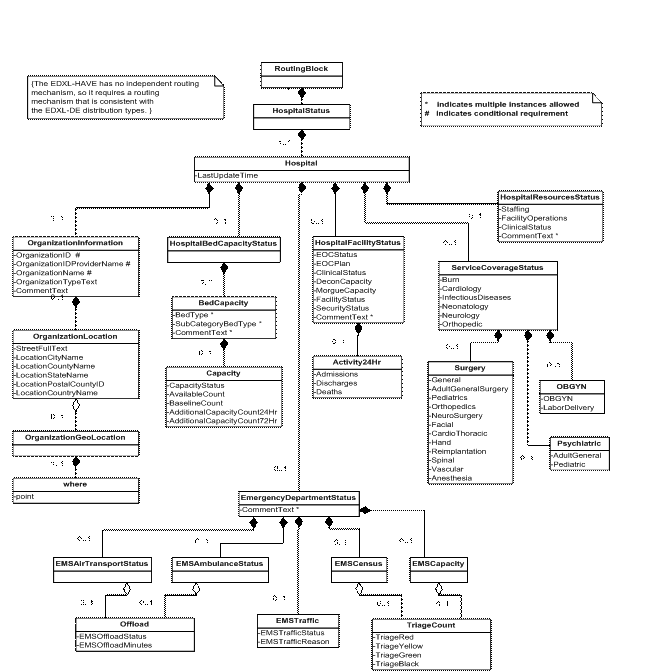
Figure 1: EDXL-HAVE DOM
Element |
<HospitalStatus> |
Type |
XML Structure |
Usage |
REQUIRED, MUST be used once and only once, top level container. |
Definition |
The top level container element for reporting status of any number of hospitals. |
Comments |
|
Sub-elements |
|
Used In |
Top level element |
Element |
|
Type |
XML Structure |
Usage |
REQUIRED, May Use Multiple; Must be used for each reporting hospital status. |
Definition |
The container element for reporting status of a hospital. |
Comments |
|
Sub-elements |
OrganizationInformation |
Used In |
Top level element |
3.2.1 Organization Information
Element |
|
Type |
XML Structure |
Usage |
REQUIRED, MUST be used once and only once, top level container |
Definition |
The container element for organization information elements. |
Comments |
|
Sub-elements |
OrganizationID |
Used In |
Top level element |
Element |
<OrganizationID> |
Type |
xsd:string |
Usage |
CONDITIONAL |
Definition |
An identifier of an organization based on the type of organization it is, e.g., for a school, this would be a school identifier, for a lien holder, this would be a lien holder identifier, for a court, this would be a court identifier. |
Comments |
|
Used In |
Element |
<OrganizationIDProviderName> |
Type |
xsd:string |
Usage |
CONDITIONAL |
Definition |
The name of the provider that has provided the identification scheme. This could also be the name a particular identification list. |
Comments |
Example: American Hospital Association |
Used In |
Element |
|
Type |
xsd:string |
Usage |
CONDITIONAL |
Definition |
The name of the organization. |
Comments |
Example: ABC hospital at Fairfax and ABC hospital at Alexandria |
Used In |
Element |
|
Type |
xsd:string |
Usage |
OPTIONAL |
Definition |
The general functional type of the organization. |
Comments |
Example: Hospital, Nursing Center etc. |
Used In |
Element |
|
Type |
XML Structure |
Usage |
OPTIONAL |
Definition |
The container element for the specifying the location of the organization. |
Comments |
|
Sub-elements |
StreetFullText |
Used In |
Top level element |
Element |
|
Type |
xsd:string |
Usage |
OPTIONAL |
Definition |
A complete street reference, e.g., "123 Main Street NW". |
Used In |
Element |
|
Type |
xsd:string |
Usage |
OPTIONAL |
Definition |
A name of a city or town. |
Comments |
|
Used In |
Element |
|
Type |
xsd:string |
Usage |
OPTIONAL |
Definition |
A name of a county or parish |
Comments |
|
Used In |
Element |
|
Type |
xsd:string |
Usage |
OPTIONAL |
Definition |
A name of a state, commonwealth, province, or other sub-region of a country |
Comments |
|
Used In |
Element |
|
Type |
xsd:string |
Usage |
OPTIONAL |
Definition |
A zip code or postal code |
Used In |
Element |
|
Type |
xsd:string |
Usage |
OPTIONAL |
Definition |
A name of a country |
Used In |
Element |
|
Type |
XML Structure |
Usage |
OPTIONAL |
Definition |
The container element for specifying the geo-coded address. |
Comments |
Note: See Appendix C |
Sub-elements |
|
Used In |
Element |
|
Type |
XML Structure |
Usage |
OPTIONAL |
Definition |
Root property element of a geo-oasis GML instance |
Comments |
See Appendix C. |
Sub-elements/Attributes |
|
Used In |
OrganizationInformation/OrganizationLocation/OrganizationGeoLocation |
Element |
|
Type |
|
Usage |
OPTIONAL |
Definition |
Point property element containing a pair of coordinates representing latitude then longitude in the World Geodetic System 1984 [WGS84] coordinate reference system. |
Comments |
<OrganizationGeoLocation> |
Used In |
OrganizationInformation/OrganizationLocation/OrganizationGeoLocation |
3.2.2 Emergency Department Status
Element |
|
Type |
XML Structure |
Usage |
REQUIRED, MUST be used once and only once, top level container |
Definition |
The container of all of the elements related to the emergency department status. |
Comments |
It describes the ability of this emergency department to treat patients. |
Sub-elements |
EMSTraffic |
Used In |
Top level element |
Element |
|
Type |
XML Structure |
Usage |
REQUIRED, MUST be used once and only once, top level container |
Definition |
The container of all of the elements related to the status of operations of EMS traffic. It defines the ability of this emergency department to receive patients via emergency medical services. |
Comments |
|
Sub-elements |
|
Used In |
Element |
|
Type |
xsd:string with restrictions |
Usage |
OPTIONAL |
Definition |
Identifies the status of EMS traffic operations. |
Comments |
Value must be one of:
|
Used In |
Element |
|
Type |
xsd:string with restrictions |
Usage |
OPTIONAL |
Definition |
It is used to report the contributing factor to an EMSTraffic Status. |
Comments |
|
Used In |
Element |
|
Type |
XML Structure |
Usage |
OPTIONAL |
Definition |
The number of each triage patient type the hospital can accept. |
Comments |
|
Sub-elements |
|
Used In |
Element |
|
Type |
XML Structure |
Usage |
OPTIONAL |
Definition |
The number of each triage patient type the overall hospital currently has. |
Comments |
|
Sub-elements |
|
Used In |
Element |
|
Type |
XML Structure |
Usage |
OPTIONAL |
Definition |
The number of each triage patient type the overall hospital currently has. |
Comments |
|
Sub-elements |
|
Used In |
EmergencyDepartmentStatus/EMSCensus |
Element |
|
Type |
xsd:integer |
Usage |
OPTIONAL |
Definition |
Number of victims with immediate needs. |
Comments |
|
Used In |
EmergencyDepartmentStatus/EMSCapacity/TriageCount |
Element |
|
Type |
xsd:integer |
Usage |
OPTIONAL |
Definition |
Number of victims with delayed needs |
Comments |
|
Used In |
EmergencyDepartmentStatus/EMSCapacity/TriageCount |
Element |
|
Type |
xsd:integer |
Usage |
OPTIONAL |
Definition |
Number of victims with minor needs |
Comments |
|
Used In |
EmergencyDepartmentStatus/EMSCapacity/TriageCount |
Element |
|
Type |
xsd:integer |
Usage |
OPTIONAL |
Definition |
Number of deceased victims |
Used In |
EmergencyDepartmentStatus/EMSCapacity/TriageCount |
Element |
|
Type |
XML Structure |
Usage |
OPTIONAL |
Definition |
The container element to indicate the status and offload time for ambulance capabilities. |
Comments |
|
Sub-elements |
|
Used In |
Element |
|
Type |
XML Structure |
Usage |
OPTIONAL |
Definition |
The container element to indicate the status and offload time for ambulance capabilities. |
Comments |
|
Sub-elements |
|
Used In |
Element |
|
Type |
XML Structure |
Usage |
OPTIONAL |
Definition |
Indicator of offload times of ambulance capabilities. The time it takes to transfer care of a patient to hospital staff, thereby freeing the transport for assignment. |
Sub-elements |
|
Used In |
EmergencyDepartmentStatus/EMSAmbulanceStatus |
Element |
|
Type |
xsd: string with restrictions |
Usage |
OPTIONAL |
Definition |
Indicator of offload times of ambulance capabilities. |
Comments |
Values: Normal – The time required to offload the patient is typical Delayed – The time required to offload the patient is longer than typical. |
Used In |
EmergencyDepartmentStatus/EMSAmbulanceStatus/Offload |
Element |
|
Type |
xsd: integer |
Usage |
OPTIONAL |
Definition |
Average offload time in minutes. |
Comments |
|
Used In |
EmergencyDepartmentStatus/EMSAmbulanceStatus/Offload |
3.2.3 HospitalBedCapacityStatus
Element |
|
Type |
XML Structure |
Usage |
REQUIRED, MUST be used once and only once, top level container |
Definition |
The container of all of the elements related to the hospital bed capacity and status. |
Comments |
Example, a hospital may sub-categorize Adult ICU beds into Surgery, Cardiac, General and Neuro. |
Sub-elements |
|
Used In |
Top level element |
Element |
|
Type |
XML Structure |
Usage |
REQUIRED; May use multiple |
Definition |
Container element to identify the number of available beds. |
Comments |
|
Sub-elements |
|
Used In |
Element |
|
Type |
xsd: string with restrictions |
Usage |
OPTIONAL, May use multiple |
Definition |
Enumerated list of available Bed Types. |
Comments |
Values:
These can support critically ill or injured patients, including ventilator support.
These are also thought of as ward beds.
These are thought of as burn ICU beds, either approved by the American Burn Association or self-designated.
Capacity status for pediatric ICU beds. This is similar to adult ICU beds, but for patients 17-years-old and younger.
Capacity status for pediatrics beds. These are ward medical/surgical beds for patients 17-years-old and younger.
Capacity status for psychiatric beds. These are ward beds on a closed/locked psychiatric unit or ward beds where a patient will be attended by a sitter.
Capacity status for negative airflow isolation beds. These provide respiratory isolation. NOTE: This value may represent available beds included in the counts of other types.
Capacity status for other isolation beds. These provide isolation where airflow is not a concern. NOTE: This value may represent available beds included in the counts of other types.
Capacity status for operating rooms which are equipped staffed and could be made available for patient care in a short period of time. Each bed type (AdultICU, MedicalSurgical, etc.) may optionally contain a collection of named sub-categories.
|
Used In |
Element |
|
Type |
xsd: string |
Usage |
OPTIONAL, May use multiple |
Definition |
The name of the sub-category bed type |
Comments |
|
Used In |
Element |
|
Type |
xsd: string |
Usage |
OPTIONAL, May use multiple |
Definition |
Container element to define the capacity information of each specified bed type or sub category bed type. |
Comments |
|
Sub-elements |
CapacityStatus |
Used In |
Element |
|
Type |
xsd: string with restrictions |
Usage |
OPTIONAL |
Definition |
Indicator of status of bed type or sub-category bed type. |
Comments |
Values:
|
Used In |
HospitalBedCapacityStatus/BedCapacity/Capacity |
Element |
|
Type |
xsd: integer |
Usage |
OPTIONAL |
Definition |
The number of vacant/available beds to which patients can be immediately transported. |
Comments |
|
Used In |
HospitalBedCapacityStatus/BedCapacity/Capacity |
Element |
|
Type |
xsd: integer |
Usage |
OPTIONAL |
Definition |
The maximum (baseline) number of beds in this category |
Comments |
|
Used In |
HospitalBedCapacityStatus/BedCapacity/Capacity |
Element |
|
Type |
xsd: integer |
Usage |
OPTIONAL |
Definition |
Estimate of the beds, above the current number, that could be made vacant/available within 24 hours. |
Comments |
|
Used In |
HospitalBedCapacityStatus/BedCapacity/Capacity |
Element |
|
Type |
xsd: integer |
Usage |
OPTIONAL |
Definition |
Estimate of the beds, above the current number, that could be made vacant/available within 72 hours. |
Comments |
|
Used In |
HospitalBedCapacityStatus/BedCapacity/Capacity |
Element |
|
Type |
XML Structure |
Usage |
OPTIONAL |
Definition |
The container element of all the elements of service coverage. This includes both the necessary staff and facilities. Indicator of the availability of specialty service coverage. |
Comments |
|
Sub-elements |
Burn |
Used In |
Top level element |
Element |
|
Type |
xsd: boolean |
Usage |
OPTIONAL |
Definition |
The availability of burn center services. |
Comments |
Values:
|
Used In |
Element |
|
Type |
xsd: boolean |
Usage |
OPTIONAL |
Definition |
The availability of cardiology services. |
Comments |
Values:
|
Used In |
Element |
|
Type |
xsd: boolean |
Usage |
OPTIONAL |
Definition |
The availability of infectious diseases services. |
Comments |
Values:
|
Used In |
Element |
|
Type |
xsd: boolean |
Usage |
OPTIONAL |
Definition |
The availability of neonatology services. |
Comments |
Values:
|
Used In |
Element |
|
Type |
xsd: boolean |
Usage |
OPTIONAL |
Definition |
The availability of neurology services. Values:
|
Comments |
|
Used In |
Element |
|
Type |
xsd: boolean |
Usage |
OPTIONAL |
Definition |
The availability of orthopedic services. |
Comments |
Values:
|
Used In |
Element |
|
Type |
xsd: boolean |
Usage |
OPTIONAL; SUPERTYPE |
Definition |
The availability of OBGYN services. |
Comments |
Values:
|
Sub-elements |
|
Used In |
Element |
|
Type |
xsd: boolean |
Usage |
OPTIONAL |
Definition |
The Sub-type element of the OBGYN services. |
Comments |
Values:
|
Used In |
Element |
|
Type |
xsd: boolean |
Usage |
OPTIONAL |
Definition |
Sub-type element of the OBGYN Services. Availability of Labor Delivery services. |
Comments |
Values:
|
Used In |
Element |
|
Type |
xsd: boolean |
Usage |
OPTIONAL |
Definition |
The availability of psychiatric services. |
Comments |
|
Sub-elements |
|
Used In |
Element |
|
Type |
xsd: boolean |
Usage |
OPTIONAL |
Definition |
Availability of Adult General Psychiatric services. |
Comments |
|
Used In |
Element |
|
Type |
xsd: boolean |
Usage |
OPTIONAL |
Definition |
Availability of Pediatric Psychiatric services. |
Comments |
|
Used In |
Element |
|
Type |
xsd: boolean |
Usage |
OPTIONAL |
Definition |
The availability of general surgery services. |
Comments |
|
Sub-elements |
General |
Used In |
Element |
|
Type |
xsd: boolean |
Usage |
OPTIONAL |
Definition |
The availability of general surgical services. |
Comments |
|
Used In |
Element |
|
Type |
xsd: boolean |
Usage |
OPTIONAL |
Definition |
The availability of adult general services. |
Comments |
|
Used In |
Element |
|
Type |
xsd: boolean |
Usage |
OPTIONAL |
Definition |
The availability of Pediatrics general surgical services. |
Comments |
|
Used In |
Element |
|
Type |
xsd: boolean |
Usage |
OPTIONAL |
Definition |
The availability of Orthopedic surgical services. |
Comments |
|
Used In |
Element |
|
Type |
xsd: boolean |
Usage |
OPTIONAL |
Definition |
The availability of Neurosurgery services. |
Comments |
|
Used In |
Element |
|
Type |
xsd: boolean |
Usage |
OPTIONAL |
Definition |
The availability of facial surgical services. |
Comments |
|
Used In |
Element |
|
Type |
xsd: boolean |
Usage |
OPTIONAL |
Definition |
The availability of cardiothoracic surgical services. |
Comments |
|
Used In |
Element |
|
Type |
xsd: boolean |
Usage |
OPTIONAL |
Definition |
The availability of hand surgery services. |
Comments |
|
Used In |
Element |
|
Type |
xsd: boolean |
Usage |
OPTIONAL |
Definition |
The availability of reimplantation surgical services. |
Comments |
|
Used In |
Element |
|
Type |
xsd: boolean |
Usage |
OPTIONAL |
Definition |
The availability of spinal surgical services. |
Comments |
|
Used In |
Element |
|
Type |
xsd: boolean |
Usage |
OPTIONAL |
Definition |
The availability of vascular surgical services. |
Comments |
|
Used In |
Element |
|
Type |
xsd: boolean |
Usage |
OPTIONAL |
Definition |
The availability of anesthesia services. |
Comments |
|
Used In |
3.2.5 Hospital Facility Status
Element |
|
Type |
XML Structure |
Usage |
REQUIRED, MUST be used once and only once, top level container |
Definition |
The container of all of the elements related to the status of the facility. |
Comments |
|
Sub-elements |
EOCStatus |
Used In |
Top level element |
Element |
|
Type |
xsd: string with restrictions |
Usage |
OPTIONAL |
Definition |
Whether the Emergency Operations Center (EOC) is currently operating. |
Comments |
Values:
|
Used In |
Element |
|
Type |
xsd: string with restrictions |
Usage |
OPTIONAL |
Definition |
Whether the hospital has activated its Emergency Operations Plan (EOP) |
Comments |
Values:
|
Used In |
Element |
|
Type |
xsd: string with restrictions |
Usage |
OPTIONAL |
Definition |
The clinical status of the facility. |
Comments |
Values:
|
Used In |
Element |
|
Type |
xsd: string with restrictions |
Usage |
OPTIONAL |
Definition |
The capacity for chemical/biological/radiological patient decontamination. |
Comments |
Values:
|
Used In |
Element |
|
Type |
xsd: string with restrictions |
Usage |
OPTIONAL |
Definition |
The status of the morgue capacity. |
Comments |
Values:
|
Used In |
Element |
|
Type |
xsd: string with restrictions |
Usage |
OPTIONAL |
Definition |
The status of the facility. |
Comments |
Values:
|
Used In |
Element |
|
Type |
xsd: string with restrictions |
Usage |
OPTIONAL |
Definition |
The status of security procedures in the hospital. |
Comments |
Values:
|
Used In |
Element |
|
Type |
XML Structure |
Usage |
OPTIONAL |
Definition |
The container element for reporting activities in the last 24 hours. |
Comments |
|
Sub-elements |
|
Used In |
Element |
|
Type |
xsd: integer |
Usage |
OPTIONAL |
Definition |
The number of admissions in the last 24 hours. |
Comments |
|
Used In |
Element |
|
Type |
xsd: integer |
Usage |
OPTIONAL |
Definition |
The number of discharges in the last 24 hours. |
Comments |
|
Used In |
Element |
|
Type |
xsd: integer |
Usage |
OPTIONAL |
Definition |
The number of deaths in the last 24 hours. |
Comments |
|
Used In |
3.2.6 Hospital Resources Status
Element |
|
Type |
XML Structure |
Usage |
REQUIRED, MUST be used once and only once, top level container |
Definition |
The container for all the elements related to the operations of the facility. |
Comments |
|
Sub-elements |
|
Used In |
Top level element |
Element |
|
Type |
xsd: string with restrictions |
Usage |
OPTIONAL |
Definition |
The status of staffing. |
Comments |
Values:
|
Used In |
Element |
|
Type |
xsd: string with restrictions |
Usage |
OPTIONAL |
Definition |
The status of supplies necessary for facility operations. |
Comments |
Values:
|
Used In |
Element |
|
Type |
xsd: string with restrictions |
Usage |
OPTIONAL |
Definition |
The status of supplies necessary for clinical operations. |
Comments |
Values:
|
Used In |
Element |
|
Type |
xsd:string |
Usage |
OPTIONAL |
Definition |
Open Comments field. |
Comments |
|
Used In |
Element |
|
Type |
xsd:datetime |
Usage |
REQUIRED |
Definition |
The last time the information was updated. |
Comments |
Each Hospital must have a LastUpdateTime |
Used In |
A: XML SCHEMA FOR THE EDXL Hospital AVailability Exchange (HAVE)
<?xml version="1.0"?>
<!-- edited with XMLSpy v2005 rel. 3 U (http://www.altova.com) by Sukumar Dwarkanath (private) -->
<schema xmlns:gml="http://www.opengis.net/gml" xmlns="http://www.w3.org/2001/XMLSchema" xmlns:have="urn:oasis:names:tc:emergency:EDXL:HAVE:1.0" xmlns:geo-oasis="http://www.opengis.net/gml/geo-oasis/10" targetNamespace="http://www.w3.org/2001/XMLSchema" elementFormDefault="unqualified" attributeFormDefault="unqualified">
<import namespace="http://www.opengis.net/gml/geo-oasis/10" schemaLocation="geo-oasis.xsd"/>
<element name="HospitalStatus">
<annotation>
<documentation>The top level container element for reporting status of any number of hospitals. The EDXL-HAVE has no independent routing mechanism, so it requires a routing mechanism that is consistent with the EDXL-DE distribution types. It must contain one or more Hospital elements.
</documentation>
</annotation>
<complexType>
<sequence>
<element name="Hospital" maxOccurs="unbounded">
<annotation>
<documentation>The container element for reporting status of a hospital. Multiple Instances of the Hospital element MAY occur within the HospitalStatus container element. </documentation>
</annotation>
<complexType>
<sequence>
<element name="OrganizationInformation" type="OrganizationInformation">
<annotation>
<documentation>The container element for organization information elements. The generic element Organization refers to the entity that is providing the data. This generic name is used throughout this document. Typically, this will include hospitals, nursing care centers, trauma centers etc.
</documentation>
</annotation>
</element>
<element name="EmergencyDepartmentStatus" type="EmergencyDepartmentStatus" minOccurs="0">
<annotation>
<documentation>Report on the emergency department status for the organization.</documentation>
</annotation>
</element>
<element name="HospitalBedCapacityStatus" type="HospitalBedCapacityStatus" minOccurs="0">
<annotation>
<documentation>The hospital bed capacity for the organization.</documentation>
</annotation>
</element>
<element name="ServiceCoverageStatus" type="ServiceCoverageStatus" minOccurs="0">
<annotation>
<documentation>The physician service coverage status for the organization.</documentation>
</annotation>
</element>
<element name="HospitalFacilityStatus" type="HospitalFacilityStatus" minOccurs="0">
<annotation>
<documentation>The status of operations for the organization.</documentation>
</annotation>
</element>
<element name="HospitalResourcesStatus" type="HospitalResourceStatus" minOccurs="0">
<annotation>
<documentation>The status of resources for the organization.</documentation>
</annotation>
</element>
<element name="LastUpdateTime" type="dateTime">
<annotation>
<documentation>The last time the information was updated.</documentation>
</annotation>
</element>
</sequence>
</complexType>
</element>
</sequence>
</complexType>
</element>
<element name="CommentText" type="string">
<annotation>
<documentation>One or more comments</documentation>
</annotation>
</element>
<complexType name="OrganizationInformation">
<annotation>
<documentation>The container element for organization information elements. </documentation>
</annotation>
<sequence>
<element name="OrganizationID" type="string">
<annotation>
<documentation>An identifier of an organization based on the type of organization it is. In this case, it is used to specify the identifier for the healthcare organization. </documentation>
</annotation>
</element>
<element name="OrganizationIDProviderName" minOccurs="0">
<annotation>
<documentation>The name of the provider that has provided the identification scheme. This could also be the name a particular identification list. </documentation>
</annotation>
</element>
<element name="OrganizationName" type="string">
<annotation>
<documentation>The name of the organization. If multiple branches of a hospital are present, the OrganizationName may include the location information as well. </documentation>
</annotation>
</element>
<element name="OrganizationTypeText" type="string" minOccurs="0">
<annotation>
<documentation>The general functional type of the organization. Example: Hospital, Nursing Center etc.</documentation>
</annotation>
</element>
<element name="OrganizationLocation" minOccurs="0">
<annotation>
<documentation>The container element for the specifying the location of the organization. The location consists of the address and the geographic location (which is specified as a point). The geographic coordinates specified in Point must match the address.</documentation>
</annotation>
<complexType>
<sequence>
<element name="StreetFullText" type="string" minOccurs="0">
<annotation>
<documentation>A complete street reference. For example, 123 Main Street NW.</documentation>
</annotation>
</element>
<element name="LocationCityName" type="string" minOccurs="0">
<annotation>
<documentation>A name of a city or town.</documentation>
</annotation>
</element>
<element name="LocationCountryName" type="string" minOccurs="0">
<annotation>
<documentation>A name of a country</documentation>
</annotation>
</element>
<element name="LocationStateName" type="string" minOccurs="0">
<annotation>
<documentation>A name of a state, commonwealth, province, or other subregion of a country.</documentation>
</annotation>
</element>
<element name="LocationPostalCountyId" type="string" minOccurs="0">
<annotation>
<documentation>A zip code or postal code.</documentation>
</annotation>
</element>
<element name="LocationCountyName" type="string" minOccurs="0">
<annotation>
<documentation>A name of a county, parish, or vicinage.</documentation>
</annotation>
</element>
<element name="OrganizationGeoLocation" type="OrganizationGeoLocation" minOccurs="0">
<annotation>
<documentation>The container element for specifying the geo-coded address. For the purpose of this specification, it is constrained to use only the Point element. </documentation>
</annotation>
</element>
</sequence>
</complexType>
</element>
<element ref="CommentText" minOccurs="0"/>
</sequence>
</complexType>
<complexType name="EmergencyDepartmentStatus">
<annotation>
<documentation> The container of all of the elements related to the emergency department status. It describes the ability of this emergency department to treat patients.</documentation>
</annotation>
<sequence>
<element name="EMSTraffic" minOccurs="0">
<annotation>
<documentation>Ability of this emergency department to receive patients via emergency medical services.</documentation>
</annotation>
<complexType>
<sequence>
<element name="EMSTrafficStatus" minOccurs="0">
<annotation>
<documentation>Identifies the status of EMS traffic operations</documentation>
</annotation>
<simpleType>
<restriction base="string">
<enumeration value="Normal">
<annotation>
<documentation>Accepting all EMS traffic.</documentation>
</annotation>
</enumeration>
<enumeration value="Advisory">
<annotation>
<documentation>Experiencing specific resource limitations which may affect transport of some EMS traffic.</documentation>
</annotation>
</enumeration>
<enumeration value="Closed">
<annotation>
<documentation>Requesting re-route of EMS traffic to other facilities.</documentation>
</annotation>
</enumeration>
<enumeration value="N/A">
<annotation>
<documentation>Not Applicable. This hospital does not have an emergency department.</documentation>
</annotation>
</enumeration>
</restriction>
</simpleType>
</element>
<element name="EMSTrafficReason" type="string" minOccurs="0">
<annotation>
<documentation>It is used to report the contributing factor to an EMSTraffic Status.</documentation>
</annotation>
</element>
<element ref="CommentText" minOccurs="0"/>
</sequence>
</complexType>
</element>
<element name="EMSCapacity" type="TriageCount" minOccurs="0">
<annotation>
<documentation>The number of each triage patient type the hospital can accept.</documentation>
</annotation>
</element>
<element name="EMSCensus" type="TriageCount" minOccurs="0">
<annotation>
<documentation>The number of each triage patient type the hospital currently has.</documentation>
</annotation>
</element>
<element name="EMSAirTransportStatus" type="Offload" minOccurs="0">
<annotation>
<documentation>The container element to indicate the status and offload time for ambulance capabilities.</documentation>
</annotation>
</element>
<element name="EMSAmbulanceStatus" type="Offload" minOccurs="0">
<annotation>
<documentation>The container element to indicate the status and offload time for air transport capabilities. </documentation>
</annotation>
</element>
</sequence>
</complexType>
<complexType name="HospitalBedCapacityStatus">
<annotation>
<documentation>The container of all of the elements related to the hospital bed capacity and status. For each of the bed types (AdultICU, MedicalSurgical, etc.), if needed, a collection of named sub-types can be provided. The totals of sub-categories SHOULD equal the capacity data specified in the parent.
</documentation>
</annotation>
<sequence>
<element name="BedCapacity" maxOccurs="unbounded">
<annotation>
<documentation>Container element to identify the number of available beds. Each Bed Type and the sub-categories under it must be encapsulated by a BedCapacity element. Multiple instances of BedCapacity elements are allowed. For example, a hospital may sub-categorize Adult ICU beds into Surgery, Cardiac, General and Neuro.
</documentation>
</annotation>
<complexType>
<sequence>
<element name="BedType" block="restriction" minOccurs="0" maxOccurs="unbounded">
<annotation>
<documentation>Enumerated list of available Bed Types</documentation>
</annotation>
<simpleType>
<restriction base="string">
<enumeration value="AdultICU">
<annotation>
<documentation>These can support critically ill or injured patients, including ventilator support. category includes all major subtypes of ICU beds, including neuro, cardiac, trauma, or medical, with the exception that this category does not include burn ICU beds.
</documentation>
</annotation>
</enumeration>
<enumeration value="MedicalSurgical">
<annotation>
<documentation>These are also thought of as ward beds. These beds may or may not include cardiac telemetry capability.
</documentation>
</annotation>
</enumeration>
<enumeration value="Burn">
<annotation>
<documentation>These are thought of as burn ICU beds, either approved by the American Burn Association or self-designated. These beds are NOT to be included in other ICU bed counts.
</documentation>
</annotation>
</enumeration>
<enumeration value="PediatricICU">
<annotation>
<documentation>Capacity status for pediatric ICU beds. This is similar to adult ICU beds, but for patients 17-years-old and younger.</documentation>
</annotation>
</enumeration>
<enumeration value="Pediatrics">
<annotation>
<documentation>Capacity status for pediatrics beds. These are ward medical/surgical beds for patients 17-years-old and younger.</documentation>
</annotation>
</enumeration>
<enumeration value="Psychiatric">
<annotation>
<documentation>Capacity status for psychiatric beds. These are ward beds on a closed/locked psychiatric unit or ward beds where a patient will be attended by a sitter. </documentation>
</annotation>
</enumeration>
<enumeration value="NegativeFlowIsolation">
<annotation>
<documentation>Capacity status for negative airflow isolation beds. These provide respiratory isolation. NOTE: This value may represent available beds included in the counts of other types. </documentation>
</annotation>
</enumeration>
<enumeration value="OtherIsolation">
<annotation>
<documentation>Capacity status for other isolation beds. These provide isolation where airflow is not a concern. NOTE: This value may represent available beds included in the counts of other types. </documentation>
</annotation>
</enumeration>
<enumeration value="OperatingRooms">
<annotation>
<documentation>Capacity status for operating rooms which are equipped staffed and could be made available for patient care in a short period of time.</documentation>
</annotation>
</enumeration>
</restriction>
</simpleType>
</element>
<element name="SubCategoryBedType" block="extension" minOccurs="0" maxOccurs="unbounded">
<annotation>
<documentation>The name of the sub-category bed type. Each bed type (AdultICU, MedicalSurgical, etc.) may optionally contain a collection of named sub-categories. The totals of sub-categories should equal the capacity data specified in the parent. </documentation>
</annotation>
</element>
<element name="Capacity" type="Capacity" minOccurs="0">
<annotation>
<documentation>Container element to define the capacity information of each specified bed type or sub category bed type. </documentation>
</annotation>
</element>
<element ref="CommentText" minOccurs="0" maxOccurs="unbounded"/>
</sequence>
</complexType>
</element>
</sequence>
</complexType>
<complexType name="ServiceCoverageStatus">
<annotation>
<documentation>Container element of all the elements of service coverage. This includes both the necessary staff and facilities. Indicator of the availability of specialty service coverage.</documentation>
</annotation>
<sequence>
<element name="Burn" type="boolean" minOccurs="0">
<annotation>
<documentation>The availability of Burn center services. </documentation>
</annotation>
</element>
<element name="Cardiology" type="boolean" minOccurs="0">
<annotation>
<documentation>The availability of Cardiology services. </documentation>
</annotation>
</element>
<element name="InfectiousDisease" type="boolean" minOccurs="0">
<annotation>
<documentation>The availability of Infectious Diseases. </documentation>
</annotation>
</element>
<element name="Neonatology" type="boolean" minOccurs="0">
<annotation>
<documentation>The availability of Neonatology services. </documentation>
</annotation>
</element>
<element name="Neurology" type="boolean" minOccurs="0">
<annotation>
<documentation>The availability of Neurology services. </documentation>
</annotation>
</element>
<element name="Orthopedic" type="boolean" minOccurs="0">
<annotation>
<documentation>The availability of Orthopedic services. </documentation>
</annotation>
</element>
<element name="OBGYN" minOccurs="0">
<annotation>
<documentation>The availability of OBGYN services. </documentation>
</annotation>
<complexType>
<sequence>
<element name="OBGYN" type="boolean" minOccurs="0">
<annotation>
<documentation>The Sub-type element of the OBGYN services.</documentation>
</annotation>
</element>
<element name="LaborDelivery" type="boolean" minOccurs="0">
<annotation>
<documentation>Sub-type element of the OBGYN Services. Availability of Labor Delivery services. </documentation>
</annotation>
</element>
</sequence>
</complexType>
</element>
<element name="Psychiatric" minOccurs="0">
<annotation>
<documentation>The availability of psychiatric services. </documentation>
</annotation>
<complexType>
<sequence>
<element name="Pediatric" type="boolean" minOccurs="0">
<annotation>
<documentation>Availability of Adult General Psychiatric services. </documentation>
</annotation>
</element>
<element name="AdultGeneral" type="boolean" minOccurs="0">
<annotation>
<documentation>Availability of Pediatric Psychiatric services. </documentation>
</annotation>
</element>
</sequence>
</complexType>
</element>
<element name="Surgery" minOccurs="0">
<annotation>
<documentation>The availability of general surgery services. </documentation>
</annotation>
<complexType>
<sequence>
<element name="General" type="boolean" minOccurs="0">
<annotation>
<documentation>The availability of general surgical services. </documentation>
</annotation>
</element>
<element name="AdultGeneralSugery" type="boolean" minOccurs="0">
<annotation>
<documentation>The availability of adult general services. </documentation>
</annotation>
</element>
<element name="Pediatrics" type="boolean" minOccurs="0">
<annotation>
<documentation>The availability of Pediatrics general surgical services. </documentation>
</annotation>
</element>
<element name="Orthopedics" type="boolean" minOccurs="0">
<annotation>
<documentation>The availability of Orthopedic surgical services.</documentation>
</annotation>
</element>
<element name="Neurosurgery" type="boolean" minOccurs="0">
<annotation>
<documentation>The availability of Neurosurgery services. </documentation>
</annotation>
</element>
<element name="Facial" type="boolean" minOccurs="0">
<annotation>
<documentation>The availability of facial surgical services. </documentation>
</annotation>
</element>
<element name="CardioThoracic" type="boolean" minOccurs="0">
<annotation>
<documentation>The availability of cardiothoracic surgical services.</documentation>
</annotation>
</element>
<element name="Hand" type="boolean" minOccurs="0">
<annotation>
<documentation>The availability of hand surgery services.</documentation>
</annotation>
</element>
<element name="Reimplantation" type="boolean" minOccurs="0">
<annotation>
<documentation>The availability of reimplantation surgical services. </documentation>
</annotation>
</element>
<element name="Spinal" type="boolean" minOccurs="0">
<annotation>
<documentation>The availability of spinal surgical services. </documentation>
</annotation>
</element>
<element name="Vascular" type="boolean" minOccurs="0">
<annotation>
<documentation>The availability of vascular surgical services. </documentation>
</annotation>
</element>
<element name="Anesthesia" type="boolean" minOccurs="0">
<annotation>
<documentation>The availability of anesthesia services. </documentation>
</annotation>
</element>
</sequence>
</complexType>
</element>
<element ref="CommentText" minOccurs="0"/>
</sequence>
</complexType>
<complexType name="HospitalFacilityStatus">
<annotation>
<documentation>The container of all of the elements related to the status of the facility. </documentation>
</annotation>
<sequence>
<element name="EOCStatus" minOccurs="0">
<annotation>
<documentation>Whether the EOC is currently operating.</documentation>
</annotation>
<simpleType>
<restriction base="string">
<enumeration value="Active"/>
<enumeration value="Inactive"/>
</restriction>
</simpleType>
</element>
<element name="EOCPlan" minOccurs="0">
<annotation>
<documentation>Whether the EOC has activated its Emergency Operations Plan (EOP).</documentation>
</annotation>
<simpleType>
<restriction base="string">
<enumeration value="Active"/>
<enumeration value="Inactive"/>
</restriction>
</simpleType>
</element>
<element name="ClinicalStatus" minOccurs="0">
<annotation>
<documentation>The clinical status of the facility. </documentation>
</annotation>
<simpleType>
<restriction base="string">
<enumeration value="Normal">
<annotation>
<documentation>Hospital clinical resources are operating within normal conditions.</documentation>
</annotation>
</enumeration>
<enumeration value="Level-1">
<annotation>
<documentation>Hospital clinical resources are operating at Level-1 surge conditions.</documentation>
</annotation>
</enumeration>
<enumeration value="Level-2">
<annotation>
<documentation>Hospital clinical resources are operating at Level-2 surge conditions.</documentation>
</annotation>
</enumeration>
<enumeration value="Full">
<annotation>
<documentation>Hospital clinical resources are exceeded and acceptable care cannot be
provided to additional patients. Diversion or community surge response is required.</documentation>
</annotation>
</enumeration>
</restriction>
</simpleType>
</element>
<element name="DeconCapacity" minOccurs="0">
<annotation>
<documentation>The capacity for chemical/biological/radiological patient decontamination.</documentation>
</annotation>
<simpleType>
<restriction base="string">
<enumeration value="Inactive">
<annotation>
<documentation>Not being used, but available if needed.</documentation>
</annotation>
</enumeration>
<enumeration value="Open">
<annotation>
<documentation>In use and able to accept additional patients.</documentation>
</annotation>
</enumeration>
<enumeration value="Full">
<annotation>
<documentation>In use at maximum capacity.</documentation>
</annotation>
</enumeration>
<enumeration value="Exceeded">
<annotation>
<documentation>Storage needs exceed available space.</documentation>
</annotation>
</enumeration>
</restriction>
</simpleType>
</element>
<element name="MorgueCapacity" minOccurs="0">
<annotation>
<documentation>The status of the morgue capacity. </documentation>
</annotation>
<simpleType>
<restriction base="string">
<enumeration value="Open">
<annotation>
<documentation>Space is available.</documentation>
</annotation>
</enumeration>
<enumeration value="Full">
<annotation>
<documentation>All normal space is in use.</documentation>
</annotation>
</enumeration>
<enumeration value="Exceeded">
<annotation>
<documentation>Storage needs exceed available space.</documentation>
</annotation>
</enumeration>
</restriction>
</simpleType>
</element>
<element name="FacilityStatus" minOccurs="0">
<annotation>
<documentation>The status of the facility.</documentation>
</annotation>
<simpleType>
<restriction base="string">
<enumeration value="Normal">
<annotation>
<documentation>No conditions exist that adversely affect
the general operations of the facility.</documentation>
</annotation>
</enumeration>
<enumeration value="Compromised">
<annotation>
<documentation>General operations of the facility have been
affected due to damage, operating on emergency backup systems,
or facility contamination.</documentation>
</annotation>
</enumeration>
<enumeration value="Evacuating">
<annotation>
<documentation>Indicates that a hospital is in the process
of a partial or full evacuation.</documentation>
</annotation>
</enumeration>
<enumeration value="Closed">
<annotation>
<documentation>Indicates that a hospital is no longer capable
of providing services and only emergency services/restoration
personnel remain in the facility.</documentation>
</annotation>
</enumeration>
</restriction>
</simpleType>
</element>
<element name="SecurityStatus" minOccurs="0">
<annotation>
<documentation>The status of security procedures in the hospital.</documentation>
</annotation>
<simpleType>
<restriction base="string">
<enumeration value="Normal">
<annotation>
<documentation>The hospital is operating under routine security
procedures.</documentation>
</annotation>
</enumeration>
<enumeration value="Elevated">
<annotation>
<documentation>The hospital has activated increased security
procedures (awareness, surveillance) due to a potential threat,
or specific security related event i.e. increase in local threat
level, VIP, bomb threat.</documentation>
</annotation>
</enumeration>
<enumeration value="RestrictedAccess">
<annotation>
<documentation>Based on security needs, the hospital has
activated procedures to allow access to the facility through
a reduced number of controlled entrances.</documentation>
</annotation>
</enumeration>
<enumeration value="Lockdown">
<annotation>
<documentation>Based on security needs, the hospital has
activated procedures to control entry to the facility to
authorized persons only.</documentation>
</annotation>
</enumeration>
<enumeration value="Quarantine">
<annotation>
<documentation>Based on a public health emergency, the
entry and exit of the facility is controlled by public
health officials.</documentation>
</annotation>
</enumeration>
</restriction>
</simpleType>
</element>
<element name="Activity24Hr" minOccurs="0">
<annotation>
<documentation>The container element for reporting activities in the last 24 hours. </documentation>
</annotation>
<complexType>
<sequence>
<element name="Admissions" minOccurs="0"/>
<element name="Discharges" minOccurs="0"/>
<element name="Deaths" minOccurs="0"/>
</sequence>
</complexType>
</element>
<element ref="CommentText" minOccurs="0"/>
</sequence>
</complexType>
<complexType name="HospitalResourceStatus">
<annotation>
<documentation>The container for all the elements related to the operations of the facility. </documentation>
</annotation>
<sequence>
<element name="Staffing" minOccurs="0">
<annotation>
<documentation>The status of staffing. </documentation>
</annotation>
<simpleType>
<restriction base="string">
<enumeration value="Adequate">
<annotation>
<documentation>Meets the current needs.</documentation>
</annotation>
</enumeration>
<enumeration value="Insufficient">
<annotation>
<documentation>Current needs not being met.</documentation>
</annotation>
</enumeration>
</restriction>
</simpleType>
</element>
<element name="FacilityOperations" minOccurs="0">
<annotation>
<documentation>The status of supplies necessary for facility operations. </documentation>
</annotation>
<simpleType>
<restriction base="string">
<enumeration value="Adequate">
<annotation>
<documentation>Meets the current needs.</documentation>
</annotation>
</enumeration>
<enumeration value="Insufficient">
<annotation>
<documentation>Current needs not being met.</documentation>
</annotation>
</enumeration>
</restriction>
</simpleType>
</element>
<element name="ClinicalOperations" minOccurs="0">
<annotation>
<documentation>The status of supplies necessary for clinical operations. </documentation>
</annotation>
<simpleType>
<restriction base="string">
<enumeration value="Adequate">
<annotation>
<documentation>Meets the current needs.</documentation>
</annotation>
</enumeration>
<enumeration value="Insufficient">
<annotation>
<documentation>Current needs not being met.</documentation>
</annotation>
</enumeration>
</restriction>
</simpleType>
</element>
<element ref="CommentText" minOccurs="0"/>
</sequence>
</complexType>
<complexType name="TriageCount">
<annotation>
<documentation>The number of each triage patient type the overall hospital currently has.</documentation>
</annotation>
<sequence>
<element name="TriageRed" type="integer" minOccurs="0">
<annotation>
<documentation>Number of victims with immediate needs.</documentation>
</annotation>
</element>
<element name="TriageYellow" type="integer" minOccurs="0">
<annotation>
<documentation>Number of victims with delayed needs.</documentation>
</annotation>
</element>
<element name="TriageGreen" type="integer" minOccurs="0">
<annotation>
<documentation>Number of victims with minor needs.</documentation>
</annotation>
</element>
<element name="TriageBlack" type="integer" minOccurs="0">
<annotation>
<documentation>Number of deceased victims.</documentation>
</annotation>
</element>
</sequence>
</complexType>
<complexType name="Capacity">
<annotation>
<documentation>Top level complex schema type defining bed capacity counts
given a specific type of bed.</documentation>
</annotation>
<sequence>
<element name="CapacityStatus" minOccurs="0">
<annotation>
<documentation>Indicator of status of bed type or sub-category bed type. </documentation>
</annotation>
<simpleType>
<restriction base="string">
<enumeration value="Vacant/Available"/>
<enumeration value="NotAvailable"/>
</restriction>
</simpleType>
</element>
<element name="AvailableCount" type="integer" minOccurs="0">
<annotation>
<documentation>The number of vacant/available beds to which patients can be immediately transported. These must include supporting space, equipment, medical material, ancillary and support services and staff to operate under normal circumstances. These beds are licensed, physically available and have staff on hand to attend to the patient who occupies the bed.</documentation>
</annotation>
</element>
<element name="BaselineCount" type="integer" minOccurs="0">
<annotation>
<documentation>The maximum (baseline) number of beds in this category.</documentation>
</annotation>
</element>
<element name="AdditionalCapacityCount24Hr" type="integer" minOccurs="0">
<annotation>
<documentation>Estimate how many beds above the current number could be made vacant/available within 24 hours. This includes institutional surge beds as well as beds made available by discharging/transferring patients.</documentation>
</annotation>
</element>
<element name="AdditionalCapacityCount72Hr" type="integer" minOccurs="0">
<annotation>
<documentation>Estimate how many beds above the current number could be made vacant/available within 72 hours. This includes institutional surge beds as well as beds made available by discharging/transferring patients.</documentation>
</annotation>
</element>
</sequence>
</complexType>
<complexType name="Offload">
<annotation>
<documentation>Indicator of offload times of ambulance capabilities. The time it takes to transfer care of a patient to hospital staff, thereby freeing the transport for assignment. </documentation>
</annotation>
<sequence>
<element name="EMSOffloadStatus" minOccurs="0">
<annotation>
<documentation>Indicator of offload times of ambulance capabilities. </documentation>
</annotation>
<simpleType>
<restriction base="string">
<enumeration value="Normal">
<annotation>
<documentation>The time required to offload a patient is typical.</documentation>
</annotation>
</enumeration>
<enumeration value="Delayed">
<annotation>
<documentation>The time required to offload a patient is longer than typical. </documentation>
</annotation>
</enumeration>
</restriction>
</simpleType>
</element>
<element name="EMSOffloadMinutes" type="integer" minOccurs="0">
<annotation>
<documentation>Average offload time in minutes.</documentation>
</annotation>
</element>
</sequence>
</complexType>
<complexType name="OrganizationGeoLocation">
<annotation>
<documentation>The container element for specifying the geo-coded address. </documentation>
</annotation>
<complexContent>
<extension base="geo-oasis:SimplePositionType">
<sequence>
<element ref="geo-oasis:where"/>
</sequence>
</extension>
</complexContent>
</complexType>
</schema>
<?xml version="1.0" encoding="UTF-8"?>
<EDXLDistribution xmlns="urn:oasis:names:tc:emergency:EDXL:DE:1.0:">
<distributionID>edxl_d1</distributionID>
<senderID>XMl2005</senderID>
<dateTimeSent>2005-11-15T16:53:00-05:00</dateTimeSent>
<distributionStatus>Test</distributionStatus>
<distributionType>Report</distributionType>
<keyword>
<valueListurn>http://www.niem.gov/EventTypeList</valueListurn>
<value>Pandemic Flu</value>
</keyword>
<targetArea>
<polygon>
33.4745,-112.1174 33.4745,-112.0238 33.4238,-112.0238 33.4238,-112.1174 33.4745,-112.1174
</polygon>
</targetArea>
<contentObject>
<contentDescription>HAVE message reporting bed capacities</contentDescription>
<xmlContent>
<embeddedXMLContent>
<have:HospitalStatus xmlns="urn:oasis:names:ec:emergency:have:1.0:"><Hospital>
<OrganizationInformation>
<OrganizationID>XXX1234</OrganizationID>
<OrganizationIDProviderName>AHA</OrganizationIDProviderName>
<OrganizationName>ABC Hospital</OrganizationName>
<OrganizationTypeText>Hospital</OrganizationTypeText>
<OrganizationLocation>
<StreetFullText>123 Main Street</StreetFullText>
<LocationCityName>Fairfax</LocationCityName>
<LocationCountryName>USA</LocationCountryName>
<LocationStateName>Virginia</LocationStateName>
</OrganizationLocation>
</OrganizationInformation><EmergencyDepartmentStatus>
<EMSTraffic>
<EMSTrafficStatus>Normal</EMSTrafficStatus>
</EMSTraffic>
<EMSCapacity>
<TriageRed>40</TriageRed>
<TriageYellow>40</TriageYellow>
<TriageGreen>40</TriageGreen>
<TriageBlack>40</TriageBlack>
</EMSCapacity>
<EMSCensus>
<TriageRed>20</TriageRed>
<TriageYellow>20</TriageYellow>
<TriageGreen>20</TriageGreen>
<TriageBlack>20</TriageBlack>
</EMSCensus>
<EMSAmbulanceStatus>
<EMSOffloadStatus>Normal</EMSOffloadStatus>
<EMSOffloadMinutes>20</EMSOffloadMinutes>
</EMSAmbulanceStatus>
</EmergencyDepartmentStatus><HospitalBedCapacityStatus>
<BedCapacity>
<Bed>AdultICU</Bed>
<Capacity>
<CapacityStatus>Vacant/Available</CapacityStatus>
<AvailableCount>10</AvailableCount>
<BaselineCount>30</BaselineCount>
<AdditionalCapacityCount24Hr>5</AdditionalCapacityCount24Hr>
<AdditionalCapacityCount72Hr>5</AdditionalCapacityCount72Hr>
</Capacity>
</BedCapacity>
</HospitalBedCapacityStatus><ServiceCoverageStatus>
<Burn>True</Burn>
<Cardiology>True</Cardiology>
<InfectiousDiseases>True</InfectiousDiseases>
<Neonatology>True</Neonatology>
<Neurology>True</Neurology>
<Orthopedic>True</Orthopedic>
<Surgery>
<General>True</General>
</Surgery>
</ServiceCoverageStatus><HospitalFacilityStatus>
<EOCStatus>Active</EOCStatus>
<EOCPlan>Active</EOCPlan>
<ClinicalStatus>Normal</ClinicalStatus>
<DeconCapacity>Inactive</DeconCapacity>
<MorgueCapacity>Open</MorgueCapacity>
<FacilityStatus>Normal</FacilityStatus>
<SecurityStatus>Normal</SecurityStatus>
</HospitalFacilityStatus><HospitalResourcesStatus>
<Staffing>Adequate</Staffing>
<FacilityOperations>Adequate</FacilityOperations>
<ClinicalOperations>Adequate</ClinicalOperations>
</HospitalResourcesStatus>
<LastUpdateTime>2001-12-17T09:30:47.0Z</LastUpdateTime>
</Hospital>
</have:HospitalStatus>
</embeddedXMLContent>
</xmlContent>
</contentObject>
</EDXLDistribution>
The <where> Element
The <where> element is structured as a container element with a choice-type component and attributes. For the purposes of the EDXL-HAVE document, the Point element will be used most of the time, if not always. Taking this into consideration, documentation on the other sub-elements is provided here to serve as a context and reference. These are included in the schema below as well.
For additional information, please refer to the Open Geospatial Consortium, OpenGIS® Geography Markup Language (GML) Encoding Specification (GML) Version 3.1.1.
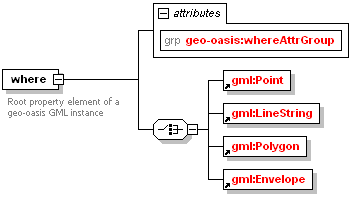
Figure 2: Structure of <where> element
Element |
<line> |
Type |
|
Usage |
OPTIONAL |
Definition |
Line property element containing a list of pairs of coordinates representing latitude then longitude in the WGS84 coordinate reference system |
Comments |
|
Element |
<polygon> |
Type |
|
Usage |
OPTIONAL |
Definition |
Closed ring property element containing a list of pairs of coordinates (first pair and last pair identical) representing latitude then longitude in the WGS84 coordinate reference system. |
Comments |
|
Element |
<box> |
Type |
|
Usage |
OPTIONAL |
Definition |
Rectangular envelope property element containing two pairs of coordinates (lower left envelope corner, upper right envelope corner) representing latitude then longitude in the WGS84 coordinate reference system. |
Comments |
|
C.1 geo-oasis Type elements used in EDXL-HAVE
Element |
|
Type |
|
Usage |
OPTIONAL |
Definition |
Extended <doubleList> with the addition of geo-oasis where attributes |
Element |
|
Type |
xsd: double |
Usage |
OPTIONAL |
Definition |
XML List based on XML Schema double type, identical to <gml:doubleList>. An element of this type contains a space-separated list of double values. |
Element |
|
Type |
XML Structure |
Usage |
OPTIONAL |
Definition |
Optional additional parameters for a geo-oasis location property |
Sub-elements/attributes |
Element |
|
Type |
xsd:NCName |
Usage |
OPTIONAL |
Definition |
Attribute of the <where> element indicating the type of geographic entity is being referred to. |
Used In |
Element |
|
Type |
xsd:NCName |
Usage |
OPTIONAL |
Definition |
Attribute of the <where> element indicating how geo-tagged content is related to the represented location. |
Used In |
Element |
|
Type |
xsd:double |
Usage |
OPTIONAL |
Definition |
Attribute of the <where> element indicating a GPS-measured elevation in meters (e.g. WGS84 geoid height) |
Used In |
Element |
|
Type |
xsd: double |
Usage |
OPTIONAL |
Definition |
Attribute of the <where> element indicating elevation by building floor. |
Used In |
Element |
|
Type |
xsd: double |
Usage |
OPTIONAL |
Definition |
Attribute of the <where> indicating size in meters of a radius or buffer being indicated around the geometry (e.g. radius of circular area around a point geometry. |
Used In |
<?xml version="1.0" encoding="UTF-8"?>
<xs:schema xmlns:xs="http://www.w3.org/2001/XMLSchema" xmlns:geo-oasis="http://www.opengis.net/gml/geo-oasis/10" xmlns:gml="http://www.opengis.net/gml" targetNamespace="http://www.opengis.net/gml/geo-oasis/10" elementFormDefault="qualified" attributeFormDefault="unqualified" version="1.0">
<xs:import namespace="http://www.opengis.net/gml" schemaLocation="geo-oasis.xsd"/>
<xs:element name="where">
<xs:annotation>
<xs:documentation>Root property element of a geo-oasis GML instance</xs:documentation>
<xs:documentation>Container for optional geo-oasis attributes</xs:documentation>
</xs:annotation>
<xs:complexType>
<xs:choice>
<xs:element ref="gml:Point"/>
<xs:element ref="gml:LineString"/>
<xs:element ref="gml:Polygon"/>
<xs:element ref="gml:Envelope"/>
</xs:choice>
<xs:attributeGroup ref="geo-oasis:whereAttrGroup"/>
</xs:complexType>
</xs:element>
<xs:element name="point" type="geo-oasis:SimplePositionType">
<xs:annotation>
<xs:documentation>Point property element containing a pair of coordinates representing latitude then longitude in the WGS84 coordinate reference system</xs:documentation>
<xs:documentation>This geo-oasis Simple element maps completely onto the where + gml:Point combination of geo-oasis GML</xs:documentation>
</xs:annotation>
</xs:element>
<xs:element name="line" type="geo-oasis:SimplePositionType">
<xs:annotation>
<xs:documentation>Line property element containing a list of pairs of coordinates representing latitude then longitude in the WGS84 coordinate reference system</xs:documentation>
<xs:documentation>This geo-oasis Simple element maps completely onto the where + gml:LineString combination of geo-oasis GML</xs:documentation>
</xs:annotation>
</xs:element>
<xs:element name="polygon" type="geo-oasis:SimplePositionType">
<xs:annotation>
<xs:documentation>Closed ring property element containing a list of pairs of coordinates (first pair and last pair identical) representing latitude then longitude in the WGS84 coordinate reference system</xs:documentation>
<xs:documentation>This geo-oasis Simple element maps completely onto the where + gml:Polygon combination of geo-oasis GML</xs:documentation>
</xs:annotation>
</xs:element>
<xs:element name="box" type="geo-oasis:SimplePositionType">
<xs:annotation>
<xs:documentation>Rectangular envelope property element containing two pairs of coordinates (lower left envelope corner, upper right envelope corner) representing latitude then longitude in the WGS84 coordinate reference system</xs:documentation>
<xs:documentation>This geo-oasis Simple element maps completely onto the where + gml:Envelope combination of geo-oasis GML</xs:documentation>
</xs:annotation>
</xs:element>
<!-- ================================================= -->
<xs:complexType name="SimplePositionType">
<xs:simpleContent>
<xs:annotation>
<xs:documentation>Extended doubleList with the addition of geo-oasis where attributes</xs:documentation>
</xs:annotation>
<xs:extension base="geo-oasis:doubleList">
<xs:attributeGroup ref="geo-oasis:whereAttrGroup"/>
</xs:extension>
</xs:simpleContent>
</xs:complexType>
<!-- ================================================= -->
<xs:simpleType name="doubleList">
<xs:annotation>
<xs:documentation>XML List based on XML Schema double type, identical to gml:doubleList. An element of this type contains a space-separated list of double values</xs:documentation>
</xs:annotation>
<xs:list itemType="xs:double"/>
</xs:simpleType>
<!-- ================================================= -->
<xs:attributeGroup name="whereAttrGroup">
<xs:annotation>
<xs:documentation>Optional additional parameters for a geo-oasis location property </xs:documentation>
</xs:annotation>
<xs:attribute name="featuretypetag" type="xs:NCName" use="optional">
<xs:annotation>
<xs:documentation>Optional where attribute indicating the type of geographic entity is being referred to. Default is "location"</xs:documentation>
</xs:annotation>
</xs:attribute>
<xs:attribute name="relationshiptag" type="xs:NCName" use="optional">
<xs:annotation>
<xs:documentation>Optional where attribute indicating how geotagged content is related to the represented location. Default is "isLocatedAt"</xs:documentation>
</xs:annotation>
</xs:attribute>
<xs:attribute name="elev" type="xs:double" use="optional">
<xs:annotation>
<xs:documentation>Optional where attribute indicating a GPS-measured elevation in meters (e.g. WGS84 geoid height)</xs:documentation>
</xs:annotation>
</xs:attribute>
<xs:attribute name="floor" type="xs:double" use="optional">
<xs:annotation>
<xs:documentation>Optional where attribute indicating elevation by building floor</xs:documentation>
</xs:annotation>
</xs:attribute>
<xs:attribute name="radius" type="xs:double" use="optional">
<xs:annotation>
<xs:documentation>Optional where attribute indicating size in meters of a radius or buffer being indicated around the geometry (e.g. radius of circular area around a point geometry </xs:documentation>
</xs:annotation>
</xs:attribute>
</xs:attributeGroup>
<!-- ================================================= -->
</xs:schema>
The following individuals have participated in the creation of this specification and are gratefully acknowledged:
Participants:
Lawrence Freudinger, NASA*
Paula Moss, Raytheon*
Elysa Jones, Warning Systems, Inc.*
Renato Iannella, NICTA*
Richard Vandame, US Department of Homeland Security*
William Beavin, The Boeing Company*
Jeff Kyser, Warning Systems, Inc.*
David Kehrlein, ESRI
Scott Came*, Individual
Jack Fox, US Department of Homeland Security*
Tim Grapes, Disaster Management Interoperability Services*
Ash Parikh, Raining Data Corporation*
Julia Ridgely, Individual
Roy Bell, Raytheon*
Bona Nasution, MTG Management Consultants, LLC.*
Robin Cover, OASIS *
Orville Tincher, Disaster Management Interoperability Services*
Greg Meyer*, Associate Member
Gary Ham, Disaster Management Interoperability Services*
Art Botterell*, Individual
John Aerts, LA County Information Systems Advisory Body*
John Ruegg, LA County Information Systems Advisory Body*
Kim Lambert, LMI*
Sukumar Dwarkanath*, Associate Member
Stephen Jepsen, Oracle Corporation*
Raajmohan Na, EDS*
Jerry Weltman, IEM*
Ron Lake, Galdos Systems Inc.*
Carl Reed, Open Geospatial Consortium, Inc. (OGC)*
Louis Lagonik, Lockheed Martin*
David Danko, ESRI
Darren DeLoach, Thomson*
Matthew Dovey, Oxford University*
Ara Rubyan, IEM*
Michael Thompson, The Boeing Company*
Thomas Bui, The Boeing Company*
Russell Moody*, SAIC*
John Moehrke*, Associate Member
Karen Robinson, NICTA*
Rex Brooks*, Individual
Rick Tucker, Mitre Corporation*
Travis Hubbard, Disaster Management Interoperability Services*
Tom Merkle, Lockheed Martin*
Bryan Small, ESI Acquisition, Inc.*
Anthony Sangha, Raining Data Corporation*
Paul Denning, Mitre Corporation*
Hong-Eng Koh, Sun Microsystems*
James Bryce Clark, OASIS *
Susan McGrath, Dartmouth College ISTS*
Adam Hocek*, Associate Member
Eliot Christian, US Department of the Interior*
Kendrix Moore, Drummond Group Inc.*
Scott Edson, LA County Information Systems Advisory Body*
Josh Shows, ESI Acquisition, Inc.*
Richard Masline, IBM*
Winfield Wagner*, Associate Member
Patti Aymond, IEM*
Kent Reed, NIST*
David Ellis*, Individual
Sylvia Webb, Individual
Gilbert Green, USAMC Logistics Support Activity*
Michelle Raymond*, Associate Member
Mary McRae, OASIS *
Boris Shur, US Department of Justice*
Gerald Golden, Raytheon Technical Services Company*
Mark Carlson*, Associate Member
Aaron Temin*, Individual
| Revision | Date | Editor | Changes Made |
|---|---|---|---|
| Public Review Draft Version 2.0 | 13 November 2006 | Sukumar Dwarkanath |
|
| Public Review Version 1.0 Revision 01 | 23 October 2006 | Sukumar Dwarkanth |
|